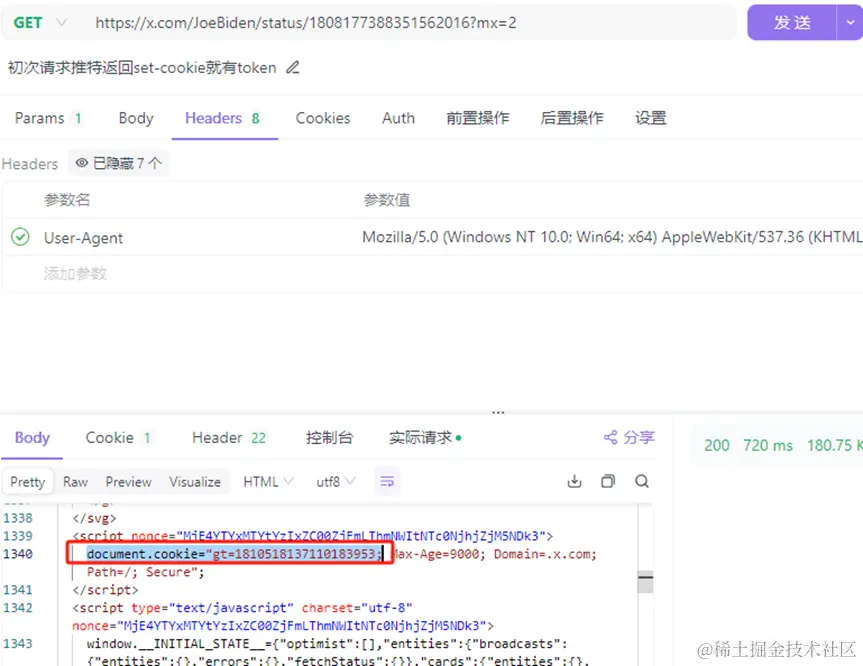
基本原理:
(async () => {
const twitterLink = 'https://x.com/itsme_urstruly/status/1810333882299887716?mx=2'
const res = await fetch(twitterLink, {
method: 'GET',
headers: {
'User-Agent': 'Mozilla/5.0 (Windows NT 10.0; Win64; x64) AppleWebKit/537.36 (KHTML, like Gecko) Chrome/126.0.0.0 Safari/537.36'
},
}).then(response => response.text())
const token = res.match(/gt=(\d+);/)?.[1]
})()
- 接口请求示例:
(async () => {
const twitterId = twitterLink.match(/status\/(\d+)/)?.[1]
const url_dto = new URL('https://api.x.com/graphql/Xl5pC_lBk_gcO2ItU39DQw/TweetResultByRestId?variables={%22tweetId%22%3A%221810333882299887716%22%2C%22withCommunity%22%3Afalse%2C%22includePromotedContent%22%3Afalse%2C%22withVoice%22%3Afalse}&features={%22creator_subscriptions_tweet_preview_api_enabled%22%3Atrue%2C%22communities_web_enable_tweet_community_results_fetch%22%3Atrue%2C%22c9s_tweet_anatomy_moderator_badge_enabled%22%3Atrue%2C%22articles_preview_enabled%22%3Atrue%2C%22tweetypie_unmention_optimization_enabled%22%3Atrue%2C%22responsive_web_edit_tweet_api_enabled%22%3Atrue%2C%22graphql_is_translatable_rweb_tweet_is_translatable_enabled%22%3Atrue%2C%22view_counts_everywhere_api_enabled%22%3Atrue%2C%22longform_notetweets_consumption_enabled%22%3Atrue%2C%22responsive_web_twitter_article_tweet_consumption_enabled%22%3Atrue%2C%22tweet_awards_web_tipping_enabled%22%3Afalse%2C%22creator_subscriptions_quote_tweet_preview_enabled%22%3Afalse%2C%22freedom_of_speech_not_reach_fetch_enabled%22%3Atrue%2C%22standardized_nudges_misinfo%22%3Atrue%2C%22tweet_with_visibility_results_prefer_gql_limited_actions_policy_enabled%22%3Atrue%2C%22rweb_video_timestamps_enabled%22%3Atrue%2C%22longform_notetweets_rich_text_read_enabled%22%3Atrue%2C%22longform_notetweets_inline_media_enabled%22%3Atrue%2C%22rweb_tipjar_consumption_enabled%22%3Atrue%2C%22responsive_web_graphql_exclude_directive_enabled%22%3Atrue%2C%22verified_phone_label_enabled%22%3Afalse%2C%22responsive_web_graphql_skip_user_profile_image_extensions_enabled%22%3Afalse%2C%22responsive_web_graphql_timeline_navigation_enabled%22%3Atrue%2C%22responsive_web_enhance_cards_enabled%22%3Afalse}&fieldToggles={%22withArticleRichContentState%22%3Atrue%2C%22withArticlePlainText%22%3Afalse%2C%22withGrokAnalyze%22%3Afalse}')
const variables = JSON.parse(url_dto.searchParams.get('variables') as string)
variables.tweetId = twitterId
url_dto.searchParams.set('variables', JSON.stringify(variables))
const twitterAPI = url_dto.toString()
const twitterData = await fetch(twitterAPI, {
method: 'GET',
headers: {
'X-Guest-Token': token,
'Authorization': 'Bearer AAAAAAAAAAAAAAAAAAAAANRILgAAAAAAnNwIzUejRCOuH5E6I8xnZz4puTs%3D1Zv7ttfk8LF81IUq16cHjhLTvJu4FA33AGWWjCpTnA',
'User-Agent': 'Mozilla/5.0 (Windows NT 10.0; Win64; x64) AppleWebKit/537.36 (KHTML, like Gecko)',
},
}).then(response => response.text())
console.log(twitterData);
})()
优点:
- 通过官方获取解析数据完整。
- 免登录无需消耗账号资源。
缺点:
- 每次执行需先请求贴html数据匹配token,接口等待时常较久。(优化建议:获取到的token可以缓存起来,在详情接口调用中反复使用;但需要识别token是否过期有效,如果失效还需重新获取token此缓存流程会加剧解析流程的复杂性影响稳定性)



