vue 模板语法与响应式基础
// 文本插值 {{ }}
// Attribute 绑定 (v-bind 简写 :)
// v-model 双向绑定
// v-if / v-show 控制显隐
// v-for 循环
// v-on 事件绑定 简写 @
// ref() / reactive()
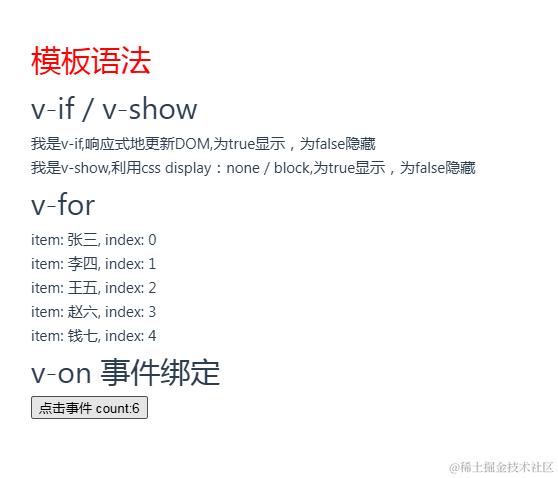
<template>
  <div>
    <h1 :class={color:true}>{{name}}</h1>
    <input v-model="name" />

    <p v-if='true'>我是v-if,响应式地更新DOM,为true显示,为false隐藏</p>
    <p v-show='true'>我是v-show,利用css display:none / block,为true显示,为false隐藏</p>

     <p v-for='(item,index) in 5'>
      {{`item: ${item}, index: ${index}`}}
    </p>

    <h1>v-on 事件绑定</h1>
    <button @click="add()">点击事件</button>
    <!-- 仅在 `key` 为 `Enter` 时调用 `add()` -->
    <button @keyup.enter="add()">点击事件</button>

  </div>
</template>

<script setup>
import { ref, reactive } from 'vue'
const name = ref('模板语法')

const data = reactive([
  { name: '张三' },
  { name: '李四' },
  { name: '王五' },
  { name: '赵六' },
  { name: '钱七' }
])

const count = ref(1)
const add = () => {
  count.value++
}
</script>

<style>
.color{
  color: red;
}
</style>
vue响应式进阶 -- watch 和 computed
 // watch()监听
 <template>
  <main>
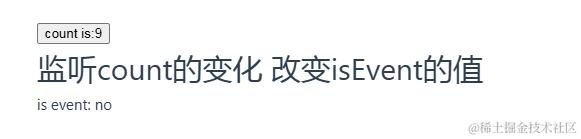
    <button @click="increment">count is:{{ count }}</button>
    <h1>监听count的变化 改变isEvent的值</h1>
    <p>is event: {{ isEvent ? 'yes' : 'no' }}</p>
  </main>
</template>

<script setup>
import { ref, watch } from 'vue'

const count = ref(0)
const isEvent = ref(false)

const increment = () => {
  count.value++
}

watch(
  count,
  function () {
    isEvent.value = count.value % 2 === 0
  },
  //immediate 立即执行,deep 深度监听
  { immediate: true, deep: true }
)
</script>
// computed
<script setup >
import { ref, computed } from 'vue'

const text = ref('')
// computed 的回调函数里,会根据已有并用到的状态计算出新的状态
const capital = computed(function () {
  return text.value.toUpperCase()
})
</script>

<template>
  <main>
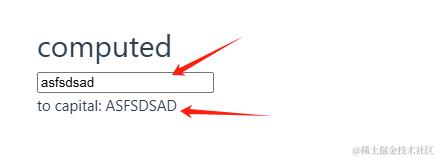
    <input v-model="text" />
    <p>to capital: {{ capital }}</p>
  </main>
</template>
vue组件通信
父传子
- 在父组件 向子组件传递数据
- 在子组件 使用defineProps接收父组件传递的数据
- 在子组件 使用数据
// 父组件
<script setup>
     import children from './components/children.vue'
     const username = 'vue'

</script>

<template>
     //1 向子组件传递数据
     <children :username="username" />
</template>


//子组件
<template>
    // 3 在子组件使用数据
    <p>username: {{ username }}</p>
</template>

<script setup>
    import { defineProps } from 'vue'
    // 2 在子组件使用**defineProps**接收父组件传递的数据
    const props = defineProps({
      username: {
        type: String,
        default: ''
      }
    })
    console.log(props.msg) // 在 js 里需要使用 props.xxx 的方式使用。在 html 中使用不需要 props

</script>
子传父
- 在子组件 使用defineEmits方法定义事件名称
- 在子组件 利用事件向父组件传值
- 在父组件 接收数据
// 子组件
<template>
    <div>
        子组件:<button @click="handleClick">子组件的按钮</button>
    </div>
</template>
<script setup>
    import { defineEmits, ref } from 'vue'
    // 1. 注册一个自定义事件名,向上传递时告诉父组件要触发的事件。
    const emit = defineEmits(['changeMsg'])
    // 2. 利用事件向父组件传值
    const handleClick = () => {
        // 参数1:事件名 // 参数2:传给父组件的值
        emit('changeMsg', '鲨鱼辣椒')
    }
</script>

// 父组件
<script setup>
     import children from './components/children.vue'

     // 3 接收数据
     const changeMsg = (data)=>{
         console.log(data); // '鲨鱼辣椒'
     }

</script>

<template>
    // 3 接收数据
     <children @changeMsg="changeMsg" />
</template>
父使用子的方法
- 在父组件中给子组件绑定 ref
- 在子组件利用defineExpose子组件对父组件暴露方法
- 在父组件使用子组件的方法
// 父组件
<script setup>
     import { ref } from 'vue'

     const childrenRef = ref(null)
     // 3. 在父组件使用子组件的方法
     const onSearch = function() {
         childrenRef.value.onSearch()
      }
</script>

<template>
    // 1. 在父组件中给子组件绑定 **ref**
    <children ref='childrenRef' />、

    <button @click="onSearch">search</button>
</template>


// 子组件
<script setup>
    import { defineExpose, ref } from 'vue';

    const keyword = ref('')
    const onSearch = ()=> {
            console.log(keyword.value)
        }
    // 2. 在子组件利用**defineExpose**子组件对父组件暴露方法
    defineExpose({ onSearch })
</script>

<template>
     <input v-model="keyword" />
 </template>
Provide / Inject 通信
// 父组件
<script setup >
    import { provide } from 'vue'
    provide('ProvideKey', '要传递的数据')
</script>

// 子组件
<script setup >
    import { inject } from 'vue'
    const data = inject('ProvideKey')
    console.log(data) // '要传递的数据'
</script>
生命周期
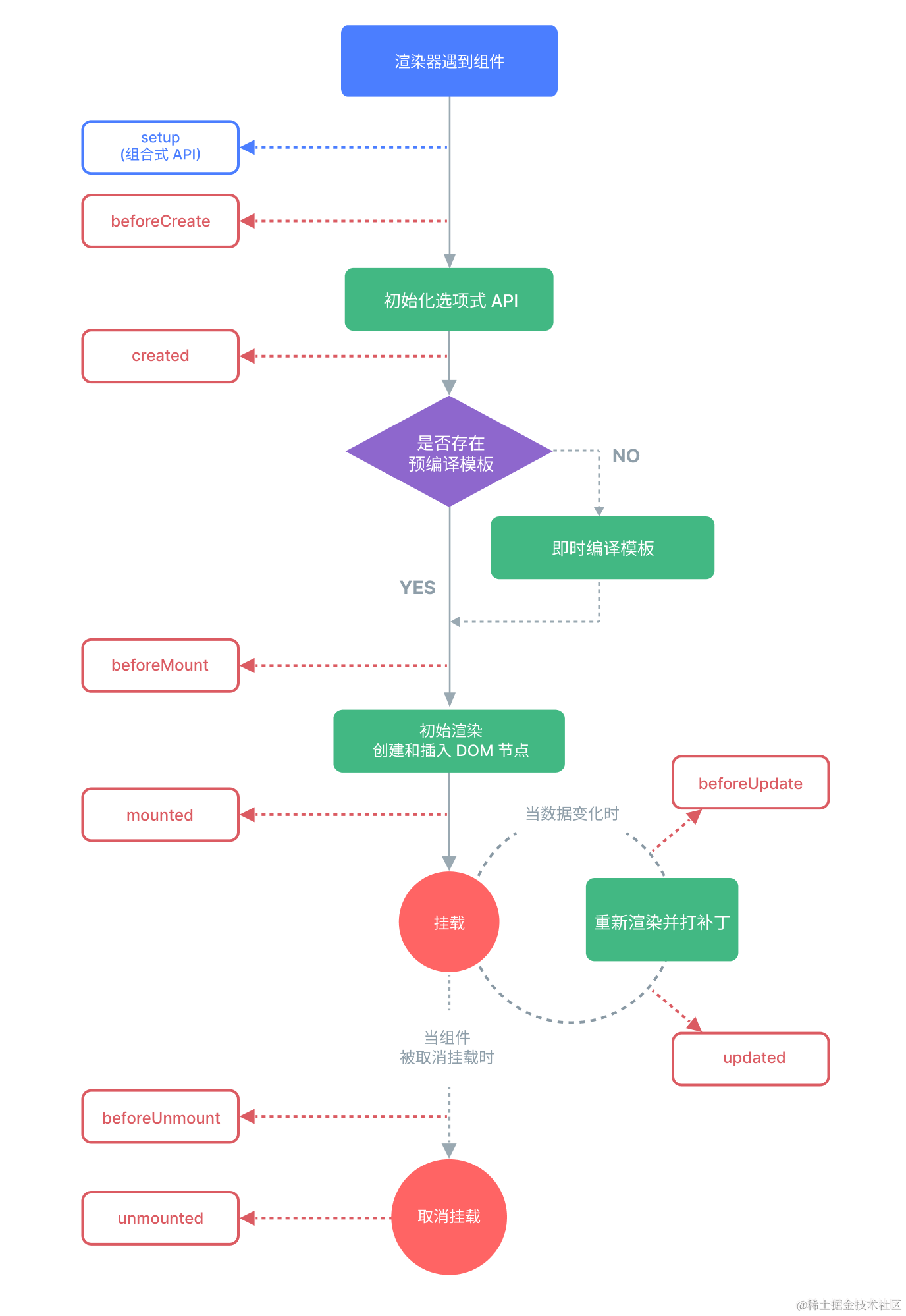
- onMounted() 在组件挂载完成后执行
- onBeforeMount() 在组件实例被挂载之前调用
- onUpdated() 响应式状态变更而更新其 DOM 树之后调用
- onBeforeUpdate() 响应式状态变更而更新其 DOM 树之前调用
- onUnmounted() 在组件实例被卸载之后调用
- onBeforeUnmount() 在组件实例被卸载之前调用
<script setup>
    import { onMounted } from 'vue'
    onMounted(() => {
        console.log(`the component is now mounted.`)
     })
</script>
Vue.js的一些指令
详情请看 内置指令 | Vue.js (vuejs.org)
v-text
更新元素的文本内容。
<template>
    <span v-text="msg"></span>
    <!-- 等同于 -->
    <span>{{msg}}</span>
</template>

<script setup>
  const msg="内容"
</script>
v-html
更新元素的 innerHTML。
<template>
    <div v-html="html"></div>
</template>

<script setup>
  const html = '<p>这是html内容</p>'
</script>
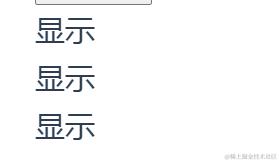
v-show 、v-if 、v-else 、 v-else-if
控制元素的显隐
<template>

    <h1 v-show="true">显示</h1>
    <h1 v-show="false">隐藏</h1>

    // v-else要与v-if
    <h1 v-if="true">显示</h1>
    <h1 v-if="false">隐藏</h1>
    <h1 v-else-if="false">隐藏</h1>
    <h1 v-else>显示</h1>
</template>
v-for
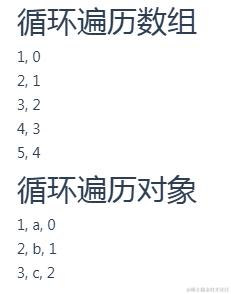
基于原始数据多次渲染元素或模板块。
<template>

    <h1>循环遍历数组</h1>
    <div v-for="(item, index) in [1, 2, 3, 4, 5]">
      {{ `${item},  ${index}` }}
    </div>

    <h1>循环遍历对象</h1>
    <div v-for="(value, name, index) in { a: 1, b: 2, c: 3 }">
      {{ `${value}, ${name}, ${index}` }}
    </div>
</template>
v-on 缩写 @
给元素绑定事件监听器。
- 修饰符
.stop- 调用event.stopPropagation()。.prevent- 调用event.preventDefault()。.capture- 在捕获模式添加事件监听器。.self- 只有事件从元素本身发出才触发处理函数。.{keyAlias}- 只在某些按键下触发处理函数。.once- 最多触发一次处理函数。.left- 只在鼠标左键事件触发处理函数。.right- 只在鼠标右键事件触发处理函数。.middle- 只在鼠标中键事件触发处理函数。.passive- 通过{ passive: true }附加一个 DOM 事件。
<!-- 方法处理函数 -->
<button v-on:click="doThis"></button>

<!-- 动态事件 -->
<button v-on:[event]="doThis"></button>

<!-- 内联声明 -->
<button v-on:click="doThat('hello', $event)"></button>

<!-- 缩写 -->
<button @click="doThis"></button>

<!-- 使用缩写的动态事件 -->
<button @[event]="doThis"></button>

<!-- 停止传播 -->
<button @click.stop="doThis"></button>

<!-- 阻止默认事件 -->
<button @click.prevent="doThis"></button>

<!-- 不带表达式地阻止默认事件 -->
<form @submit.prevent></form>

<!-- 链式调用修饰符 -->
<button @click.stop.prevent="doThis"></button>

<!-- 按键用于 keyAlias 修饰符-->
<input @keyup.enter="onEnter" />

<!-- 点击事件将最多触发一次 -->
<button v-on:click.once="doThis"></button>

<!-- 对象语法 -->
<button v-on="{ mousedown: doThis, mouseup: doThat }"></button>
v-bind 缩写 :
动态的绑定一个或多个 attribute,也可以是组件的 prop。
- 修饰符
.camel- 将短横线命名的 attribute 转变为驼峰式命名。.prop- 强制绑定为 DOM property。3.2+.attr- 强制绑定为 DOM attribute。3.2+
<!-- 绑定 attribute -->
<img v-bind:src="imageSrc" />

<!-- 动态 attribute 名 -->
<button v-bind:[key]="value"></button>

<!-- 缩写 -->
<img :src="imageSrc" />

<!-- 缩写形式的动态 attribute 名 (3.4+),扩展为 :src="src" -->
<img :src />

<!-- 动态 attribute 名的缩写 -->
<button :[key]="value"></button>

<!-- 内联字符串拼接 -->
<img :src="'/path/to/images/' + fileName" />

<!-- class 绑定 -->
<div :class="{ red: isRed }"></div>
<div :class="[classA, classB]"></div>
<div :class="[classA, { classB: isB, classC: isC }]"></div>

<!-- style 绑定 -->
<div :style="{ fontSize: size + 'px' }"></div>
<div :style="[styleObjectA, styleObjectB]"></div>

<!-- 绑定对象形式的 attribute -->
<div v-bind="{ id: someProp, 'other-attr': otherProp }"></div>

<!-- prop 绑定。“prop” 必须在子组件中已声明。 -->
<MyComponent :prop="someThing" />

<!-- 传递子父组件共有的 prop -->
<MyComponent v-bind="$props" />

<!-- XLink -->
<svg><a :xlink:special="foo"></a></svg>
v-model
在表单输入元素或组件上创建双向绑定。
<template>
    <input v-model='data'/>
</template>

<script setup>
    const data = '数据'
</script>
v-once
仅渲染元素和组件一次,并跳过之后的更新。
<!-- 单个元素 -->
<span v-once>This will never change: {{msg}}</span>
<!-- 带有子元素的元素 -->
<div v-once>
  <h1>Comment</h1>
  <p>{{msg}}</p>
</div>
<!-- 组件 -->
<MyComponent v-once :comment="msg" />
<!-- `v-for` 指令 -->
<ul>
  <li v-for="i in list" v-once>{{i}}</li>
</ul>
v-slot 缩写 #
用于声明具名插槽或是期望接收 props 的作用域插槽。
<!-- 具名插槽 -->
<BaseLayout>
  <template v-slot:header>
    Header content
  </template>

  <template v-slot:default>
    Default slot content
  </template>

  <template v-slot:footer>
    Footer content
  </template>
</BaseLayout>

<!-- 接收 prop 的具名插槽 -->
<InfiniteScroll>
  <template v-slot:item="slotProps">
    <div class="item">
      {{ slotProps.item.text }}
    </div>
  </template>
</InfiniteScroll>

<!-- 接收 prop 的默认插槽,并解构 -->
<Mouse v-slot="{ x, y }">
  Mouse position: {{ x }}, {{ y }}
</Mouse>
v-pre
跳过该元素及其所有子元素的编译。
元素内具有 v-pre,所有 Vue 模板语法都会被保留并按原样渲染。最常见的用例就是显示原始双大括号标签及内容。
<span v-pre>{{ this will not be compiled }}</span>
$nextTick
$nextTick 是 Vue 提供的用于在下次 DOM 更新完成后执行回调的 API,确保操作的是最新的 DOM 结构。
this.$nextTick(() => {
  // DOM 已经更新
  console.log('DOM 更新完成');
});

// Composition API
import { nextTick } from 'vue';
nextTick(() => {
  console.log('DOM 更新完成');
});
$forceUpdate
Vue 中的 $forceUpdate 用于强制重新渲染组件,但不改变组件的状态或数据。这个 API 用得较少,一般用于特殊情况。
this.$forceUpdate(); // 强制组件重新渲染


// Composition API
import { ref, getCurrentInstance } from 'vue';
const { proxy } = getCurrentInstance();
const forceUpdateComponent = () => { proxy.$forceUpdate(); // 获取当前组件实例并强制更新 };
React基础使用
// State 点击加1
import { useState } from 'react'; // 状态
export default function Count() {
  const [count, setCount] = useState(0); // 状态
  const click = () => setCount(count + 1); // 加1
  return (
    <div>
    <p>您点击了 {count} 次</p>
    <button onClick={click} className='bg-blue-500 text-white p-2 rounded-md'>
      点击我
    </button>
  </div>
  )
}


// React 组件中的 CSS
const redStyle = {
  color: 'red'
}
const blueStyle = {
  color: 'blue'
}
export default function Student(props: { name: string, pro: boolean }) {
  return <h1 className="text">Hello,<span style={props.pro ? redStyle : blueStyle}>{props.name}</span></h1>;
}


//  条件渲染 (注意:组件必须总是返回一些东西)
import React from "react";
export default function Home() {
    return (
        <Greeting firstName="web3" lastName="123" />
    )
}

function Greeting(user) {
    if (user) { return ( <h1>你好, {formatName(user)}!</h1> ); }
    return ( <h1>你好, 先生。</h1> );
}

function formatName(user) {
    return user.firstName + ' ' + user.lastName;
}


//循环
const elm = ['one', 'two', 'three'];
export default function Home() {
    return (
      <div>
        {elm.map((value, index) => (
          <li key={index}>{value}</li>
        ))}
      </div>
    )
}