Angular 中的 NgRx 正如 React 中的 Redux. 但 NgRx 也可以看成是 service 的延续。本文全面介绍在 Angular 中使用 NgRx 的方方面面。通过本文的叙述,相信你一定能够对 NgRx 有一个坚实的基础。喜欢的朋友赶快收藏起来吧!
不过,在开始之前,我们必须弄懂一个事情,那就是:何为状态?(What Is State)
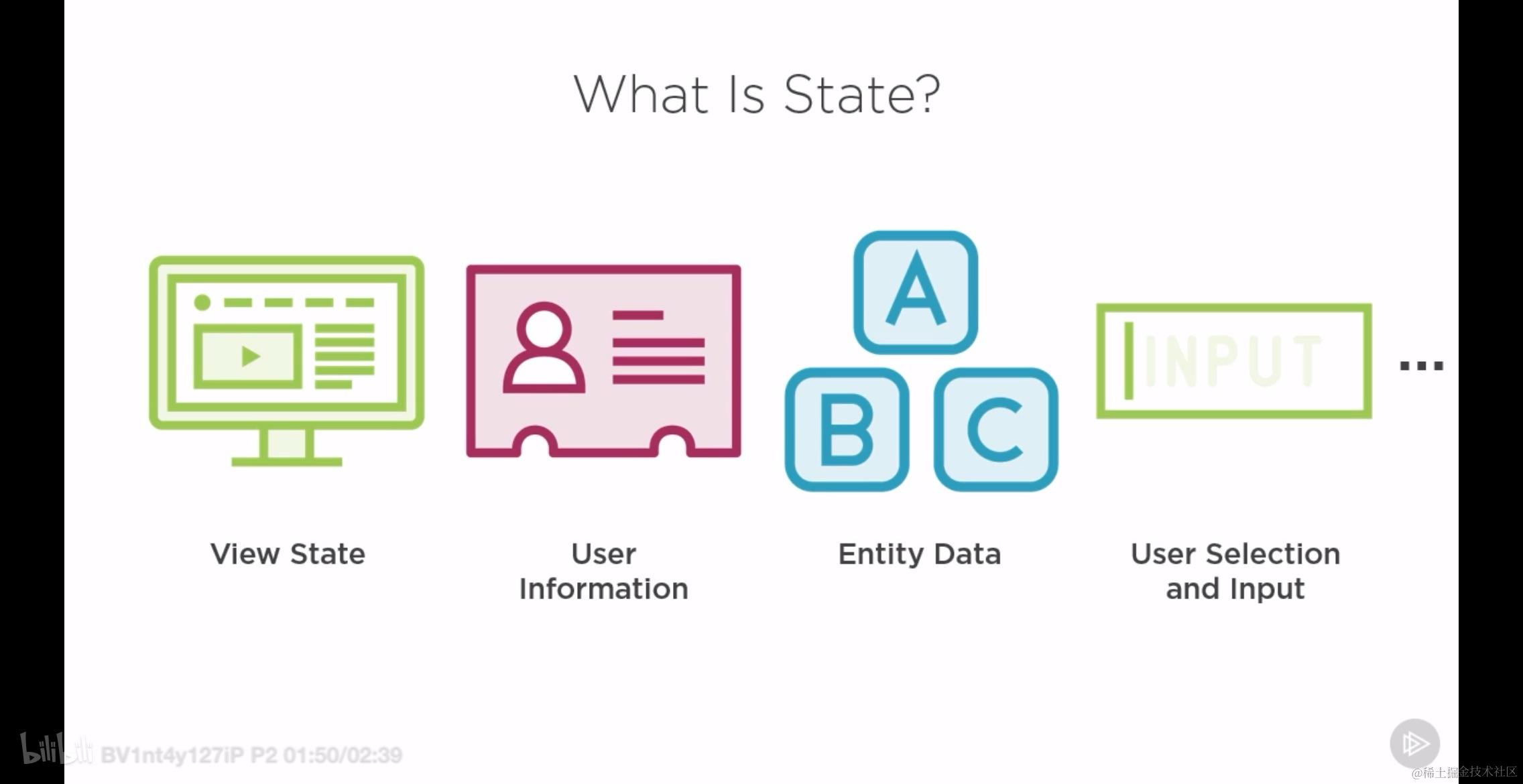
What Is State
所谓状态其本质还是数据,但是体现在工程化的项目中,表现为:
- view state 视图状态
- user infomation 用户信息
- entity data 实体数据
- user selection and input 用户选择或者输入的交互性内容
那我们使用 NgRx 的目的是什么呢?
- 组织状态
- 管理状态
- 在组件中共享状态的改变
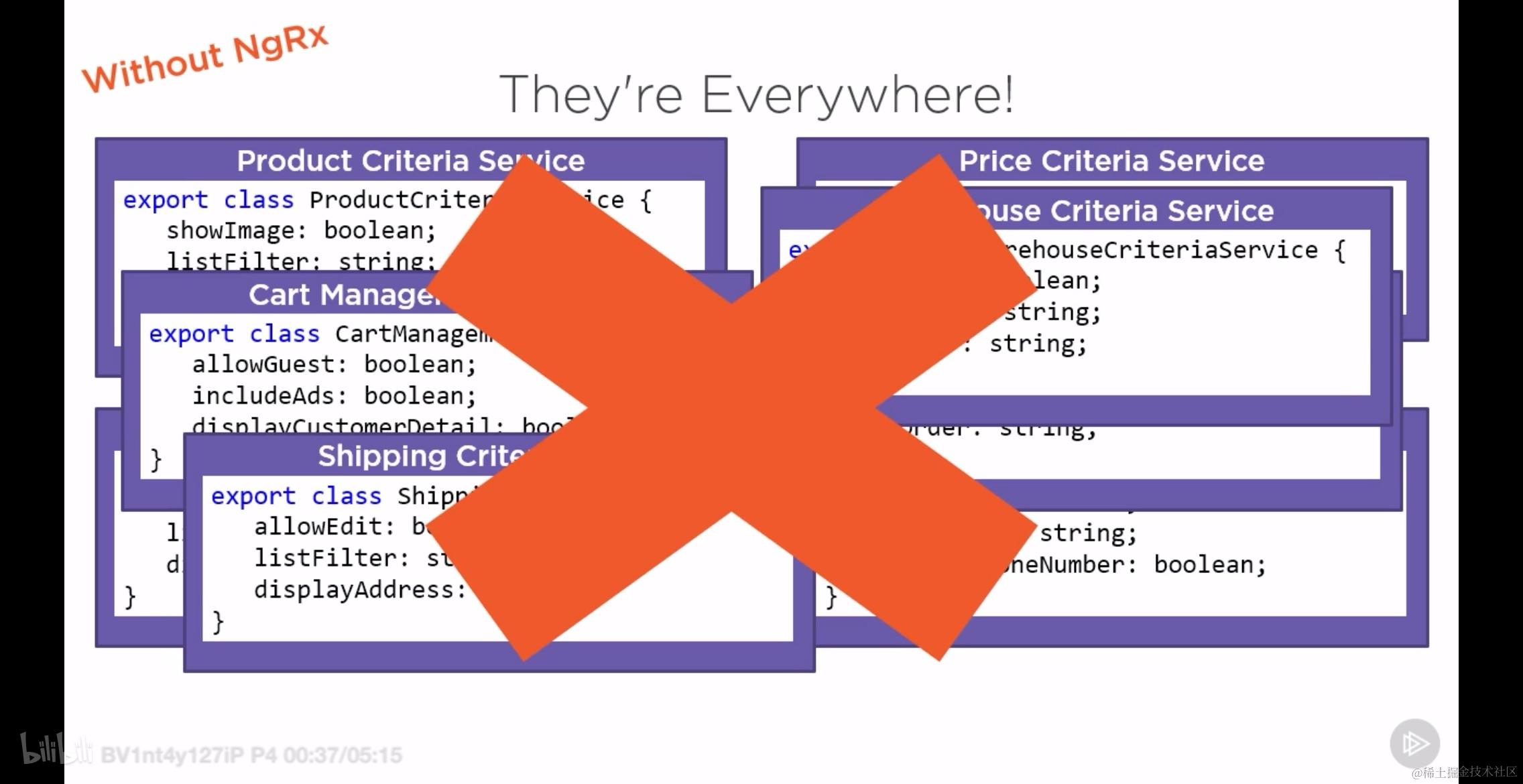
如果不使用 NgRx, 在复杂的 App 中你可能会看到如下的光景:
0. redux 基础及在 react 项目中的使用
本节首先介绍 redux 的一些基本概念和知识,让后简单介绍一下其在 react 项目中的使用。目的是为了能够通过对比的方式更好的理解 ngrx.
Redux 的基本概念包括以下四个方面:view action reducer store. 而将 action 从view 发送到 reducer 的这个过程称为 dispatch.
0.1 redux 在静态 html 中的应用
在一个 html 文件中通过脚本编写自增自减的一个简单效果,包括:
- 如何创建
initialState:initialState本质上就是一个简单的对象,但是需要有特定的结构:
    const initialState = {
      count: 0,
    };
- 如何创建 reducer reducer 本质上是一个纯函数,一般来说只需要对 action 拆包,然后使用扩展运算符将目前的 state 和 payload 结合起来就可以了,常用到 switch 语句。
    const reducer = (state = initialState, action) => {
      const { type, payload } = action;
      switch (type) {
        case "add":
          return {
            ...state,
            count: state.count + payload,
          };
        case "minus":
          return {
            ...state,
            count: state.count - payload,
          };

        default:
          return state;
      }
    };
- 如何创建 store 创建 store 使用的是 redux 第三方库中提供的名为 createStore 的 api, 而入参一般只需要使用刚创建的 reducer 纯函数就可以了!
const store = Redux.createStore(reducer);
- 如何创建 action action 的本质是实现了下面这个接口的 object 实例:
export interface IAction {
    type: string;
    payload: any;
}
- 如何发出 action, 处理 action, 引发 store 的更新 创建好 store 之后就可使用这个对象上面的名为 dispatch 的方法将上面创建的 action 发射出去了。
function addHandler() {
  store.dispatch({ type: "add", payload: 2 });
}

function minusHandler() {
  store.dispatch({ type: "minus", payload: 2 });
}
- 在 store 更新之后如何通知页面更新 在 reducer 接受到 store dispatch 的 action 之后,会触发 store 的更新,而当 store 更新之后则会调用其回调函数队列。而往此队列中注册回调函数的方法名为:subscribe
store.subscribe(() => {
  update();
});

function update() {
  content.innerHTML = store.getState().count;
}
所有在静态页面上的代码如下所示,注意是如何以 module 的方式引入 redux 这个第三方库的!
<!DOCTYPE html>
<html lang="en">
  <head>
    <meta charset="UTF-8" />
    <meta name="viewport" content="width=device-width, initial-scale=1.0" />
    <title>Document</title>
  </head>
  <body>
    <div
      id="container"
      style="
        display: flex;
        width: 400px;
        justify-content: space-around;
        margin: 100px auto;
      "
    >
      <input id="minus" type="button" value="-" />
      <div id="content"></div>

      <input id="add" type="button" value="+" />
    </div>
  </body>

  <script type="module">
    import * as Redux from "./node_modules/redux/dist/redux.browser.mjs";
    const content = document.getElementById("content");
    const add = document.getElementById("add");
    const minus = document.getElementById("minus");

    const initialState = {
      count: 0,
    };

    const reducer = (state = initialState, action) => {
      const { type, payload } = action;
      switch (type) {
        case "add":
          return {
            ...state,
            count: state.count + payload,
          };
        case "minus":
          return {
            ...state,
            count: state.count - payload,
          };

        default:
          return state;
      }
    };

    const store = Redux.createStore(reducer);

    store.subscribe(() => {
      update();
    });

    update();

    add.addEventListener("click", addHandler);
    minus.addEventListener("click", minusHandler);

    function update() {
      content.innerHTML = store.getState().count;
    }

    function addHandler() {
      store.dispatch({ type: "add", payload: 2 });
    }

    function minusHandler() {
      store.dispatch({ type: "minus", payload: 2 });
    }
  </script>
</html>
0.2 在 react 项目中实现上述效果
现在我们将在静态页面上实现的功能完整的在 react 工程化前端项目中复现一遍。
0.2.1 创建一个 react 项目
npx create-react-app text-redux
0.2.2 安装相关的依赖
yarn add redux react-redux
0.2.3 在 index.ts 中仿静态页面完成相同效果
在 react 中完成上述功能的步骤基本上是完全相同的,需要注意的是在 store 更新之后如何通知 react 去更新组件,其实也就是这一点不同而已!
// index.js
import React from 'react';
import ReactDOM from 'react-dom/client';
import * as Redux from 'redux';

import App from './App';

const root = ReactDOM.createRoot(document.getElementById('root'));

const initialState = {
  count: 0,
};

const reducer = (state = initialState, action) => {
  const { type, payload } = action;
  switch (type) {
    case "add":
      return {
        ...state,
        count: state.count + payload,
      };
    case "minus":
      return {
        ...state,
        count: state.count - payload,
      };

    default:
      return state;
  }
};

const store = Redux.createStore(reducer);

store.subscribe(() => {
  update(root);
});

update(root);

function addHandler() {
  store.dispatch({ type: "add", payload: 2 });
}

function minusHandler() {
  store.dispatch({ type: "minus", payload: 2 });
}

function update(root) {
  root.render(
    <React.StrictMode>
      <App addHandler={addHandler} minusHandler={minusHandler} count={store.getState().count} />
    </React.StrictMode>
  );
}
// app.js
export default function App({ addHandler, minusHandler, count }) {

  return (
    <div
      id="container"
      style={{
        display: 'flex',
        width: 400,
        justifyContent: 'space-around',
        margin: '100px auto',
      }}
    >
      <input id="minus" type="button" value="-" onClick={minusHandler} />
      <div id="content">{count}</div>
      <input id="add" type="button" value="+" onClick={addHandler} />
    </div>
  );
}
0.2.4 使用 react-redux 提供的 provider 和 connect 第一次优化代码结构
我们注意到在 index.js 中调用 App 组件的时候传递了 加、减、当前数值。其实这三个值都可以在 store 中获取到,所以我们只要给 App 组件传递 store 就可以了。
// index.js
import React from 'react';
import ReactDOM from 'react-dom/client';
import * as Redux from 'redux';

import App from './App';

const root = ReactDOM.createRoot(document.getElementById('root'));

const initialState = {
  count: 0,
};

const reducer = (state = initialState, action) => {
  const { type, payload } = action;
  switch (type) {
    case "add":
      return {
        ...state,
        count: state.count + payload,
      };
    case "minus":
      return {
        ...state,
        count: state.count - payload,
      };

    default:
      return state;
  }
};

const store = Redux.createStore(reducer);

store.subscribe(() => {
  update(root);
});

update(root);

function update(root) {
  root.render(
    <React.StrictMode>
      <App store={store} />
    </React.StrictMode>
  );
}
// app.js
export default function App({ store }) {

  return (
    <div
      id="container"
      style={{
        display: 'flex',
        width: 400,
        justifyContent: 'space-around',
        margin: '100px auto',
      }}
    >
      <input id="minus" type="button" value="-" onClick={() => {
        store.dispatch({ type: "minus", payload: 2 });
      }} />
      <div id="content">{store.getState().count}</div>

      <input id="add" type="button" value="+" onClick={() => {
        store.dispatch({ type: "add", payload: 2 });
      }} />
    </div>
  );
}
那么能不能再简化呢?因为可能有很多不同层级的组件都需要 store, 总不能一直通过 props 透传吧,我们需要更好的方式,比如使用 provide。
这就是为什么在 react 中使用 redux 还要引入第二个库 react-redux 的原因了,因为它可以提供相应的 provider, 值得一提的是使用了 react-redux 之后,原来的 redux 也就光荣的退居二线了,我们使用的是封装性更好的 api
改进之后的,使用了 provider 之后的 index.js 长这样:
import React from 'react';
import ReactDOM from 'react-dom/client';
import * as Redux from 'redux';
import { Provider } from 'react-redux';

import App from './App';

const root = ReactDOM.createRoot(document.getElementById('root'));

const initialState = {
  count: 0,
};

const reducer = (state = initialState, action) => {
  const { type, payload } = action;
  switch (type) {
    case "add":
      return {
        ...state,
        count: state.count + payload,
      };
    case "minus":
      return {
        ...state,
        count: state.count - payload,
      };

    default:
      return state;
  }
};

const store = Redux.createStore(reducer);

store.subscribe(() => {
  update(root);
});

update(root);

function update(root) {
  root.render(
    <React.StrictMode>
      <Provider store={store}>
        <App />
      </Provider>
    </React.StrictMode>
  );
}
这个时候 App 组件在渲染的时候就已经无需再传入 store 了,相比之前更加的简洁了!
0.2.5 使用 mapStateToProps 第二次优化代码结构
如果 index.js 修改成上述模样,那么在 app.js 中又如何才能够获取到 store 呢?
实际上, react-redux 不仅提供了名为 Provider 的包裹组件,还提供了名为 connect 的函数。connect 函数作用之一就是方便 App 组件内部获取到 store 上面的信息的。
但是,可能和你想的有点不一样,我们无法从 connect 上获取到 store, 因为这不是必要的,我们真正想要获取的是 store 中的信息(用于渲染),以及能够发出 action 的 dispatch 方法;而这两部分内容 connect 都可以提供。
connect 方法的使用过程也很简单,直接用此方法包裹 App 组件之后再导出即可!如下所示:
import { connect } from "react-redux";

function App(props) {
  console.log('props: ', props);
  return (
    <div
      id="container"
      style={{
        display: 'flex',
        width: 400,
        justifyContent: 'space-around',
        margin: '100px auto',
      }}
    >
    </div>
  );
}

export default connect()(App)
执行之后在控制台中打印出的 props 如下所示:
可以看出高阶组件已经向低阶组件的 props 中注入了名为 dispatch 的方法。这证实了我上面的论述。这样的话我们的代码可以进一步修改成如下:
import { connect } from "react-redux";

function App({ dispatch }) {

  return (
    <div
      id="container"
      style={{
        display: 'flex',
        width: 400,
        justifyContent: 'space-around',
        margin: '100px auto',
      }}
    >
      <input id="minus" type="button" value="-" onClick={() => {
        dispatch({ type: "minus", payload: 2 });
      }} />
      {/* <div id="content">{store.getState().count}</div> */}

      <input id="add" type="button" value="+" onClick={() => {
        dispatch({ type: "add", payload: 2 });
      }} />
    </div>
  );
}

export default connect()(App)
现在还有一个问题,那就是我们怎么才能够拿到 store 中的数据,这里直接遵守规则即可,无需问为什么。
实现 store 中数据获取的方式是使用 selector, 所谓 selector 本质上就是一个筛选器,它接受所有的 store 数据然后将本组件需要的数据返回。那么为什么多此一举呢,直接在 connect 中向 props 中挂载所有的数据不可以吗?这个后续再说!selector 本质上也是纯函数,如下所示:
const mapStateToProps = state => {
  return {
    count: state.count,
  }
}
完整的代码如下所示:
import { connect } from "react-redux";

const mapStateToProps = state => {
  return {
    count: state.count,
  }
}

function App(props) {
  console.log(props);
  const { dispatch } = props;
  return (
    <div
      id="container"
      style={{
        display: 'flex',
        width: 400,
        justifyContent: 'space-around',
        margin: '100px auto',
      }}
    >
      <input id="minus" type="button" value="-" onClick={() => {
        dispatch({ type: "minus", payload: 2 });
      }} />
      <div id="content">{props.count}</div>

      <input id="add" type="button" value="+" onClick={() => {
        dispatch({ type: "add", payload: 2 });
      }} />
    </div>
  );
}

export default connect(mapStateToProps)(App)
控制台中的打印效果如下:
由于 mapStateToProps 是纯函数,所以可以放在组件外面甚至是其它文件中去。
0.2.6 使用 mapDispatchToProps 第三次优化代码结构
一般来说,我们在定义好 store 的时候就确定下来这部分 store 对应的 action,也就是 action 本质上和视图层是脱钩的,也就是解耦的,所以尽管是可行的,我们也不会直接使用 connect 向 props 中注入的 dispatch 来发起 action, 更好的实践是我们参考 mapStateToProps 的做法,使用另外的纯函数向 props 中注入 dispatch 方法,如下所示:
import { connect } from "react-redux";

const mapStateToProps = state => {
  return {
    count: state.count,
  }
}

const mapDispatchToProps = dispatch => {
  return {
    Add() {
      dispatch({ type: "minus", payload: 2 });
    },
    Minus() {
      dispatch({ type: "add", payload: 2 })
    },
  }
}

function App(props) {
  console.log(props);

  return (
    <div
      id="container"
      style={{
        display: 'flex',
        width: 400,
        justifyContent: 'space-around',
        margin: '100px auto',
      }}
    >

    </div>
  );
}

export default connect(mapStateToProps, mapDispatchToProps)(App)
如此一来,我们的代码就可以写成如下的形式:
import { connect } from "react-redux";

const mapStateToProps = state => {
  return {
    count: state.count,
  }
}

const mapDispatchToProps = dispatch => {
  return {
    Add() {
      dispatch({ type: "add", payload: 2 });
    },
    Minus() {
      dispatch({ type: "minus", payload: 2 })
    },
  }
}

function App({ count, Add, Minus }) {
  return (
    <div
      id="container"
      style={{
        display: 'flex',
        width: 400,
        justifyContent: 'space-around',
        margin: '100px auto',
      }}
    >
      <input id="minus" type="button" value="-" onClick={Minus} />
      <div id="content">{count}</div>

      <input id="add" type="button" value="+" onClick={Add} />
    </div>
  );
}

export default connect(mapStateToProps, mapDispatchToProps)(App)
0.2.7 优化组件的更新策略
首先回答两个疑问:
- connect 方法的另外一个功能是什么?
另外一个功能就是可以在 store 更新之后有选择的更新包裹的组件,什么是有选择的,见下。这意味着我们无需反复调用 update 函数,也无需手动往 store 中注入更新回调。
import React from 'react';
import ReactDOM from 'react-dom/client';
import * as Redux from 'redux';
import { Provider } from 'react-redux';

import App from './App';

const initialState = {
  count: 0,
};

const reducer = (state = initialState, action) => {
  const { type, payload } = action;
  switch (type) {
    case "add":
      return {
        ...state,
        count: state.count + payload,
      };
    case "minus":
      return {
        ...state,
        count: state.count - payload,
      };

    default:
      return state;
  }
};

const store = Redux.createStore(reducer);

const root = ReactDOM.createRoot(document.getElementById('root'));
root.render(
  <React.StrictMode>
    <Provider store={store}>
      <App />
    </Provider>
  </React.StrictMode>
);
这样一来我们的 index.js 也得到了简化,比之前简单多了,更加的工程化了。
- 为什么需要 selector 而不是让 connect 直接注入整个 store 中的内容?
因为connect 的按需更新的策略,如果注入整个 state 就会导致无关组件被更新,降低了性能。使用 mapStateToProps 仿佛是在告诉 connect 更新的时机是什么。
0.2.8 使用 bindActionCreators 第四次优化代码结构
我们使用 redux(注意不是 react-redux) 中的 api bindActionCreators 对 mapDispatchToProps 更近一步优化,这里有点奇妙,可以窥见大佬的思想。
import { bindActionCreators } from "redux";
const Add = () => ({ type: "add", payload: 2 });

const Minus = () => ({ type: "minus", payload: 2 });

const mapDispatchToProps = dispatch => bindActionCreators({
  Add,
  Minus,
}, dispatch)
所有代码为:
import { connect } from "react-redux";
import { bindActionCreators } from "redux";

const mapStateToProps = state => {
  return {
    count: state.count,
  }
}

const Add = () => ({ type: "add", payload: 2 });

const Minus = () => ({ type: "minus", payload: 2 });

const mapDispatchToProps = dispatch => bindActionCreators({
  Add,
  Minus,
}, dispatch)

function App({ count, Add, Minus }) {
  return (
    <div
      id="container"
      style={{
        display: 'flex',
        width: 400,
        justifyContent: 'space-around',
        margin: '100px auto',
      }}
    >
      <input id="minus" type="button" value="-" onClick={Minus} />
      <div id="content">{count}</div>

      <input id="add" type="button" value="+" onClick={Add} />
    </div>
  );
}

export default connect(mapStateToProps, mapDispatchToProps)(App)
这样做看不出来有什么高级的,但是接下来才是见证奇迹的时候,巧妙的利用 module.
- 创建 store 目录,并在其中创建 action type 子目录
- 在 store/action 中写入下面的内容:
export const Add = () => ({ type: "add", payload: 2 });

export const Minus = () => ({ type: "minus", payload: 2 });
- 然后 app.js 中的内容就变成了:
import * as actions from "./store/action";
const mapDispatchToProps = dispatch => bindActionCreators(actions, dispatch);
- 完整代码如下:
import { connect } from "react-redux";
import { bindActionCreators } from "redux";
import * as actions from "./store/action";

const mapStateToProps = state => {
  return {
    count: state.count,
  }
}
const mapDispatchToProps = dispatch => bindActionCreators(actions, dispatch);

function App({ count, Add, Minus }) {
  return (
    <div
      id="container"
      style={{
        display: 'flex',
        width: 400,
        justifyContent: 'space-around',
        margin: '100px auto',
      }}
    >
      <input id="minus" type="button" value="-" onClick={Minus} />
      <div id="content">{count}</div>

      <input id="add" type="button" value="+" onClick={Add} />
    </div>
  );
}

export default connect(mapStateToProps, mapDispatchToProps)(App);
0.2.9 使用常量优化 action.type
在上面创建的 store/type/index.js 中写入如下的内容,然后将 reducer 和 action 中原来的硬编码进行替换。
// store/type/index.js
export const ADD = 'Add';
export const MINUS = 'Minus';
// store/action/index.js
import { ADD, MINUS } from "./type";

export const Add = () => ({ type: ADD, payload: 2 });

export const Minus = () => ({ type: MINUS, payload: 2 });
// index.js
import { ADD, MINUS } from './store/type';

const initialState = {
  count: 0,
};

const reducer = (state = initialState, action) => {
  const { type, payload } = action;
  switch (type) {
    case ADD:
      return {
        ...state,
        count: state.count + payload,
      };
    case MINUS:
      return {
        ...state,
        count: state.count - payload,
      };

    default:
      return state;
  }
};
0.2.10 将 reducer 函数放入 reducer 目录中去,将 store 放入 store/index.js 中去
在之前的 store 目录下创建 index.js 文件和 reducer/index.js 文件,然后将 reducer 和 store 分别放入,然后修改对应的引用路径。
目前 store 中的文件目录如下所示:
从上往下文件中的代码如下:
// store/action/index.js
import { ADD, MINUS } from "../type";

export const Add = () => ({ type: ADD, payload: 2 });

export const Minus = () => ({ type: MINUS, payload: 2 });
// store/reducer/index.js
import { ADD, MINUS } from '../type';

const initialState = {
  count: 0,
};

export const reducer = (state = initialState, action) => {
  const { type, payload } = action;
  switch (type) {
    case ADD:
      return {
        ...state,
        count: state.count + payload,
      };
    case MINUS:
      return {
        ...state,
        count: state.count - payload,
      };

    default:
      return state;
  }
};
// store/type/index.js
export const ADD = 'Add';
export const MINUS = 'Minus';
// store/index.js
import * as Redux from 'redux';
import { Provider } from 'react-redux';
import { reducer } from './reducer';

const store = Redux.createStore(reducer);

export default function StoreProvider({ children }) {
  return <Provider store={store}>
    {children}
  </Provider>
}
// index.js
import React from 'react';
import ReactDOM from 'react-dom/client';
import App from './App';
import StoreProvider from './store';

const root = ReactDOM.createRoot(document.getElementById('root'));
root.render(
  <React.StrictMode>
    <StoreProvider>
      <App />
    </StoreProvider>
  </React.StrictMode>
);
// app.js
import { connect } from "react-redux";
import { bindActionCreators } from "redux";
import * as actions from "./store/action";

const mapStateToProps = state => {
  return {
    count: state.count,
  }
}
const mapDispatchToProps = dispatch => bindActionCreators(actions, dispatch);

function App({ count, Add, Minus }) {
  return (
    <div
      id="container"
      style={{
        display: 'flex',
        width: 400,
        justifyContent: 'space-around',
        margin: '100px auto',
      }}
    >
      <input id="minus" type="button" value="-" onClick={Minus} />
      <div id="content">{count}</div>

      <input id="add" type="button" value="+" onClick={Add} />
    </div>
  );
}

export default connect(mapStateToProps, mapDispatchToProps)(App);
0.2.11 使用 combineReducer 对 store 进行分包
上面十个步骤中,我们只是对 App 组件构建了 redux 中的 store, 所以将其作为整个 app 的 provider 是不合适,为此我们需要做的是指明这部分 store 只属于 App 这个组件,并且将此子 store 融入到根(上级)store 中去。
涉及到一些目录调整,具体来说包括:
在 src 下新建 components 目录,并创建 App 子目录,在 App/ 中创建 index.js, 最后将 src/store 复制一份到 src/components/App 中。
删除原来 src/store 中除了 src/store/index.js 的其它内容,删除原来的 src/App.js。当前的文件目录如下所示:
接下来将相对引用位置修改正确,从上到下文件内容为:
// action
import { ADD, MINUS } from "../type";

export const Add = () => ({ type: ADD, payload: 2 });

export const Minus = () => ({ type: MINUS, payload: 2 });
// reducer.js
import { ADD, MINUS } from '../type';

const initialState = {
  count: 0,
};

export const reducer = (state = initialState, action) => {
  const { type, payload } = action;
  switch (type) {
    case ADD:
      return {
        ...state,
        count: state.count + payload,
      };
    case MINUS:
      return {
        ...state,
        count: state.count - payload,
      };

    default:
      return state;
  }
};

export const APP_REDUCER = "app reducer";
其中,export const APP_REDUCER = "app reducer";的作用是给此子 store 起个名,用于标识。
// type.js
export const ADD = 'Add';
export const MINUS = 'Minus';
// store/index.js
export { reducer, APP_REDUCER } from './reducer';
// App/index.js
import { connect } from "react-redux";
import { bindActionCreators } from "redux";
import * as actions from "./store/action";
import { APP_REDUCER } from "./store/reducer";

const mapStateToProps = state => {
    return {
        count: state[APP_REDUCER].count,
    }
}
const mapDispatchToProps = dispatch => bindActionCreators(actions, dispatch);

function App({ count, Add, Minus }) {
    return (
        <div
            id="container"
            style={{
                display: 'flex',
                width: 400,
                justifyContent: 'space-around',
                margin: '100px auto',
            }}
        >
            <input id="minus" type="button" value="-" onClick={Minus} />
            <div id="content">{count}</div>

            <input id="add" type="button" value="+" onClick={Add} />
        </div>
    );
}

export default connect(mapStateToProps, mapDispatchToProps)(App);
// src/index.js 中的内容不变
import React from 'react';
import ReactDOM from 'react-dom/client';
import App from './components/App';
import StoreProvider from './store';

const root = ReactDOM.createRoot(document.getElementById('root'));
root.render(
  <React.StrictMode>
    <StoreProvider>
      <App />
    </StoreProvider>
  </React.StrictMode>
);
下面是重头戏,我们修改 src/store/index.js 中的文件内容如下:
import * as Redux from 'redux';
import { Provider } from 'react-redux';
import { APP_REDUCER, reducer as appReducer } from '../components/App/store';

const reducer = Redux.combineReducers(
  {
    [APP_REDUCER]: appReducer,
  }
)

const store = Redux.createStore(reducer);

export default function StoreProvider({ children }) {
  return <Provider store={store}>
    {children}
  </Provider>
}
在上面的代码中,我们我们引入了 App 组件的 reducer 和其 store 标识,并使用 combineReducer 将子 reducer+store 合并。
由于中间隔了一个 APP_REDUCER 所以在 mapStateToProps 的时候也需要做出相应的改变,如下所示:
const mapStateToProps = state => {
    return {
        count: state[APP_REDUCER].count,
    }
}
1. 什么时候该用或者不用 NgRx
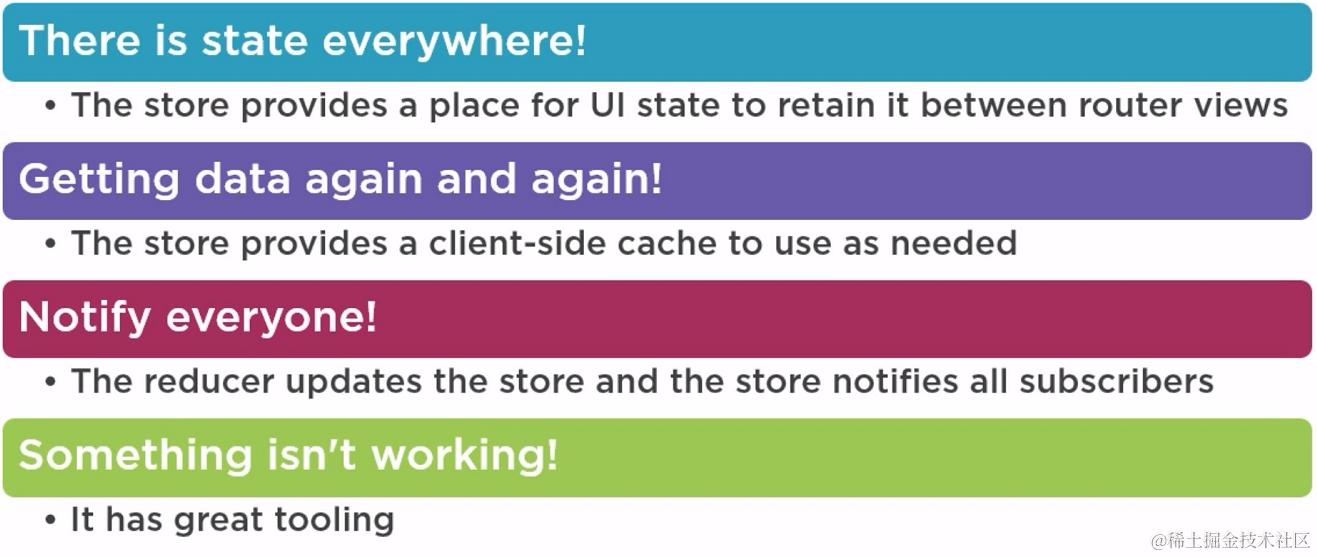
应该使用 NgRx 的场景:
- 需要保存当前页面 ui 状态的场景,例如在路由跳转前后能够保存对组件的最新更改(例如分页表单中,跳转之后仍能保存上页的数据)
- 客户端缓存网络数据
- 数据改变之后用来通知所有的订阅者
- 方便调试,特别是出现问题的时候
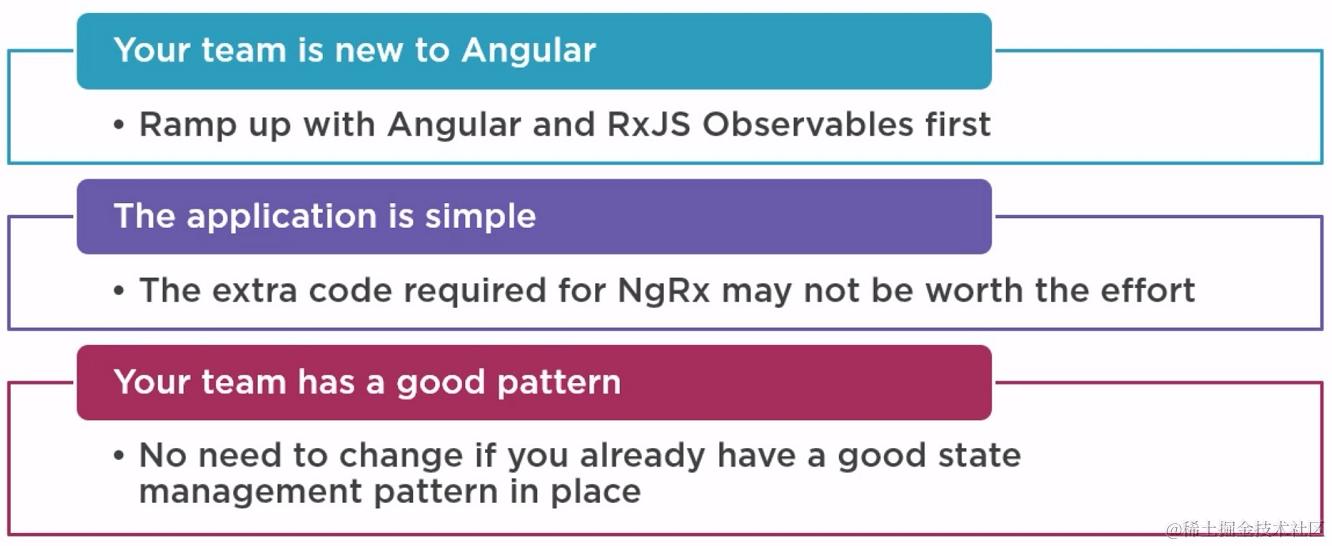
不应该使用 NgRx 的场景:
- 对 Angular 中的 Observable 使用不熟练的时候
- 使用 NgRx 节省的代码没有 NgRx 本身增加的代码多的时候
- 项目中已经有了状态管理工具的时候
2. 本文用到的代码以及结构
在如下所示的仓库中你可以找到所有的代码:

所用到的 demo 项目的架构如下所示:
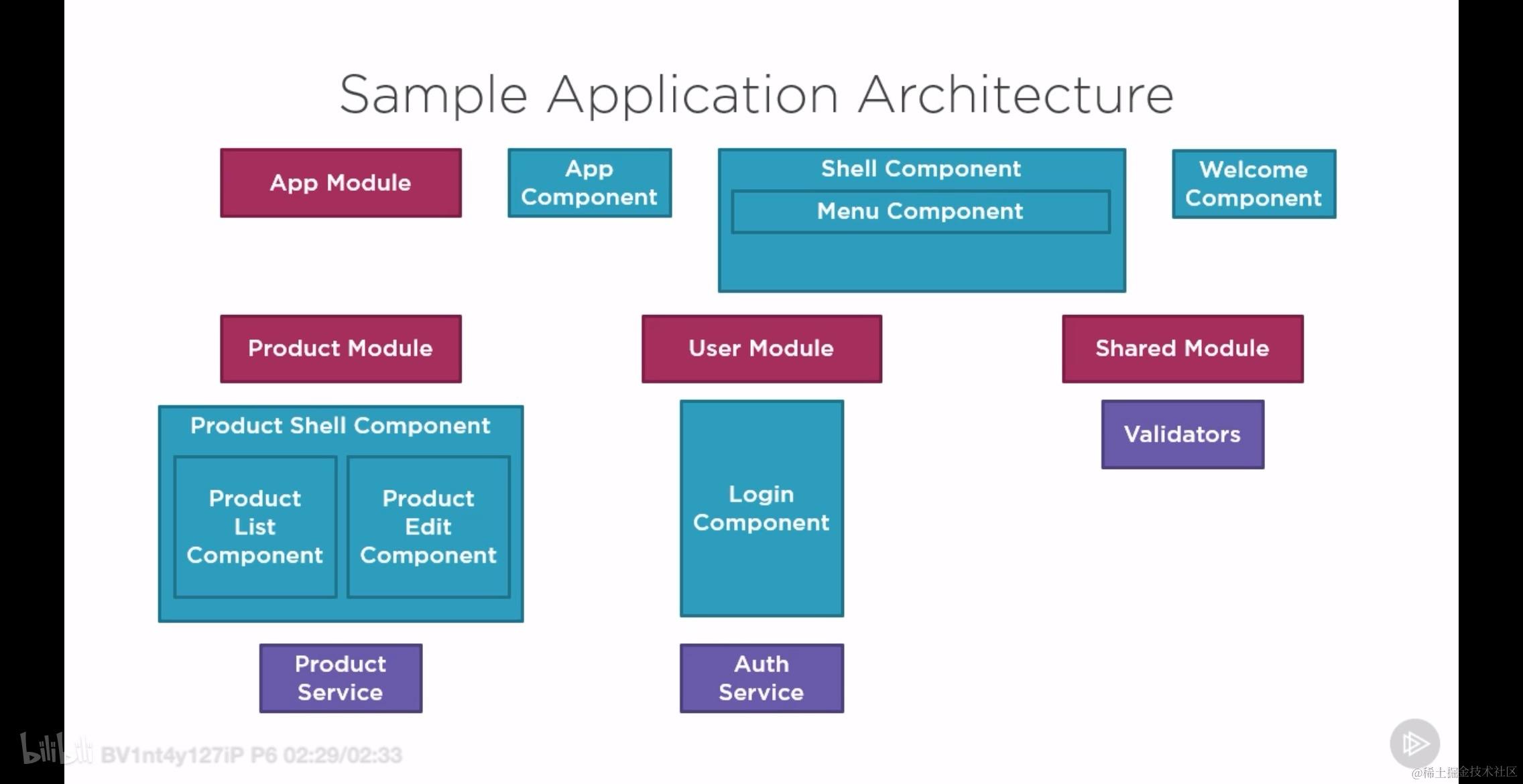
3. 本文的所有内容提纲
- redux 模式
- 初见 NgRx
- 开发者工具和调试工具
- 状态 state 的强类型
- action 以及 action creators
- 处理副作用
- 执行更新操作
- NgRx 的
- 架构设计考虑
4. Redux 模式
所谓 Redux 模式指的就是:
Redux is a predictable state container for JavaScript apps
Redux 原则是:
- store 作为唯一的信源
- store 中的数据或者状态只能通过 action 进行修改
- 修改 store 的是被称为 reducer 的纯函数
什么不应该放入 store 中去?
- unshared state - 不会被共享的状态
- angular form state - 表单状态
- non-serializable state - 不能被序列化的状态
发送 action 的时机
- 提交登录表单之后
- 点击按钮之后 toggle 一个侧边栏
- 加载组件的时候从 store 中获取数据对其进行初始化
- 保存数据以及其它耗时操作的时候开启 spinning 或者关闭之
使用 reducer 的场景
- 登录的时候在 store 中写入用户详情数据
- 点击侧边栏按钮之后修改 visible 属性
- 组件成功加载并获取数据之后将初始数据保存在 store 中
- 改变 spinning 的状态
你不应该使用 reducer 来处理带有副作用的 action, 这种 action 你可以使用 NgRx Effects 这个库来处理。
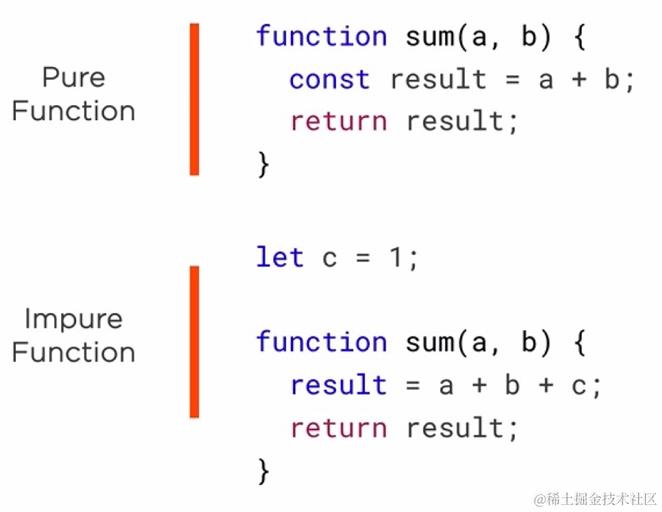
纯函数和非纯函数 下图所示的是一个非常经典的例子,但是缺失展示出了纯函数和非纯函数的区别:
使用 redux pattern 的优势
- Centralized immutable state - 可以将不可变状态集中起来
- Performance - 性能优化
- Testability - 提高可测试性
- Tooling - 提供 debug 数据
- Component communication - 有助于组件之间的通信
上面的优势可以用一句话概括之:
Redux is not great for making simple things quickly. lt's great for making really hard things simple. —— Jani Evakallio
5. 初识 NgRx
- 第一步:检查 npm 版本
npm -v - 第二步:安装基础依赖,必须安装的只有一个,那就是:
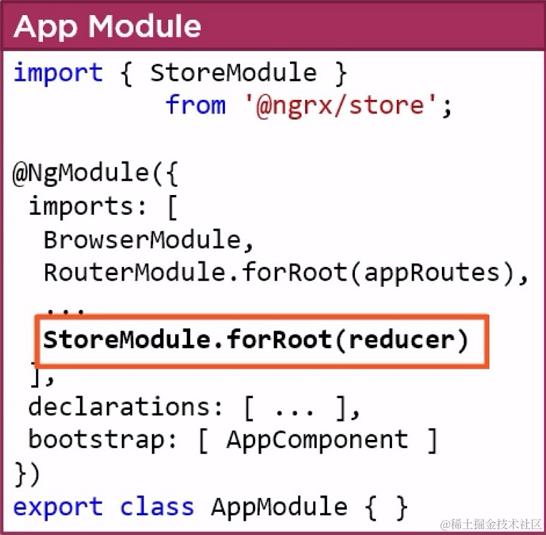
npm install @ngrx/store - 第三步:配置 store, 如下图所示,假装我们已经有了 reducer 这个对象:
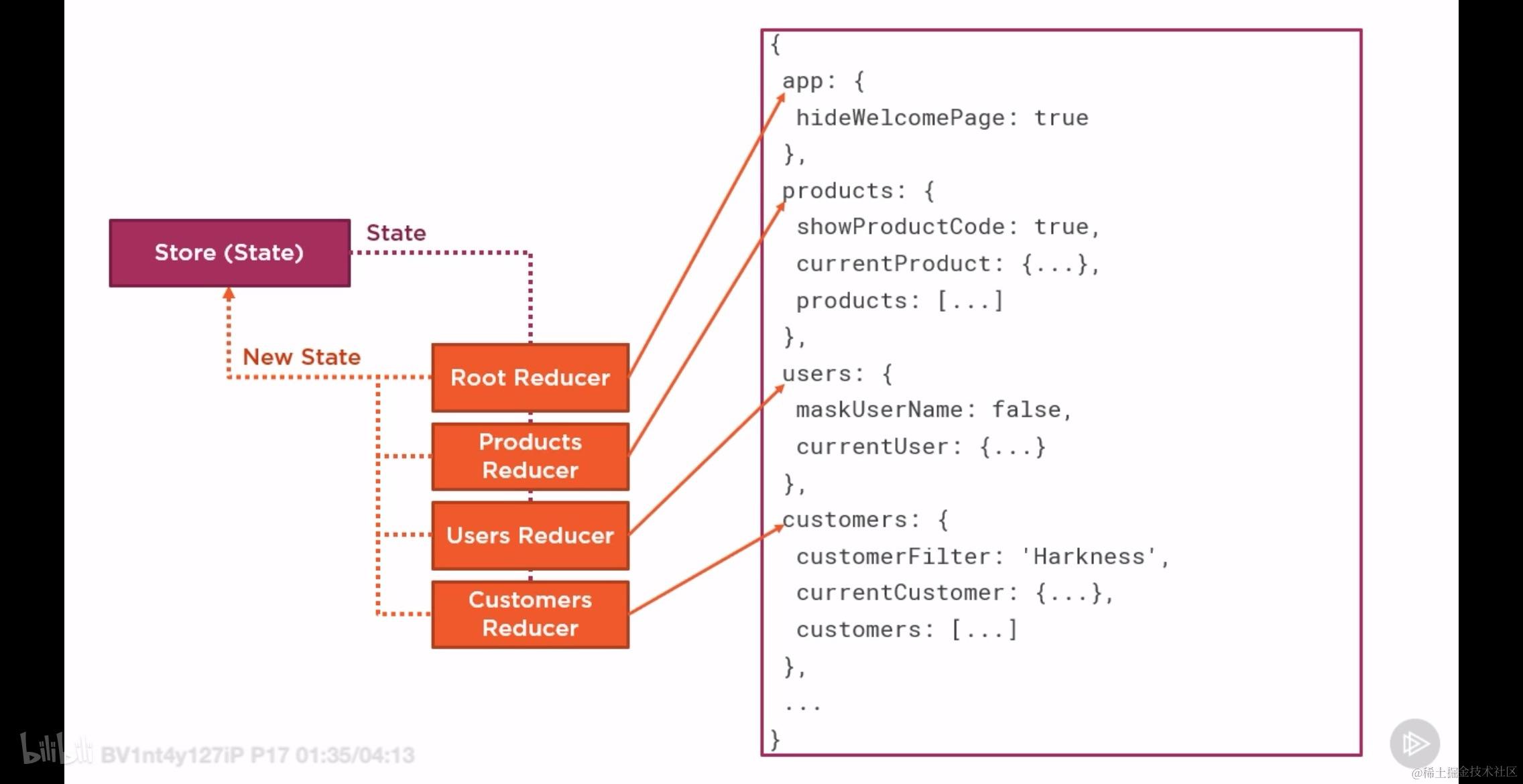
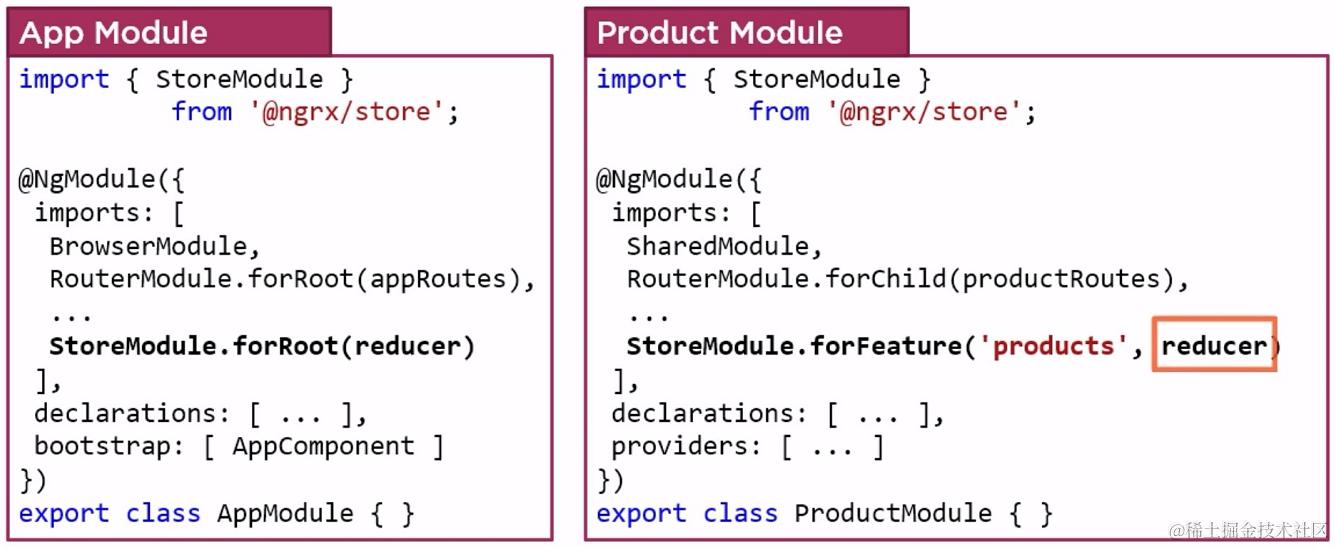
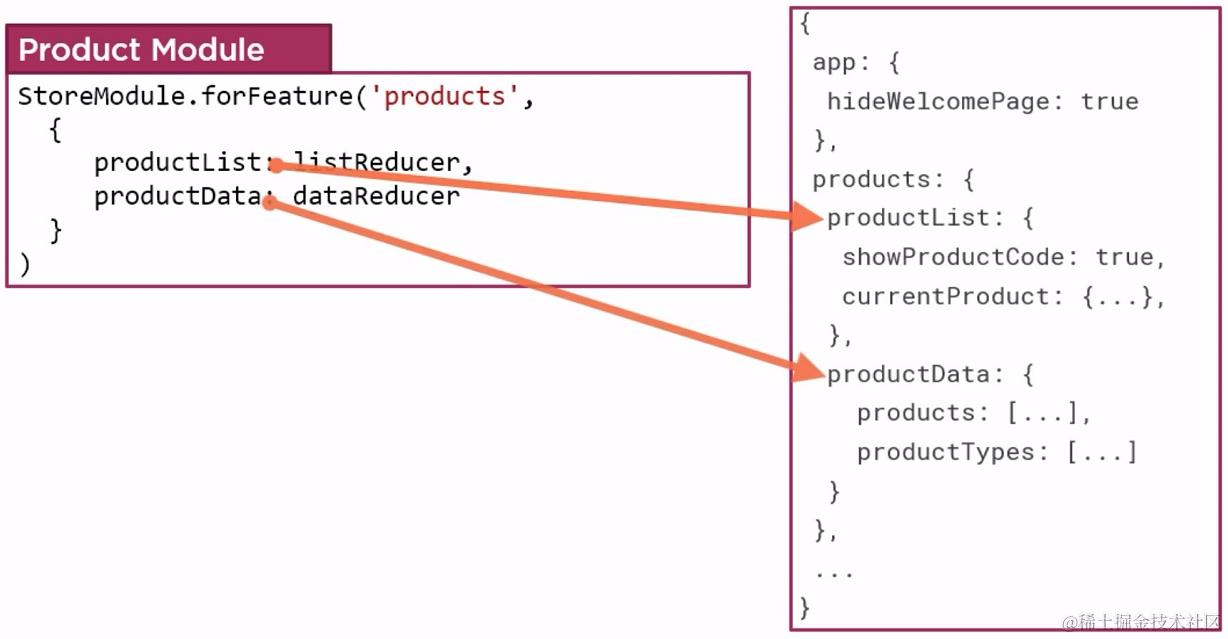
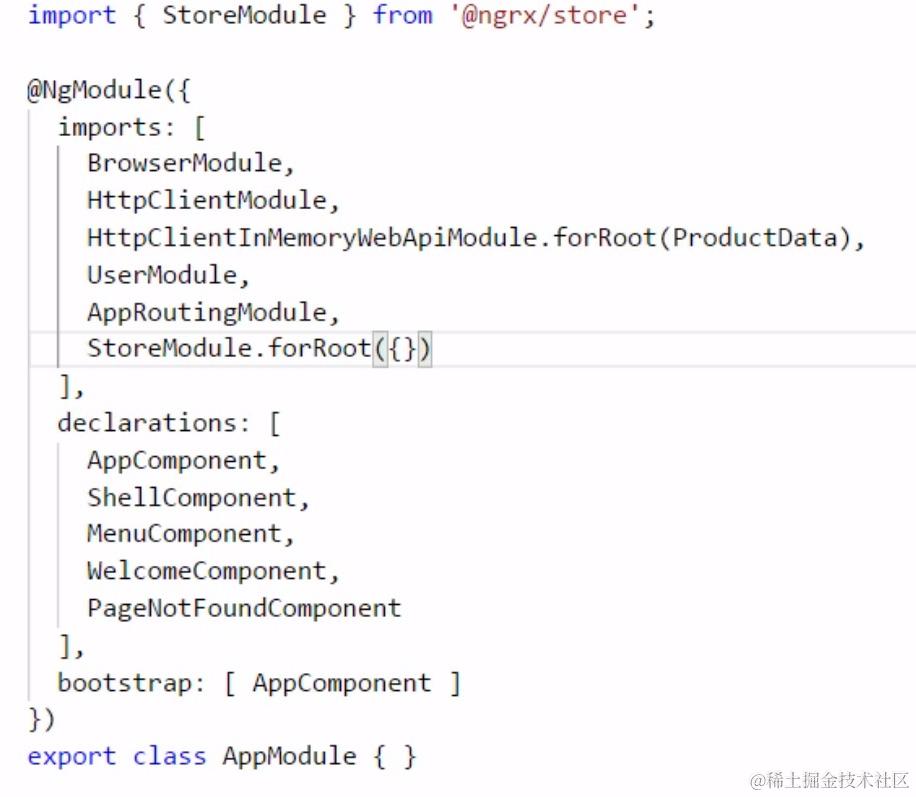
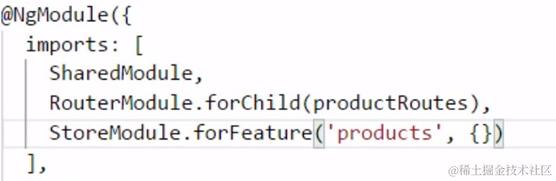
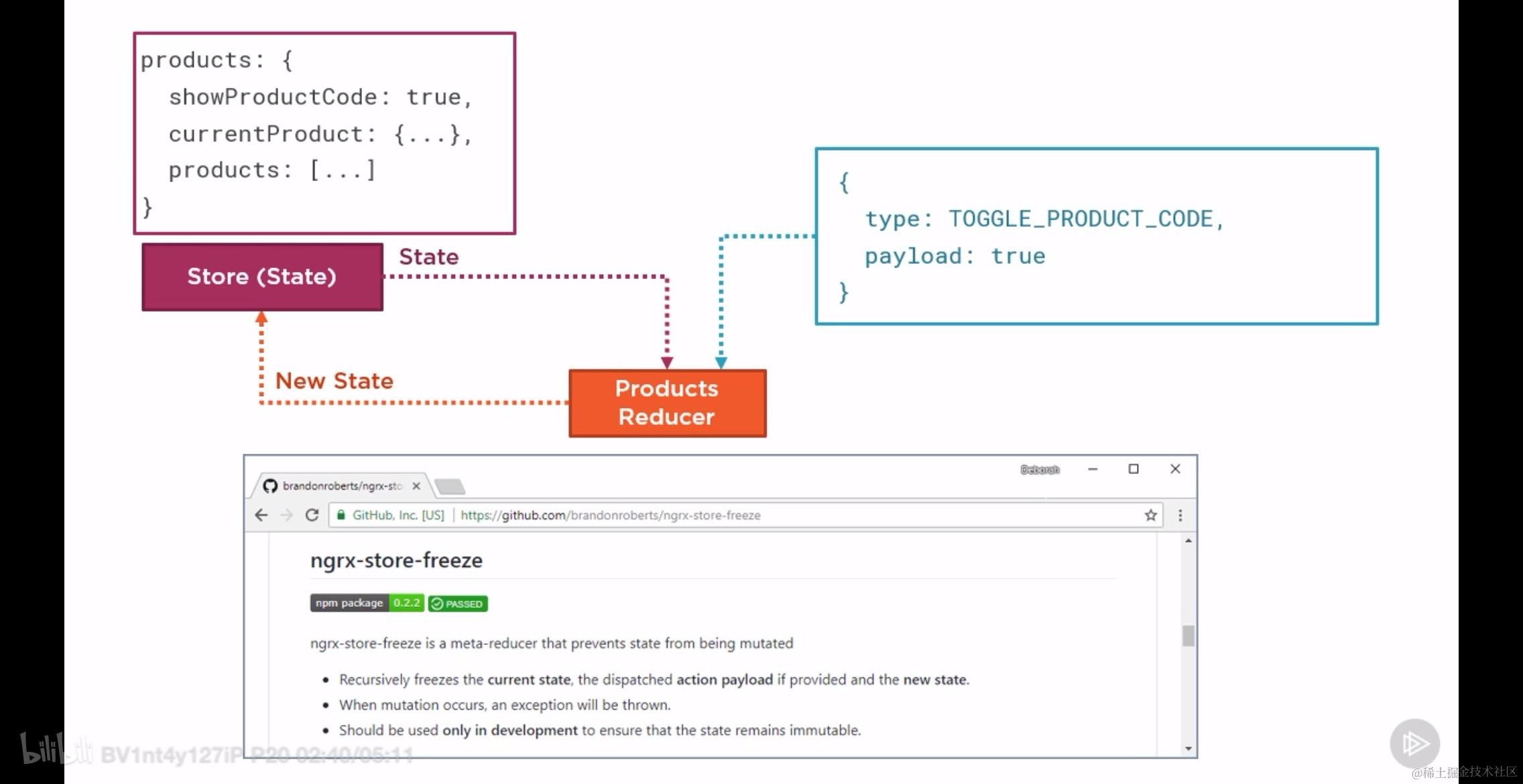
否则,就只能使用 ES6 中的展开操作符了。
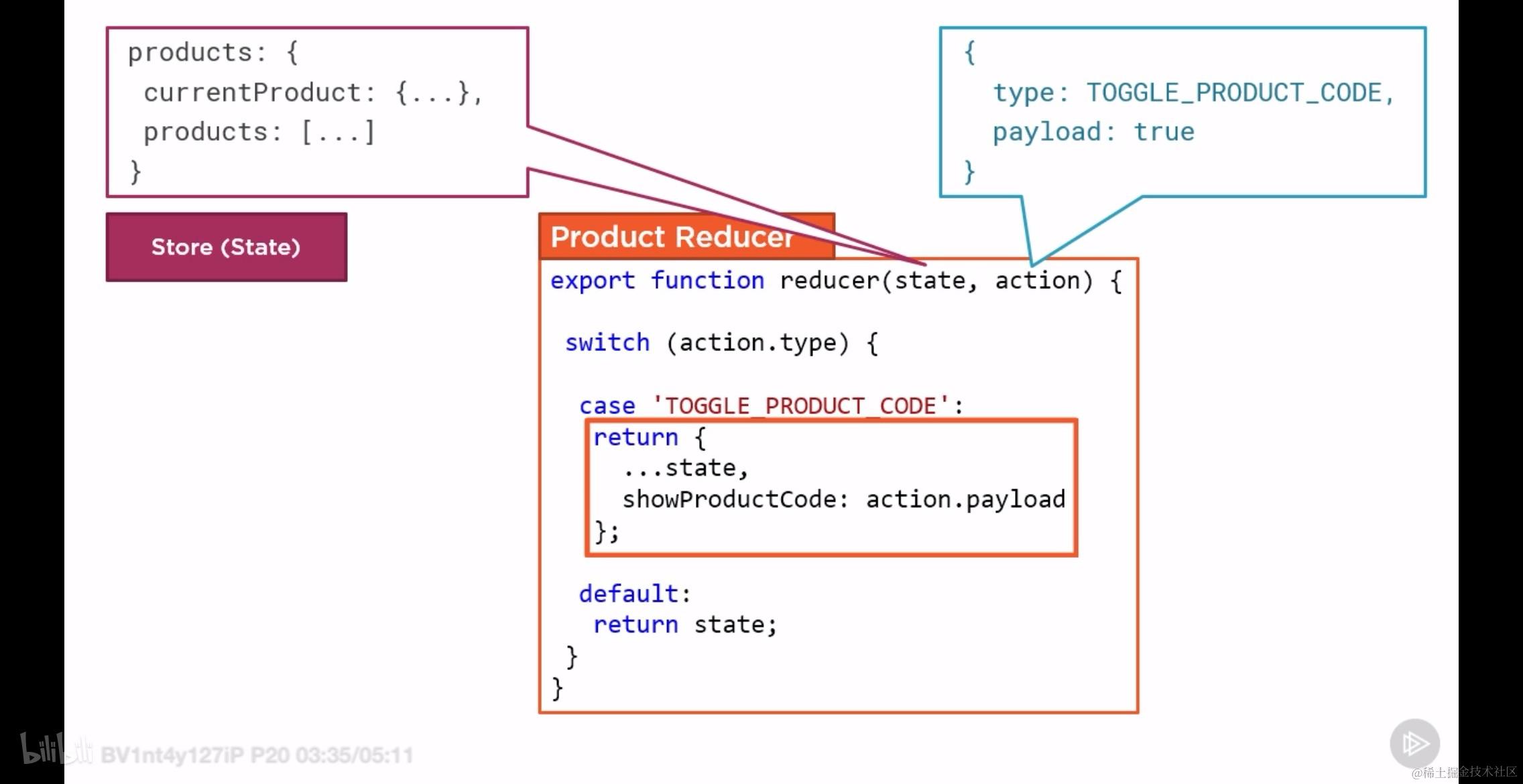
- 第九步:灵活使用 action 触发 reducer 更新 store 的第一步是 dispatch 一个 action. 这个 action 的设计或者使用是相当灵活的:
- 可以合并多个 action 为一个
- 或者多个不同的 action 完成相同的功能
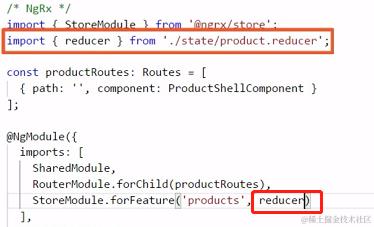
- 第十步:导入已经准备好的 reducer 如下所示,reducer 和 redux 中的一样,也是纯函数,
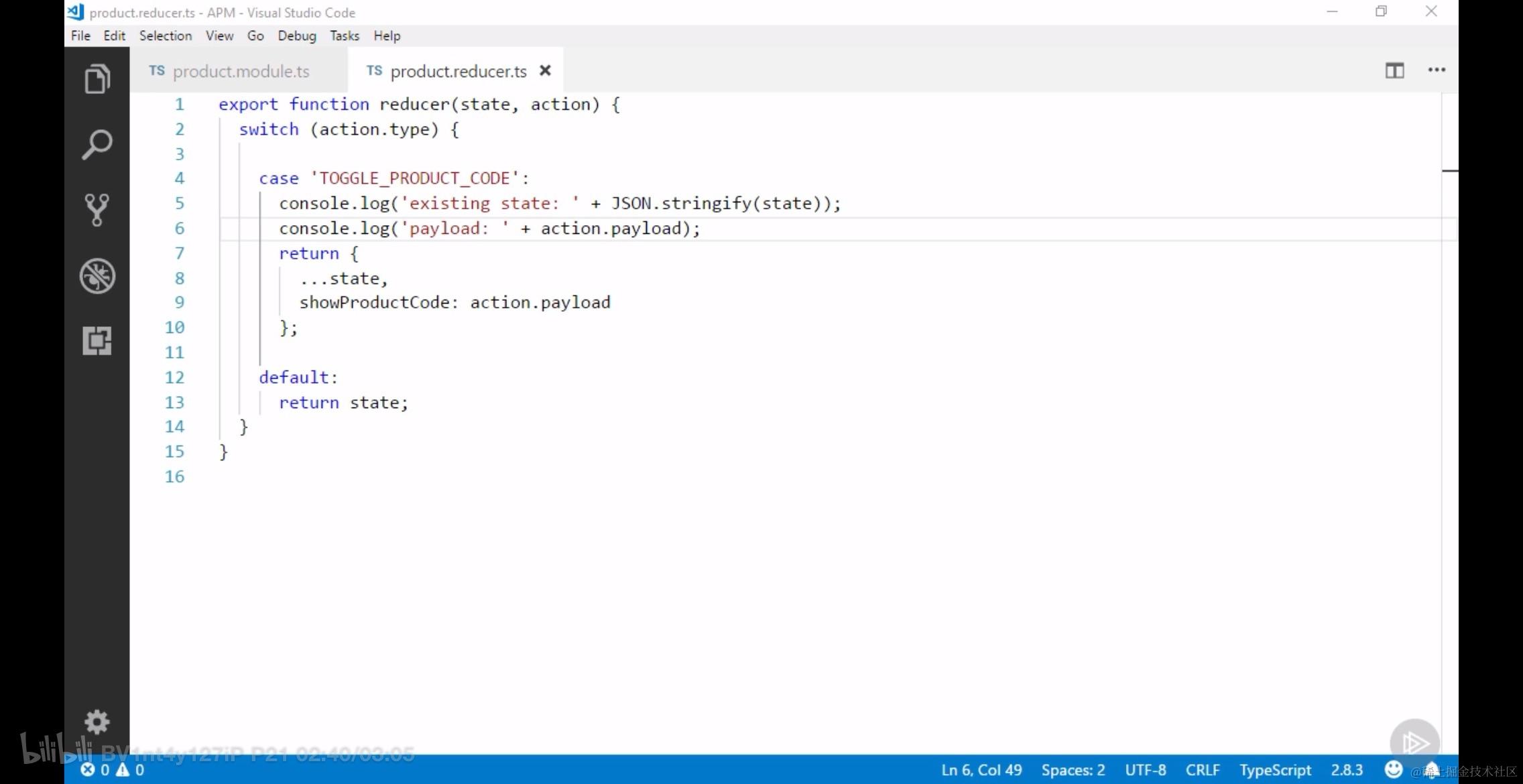
所以定义好之后直接引用然后使用就可以了。
- 第十一步:使用 store 服务实例发出 dispatch
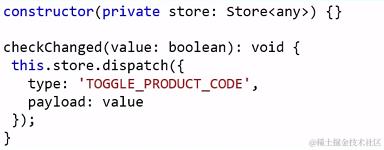
注意这里的 store 的类型写的是 any.
- 第十二步:从 store 中获取数据并显示/用于控制 使用 action 触发 reducer 更新 store 之后,被更新的 store 随即触发更新,所有订阅 store 的对象都会收到 observable store 的消息,从而做出响应。
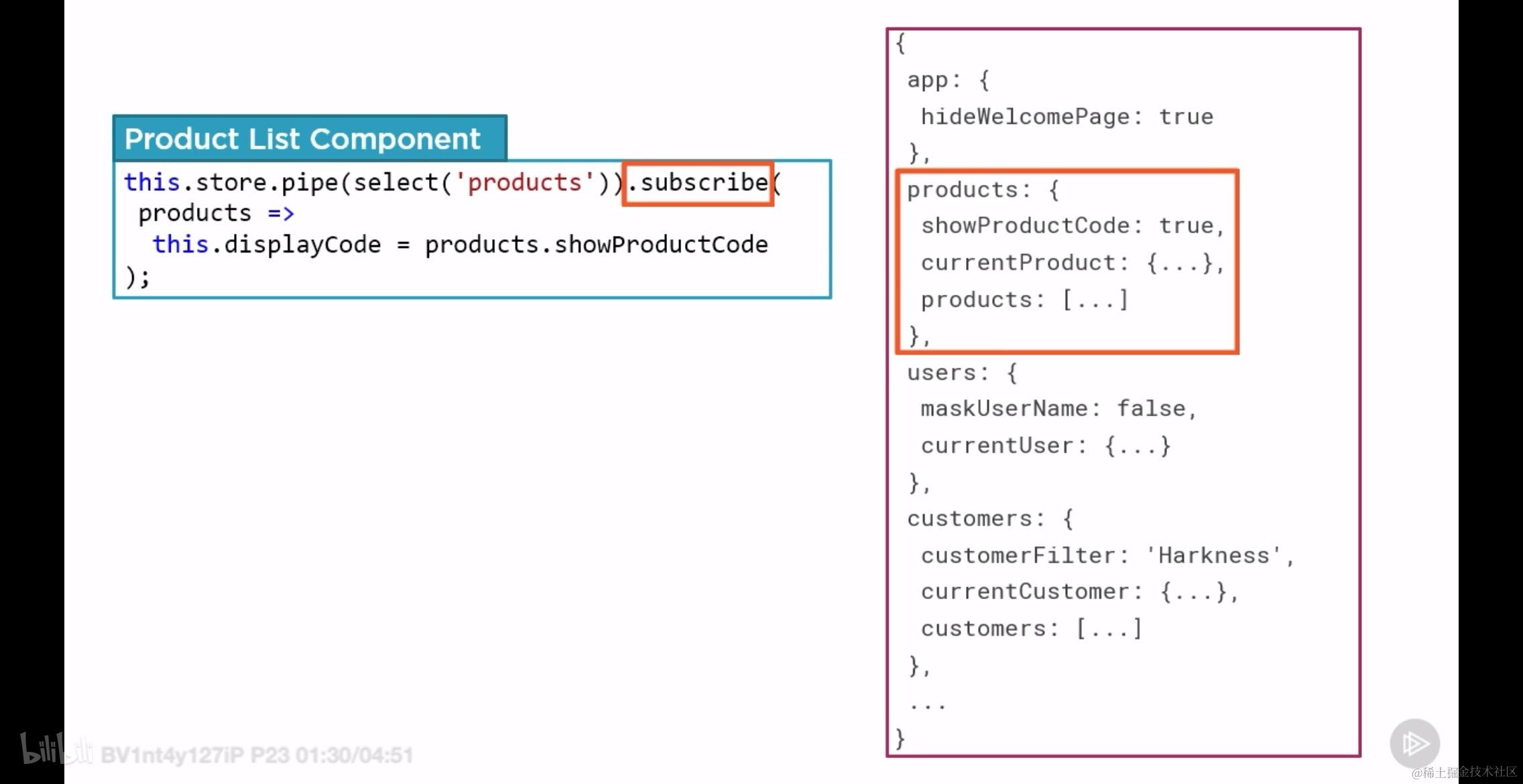
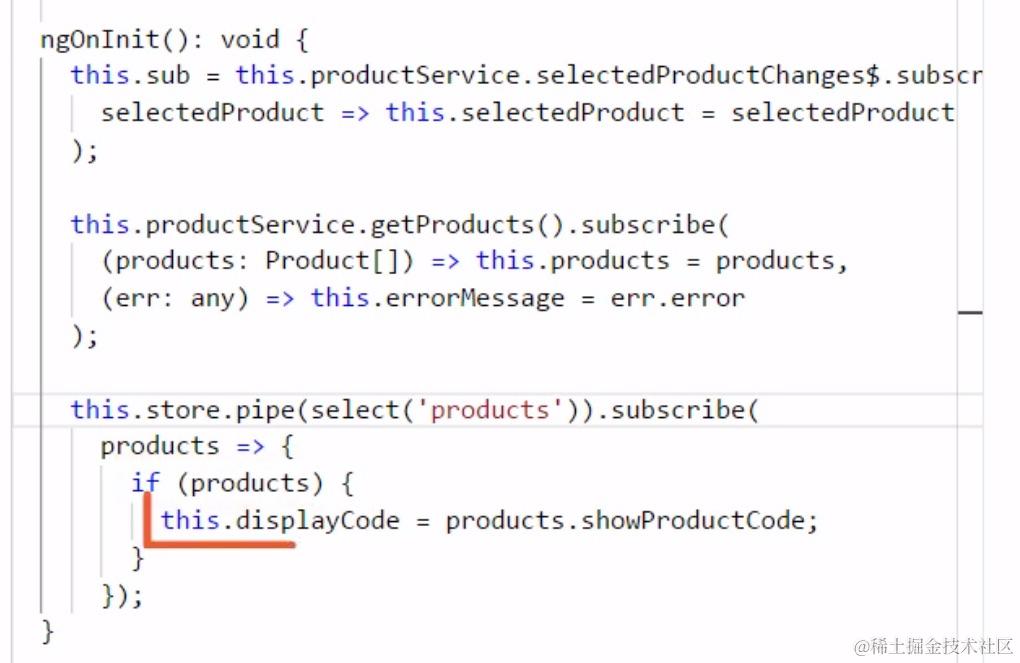
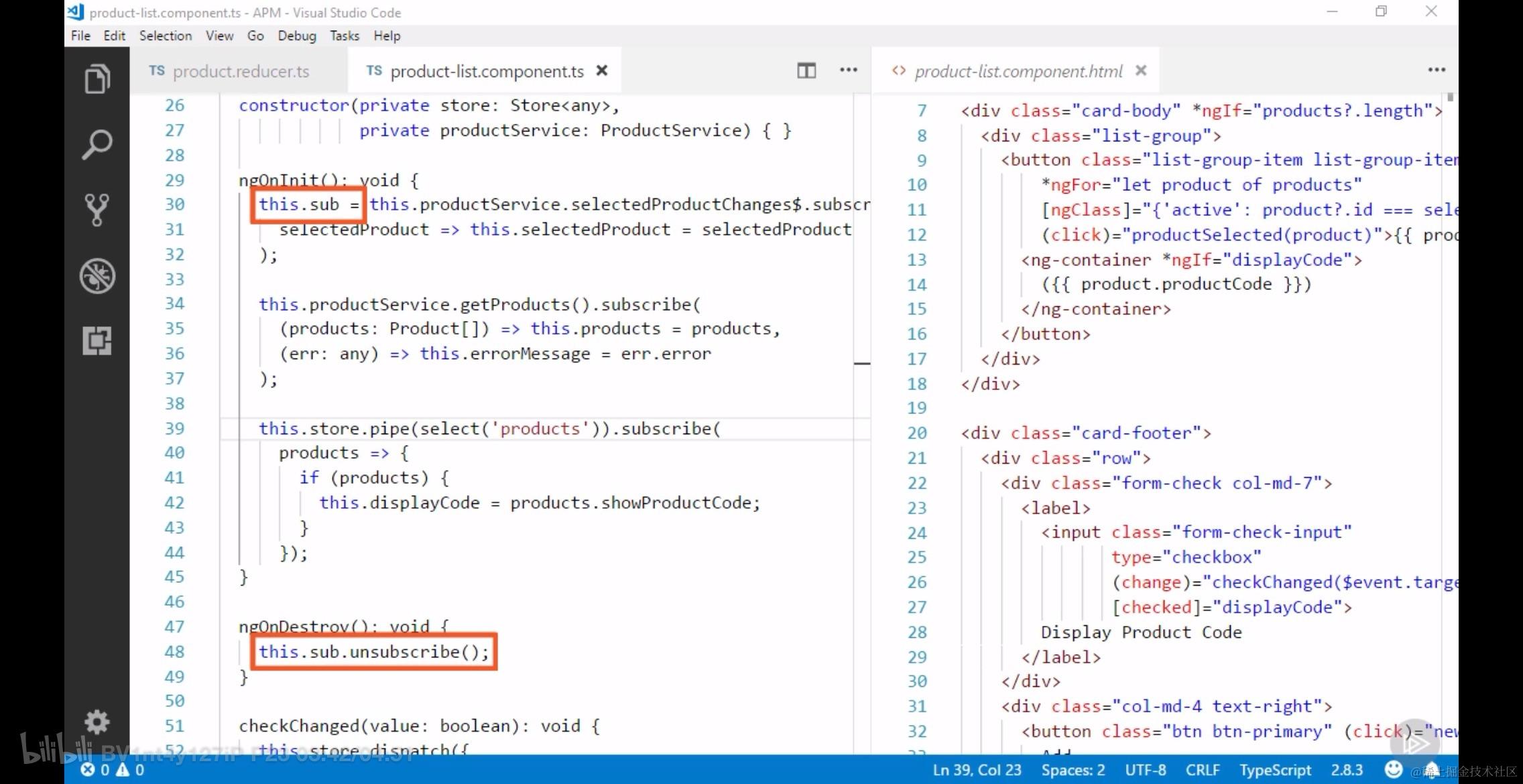
总结:
到目前为止,我们对 NgRx 的了解,包括下面的知识点:
- Single container for application state -- store 的本质
- Interact with that state in an immutable way -- 使用 immutable 的方式与 store 进行交互
- Install the @ngrx/store package -- 安装基本库 @ngrx/store package
- Organize application state by feature -- 使用 feature 组织应用状态
- Name the feature slice with the feature name -- 细分 feature reducer 以及规范命名
- Initialize the store using:
StoreModule.forRoot(reducer)orStoreModule.forFeature('feature', reducer)-- 使用 rootReducer 以及 featureReducer
Action 画像:
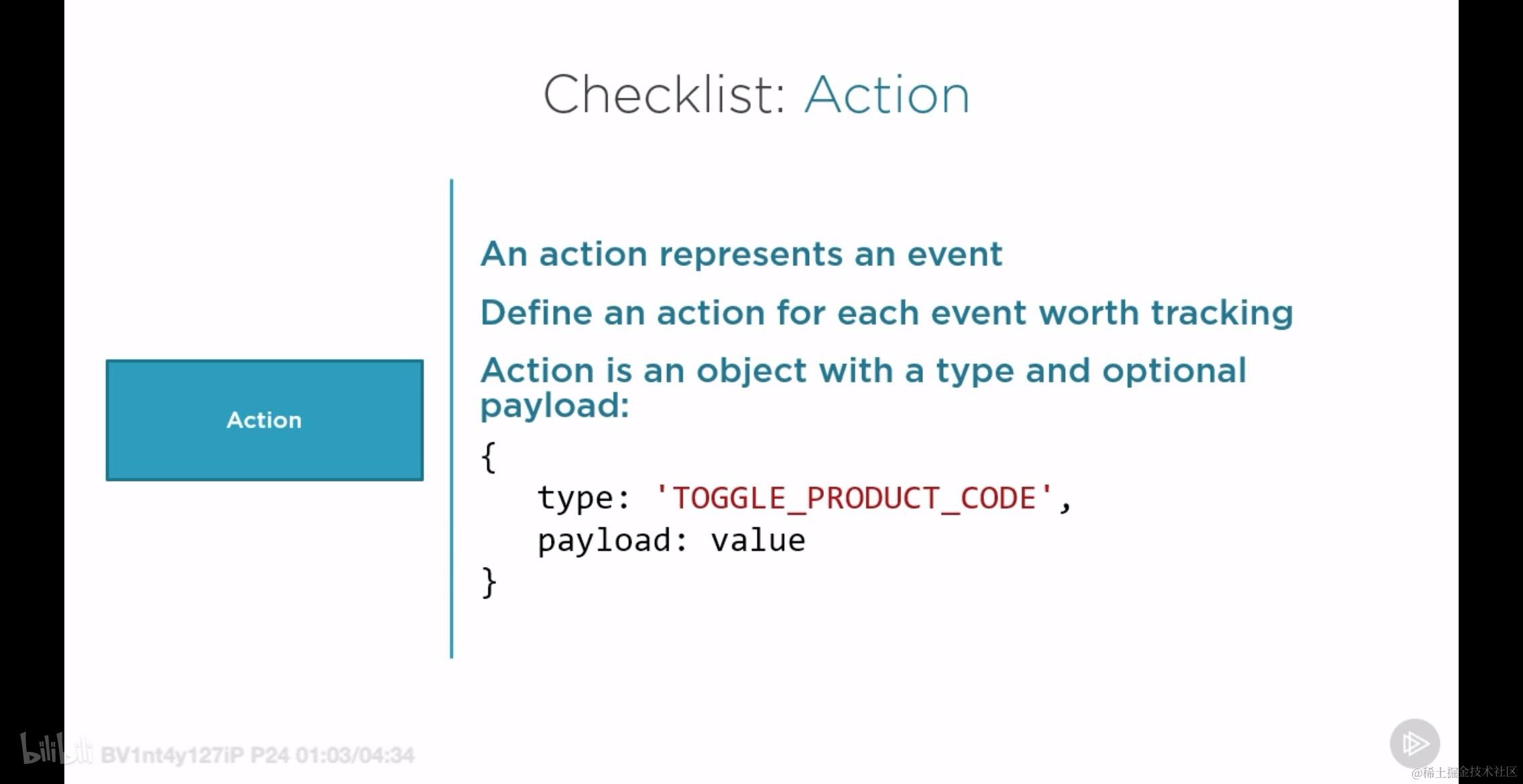
Reducer 画像:
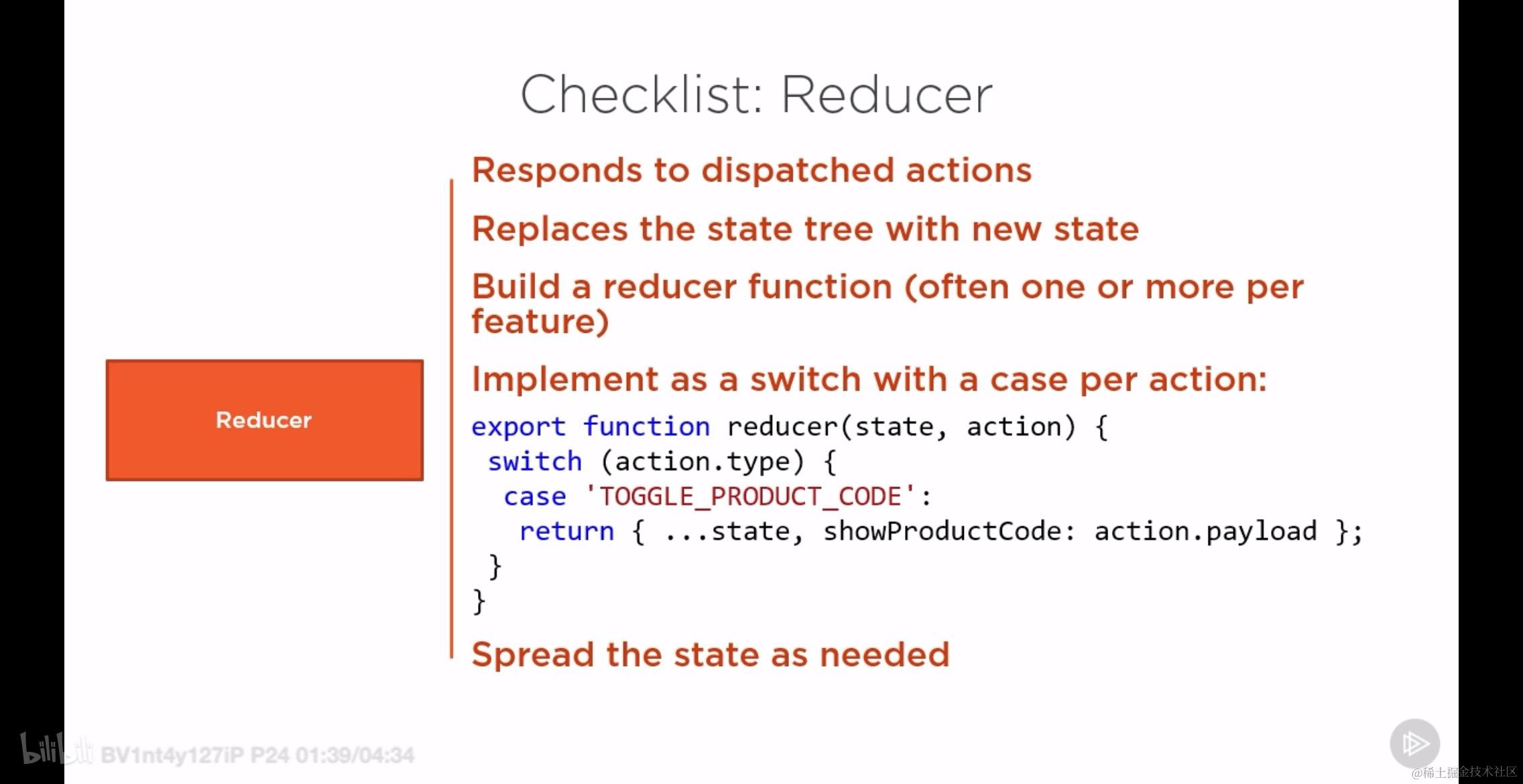
Dispatch 画像:
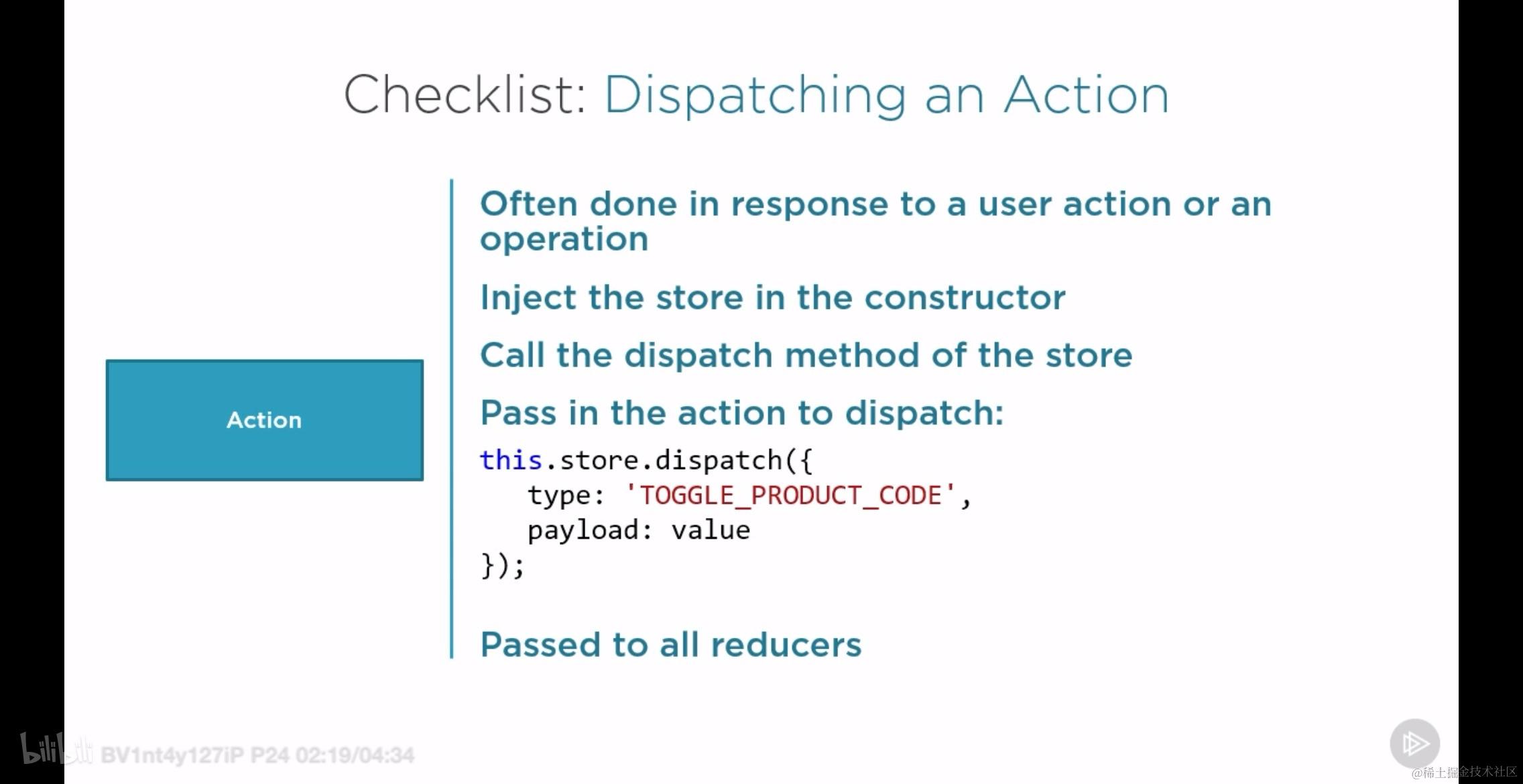
Observable Store 画像:
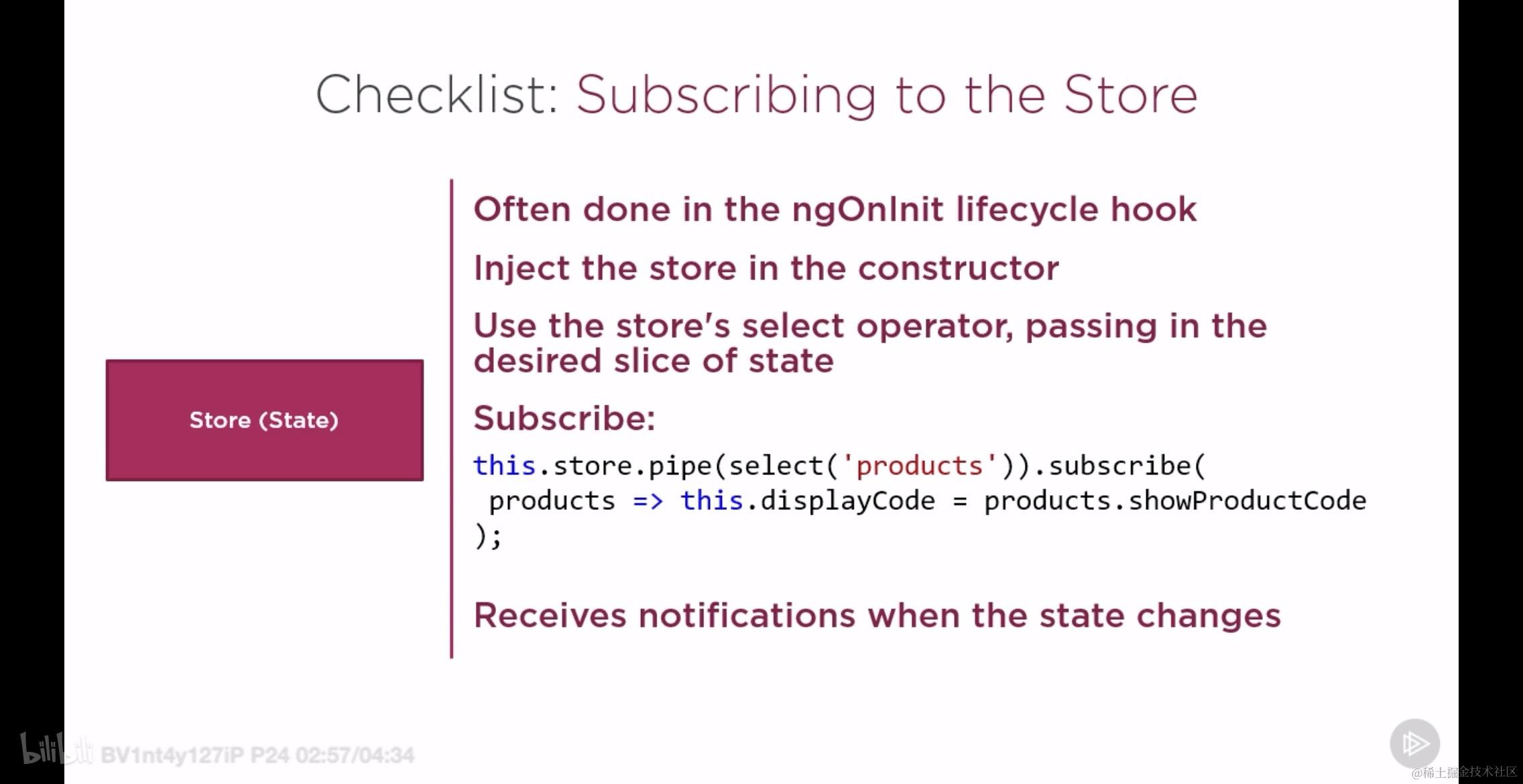
6. 插件和调试工具
本节重点介绍 NgRx 相关的 Redux 插件和开发工具,首先根据下面的不知偶安装此工具:
- 安装名为:Redux DevTools extension

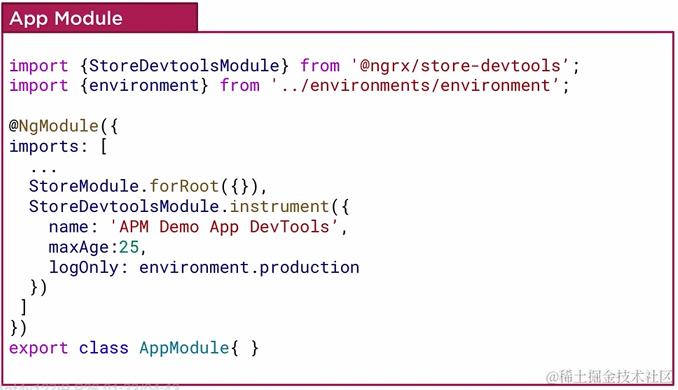
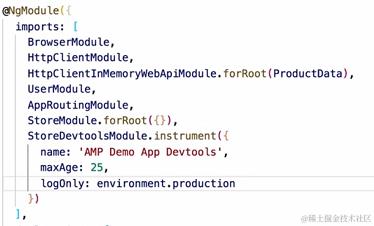
6.1 为什么需要 Redux DevTools
使用 Redux DevTools 可以让 NgRx 开发过程更加简单:
- Inspect action logs -- 可以监控 action 日志
- Visualize state tree -- 实时查看状态树
- Time travel debugging -- 按时间 debug
7. store 的数据类型约束
本小节主要介绍 store 以及对 store 的类型约束,包括:
- Define interfaces for slices of state -- 给状态切片定义类型约束
- Use the interfaces for strong typing -- 使用定义好的类型约束约束数据
- Set initial state values -- 初始化状态数据
- Build selectors -- 构建选择器
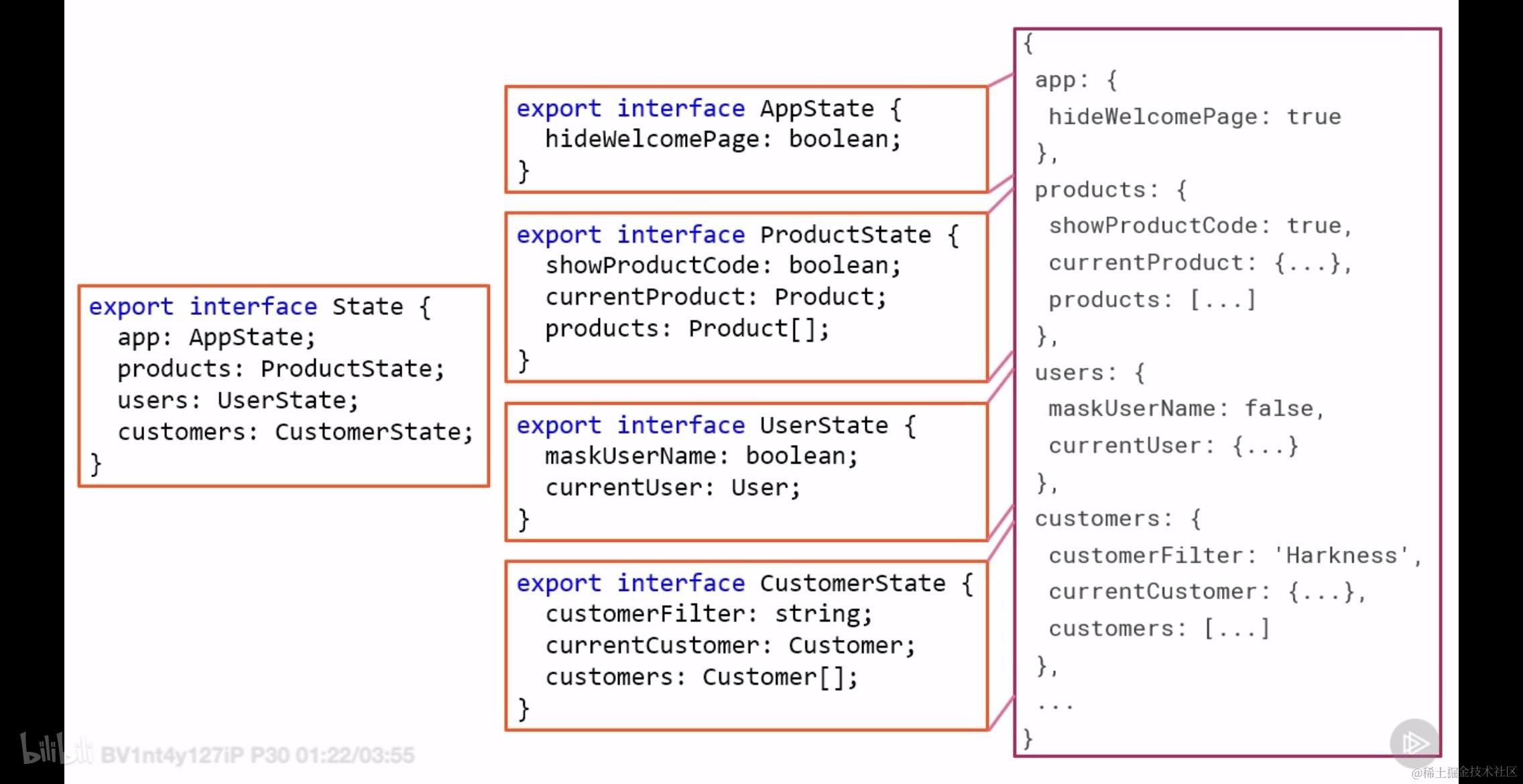
下图清晰的展示出了约束 state slice 的接口的示意:
7.1 接口所在的位置
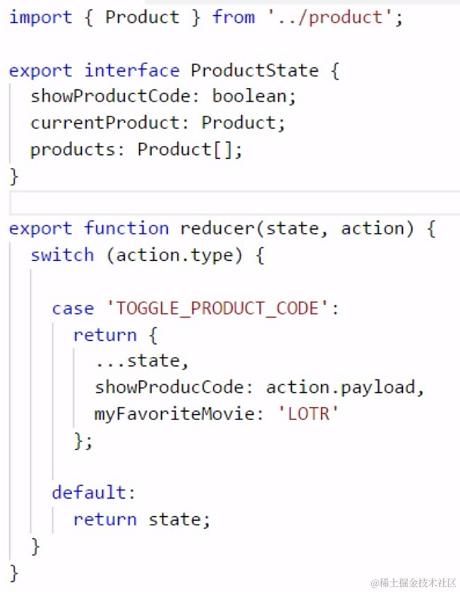
在初始阶段,我们将限制 state/store 的接口和 reducer 放在一起导出。
这是 feature reducer 以及相应的接口:
这是 root reducer 以及相应的接口:
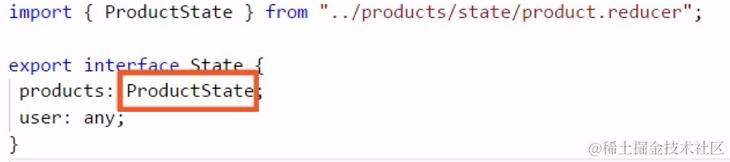
7.2 懒加载模块 state 的类型约束
定义的接口可能会破坏我们的懒加载策略,因此需要采用如下所示的策略来针对性的特殊处理。
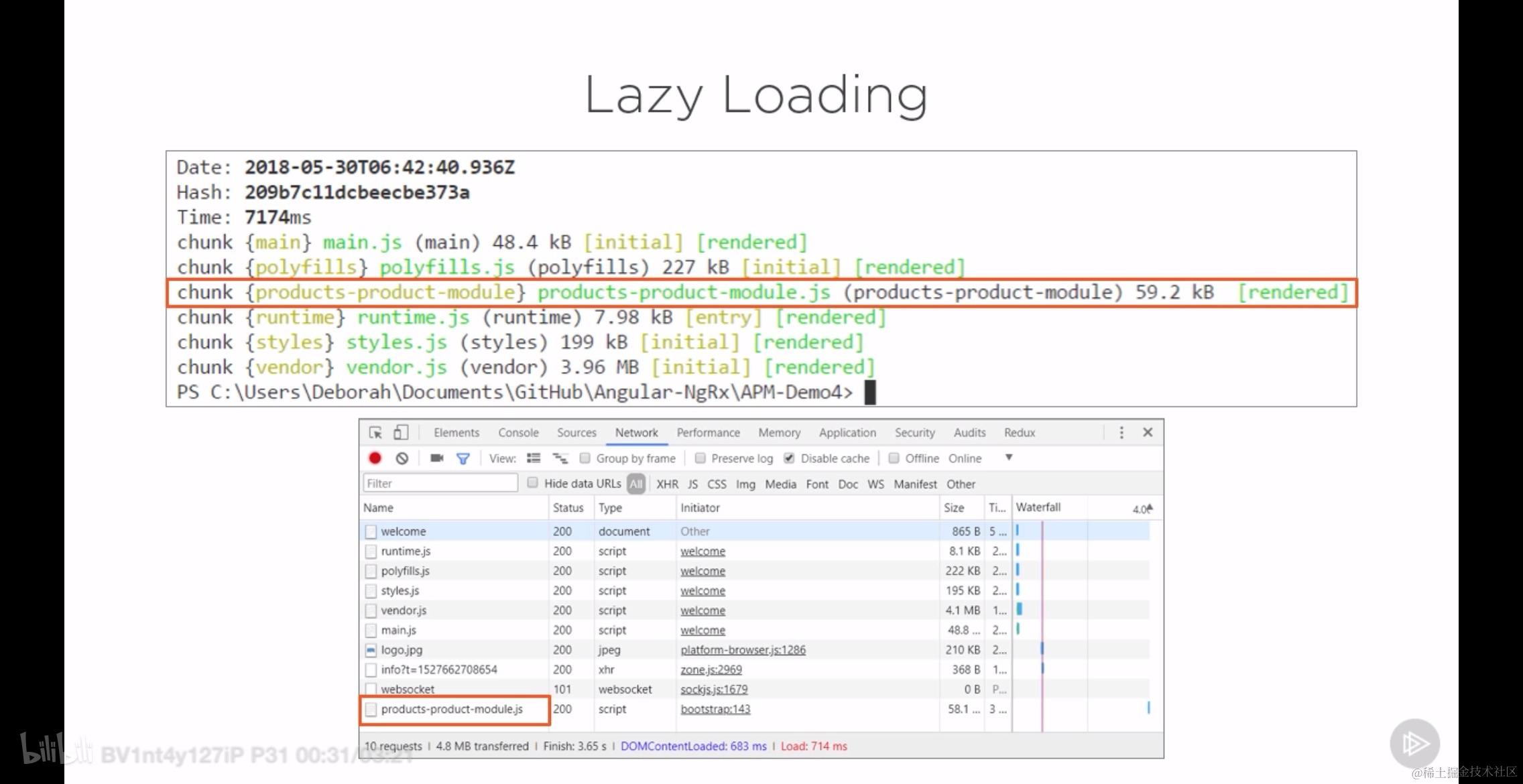
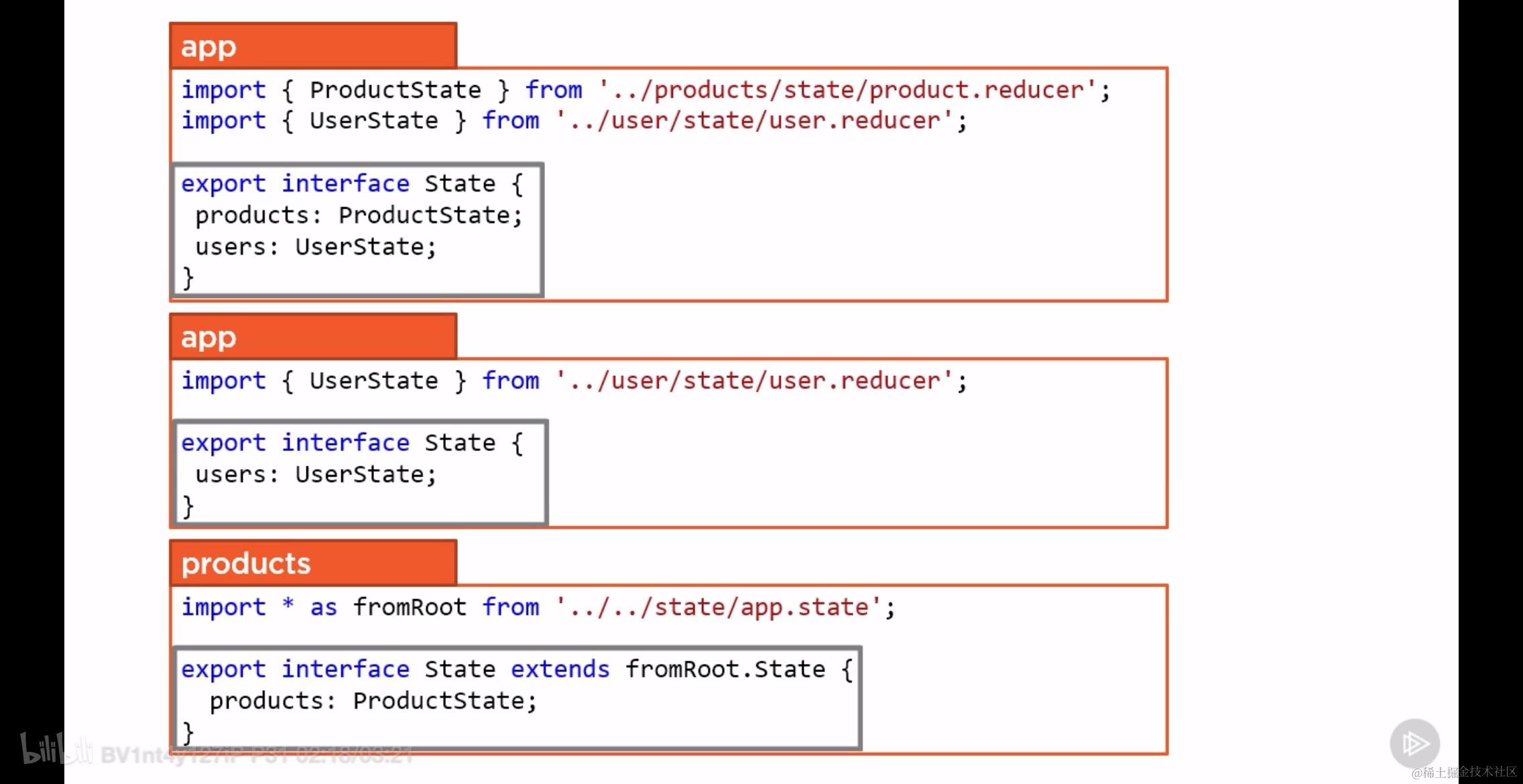
我们将上面的策略简单的总结为:
Extending the state interface for lazy loaded features
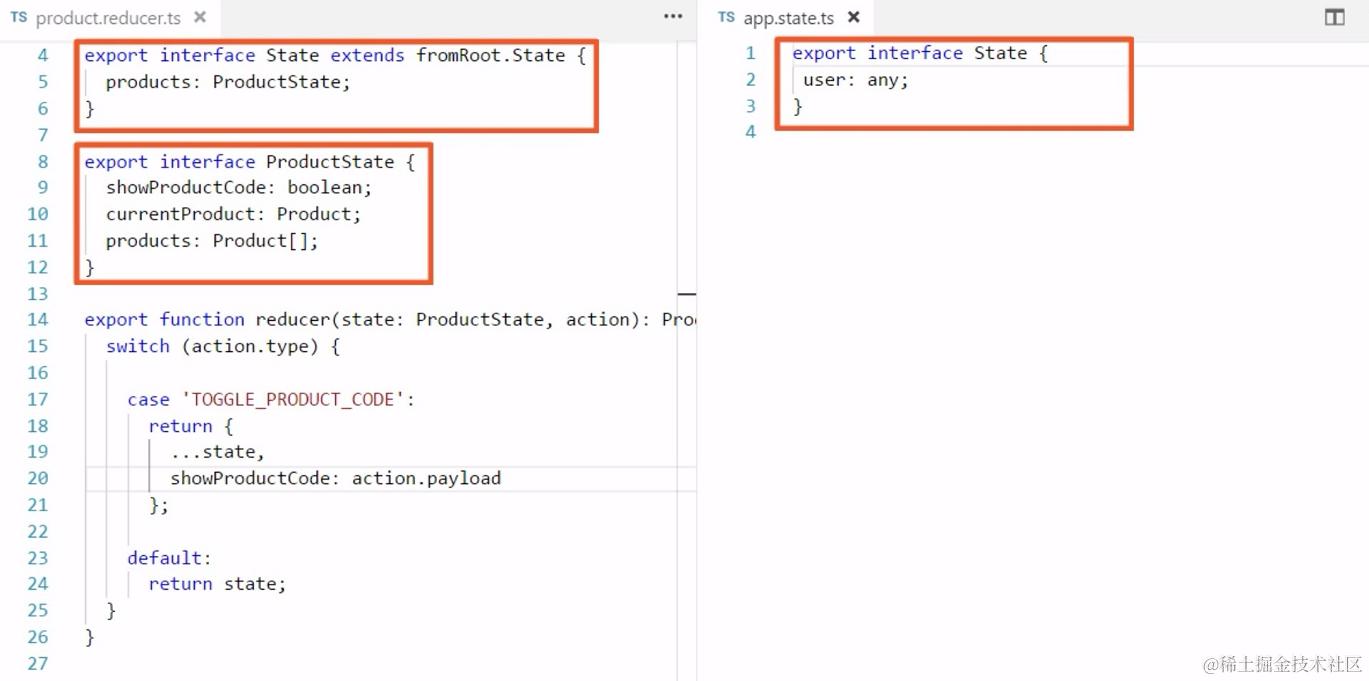
也就是说在根 store 中定义出不完整的类型约束,然后通过 extends 的方式对其进行扩展。如下所示的正是在懒加载模块的 reducer 中对根 store 的数据类型进行扩展的过程。
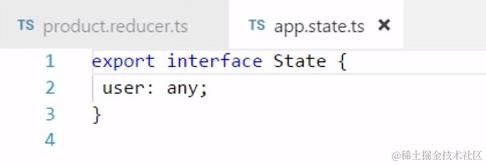
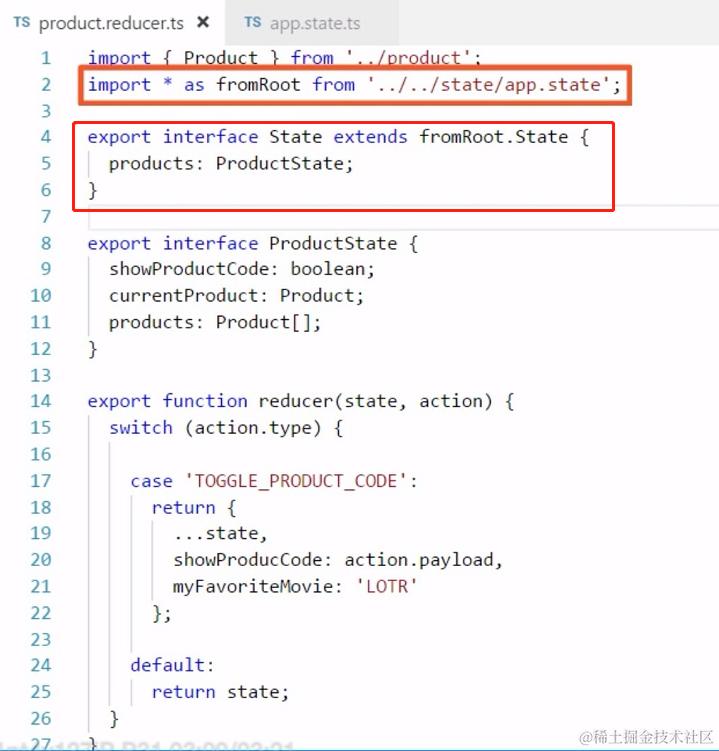
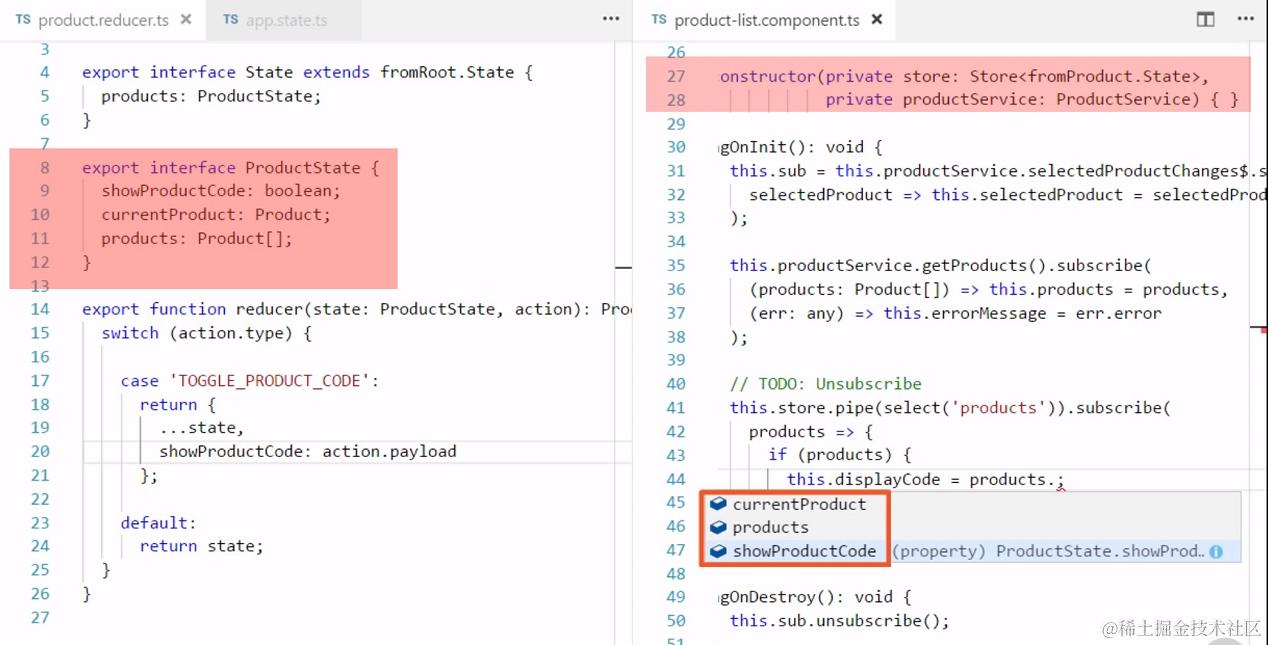
上面的代码往类型中扩展了一个名为 products 的字段,我们在定义注入的 store 的类型的时候仍然可以指定类型为根 store 中定义的类型,但是这个时候 IDE 已经开始提醒此扩展接口了,如下图所示:
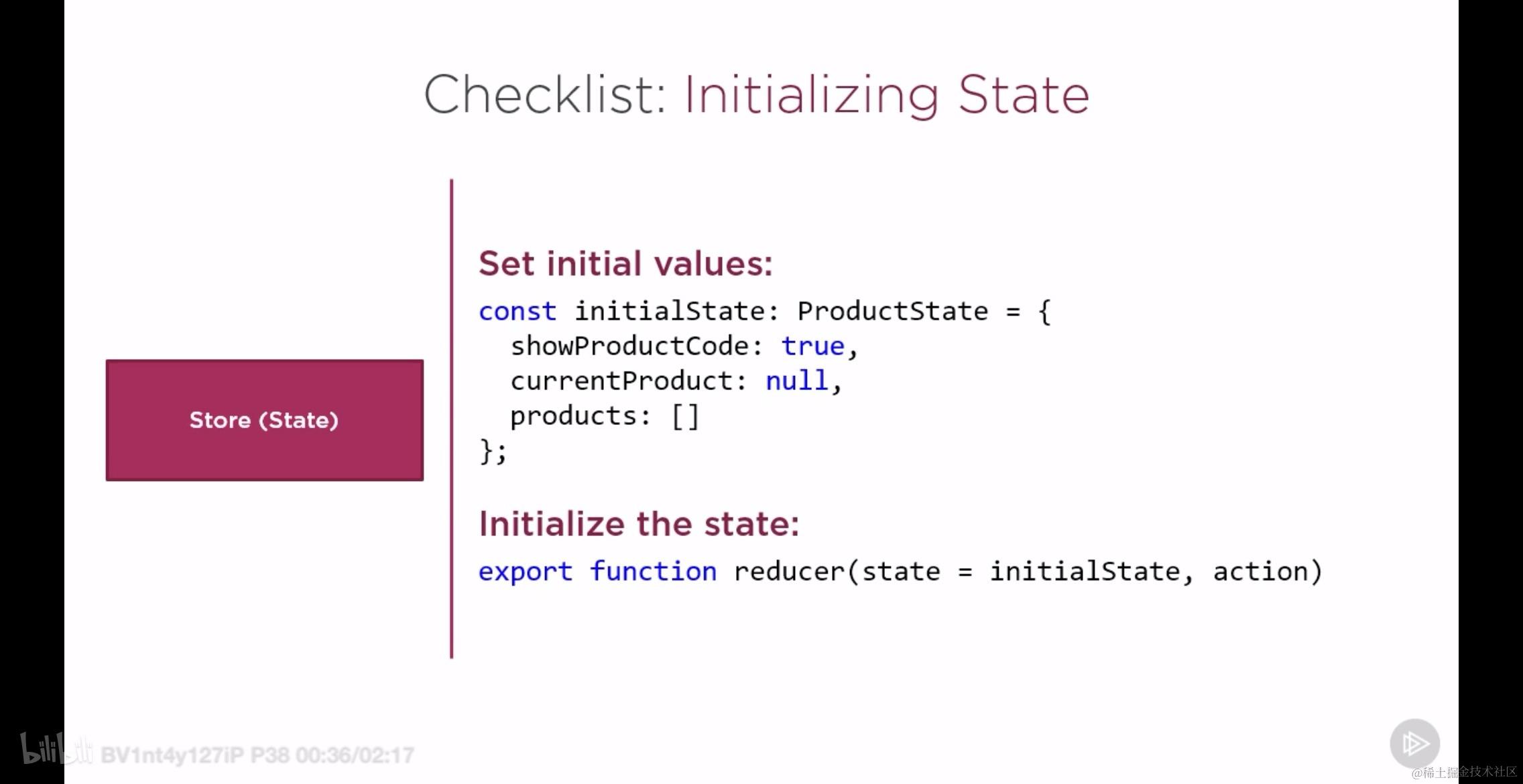
7.3 设置 store 的初始数据
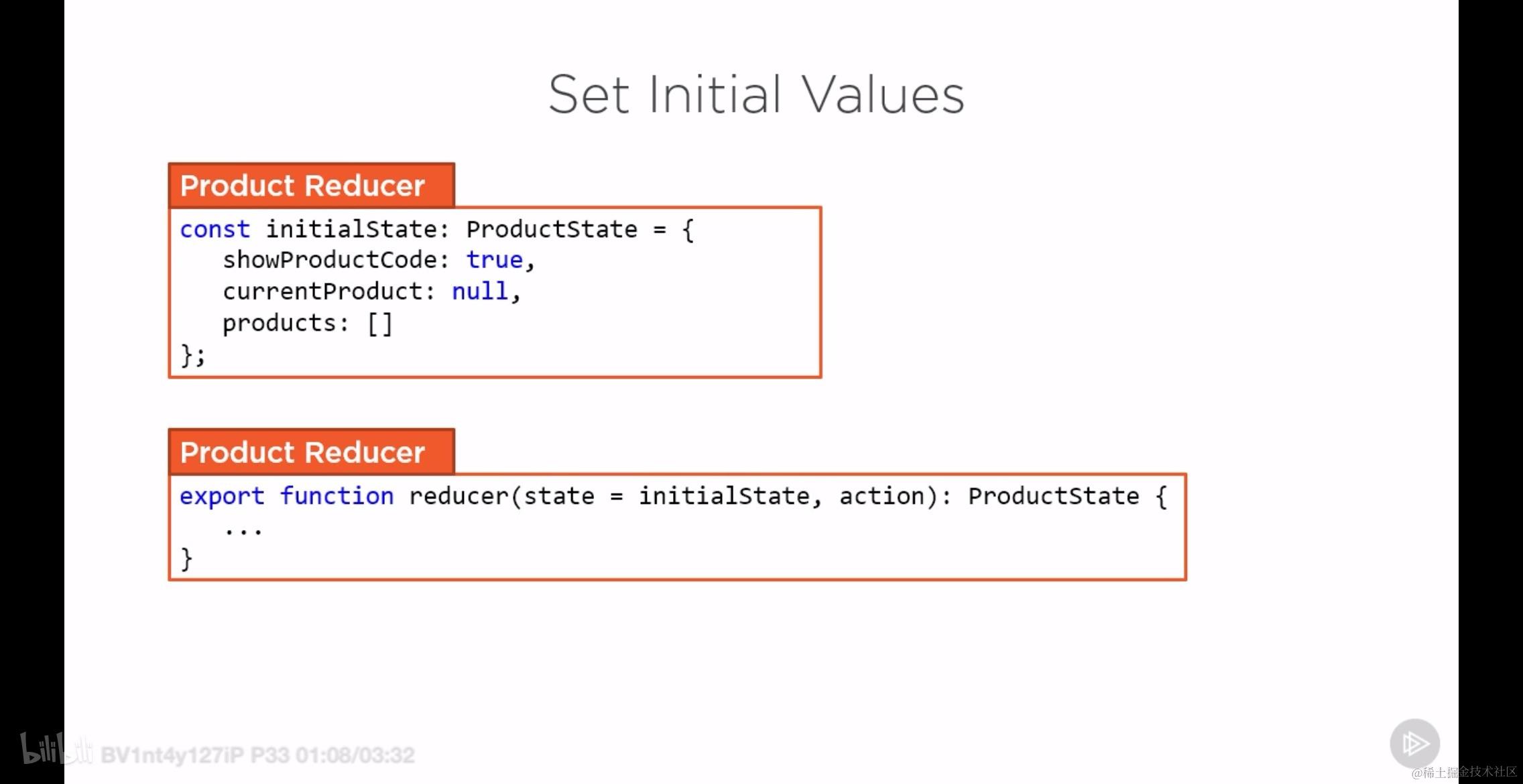
如同在任何框架中使用 redux pattern 一样,你可以在 reducer 文件中定义 const 的 initialState 然后借助 ES6 语法将其作为 reducer 的默认初始值,这样做其实就相当于是设置了此 Store 的初始值,两者是等价的!
7.4 创建 selector 来处理硬编码
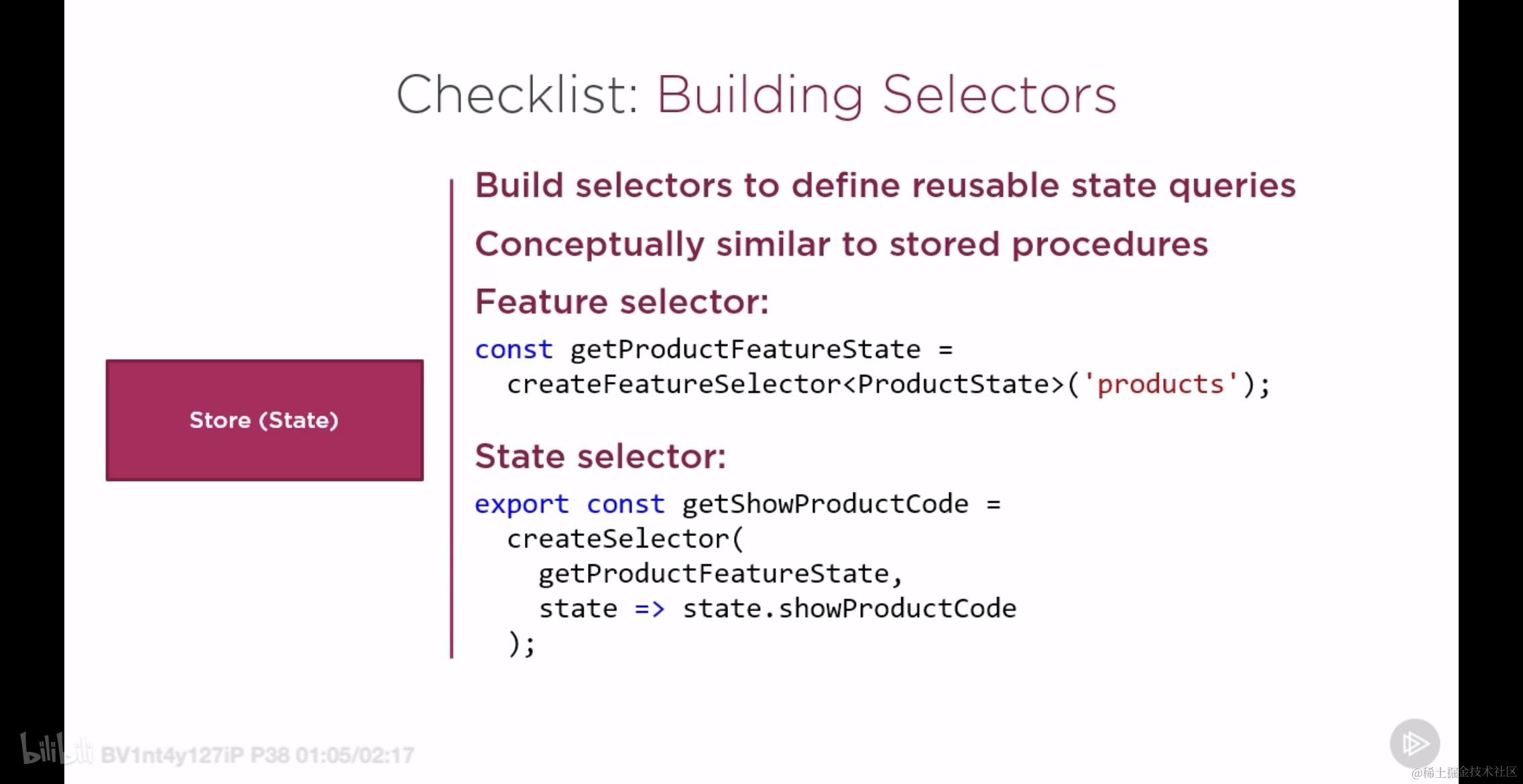
当我们订阅 Store 服务的时候,需要通过 select 筛选出我们真正感兴趣的数据,如下所示:
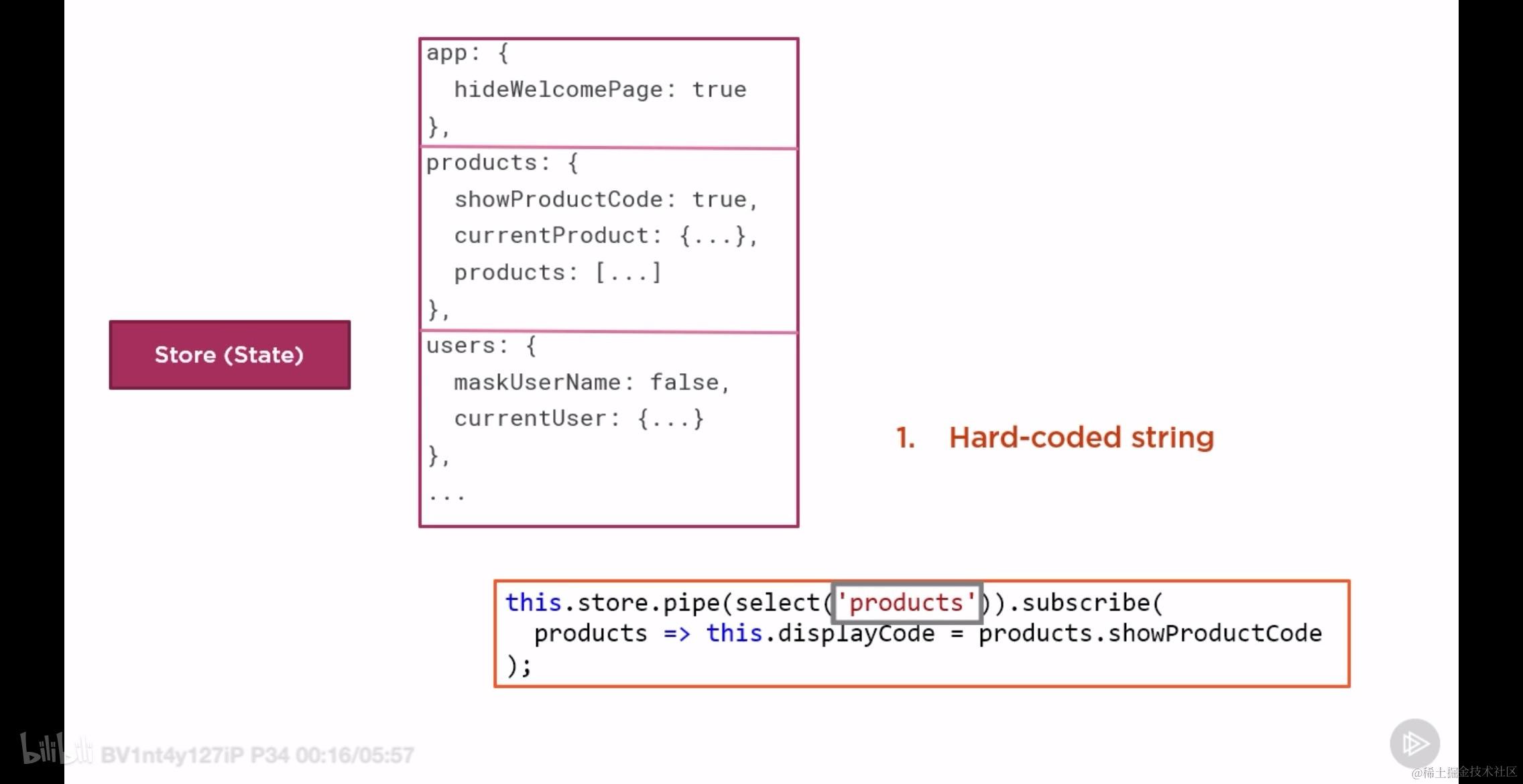
不仅如此,在 component 订阅 store 的回调中我们还必须知道 store 的具体结构,由此产生了很大的不方便,甚至会频频出错:
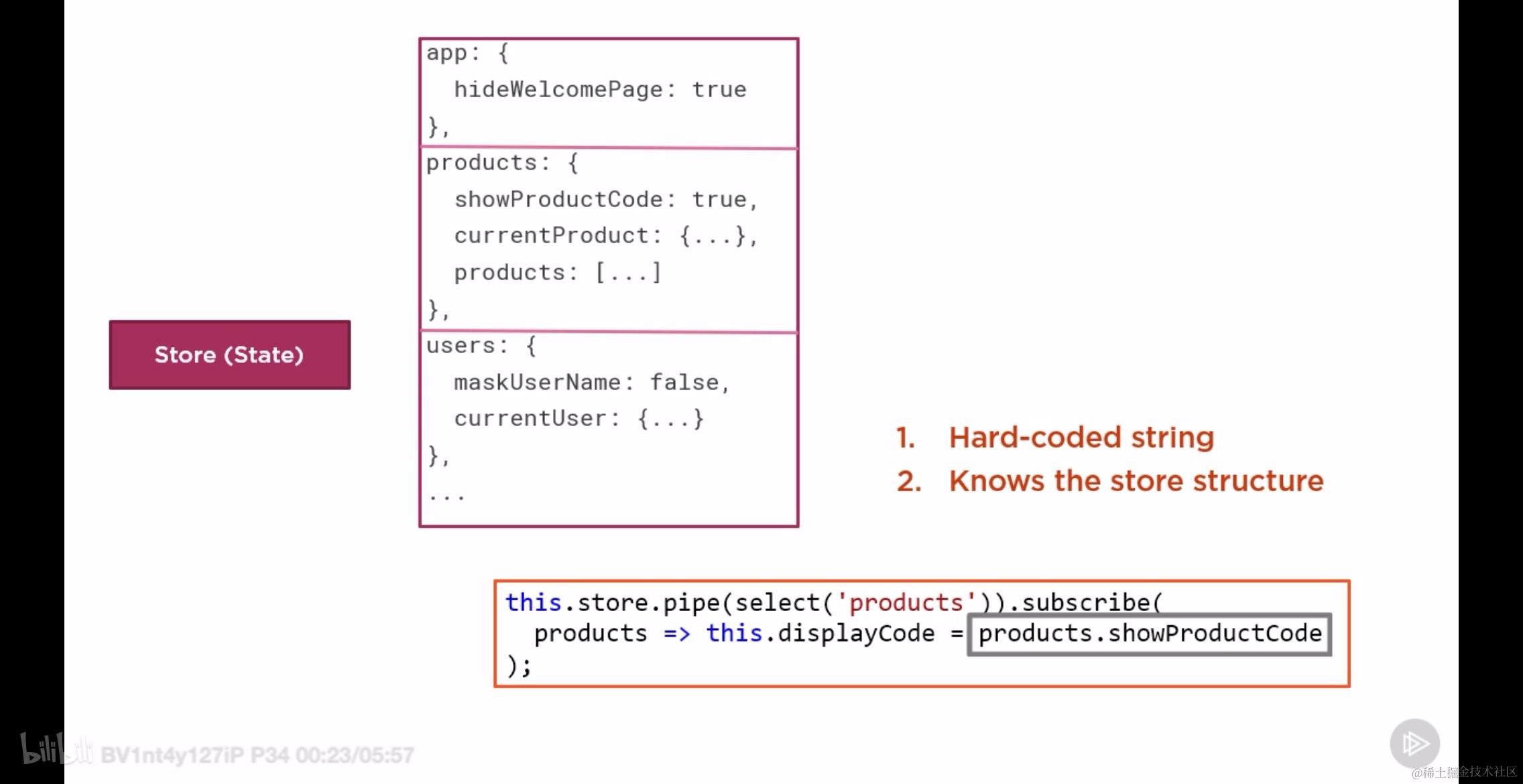
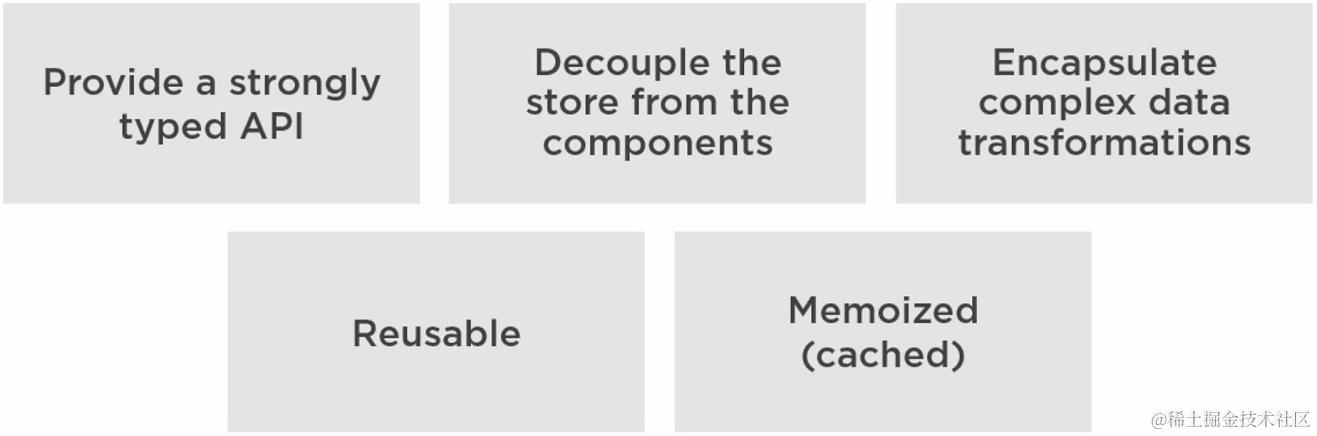
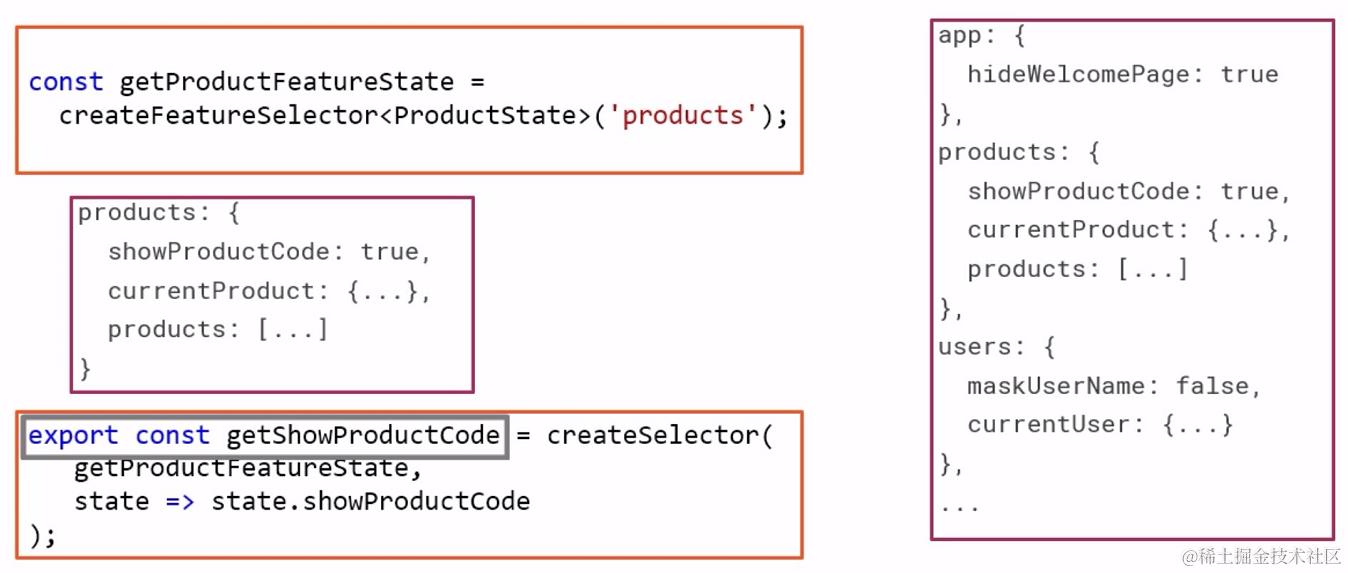
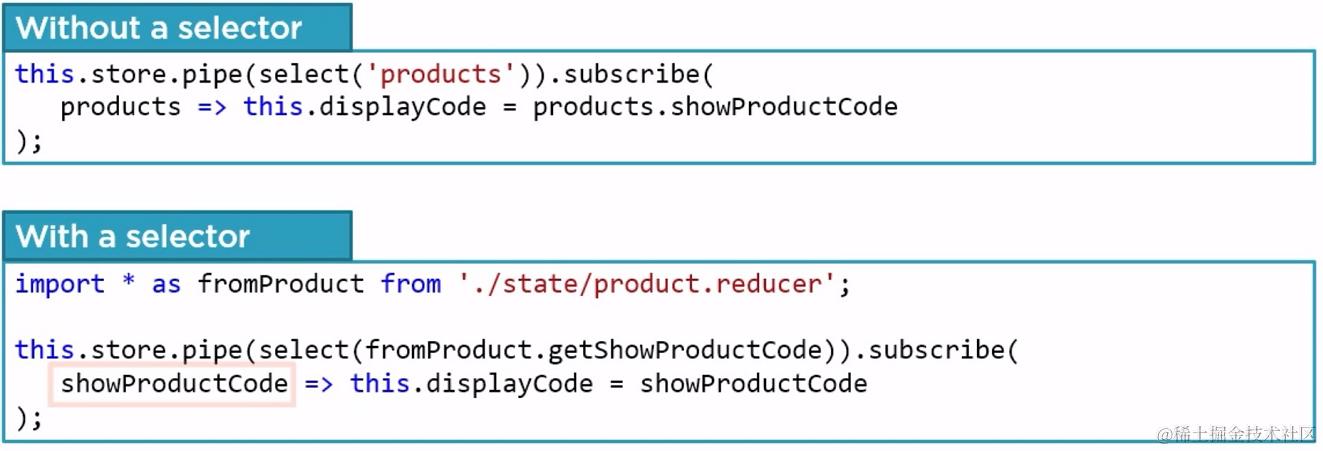 那么创建 Selectors 的代码应该放置在什么地方呢?实际上,一般来说它们应该和 reducer 定义放置在一起:
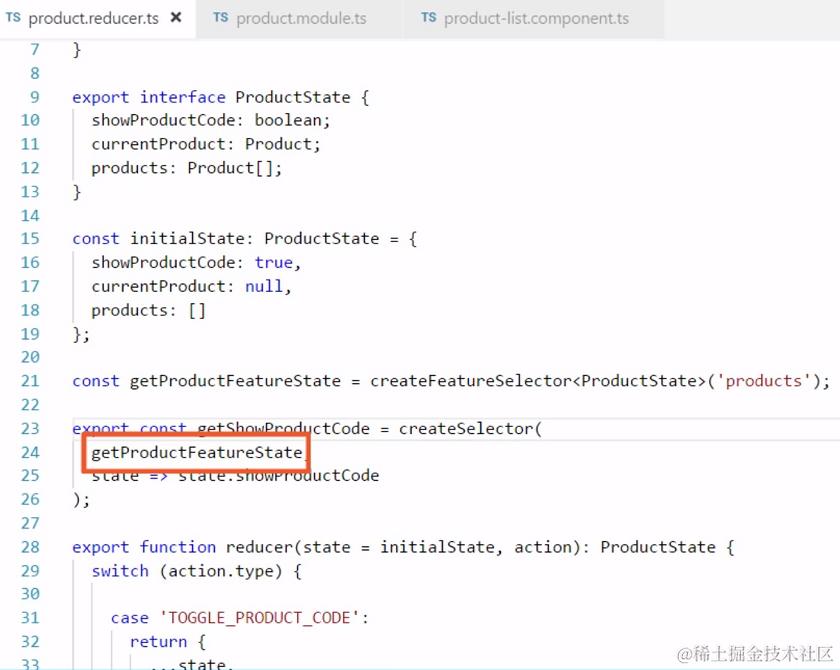
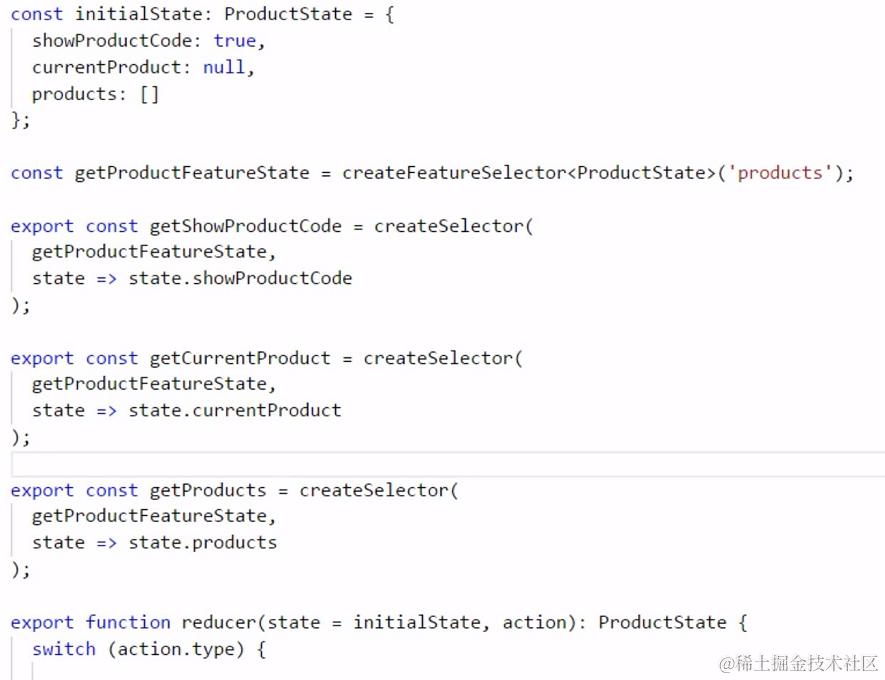
7.5 Selector 组
Selector 的强大之处也体现在其能够像 pipe 一样将多个其它的 selector 随意组合起来使用,能够获得较高的控制权限。
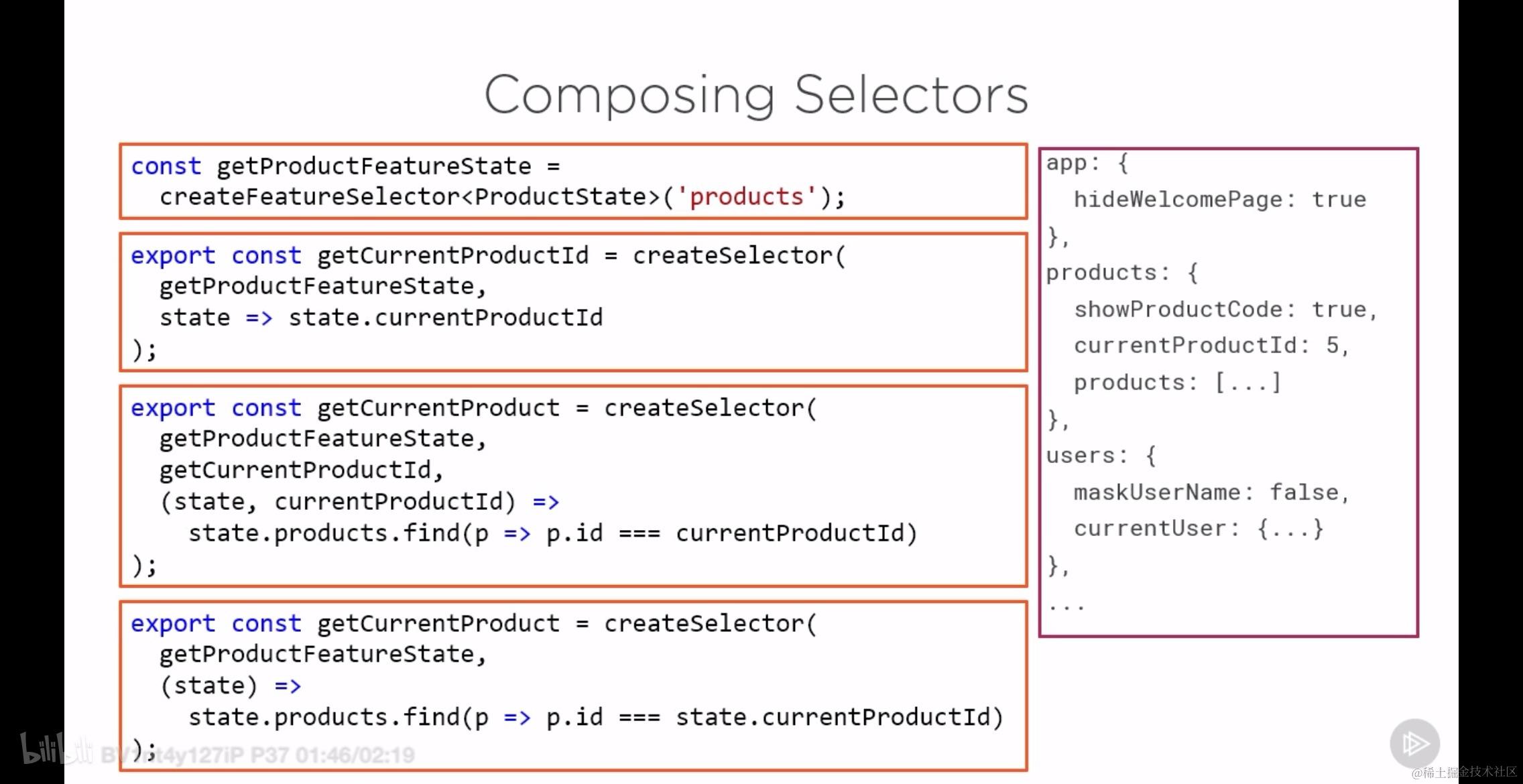
我们通过 Selector 实现了从 Store 中获取数据的 component 与 store 本身的解耦。但是,除此之外在其他地方仍然有硬编码,而且占据了相当一部分。
7.6 小结
本小节主要有三个方面的内容,它们分别是:对 state 的强类型约束、初始化状态、构建 Selector.

8. 使用强类型约束 Actions 以及 Action creator
这一小节的内容包括:
- Build action creators to strongly type actions -- 创建 action creator 来对 action 的格式进行强约束
- Use action creators to create and dispatch actions -- 创建 action creator 来创建和发送 action
- Use actions and selectors to communicate between our components -- 使用 action 和 selector 实现跨组件的通信
- Define actions for more compleX operations -- 为更加复杂的操作创建 action
8.1 使用强类型的 action 的优点
- Prevents hard to find errors: 减少不必要的编码错误
- Improves the tooling experience: 提升工具的使用体验
- Documents the set of valid actions:结合 redux 插件,能够快速生成 action 历史操作文档
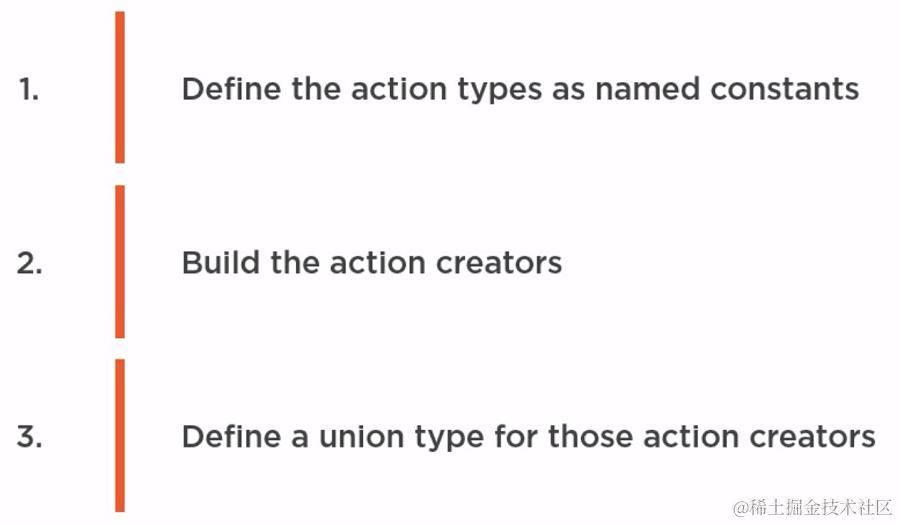
8.2 使用 action creator 的步骤
8.3 自动生成易读的 Action 操作记录
如下所示,我们利用 action creator 可以发挥极大的自由度:
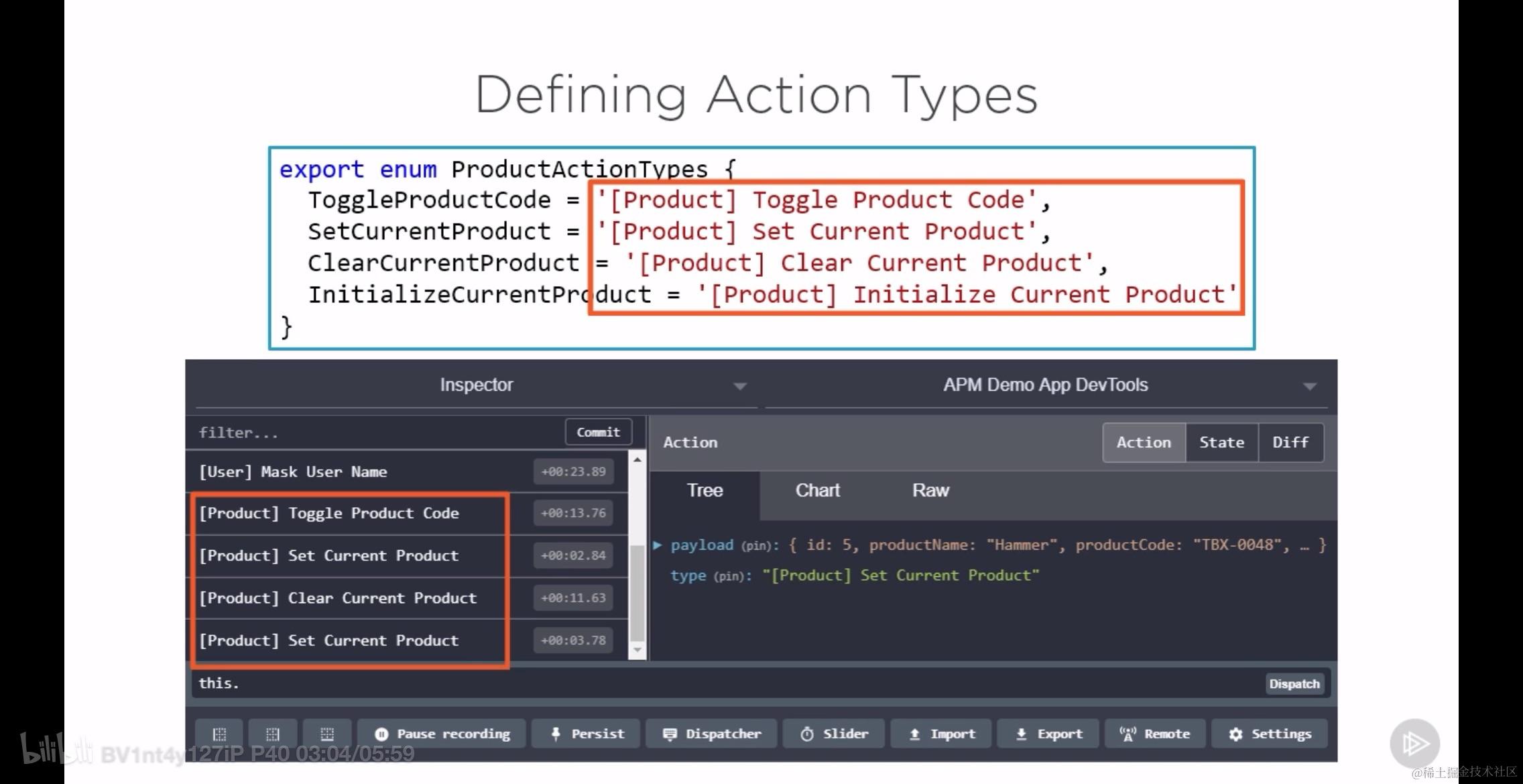
我们使用中括号,将 actions 归类:
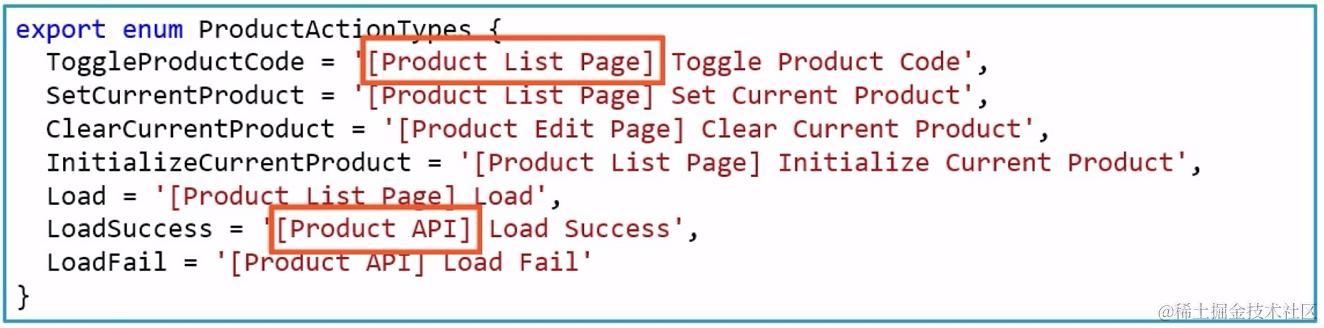
注意这里使用到了 ts 中的 enum 数据结构。
8.4 创建 Action Type 以及 Action Creator
在定义好 ActionType 之后,就可以创建 action creator 了。action creator 本身是一个 Class, 如下所示:
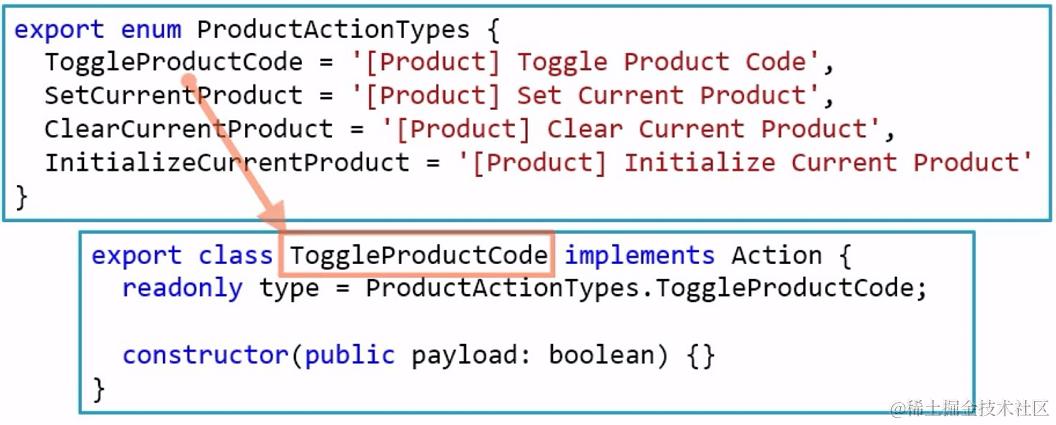
上面的简写相当于下面的全写:
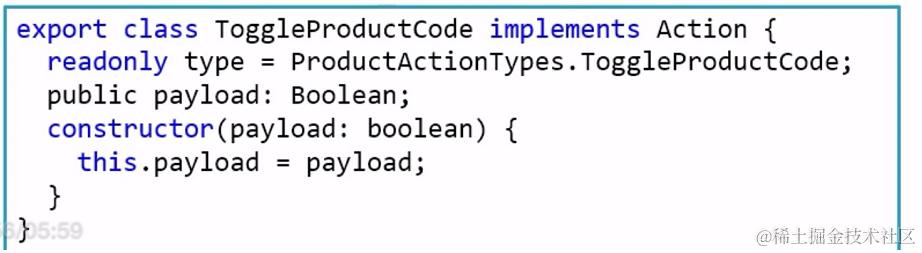
我们可以定义很多这样的 action creator 的 class, 然后我们可以将这些 class 联合起来变成一个新的类型:
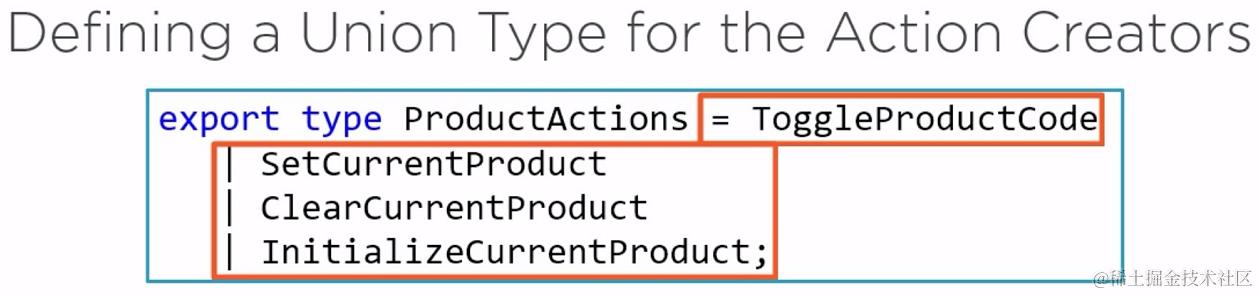
将所有的代码放在一起就是:
export enum ProductActionTypes {
  ToggleProductCode = '[Product]Toggle Product Code',
  SetCurrentProduct = '[Product]Set Current Product',
  ClearCurrentProduct = '[Product]Clear Current Product',
  InitializeCurrentProduct = '[Product]Initialize Current Product'
}

// 假设 Action 接口和 Product 类型已经在其他地方定义
export interface Action {
  readonly type: string;
  // 其他可能的属性或方法
}

// 假设 Product 类型定义
export class Product {
  // Product 类的具体实现
}

export class ToggleProductCode implements Action {
  readonly type = ProductActionTypes.ToggleProductCode;
  constructor(public payload: boolean) {}
}

export class SetCurrentProduct implements Action {
  readonly type = ProductActionTypes.SetCurrentProduct;
  constructor(public payload: Product) {}
}

export class ClearCurrentProduct implements Action {
  readonly type = ProductActionTypes.ClearCurrentProduct;
  constructor() {}
}

export class InitializeCurrentProduct implements Action {
  readonly type = ProductActionTypes.InitializeCurrentProduct;
  constructor() {}
}

export type ProductActions =
  | ToggleProductCode
  | SetCurrentProduct
  | ClearCurrentProduct
  | InitializeCurrentProduct;
8.5 在 reducer 中使用创建的 Action Creator
如下图所示的对比,是使用 action creator 前后 reducer 函数中的不同:
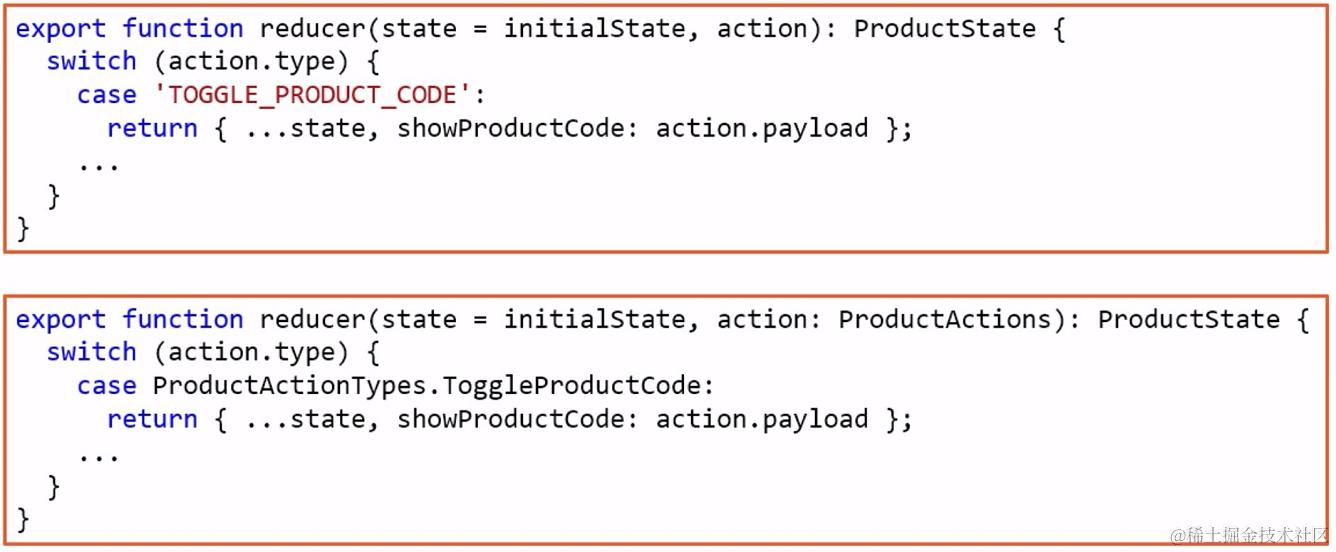
不难看出来,类型约束体现在两个地方,一个是对 action 的类型约束,另外一个就是对 case 硬编码的处理。
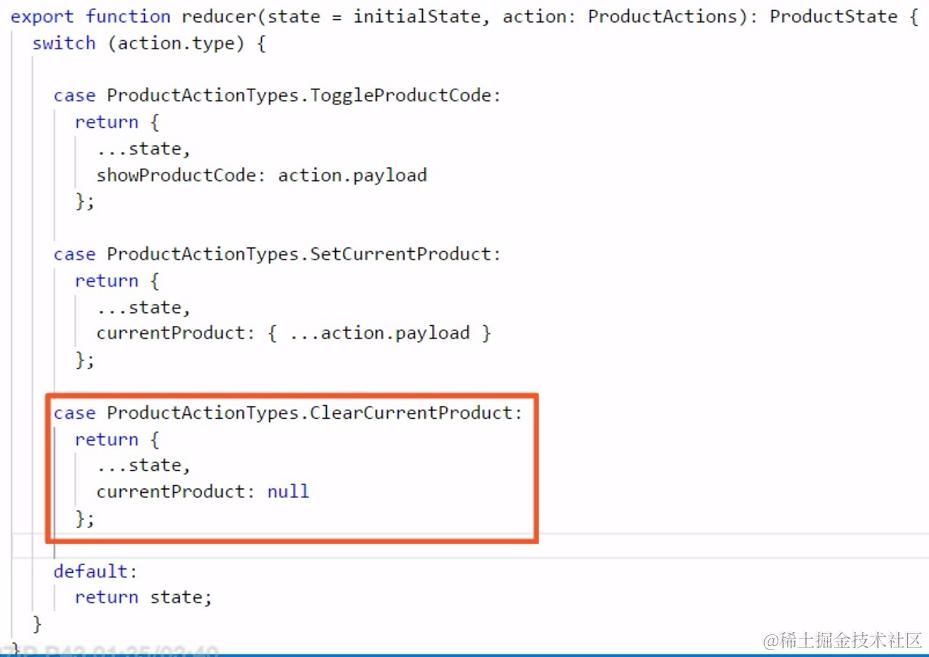
reducer 现在是这样的:
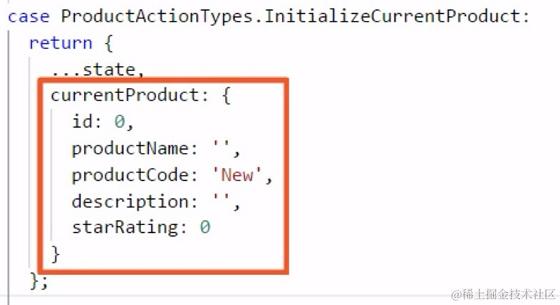
增加初始化动作:
8.6 在 component 中使用 Action Creator 发送 action
下图对比了原来 dispatch action 和使用 action creator 之后 dispatch action 的不同。
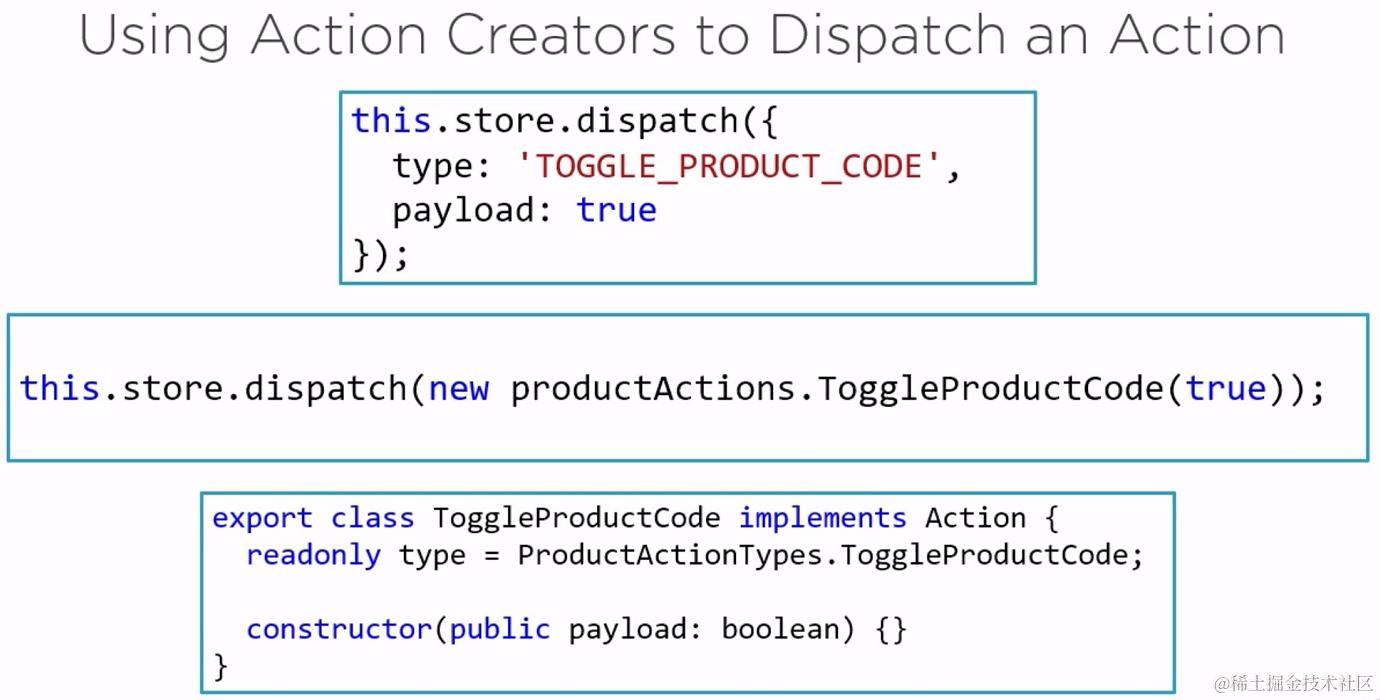
它应该存在于某个 component 的方法中:
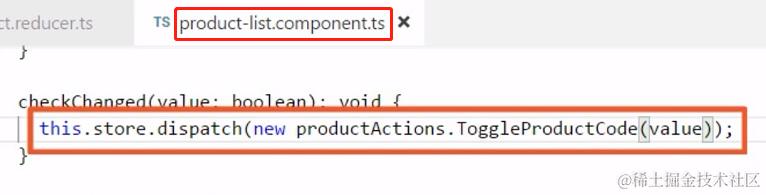
9. 使用 actions 和 selectors 实现跨组件通信
实现原理是通过 service 和 ngrx 组合的方式进行的,首先先看将 service 和 ngrx 结合起来的两个例子:
- 删除产品函数 (deleteProduct):
- 函数名是
deleteProduct,返回类型是void。 - 确认框中使用的变量
this.product.productName需要用$符号包裹,以显示变量的值。 else语句后面应该有一个{}来定义代码块。- 补全后的代码如下:
- 函数名是
deleteProduct(): void {
  if (this.product && this.product.id) {
    if (confirm(`Really delete the product: ${this.product.productName}?`)) {
      this.productService.deleteProduct(this.product.id).subscribe(
        ()=>this.store.dispatch(new productActions.clearCurrentProduct()),
        (err:any)=>this.errorMessage = err.error
      );
    } else {
      // No need to delete, it was never saved
      this.store.dispatch(new productActions.clearCurrentProduct());
    }
  }
}
- 保存产品函数 (saveProduct):
- 函数名是
saveProduct,返回类型是void。 - 存在一个语法错误,
f应该是{开始一个新的代码块。 else语句中应该包含错误消息的设置。createProduct和updateProduct的subscribe回调函数中缺少了括号)来结束函数调用。- 补全后的代码如下:
- 函数名是
saveProduct(): void {
  if (this.productForm.valid) {
    if (this.productForm.dirty) {
      // Copy over all of the original product properties
      // Then copy over the values from the form
      // This ensures values not on the form, such as the Id, are retained
      const p = {...this.product, ...this.productForm.value};
      if (p.id === 0) {
        this.productService.createProduct(p).subscribe(
          product => this.store.dispatch(new productActions.SetCurrentProduct(product)),
          (err:any) => this.errorMessage = err.error
        );
      } else {
        this.productService.updateProduct(p).subscribe(
          product => this.store.dispatch(new productActions.SetCurrentProduct(product)),
          (err:any) => this.errorMessage = err.error
        );
      }
    } else {
      this.errorMessage = 'please correct the validation errors.';
    }
  }
}
跨组件通信 action 类型
跨组件通信的时候的 action 的类型如下图所示,它们是:
- 展示或者不展示项目的 code
- 选择当前的项目
- 清除当前选择的项目
- 新建/初始化一个新的项目
- 加载已有的项目列表
- 更新现有的项目列表
- 创建一个新的项目
- 删除一个已有的项目
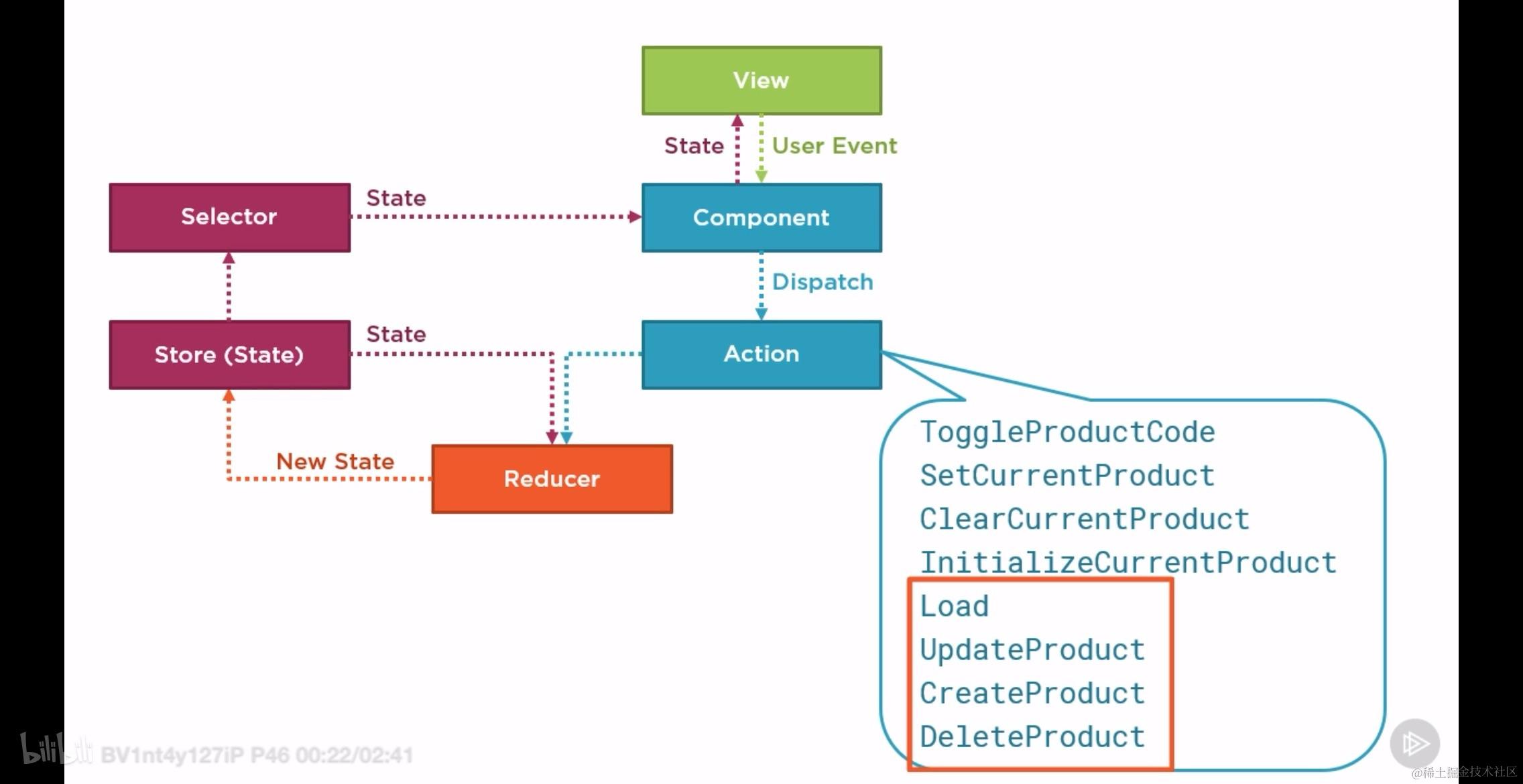
我们可以利用 typescript 的 enum 类型来创建这些 actions:
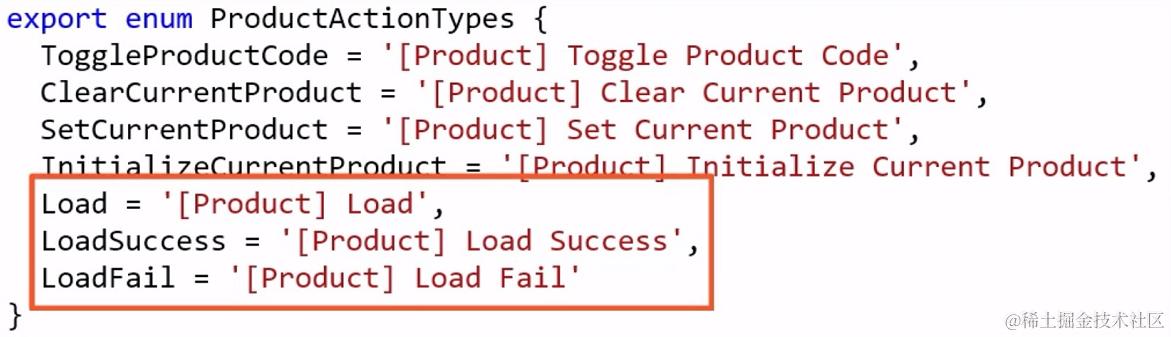
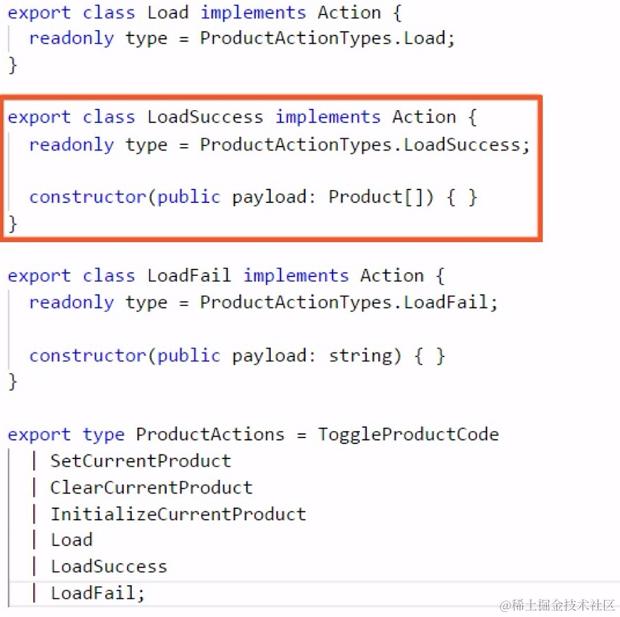
可以看出来,上面的 actions 不免涉及到与后端的服务器进行通信,因此将 service 补充进来,这张图就是这样的:
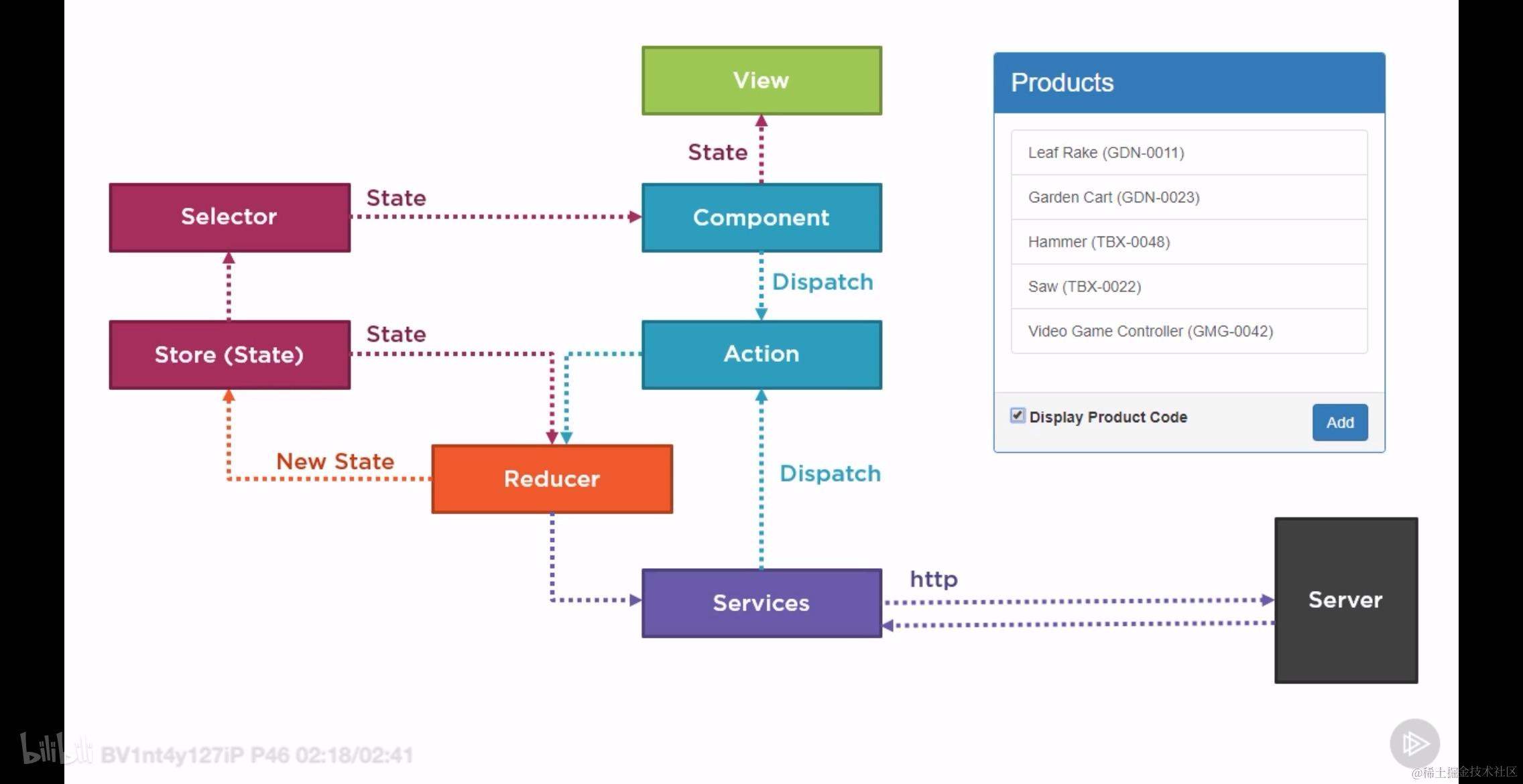
完整代码如下所示:
import { Action } from '@ngrx/store';
import { Product } from '../product';

// 定义 ProductActionTypes 枚举
export enum ProductActionTypes {
  ToggleProductCode = '[Product] Toggle Product Code',
  SetCurrentProduct = '[Product] Set Current Product',
  ClearCurrentProduct = '[Product] Clear Current Product',
  InitializeCurrentProduct = '[Product] Initialize Current Product',
  Load = '[Product] Load',
  LoadSuccess = '[Product] Load Success',
  LoadFail = '[Product] Load Fail'
}

// 定义 action creator 类
export class ToggleProductCode implements Action {
  readonly type = ProductActionTypes.ToggleProductCode;
  constructor(public payload: boolean) {}
}

export class SetCurrentProduct implements Action {
  readonly type = ProductActionTypes.SetCurrentProduct;
  constructor(public payload: Product) {}
}

export class ClearCurrentProduct implements Action {
  readonly type = ProductActionTypes.ClearCurrentProduct;
}

export class InitializeCurrentProduct implements Action {
  readonly type = ProductActionTypes.InitializeCurrentProduct;
}

export class Load implements Action {
  readonly type = ProductActionTypes.Load;
}

export class LoadSuccess implements Action {
  readonly type = ProductActionTypes.LoadSuccess;
  constructor(public payload: Product[]) {}
}

export class LoadFail implements Action {
  readonly type = ProductActionTypes.LoadFail;
  constructor(public payload: string) {}
}

// 定义 ProductActions 类型联合
export type ProductActions =
  | ToggleProductCode
  | SetCurrentProduct
  | ClearCurrentProduct
  | InitializeCurrentProduct
  | Load
  | LoadSuccess
  | LoadFail;
本章小节
本章主要介绍的是如何给 Actions 施加类型约束,主要的内容有:
- 创建 action 类型约束
- 创建出带有详细说明的 action

- 使用 action creator
- 使用一个 class 来将 action 的 type 和 payload 有机的融合起来
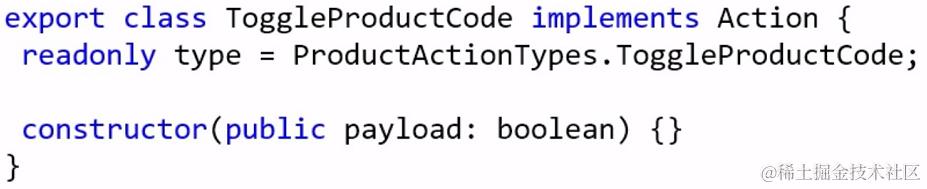
- 然后在 dispatch 的时候使用 action creator

- 将 action creator 联合起来形成新的类型

- 使用联合类型约束 reducer 接受到的实参类型

- 使用复杂的 actions 来完善组件通过 ngrx 进行数据通信的行为
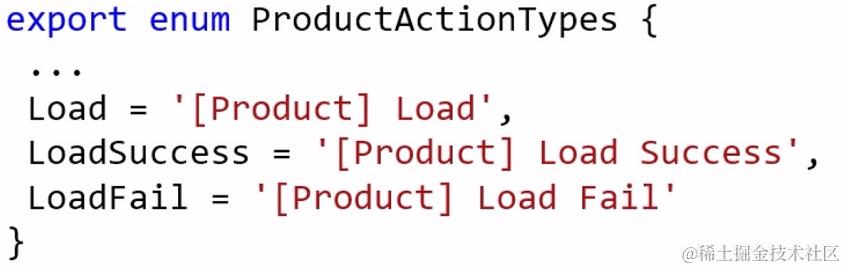
- 牢记下面的使用流程
- 创建一个
***.actions.ts的文件 - 创建一个枚举类型,在其中放入 action creator 的 type 和 description
- 为每一个 type 创建相应的 action creator
- 将所有的 action creator 联合起来创建一个 union type
- 使用 union type 和 枚举类型约束 reducer 中的变量
- 在 service 或者 component 中使用 action creator 创建 action
前 9 章总结
在之前的 9 章中,我们主要是完成了对 ngrx 的基本使用,包括 action 和 reducer 的分离和整合;reducer 和 action 的类型约束;store 数据的获取和改变。下面通过步骤的方式,将上述内容应用到当前的项目中去:
1. 创建相应的文件目录结构:
在 src 下面创建名为 store 的文件夹,然后在其中再创建名为 reducer 的文件夹,在其中放入 index.ts 这个文件。在相应的 featured module 的文件夹下(这里我们以 alarmlist module 为例)创建 store 目录,然后在此文件夹下面分别创建名为 action 和 reducer 的子目录,并在每一个子目录下创建 index.ts 文件。然后在另一个 featured module 下面创建相同的结构(假设这里我们使用的是名为 alarmdetails module 的模块)。创建完成之后的文件结构如下如图所示:
2. 创建每个模块的 reducer
注意,我们总是先创建【子】,或者说是【模块】中的 store,这一点需要明确。或者说我们整个 application 的 store 是通过下级的 store 一层层堆叠而成的。这种思想不仅体现在两级结构上,就算 store 的层级再深,也要满足这种规则。
以 alarmlist 中的 store 为例,我们需要先构建 reducer 再构建 action,这是因为 action 目录中的内容只会影响到 reducer 文件中 reducer 函数的构造,不会影响其它内容,影响较小;而如果我们先构建 action 目录中的内容就会导致写起来没有目标,有些盲目,整体效率不如先写 reducer.
那么在构建 reducer 的时候需要哪些组成部分呢?实际上这是非常确定的,或者说固定的,能够记住最好,记不住下次用的时候来这里抄袭一下也是很方便的!需要下面 5 种材料。
- 需要一个接口,说明或者约束这个 reducer 处理的数据的类型;
IAlarmState - 需要一个初始状态 initialState 满足上面的接口,这个就是 redux 中传递给 reducer 函数作为初始默认值的初始状态对象;
initialState - 需要一个表示符号,通常是字符串,用来给这个子 store 起名字,方便从根 store 找到这个 store;
ALARM - 创建空的 reducer 函数作为占位符;
alarmReducer - 使用 createFeatureSelector 函数创建获取此子 store 所有数据的函数,这个函数的作用是为了后续方便的构造 selector 对象。
getAlarm
这一步完成之后 reducer/index.ts 中的代码长这样:
import { createFeatureSelector } from "@ngrx/store";
import { alarmTypes } from "../action";

export interface IAlarmState {
    count: number
}

const initialState: IAlarmState = {
    count: 0,
}

export const ALARM = 'alarm';

export function alarmReducer(state = initialState, action) {
    const { type, payload } = action;
    switch (type) {
        // ...
        default: return state;
    }
}

export const getAlarm = createFeatureSelector<IAlarmState>(ALARM);
3. 创建每个模块的 action
根据上面的论述,在构造好 reducer 之后(尽管它的 reducer 函数并没完整),在构造 action 的时候我们会参考 store 的数据结构,能够更加清楚的知道我们想要对这部分数据做什么。例如,由于这部分的 store 中定义了一个 number 类型的 count, 那么很自然的我们可以定义一个增加 count 值的 action, 一个减少 count 值的 action.
那么创建完整的,被类型所约束的 action, 需要准备多少东西呢?实际上需要 4 种材料:
- 定义此子 store 所需要的所有的 action 的枚举;
alarmTypes - 为每一个枚举创建一个同名的 action 类;
AddAlarmCount MinusAlarmCount - 将所有的 action 类名联合起来做成一个 type;
AlarmActions - 将所有的类放在一个命名空间中去。
alarmActions
构建完成之后的 action/index.ts 中的内容如下所示:
import { Action } from "@ngrx/store";

export enum alarmTypes {
    AddAlarmCount = "[Alarm] Add Alarm Count",
    MinusAlarmCount = "[Alarm] Minus Alarm Count",
}

export class AddAlarmCount implements Action {
    readonly type = alarmTypes.AddAlarmCount;

    constructor(public payload: number) { }
}

export class MinusAlarmCount implements Action {
    readonly type = alarmTypes.MinusAlarmCount;

    constructor(public payload: number) { }
}

export type AlarmActions = AddAlarmCount | MinusAlarmCount;

export const alarmActions = {
    AddAlarmCount,
    MinusAlarmCount
}
到此为止 alarm list 的子 store 就构建完成了。我们用一模一样的方式为 alarmdetails 创建子 store.
// reducer/index.ts
import { createFeatureSelector } from "@ngrx/store";
import { alarmDetailsTypes } from "../action";

export interface IAlarmDetailsState {
  age: number
}

const initialState = {
  age: 0,
}

export const ALARM_DETAILS = 'alarm details';

export function alarmDetailsReducer(state = initialState, action) {
  const { type } = action;
  switch (type) {
    case alarmDetailsTypes.UpdateAlarmAge:
      return {
        ...state,
      }

    default: return state;
  }
}

export const getAlarmDetails = createFeatureSelector<IAlarmDetailsState>(ALARM_DETAILS);
// action/index.ts
import { Action } from "@ngrx/store";

export enum alarmDetailsTypes {
    UpdateAlarmAge = "[Alarm Details] Update Alarm Details -- Age",
}

export class UpdateAlarmAge implements Action {
    readonly type = alarmDetailsTypes.UpdateAlarmAge;

    constructor(public payload: number) { }
}

export type AlarmDetailsActions = UpdateAlarmAge;

export const alarmDetailsActions = {
    UpdateAlarmAge,
}
4. 创建项目的根 store 创建根 store 的本质就是将所有的子 store 结合起来,并向外通过方便获取数据的接口,构建一个根 store 主要包括的是下面 3 个部分的内容:
- 将所有的子 state 合并成一个大的 state 接口并暴露出去。
IState - 将所有的子 reducer 合并成一个大的 reducer 并暴露出去。
reducer - 创建方便精确获取数据的 selector 并导出。
getAlarmCount getAlarmCombiledData
因此, store/reducer/index.ts 中的所有内容为:
import { combineReducers, createSelector } from "@ngrx/store";
import { alarmReducer, ALARM, IAlarmState, getAlarm } from "../../alarmlist/store/reducer";
import { alarmDetailsReducer, ALARM_DETAILS, getAlarmDetails, IAlarmDetailsState } from "../../alarmlist/alarmdetails/store/reducer";

export interface IState {
    [ALARM]: IAlarmState,
    [ALARM_DETAILS]: IAlarmDetailsState,
}

export const reducer = combineReducers({
    [ALARM]: alarmReducer,
    [ALARM_DETAILS]: alarmDetailsReducer,
})

export const getAlarmCount = createSelector(
    getAlarm,
    (alarmState: IAlarmState) => alarmState.count,
);

export const getAlarmCombiledData = createSelector(
    getAlarm,
    getAlarmDetails,
    (alarmState: IAlarmState, alarmDetailsState: IAlarmDetailsState) => {
        return alarmState.count + '' + alarmDetailsState.age;
    },
);
5. 在视图层 订阅、筛选、显示 store 中的内容
- 注入 Store 服务
- 订阅然后筛选 store 中的内容
- 使用 async pipe 显示订阅值
import { IState, getAlarmCount } from '../store/reducer';
...
  ...
  count$: Observable<number>;
  ...
  constructor(
    ...
    private store: Store<IState>,
  ) {
    ...
    this.count$ = this.store.pipe(
      select(getAlarmCount),
    )
  }
  ...
...
<span>{{ count$ | async }}</span>
6. 在视图层触发状态的改变
- 视图层按钮按下之后调用相应的函数
<div class="bg-bar d-flex" (click)="add()">
- 在 component 中创建对应的回调函数
  add() {
    this.store.dispatch(new alarmActions.AddAlarmCount(2));
  }
这里的 new alarmActions.AddAlarmCount(2) 简直就是神来之笔!太牛逼了
对比一下,在获取 store 中的数据我们使用的是
this.store.pipe而更新 store 中的数据则使用的是this.store.dispatch, 一个是 pipe 一个是 dispatch.
进行类型约束的效果:可以看出来,我们将所有的硬编码都约束到了
action/index.ts和reducer/index.ts中,在其它地方,如store.reducer/index.ts和 各个模块的component和view层都没有硬编码的字符,这在很大程度上保证了我们修改位置的单一性,并且在其他地方使用的时候能够享受到编译器提供的提示。
10. 处理 ngrx 中的副作用
本小节的内容包括:
- 首先必须搞清楚为什么使用 effects 这个 library 来处理副作用。
- 安装
@ngrx/effects - 定义 effect
- 注册 effect
- 使用 effect
- 着重解决 observable 的取消订阅的问题
- 着重解决 effects 的异常处理
10.1 为什么要使用 Effects?
使用 Effects 的原因很简单,那就是将副作用剥离出去保持组件 pure
Manages side effects to keep components pure
先看下面两张图所示的代码,一个是 component 中的代码,另一个是 reducer 中的代码。为什么说它们违反了 pure 原则?
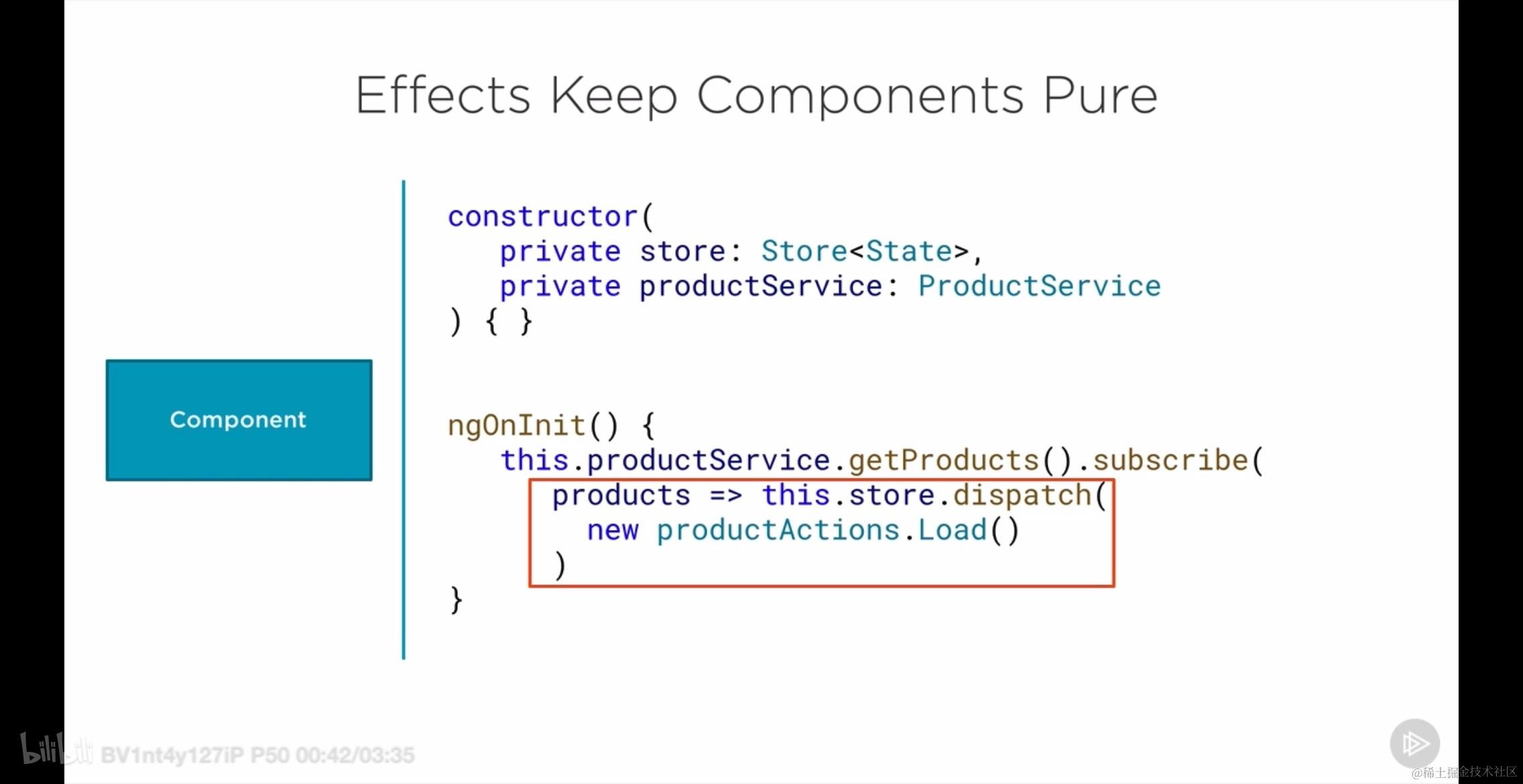
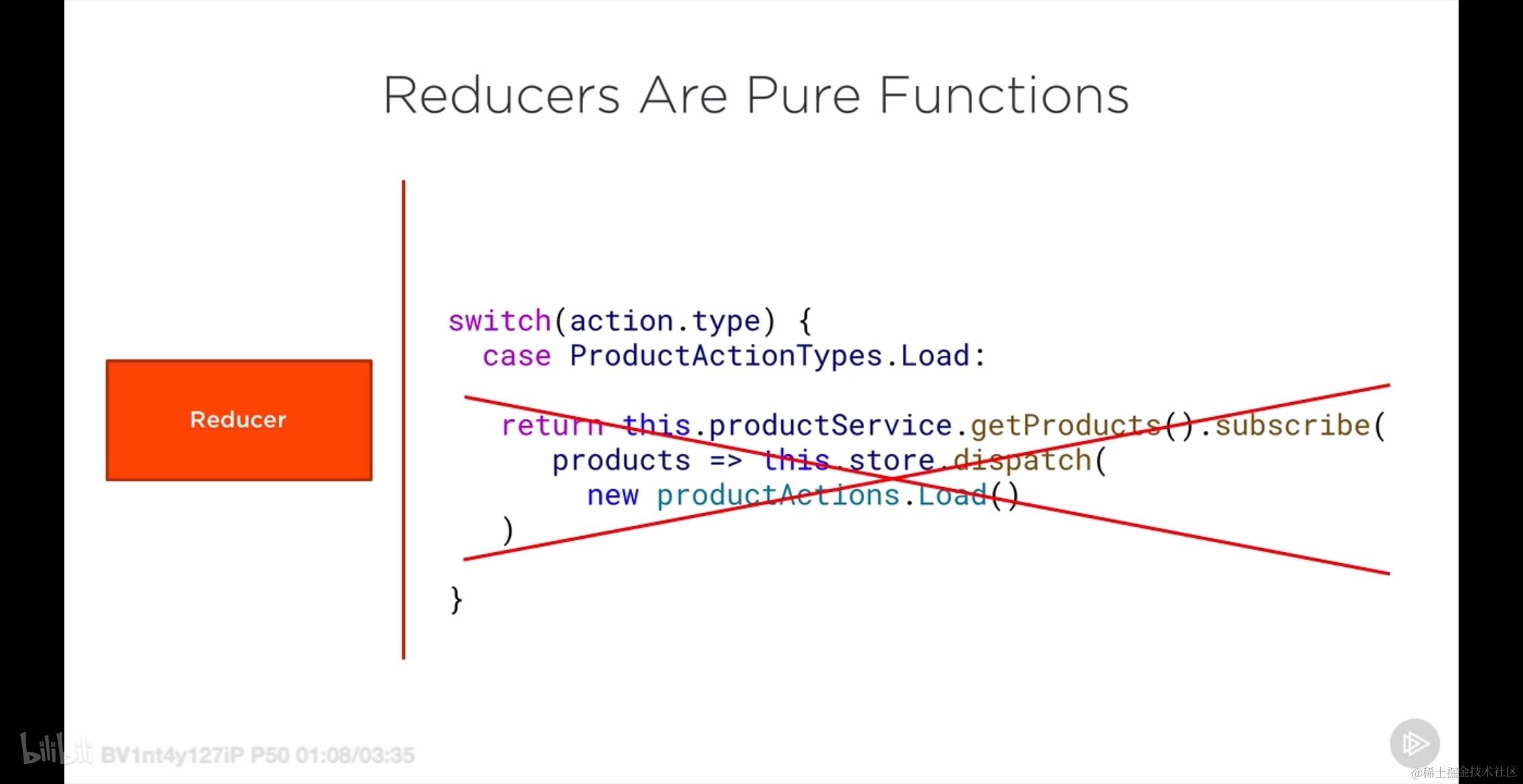
所谓 pure 在这里指的就是相关的函数失去了 纯函数 的性质。在上面的图 1 中,在 ngOnInit 钩子函数中,dispatch 的 action 是用来获取数据的,而这个行为不符合纯函数的规范(因为这是副作用,纯函数要求相同输入,相同输出,而不引起其他变化,显然这已经引起其它变化了),事实上,我们可以说:
- 组件直接与
@ngrx/store的Store交互,进行了状态的分派(dispatch)。这表明组件参与了应用的状态管理,而根据纯净组件原则,组件应该避免直接管理状态。 - 组件通过调用
productService.getProducts()并处理其返回的Observable来包含业务逻辑。理想情况下,业务逻辑应该封装在服务中,组件只负责调用服务并展示结果。
而在图 2 中,我们可以看出来,本来应该是纯函数的 reducer 却使用其它 action 发起了网络请求。
不论是图 1 还是图 2, 这样的做法都不利于进行 单元测试。
下图能够更好的说明为什么在 reducer 中发送网络请求会破坏其纯函数性:
下图的上半部分的紫色过程不符合相同输入、相同输出的要求;但是下半部分符合此要求,下半部分三个紫色线段都符合相同输入相同输出的要求。不符合相同输入相同输出的部分被摘了出来。
10.2 Effects 的原理
Effects take an action, do some work and dispatch a new action
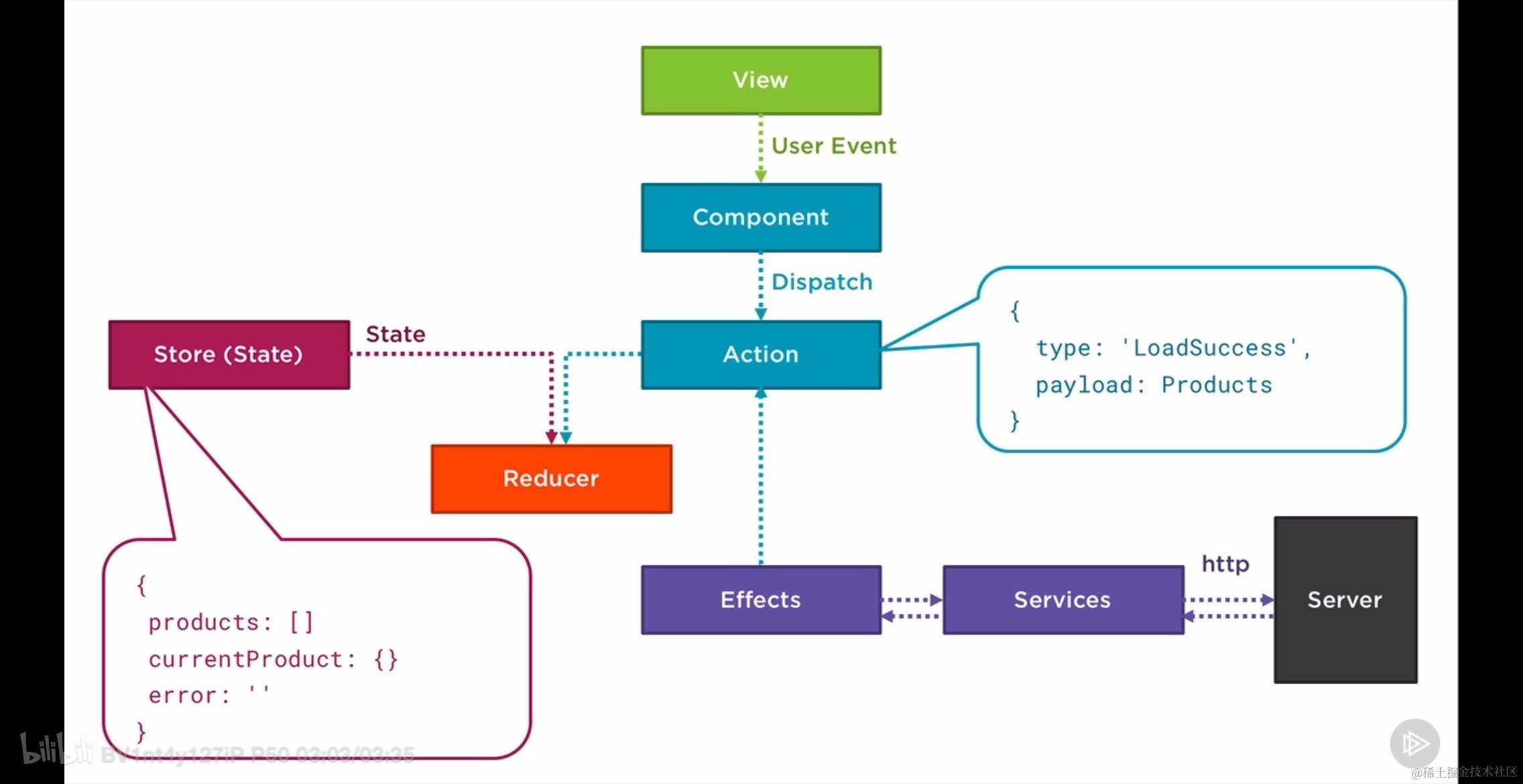
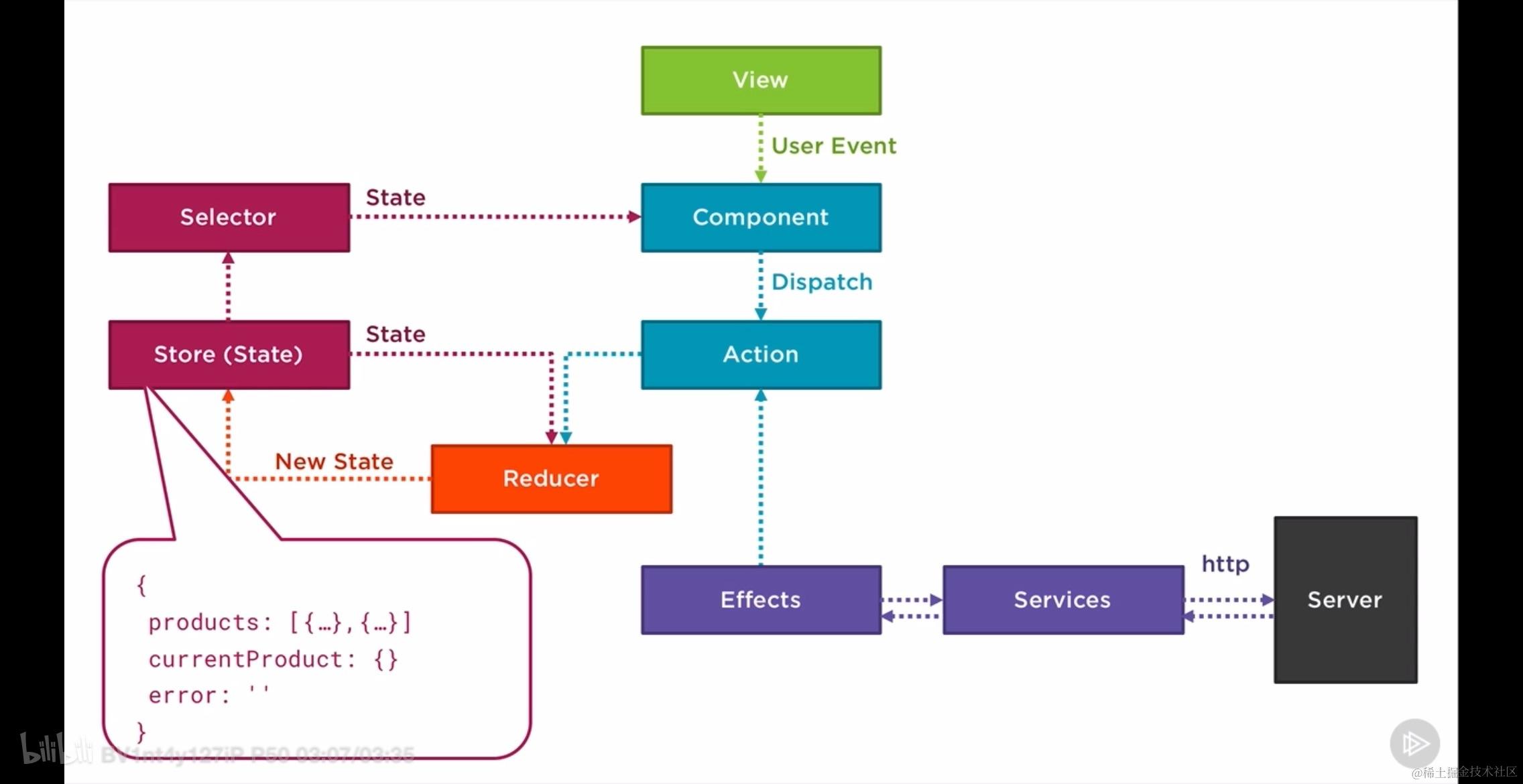
10.3 使用 Effects 的好处
- Keep components pure
- lsolate side effects
- Easier to test
10.4 定义一个 Effect
Effect 究其本质仍然是一个服务,因为对应的 class 被 @Injectable 所修饰,但是我们没有将其注入到任何位置。而不同之处在于,这个类中实现了一些属性,这些属性被 @Effect 所修饰,并且,被修饰的属性的值类型为 Observable.
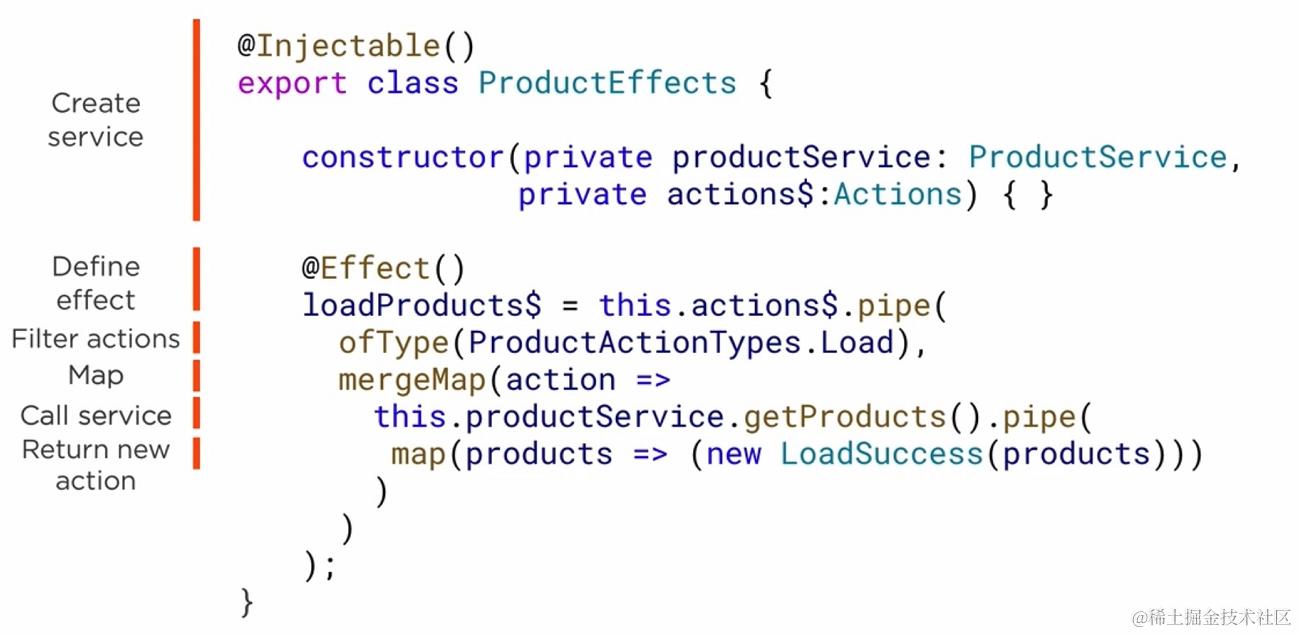
完整代码是:
import { Injectable } from '@angular/core';
import { Actions, Effect, ofType } from '@ngrx/effects';
import { ProductService } from '../product.service';
import * as productActions from './product.actions';
import { mergeMap, map } from 'rxjs/operators';
import { Product } from '../product';

@Injectable()
export class ProductEffects {
  constructor(private actions$: Actions, private productService: ProductService) {}

  @Effect()
  loadProducts$ = this.actions$.pipe(
    ofType(productActions.ProductActionTypes.Load),
    mergeMap((action: productActions.Load) =>
      this.productService.getProducts().pipe(
        map((products: Product[]) => new productActions.LoadSuccess(products))
      )
    )
  );
}
对应的 action 为:
case ProductActionTypes.LoadSuccess:
return {
    ...state,
    products: action.payload,
}
此时整个 service 代码为:
import { Injectable } from '@angular/core';
import { HttpClient, HttpHeaders } from '@angular/common/http';
import { Observable, of, throwError } from 'rxjs';
import { catchError, tap, map } from 'rxjs/operators';
import { Product } from './product';

@Injectable({
  providedIn: 'root',
})
export class ProductService {
  private productsUrl = 'api/products';
  constructor(private http: HttpClient) {}

  getProducts(): Observable<Product[]> {
    return this.http.get<Product[]>(this.productsUrl)
      .pipe(
        tap(data => console.log(JSON.stringify(data))),
        catchError(this.handleError)
      );
  }

  createProduct(product: Product): Observable<Product> {
    const headers = new HttpHeaders({ 'Content-Type': 'application/json' });
    product.id = null;
    return this.http.post<Product>(this.productsUrl, product, { headers: headers })
      .pipe(
        tap(data => console.log('createProduct: ' + JSON.stringify(data))),
        catchError(this.handleError)
      );
  }

  deleteProduct(id: number): Observable<{}> {
    const headers = new HttpHeaders({ 'Content-Type': 'application/json' });
    const url = `${this.productsUrl}/${id}`;
    return this.http.delete<Product>(url, { headers: headers })
      .pipe(
        tap(data => console.log('deleteProduct: ' + id)),
        catchError(this.handleError)
      );
  }

  updateProduct(product: Product): Observable<Product> {
    const headers = new HttpHeaders({ 'Content-Type': 'application/json' });
    const url = `${this.productsUrl}/${product.id}`;
    return this.http.put<Product>(url, product, { headers: headers })
      .pipe(
        map(() => product), // Assuming the server returns the updated product
        catchError(this.handleError)
      );
  }

  private handleError(err: any) {
    // in a real world app, we may send the error to some remote logging infrastructure
    // instead of just logging it to the console
    let errorMessage: string;
    if (err.error instanceof ErrorEvent) {
      // A client-side or network error occurred. Handle it accordingly.
      errorMessage = `An error occurred: ${err.error.message}`;
    } else {
      // The backend returned an unsuccessful response code.
      errorMessage = `Server returned code: ${err.status}, error message is: ${err.message}`;
    }
    console.error(errorMessage);
    return throwError(() => new Error(errorMessage));
  }
}
getProducts 方法从网络请求到的数据不是直接返回给 component, 而是被另一个 action 包裹更新到 store 中去,store 随之刷新引发组件更新。注意此时调用 getProducts 方法的不再是 component, 取而代之的是 component 触发 action1, action1 被 effect 劫持,根据其 type 使用 service 发出正确的网络请求,等到网络请求完毕之后,构建新的 action2 包裹响应数据触发 reducer, 进而引起 store 更新,完成页面刷新。
可能需要澄清的点:
-
组件触发 Action: 组件不直接调用
getProducts方法,而是分派一个 Action(例如LoadAction),这个 Action 由 NgRx Effects 监听。 -
Effects 处理 Action: NgRx Effects 通过
@Effect()装饰器定义的loadProducts$属性监听特定的 Action(Load)。当这个 Action 被分派时,Effects 会执行定义的逻辑。 -
Service 发出网络请求: 在 Effects 中,根据监听到的 Action,调用
ProductService的getProducts方法发出网络请求。 -
处理响应和分派新的 Action: 网络请求成功后,响应数据通过 RxJS 操作符(如
map)被转换成一个新的 Action(例如LoadSuccess),这个 Action 包含了从网络请求获取的数据作为 payload。 -
更新 Store: 新的 Action(
LoadSuccess)随后被分派到 Store,Store 根据这个 Action 更新状态。状态的更新会自动触发组件的重新渲染。 -
组件更新: 组件通常会使用 NgRx Store 的选择器来订阅 Store 中的状态,并根据状态的变化进行更新。
-
错误处理: 如果网络请求失败,
catchError操作符会捕获错误,并可以通过分派另一个 Action 来处理错误情况,例如显示错误消息。 -
页面刷新: 组件的刷新不是由 Store 直接完成的,而是由组件通过监听 Store 的状态变化来实现的。当状态更新时,组件可以调用
ngOnChanges或其他生命周期钩子来响应这些变化。 -
注意: 组件触发的 Action 通常是一个"触发型" Action,它不包含业务数据,只用于触发异步流程。而由 Effects 发出的 Action(例如
LoadSuccess)是一个"完成型" Action,它包含了业务数据。
总结来说,结论描述的流程是 NgRx 架构中常见的模式,即组件触发 Action,Effects 监听并处理这些 Action,通过 Service 进行业务逻辑处理,然后分派新的 Action 来更新 Store,最终导致组件的更新。
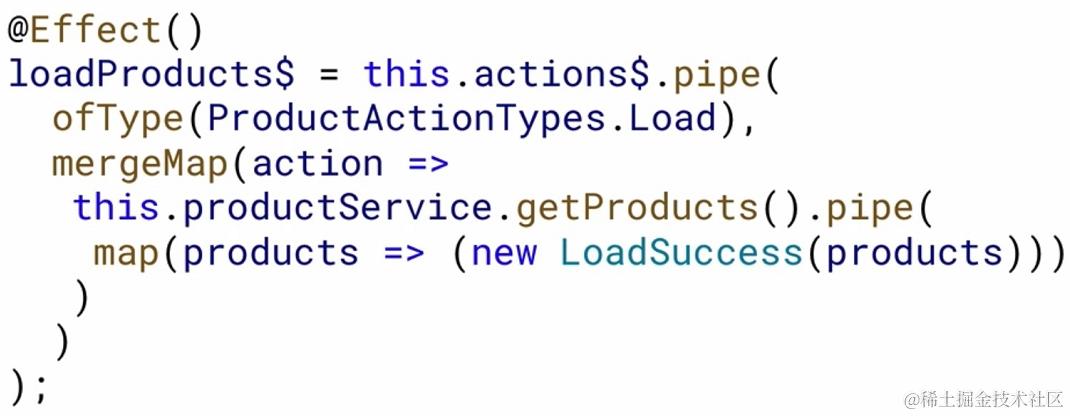
10.5 Effects 层常用的操作符
如下所示,被 @Effect 所修饰的,并且以 $ 结束的属性,在赋予其值的时候使用了大量的 Rxjs 中的操作符,如:ofType mergeMap pipe map 等。
对比switchMap、concatMap、mergeMap 和 exhaustMap:
-
switchMap:
- 取消当前的订阅/请求,并可能引起竞态条件。
- 当你想要在新请求发出时取消之前的请求时使用,例如搜索框输入时的搜索请求。
- 它只关心最新的请求结果,忽略旧的请求结果。
-
concatMap:
- 按顺序运行订阅/请求,性能可能较低。
- 当你需要保持请求的顺序时使用,例如按顺序处理多个 GET 请求。
- 它会等待前一个请求完成后再开始下一个请求。
-
mergeMap (之前称为
flatMap):- 并行运行订阅/请求。
- 当订单不重要时使用,例如并行处理多个 POST、PUT 和 DELETE 请求。
- 它将内层 Observable 序列中的所有项目合并成一个新的 Observable 序列。
-
exhaustMap:
- 忽略所有后续的订阅/请求,直到当前的完成。
- 当你不想在初始请求完成之前处理更多的请求时使用,例如登录过程。
以下是每种操作符使用场景的示例:
-
switchMap:
source$.pipe(
  switchMap(value => someObservable(value))
);
适用于:用户输入时的搜索请求,每次输入都会取消上一次的搜索。
-
concatMap:
source$.pipe(
  concatMap(value => someObservable(value))
);
适用于:需要按顺序执行的请求,如文件的顺序上传。
-
mergeMap:
source$.pipe(
  mergeMap(value => someObservable(value))
);
适用于:不需要关心顺序的请求,如并行上传多个文件。
-
exhaustMap:
source$.pipe(
  exhaustMap(value => someObservable(value))
);
适用于:如登录请求,只有在当前登录请求完成后,新的登录请求才会被处理。
10.6 将 Effect 注册到 Module 中去
下图展示了feature 和 root module 的 effects 注入 以及 默认为空的 effects 注入和已构建的 effects 注入
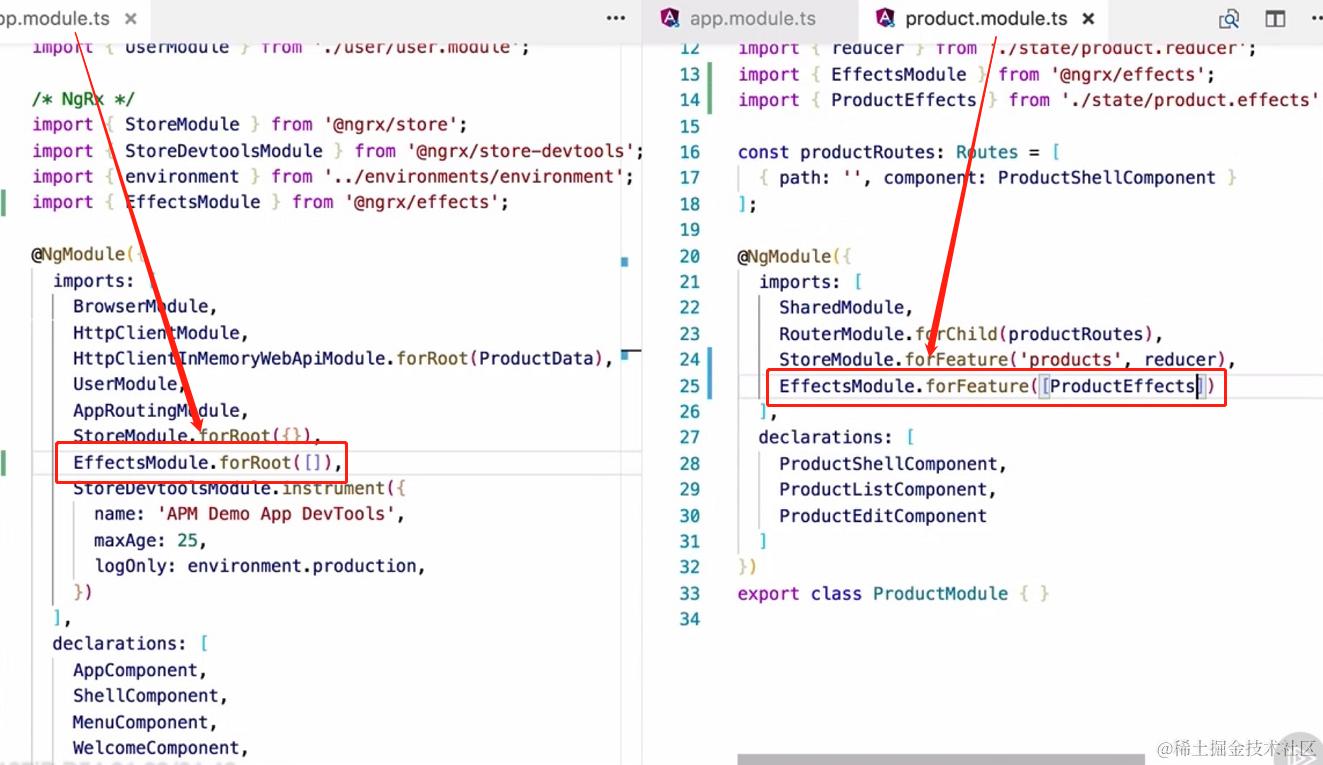
10.7 使用已经注册的 Effect
下图是使用了 Effects 层之后的 component, 乍看上去好像与 Effects 无关。实际上,这正体现出 Effects 的优势 -- component 和 异步 action 解绑:
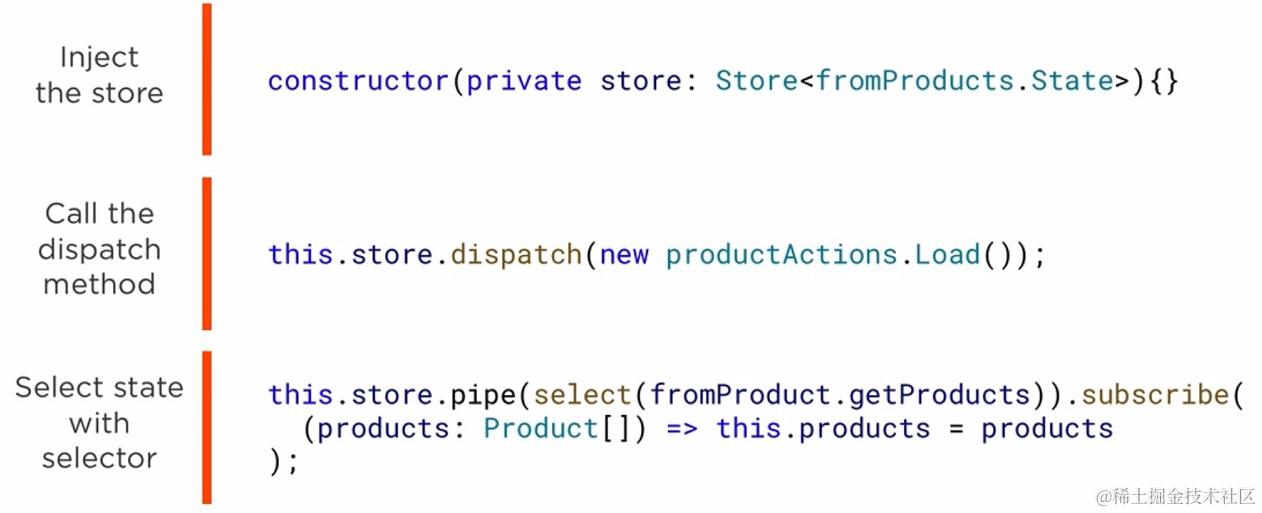
对比
或者放在一起对比之
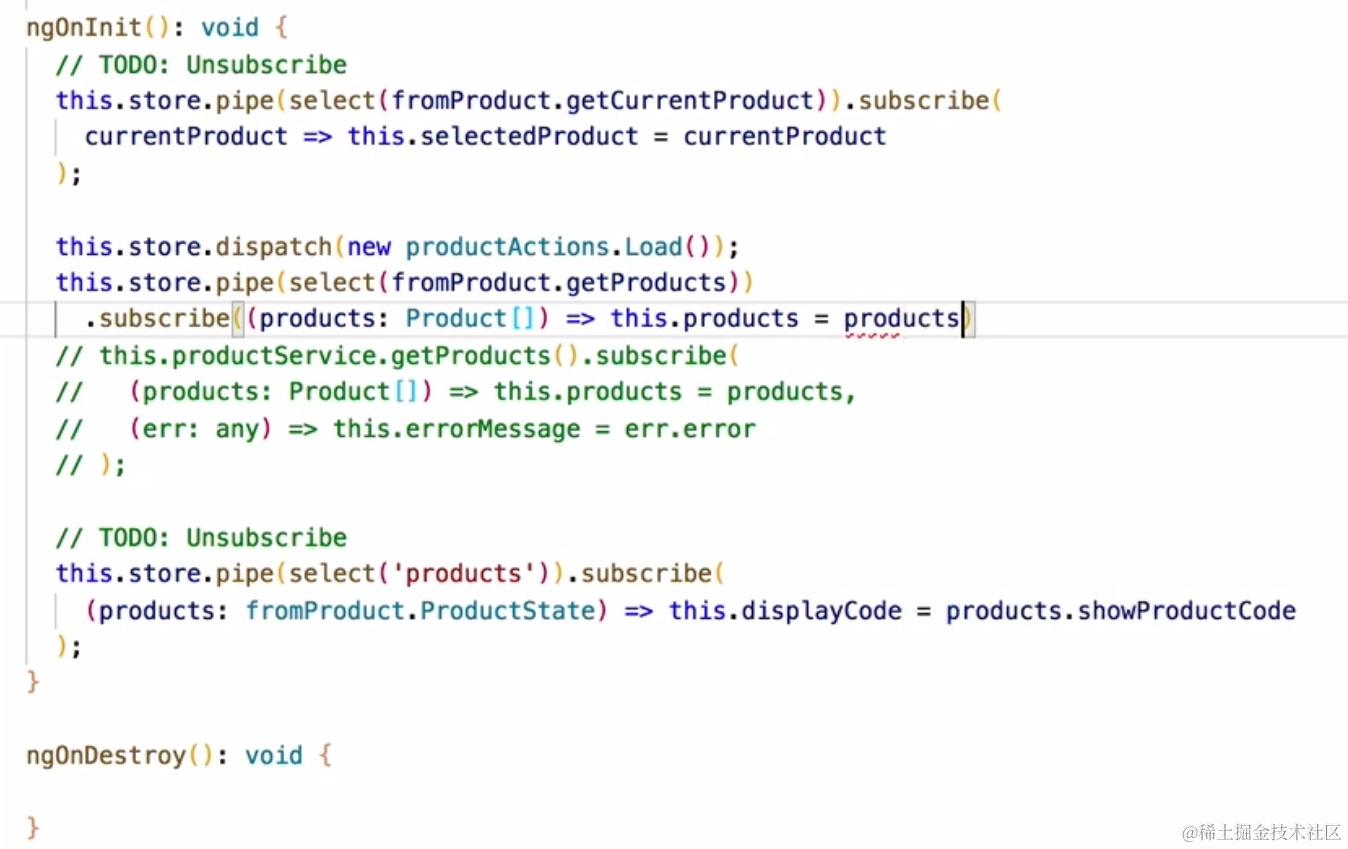
我们可以在对应的插件中看到连续发出了两次 action:
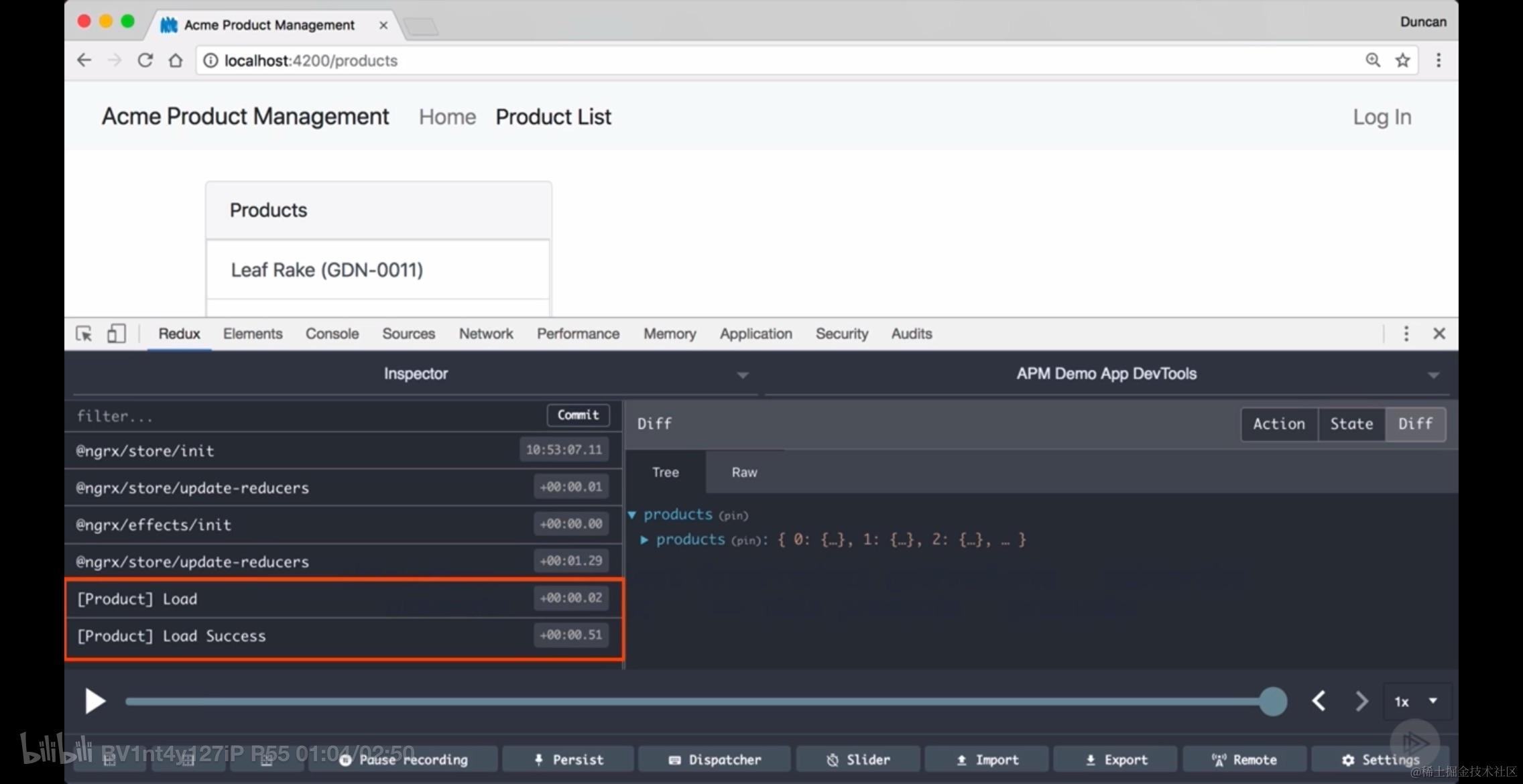
其中 [Product] Load 是异步的,而 [Product] Load Success 则是同步的。
关于取消订阅
到目前为止,一个亟待解决的问题就是:
You need to unsubscribe from the store
在讨论其他更好的方式解决这个问题之前,这里起码有一个小窍门,可以在组件将要销毁的时候,统一的处理已订阅:takeWhile + ngOnDestroy + boolean 方法
import { Component, OnInit, OnDestroy } from '@angular/core';
import { Store, select } from '@ngrx/store';
import { takeWhile } from 'rxjs/operators';
import { fromProduct } from './product.reducer'; // 假设这是你的reducer文件路径
import { Product } from './product.model'; // 假设这是你的产品模型文件路径

@Component({
  selector: 'app-product-list',
  templateUrl: './product-list.component.html',
  styleUrls: ['./product-list.component.css']
})
export class ProductListComponent implements OnInit, OnDestroy {
  componentActive = true;
  products: Product[];

  constructor(private store: Store<{ products: Product[] }>) {}

  ngOnInit() {
    this.store.pipe(select(fromProduct.getProducts),
      takeWhile(() => this.componentActive))
      .subscribe((products: Product[]) => this.products = products);
  }

  ngOnDestroy() {
    this.componentActive = false;
  }
}
操作步骤:
- Identify all subscriptions to the store (Hint: Look for"//ToDo: Unsubscribe, code comments)
- Add an OnDestroy lifecycle hook to the component
- Initialize a componentActive flag to true
- Set the componentActive flag to false in the ngonDestory method
- Add a takeWhile pipe before the subscribe method and use the componentActive property as a predicate in this operator
而更好的处理方式则是在 component 类中给予 Observable 类型的数据,将其绑定到某个属性上,然后在模板的 *ngFor 中,以下面的格式使用之:
this.products$ = this.store.pipe(select(fromProduct.getProducts));
*ngFor="let product of products | async"
当然,结合 as 运算符,效果会更好:
*ngIf="products$ | async as products"
这意味着,所有的重构/修改,都会以:在 *ngIf 被指定给 html 的局部变量,的方式被处理掉。
<div class="card-body" *ngIf="products$ | async as products">
  <div class="list-group">
    <button class="list-group-item list-group-item-action rounded-0"
            *ngFor="let product of products"
            [ngClass]="{'active': product?.id === selectedProduct?.id}"
            (click)="productSelected(product)">
      {{ product.productName }}
    </button>
    <ng-container *ngIf="displayCode">
      ({{ product.productCode }})
    </ng-container>
  </div>
</div>
关于错误处理
对于 Observable 类型的数据,如果没有错误处理,是不完整的,因此我们需要加上合适的错误处理,如下所示:
import { Injectable } from '@angular/core';
import { Effect, Actions, ofType } from '@ngrx/effects';
import { mergeMap, map, catchError } from 'rxjs/operators';
import { of } from 'rxjs';

import { ProductService } from './product.service';
import * as ProductActions from './product.actions';
import { ProductActionTypes } from './product.action-types';

@Injectable()
export class ProductEffects {
  constructor(
    private productService: ProductService,
    private actions$: Actions
  ) {}

  @Effect()
  loadProducts$ = this.actions$.pipe(
    ofType(ProductActionTypes.Load),
    mergeMap(action =>
      this.productService.getProducts().pipe(
        map(products => new ProductActions.LoadSuccess(products)),
        catchError(err => of(new ProductActions.LoadFail(err)))
      )
    )
  );
}
上面的 pipe(map,catchError) 也是非常经典的搭配了。
接下来,需要考虑的事情就是,一旦发生了错误,整个 NgRx 要怎么样去处理的问题。由于这种 Observable 出现错误的情况只可能发生在异步请求中,而之前已经介绍了使用 Effect 层处理异步 action, 所以错误处理也需要在 Effect 中处理:
您提供的内容是关于在Angular中使用NgRx进行状态管理时,异常处理在Effects中的实现步骤,并涉及到了一些特定的代码片段。下面我将整理出您提到的“三步走”过程,并对代码进行整理和解释:
改造 Effect 使其能够处理 Error 的三步走过程:
-
Exception Handling in Effects:
- 在Effects中处理异常,确保当异步操作(如API调用)失败时,能够捕获错误并更新状态。
-
Add to interface:
- 定义一个接口(如
ProductState),用于描述状态的结构。在这个接口中添加一个属性来存储错误信息。
- 定义一个接口(如
-
Initialize state & Make selector:
- 初始化状态对象,为其赋予初始值。
- 创建一个选择器(如
getError),用于从状态树中提取错误信息。
-
Add case statement
- 增加一个 action 专门用来处理发生错误时候的场景。
// 定义产品状态接口,包含一个错误信息属性
export interface ProductState {
  ...
  error: string;
}

// 初始化状态对象,错误信息为空字符串
const initialState: ProductState = {
  ...
  error: ''
};

// 创建一个选择器,用于从状态中提取错误信息
export const getError = createSelector(
  getProductFeatureState, // 假设这是一个已定义的选择器,用于获取产品特征状态
  (state: ProductState) => state.error // 返回错误信息
);
    // 在 reducer 中增加一种 action types 完成错误处理
    case ProductActionTypes.LoadFail: {
      return {
        ...state,
        error: action.payload // 假设payload就是错误信息
      };
    }
解释:
ProductState接口定义了一个状态的结构,这里只有一个error属性用于存储错误信息。initialState是一个ProductState类型的对象,它表示状态的初始值,其中error属性被初始化为一个空字符串。getError是一个选择器,它接收整个产品特征状态作为输入,并返回其中的error属性。这个选择器可以在组件或服务中使用,以便访问当前的错误信息。
10.8 本节小节
本节内容包括下面几点:
- Install @ngrx/effects
- Build the effect to process that action and dispatch the success and fail actions
- Initialize the effects module in your root module
- Register effects in your feature modules
- Process the success and fail actions in the reducer
11. NgRx 中的异步 action 使用全流程
本节是之前所有内容的集合,旨在演示如何进行完整的 NgRx 使用,内容包括:
- ldentify the state and actions - 给 state 和 action 以身份
- Strongly type the state and build selectors - 对 state 和 selector 进行类型约束
- Strongly type the actions with action creators - 对 action 使用 action creator 进行类型约束
- Dispatch an action - 触发一个 action
- Build the effect to process the action - 构建 effect 去处理异步 action
- Process the success and fail actions - 处理成功的和失败的 action
11.1. 定义状态接口,设置初始状态,构建选择器
第一步完成接口定义,初始状态构建以及选择器的构建,它们都放在同一文件中,代码如下:
// 定义状态接口
export interface ProductState {
  showProductCode: boolean;
  currentProductId: number | null;
  products: Product[];
}

// 设置初始状态
export const initialState: ProductState = {
  showProductCode: true,
  currentProductId: null,
  products: []
};

// 构建选择器
import { createSelector } from '@ngrx/store';
import { ProductState } from './product.state'; // 假设这是状态接口的文件路径

// 假设这是获取产品特性状态的函数,它应该返回一个状态片段
export const getProductFeatureState = (state: any) => state.product;

// 创建选择器来获取产品列表
export const getProducts = createSelector(
  getProductFeatureState,
  (state: ProductState) => state.products
);
第一步到此尚未完成,应该将接口剥离到单独文件中去,然后在 reducer 中对其类型进行扩充,增加 error 信息:
// 假设 fromRoot.State 是您的根状态接口
import { State as RootState } from './fromRoot'; // 导入根状态接口,并为其设置别名 RootState

// 扩展根状态接口以包含产品状态
export interface State extends RootState {
  products: ProductState;
}

// 定义产品状态接口,并添加 error 属性
export interface ProductState {
  showProductCode: boolean;
  currentProductId: number | null; // 注意这里的类型应该是 number | null
  products: Product[];
  error: string; // 新增的错误属性
}

// 设置初始状态,并包含错误属性的初始值
export const initialState: ProductState = {
  showProductCode: true,
  currentProductId: null,
  products: [],
  error: '' // 初始错误值为空字符串
};
11.2. 创建 Effect 层解决异步 Action
代码示例如下:
import { Injectable } from '@angular/core';
import { Effect, Actions, ofType } from '@ngrx/effects';
import { Observable, of } from 'rxjs';
import { map, mergeMap, catchError } from 'rxjs/operators';
import * as productActions from './product.actions';
import { ProductService } from './product.service';
import { Product } from './product.model'; // 假设您已经定义了Product模型并放置在此处

@Injectable()
export class ProductEffects {
  constructor(private actions$: Actions, private productService: ProductService) {}

  @Effect()
  loadProducts$: Observable<any> = this.actions$.pipe(
    ofType(productActions.ProductActionTypes.Load),
    mergeMap(action =>
      this.productService.getProducts().pipe(
        map(products => new productActions.LoadSuccess(products)),
        catchError(err => of(new productActions.LoadFail(err)))
      )
    )
  );

  @Effect()
  updateProduct$: Observable<any> = this.actions$.pipe(
    ofType(productActions.ProductActionTypes.UpdateProduct),
    map((action: productActions.UpdateProduct) => action.payload),
    mergeMap((product: Product) =>
      this.productService.updateProduct(product).pipe(
        map(updatedProduct => new productActions.UpdateProductSuccess(updatedProduct)),
        catchError(err => of(new productActions.UpdateProductFail(err)))
      )
    )
  );
}
11.3. 异步 Action 成功或者失败之后的处理
示例代码如下所示:
case ProductActionTypes.UpdateProductSuccess:
  const updatedProducts = state.products.map(
    item => action.payload.id === item.id ? action.payload : item
  );
  return {
    ...state,
    products: updatedProducts,
    currentProductId: action.payload.id,
    error: ''
  };

case ProductActionTypes.UpdateProductFail:
  return {
    ...state,
    error: action.payload
  };
注意上面 UpdateProductSuccess 这个 action 中用到的 map 是 immutable 类型的 数组方法。
reducer 的不可变性和数组方法
数组上的方法大致分成两类,一类是可变的,一类是不可变的。如果要将数组方法的返回值作为 reducer 函数的返回值,那么一定要搞清楚哪些是可变,哪些是不可变的:
| 方法 | Mutable(可变) | Immutable(不可变) |
|---|---|---|
| state.products.push(action.payload) | Mutable | |
| state.products.concat(action.payload) | Immutable | |
| ...state.products, action.payload | Immutable | |
| state.products.shift() | Mutable | |
| state.products.splice(0,2) | Mutable | |
| state.products.filter(p => p.id !== action.payload.id) | Immutable | |
| state.products.map(p => p.id === action.payload.id ? action.payload : p) | Immutable | |
| state.products.forEach(p => p.id === action.payload.id ? action.payload : p) | Mutable |
将 Effect 和 reducer 的代码放在一起看
// Reducer logic
case ProductActionTypes.UpdateProductSuccess:
  const updatedProducts = state.products.map(
    item => action.payload.id === item.id ? action.payload : item
  );
  return {
    ...state,
    products: updatedProducts,
    currentProductId: action.payload.id,
    error: ''
  };

case ProductActionTypes.UpdateProductFail:
  return {
    ...state,
    error: action.payload
  };

// Effects logic
@Effect()
loadProducts$: Observable<Action> = this.actions$.pipe(
  ofType(productActions.ProductActionTypes.Load),
  mergeMap(action =>
    this.productService.getProducts().pipe(
      map(products => new productActions.LoadSuccess(products)),
      catchError(err => of(new productActions.LoadFail(err)))
    )
  )
);

@Effect()
updateProduct$: Observable<Action> = this.actions$.pipe(
  ofType(productActions.ProductActionTypes.UpdateProduct),
  map((action: productActions.UpdateProduct) => action.payload),
  mergeMap((product: Product) =>
    this.productService.updateProduct(product).pipe(
      map(updatedProduct => new productActions.UpdateProductSuccess(updatedProduct)),
      catchError(err => of(new productActions.UpdateProductFail(err)))
    )
  )
);
这段代码是一个结合了NgRx中的Reducer和Effects的使用示例,用于处理产品数据的加载和更新操作。下面是对代码的详细解释:
Reducer逻辑
Reducer是NgRx中的一个核心概念,它负责根据当前的状态和一个动作(action)来计算出新的状态。
-
ProductActionTypes.UpdateProductSuccess:
- 当产品更新成功的动作被分发时,Reducer会执行这个case。
- 它首先使用
map函数遍历当前状态中的products数组,并检查每个产品的id是否与动作中的payload.id相匹配。 - 如果找到匹配的产品,就将其替换为动作中的
payload(即更新的产品)。 - 然后,它返回一个新的状态对象,其中包含更新后的
products数组、当前的产品id(设置为动作中的payload.id),以及将错误信息清空。
-
ProductActionTypes.UpdateProductFail:
- 当产品更新失败的动作被分发时,Reducer会执行这个case。
- 它返回一个新的状态对象,其中包含当前的状态和错误信息(设置为动作中的
payload)。
Effects逻辑
Effects是NgRx中用于处理副作用(如API调用)的另一个核心概念。它们监听动作,并基于这些动作执行副作用,然后可能会分发新的动作。
-
loadProducts$:
- 这是一个Effect,它监听
ProductActionTypes.Load动作。 - 当这个动作被分发时,它使用
mergeMap来调用productService.getProducts()方法,该方法返回一个包含产品数据的Observable。 - 然后,它使用
map将获取到的产品数据转换为LoadSuccess动作,并使用catchError来捕获任何错误,并将其转换为LoadFail动作。
- 这是一个Effect,它监听
-
updateProduct$:
- 这是一个Effect,它监听
ProductActionTypes.UpdateProduct动作。 - 当这个动作被分发时,它首先使用
map提取出动作中的payload(即要更新的产品)。 - 然后,它使用
mergeMap来调用productService.updateProduct()方法,该方法返回一个包含更新后的产品数据的Observable。 - 接着,它使用
map将更新后的产品数据转换为UpdateProductSuccess动作,并使用catchError来捕获任何错误,并将其转换为UpdateProductFail动作。
- 这是一个Effect,它监听
这段代码展示了如何在NgRx中使用Reducer和Effects来处理产品数据的加载和更新操作,包括成功和失败的情况。
总结使用过程
总结异步的 action 的使用过程如下:
- 定义 action 和 state
- 定义 state 和 selector 的接口
- 构建 action creator
- 发出异步 action
- 构建 effect 处理异步 action 并根据处理结果(成功/失败)触发新的 action
- 新的 action 被 reducer 重新处理
demo 参考地址:github.com/DeborahK/An…
第 10 章和第 11 章总结
要想理解这两章的内容,重在理解一个 Effects 层的概念。所谓 Effects 层,相当于一个拦截器, 其本质是一个服务。其原理为:当 view 将 action 发出的时候首先被 Effects 截获,截获之后检查,检查的对象是其 type,如果其 type 为目标值,则此 action 就此中断,交由 Effects 层处理,不会传递到 reducer, 而当被 Effects 处理完毕之后,再发出一个派生的 action. 正是因为这样,我们可以在 effects 层中将所有的副作用处理完毕,保证传递给 reducer 的派生 action 的处理过程是 pure 的。
Effects 层的本质:之所以是层,是因为这个拦截器是由多个同构的服务构成的,即服务数组。数组中的每个元素的本质都是一个 Service, 此 Service 具备如下的特点:不声明注入的位置;在构造器中注入了名为 Actions 的另一个服务,并使用此服务的单例来监听当前是否有 action 发出。除此之外,Effects 服务中一般没有方法,而是被修饰符
@Effect()所修饰的属性。
下面,通过一些步骤说明如何在项目中使用 Effects 完成和网络之间的通信。
- 创建文件结构。
- 增加被 Effects 处理的异步 action, 以及异步 action 处理完毕之后派生的同步 action.
- 创建 effects 服务处理异步 action, 引发派生 action. 使用 Effects 服务。
- 在 reducer 中增加处理派生的同步的 action 的回调。
- 改造视图层,剥离原来逻辑中直接使用数据获取 Service 的逻辑。
1. 创建文件结构
我们以 alarmlist module 为例,在之前的 store 文件夹下面创建名为 effects 的子目录,然后创建 index.ts 文件。
2. 增加 Actions 的种类
进入到 store/action/index.ts 文件中,增加三个相关的 action. 和数据请求相关的 action 有:
- 发起异步请求数据的 action
- 数据请求完成之后的 action
- 数据请求失败之后的 action
补充完毕之后的 store/action/index.ts 的内容为:
import { IAlarmDetailsData } from '../../../alarmlist/alarm-list.component';
import { Action } from "@ngrx/store";

export enum alarmTypes {
  AddAlarmCount = "[Alarm] Add Alarm Count",
  MinusAlarmCount = "[Alarm] Minus Alarm Count",
  LoadAlarmData = "[Alarm] Load Data",
  LoadAlarmDataSuccess = "[Alarm] Load Data Success",
  LoadAlarmDataFailed = "[Alarm] Load Data Failed",
}

export class AddAlarmCount implements Action {
  readonly type = alarmTypes.AddAlarmCount;

  constructor(public payload: number) { }
}

export class MinusAlarmCount implements Action {
  readonly type = alarmTypes.MinusAlarmCount;

  constructor(public payload: number) { }
}

export class LoadAlarmData implements Action {
  readonly type = alarmTypes.LoadAlarmData;

  constructor() { }
}

export class LoadAlarmDataSuccess implements Action {
  readonly type = alarmTypes.LoadAlarmDataSuccess;
  public payload = {
    alarms: [],
  }
  constructor(public alarms: IAlarmDetailsData[]) {
    this.payload.alarms = alarms;
  }
}

export class LoadAlarmDataFailed implements Action {
  readonly type = alarmTypes.LoadAlarmDataFailed;
  public payload = {
    alarms: [],
  }
}

export type AlarmActions = AddAlarmCount | MinusAlarmCount | LoadAlarmData | LoadAlarmDataSuccess | LoadAlarmDataFailed;

export const alarmActions = {
  AddAlarmCount,
  MinusAlarmCount,
  LoadAlarmData,
  LoadAlarmDataSuccess,
  LoadAlarmDataFailed,
}
```一步

**需要说明的是,其中异步 `tion LoadAlarmData` 将会被 `Effects` 层结果并消耗;而作为派生的同步 `action LoadAlarmDataSuccess` 和 `LoadAlarmDataFailed` 则会被 `reducer` 处理掉。**

### 3. 创建 Effects 服务
根据上面的分析,向此 Effects 服务中注入了获取数据的自定义服务和监听 action 的服务 Actions, 然后使用 @Effects() 修饰符号修饰类的实例属性 allAlarms$.

属性 allAlarms$ 定义了流,这个流的源来自于 action 事件,也就是每一次 action 出现的时候都会把这个流走一边,在这个流中,首先使用了操作符 ofType 检查了 action 的 type, 如果 type 为预定义的 alarmTypes.LoadAlarmData 则会被此 Effects 处理,否则会放行。

具体的处理流程就是使用注入的数据请求服务获取网络数据,根据网络数据是否获取成功分别调用派生的 LoadAlarmDataSuccess 或者 LoadAlarmDataFailed 这两个派生的 action.

完整的代码如下所示:
```ts
import { Injectable } from "@angular/core";
import { AlarmListDataService } from "../../../services/alarmlist-data.service";
import { Actions, Effect, ofType } from "@ngrx/effects";
import { of } from "rxjs";
import { catchError, map, mergeMap } from "rxjs/operators";
import { LoadAlarmDataFailed, LoadAlarmDataSuccess, alarmTypes } from "../action";
import { IAlarmDetailsData } from "../../../alarmlist/alarm-list.component";

@Injectable()
export class AlarmEffects {
  constructor(
    private alarmListDataService: AlarmListDataService,
    private actions$: Actions,
  ) { }

  @Effect()
  allAlarms$ = this.actions$.pipe(
    ofType(alarmTypes.LoadAlarmData),
    mergeMap(action => {
      return this.alarmListDataService.getAllAlarms().pipe(
        map((alarms: IAlarmDetailsData[]) => {
          return new LoadAlarmDataSuccess(alarms);
        }),
        catchError(() => {
          return of(new LoadAlarmDataFailed());
        }),
      )
    }),
  )
}
创建好 Effects 层之后就是使用了,使用 Effects 层非常类似于使用 Reducer:
根模块下的使用:
import { EffectsModule } from '@ngrx/effects';
...
    ...
    RouterModule.forRoot([]),
    StoreModule.forRoot(reducer),
    EffectsModule.forRoot([]),
    ...
...
feature 模块下的使用:
import { EffectsModule } from '@ngrx/effects';
...
    ...
    RouterModule.forChild(routes),
    StoreModule.forFeature(ALARM, alarmReducer),
    EffectsModule.forFeature([AlarmEffects]),
    ...
...
4. 增加 reducer 处理数据的种类
首先给原来的 store 上面增加新的数据 alarms, 然后修改所有受影响的类型约束,然后对case alarmTypes.LoadAlarmDataSuccess: 和 case alarmTypes.LoadAlarmDataFailed: 两种情况进行处理。
import { createFeatureSelector } from "@ngrx/store";
import { alarmTypes } from "../action";
import { IAlarmDetailsData } from "../../../alarmlist/alarm-list.component";

export interface IAlarmState {
    count: number,
    alarms: IAlarmDetailsData[],
}

const initialState: IAlarmState = {
    count: 0,
    alarms: [],
}

export const ALARM = 'alarm';

export function alarmReducer(state = initialState, action) {
    const { type, payload } = action;
    switch (type) {
        case alarmTypes.AddAlarmCount:
            return {
                ...state,
                count: state.count + payload,
            }
        case alarmTypes.MinusAlarmCount:
            return {
                ...state,
                count: state.count - payload,
            }
        case alarmTypes.LoadAlarmDataSuccess:
        case alarmTypes.LoadAlarmDataFailed:
            return {
                ...state,
                alarms: payload.alarms,
            }

        default: return state;
    }
}

export const getAlarm = createFeatureSelector<IAlarmState>(ALARM);
5. 在视图层发起异步 action 并获取网络请求的数据
在组件的 constructor 构造方法中使用如下的代码发起网络请求:
this.store.dispatch(new alarmActions.LoadAlarmData());
在需要这部分数据的地方使用下面的代码获取 store 中的数据:
  this.store.pipe(select(getAlarms)).pipe(
    takeUntil(this.isComponentDestroyed),
  ).subscribe(
    newData => {
      const filteredData = newData.filter(item => {
        const matchesType = !this.lastQueryParams?.type || item.type === this.lastQueryParams.type;
        const matchesPriority = !this.lastQueryParams?.priority || item.priority === this.lastQueryParams.priority;
        const matchesEUI = !this.lastQueryParams?.eui || item.eui === this.lastQueryParams.eui;
        const matchesOrderNum = !this.lastQueryParams?.orderNum || item.orderNum === this.lastQueryParams.orderNum;

        return matchesType && matchesPriority && matchesEUI && matchesOrderNum;
      });

      this.dataSource.data = filteredData;
      this.forceStyleChanging(0);
    }
  )
如此一来,我们的 component 和 store 之间进行数据的交换,不会再使用到 data service, 完成了逻辑和视图之间的解耦。那么这样做的意义是什么呢?见 12 章内容。
这样做之后就可以使用另外一种组件
component的更新策略了,这会节省很多不必要的页面更新,能够有效的提供性能。
12. NgRx 组织架构
本章主要介绍我们在使用 NgRx 的时候代码的组织结构和整体架构
- Folder structure -- 文件结构
- Presentational and container components - 视图组件和容器组件
- Change detection strategy OnPush - 修改更新策略为 OnPush 以提高性能
- Adding an index.ts file to our state folder - 为 state 目录添加入口文件
12.1. 将代码按照功能点组织的优点
- Follows Angular style guide
- Easy to find related files
- Less cluttered
12.2. NgRx 的真正威力
NgRx 的真正威力在于其能够将 component 的逻辑剥离出来,实现视图层和逻辑层的脱离。
NgRx takes logic out of components.
它将组件分成两类:Presentational 和 Container
Division of components into two categories: Presentational and Container Components
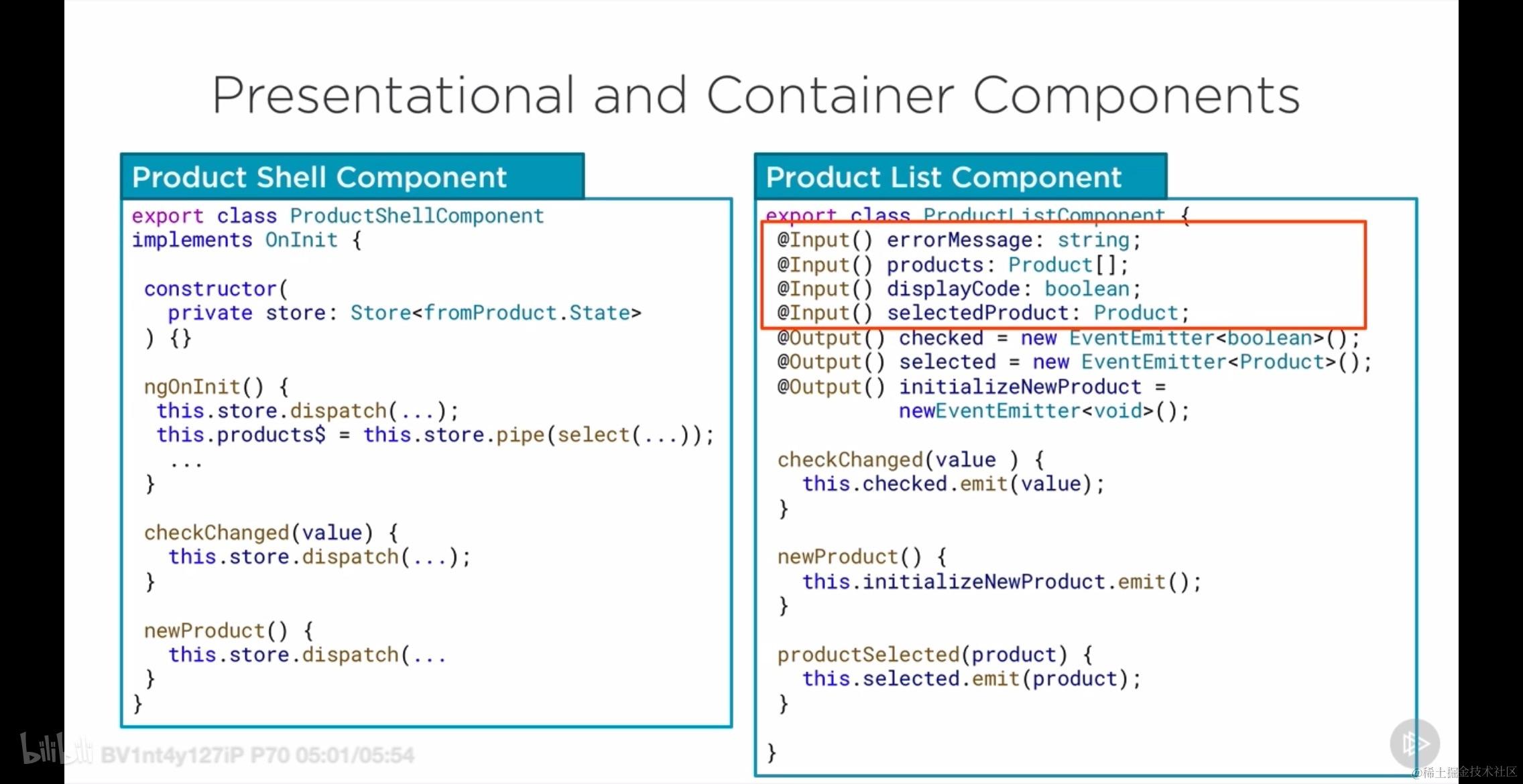
这两种组件进行对比: 以下是将所提供的信息整理成表格的Markdown格式:
| Presentational Components | Container Components | |
|---|---|---|
| 关注点 | 事物的外观 | 事物的工作方式 |
| 内容 | HTML标记和CSS样式 | 几乎没有HTML和CSS样式 |
| 依赖关系 | 不依赖于应用的其他部分 | 有注入的依赖关系 |
| 数据加载与变更 | 不指定数据如何加载或变更,但通过@Outputs发出事件 | 是有状态的,并指定数据如何加载或变更 |
| 接收数据 | 通过@Inputs接收数据 | |
| 包含其他组件 | 可以包含其他组件 | 可以包含其他组件 |
| 其他特点 | 顶级路由 |
那么这种分离的好处在哪里呢?
- 可以提高性能,这主要表现在减少了 container component 刷新次数上
- 更强的代码组织性,即 composability
- 更加容易被测试,即 Easier to test
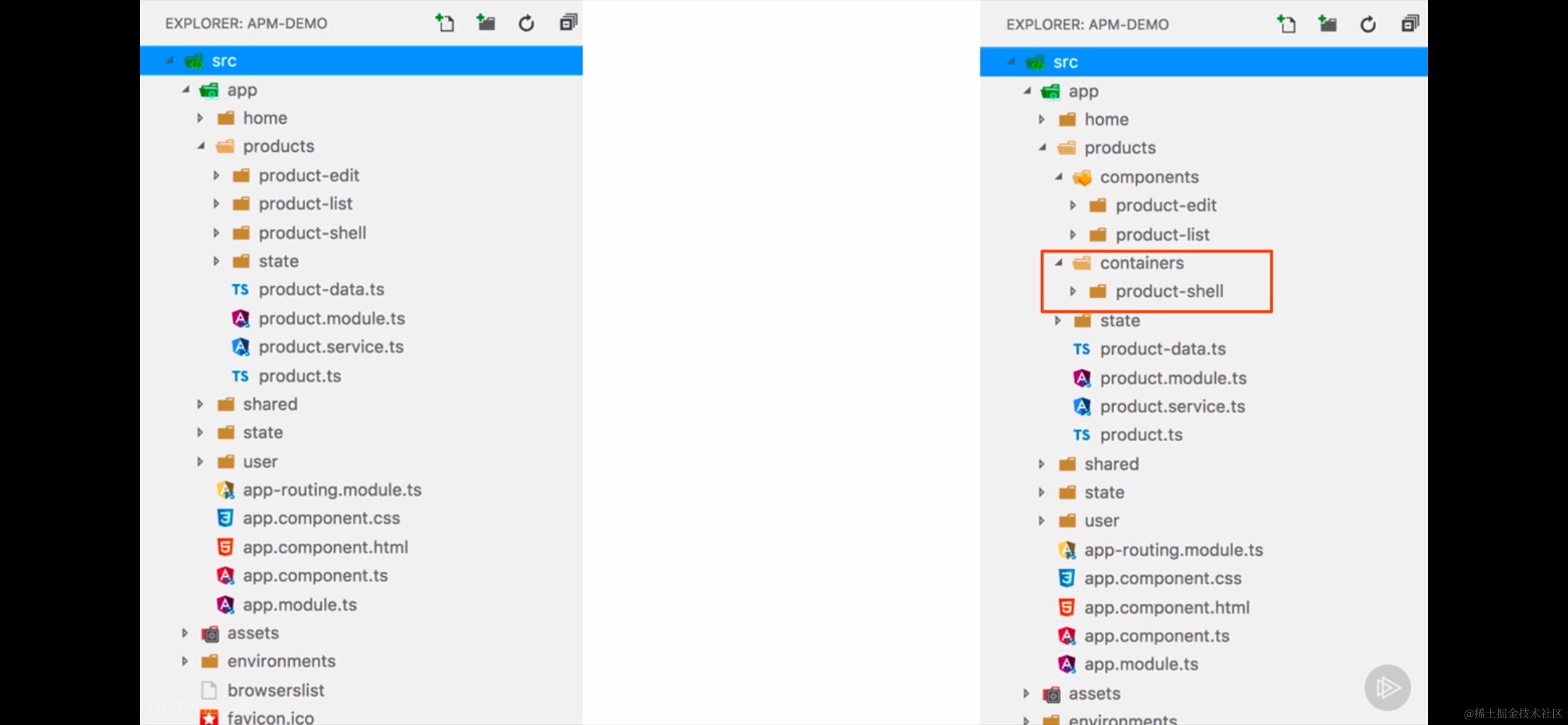
体现在实际业务中,那就是,对于一个 Product 列表组件,可以将其拆成核心视图组件和外部的 shell 组件。
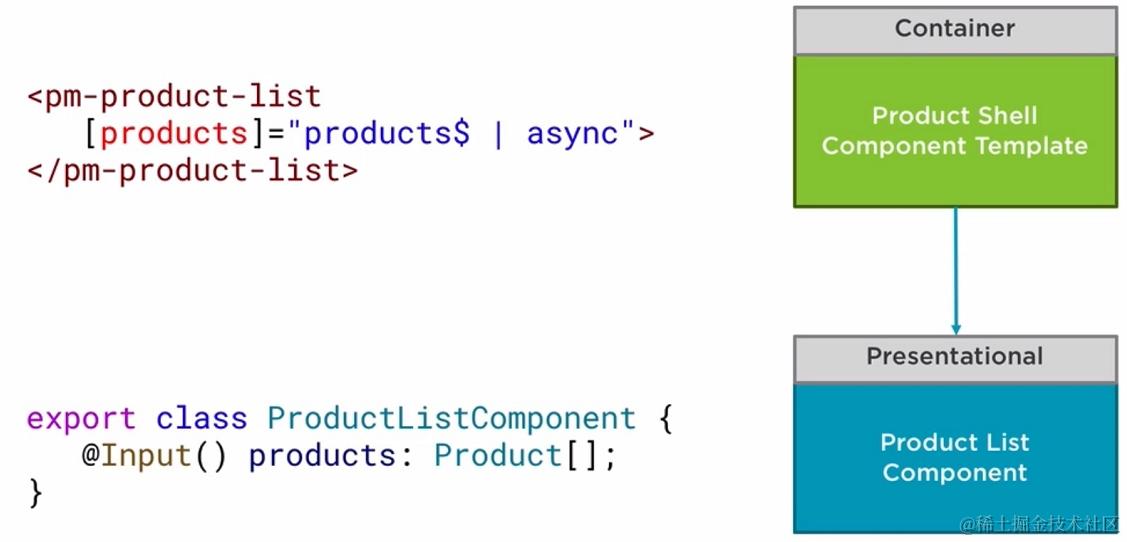
下图所示的就是 presentational 和 container 组件前后分离的结果展示。
分开是为了更好的完成各自的任务,分开之后还需要进行组装,组装其实就是父子组件之间的相互嵌套,如下所示:
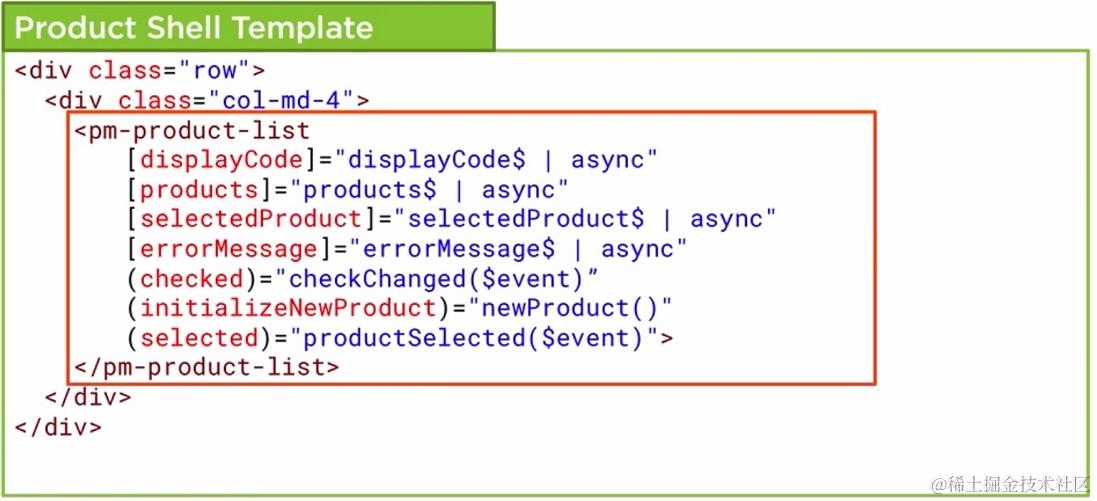
其中 pm-product-list 组件就是子视图组件,而外面的两个 div 可以看成是 shell 提供的 container
12.3 性能上的提升
这种分离,带来性能上的提升,最直观能够感受到的就是我们可以将视图层组件的更新策略修改成 onPush 了。
OnPush means that the change detector's mode will be initially set to CheckOnce
不仅性能上带来提升,更重要的是它的更新现在是受控的!
下面是设置更新策略的示意图:
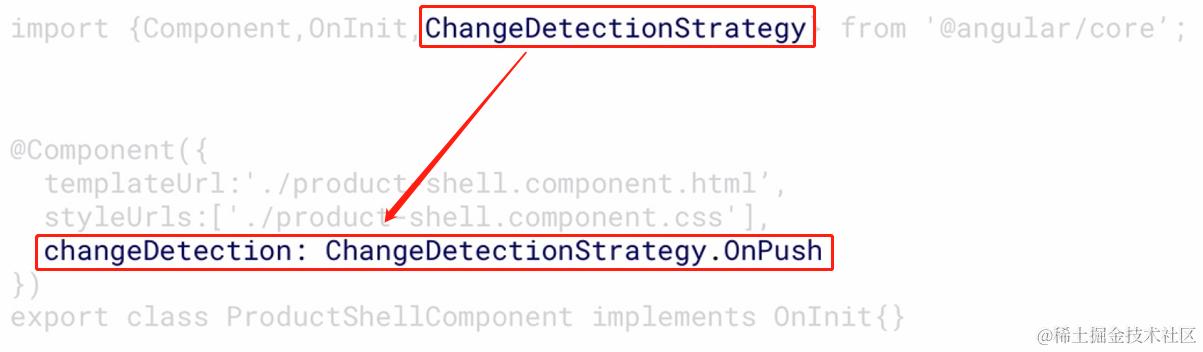
此时想要内层视图组件更新就只能通过 NgRx 精确定位刷新对应的订阅了数据的 Shell 层中的数据,进而引起传给内层组件值的改变,从而刷新内层视图组件。也就是说通过这样的方式不必将数据逐层上报,而是做到了定点更新,正所谓:
Skip change detection unless an @lnput receives a new value or object reference
12.4 Barrel 策略
一种将多个模块的导出汇总到一个单独的便捷模块中的方法。桶本身是一个模块文件,它重新导出其他模块中选定的导出项。所谓桶,这里指的其实就是:index.js
Barrel 策略下的 re-export:
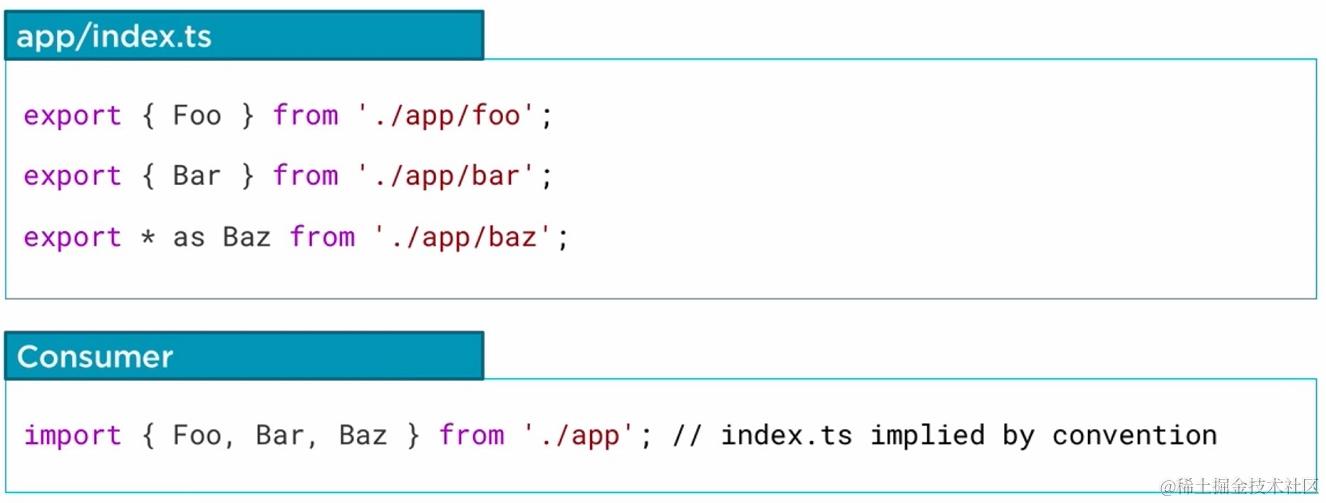
使用 Barrel 桶策略 (即 index.ts) 的好处在于:
- 能提供 state 相关的公共 API
- 将所关心的部分分离开,更好管理
- 更加整洁的代码

分离之后的 index.ts 大致有下面的组织结构:
import { createFeatureSelector, createSelector } from '@ngrx/store';
import * as fromRoot from '../../state/app.state';
import * as fromProducts from './product.reducer';

export interface State extends fromRoot.State {
  products: fromProducts.ProductState;
}

const getProductFeatureState = createFeatureSelector<fromProducts.ProductState>('products');

export const getShowProductCode = createSelector(
  // ... 这里应该是具体的选择器逻辑
);

export const getCurrentProductId = createSelector(
  // ... 这里应该是具体的选择器逻辑
);

export const getCurrentProduct = createSelector(
  // ... 这里应该是具体的选择器逻辑
);

export const getProducts = createSelector(
  // ... 这里应该是具体的选择器逻辑
);

export const getError = createSelector(
  // ... 这里应该是具体的选择器逻辑
);
我们将其和 reducer 放在一起对比:
import { Product } from '../product';
import { createFeatureSelector, createSelector } from '@ngrx/store';
import { ProductActions, ProductActionTypes } from './product.actions';
import * as fromRoot from '../../state/app.state';
import { ProductState } from './product.reducer';

// 扩展应用状态以包含产品特性
// 这是必需的,因为产品是惰性加载的
// 因此,无法将 ProductState 的引用添加到 app 状态中
export interface State extends fromRoot.State {
  products: ProductState;
}

// 选择器函数
const getProductFeatureState = createFeatureSelector<ProductState>('products');

export const getShowProductCode = createSelector(
  getProductFeatureState,
  state => state.showProductCode
);

export const getCurrentProductId = createSelector(
  getProductFeatureState,
  state => state.currentProductId
);

export const getCurrentProduct = createSelector(
  getProductFeatureState,
  getCurrentProductId,
  (state, currentProductId) => {
    // 假设这里是通过 currentProductId 从 products 数组中找到对应的产品
    return state.products.find(product => product.id === currentProductId);
  }
);

// 产品特性的状态
export interface ProductState {
  showProductCode: boolean;
  currentProductId: number | null;
  products: Product[];
  error: string;
}

const initialState: ProductState = {
  showProductCode: true,
  currentProductId: null,
  products: [],
  error: ''
};

export function reducer(state = initialState, action: ProductActions): ProductState {
  switch (action.type) {
    case ProductActionTypes.ToggleProductCode:
      return {
        ...state,
        showProductCode: action.payload
      };
    case ProductActionTypes.SetCurrentProduct:
      return {
        ...state,
        currentProductId: action.payload
      };
    // 处理其他动作...
    default:
      return state;
  }
}
12.5 使用 Barrel 策略
可以从下面的三个方面使用桶策略:
- Make index.ts file in each state module - 在每个需要 state 管理的目录下创建 index.ts
- Add selectors and state interfaces to index.ts - 在此 index.ts 文件中添加接口和 selector
- Re-export other feature state for other modules - 将导入模块统一向外暴露出去
13. NgRx 其他库介绍
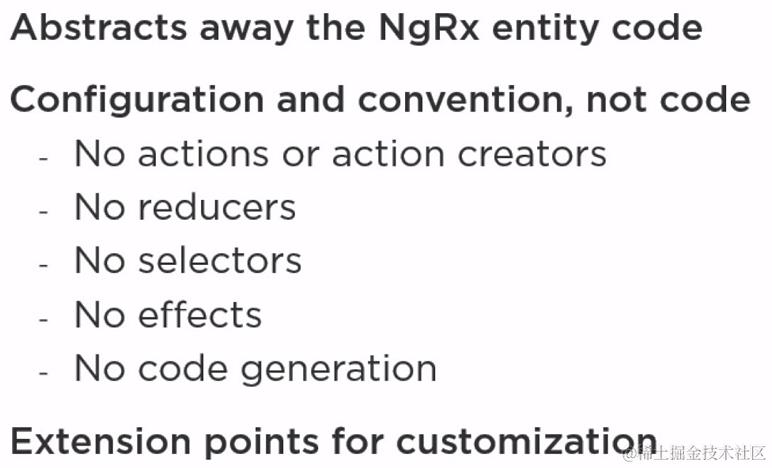
- Angular ngrx-data
Schematics:
- 是一个脚手架库,用于通过CLI生成代码。
- 常用命令:
ng new:创建新项目。ng generate:生成组件、服务等。
@ngrx/schematics:
- 是一组用于生成NgRx相关代码的schematics。
- 常用命令:
ng generate store:生成Store。ng generate action:生成Action。ng generate reducer:生成Reducer。ng generate effect:生成Effect。ng generate feature:生成Feature(可能包含Store、Reducer、Effects等)。ng generate container:生成Container组件。
- @ngrx/router-store: Connects the Angular router to the store; Dispatches router navigation actions
13. 实践与练习
1. 完成一个至少两层的深度的 store
2. 完成一个 combinedSelector 的创建
3. 创建 Effects 层,而不是单个 Effects
4. 完成一次 shell component 的改造
以上就是本文的所有内容了!谢谢您阅读至此。