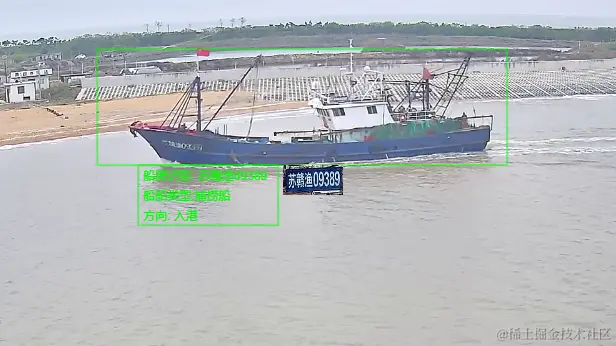
<canvas id="imgCanvas" width="1200" height="700"></canvas>
const handleImg = (url: any) => {
const canvas = document.getElementById('imgCanvas');
const ctx = canvas.getContext('2d');
const shipLabel = dataInfo.value.shipLabel || '--'
const aiShipTypeName = dataInfo.value.aiShipTypeName || '--'
const directionName = dataInfo.value.directionName || '--'
const rect = JSON.parse(dataInfo.value.rect)
const img = new Image();
img.src = url;
img.onload = function () {
ctx.drawImage(img, 0, 0, canvas.width, canvas.height);
ctx.strokeStyle = 'rgba(0, 255, 0, 0.5)';
ctx.lineWidth = 2;
ctx.fillStyle = 'rgba(0, 255, 0, 0)';
const rectX = rect.x1 * (1200 / 1920);
const rectY = rect.y1 * (700 / 1080);
const rectWidth = (rect.x2 - rect.x1) * (1200 / 1920);
const rectHeight = (rect.y2 - rect.y1) * (700 / 1080);
ctx.strokeRect(rectX, rectY, rectWidth, rectHeight);
ctx.fillRect(rectX, rectY, rectWidth, rectHeight);
let width2 = rectX + rectWidth * 0.1;
let height2 = 1080 - rect.y2 > 100 ? rectY + rectHeight : rectY - 60;
ctx.strokeRect(width2, height2, 140, 60);
ctx.font = '12px Arial';
ctx.fillStyle = 'rgba(0, 255, 0, 1)';
ctx.fillText(`船牌识别: ${shipLabel}` , width2 + 5, height2 + 15);
ctx.fillText(`船舶类型:${aiShipTypeName}`, width2 + 5, height2 + 35);
ctx.fillText(`方向: ${directionName}`, width2 + 5, height2 + 55);
if (dataInfo.value.shipLabelUrl && dataInfo.value.shipLabelUrl != '') {
const overlayImage = new Image();
overlayImage.src = dataInfo.value.shipLabelUrl;
overlayImage.onload = () => {
ctx.drawImage(overlayImage, width2 + 145, height2, 60, 30);
};
}
loading.value = false;
};
};



