1、完整代码及样式示例
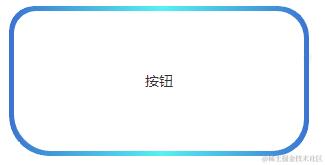
1.1. 渐变色 圆角/倒角 效果图
圆角
倒角
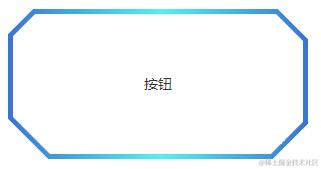
1.2. 渐变色 圆角/倒角 完整示例代码
渐变色色值:linear-gradient(270deg,rgba(34,117,211,1) 0%,rgba(14,244,243,1) 49%,rgba(34,117,211,1) 100%)
边宽:5px
宽:300px
高:150px
圆角值: 左上25px 右上30px 右下35px 左下40px
类型:圆角(若想要查看倒角样式,将borderType设置为chamfer即可)

2、前景提要
圆角渐变色边框不支持圆角
.fillet-gradient-color-box {
  display: flex;
  justify-content: center;
  align-items: center;
  width: 400px;
  height: 200px;

  border: 1px solid transparent;
  border-image: linear-gradient(270deg,rgba(34,117,211,1) 0%,rgba(14,244,243,1) 49%,rgba(34,117,211,1) 100%) 1;
  border-image-slice: 1;
}
圆角纯色边框不支持渐变色
.fillet-pure-color-box {
  border: 1px solid #9ba2b0;
  border-radius: 20;
}
所以当我们需要满足既要**支持圆角**,又要**支持渐变色**的时候,就没有直接可以使用的css样式可以实现
圆角背景色设置渐变,after切割出圆角效果
【注】这种效果的缺陷是背景颜色不能有透明度,不然被叠加遮盖住的_background-image_颜色就会显示出来
.border-radius-demo {
  width: 400px;
  height: 400px;

  position: relative;
  display: flex;
  justify-content: center;
  align-items: center;

  background-image: linear-gradient(270deg,rgba(34,117,211,1) 0%,rgba(14,244,243,1) 49%,rgba(34,117,211,1) 100%);
  border-radius: 25px 30px 35px 40px;
}
.border-radius-demo:after {
  content: "";
  position: absolute;
  left: 5px;
  top: 5px;
  z-index: 10;
  width: calc(100% - 10px);
  height: calc(100% - 10px);
  border-radius: 25px 30px 35px 40px;
  background-color: red;
}
倒角结合边框配置单纯切割图形实现的倒角,会出现切割部分没有边的问题
【注】一下这种矩形裁切方式,会将四个角裁去的部分中边框的部分同样裁去,最终并不是想要实现的效果
.chamfer-gradient-color-box {
  width: 400px;
  height: 200px;

  border: 3px solid transparent;
  border-image: linear-gradient(270deg,rgba(34,117,211,1) 0%,rgba(14,244,243,1) 49%,rgba(34,117,211,1) 100%) 1;
  border-image-slice: 1;
  background-color: rgb(103, 235, 63);
  clip-path: polygon(15px 0, calc(100% - 15px) 0, 100% 15px, 100% calc(100% - 5px), calc(100% - 15px) 100%,15px 100%, 0 calc(100% - 15px), 0 15px);
}
.chamfer-pure-color-box {
  width: 400px;
  height: 200px;

  border: 3px solid #9ba2b0;
  border-radius: 20;
  background-color: rgb(127, 255, 212);
  clip-path: polygon(15px 0, calc(100% - 15px) 0, 100% 15px, 100% calc(100% - 15px), calc(100% - 15px) 100%,15px 100%, 0 calc(100% - 15px), 0 15px);
}
3、实现方法及逻辑
通过CSS样式中的clip-path样式,结合dom元素的after进行叠加遮盖,实现 渐变色 圆角/倒角 边框 的效果
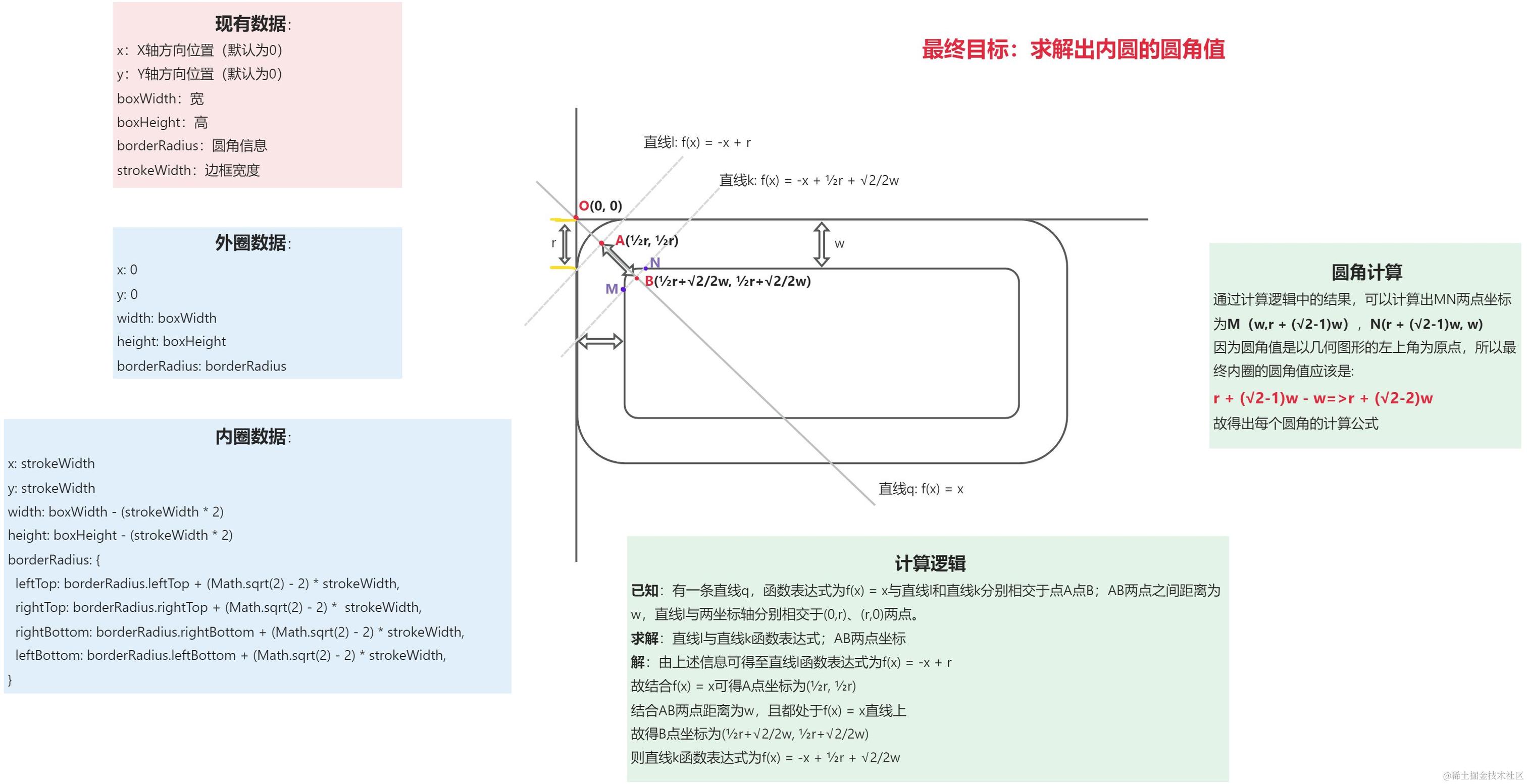
3.1. 内圆 圆角值计算逻辑图解
3.2. CSS绘制逻辑图解
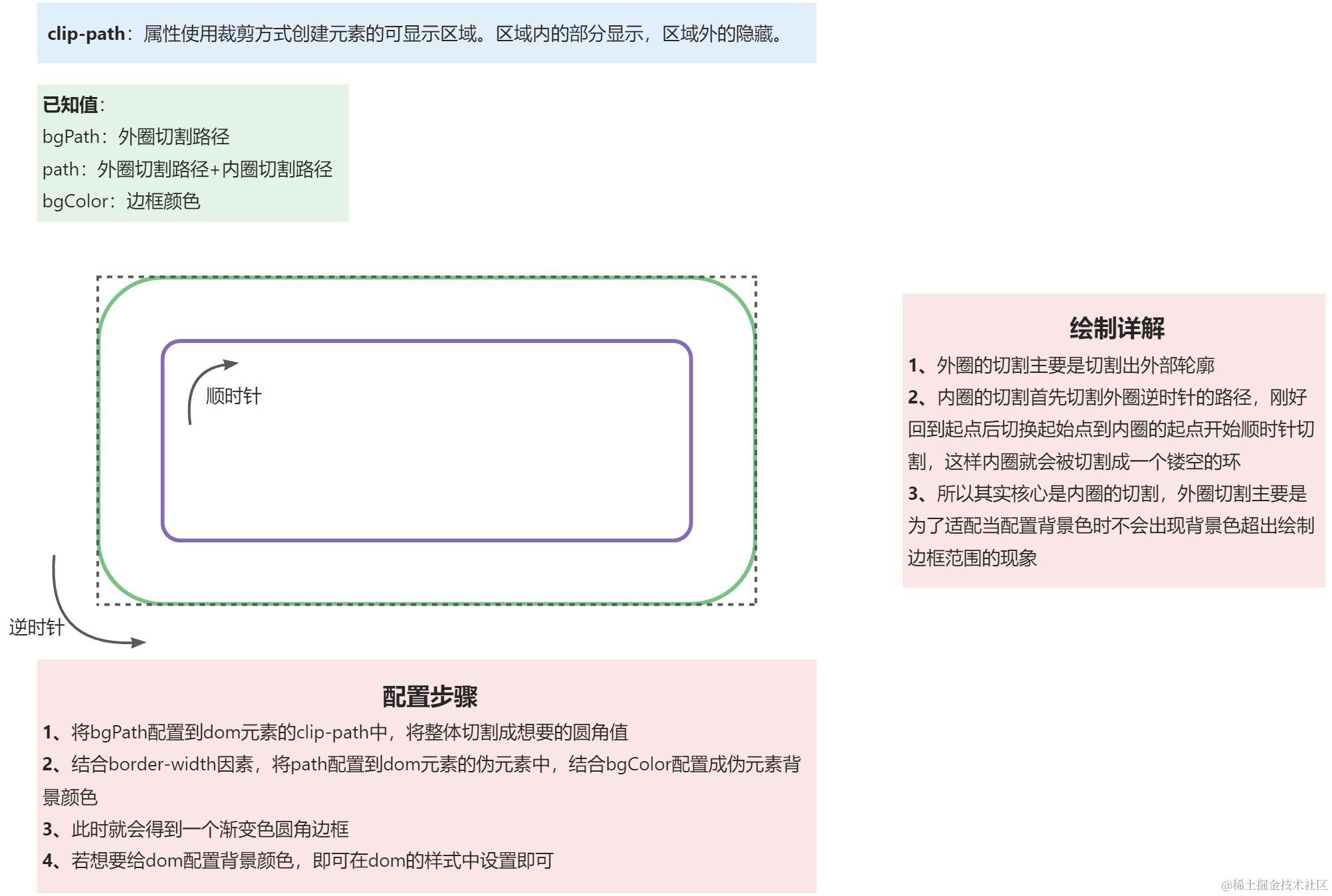
3.3. 绘制外圈圆角矩形路径(按照逆时针方向绘制)
const createOuterRoundedRectPath = (params) => {
  const { x, y, width, height, borderRadius } = params;
  return (
    "M " +
    x +
    "," +
    (y + height / 2 + (height / 2 - borderRadius.leftBottom)) +
    " a " +
    borderRadius.leftBottom +
    "," +
    borderRadius.leftBottom +
    " 0 0 0 " +
    borderRadius.leftBottom +
    "," +
    borderRadius.leftBottom +
    " h " +
    (width - (borderRadius.rightBottom + borderRadius.leftBottom)) +
    " a " +
    borderRadius.rightBottom +
    "," +
    borderRadius.rightBottom +
    " 0 0 0 " +
    borderRadius.rightBottom +
    "," +
    borderRadius.rightBottom * -1 +
    " v " +
    (height - (borderRadius.rightBottom + borderRadius.rightTop)) * -1 +
    " a " +
    borderRadius.rightTop +
    "," +
    borderRadius.rightTop +
    " 0 0 0 " +
    borderRadius.rightTop * -1 +
    "," +
    borderRadius.rightTop * -1 +
    " h " +
    (width - (borderRadius.rightTop + borderRadius.leftTop)) * -1 +
    " a " +
    borderRadius.leftTop +
    "," +
    borderRadius.leftTop +
    " 0 0 0 " +
    borderRadius.leftTop * -1 +
    "," +
    borderRadius.leftTop +
    " z"
  );
};
3.4. 绘制内圈圆角矩形路径(按照顺时针方向绘制)
const createInnerRoundedRectPath = (params) => {
  const { x, y, width, height, borderRadius } = params;
  return (
    "M " +
    (x + borderRadius.leftTop) +
    "," +
    y +
    " h " +
    (width - (borderRadius.rightTop + borderRadius.leftTop)) +
    " a " +
    borderRadius.rightTop +
    "," +
    borderRadius.rightTop +
    " 0 0 1 " +
    borderRadius.rightTop +
    "," +
    borderRadius.rightTop +
    " v " +
    (height - (borderRadius.rightBottom + borderRadius.rightTop)) +
    " a " +
    borderRadius.rightBottom +
    "," +
    borderRadius.rightBottom +
    " 0 0 1 " +
    borderRadius.rightBottom * -1 +
    "," +
    borderRadius.rightBottom +
    " h " +
    (width - (borderRadius.leftBottom + borderRadius.rightBottom)) * -1 +
    " a " +
    borderRadius.leftBottom +
    "," +
    borderRadius.leftBottom +
    " 0 0 1 " +
    borderRadius.leftBottom * -1 +
    "," +
    borderRadius.leftBottom * -1 +
    " v " +
    (height - (borderRadius.leftBottom + borderRadius.leftTop)) * -1 +
    " a " +
    borderRadius.leftTop +
    "," +
    borderRadius.leftTop +
    " 0 0 1 " +
    borderRadius.leftTop +
    "," +
    borderRadius.leftTop * -1 +
    " z"
  );
};
3.5. 绘制外圈倒角矩形路径(按照逆时针方向绘制)
const createOuterAngleRectPath = (params) => {
  const { x, y, width, height, borderRadius } = params;
  return (
    "M " +
    x +
    "," +
    (y + height / 2 + (height / 2 - borderRadius.leftBottom)) +
    " l " +
    borderRadius.leftBottom +
    "," +
    borderRadius.leftBottom +
    " h " +
    (width - (borderRadius.rightBottom + borderRadius.leftBottom)) +
    " l " +
    borderRadius.rightBottom +
    "," +
    borderRadius.rightBottom * -1 +
    " v -" +
    (height - (borderRadius.rightBottom + borderRadius.rightTop)) +
    " l " +
    borderRadius.rightTop * -1 +
    "," +
    borderRadius.rightTop * -1 +
    " h -" +
    (width - (borderRadius.rightTop + borderRadius.leftTop)) +
    " l " +
    borderRadius.leftTop * -1 +
    "," +
    borderRadius.leftTop +
    " z"
  );
};
3.6. 绘制内圈倒角矩形路径(按照顺时针方向绘制)
const createInnerAngleRectPath = (params) => {
  const { x, y, width, height, borderRadius } = params;
  return (
    "M " +
    (x + borderRadius.leftTop) +
    "," +
    y +
    " h " +
    (width - borderRadius.rightTop - borderRadius.leftTop) +
    " l " +
    borderRadius.rightTop +
    "," +
    borderRadius.rightTop +
    " v " +
    (height - borderRadius.rightBottom - borderRadius.rightTop) +
    " l " +
    borderRadius.rightBottom * -1 +
    "," +
    borderRadius.rightBottom +
    " h " +
    -1 * (width - borderRadius.leftBottom - borderRadius.rightBottom) +
    " l " +
    borderRadius.leftBottom * -1 +
    "," +
    borderRadius.leftBottom * -1 +
    " v " +
    -1 * (height - borderRadius.leftTop - borderRadius.leftBottom) +
    " l " +
    borderRadius.leftTop * -1 +
    "," +
    borderRadius.leftTop +
    " z"
  );
};
3.7. 结合内圈&外圈return的路径,返回clip-path样式path的路径数据
【注】这里传递参数时,需要对圆角大小进行限制,不能超过宽高最小值的一半
const getAssemblePath = (outerParams, innerParams, type) => {
  // 创建外圈圆角矩形
  const outerRoundPath =
    type === "fillet"
      ? createOuterRoundedRectPath(outerParams)
      : createOuterAngleRectPath(outerParams);
  // 创建内圈圆角矩形
  const innerRoundPath =
    type === "fillet"
      ? createInnerRoundedRectPath(innerParams)
      : createInnerAngleRectPath(innerParams);
  return {
    borderPath: `${outerRoundPath} ${innerRoundPath}`,
    bgPath: `${outerRoundPath}`,
  };
};

const handleCalculatePath = (
  borderRadius,
  type,
  strokeWidth,
  { boxWidth, boxHeight }
) => {
  // 这里对 圆角/倒角 大小尺寸做一次限制处理,不能超过 宽/高 最小值的一半
  let newBorderRadius = {
    leftTop: Math.min(borderRadius.leftTop, Math.min(boxWidth, boxHeight) / 2),
    rightTop: Math.min(
      borderRadius.rightTop,
      Math.min(boxWidth, boxHeight) / 2
    ),
    rightBottom: Math.min(
      borderRadius.rightBottom,
      Math.min(boxWidth, boxHeight) / 2
    ),
    leftBottom: Math.min(
      borderRadius.leftBottom,
      Math.min(boxWidth, boxHeight) / 2
    ),
  };
  const outerParams = {
    x: 0,
    y: 0,
    width: boxWidth,
    height: boxHeight,
    borderRadius: newBorderRadius,
  };
  const innerParams = {
    x: strokeWidth,
    y: strokeWidth,
    width: boxWidth - strokeWidth * 2,
    height: boxHeight - strokeWidth * 2,
    borderRadius: {
      leftTop: newBorderRadius.leftTop + (Math.sqrt(2) - 2) * strokeWidth,
      rightTop: newBorderRadius.rightTop + (Math.sqrt(2) - 2) * strokeWidth,
      rightBottom:
        newBorderRadius.rightBottom + (Math.sqrt(2) - 2) * strokeWidth,
      leftBottom: newBorderRadius.leftBottom + (Math.sqrt(2) - 2) * strokeWidth,
    },
  };
  const path = getAssemblePath(outerParams, innerParams, type).borderPath;
  const bgPath = getAssemblePath(outerParams, innerParams, type).bgPath;

  return { path, bgPath };
};
3.8. 生成CSS样式
const handleDrawGraph = (
  borderRdius,
  type,
  borderWidth,
  boxWidth,
  boxHeight,
  borderColor
) => {
  const { path, bgPath } = handleCalculatePath(
    borderRadius,
    type,
    borderWidth,
    {
      boxWidth,
      boxHeight
    }
  );
  return {
    "--custom-box-clip-path": `path('${path}')`,
    "--custom-box-clip-path-bg-path": `path('${bgPath}')`,
    "--custom-box-clip-path-bg-color": borderColor
  }
}
.custom-box {
  position: relative;
  width: 100%;
  height: 100%;
  clip-path: var(--custom-box-clip-path-bg-path);
  &::after {
    position: absolute;
    left: 0;
    top: 0;
    z-index: -1;
    width: 100%;
    height: 100%;
    background: var(--custom-box-clip-path-bg-color);
    clip-path: var(--custom-box-clip-path);
  }
}
通过以上设置就可以实现 渐变色/纯色+圆角/倒角 的样式效果