1.Maven导入依赖
<dependency>
    <groupId>com.alibaba</groupId>
    <artifactId>easyexcel</artifactId>
    <version>3.1.0</version>
</dependency>
2. 定义模板文件
public static void main(String[] args) {
File templateFileName = new File("D:\upload\templateFile.xlsx");
}
3. 定义模板样式和内容
public static void main(String[] args) {
File templateFileName = new File("D:\upload\templateFile.xlsx");
WriteCellStyle contentWriteCellStyle = new WriteCellStyle();
contentWriteCellStyle.setHorizontalAlignment(HorizontalAlignment.CENTER);
contentWriteCellStyle.setVerticalAlignment(VerticalAlignment.CENTER);
HorizontalCellStyleStrategy horizontalCellStyleStrategy = new HorizontalCellStyleStrategy(null, contentWriteCellStyle);
SimpleRowHeightStyleStrategy rowHeightStrategy = new SimpleRowHeightStyleStrategy((short) 31, (short) 29);
SimpleColumnWidthStyleStrategy columnWidthStyleStrategy = new SimpleColumnWidthStyleStrategy(20);
List<String> headerList = Stream.of("姓名", "数字").collect(Collectors.toList());
List<List<String>> header = headerList.stream().map(item -> new ArrayList<>(Collections.singletonList(item))).collect(Collectors.toList());
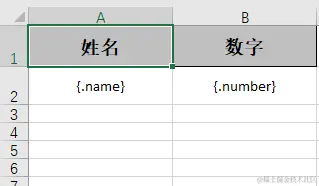
List<String> column = Stream.of("{.name}", "{.number}").collect(Collectors.toList());
List<List<String>> templateColumn = column.stream().map(item -> new ArrayList<>(Collections.singletonList(item))).collect(Collectors.toList());
EasyExcel.write(templateFileName.getPath())
.registerWriteHandler(rowHeightStrategy)
.registerWriteHandler(columnWidthStyleStrategy)
.registerWriteHandler(horizontalCellStyleStrategy).head(header)
.sheet().doWrite(templateColumn);
}
模板生成内容
4. 根据模板填充数据
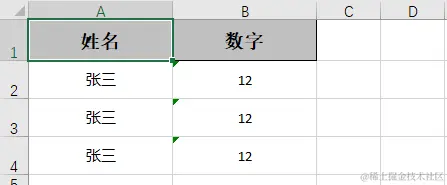
List<Map<String,String>> data = new ArrayList<>();
for (int i = 0; i <= 2; i++){
Map<String, String> map = new HashMap<>();
map.put("name","张三");
map.put("number","12");
data.add(map);
}
File fileName = new File("D:\upload\testFile.xlsx");
EasyExcel.write(fileName.getPath()).inMemory(true).withTemplate("D:\upload\templateFile.xlsx").sheet().doFill(data);
填充完毕内容
本次主要记录EasyExcel模板填充,填充所使用的.inMemory(true)方法在大量数据填充时请不要使用,所有的数据都会在内存容易OOM,具体可以查看API官方说明。