创建一个RN项目
  "name": "my_react_app",
  "version": "0.0.1",
  "private": true,
  "scripts": {
    "start": "npx react-native start",
    "start:cache": "npx react-native start --reset-cache",
    "build:android": "npx react-native bundle --platform android --dev false --entry-file index.js --bundle-output dist/index.android.bundle --assets-dest dist",
    "build:ios": "npx react-native bundle --platform ios --dev false --entry-file index.js --bundle-output dist/index.ios.bundle --assets-dest dist",
    "build": "npm run build:android && npm run build:ios && npm run build:md5",
    "build:md5": "node px_config/build/build.js",
    "remove:dist": "node .bundle/remove.js"
  },
  "dependencies": {
    "@react-native-community/masked-view": "^0.1.11",
    "@react-navigation/native": "^6.1.17",
    "@react-navigation/native-stack": "^6.9.26",
    "@react-navigation/stack": "^6.3.29",
    "babel-loader": "^9.1.3",
    "crypto-js": "^4.2.0",
    "react": "18.2.0",
    "react-native": "0.72",
    "react-native-flipper": "^0.212.0",
    "react-native-gesture-handler": "^2.16.0",
    "react-native-performance": "^5.1.2",
    "react-native-performance-flipper-reporter": "^5.0.0",
    "react-native-reanimated": "^3.8.1",
    "react-native-screens": "^3.30.1",
    "react-native-vector-icons": "^10.0.3",
    "url-loader": "^4.1.1"
  },
  "devDependencies": {
    "@babel/runtime": "^7.24.1",
    "@react-native-community/cli-plugin-metro": "^13.2.0",
    "react-native-safe-area-context": "^4.6.0",
    "react-native-svg-transformer": "^1.3.0"
  }
}
node环境
scripts中build指令
- 用做ios+Android产物.bundle文件的打包
- build:md5将产物的md5作为文件名,重命名.bundle文件
开发调试
- 在设备上运行
-
- 电脑上启动RN项目 npm run start,默认端口号是8081
- 手机上,下载安装debug包
-
- 连接电脑ip代理,确保你的电脑和手机连接至 same Wi-Fi 网络
- 打开app,进入首页后按音量下键后进入RN界面
- 默认 RN会访问localhost:8081的bundle.js资源
- 可以自定义配置,通过“摇一摇”打开RN内置的开发菜单
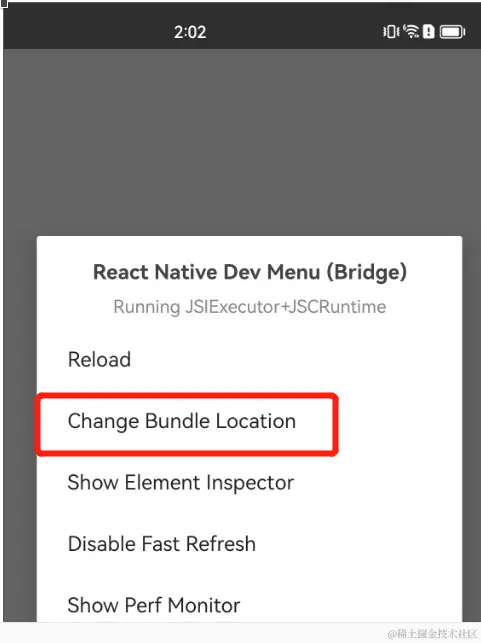
- chrome devtools
-