在# 05. Spring AI 提示词模版源码分析及简单的使用 介绍了提示词的如何的使用的,提示词这么强大,是否能够在提示词模版中指定AI大模型返回结果的结构呢?答案是必然的。本篇文章就对Spring AI框架实现的对大模型返回内容进行格式化输出的源码分析及提供简单的使用示例。
为什么需要格式化输出
对于依赖可靠解析输出值的下游应用程序来说,生成结构化输出是LLMs非常重要的能力。开发人员希望快速将 AI 模型的结果转换为数据类型,例如 JSON、XML 或 Java 类,这些数据类型可以传递给其他应用程序函数和方法。
特别是函数调用、智能体等都需要将大模型的输出进行格式化,然后调用外部函数辅助大模型更好的回答提出的问题。
支持结构化输出的大模型
| 模型 | 代码示例 | 模型说明 |
|---|---|---|
| OpenAI | OpenAiChatModelIT | OpenAI 大模型 |
| Anthropic Claude 3 | AnthropicChatModelIT.java | 美国初创公司Anthropic发布的大模型 |
| Azure OpenAI | AzureOpenAiChatModelIT.java | 微软发布的大模型 |
| Mistral AI | MistralAiChatModelIT.java | 法国2023年成立工智能公司发布的大模型 |
| Ollama | OllamaChatModelIT.java | 本地运行大模型工具 |
| Vertex AI Gemini | VertexAiGeminiChatModelIT.java | Google公司的大模型 |
| Bedrock Anthropic 2 | BedrockAnthropicChatModelIT.java | 托管在Amazon Bedrock的大模型 |
| Bedrock Anthropic 3 | BedrockAnthropic3ChatModelIT.java | 托管在Amazon Bedrock的大模型 |
| Bedrock Cohere | BedrockCohereChatModelIT.java | 托管在Amazon Bedrock的大模型 |
| Bedrock Llama | BedrockLlamaChatModelIT.java.java | 托管在Amazon Bedrock的大模型, Meta 发布 |
处理流程图
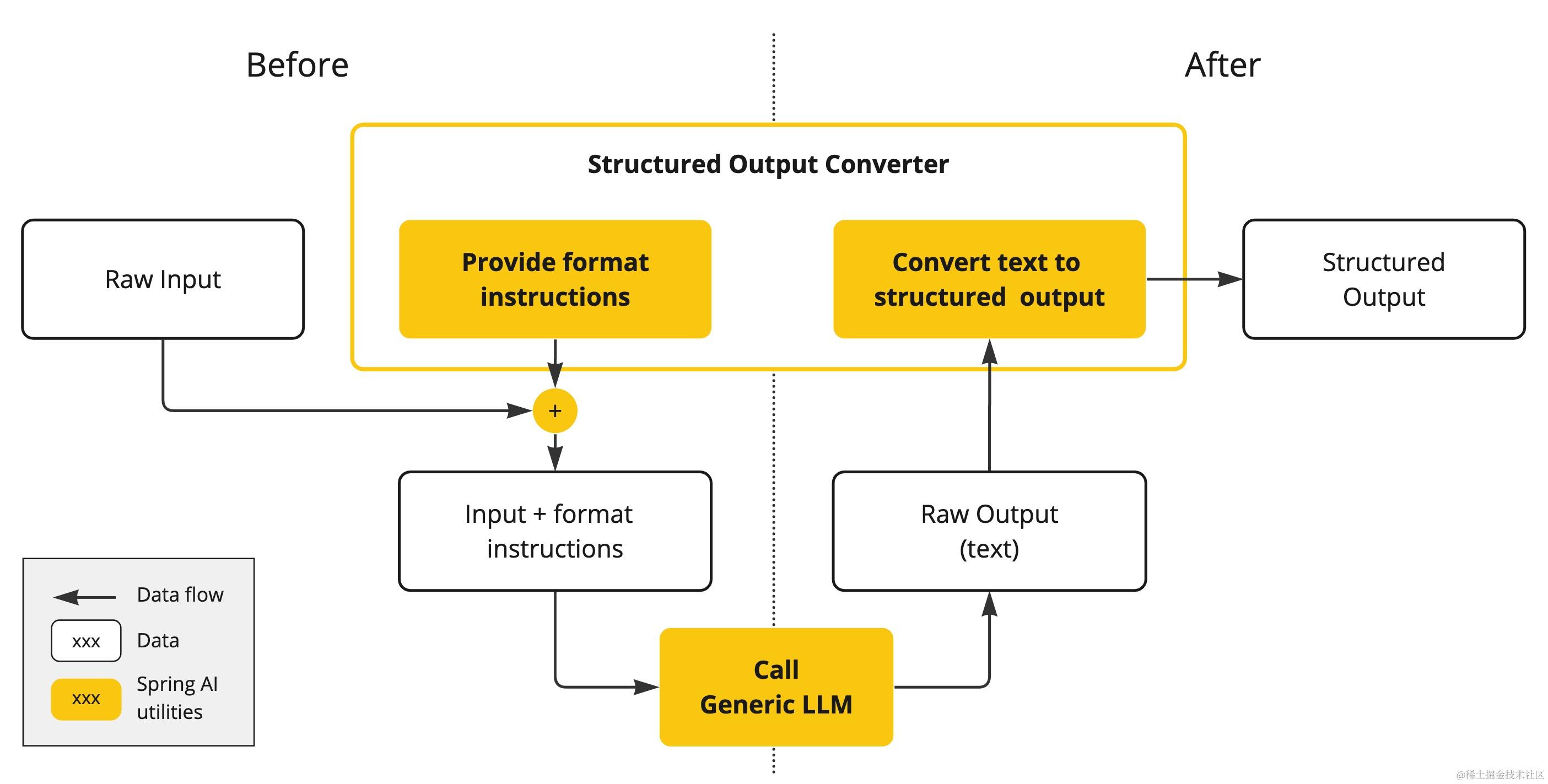 Spring AI提供了调用之前和调用之后两个步骤进行处理;
-
在LLM调用前,转换器会将格式说明附加到提示词中,为模型生成所需的输出结构提供明确的指导。
-
LLM调用后,转换器获取模型的输出文本,并将其转换为结构化类型的实例。此转换过程涉及分析原始文本输出并将其映射到相应的结构化数据表示形式,例如 JSON、XML 或特定于域的数据结构。
类交互图
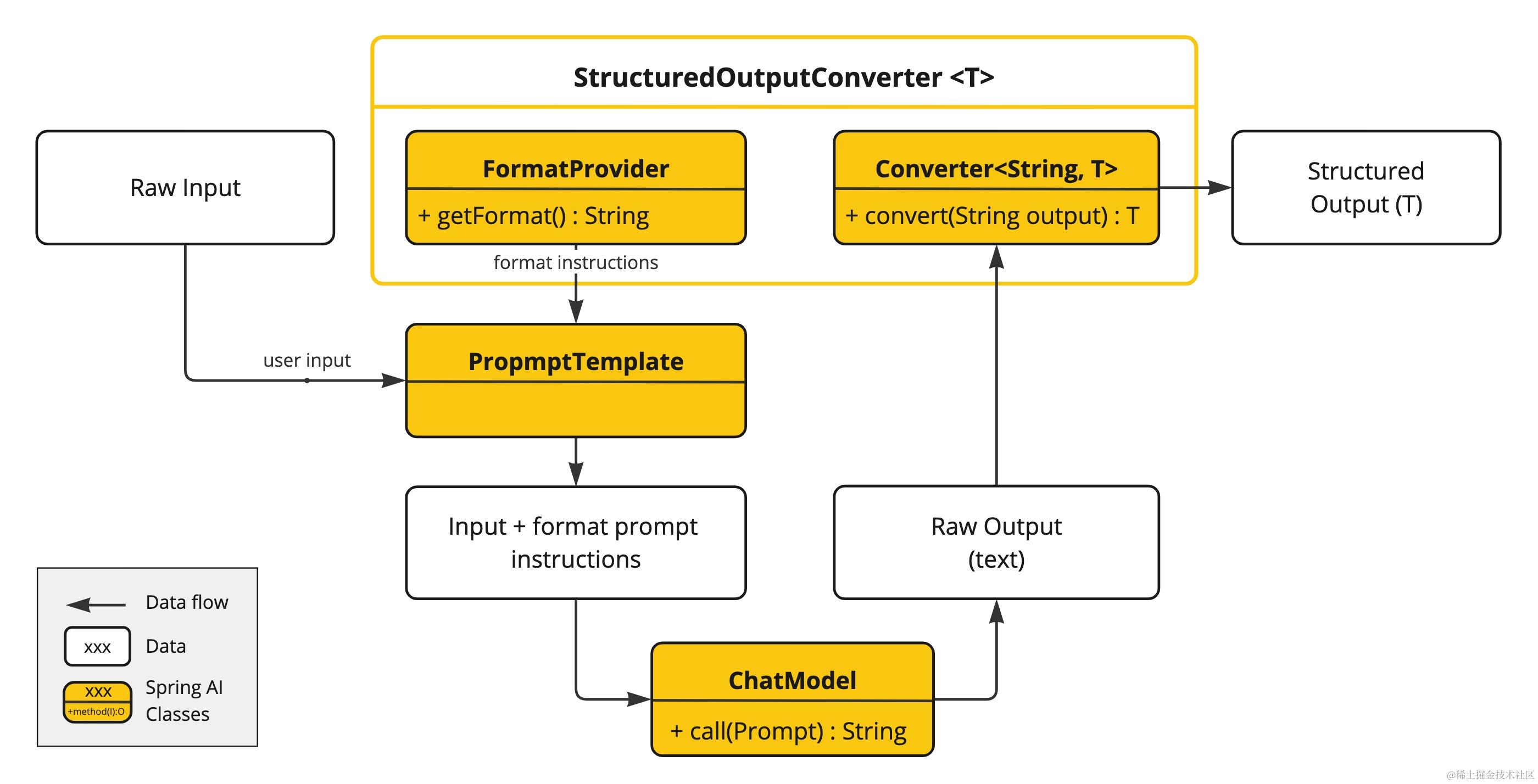
第一步:使用PromptTemplate定义提示词模板,通过FormatProvider#getFormat()获取指示大模型输出格式的指令,并将输入和格式指令组组合,然后指定第二步。
第二步:将第一步骤组合的指令,通过ChatModel将指令发送给大模型,大模型返回原始文本输出。
第三步:通过Spring AI提供的Converter<String,T>将第二步大模型返回的原始文本转换结构化内容输出。
源码分析
注意,本文分析的是1.0.0-SNAPSHOT版本的,与1.0.0之前的版本相差比较大。
整体架构图
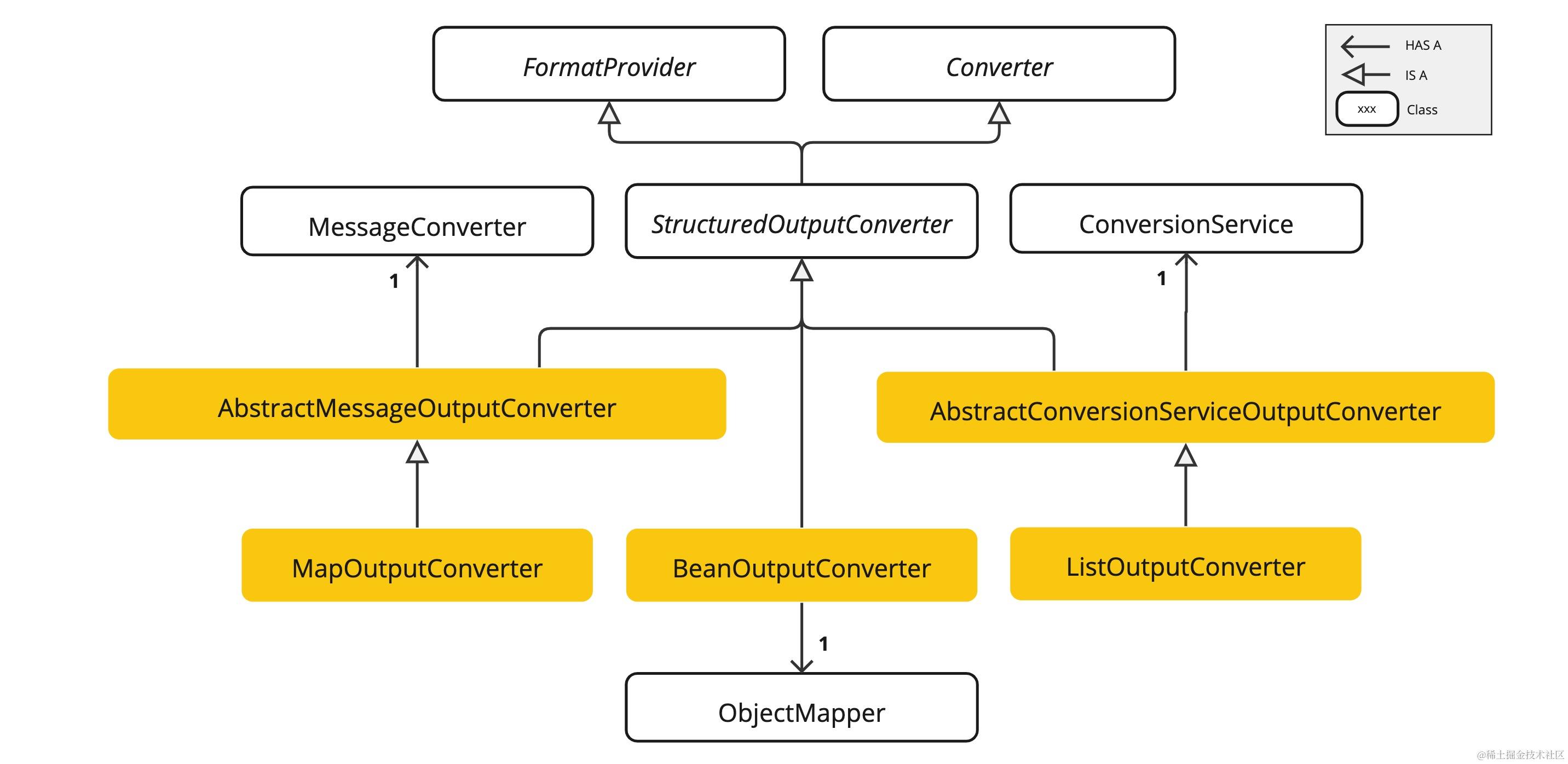
StructuredOutputConverter
public interface StructuredOutputConverter<T> extends Converter<String, T>, FormatProvider {

    /**
     * 该接口废弃,应该使用父接口中的convert方法替代
     * @deprecated Use the {@link #convert(Object)} instead.
     */
    default T parse(@NonNull String source) {
       return this.convert(source);
    }

}
该接口继承两个接口 Converter<String, T> 和 FormatProvider。
其中Converter<String, T> springframework core包中的转换器接口。之所以继承该接口,官方文档说保持所有转换器风格的一致性。
FormatProvider 由 Spring AI 提供,主要获取格式化指令内容,指导大模型以什么格式输出内容。
package org.springframework.ai.converter;

public interface FormatProvider {

    /**
     * 返回含有指导大模型返回格式化的指令,大家先这么理解着,后续示例中会使用,让大家更好地理解它
     */
    String getFormat();
}
BeanOutputConverter
BeanOutputConverter 是 StructuredOutputConverter<T> 的唯一子类。具体源码如下【只留了核心代码】;
public class BeanOutputConverter<T> implements StructuredOutputConverter<T> {

    /** The object mapper used for deserialization and other JSON operations. */
    @SuppressWarnings("FieldMayBeFinal")
    private ObjectMapper objectMapper;


    /**
     * 将指定的String文本类型转换为目标类型的对象
     * @param text 大模型返回的string类型格式的文本.
     * @return 目标类型.
     */
    @Override
    public T convert(@NonNull String text) {
       try {
          if (text.startsWith("```json") && text.endsWith("```")) {
             text = text.substring(7, text.length() - 3);
          }
          return (T) this.objectMapper.readValue(text, this.typeRef);
       }
       catch (JsonProcessingException e) {
          logger.error("Could not parse the given text to the desired target type:" + text + " into " + this.typeRef);
          throw new RuntimeException(e);
       }
    }

    /**
     * Provides the expected format of the response, instructing that it should adhere to
     * the generated JSON schema.
     * @return The instruction format string.
     */
    @Override
    public String getFormat() {
       String template = """
             Your response should be in JSON format.
             Do not include any explanations, only provide a RFC8259 compliant JSON response following this format without deviation.
             Do not include markdown code blocks in your response.
             Remove the ```json markdown from the output.
             Here is the JSON Schema instance your output must adhere to:
             ```%s```
             """;
       return String.format(template, this.jsonSchema);
    }

}
BeanOutputConverter的底层实现的几个关键点;
- 使用了ObjectMapper对象转换
- ParameterizedTypeReference 返回对象的类型,而不受范型擦除的影响。
- jsonSchema的获取,并将jsonSchema格式化到template中,具体源码如
getFormat方法
什么是jsonschema?首先定一个User类型,然后获取其json schema
public class User {
    private String name;

    public String getName() {
        return name;
    }

    public void setName(String name) {
        this.name = name;
    }
}
获取到的json schema 如下;
{
  "$schema" : "https://json-schema.org/draft/2020-12/schema",
  "type" : "object",
  "properties" : {
    "name" : {
      "type" : "string"
    }
  }
}
最终生成的发给大模型的format指令如下;
Your response should be in JSON format.
Do not include any explanations, only provide a RFC8259 compliant JSON response following this format without deviation.
Do not include markdown code blocks in your response.
Remove the ```json markdown from the output.
Here is the JSON Schema instance your output must adhere to:
```{
  "$schema" : "https://json-schema.org/draft/2020-12/schema",
  "type" : "object",
  "properties" : {
    "name" : {
      "type" : "string"
    }
  }
}```
AbstractMessageOutputConverter<T>
AbstractMessageOutputConverter<T> - 使用预定的转换器对大模型输出进行格式化输出。未提供默认 FormatProvider 实现。
package org.springframework.ai.converter;

import org.springframework.messaging.converter.MessageConverter;

/**
 * Abstract {@link StructuredOutputConverter} implementation that uses a pre-configured
 * {@link MessageConverter} to convert the LLM output into the desired type format.
 *
 * @param <T> Specifies the desired response type.
 * @author Mark Pollack
 * @author Christian Tzolov
 */
public abstract class AbstractMessageOutputConverter<T> implements StructuredOutputConverter<T> {
    // 引用springframework-messaging提供的消息转换器
    private MessageConverter messageConverter;

    public AbstractMessageOutputConverter(MessageConverter messageConverter) {
       this.messageConverter = messageConverter;
    }

    public MessageConverter getMessageConverter() {
       return this.messageConverter;
    }

}
MapOutputConverter
public class MapOutputConverter extends AbstractMessageOutputConverter<Map<String, Object>> {

    public MapOutputConverter() {
        // 调用父类构造方法,设置converter。
       super(new MappingJackson2MessageConverter());
    }

    @Override
    public Map<String, Object> convert(@NonNull String text) {
       // 大模型返回的String类型为 ```json xxxx ```
       if (text.startsWith("```json") && text.endsWith("```")) {
          text = text.substring(7, text.length() - 3);
       }
       //
       Message<?> message = MessageBuilder.withPayload(text.getBytes(StandardCharsets.UTF_8)).build();
       return (Map) this.getMessageConverter().fromMessage(message, HashMap.class);
    }

    // 发送给大模型提示词中的format内容,能够指导大模型按照format的说明进行返回
    @Override
    public String getFormat() {
       String raw = """
             Your response should be in JSON format.
             The data structure for the JSON should match this Java class: %s
             Do not include any explanations, only provide a RFC8259 compliant JSON response following this format without deviation.
             Remove the ```json markdown from the output.
             """;
       return String.format(raw, HashMap.class.getName());
    }

}
MapOutputConverter 是 AbstractMessageOutputConverter<T> 的唯一的实现类。其内部使用的MessageConverter类型为springframework.messaging包提供的消息转换器 MappingJackson2MessageConverter。使用Jackson 2 JSON库实现消息与JSON格式之间相互转换。
Spring 还提供了其它消息类型转换器,大大简化消息的读取和写入。
- MappingJacksonMessageConverter:使用Jackson JSON库实现消息与JSON格式之间的相互转换
- MarshallingMessageConverter:使用JAXB库实现消息与XML格式之间的相互转换
- SimpleMessageConverter:实现String与TextMessage之间的相互转换,字节数组与Bytes Message之间的相互转换,Map与MapMessage之间的相互转换 以及Serializable对象与ObjectMessage之间的相互转换。
这里不再详细介绍MessageConveter的实现,如果大家有兴趣自行研究其实现原理。
AbstractConversionServiceOutputConverter
public abstract class AbstractConversionServiceOutputConverter<T> implements StructuredOutputConverter<T> {

    private final DefaultConversionService conversionService;

    public AbstractConversionServiceOutputConverter(DefaultConversionService conversionService) {
       this.conversionService = conversionService;
    }

    public DefaultConversionService getConversionService() {
       return this.conversionService;
    }

}
AbstractConversionServiceOutputConverter使用的是 springframework.core 模块提供的 ConversionService 其提供了一种机制来执行类型之间的转换。默认使用 DefaultConversionService,内部提供了许多内置类型转换的支持。
ConversionService 允许开发者定义自己的转换逻辑,并注册到服务中,从而可以在运行时动态地转换对象。这种机制在数据绑定、服务层方法参数转换以及热河需要类型转换的场景中都非常有用。
ConversionService 在SpringMVC中也扮演重要的角色,它用于将请求参数绑定到控制器方法的参数上时进行类型转换。
ListOutputConverter
ListOutputConverter是AbstractConversionServiceOutputConverter唯一实现类,其源码如下;
public class ListOutputConverter extends AbstractConversionServiceOutputConverter<List<String>> {

    public ListOutputConverter(DefaultConversionService defaultConversionService) {
       super(defaultConversionService);
    }

    @Override
    public String getFormat() {
       return """
             Your response should be a list of comma separated values
             eg: `foo, bar, baz`
             """;
    }

    @Override
    public List<String> convert(@NonNull String text) {
       return this.getConversionService().convert(text, List.class);
    }

}
ListOutputConverter的构造方法传入默认的DefaultConversionService类,默认使用springframework.core 提供的默认转换器。如果有特殊的业务需求,我们可以自定义转换器来实现特殊的需求。后续的代码示例都有使用。
转换器实现原理
| 转换器 | 实现方案 |
|---|---|
| BeanOutputConverter | 底层使用 ObjectMapper 实现转换 |
| ListOutputConverter | 底层使用 springframework.core 提供的 ConversionService 实现的 |
| MapOutputConverter | 底层使用 springframework.messaging 模块提供的消息转换器实现的 |
三种类型的转换,使用了三种实现方案
结构化(Bean)输出示例
在 # 05. Spring AI 提示词模版源码分析及简单的使用 基础上,我们返回一个电影对象。
定义Model
package com.ivy.model;

/**
 * 电影返回对象
 *
 * @param director
 * @param filmName
 * @param publishedDate
 * @param description
 */
public record Film(String director, String filmName, String publishedDate, String description) {
}
BeanOutputConverter示例
package com.ivy.controller;

import com.ivy.model.Film;
import jakarta.annotation.Resource;
import org.springframework.ai.chat.client.ChatClient;
import org.springframework.ai.chat.prompt.Prompt;
import org.springframework.ai.chat.prompt.PromptTemplate;
import org.springframework.ai.converter.BeanOutputConverter;
import org.springframework.ai.converter.StructuredOutputConverter;
import org.springframework.ai.openai.OpenAiChatModel;
import org.springframework.web.bind.annotation.GetMapping;
import org.springframework.web.bind.annotation.RestController;

import java.util.Map;

@RestController
public class StructuredOutputController {
    @Resource
    private OpenAiChatModel openAiChatModel;

    @GetMapping("/bean")
    public Film structuredOutput(String director) {
        // 定义提示词模版
        // 其中 format指定输出的格式
        final String template = """
                        请问{director}导演最受欢迎的电影是什么?哪年发行的,电影讲述的什么内容?
                        {format}
                """;
        // 定义结构化输出转化器, 生成Bean
        StructuredOutputConverter<Film> structured = new BeanOutputConverter<>(Film.class);
        // 生成提示词对象
        PromptTemplate promptTemplate = new PromptTemplate(template);
        Prompt prompt = promptTemplate.create(Map.of("director", director, "format", structured.getFormat()));

        ChatClient chatClient = ChatClient.builder(openAiChatModel)
                .build();
        String content = chatClient.prompt(prompt).call().content();
        // 转换
        return structured.convert(content);
    }


}
测试结果
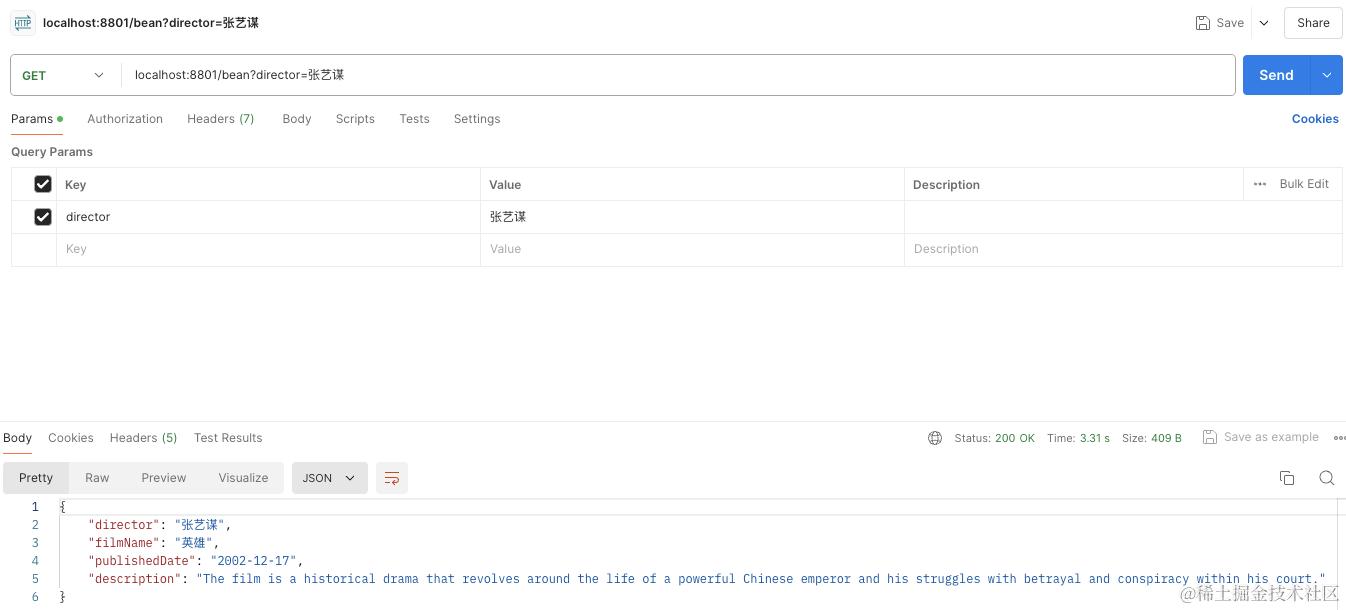
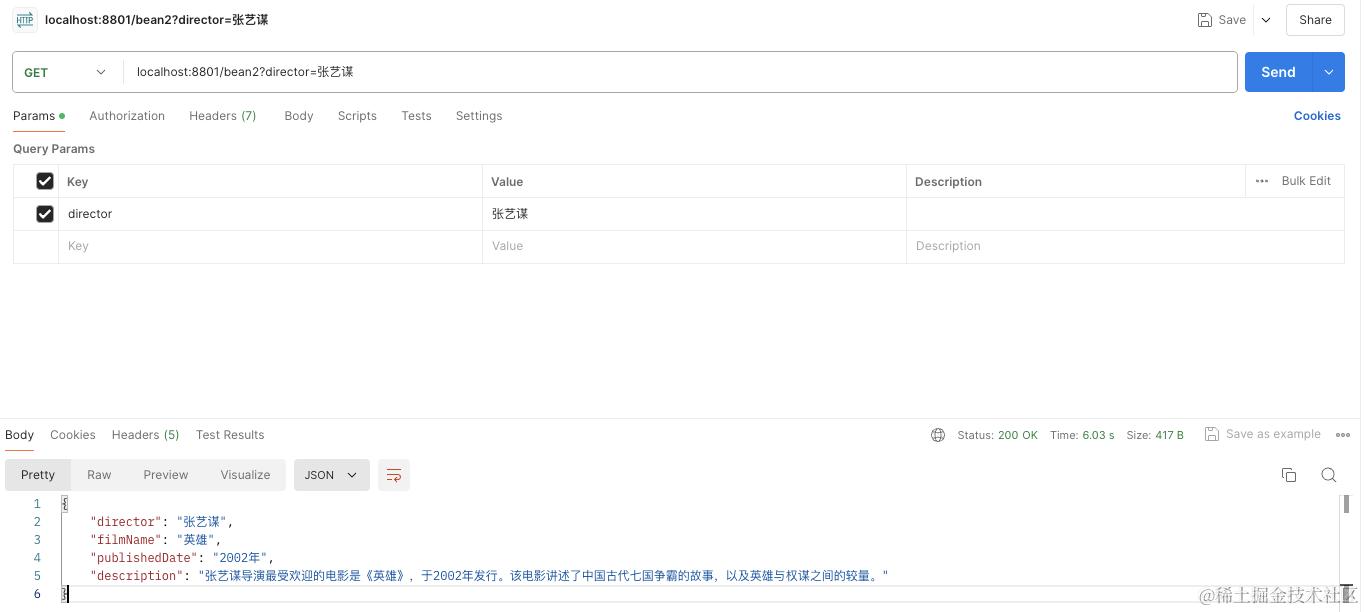
另外一种实现方式
@GetMapping("/bean2")
public Film structuredOutput2(String director) {
    return ChatClient.create(openAiChatModel)
            .prompt()
            .user(u -> u.text("""
                            请问{director}导演最受欢迎的电影是什么?哪年发行的,电影讲述的什么内容
                    """).params(Map.of("director", director))
            ).call()
            .entity(Film.class);

}
代码示例
总结
本篇文章对Spring AI框架提供的格式化输出源码进行分析,并提供了BeanOutputConverter简单的使用示例。对于ListOutputConverter 和 MapOutputConverter 使用大家可以参考github上的代码,文章篇幅原因不在列举。