step1 - pc端-drag

<template>
  <div
    class="item baseBox"
    @dragenter="handleDragenter($event)"
    @dragleave="handleDragleave($event)"
    @dragover="handleDragover($event)"
    @drop="handleDrop"
    :class="isRight ? 'right' : ''"
  >
    {{ fillTitle }}
  </div>
  <div
    class="baseBox baseBox-cursor"
    id="item1"
    @dragstart="handleDragStart($event)"
    @dragend="handleDragend"
    :draggable="true"
  >
    {{ title }}
  </div>
</template>

<script setup>
import { ref } from "vue";
const title = ref("拖拽我");
const fillTitle = ref("");
let draggingId = ref(""); //拖拽对象的id,可通过这种传递信息方式与drop事件连接
let isRight = ref(false); //为true时添加right样式
let targetEl = null; //移入的目标元素

function handleDragStart(ev) {
  draggingId.value = ev.target.id;
}
function handleDragend() {
  if (targetEl) {
    targetEl.classList.remove("dragMoving");
  }
}
function handleDragenter(ev) {
  targetEl = ev.target;
  ev.target.classList.add("dragMoving");
}
function handleDragover(ev) {
  ev.preventDefault(); //允许图标变化
}
function handleDragleave(ev) {
  ev.target.classList.remove("dragMoving");
}
function handleDrop() {
  if (draggingId) {
    isRight.value = true;
    fillTitle.value = title.value;
  }
}
</script>

<style lang="scss" scoped>
.item {
  box-sizing: border-box;
  margin-bottom: 40px;
  cursor: not-allowed;
  &.manager {
    background: #6c63ff;
    color: #ffffff;
    margin-bottom: 63px;
  }
  &.right {
    border: 4px solid #62fb8d;
    color: #62fb8d;
  }
  &.dragMoving {
    border: 4px solid #cad6ce;
    background-color: #cad6ce;
  }
}
.baseBox {
  width: 204px;
  border-radius: 24px;
  height: 56px;
  line-height: 56px;
  font-size: 25px;
  border: 2px solid #6c63ff;
  box-sizing: border-box;
  text-align: center;
  color: #6c63ff;
  user-select: none;
  overflow: hidden;
}
.baseBox-cursor {
  cursor: grab;
  &.selected {
    box-shadow: 0px 0px 7.6px 3px #b2bed6;
  }
  &:hover {
    box-shadow: 0px 0px 7.6px 3px #b2bed6;
  }
  transition: box-shadow 0.5s ease;
}
</style>
step2 - 移动端-没有drag方法,用touchstart/touchmove/touchend

<template>
  <div class="outer">
    <div
      class="item baseBox"
      @dragenter="handleDragenter($event)"
      @dragleave="handleDragleave($event)"
      @dragover="handleDragover($event)"
      @drop="handleDrop"
      :class="isRight ? 'right' : ''"
    >
      {{ fillTitle }}
    </div>
    <div
      class="baseBox baseBox-cursor"
      id="item1"
      @dragstart="handleDragStart($event)"
      @dragend="handleDragend"
      :draggable="true"
      @touchstart="handleTouchstart($event)"
      @touchmove="handleTouchmove($event)"
      @touchend="handleTouchend($event)"
    >
      {{ title }}
    </div>
  </div>
</template>

<script setup>
import { ref } from "vue";
const title = ref("拖拽我");
const fillTitle = ref("");
let draggingId = ref(""); //拖拽对象的id,可通过这种传递信息方式与drop事件连接
let isRight = ref(false); //为true时添加right样式
let targetEl = null; //移入的目标元素
let cloneNode = null; //克隆的拖拽对象,用于移动

//克隆节点的宽高,用于计算拖拽中心
let width = 0;
let height = 0;

//移动端
function handleTouchstart(ev) {
  ev.preventDefault();
  draggingId.value = ev.target.id;
  targetEl = ev.target;
  //复制节点,用于移动
  cloneNode = targetEl.cloneNode(true);
  cloneNode.style.position = "absolute";
  cloneNode.classList.add("selected");

  //向外部容器添加该节点
  document.getElementsByClassName("app")[0].append(cloneNode);

  height = cloneNode.clientHeight;
  width = cloneNode.clientWidth;
  let { clientX, clientY } = ev.changedTouches[0];
  let x = clientY - height / 2;
  let y = clientX - width / 2;
  cloneNode.style.top = x + "px";
  cloneNode.style.left = y + "px";
}
function handleTouchmove(ev) {
  ev.preventDefault();
  if (!cloneNode) {
    return;
  }
  let { clientX, clientY } = ev.targetTouches[0];
  cloneNode.style.top = clientY - height / 2 + "px";
  cloneNode.style.left = clientX - width / 2 + "px";

  //先将样式全部去掉
  document.querySelector(".item").classList.remove("dragMoving");
  //暂时隐藏
  cloneNode.style.display = "none";
  let oElement = document.elementFromPoint(clientX, clientY);
  oElement.classList.add("dragMoving"); //再把到达的添加样式
  //恢复
  cloneNode.style.display = "flex";
}
function handleTouchend(ev) {
  if (!cloneNode) {
    return;
  }
  let { clientX, clientY } = ev.changedTouches[0];
  //暂时隐藏,不然oElement获取到的就是cloneNode
  cloneNode.style.display = "none";
  let oElement = document.elementFromPoint(clientX, clientY);
  if (cloneNode) {
    //移除cloneNode
    document.getElementsByClassName("app")[0].removeChild(cloneNode);
  }
  targetEl = oElement;
  targetEl.classList.remove("dragMoving");
  if (draggingId) {
    //这里换成功能的判断逻辑就好了
    isRight.value = true;
    fillTitle.value = title.value;
  }
}

//pc端-drag
function handleDragStart(ev) {
  draggingId.value = ev.target.id;
}
function handleDragend() {
  if (targetEl) {
    targetEl.classList.remove("dragMoving");
  }
}
function handleDragenter(ev) {
  targetEl = ev.target;
  ev.target.classList.add("dragMoving");
}
function handleDragover(ev) {
  ev.preventDefault(); //允许图标变化
}
function handleDragleave(ev) {
  ev.target.classList.remove("dragMoving");
}
function handleDrop() {
  if (draggingId) {
    //这里换成功能的判断逻辑就好了
    isRight.value = true;
    fillTitle.value = title.value;
  }
}
</script>

<style lang="scss" scoped>
.outer {
  height: 100vh;
}
.item {
  box-sizing: border-box;
  margin-bottom: 40px;
  cursor: not-allowed;

  &.manager {
    background: #6c63ff;
    color: #ffffff;
    margin-bottom: 63px;
  }
  &.right {
    border: 4px solid #62fb8d;
    color: #62fb8d;
  }
  &.dragMoving {
    border: 4px solid #cad6ce;
    background-color: #cad6ce;
  }
}
.baseBox {
  width: 204px;
  border-radius: 24px;
  height: 56px;
  line-height: 56px;
  font-size: 25px;
  border: 2px solid #6c63ff;
  box-sizing: border-box;
  text-align: center;
  color: #6c63ff;
  user-select: none;
  overflow: hidden;
}
.baseBox-cursor {
  cursor: grab;
  &.selected {
    box-shadow: 0px 0px 7.6px 3px #b2bed6;
    cursor: grabbing;
  }
  &:hover {
    box-shadow: 0px 0px 7.6px 3px #b2bed6;
  }
  transition: box-shadow 0.5s ease;
}
</style>
step3 - pc端优化-drag方法自带样式问题-选择用原生实现mousedown/mousemove/mouseup-复用移动端逻辑-获取clientX和clientY的地方不一样
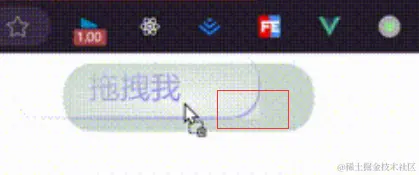
problem1 - mousedown/mousemove/mouseup方法只会在被绑定的元素身上被检测-导致拖拽一卡一卡的
错误代码
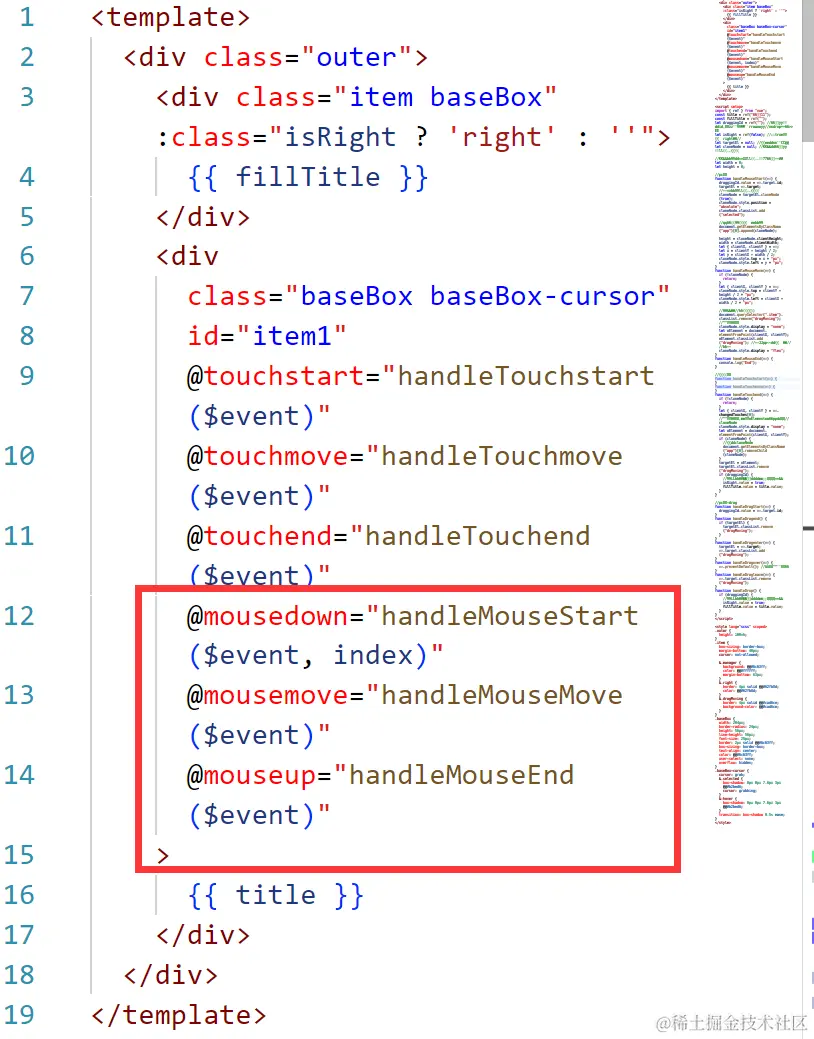
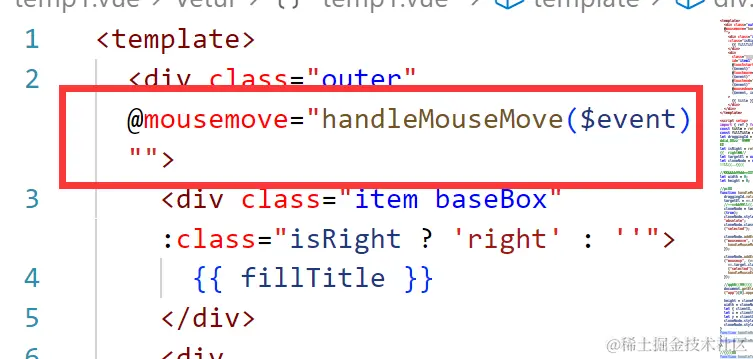
problem2 - mousemove加在最外层盒子上,复制节点cloneNode监听不到move事件-导致拖拽一卡一卡的
错误代码
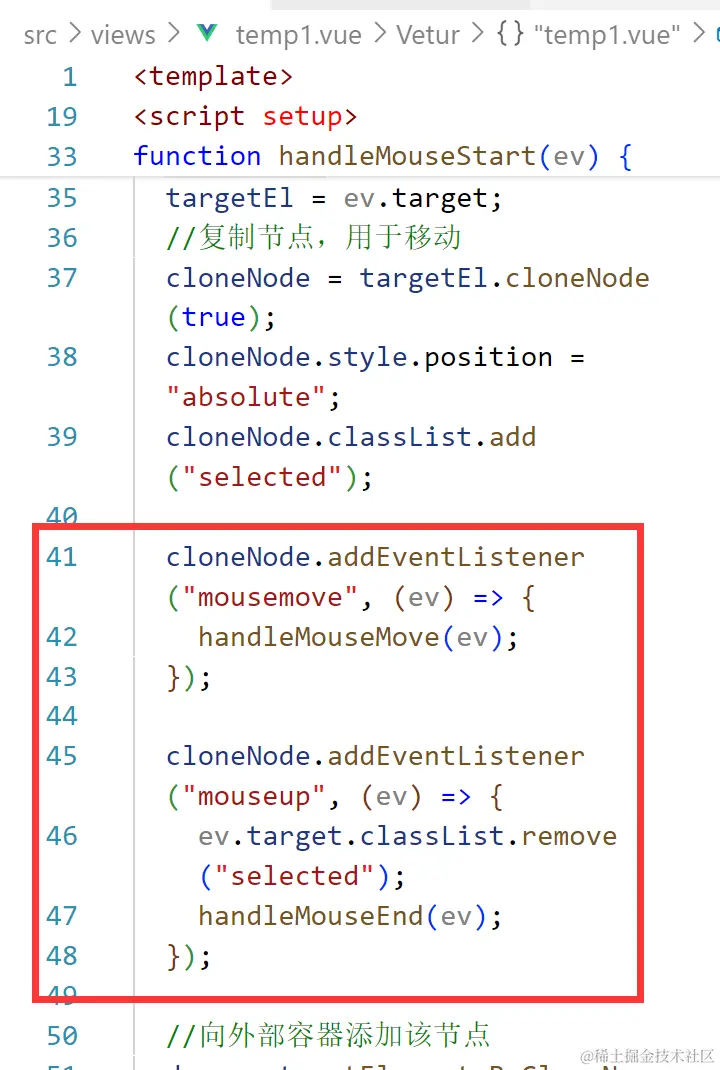
更正代码
<template> //只展示新增部分
 <div
      class="baseBox baseBox-cursor"
      id="item1"
      @touchstart="handleTouchstart($event)"
      @touchmove="handleTouchmove($event)"
      @touchend="handleTouchend($event)"
      @mousedown="handleMouseStart($event, index)"
    >
      {{ title }}
    </div>
</template>
<script setup> //只展示新增部分
//pc端
function handleMouseStart(ev) {
  draggingId.value = ev.target.id;
  targetEl = ev.target;
  cloneNode = targetEl.cloneNode(true);
  cloneNode.style.position = "absolute";
  cloneNode.classList.add("selected");

  cloneNode.addEventListener("mousemove", (ev) => { // 直接为节点添加监听事件
    handleMouseMove(ev);
  });

  cloneNode.addEventListener("mouseup", (ev) => { // 直接为节点添加监听事件
    ev.target.classList.remove("selected");
    handleMouseEnd(ev);
  });
  document.getElementsByClassName("app")[0].append(cloneNode);

  height = cloneNode.clientHeight;
  width = cloneNode.clientWidth;
  let { clientX, clientY } = ev;
  let x = clientY - height / 2;
  let y = clientX - width / 2;
  cloneNode.style.top = x + "px";
  cloneNode.style.left = y + "px";
}
function handleMouseMove(ev) {
  if (!cloneNode) {
    return;
  }
  let { clientX, clientY } = ev; //ev
  cloneNode.style.top = clientY - height / 2 + "px";
  cloneNode.style.left = clientX - width / 2 + "px";
  document.querySelector(".item").classList.remove("dragMoving");
  cloneNode.style.display = "none";
  let oElement = document.elementFromPoint(clientX, clientY);
  oElement.classList.add("dragMoving");
  cloneNode.style.display = "flex";
}
function handleMouseEnd(ev) {
  if (!cloneNode) {
    return;
  }
  let { clientX, clientY } = ev;
  cloneNode.style.display = "none";
  let oElement = document.elementFromPoint(clientX, clientY);
  if (cloneNode) {
    document.getElementsByClassName("app")[0].removeChild(cloneNode);
  }
  targetEl = oElement;
  targetEl.classList.remove("dragMoving");
  if (draggingId) {
    isRight.value = true;
    fillTitle.value = title.value;
  }
}
</script>
problem2 - 样式问题
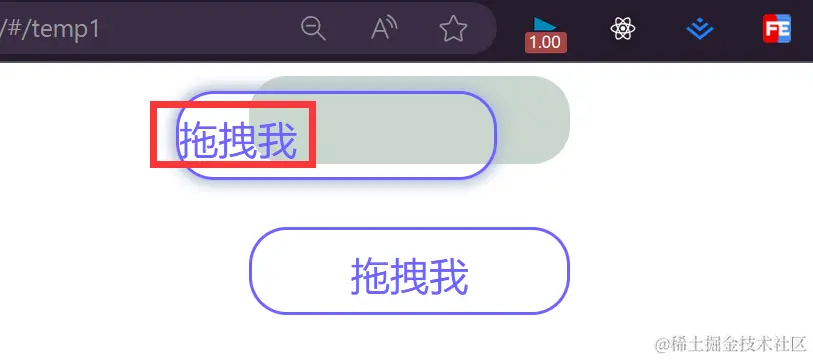
解决
<style lang="scss" scoped> //只展示修改部分
.baseBox {
  width: 204px;
  border-radius: 24px;
  height: 56px;
  line-height: 56px;
  font-size: 25px;
  border: 2px solid #6c63ff;
  box-sizing: border-box;
  text-align: center;
  display: flex; //
  align-items: center; //
  justify-content: center; //
  color: #6c63ff;
  user-select: none;
  overflow: hidden;
}
</style>
step4 - 成功!完成代码!快试试吧!
<template>
  <div class="outer">
    <div class="item baseBox" :class="isRight ? 'right' : ''">
      {{ fillTitle }}
    </div>
    <div
      class="baseBox baseBox-cursor"
      id="item1"
      @touchstart="handleTouchstart($event)"
      @touchmove="handleTouchmove($event)"
      @touchend="handleTouchend($event)"
      @mousedown="handleMouseStart($event, index)"
    >
      {{ title }}
    </div>
  </div>
</template>

<script setup>
import { ref } from "vue";
const title = ref("拖拽我");
const fillTitle = ref("");
let draggingId = ref(""); //拖拽对象的id,可通过这种传递信息方式与drop事件连接
let isRight = ref(false); //为true时添加right样式
let targetEl = null; //移入的目标元素
let cloneNode = null; //克隆的拖拽对象,用于移动

//克隆节点的宽高,用于计算拖拽中心
let width = 0;
let height = 0;

//pc端
function handleMouseStart(ev) {
  draggingId.value = ev.target.id;
  targetEl = ev.target;
  //复制节点,用于移动
  cloneNode = targetEl.cloneNode(true);
  cloneNode.style.position = "absolute";
  cloneNode.classList.add("selected");

  cloneNode.addEventListener("mousemove", (ev) => {
    handleMouseMove(ev);
  });

  cloneNode.addEventListener("mouseup", (ev) => {
    ev.target.classList.remove("selected");
    handleMouseEnd(ev);
  });

  //向外部容器添加该节点
  document.getElementsByClassName("app")[0].append(cloneNode);

  height = cloneNode.clientHeight;
  width = cloneNode.clientWidth;
  let { clientX, clientY } = ev;
  let x = clientY - height / 2;
  let y = clientX - width / 2;
  cloneNode.style.top = x + "px";
  cloneNode.style.left = y + "px";
}
function handleMouseMove(ev) {
  if (!cloneNode) {
    return;
  }
  let { clientX, clientY } = ev;
  cloneNode.style.top = clientY - height / 2 + "px";
  cloneNode.style.left = clientX - width / 2 + "px";

  //先将样式全部去掉
  document.querySelector(".item").classList.remove("dragMoving");
  //暂时隐藏
  cloneNode.style.display = "none";
  let oElement = document.elementFromPoint(clientX, clientY);
  oElement.classList.add("dragMoving"); //再把到达的添加样式
  //恢复
  cloneNode.style.display = "flex";
}
function handleMouseEnd(ev) {
  if (!cloneNode) {
    return;
  }
  let { clientX, clientY } = ev;
  //暂时隐藏,不然oElement获取到的就是cloneNode
  cloneNode.style.display = "none";
  let oElement = document.elementFromPoint(clientX, clientY);
  if (cloneNode) {
    //移除cloneNode
    document.getElementsByClassName("app")[0].removeChild(cloneNode);
  }
  targetEl = oElement;
  targetEl.classList.remove("dragMoving");
  if (draggingId) {
    //这里换成功能的判断逻辑就好了
    isRight.value = true;
    fillTitle.value = title.value;
  }
}

//移动端
function handleTouchstart(ev) {
  ev.preventDefault();
  draggingId.value = ev.target.id;
  targetEl = ev.target;
  //复制节点,用于移动
  cloneNode = targetEl.cloneNode(true);
  cloneNode.style.position = "absolute";
  cloneNode.classList.add("selected");

  //向外部容器添加该节点
  document.getElementsByClassName("app")[0].append(cloneNode);

  height = cloneNode.clientHeight;
  width = cloneNode.clientWidth;
  let { clientX, clientY } = ev.changedTouches[0];
  let x = clientY - height / 2;
  let y = clientX - width / 2;
  cloneNode.style.top = x + "px";
  cloneNode.style.left = y + "px";
}
function handleTouchmove(ev) {
  ev.preventDefault();
  if (!cloneNode) {
    return;
  }
  let { clientX, clientY } = ev.targetTouches[0];
  cloneNode.style.top = clientY - height / 2 + "px";
  cloneNode.style.left = clientX - width / 2 + "px";

  //先将样式全部去掉
  document.querySelector(".item").classList.remove("dragMoving");
  //暂时隐藏
  cloneNode.style.display = "none";
  let oElement = document.elementFromPoint(clientX, clientY);
  oElement.classList.add("dragMoving"); //再把到达的添加样式
  //恢复
  cloneNode.style.display = "flex";
}
function handleTouchend(ev) {
  if (!cloneNode) {
    return;
  }
  let { clientX, clientY } = ev.changedTouches[0];
  //暂时隐藏,不然oElement获取到的就是cloneNode
  cloneNode.style.display = "none";
  let oElement = document.elementFromPoint(clientX, clientY);
  if (cloneNode) {
    //移除cloneNode
    document.getElementsByClassName("app")[0].removeChild(cloneNode);
  }
  targetEl = oElement;
  targetEl.classList.remove("dragMoving");
  if (draggingId) {
    //这里换成功能的判断逻辑就好了
    isRight.value = true;
    fillTitle.value = title.value;
  }
}

//pc端-drag
function handleDragStart(ev) {
  draggingId.value = ev.target.id;
}
function handleDragend() {
  if (targetEl) {
    targetEl.classList.remove("dragMoving");
  }
}
function handleDragenter(ev) {
  targetEl = ev.target;
  ev.target.classList.add("dragMoving");
}
function handleDragover(ev) {
  ev.preventDefault(); //允许图标变化
}
function handleDragleave(ev) {
  ev.target.classList.remove("dragMoving");
}
function handleDrop() {
  if (draggingId) {
    //这里换成功能的判断逻辑就好了
    isRight.value = true;
    fillTitle.value = title.value;
  }
}
</script>

<style lang="scss" scoped>
.outer {
  height: 100vh;
}
.item {
  box-sizing: border-box;
  margin-bottom: 40px;
  cursor: not-allowed;

  &.manager {
    background: #6c63ff;
    color: #ffffff;
    margin-bottom: 63px;
  }
  &.right {
    border: 4px solid #62fb8d;
    color: #62fb8d;
  }
  &.dragMoving {
    border: 4px solid #cad6ce;
    background-color: #cad6ce;
  }
}
.baseBox {
  width: 204px;
  border-radius: 24px;
  height: 56px;
  line-height: 56px;
  font-size: 25px;
  border: 2px solid #6c63ff;
  box-sizing: border-box;
  text-align: center;
  display: flex;
  align-items: center;
  justify-content: center;
  color: #6c63ff;
  user-select: none;
  overflow: hidden;
}
.baseBox-cursor {
  cursor: grab;
  &.selected {
    box-shadow: 0px 0px 7.6px 3px #b2bed6;
    cursor: grabbing;
  }
  &:hover {
    box-shadow: 0px 0px 7.6px 3px #b2bed6;
  }
  transition: box-shadow 0.5s ease;
}
</style>



