SpringMVC
依赖
springMVC依赖
<!-- https://mvnrepository.com/artifact/org.springframework/spring-webmvc -->
<dependency>
    <groupId>org.springframework</groupId>
    <artifactId>spring-webmvc</artifactId>
    <version>6.1.5</version>
</dependency>
<!-- https://mvnrepository.com/artifact/org.springframework/spring-web -->
<dependency>
    <groupId>org.springframework</groupId>
    <artifactId>spring-web</artifactId>
    <version>6.1.5</version>
</dependency>
servlet和jsp
<!-- servlet和jsp-->
<dependency>
    <groupId>jakarta.servlet.jsp</groupId>
    <artifactId>jakarta.servlet.jsp-api</artifactId>
    <version>4.0.0-M2</version>
</dependency>
<!-- https://mvnrepository.com/artifact/jakarta.servlet/jakarta.servlet-api -->
<dependency>
    <groupId>jakarta.servlet</groupId>
    <artifactId>jakarta.servlet-api</artifactId>
    <version>6.1.0-M2</version>
</dependency>
spring的默认json转换器
<!-- spring默认的json转换器-->
<!-- https://mvnrepository.com/artifact/com.fasterxml.jackson.core/jackson-databind -->
<dependency>
    <groupId>com.fasterxml.jackson.core</groupId>
    <artifactId>jackson-databind</artifactId>
    <version>2.17.0</version>
</dependency>
<dependency>
    <groupId>com.fasterxml.jackson.core</groupId>
    <artifactId>jackson-core</artifactId>
    <version>2.17.0</version>
</dependency>
<!-- https://mvnrepository.com/artifact/com.fasterxml.jackson.core/jackson-annotations -->
<dependency>
    <groupId>com.fasterxml.jackson.core</groupId>
    <artifactId>jackson-annotations</artifactId>
    <version>2.17.0</version>
</dependency>
文件下载
<!-- 文件下载-->
<!-- https://mvnrepository.com/artifact/commons-io/commons-io -->
<dependency>
    <groupId>commons-io</groupId>
    <artifactId>commons-io</artifactId>
    <version>2.16.1</version>
</dependency>
<!-- https://mvnrepository.com/artifact/commons-fileupload/commons-fileupload -->
<dependency>
    <groupId>commons-fileupload</groupId>
    <artifactId>commons-fileupload</artifactId>
    <version>1.5</version>
</dependency>
测试使用
<!-- 测试时使用-->
<!-- https://mvnrepository.com/artifact/org.junit.jupiter/junit-jupiter-api -->
<dependency>
    <groupId>org.junit.jupiter</groupId>
    <artifactId>junit-jupiter-api</artifactId>
    <version>5.10.0</version>
    <scope>test</scope>
</dependency>
<!-- https://mvnrepository.com/artifact/org.springframework/spring-test -->
<dependency>
    <groupId>org.springframework</groupId>
    <artifactId>spring-test</artifactId>
    <version>6.1.5</version>
    <scope>test</scope>
</dependency>
配置
web.xml
<!DOCTYPE web-app PUBLIC
        "-//Sun Microsystems, Inc.//DTD Web Application 2.3//EN"
        "http://java.sun.com/dtd/web-app_2_3.dtd" >
<!-- servlet3.0以上版本指定-->
<web-app xmlns="http://xmlns.jcp.org/xml/ns/javaee"
         xmlns:xsi="http://www.w3.org/2001/XMLSchema-instance"
         xsi:schemaLocation="http://xmlns.jcp.org/xml/ns/javaee
                             http://xmlns.jcp.org/xml/ns/javaee/web-app_3_1.xsd"
         version="3.1">
    <display-name>Archetype Created Web Application</display-name>

    <!--    配置前端控制器-->
    <servlet>
        <servlet-name>springmvc</servlet-name>
        <servlet-class>
            org.springframework.web.servlet.DispatcherServlet
        </servlet-class>
        <init-param>
            <param-name>contextConfigLocation</param-name>
            <param-value>classpath:springmvc-config.xml</param-value>
        </init-param>
        <!-- 程序加载时就开始-->
        <load-on-startup>1</load-on-startup>
        <!-- 文件下载配置-->
        <multipart-config>
            <max-file-size>5242880</max-file-size>
            <max-request-size>10485760</max-request-size>
        </multipart-config>
    </servlet>

    <servlet-mapping>
        <servlet-name>springmvc</servlet-name>
        <url-pattern>/</url-pattern>
    </servlet-mapping>
</web-app>
springmvc-config.xml
<?xml version="1.0" encoding="UTF-8"?>
<beans xmlns="http://www.springframework.org/schema/beans"
       xmlns:xsi="http://www.w3.org/2001/XMLSchema-instance"
       xmlns:context="http://www.springframework.org/schema/context"
       xmlns:mvc="http://www.springframework.org/schema/mvc"
       xsi:schemaLocation="http://www.springframework.org/schema/beans
                           http://www.springframework.org/schema/beans/spring-beans.xsd
                           http://www.springframework.org/schema/context
                           https://www.springframework.org/schema/context/spring-context.xsd
                           http://www.springframework.org/schema/mvc
                           https://www.springframework.org/schema/mvc/spring-mvc.xsd">
    <!--包扫描器-->
    <context:component-scan base-package="mvc.controller"/>

    <!--    开启注解驱动-->
    <!--    <mvc:annotation-driven/>-->
    <mvc:annotation-driven>
        <!-- 消息转换器    保证前端接收后的字符串里的中文不是问号-->
        <mvc:message-converters register-defaults="true">
            <bean class="org.springframework.http.converter.StringHttpMessageConverter">
                <property name="supportedMediaTypes" value="text/html;charset=UTF-8"/>
            </bean>
        </mvc:message-converters>
    </mvc:annotation-driven>


    <!--
    静态资源访问映射,将不被前段控制器拦截
    mapping:映射后的路径
    location: 项目里的实际路径
    -->
    <mvc:resources mapping="/js/**" location="/js/"/>
    <mvc:resources mapping="/css/**" location="/css/"/>

    <!--    视图解析-->
    <bean id="jspViewResolver"
          class="org.springframework.web.servlet.view.InternalResourceViewResolver">
        <!--        前缀-->
        <property name="prefix" value="/jsp/"/>
        <!--        后缀-->
        <property name="suffix" value=".jsp"/>
    </bean>
    <!-- 文件上传 这是行版本里用的方法-->
    <bean id="multipartResolver"
          class="org.springframework.web.multipart.support.StandardServletMultipartResolver">
    </bean>
</beans>
pom.xml
配置java版本,防止一些无语的问题和idea发疯
<properties>
    <maven.compiler.source>17</maven.compiler.source>
    <maven.compiler.target>17</maven.compiler.target>
    <project.build.sourceEncoding>UTF-8</project.build.sourceEncoding>
</properties>
项目结构
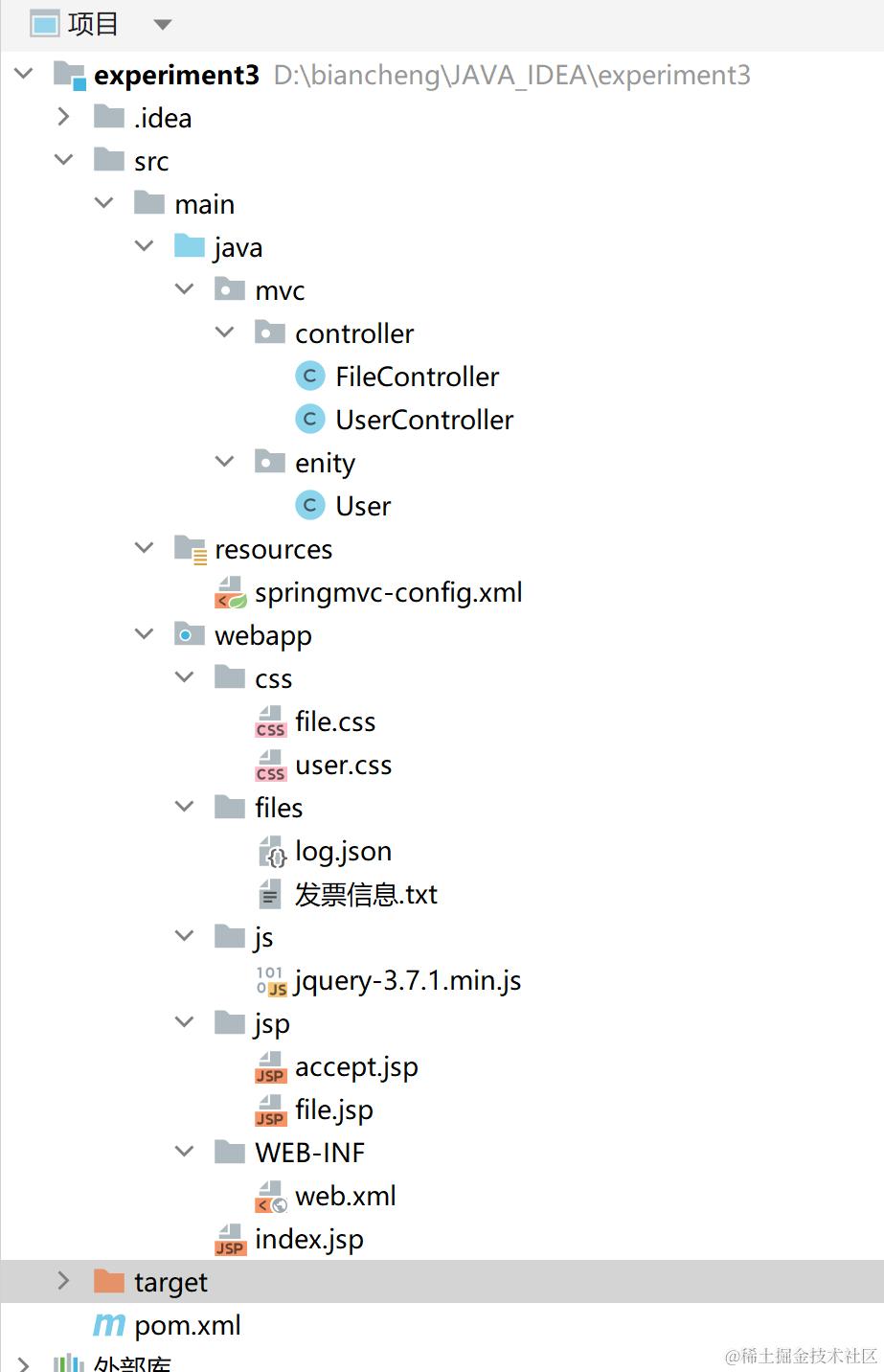
实体类
-
User.java
package mvc.enity;

/*****UTF-8*****
 * Description:
 * Author: wnan
 * Date: 2024/5/7 19:22
 * Proverbs: 吃的苦中苦,方为人上人
 */

public class User {
    private String name;
    private String password;

    public User() {
    }

    public User(String name, String password) {
        this.name = name;
        this.password = password;
    }

    public String getName() {
        return name;
    }

    public void setName(String name) {
        this.name = name;
    }

    public String getPassword() {
        return password;
    }

    public void setPassword(String password) {
        this.password = password;
    }
    @Override
    public String toString() {
        return "User{" +
                "name='" + name + '\'' +
                ", password='" + password + '\'' +
                '}';
    }
}
控制器
-
UserController.java
package mvc.controller; import mvc.enity.User; import org.springframework.http.HttpStatus; import org.springframework.http.ResponseEntity; import org.springframework.stereotype.Controller; import org.springframework.web.bind.annotation.*; import java.util.ArrayList; import java.util.HashMap; import java.util.List; import java.util.Map; /*****UTF-8***** * Description: * Author: wnan * Date: 2024/5/7 19:44 * Proverbs: 吃的苦中苦,方为人上人 */ @Controller public class UserController { @RequestMapping("/login") @ResponseBody public List<User> usersInfo(@RequestBody User user){ System.out.println(user.toString()); List<User> users = new ArrayList<>(); users.add(new User("hauhau1","123456")); users.add(new User("hauhau2","123456")); users.add(new User("hauhau3","123456")); return users; } @RequestMapping("/user") @ResponseBody public User userInfo(){ User user =new User("hauhau1","123456"); return user; } @RequestMapping("/users") @ResponseBody public List<User> usersInfo(){ List<User> users = new ArrayList<>(); users.add(new User("hauhau1","123456")); users.add(new User("hauhau2","123456")); users.add(new User("hauhau3","123456")); return users; } @RequestMapping("/mapuser") @ResponseBody public Map<String,List<User>> userMapInfo(){ Map<String,List<User>> map = new HashMap<>(); List<User> users = new ArrayList<>(); map.put("users",users); users.add(new User("hauhau1","123456")); users.add(new User("hauhau2","123456")); users.add(new User("hauhau3","123456")); return map; } } -
FileController.java
package mvc.controller;

import com.fasterxml.jackson.databind.ObjectMapper;
import jakarta.servlet.http.HttpServletRequest;
import jakarta.servlet.http.HttpServletResponse;
import org.apache.commons.io.FileUtils;
import org.springframework.http.HttpHeaders;
import org.springframework.http.HttpStatus;
import org.springframework.http.MediaType;
import org.springframework.http.ResponseEntity;
import org.springframework.stereotype.Controller;
import org.springframework.web.bind.annotation.RequestMapping;
import org.springframework.web.bind.annotation.RequestParam;
import org.springframework.web.bind.annotation.ResponseBody;
import org.springframework.web.multipart.MultipartFile;

import java.io.File;
import java.net.URLEncoder;
import java.nio.file.Files;
import java.nio.file.Paths;
import java.util.ArrayList;
import java.util.HashMap;
import java.util.List;
import java.util.Map;

/*****UTF-8*****
 * Description:
 * Author: wnan
 * Date: 2024/5/15 20:44
 * Proverbs: 吃的苦中苦,方为人上人
 */
@Controller

public class FileController {
    @RequestMapping("/file")
    public String file() {
        return "file";
    }

    @RequestMapping("/fileUpload")
    public String fileUpload(@RequestParam("uploadfile") MultipartFile[] uploadfiles, HttpServletRequest request) {
        System.out.println("文件上传");
        String path = request.getServletContext().getRealPath("/") + "files/";
        File pathFloder = new File(path);
        if (!pathFloder.exists()) {
            pathFloder.mkdir();
        }
        try {
            if (uploadfiles != null) {
                for (MultipartFile file : uploadfiles) {
                    //获取上传文件的名字
                    String fileName = file.getOriginalFilename();
                    //保存文件
                    File fileTarget = new File(path + fileName);
                    //保存文件
                    file.transferTo(fileTarget);
                }
            }
        } catch (Exception e) {
            e.printStackTrace();
        }
        request.setAttribute("msg", "上传成功");
        return "file";
    }

    @RequestMapping("/fileDown")
    public ResponseEntity<byte[]> filedown(@RequestParam("filename") String fileName,
                                           HttpServletRequest request) throws Exception {
        System.out.println("文件下载");
        System.out.println(fileName);
        String path = request.getServletContext().getRealPath("/") + "files/";
        File file = new File(path + File.separator + fileName);
        //设置请求头
        HttpHeaders headers = new HttpHeaders();
        //通知浏览器以下载的方式打开文件
        // URLEncoder.encode(fileName, "UTF-8") 保证可以正常下载中文文件
        headers.setContentDispositionFormData("attachment", URLEncoder.encode(fileName, "UTF-8"));
        //定义以流的方式下载返回数据
        headers.setContentType(MediaType.APPLICATION_OCTET_STREAM);
        //使用mvc框架进行封装
        return new ResponseEntity<byte[]>(FileUtils.readFileToByteArray(file), headers, HttpStatus.OK);
    }

    @RequestMapping("/filesName")
    @ResponseBody
    public String filesName(HttpServletRequest request, HttpServletResponse response) throws Exception {
        String path = request.getServletContext().getRealPath("/") + "files/";
        File folder = new File(path);
        Map<String, List<String>> map = new HashMap<>();
        List<String> fileNames = new ArrayList<>();
        map.put("files", fileNames);
        // 遍历文件夹,获取所有文件名
        Files.walk(Paths.get(path)).filter(Files::isRegularFile).forEach(file -> {
            fileNames.add(file.toFile().getName());
        });
        // 将文件名列表转换为JSON字符串
        ObjectMapper objectMapper = new ObjectMapper();
        String json = objectMapper.writeValueAsString(map);
        // 设置响应内容类型为JSON
        response.setContentType("application/json");
        response.setCharacterEncoding("UTF-8");
        // 发送JSON响应
        System.out.println(json);
        return json;
    }
}
前端代码
-
index.jsp
<%@ page contentType="text/html;charset=UTF-8" language="java" isELIgnored="false" %> <jsp:forward page="jsp/accept.jsp"/> -
accept.jsp
<%-- Created by IntelliJ IDEA. User: wangnan Date: 2024/5/9 Time: 20:55 To change this template use File | Settings | File Templates. --%> <%@ page contentType="text/html;charset=UTF-8" language="java" %> <html> <head> <title>Title</title> <script type="text/javascript" src="<%=request.getContextPath()%>/js/jquery-3.7.1.min.js"></script> <link rel="stylesheet" type="text/css" href="<%=request.getContextPath()%>/css/user.css"> </head> <body> <div class="file-link-container"> <a href="<%=request.getContextPath()%>/file" class="file-link"> 文件内容 </a> </div> <div> <form id="login"> <label for="name">name:</label> <input type="text" id="name" name="name" value="hauhau"><br> <label for="password">password:</label> <input type="text" id="password" name="password" value="123456"><br> <input type="button" name="go" value="提交" onclick="testjson()"> </form> </div> <div id="tab"> <table id="users" border="1"> <tr> <td width="300" align="center">姓名</td> <td width="300" align="center">密码</td> </tr> </table> </div> </body> <script> $(document).ready(function () { $("#tab").hide(); }); function testjson() { var formLogin = document.getElementById("login"); var userData = { "name": formLogin.elements["name"].value, "password": formLogin.elements["password"].value } $.ajax({ url: "<%=request.getContextPath()%>/login", type: "post", contentType: "application/json;charset=UTF-8", data: JSON.stringify(userData), dataType: "json", success: function (userList) { console.log(userList); $("#tab").show(); for (var i = 0; i < userList.length; i++) { $("#users").append( "<tr ><td>" + userList[i].name + "</td><td>" + userList[i].password + "</td></tr>"); } }, error: function (response) { console.log("error"); } }); } </script> </html> -
file.jsp
<%-- Created by IntelliJ IDEA. User: wangnan Date: 2024/5/15 Time: 21:12 To change this template use File | Settings | File Templates. --%> <%@ page contentType="text/html;charset=UTF-8" language="java" %> <html> <head> <meta charset="UTF-8"> <title>Title</title> <script type="text/javascript" src="<%= request.getContextPath()%>/js/jquery-3.7.1.min.js"></script> <link rel="stylesheet" type="text/css" href="<%=request.getContextPath()%>/css/file.css"> </head> <body> <table> <tr> <td>文件上传${msg}</td> <td>文件下载</td> </tr> <tr> <td> <form action="<%=request.getContextPath()%>/fileUpload" method="post" enctype="multipart/form-data"> <input type="file" name="uploadfile"> <input type="reset" value="清空"> <input type="submit" value="上传"> </form> </td> <td id="files"></td> </tr> </table> </body> <script> $(document).ready(function () { $.get("<%=request.getContextPath()%>/filesName", function (data) { console.log(data); var fileList = JSON.parse(data).files; console.log(fileList); for (var i = 0; i < fileList.length; i++) { $("#files").append( "<li><a href=<%=request.getContextPath()%>" + "/fileDown?filename=" + fileList[i] + ">" + fileList[i] + "</a></li>"); } } ) }) </script> </html> -
file.css
/* file.css */ /* 设置body的基本字体 */ body { font-family: Arial, sans-serif; } /* 设置table的全局样式 */ table { width: 100%; /* 定义表格宽度为100% */ border-collapse: collapse; /* 合并边框 */ margin-top: 20px; /* 上边距20px */ } /* 设置表格行的样式 */ table tr { background-color: #f9f9f9; /* 行背景色 */ } /* 为偶数行设置不同的背景色 */ table tr:nth-child(even) { background-color: #f2f2f2; /* 偶数行背景色 */ } /* 设置表格单元格的样式 */ table td { padding: 10px; /* 内边距 */ text-align: center; /* 文本居中 */ border: 1px solid #ddd; /* 边框 */ } table td:first-child{ width: 40%; } /* 设置表单的全局样式 */ form { background-color: #f9f9f9; /* 背景颜色 */ padding: 10px; /* 内边距 */ border: 1px solid #e80e0e; /* 边框 */ border-radius: 5px; /* 圆角 */ margin-bottom: 20px; /* 下边距 */ width: 90%; height: 50%; } /* 设置表单内输入元素(文件、重置、提交按钮)的样式 */ form input[type="file"], form input[type="reset"], form input[type="submit"] { padding: 8px; /* 内边距 */ margin: 5px 5px; /* 上下边距 */ border: 1px solid #ddd; /* 边框 */ border-radius: 4px; /* 圆角 */ box-sizing: border-box; /* 容器大小包含边框 */ } /* 设置文件输入框独占一行 */ input[type="file"] { display: block; } /* 设置重置和提交按钮在同一行 */ input[type="reset"], input[type="submit"] { display: inline-block; } /* 设置提交按钮的特定样式 */ form input[type="submit"] { background-color: #007bff; /* 背景颜色 */ color: white; /* 文本颜色 */ cursor: pointer; /* 鼠标样式 */ transition: all 0.3s ease; /* 动画过渡效果 */ } /* 鼠标悬停在提交按钮上时的样式变化 */ form input[type="submit"]:hover { background-color: #0056b3; /* 背景颜色变化 */ } -
user.css
.file-link-container {
    padding: 20px; /* 内边距 */
    background-color: #f9f9f9; /* 背景颜色 */
    border: 1px solid #ddd; /* 边框样式 */
    border-radius: 5px; /* 边框圆角 */
    text-align: center; /* 文本居中 */
    margin-bottom: 20px; /* 添加底部外边距 */
}

.file-link {
    text-decoration: none; /* 去除下划线 */
    color: #007bff; /* 文本颜色 */
    font-weight: bold; /* 字体加粗 */
    padding: 10px 20px; /* 内边距 */
    border: 1px solid #007bff; /* 边框样式 */
    border-radius: 5px; /* 边框圆角 */
    background-color: #fff; /* 背景颜色 */
    transition: all 0.3s ease; /* 添加过渡效果 */
}

.file-link:hover {
    background-color: #007bff; /* 鼠标悬停时改变背景颜色 */
    color: #fff; /* 鼠标悬停时改变颜色 */
}

form#login {
    background-color: #f9f9f9; /* 背景颜色 */
    padding: 20px; /* 内边距 */
    border: 1px solid #ddd; /* 边框样式 */
    border-radius: 5px; /* 边框圆角 */
    margin-bottom: 20px; /* 添加底部外边距 */
}

form#login label {
    font-weight: bold; /* 字体加粗 */
}

form#login input[type="text"] {
    padding: 8px; /* 内边距 */
    margin: 5px 0; /* 外边距 */
    border: 1px solid #ddd; /* 边框样式 */
    border-radius: 4px; /* 边框圆角 */
    box-sizing: border-box; /* 防止输入框大小超过父容器 */
}

form#login input[type="button"] {
    background-color: #007bff; /* 背景颜色 */
    color: white; /* 文本颜色 */
    padding: 10px 20px; /* 内边距 */
    border: none; /* 去除边框 */
    border-radius: 4px; /* 边框圆角 */
    cursor: pointer; /* 鼠标样式 */
    transition: all 0.3s ease; /* 添加过渡效果 */
}

form#login input[type="button"]:hover {
    background-color: #0056b3; /* 鼠标悬停时改变背景颜色 */
}

table#users {
    width: 100%; /* 表格宽度 */
    border-collapse: collapse; /* 合并边框 */
    margin-top: 20px; /* 添加顶部外边距 */
}

table#users td {
    padding: 10px; /* 单元格内边距 */
    text-align: center; /* 文本居中 */
    border: 1px solid #ddd; /* 边框样式 */
}

table#users tr:nth-child(even) {
    background-color: #f2f2f2; /* 奇数行背景颜色 */
}
运行
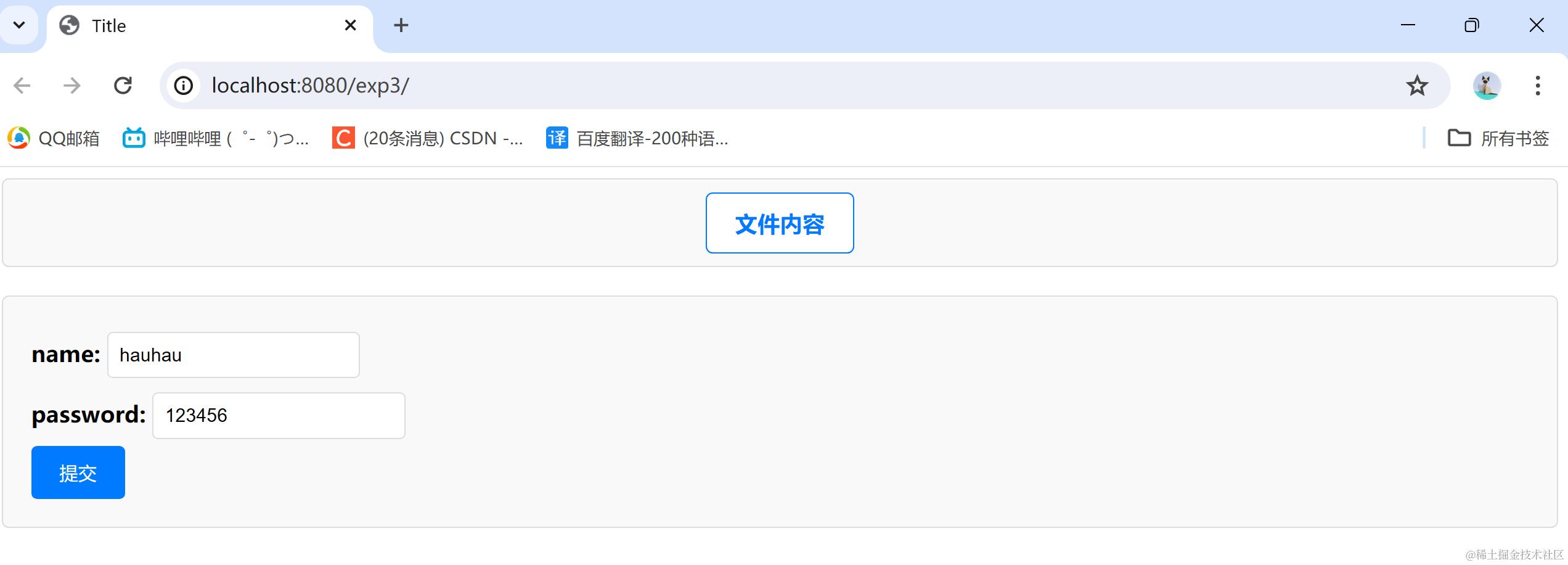
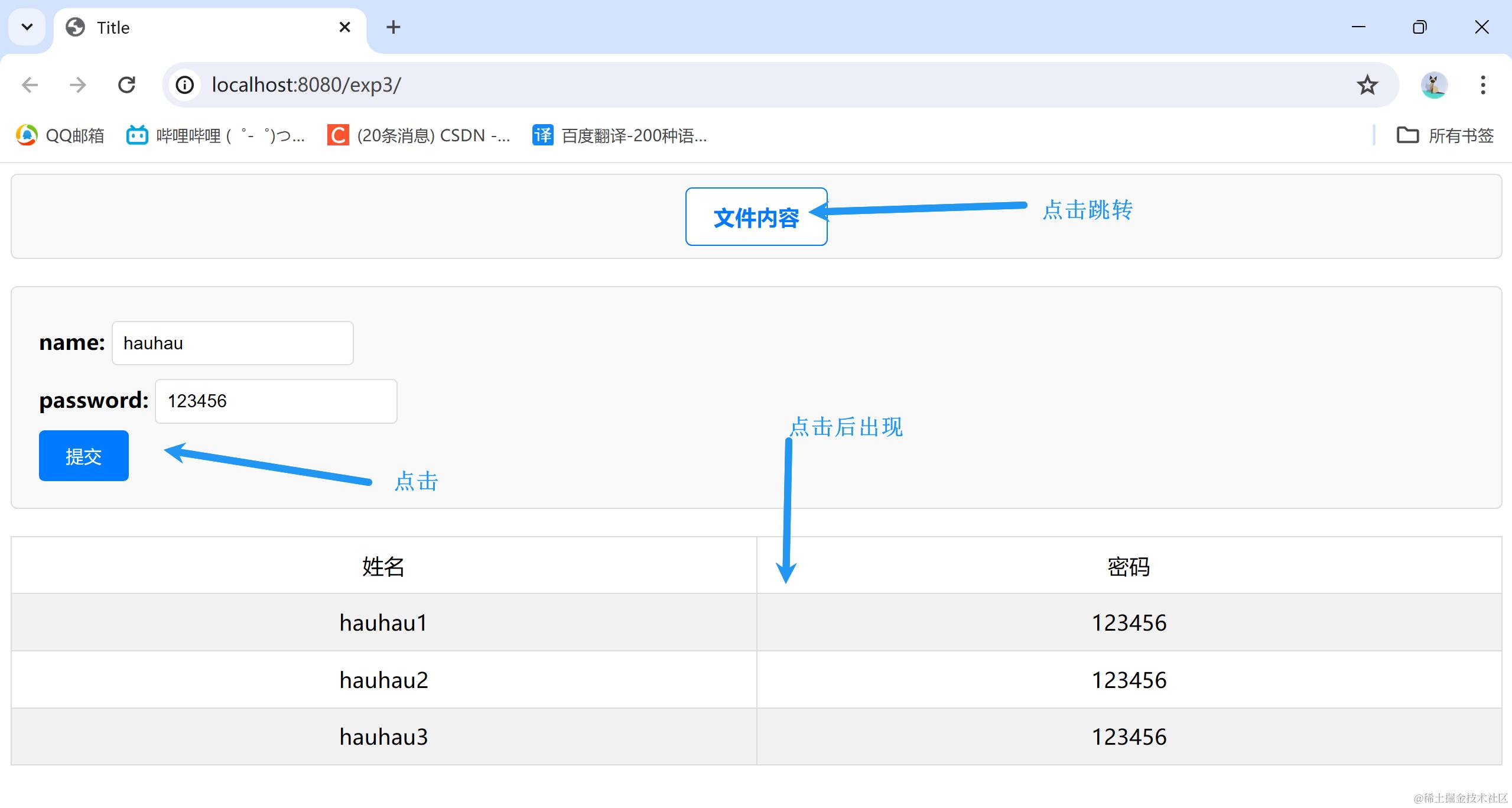
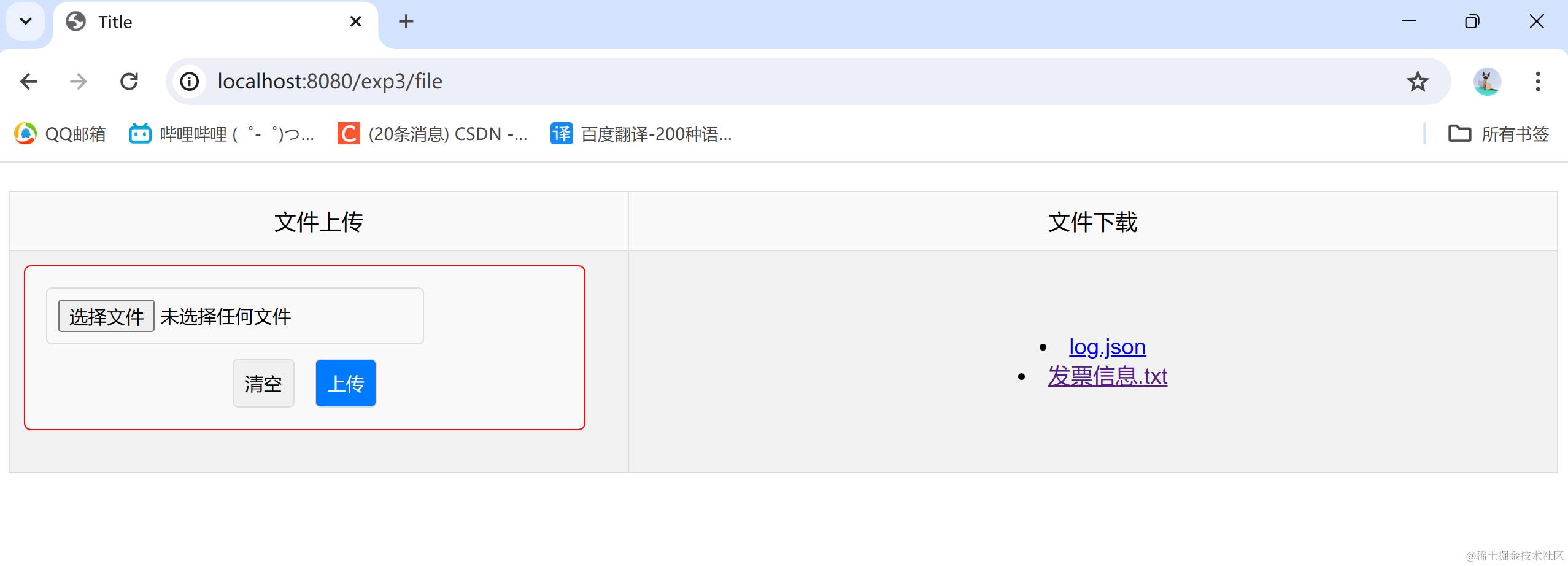
总结
- 运行时要使用tomcat11,不然会出意外,反正我意外了
- spring版本太新了,有很多问题。。呜呜呜