前言
- 正在着手正式学习D3.js相关知识,这个过程中会慢慢积累案例,分享出来
- 几年前曾经在实际工作中现学现卖过,不过当时只是做过一种知识图谱的数据图,这次想着既然D3.js至今都没有类似echarts那样丰富的案例网站,那么就自己来试试为D3.js积累出一个丰富多态的网站,不知到能否成功,干起来再说!
单一折线图(带动效)
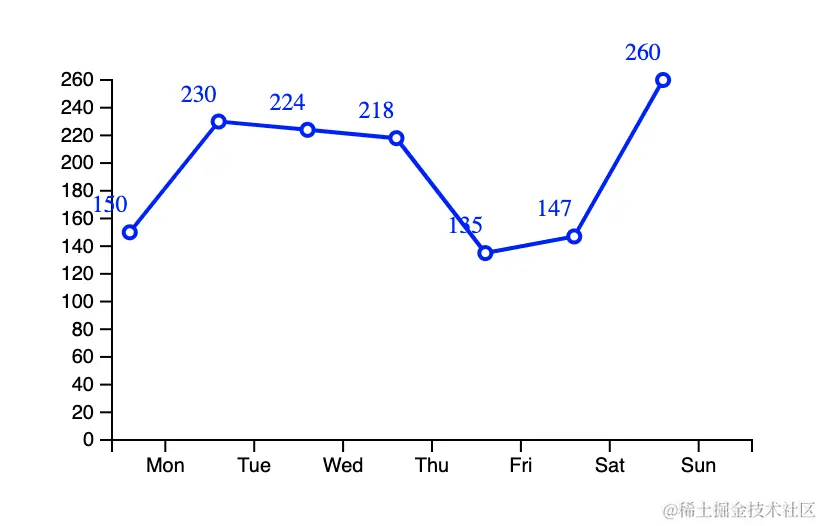
<!DOCTYPE html>
<html lang="en">
<head>
<meta charset="UTF-8">
<meta name="viewport" content="width=device-width, initial-scale=1.0">
<title>Document</title>
<script src="https://d3js.org/d3.v7.js"></script>
<style>
.dot {
cursor: pointer;
}
</style>
</head>
<body>
<div id="chart"></div>
<script>
const data = [150, 230, 224, 218, 135, 147, 260]
const xData = ['Mon', 'Tue', 'Wed', 'Thu', 'Fri', 'Sat', 'Sun']
const width = 500;
const height = 300;
const margin = { top: 60, right: 30, bottom: 60, left: 150 };
const innerWidth = width - margin.left - margin.right;
const innerHeight = height - margin.top - margin.bottom;
const svg = d3.select('#chart')
.append('svg')
.attr('width', width)
.attr('height', height)
const xScale = d3.scaleBand()
.domain(xData)
.range([0, innerWidth])
.padding(0.2);
const yScale = d3.scaleLinear()
.domain([0, d3.max(data)])
.range([innerHeight, 0]);
const g = svg.append('g').attr('id', 'maingroup')
.attr('transform', `translate(${margin.left}, ${margin.top})`);
const xAxis = d3.axisBottom(xScale);
g.append('g').call(xAxis).attr('transform', `translate(0, ${innerHeight})`);
const yAxis = d3.axisLeft(yScale);
g.append('g').call(yAxis);
const lineGenerator = d3.line()
.x((d, i) => xScale(xData[i]))
.y(d => yScale(d))
g.append('path')
.attr('d', lineGenerator(data))
.attr('fill', 'none')
.attr('stroke', 'blue')
.attr('stroke-width', 2)
.attr('stroke-dasharray', width)
.attr('stroke-dashoffset', width)
.attr('class', 'line')
const dotR = 3
g.selectAll('.dot')
.data(data)
.enter()
.append('circle')
.attr('class', 'dot')
.attr('cx', (d, i) => xScale(xData[i]))
.attr('cy', d => yScale(d))
.attr('r', 0)
.attr('opacity', 0)
.attr('fill', '#fff')
.attr('stroke', 'blue')
.attr('stroke-width', 2)
.on('mouseover', function (d, i) {
d3.select(this)
.transition()
.duration(300)
.attr('r', dotR * 2)
})
.on('mouseout', function (d, i) {
d3.select(this)
.transition()
.duration(300)
.attr('r', dotR)
})
g.selectAll('.label')
.data(data)
.enter()
.append('text')
.attr('class', 'label')
.attr('x', (d, i) => xScale(xData[i]))
.attr('y', d => yScale(d))
.attr('text-anchor', 'middle')
.text(d => d)
.attr('font-size', 12)
.attr('fill', 'blue')
.attr('opacity', 1)
.attr('transform', `translate(-10, -10)`)
g.selectAll('.dot')
.transition()
.ease(d3.easeBounce)
.delay((d, i) => i * 300)
.duration(1800)
.attr('r', dotR)
.attr('opacity', 1)
const lineDurationTotal = 3000;
g.selectAll('.line')
.transition()
.ease(d3.easeLinear)
.duration(lineDurationTotal)
.attr('stroke-dashoffset', 0)
</script>
</body>
</html>
参考资料