CSS 伪类/伪元素
CSS伪类(Pseudo-classes)是用来添加一些选择器的特殊效果。
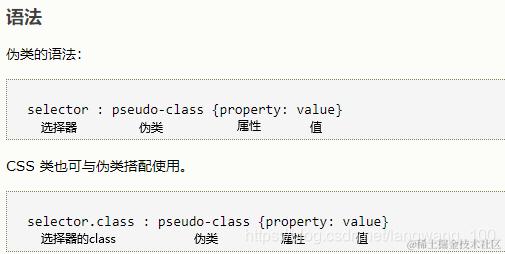
实例:
a:hover { color: #FF00FF }
.text:hover { color: #FF00FF }
p.text:hover { color: #FF00FF }
提示:
伪类名称 对大小写不敏感。
链接伪类
CSS :first-child 伪类
您可以使用 :first-child 伪类来选择父元素的第一个元素是指定类型的元素。
匹配第一个 <p> 元素,实例一:
<!DOCTYPE html>
<html>
<head>
<meta charset="utf-8">
<title>菜鸟教程(runoob.com)</title>
<style>
p:first-child
{
	background:#ff0000;
}
</style>
</head>
<body>

<p>The first paragraph.</p>
<p>The second paragraph.</p>
<p>The third paragraph.</p>
<p>The fourth paragraph.</p>
<div>
	<p>这是第三个段落。</p>
	<h3>1111</h3>
	<p>这是第三个段落。</p>
</div>
<div>
	<h3>1111</h3>
	<p>这是第三个段落。</p>
</div>
</body>
</html>
运行结果:
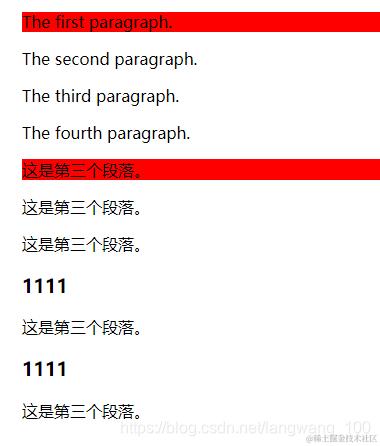
如果改成:
<!doctype html>
<html>
  <head>
    <meta charset="utf-8" />
    <title>菜鸟教程(runoob.com)</title>
    <style>
      div p:first-child {
        background: #ff0000;
      }
    </style>
  </head>
  <body>
    <p>The first paragraph.</p>
    <p>The second paragraph.</p>
    <p>The third paragraph.</p>
    <p>The fourth paragraph.</p>
    <div>
      <p>这是第三个段落。</p>
      <h3>1111</h3>
      <p>这是第三个段落。</p>
    </div>
    <div>
      <h3>1111</h3>
      <p>这是第三个段落。</p>
    </div>
  </body>
</html>
结果为
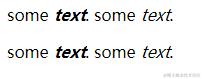
匹配所有<p> 元素中的第一个 <i> 元素,实例二:
<html>
<head>
<style type="text/css">
p > i:first-child {
  font-weight:bold;
}
</style>
</head>

<body>
<p>some <i>text</i>. some <i>text</i>.</p>
<p>some <i>text</i>. some <i>text</i>.</p>
</body>
</html>
运行结果:
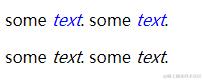
匹配所有作为第一个子元素的 <p> 元素中的所有 <i> 元素,实例三:
<html>
<head>
<style type="text/css">
p:first-child i {
  color:blue;
}
</style>
</head>

<body>
<p>some <i>text</i>. some <i>text</i>.</p>
<p>some <i>text</i>. some <i>text</i>.</p>
</body>
</html>
运行结果:
CSS :lang 伪类
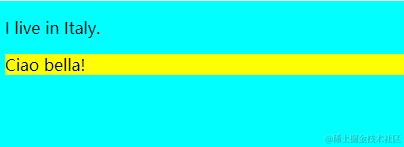
:lang 向带有指定 lang 属性开始的元素添加样式,:lang 伪类使你有能力为不同的语言定义特殊的规则。
注意:
- HTML4.01 lang 属性在以下标签中无效:<base>, <br>, <frame>, <frameset>, <hr>, <iframe>, <param> 以及 <script>
- 在HTML5中,lang 属性可用于任何的 HTML 元素(它会验证任何 HTML 元素,但不一定是有用)
注意:
- :lang在IE8中运行,必须声明。
- 值是整个单词,单独像lang="en",或者使用连字符(-)如lang ="en-us";也可以是其它任意的css键值对,但是根据作用元素,不一定生效!
实例:
<!DOCTYPE html>
<html lang="en">
<head>
<meta charset="utf-8">
<title>Document</title>
<style>
p:lang(it)
{
	background:yellow;
}

html:lang(en) {
    background-color: aqua;
}
</style>
</head>
<body>

<p>I live in Italy.</p>
<p lang="it">Ciao bella!</p>
</body>
</html>
运行结果:
关于语言的取值: HTML 语言代码 参考手册
选择器重点
| 选择器 | 示例 | 示例说明 | 定义和用法 |
|---|---|---|---|
| :first-of-type | p:first-of-type | 选择的每个 p 元素是其父元素的第一个 p 元素(但不一定是第一个元素) | :first-of-type 选择器匹配元素其父级是特定类型的第一个子元素。提示: 其和 :nth-of-type(1) 是一个意思 |
| :last-child | p:last-child | 选择父元素的最后一个元素且为p,如果不为则看其子元素中对应位置是否是p,依次类推 | :last-child选择器用来匹配父元素中最后一个子元素是指定类型的元素。提示:p:last-child等同于p:nth-last-child(1)。 |
| :last-of-type | p:last-of-type | 选择是其父元素的最后一个p元素(但不一定是最后一个元素) | :last-of-type选择器匹配元素其父级最后一个特定类型的子元素。提示:和:nth-last-of-type(1)是一个意思。 |
| :not(selector) | :not( p) | 选择所有p以外的元素 | :not(selector) 选择器匹配每个元素不是指定的元素/选择器。 |
| :nth-child(n) | p:nth-child(2) | 选择所有 p 元素的父元素的第二个子元素且为p,如果不为则看其子元素中对应位置是否是p,依次类推 | :nth-child(n) 选择器匹配父元素中的第 n 个子元素。n 可以是一个数字,一个关键字,或者一个公式。提示:该选择器匹配同类型中的第 n 个同级兄弟元素。 |
| :nth-last-child(n) | p:nth-last-child(2) | 选择所有p元素的父元素的倒数的第二个子元素且为p,如果不为则看其子元素中对应位置是否是p,依次类推 | :nth-last-child(n) 选择器匹配属于其元素的第 n 个子元素,从最后一个子元素开始计数。n可以是一个数字,一个关键字,或者一个公式。提示:该选择器匹配父元素中的倒数第n个结构子元素 |
| :nth-last-of-type(n) | p:nth-last-of-type(2) | 选择所有p元素的父元素的倒数的第二个p(但并不一定是倒数第二个元素,但是一定是倒数第二个该元素) | :nth-last-of-type(n)选择器匹配同类型中的倒数第n个同级兄弟元素。n 可以是一个数字,一个关键字,或者一个公式。提示:该选择器匹配父元素中的倒数第n个结构子元素 |
| :nth-of-type() | p:nth-of-type(2) | 选择所有p元素的父元素的第二个p元素(并不一定是第二个元素,但是一定是第二个该元素) | :nth-of-type(n)选择器匹配同类型中的第n个同级兄弟元素。n可以是一个数字,一个关键字odd / even,或者一个公式。 |
| :only-of-type | p:only-of-type | 选择所有仅有一个指定类型的子元素(还可有其它类型的),子元素为p的元素 | :only-of-type 代表了任意一个元素,这个元素没有其他相同类型的兄弟元素。 |
| :only-child | p:only-child | 选择所有仅有一个子元素(不可有其它类型的),且子元素为p的元素 | :only-child CSS 伪类表示没有任何兄弟元素的元素。这与 :first-child:last-child 或 :nth-child(1):nth-last-child(1) 相同,但前者具有更小的权重性。 |
| :focus | input:focus | 选择元素输入后具有焦点 | :focus选择器用于选择具有焦点的元素。提示: :focus选择器接受键盘事件或其他用户输入的元素。 |
| ::first-letter | p::first-letter | 选择每个 p 元素的第一个字母 | :first-letter选择器用来指定元素第一个字母的样式。注意: "first-letter" 选择器仅适用于在块级元素中 |
| ::first-line | p::first-line | 选择每个p元素的第一行 | :first-line选择器用来指定选择器第一行的样式。注意:"first-line" 选择器适用于块级元素中。 |
| ::before | p::before | 在每个p元素之前插入内容 | :before 选择器向选定的元素前插入内容。使用content 属性来指定要插入的内容。 |
| ::after | p::after | 在每个p元素之后插入内容 | :after 选择器向选定的元素之后插入内容。使用content 属性来指定要插入的内容。 |
| :focus-within | :focus-within 表示当元素或其任意后代元素被聚焦时,将匹配该元素。注:非 input 元素也适用 | ||
| :has | .label span:has(+ input[required]) | 选择label下span的兄弟元素input含有required属性的元素 | :has(xxx) 表示一个元素,如果作为参数传递的 xxx选择器 存在时生效,反之不生效。注: xxx 选择器可以和前面的有一定关联 |
| ::selection | ::selection CSS 伪元素应用于文档中被用户高亮的部分。比如:使用鼠标或其他选择设备选中的部分 | ||
| :playing | :playing CSS 伪类选择器表示一个处于“播放”状态的可播放元素,例如 < audio> 或 < video> | ||
| :checked | input:checked | 选择所有选中的表单元素 | :checked 选择器匹配每个选中的输入元素(仅适用于单选按钮或复选框) |
| :disabled | input:disabled | 选择所有禁用的表单元素 | :disabled 选择器匹配每个禁用的的元素(主要用于表单元素) |
| :enabled | input:enabled | 选择所有启用的表单元素 | :enabled 选择器匹配每个启用的的元素(主要用于表单元素) |
| :empty | p:empty | 选择所有没有子元素的p元素 | :empty选择器选择每个没有任何子级的元素(包括文本节点) |
| :optional | input:optional | 选择没有"required"的元素属性 | :optional 选择器在表单元素是可选项时设置指定样式。表单元素中如果没有特别设置 required 属性即为 optional 属性。注意: :optional 选择器只适用于表单元素: input, select 和 textarea。 |
| :required | input:required | 选择有"required"属性指定的元素属性 | :required 选择器在表单元素是必填项时设置指定样式。表单元素可以使用 required 属性来设置必填项。注意: :required 选择器只适用于表单元素: input, select 和 textarea。 |
| :read-only | input:read-only | 选择只读属性的元素属性 | :read-only 选择器用于选取设置了 "readonly" 属性的元素。表单元素可以设置 "readonly" 属性来定义元素只读。备注: 这个选择器不只是选择具有 readonly 属性的< input> 元素,它也会选择所有的不能被用户编辑的元素。 |
| :read-write | input:read-write | 选择没有只读属性的元素属性 | :read-write 选择器用于匹配可读及可写的元素。备注: 这个选择器不仅仅选择 < input> 元素,它也会选择所有可以被用户编辑的元素,例如设置了 contenteditable 属性的 < p> 元素。 |
| :root | :root | 选择文档的根元素 | :root选择器用匹配文档的根元素,在HTML中根元素始终是HTML元素,当然也有例外!(比如在 svg 中,根元素是指 svg) |
| :target | #news:target | 选择当前活动#news锚元素(点击URL包含锚的名字) | #锚的名称 是在一个文件中链接到某个元素的URL,元素被链接到目标元素。:target选择器可用于当前活动的target元素的样式。实例见:MDN |
| :in-range | input:in-range | 选择指定范围内的元素 | :in-range 选择器用于标签的值在指定区间值时显示的样式。注意: :in-range 选择器只作用于能指定区间值的元素,例如 :input 元素中的 min 和 max 属性。 |
| :out-of-range | input:out-of-range | 选择指定范围以外的值的元素属性 | :out-of-range 选择器用于标签的值在指定区间之外时显示的样式。注意: :out-of-range 选择器只作用于能指定区间之外值的元素,例如: input 元素中的 min 和 max 属性。 |
| :invalid | input:invalid | 选择所有无效的元素(eg:输入格式错误的input...) | :invalid 选择器用于在表单元素中的值是非法时设置指定样式。注意: :invalid 选择器只作用于能指定区间值的元素,例如 input 元素中的 min 和 max 属性,及正确的 email 字段, 合法的数字字段等。 |
| :valid | input:valid | 选择所有有效值的属性 | valid 选择器在表单元素的值需要根据指定条件验证时设置指定样式。注意:::valid 选择器只作用于能指定区间值的元素,例如 input 元素中的 min 和 max 属性,及正确的 email 字段, 合法的数字字段等。 |
还有更多的选择器,例如:比较火的 :is() \ :where(),这里不进行列举,可以看MDN:developer.mozilla.org/zh-CN/docs/…
注意
:first-letter选择器可以使用以下属性:
- font
- color
- background
- margin
- padding
- border
- text-decoration
- vertical-align (only if float is 'none')
- text-transform
- line-height
- float
- clear
:first-line选择器可以使用以下属性:
- font
- color
- background
- word-spacing
- letter-spacing
- text-decoration
- vertical-align
- text-transform
- line-height
- clear
:nth-child(n)、:nth-last-child(n)、:nth-last-of-type(n)、:nth-of-type(n) 都可以直接设置奇偶数和公式!
注意:
上面几个选择器,选择元素时,n 的起始值 从1开始,而不是0!
实例1:
<!DOCTYPE html>
<html>
<head>
<meta charset="utf-8">
<title>菜鸟教程(runoob.com)</title>
<style>
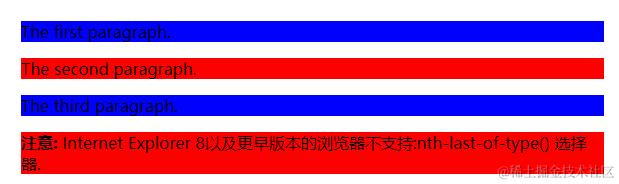
p:nth-last-of-type(odd) /*odd奇数*/
{
	background:red;
}
p:nth-last-of-type(even) /*even偶数*/
{
	background:blue;
}
</style>
</head>
<body>

<p>The first paragraph.</p>
<p>The second paragraph.</p>
<p>The third paragraph.</p>

<p><b>注意:</b> Internet Explorer 8以及更早版本的浏览器不支持:nth-last-of-type() 选择器.</p>

</body>
</html>
运行结果:
实例2:
<!DOCTYPE html>
<html>
<head>
<meta charset="utf-8">
<title>菜鸟教程(runoob.com)</title>
<style>
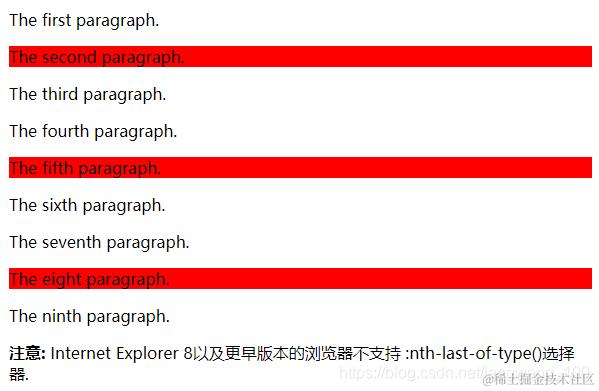
p:nth-last-of-type(3n+0)
{
	background:#ff0000;
}
</style>
</head>
<body>

<p>The first paragraph.</p>
<p>The second paragraph.</p>
<p>The third paragraph.</p>
<p>The fourth paragraph.</p>
<p>The fifth paragraph.</p>
<p>The sixth paragraph.</p>
<p>The seventh paragraph.</p>
<p>The eight paragraph.</p>
<p>The ninth paragraph.</p>

<p><b>注意:</b> Internet Explorer 8以及更早版本的浏览器不支持 :nth-last-of-type()选择器.</p>

</body>
</html>
运行结果:
content属性
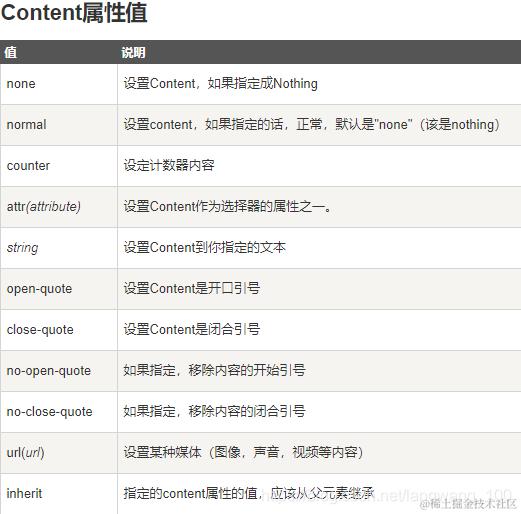
content 属性与 :before 及 :after 伪元素配合使用,来插入生成内容。
注意: IE8只有指定才支持Content属性
注意:
normal 和 none效果一样:都是什么都不加!
counter
<!DOCTYPE html>
<html lang="en">
<head>
  <meta charset="UTF-8">
  <meta name="viewport" content="width=device-width, initial-scale=1.0">
  <meta http-equiv="X-UA-Compatible" content="ie=edge">
  <title>Document</title>
  <style>
    h1::before{
      content: counter(num)'.';
    }
    h1{
      counter-increment: num;
      counter-reset: littenum; /* 重置小标题编号 */
    }
    h4::before{
      content: counter(littenum)'.';
    }
    h4{
      counter-increment: littenum;
      margin-left: 40px;
    }
  </style>
</head>
<body>
	<h1>标题</h1>
    <h4>小标题</h4>
    <h4>小标题</h4>
    <h4>小标题</h4>
    <h1>标题</h1>
    <h4>小标题</h4>
    <h4>小标题</h4>
    <h4>小标题</h4>
</body>
</html>
运行结果:
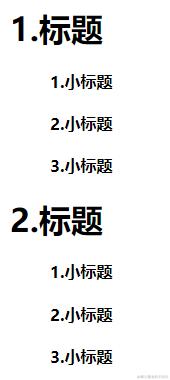
CSS 计数器使用到以下几个属性:
- counter-reset : 创建或者重置计数器
- counter-increment : 递增变量
- content : 插入生成的内容
- counter() 或 counters() 函数 : 将计数器的值添加到元素
注意:
菜鸟教程中说到:要使用 CSS 计数器,得先用 counter-reset 创建。但是上面的例子很明显,num是直接使用的而并没有创建,这里菜鸟建议大家创建
注意:
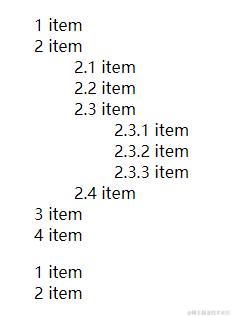
counters() 是 计数器嵌套 [常用于列表嵌套],计数器用于列表中,列表的子元素会自动创建
实例:<!DOCTYPE html> <html> <head> <meta charset="utf-8"> <title>菜鸟教程(runoob.com)</title> <style> ol { counter-reset: section; list-style-type: none; } li::before { counter-increment: section; content: counters(section,".") " "; //这里就是计数嵌套,当元素重复使用时比counter好用 } </style> </head> <body> <ol> <li>item</li> <li>item <ol> <li>item</li>> <li>item</li> <li>item <ol> <li>item</li> <li>item</li> <li>item</li> </ol> </li> <li>item</li> </ol> </li> <li>item</li> <li>item</li> </ol> <ol> <li>item</li> <li>item</li> </ol> </body> </html>运行结果:
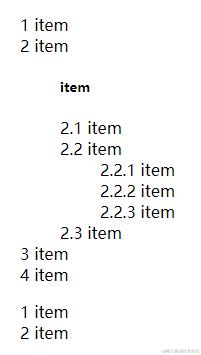
如果改成这样:
<ol>
 <li>item</li>
 <li>item
    <ol>
  	<h5>item</h5>
        <!--这里改为h5就是想说明,如果不作用于列表,嵌套计数器不是很好用-->
  	<li>item</li>
  	<li>item
  		<ol>
  		  <li>item</li>
  		  <li>item</li>
  		  <li>item</li>
  		</ol>
  	</li>
  	<li>item</li>
    </ol>
 </li>
 <li>item</li>
 <li>item</li>
</ol>
<ol>
 <li>item</li>
 <li>item</li>
</ol>
运行结果:
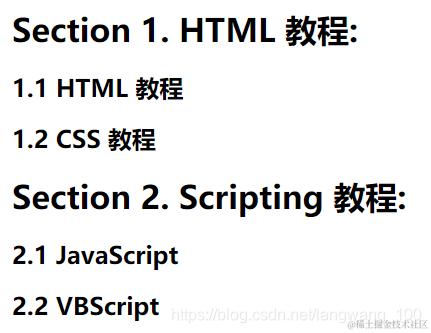
实例:
<!DOCTYPE html>
<html>
<head>
<meta charset="utf-8">
<title>菜鸟教程(runoob.com)</title>
<style>
body {
  counter-reset: section;
}

h1 {
  counter-reset: subsection;
}

h1::before {
  counter-increment: section;
  content: "Section " counter(section) ". ";
}

h2::before {
  counter-increment: subsection;
  content: counter(section) "." counter(subsection) " ";
}
</style>
</head>
<body>

<h1>HTML 教程:</h1>
<h2>HTML 教程</h2>
<h2>CSS 教程</h2>

<h1>Scripting 教程:</h1>
<h2>JavaScript</h2>
<h2>VBScript</h2>

</body>
</html>
运行结果:
counter-increment
counter-increment 属性设置某个选取器每次出现的计数器增量,默认增量是 1。
说明:
利用这个属性,计数器可以递增(或递减)某个值,这可以是正值(或负值),如果没有提供 number 值,则默认为 1。
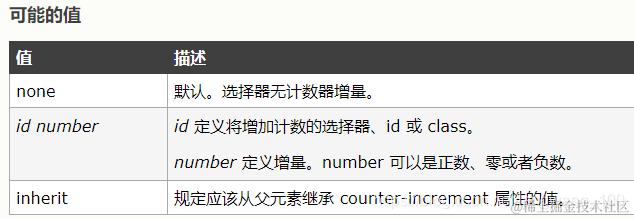
上面就是指出了id,没指出number
注释: 如果使用了 "display: none",则无法增加计数。如使用 "visibility: hidden",则可增加计数。
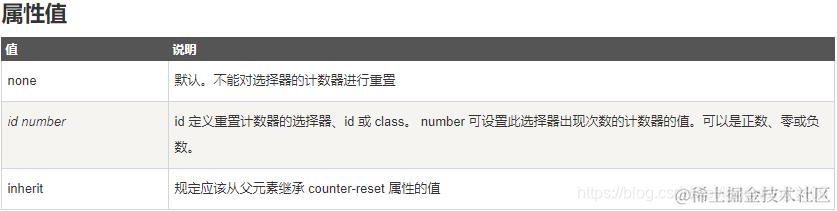
counter-reset
counter-reset属性创建或重置一个或多个计数器。
counter-reset属性通常是和counter-increment属性,content属性一起使用。
attr
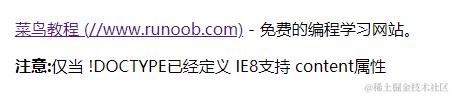
attr( ) 用来获取选择到的元素的某一HTML属性值,并用于其样式;它也可以用于伪元素,属性值采用伪元素所依附的元素。
实例:
<!DOCTYPE html>
<html>
<head>
<style>
a:after {content: " (" attr(href) ")";}
</style>
</head>

<body>
<p><a href="//www.runoob.com">菜鸟教程</a> - 免费的编程学习网站。</p>
<p><b>注意:</b>仅当 !DOCTYPE已经定义 IE8支持 content属性</p>
</body>
</html>
运行结果:
CSS 伪元素与伪类总结
区别:
(1)伪元素主要是用来创建一些不存在原有dom结构树种的元素。例如:用::before和::after在一些存在的元素前后添加文字样式等,这些被添加的内容会以具体的UI显示出来,被用户所看到的,这些内容不会改变文档的内容,不会出现在DOM中,不可复制,仅仅是在CSS渲染层加入。
注意:
CSS3中建议使用 :: 表示伪元素,如:div::before,上表中常见的伪元素都已用 :: 表示。
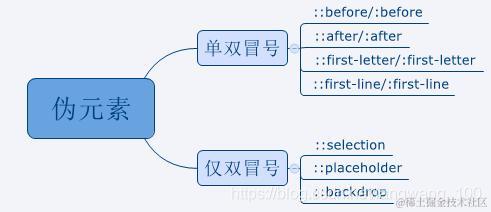
(2)伪类表示已存在的某个元素处于某种状态,但是通过dom树又无法表示这种状态,就可以通过伪类来为其添加样式。例如a元素的:hover, :active等。
注意:
CSS3中建议使用:表示伪元素,如:a:hover
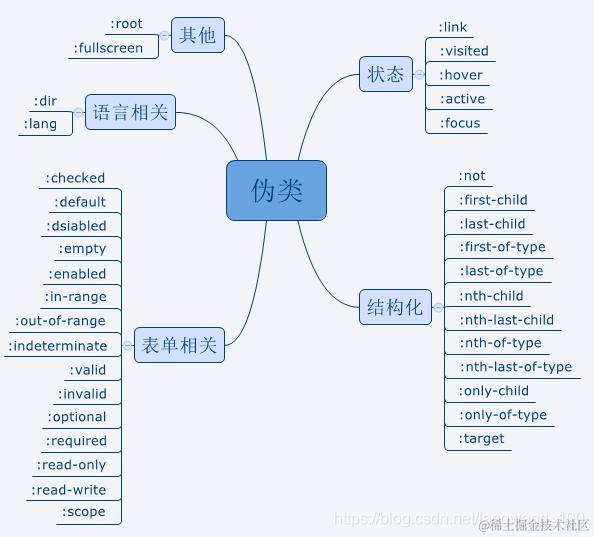 总之:
总之:
伪元素的操作对象是新生成的dom元素,而不是原来dom结构里就存在的;而伪类恰好相反,伪类的操作对象是原来的dom结构里就存在的元素。
伪元素与伪类的根本区别在于:操作的对象元素是否存在于原来的dom结构里。
感谢:蔓蔓的博客