1. 先创建一个tableScrollbarFixed.js
// 表格横向滚动条固定页面底部指令
/**
* 创建一个scroller的dom
*/
import { throttle } from 'lodash'
import Vue from 'vue'
class Scroller {
/**
* 给tableBody创建一个scroller
* @param {Element} targetTableWrapperEl
* @param {string} mode
*/
constructor(targetTableWrapperEl, mode = 'hover', scrollWrapper) {
if (!targetTableWrapperEl) {
throw new Error('need have table element')
}
this.targetTableWrapperEl = targetTableWrapperEl
this.fullwidth = false
this.mode = mode
this.scrollWrapper = scrollWrapper
/**
* 创建相关dom
*/
const scroller = document.createElement('div')
scroller.classList.add('zk-scrollbar')
scroller.style.height = '12px'
scroller.style.position = 'sticky'
scroller.style.bottom = 0
scroller.style.left = 0
scroller.style.zIndex = 3
scroller.style.display = 'none'
this.dom = scroller
const bar = document.createElement('div')
bar.classList.add('zk-scrollbar__bar', 'is-horizontal')
bar.style.cssText = 'position: absolute;right: 2px;bottom: 2px;z-index: 1;border-radius: 4px;opacity: 0;transition: opacity 120ms ease-out; height: 6px;left: 2px;'
this.bar = bar
scroller.appendChild(bar)
const thumb = document.createElement('div')
thumb.classList.add('zk-scrollbar__thumb')
thumb.style.cssText = `position: relative
display: block
width: 0
height: 100%
cursor: pointer
border-radius: inherit
background-color:
transition: .3s background-color
bar.appendChild(thumb)
this.thumb = thumb
/**
* 初始化配置
*/
// eslint-disable-next-line consistent-this
const instance = this
this.checkIsScrollBottom = throttle(() => {
if (!this.targetTableWrapperEl.offsetParent) return
const viewHeight = this.scrollWrapper.getBoundingClientRect().bottom
const { bottom } = targetTableWrapperEl.getBoundingClientRect()
const scrollBarBottom = Number(this.dom.style.bottom.split('px')[0]) - 4
if (bottom + scrollBarBottom <= viewHeight) {
instance.hideScroller()
} else {
// 需要重新设置一次当前宽度
instance.resetBar(false)
// 显示当前的bar
instance.showScroller()
}
}, 1000 / 60)
this.initBar = throttle(() => {
this.dom.style.display = 'none'
// bar宽度自动重制
setTimeout(() => {
this.resetBar()
// this.resetScroller()
this.resetThumbPosition()
}, 1000)
}, 2000)
this.scrollWrapper.addEventListener('scroll', this.checkIsScrollBottom)
this.resizeObserver = new ResizeObserver(this.initBar)
this.resizeObserver.observe(this.targetTableWrapperEl)
// 自动同步,table => scroller
targetTableWrapperEl.addEventListener(
'scroll',
throttle(() => {
instance.resetThumbPosition()
}, 1000 / 60),
)
// 自动同步 scroller => table
this.syncDestoryHandler = this.initScrollSyncHandler()
// 监听table的dom变化,自动重新设置
this.tableElObserver = new MutationObserver(this.initBar)
this.tableElObserver.observe(targetTableWrapperEl, {
childList: true,
subtree: true,
attributes: true,
attributeFilter: ['style'],
})
}
/**
* 自动设置Bar
* @param {boolean} changeScrollerVisible 是否开启自动设置滚动条显示与否
*/
resetBar(changeScrollerVisible = true) {
const { targetTableWrapperEl } = this
const widthPercentage = (targetTableWrapperEl.clientWidth * 100) / targetTableWrapperEl.scrollWidth
const thumbWidth = Math.min(widthPercentage, 100)
this.thumb.style.width = `${thumbWidth}%`
this.fullwidth = thumbWidth >= 100
if (changeScrollerVisible) {
if (this.fullwidth) {
this.hideScroller()
} else {
this.checkIsScrollBottom()
}
}
}
resetThumbPosition() {
this.thumb.style.transform = `translateX(${this.moveX}%)`
}
resetScroller() {
const { targetTableWrapperEl, dom, scrollWrapper } = this
const boundingClientRect = targetTableWrapperEl.getBoundingClientRect()
// console.log(scrollWrapper)
dom.style.width = `${boundingClientRect.width}px`
const scrollWrapperPaddingBottom = Number(getComputedStyle(scrollWrapper).paddingBottom.split('px')[0])
if (dom.style.display === 'none') return
dom.style.bottom = `${-scrollWrapperPaddingBottom}px`
setTimeout(() => {
// 获取dom元素所处位置的点击元素,如果点击元素不是dom元素 证明被遮挡,需要设置dom元素bottom位置
const domClientReact = dom.getBoundingClientRect()
const clickElement = document.elementFromPoint(domClientReact.x, domClientReact.y)
if (clickElement && clickElement.className !== 'zk-scrollbar') {
dom.style.bottom = `${clickElement.offsetHeight - scrollWrapperPaddingBottom}px`
}
}, 300)
}
get moveX() {
const { targetTableWrapperEl } = this
return (targetTableWrapperEl.scrollLeft * 100) / targetTableWrapperEl.clientWidth
}
/**
* 让scroller的拖动行为和table的同步
* 处理类似element-ui的拖拽处理
*/
initScrollSyncHandler() {
let cursorDown = false
let tempClientX = 0
let rate = 1
const { thumb, targetTableWrapperEl, bar } = this
function getRate() {
// 计算一下变换比例,拖拽走的是具体数字,但是这个实际上应该是按照比例变的
return bar.offsetWidth / thumb.offsetWidth
}
const mouseMoveDocumentHandler = throttle(
/** @param {MouseEvent} e */
(e) => {
if (cursorDown === false) {
return
}
const { clientX } = e
const offset = clientX - tempClientX
const originTempClientX = tempClientX
tempClientX = clientX
const tempScrollleft = targetTableWrapperEl.scrollLeft
targetTableWrapperEl.scrollLeft += offset * rate
if (tempScrollleft === targetTableWrapperEl.scrollLeft) {
tempClientX = originTempClientX
}
},
1000 / 60,
)
/** @param {MouseEvent} e */
function mouseUpDocumentHandler() {
cursorDown = false
document.removeEventListener('mousemove', mouseMoveDocumentHandler)
document.removeEventListener('mouseup', mouseUpDocumentHandler)
document.onselectstart = null
}
/**
* 拖拽处理
* @param {MouseEvent} e
*/
function startDrag(e) {
e.stopImmediatePropagation()
cursorDown = true
document.addEventListener('mousemove', mouseMoveDocumentHandler)
document.addEventListener('mouseup', mouseUpDocumentHandler)
document.onselectstart = () => false
}
thumb.onmousedown = function (e) {
// prevent click event of right button
if (e.ctrlKey || e.button === 2) {
return
}
const { clientX } = e
tempClientX = clientX
rate = getRate()
startDrag(e)
}
/**
* 点击槽快速移动
* @param {PointerEvent} e
*/
bar.onclick = function (e) {
const { target } = e
if (target !== bar) {
return
}
rate = getRate()
const { clientX } = e
let offset = 0
const thumbPosition = thumb.getBoundingClientRect()
if (thumbPosition.left >= clientX) {
offset = clientX - thumbPosition.left
} else {
offset = clientX - thumbPosition.left - thumbPosition.width
}
const targetScrollLeft = targetTableWrapperEl.scrollLeft + offset * rate
targetTableWrapperEl.scrollTo({
left: targetScrollLeft,
behavior: 'smooth',
})
}
return function () {
document.removeEventListener('mouseup', mouseUpDocumentHandler)
}
}
/**
* 显示整体
*/
showScroller() {
if (!this.fullwidth) {
if (this.dom.style.display === 'none') {
this.resetScroller()
}
this.dom.style.display = 'block'
}
if (this.mode === 'force') {
this.bar.style.opacity = 1
}
}
/**
* 隐藏整体
*/
hideScroller() {
this.dom.style.display = 'none'
}
/**
* 显示滚动条
*/
showBar() {
this.bar.style.opacity = 1
this.checkIsScrollBottom()
this.resetScroller()
}
/**
* 隐藏滚动条
*/
hideBar() {
if (this.mode === 'force') {
this.bar.style.opacity = 1
} else {
this.bar.style.opacity = 0
}
}
destory() {
this.tableElObserver.disconnect()
this.scrollWrapper.removeEventListener('scroll', this.checkIsScrollBottom)
this.syncDestoryHandler()
}
}
/** @type {Vue.DirectiveOptions} */
export const directiveVue2 = {
inserted(el, binding) {
if (binding.value === false) {
return
}
const { value = {} } = binding
const { mode = 'hover', noNeed = false } = value
if (noNeed) return
const tableBodyWrapper = el.querySelector('.zk-table__body')
const scrollWrapper = getScrollParent(tableBodyWrapper)
console.log(scrollWrapper)
const scroller = new Scroller(tableBodyWrapper, mode, scrollWrapper)
el.appendChild(scroller.dom)
el.horizontalScroll = scroller
if (mode === 'hover') {
el.addEventListener('mouseenter', scroller.showBar.bind(scroller))
el.addEventListener('mouseleave', scroller.hideBar.bind(scroller))
} else {
// scroller.showBar()
}
},
unbind(el, binding) {
if (binding.value === false) {
return
}
const { value = {} } = binding
const { noNeed = false } = value
if (noNeed) return
el.horizontalScroll.destory()
},
}
// 获取目标元素的滚动父级
function getScrollParent(element, includeHidden) {
let style = getComputedStyle(element)
const excludeStaticParent = style.position === 'absolute'
const overflowRegex = includeHidden ? /(auto|scroll|hidden)/ : /(auto|scroll)/
if (style.position === 'fixed') return document.body
// eslint-disable-next-line no-cond-assign
for (let parent = element
style = getComputedStyle(parent)
if (excludeStaticParent && style.position === 'static') {
continue
}
if (overflowRegex.test(style.overflow + style.overflowY + style.overflowX)) return parent
}
return document.body
}
export default Vue.directive('scrollBarFixed', directiveVue2)
2. 然后在main.js 中引令这个指令
import tableScrollbarFixed from '@/tableScrollbarFixed.js';
Vue.use(tableScrollbarFixed);
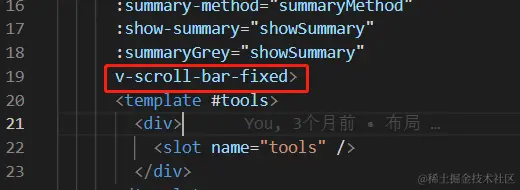
3. 最后在二次封装好的table 组件中 引入指令 v-scroll-bar-fixed
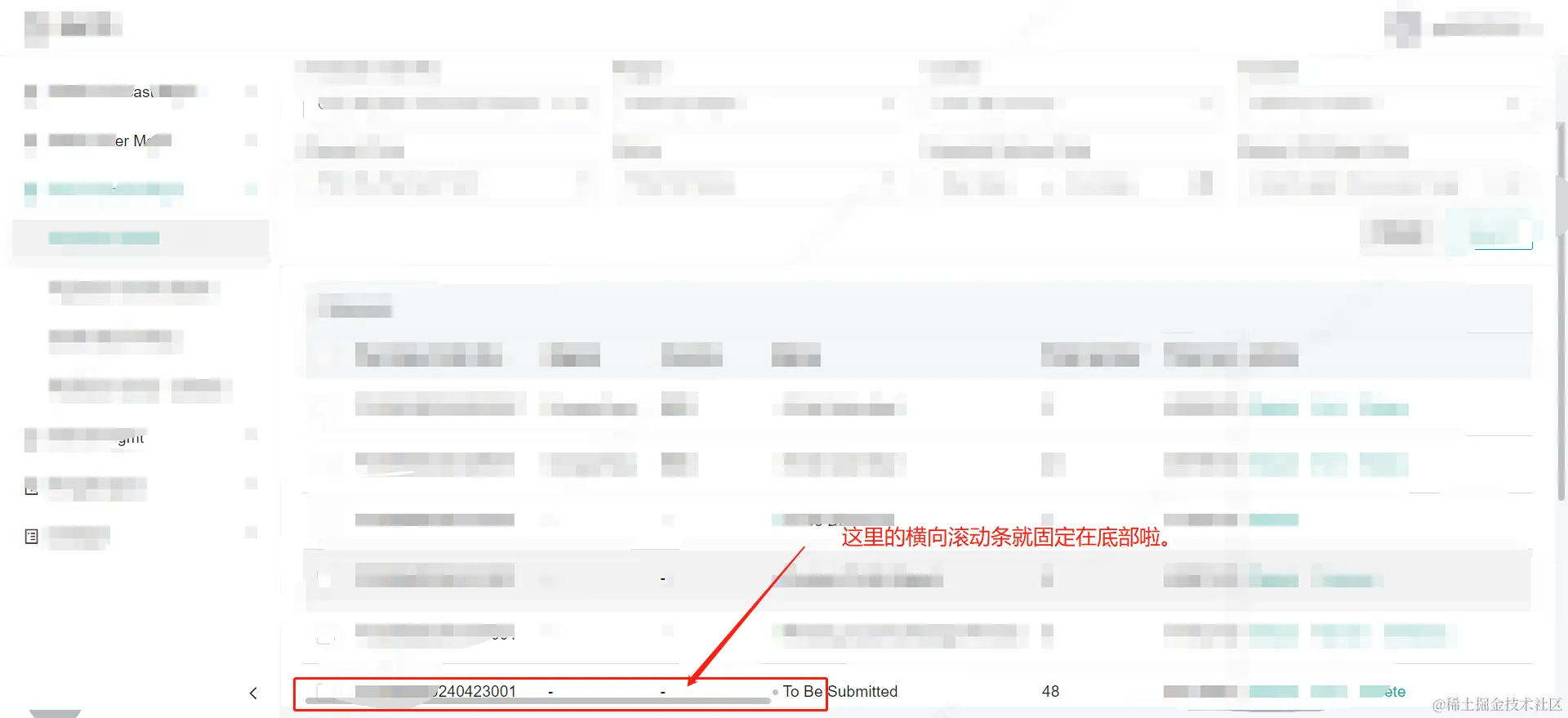
4. 效果如下