

需求分析
-
需求背景
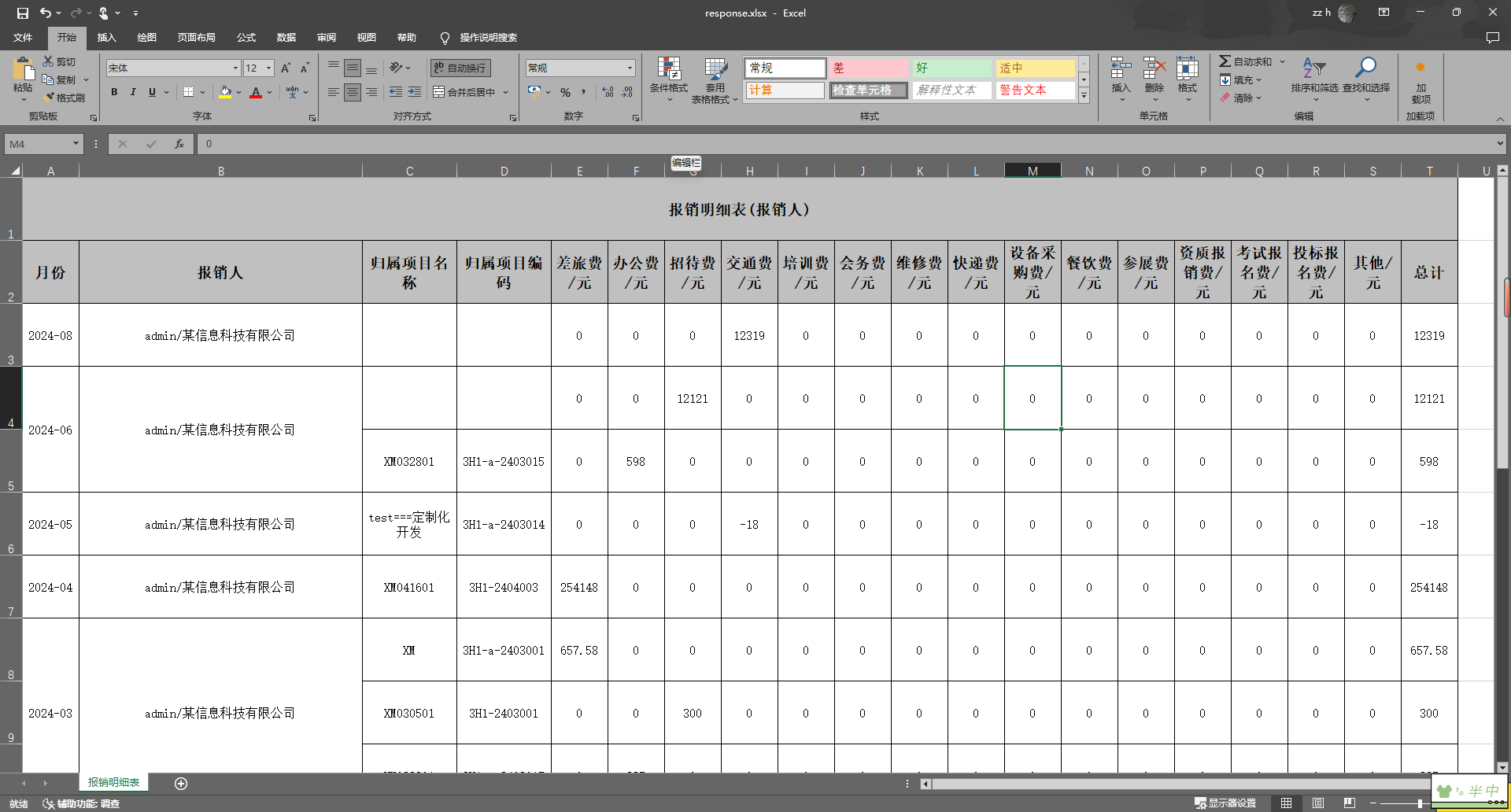
- 许多报表需要对相同数据的单元格进行合并,以提高数据的可读性和美观性。例如,在销售报表中,将相同客户的订单合并在一起。
- 同时,报表中的标题和内容部分通常需要不同的样式,以便于区分和阅读。
-
确定需求
- 合并单元格的列索引,例如合并第1、2列中的相同数据。
- 合并操作开始的行索引,通常为数据行的起始行。
- 标题行和内容行需要不同的样式,如字体、大小、对齐方式等。
-
示例
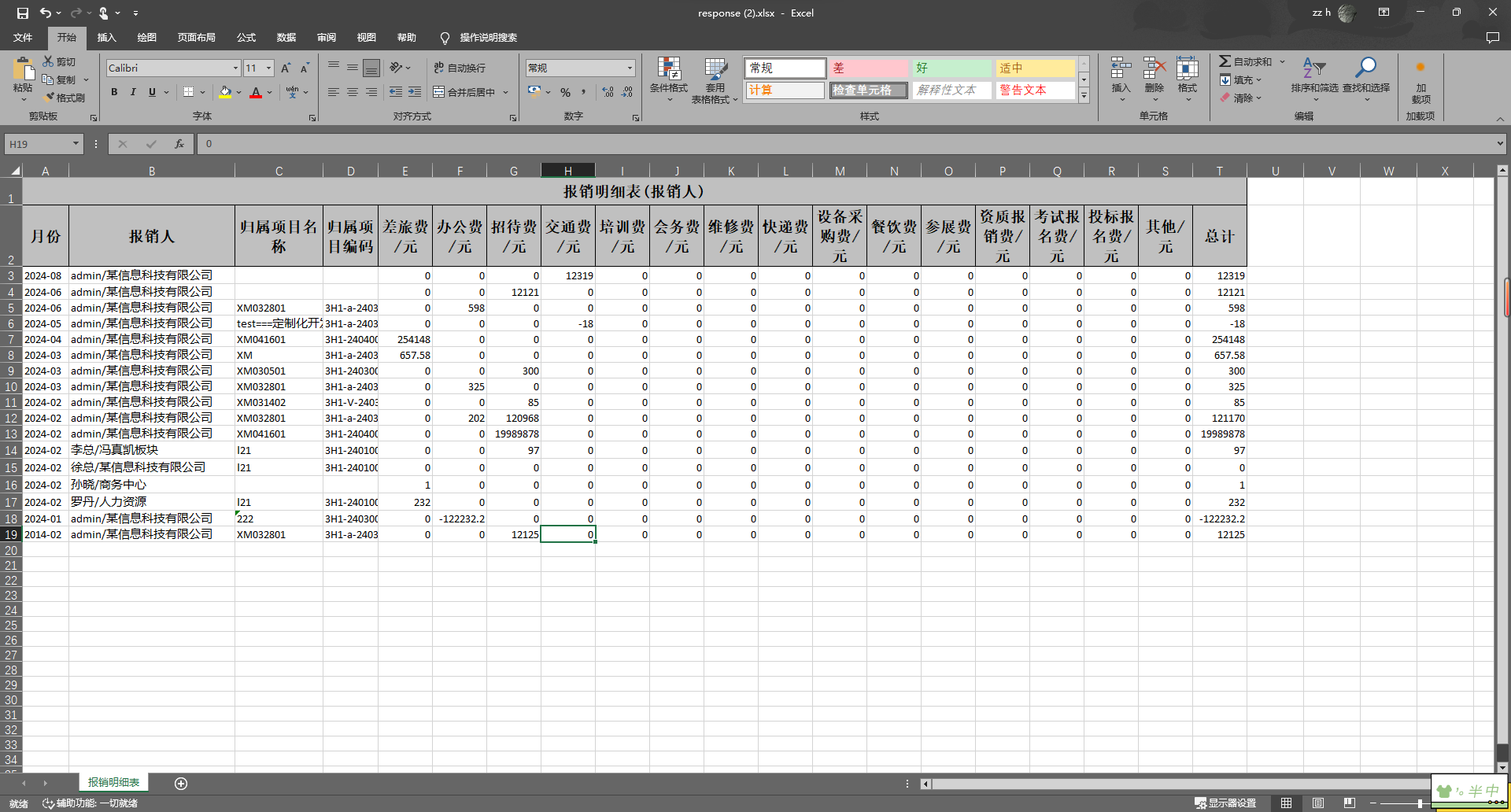
- 将图一表格导出为图二形式
- 图一
- 图二
实现步骤
一、映射实体
上图Excel导出文件的映射类如下:
package com.shy.server.business.finance.reimburse.excel;

import com.alibaba.excel.annotation.ExcelProperty;
import com.alibaba.excel.annotation.write.style.ColumnWidth;
import com.alibaba.excel.annotation.write.style.ContentRowHeight;
import com.alibaba.excel.annotation.write.style.HeadRowHeight;
import lombok.Data;

import java.math.BigDecimal;

@Data
@HeadRowHeight(60)
@ContentRowHeight(60)
public class ExpenseUserReimburseDetailToExcel {

    @ExcelProperty(value = {"报销明细表(报销人)", "月份"})
    private String month;

    @ExcelProperty(value = {"报销明细表(报销人)", "报销人"})
    @ColumnWidth(45)
    private String userName;

    @ExcelProperty(value = {"报销明细表(报销人)", "归属项目名称"})
    @ColumnWidth(15)
    private String projectName;

    @ExcelProperty(value = {"报销明细表(报销人)", "归属项目编码"})
    @ColumnWidth(15)
    private String projectCode;

    @ExcelProperty(value = {"报销明细表(报销人)", "差旅费/元"})
    private BigDecimal travel;

    @ExcelProperty(value = {"报销明细表(报销人)", "办公费/元"})
    private BigDecimal office;

    @ExcelProperty(value = {"报销明细表(报销人)", "招待费/元"})
    private BigDecimal entertainment;

    @ExcelProperty(value = {"报销明细表(报销人)", "交通费/元"})
    private BigDecimal transportation;

    @ExcelProperty(value = {"报销明细表(报销人)", "培训费/元"})
    private BigDecimal training;

    @ExcelProperty(value = {"报销明细表(报销人)", "会务费/元"})
    private BigDecimal business;

    @ExcelProperty(value = {"报销明细表(报销人)", "维修费/元"})
    private BigDecimal maintenance;

    @ExcelProperty(value = {"报销明细表(报销人)", "快递费/元"})
    private BigDecimal courier;

    @ExcelProperty(value = {"报销明细表(报销人)", "设备采购费/元"})
    private BigDecimal equipmentProcurement;

    @ExcelProperty(value = {"报销明细表(报销人)", "餐饮费/元"})
    private BigDecimal meals;

    @ExcelProperty(value = {"报销明细表(报销人)", "参展费/元"})
    private BigDecimal exhibition;

    @ExcelProperty(value = {"报销明细表(报销人)", "资质报销费/元"})
    private BigDecimal qualification;

    @ExcelProperty(value = {"报销明细表(报销人)", "考试报名费/元"})
    private BigDecimal exam;

    @ExcelProperty(value = {"报销明细表(报销人)", "投标报名费/元"})
    private BigDecimal bid;

    @ExcelProperty(value = {"报销明细表(报销人)", "其他/元"})
    private BigDecimal other;

    @ExcelProperty(value = {"报销明细表(报销人)", "总计"})
    private BigDecimal total;

}
二、自定义单元格合并处理器
-
介绍CellWriteHandler接口
- CellWriteHandler接口用于在单元格创建和处理的各个阶段执行自定义逻辑。
- 需要实现的三个主要方法:
beforeCellCreate、afterCellCreate和afterCellDispose。
-
创建ExcelMergeHandler类并实现CellWriteHandler接口
java复制代码public class ExcelMergeHandler implements CellWriteHandler {

    private final int[] mergeColumnIndex;
    private final int mergeRowIndex;

    public ExcelMergeHandler(int mergeRowIndex, int[] mergeColumnIndex) {
        this.mergeRowIndex = mergeRowIndex;
        this.mergeColumnIndex = mergeColumnIndex;
    }

    @Override
    public void beforeCellCreate(WriteSheetHolder writeSheetHolder, WriteTableHolder writeTableHolder, Row row, Head head, Integer columnIndex, Integer relativeRowIndex, Boolean isHead) {
        // 单元格创建前的处理(这里不需要处理)
    }

    @Override
    public void afterCellCreate(WriteSheetHolder writeSheetHolder, WriteTableHolder writeTableHolder, Cell cell, Head head, Integer relativeRowIndex, Boolean isHead) {
        // 单元格创建后的处理(这里不需要处理)
    }

    @Override
    public void afterCellDispose(WriteSheetHolder writeSheetHolder, WriteTableHolder writeTableHolder, List<WriteCellData<?>> cellDataList, Cell cell, Head head, Integer relativeRowIndex, Boolean isHead) {
        int curRowIndex = cell.getRowIndex();
        int curColIndex = cell.getColumnIndex();

        if (curRowIndex > mergeRowIndex && isMergeColumn(curColIndex)) {
            mergeWithPrevRow(writeSheetHolder, cell, curRowIndex, curColIndex);
        }
    }

    private boolean isMergeColumn(int curColIndex) {
        for (int columnIndex : mergeColumnIndex) {
            if (curColIndex == columnIndex) {
                return true;
            }
        }
        return false;
    }

    private void mergeWithPrevRow(WriteSheetHolder writeSheetHolder, Cell cell, int curRowIndex, int curColIndex) {
        Object curData = getCellData(cell);
        Cell preCell = cell.getSheet().getRow(curRowIndex - 1).getCell(curColIndex);
        Object preData = getCellData(preCell);

        if (curData.equals(preData) && isSamePrimaryKey(cell, curRowIndex)) {
            Sheet sheet = writeSheetHolder.getSheet();
            mergeCells(sheet, curRowIndex, curColIndex);
        }
    }

    private Object getCellData(Cell cell) {
        return cell.getCellTypeEnum() == CellType.STRING ? cell.getStringCellValue() : cell.getNumericCellValue();
    }

    private boolean isSamePrimaryKey(Cell cell, int curRowIndex) {
        String currentPrimaryKey = cell.getRow().getCell(0).getStringCellValue();
        String previousPrimaryKey = cell.getSheet().getRow(curRowIndex - 1).getCell(0).getStringCellValue();
        return currentPrimaryKey.equals(previousPrimaryKey);
    }

    private void mergeCells(Sheet sheet, int curRowIndex, int curColIndex) {
        List<CellRangeAddress> mergeRegions = sheet.getMergedRegions();
        boolean isMerged = false;

        for (int i = 0; i < mergeRegions.size() && !isMerged; i++) {
            CellRangeAddress cellRangeAddr = mergeRegions.get(i);
            if (cellRangeAddr.isInRange(curRowIndex - 1, curColIndex)) {
                sheet.removeMergedRegion(i);
                cellRangeAddr.setLastRow(curRowIndex);
                sheet.addMergedRegion(cellRangeAddr);
                isMerged = true;
            }
        }

        if (!isMerged) {
            CellRangeAddress cellRangeAddress = new CellRangeAddress(curRowIndex - 1, curRowIndex, curColIndex, curColIndex);
            sheet.addMergedRegion(cellRangeAddress);
        }
    }
}
三、设置导出样式
- 创建ExcelStyleHandler类
- 介绍ExcelStyleHandler类,用于设置Excel文件的单元格样式。
- 实现getHeadStyle方法
- 设置标题样式,包括字体、边框、对齐方式等。
- 实现getContentStyle方法
- 设置内容样式,包括字体、边框、对齐方式等。
- 实现createBaseStyle方法
- 提取公共样式设置,减少代码重复,提高可维护性。
java复制代码public class ExcelStyleHandler {

    /**
     * 创建标题样式
     * @return WriteCellStyle 标题样式
     */
    public static WriteCellStyle getHeadStyle() {
        WriteCellStyle headWriteCellStyle = createBaseStyle();

        // 设置标题字体
        WriteFont headWriteFont = new WriteFont();
        headWriteFont.setFontName("宋体");
        headWriteFont.setFontHeightInPoints((short) 14);
        headWriteFont.setBold(true);
        headWriteCellStyle.setWriteFont(headWriteFont);

        return headWriteCellStyle;
    }

    /**
     * 创建内容样式
     * @return WriteCellStyle 内容样式
     */
    public static WriteCellStyle getContentStyle() {
        WriteCellStyle contentWriteCellStyle = createBaseStyle();

        // 设置内容字体
        WriteFont contentWriteFont = new WriteFont();
        contentWriteFont.setFontHeightInPoints((short) 12);
        contentWriteFont.setFontName("宋体");
        contentWriteCellStyle.setWriteFont(contentWriteFont);

        return contentWriteCellStyle;
    }

    /**
     * 创建基础样式
     * @return WriteCellStyle 基础样式
     */
    private static WriteCellStyle createBaseStyle() {
        WriteCellStyle writeCellStyle = new WriteCellStyle();

        // 设置边框
        writeCellStyle.setBorderBottom(BorderStyle.THIN);
        writeCellStyle.setBottomBorderColor((short) 0);
        writeCellStyle.setBorderLeft(BorderStyle.THIN);
        writeCellStyle.setLeftBorderColor((short) 0);
        writeCellStyle.setBorderRight(BorderStyle.THIN);
        writeCellStyle.setRightBorderColor((short) 0);
        writeCellStyle.setBorderTop(BorderStyle.THIN);
        writeCellStyle.setTopBorderColor((short) 0);

        // 设置对齐方式
        writeCellStyle.setHorizontalAlignment(HorizontalAlignment.CENTER);
        writeCellStyle.setVerticalAlignment(VerticalAlignment.CENTER);

        // 设置其他样式属性
        writeCellStyle.setWrapped(true);
        writeCellStyle.setShrinkToFit(true);

        return writeCellStyle;
    }
}
四、创建ExcelUtils工具类
主要用于存放各类Excel操作工具
package com.shy.framework.excel.core.util;

import com.alibaba.excel.EasyExcel;
import com.alibaba.excel.annotation.ExcelProperty;
import com.alibaba.excel.write.handler.SheetWriteHandler;
import com.alibaba.excel.write.metadata.holder.WriteSheetHolder;
import com.alibaba.excel.write.metadata.holder.WriteWorkbookHolder;
import com.alibaba.excel.write.style.HorizontalCellStyleStrategy;
import com.alibaba.excel.write.style.column.LongestMatchColumnWidthStyleStrategy;
import com.shy.framework.excel.core.annotations.ExcelSelected;
import com.shy.framework.excel.core.handler.ExcelMergeHandler;
import com.shy.framework.excel.core.handler.ExcelStyleHandler;
import com.shy.framework.excel.core.selected.CustomSheetWriteHandler;
import com.shy.framework.excel.core.selected.ExcelSelectedResolve;
import lombok.extern.slf4j.Slf4j;
import org.apache.poi.ss.usermodel.*;
import org.apache.poi.ss.util.CellRangeAddressList;
import org.springframework.web.multipart.MultipartFile;

import javax.servlet.http.HttpServletResponse;
import java.io.*;
import java.lang.reflect.Field;
import java.net.URLEncoder;
import java.util.*;

/**
 * Excel 工具类
 */
@Slf4j
public class ExcelUtils {

    /**
     * 将列表写入Excel 并合并指定列、行
     *
     * @param response  响应
     * @param filename  文件名
     * @param sheetName Excel sheet 名
     * @param head      Excel head 头
     * @param data      数据列表哦
     * @param <T>       泛型,保证 head 和 data 类型的一致性
     * @param mergeRowIndex 合并开始行(从0开始)
     * @param mergeCols 需要合并的列
     * @throws IOException 写入失败的情况
     */
    public static <T> void mergeWrite(HttpServletResponse response, String filename, String sheetName,
                           Class<T> head, List<T> data, int mergeRowIndex, int[] mergeCols) throws IOException {
        EasyExcel.write(response.getOutputStream(), head)
                .autoCloseStream(Boolean.FALSE)
                // 自动合并列单元格
                .registerWriteHandler(new ExcelMergeHandler(mergeRowIndex, mergeCols))
                // 表格样式
                .registerWriteHandler(new HorizontalCellStyleStrategy(ExcelStyleHandler.getHeadStyle(), ExcelStyleHandler.getContentStyle()))
                .sheet(sheetName).doWrite(data);
        // 设置 header 和 contentType。写在最后的原因是,避免报错时,响应 contentType 已经被修改了
        response.addHeader("Content-Disposition", "attachment;filename=" + URLEncoder.encode(filename, "UTF-8"));
        response.setContentType("application/vnd.ms-excel;charset=UTF-8");
    }

    public static <T> List<T> read(MultipartFile file, Class<T> head) throws IOException {
        return EasyExcel.read(file.getInputStream(), head, null)
                .autoCloseStream(false)  // 不要自动关闭,交给 Servlet 自己处理
                .doReadAllSync();
    }

}
五、调用工具类导出Excel文件
以下一个实际业务中导出Excel文件的接口
    /**
     * 报销明细数据导出
     */
    @GetMapping("/exportReimburseDetailExcel")
    @ApiOperationSupport(order = 4)
    @ApiOperation(value = "报销明细表导出", notes = "报销明细表导出")
    public void exportReimburseDetailExcel(HttpServletResponse response, @Valid ReimburseStatisticsDTO param) throws IOException{
        List<ReimburseDetailVO> result = personExpenseService.exportReimburseDetailExcel(param);
        // 需要合并的列
        int[] cols = {0, 1, 2, 3};
        // 从第二行后开始合并
        int row = 2;
        // 导出报销人维度报销明细表
        ExcelUtils.mergeWrite(response, "报销明细表-报销人.xlsx", "报销明细表",
                ExpenseUserReimburseDetailToExcel.class,
                ReimburseStatisticsConvert.INSTANCE.expenseUserDetailDoToExcel(result),
                row, cols);
    }

