效果预览
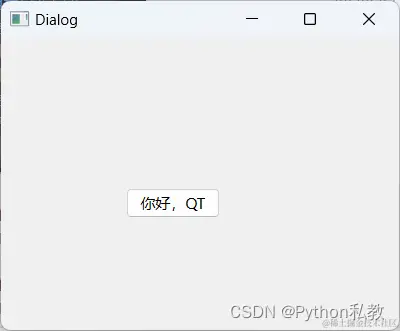
hello.ui
<?xml version="1.0" encoding="UTF-8"?>
<ui version="4.0">
 <class>Dialog</class>
 <widget class="QDialog" name="Dialog">
  <property name="geometry">
   <rect>
    <x>0</x>
    <y>0</y>
    <width>400</width>
    <height>300</height>
   </rect>
  </property>
  <property name="windowTitle">
   <string>Dialog</string>
  </property>
  <widget class="QPushButton" name="pushButton">
   <property name="geometry">
    <rect>
     <x>100</x>
     <y>120</y>
     <width>75</width>
     <height>24</height>
    </rect>
   </property>
   <property name="text">
    <string>你好,QT</string>
   </property>
  </widget>
 </widget>
 <resources/>
 <connections/>
</ui>
hello.py
from PyQt6 import QtCore, QtGui, QtWidgets
class Ui_Dialog(object):
def setupUi(self, Dialog):
Dialog.setObjectName("Dialog")
Dialog.resize(400, 300)
self.pushButton = QtWidgets.QPushButton(parent=Dialog)
self.pushButton.setGeometry(QtCore.QRect(100, 120, 75, 24))
self.pushButton.setObjectName("pushButton")
self.retranslateUi(Dialog)
QtCore.QMetaObject.connectSlotsByName(Dialog)
def retranslateUi(self, Dialog):
_translate = QtCore.QCoreApplication.translate
Dialog.setWindowTitle(_translate("Dialog", "Dialog"))
self.pushButton.setText(_translate("Dialog", "你好,QT"))
main.py
import hello
import sys
from PyQt6.QtWidgets import QApplication, QMainWindow

if __name__ == '__main__':
    app = QApplication(sys.argv)
    window = QMainWindow()
    ui = hello.Ui_Dialog()
    ui.setupUi(window)
    window.show()
    sys.exit(app.exec())