flutter pub add pin_code_fields
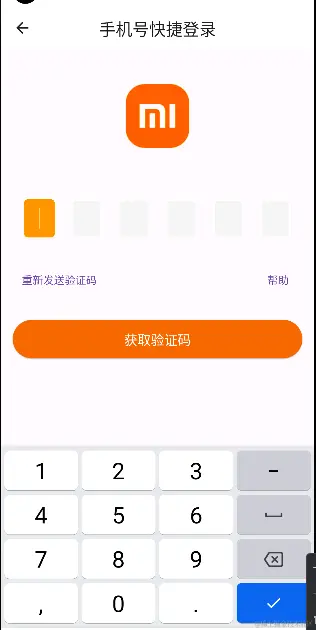
import 'package:flutter/material.dart';
import 'package:flutterdemo/app/services/screenAdapter.dart';
import 'package:flutterdemo/app/widget/logo.dart';
import 'package:flutterdemo/app/widget/passButton.dart';
import 'package:get/get.dart';
import 'package:pin_code_fields/pin_code_fields.dart';
import '../controllers/code_login_step_two_controller.dart';
class CodeLoginStepTwoView extends GetView<CodeLoginStepTwoController> {
const CodeLoginStepTwoView({Key? key}) : super(key: key);
@override
Widget build(BuildContext context) {
return Scaffold(
appBar: AppBar(
backgroundColor: Colors.white,
title: const Text('手机号快捷登录'),
centerTitle: true,
),
body: ListView(
padding: EdgeInsets.all(ScreenAdapter.width(40)),
children: [
const Logo(),
Container(
margin: EdgeInsets.only(top: ScreenAdapter.height(60)),
padding: EdgeInsets.all(ScreenAdapter.width(40)),
child: PinCodeTextField(
autoFocus: true,
keyboardType: TextInputType.number,
length:6,
obscureText: false,
animationType: AnimationType.fade,
dialogConfig: DialogConfig(
dialogTitle: "粘贴验证码",
dialogContent: "确定要粘贴验证码",
affirmativeText: "确定",
negativeText: "取消"
),
pinTheme: PinTheme(
activeColor: Colors.black12,
selectedColor: Colors.orange,
inactiveColor: Colors.white,
selectedFillColor: Colors.orange,
inactiveFillColor: const Color.fromRGBO(245, 245, 245, 1),
shape: PinCodeFieldShape.box,
borderRadius: BorderRadius.circular(5),
fieldHeight: 50,
fieldWidth: 40,
),
animationDuration: const Duration(milliseconds: 300),
enableActiveFill: true,
controller: controller.editingController,
onCompleted: (v){
print("Completed");
},
onChanged: (value){
print(value);
},
beforeTextPaste: (text){
print("Allowing to paste $text");
return true;
},
appContext: context,
),
),
SizedBox(
child: Row(
mainAxisAlignment: MainAxisAlignment.spaceBetween,
children: [
TextButton(onPressed: (){}, child: Text("重新发送验证码")),
TextButton(onPressed: (){}, child: Text("帮助"))
],
),
),
PassButton(text: "获取验证码", onPressed: (){
print(controller.editingController.text);
FocusScope.of(context).requestFocus(FocusNode());
})
],
)
);
}
}