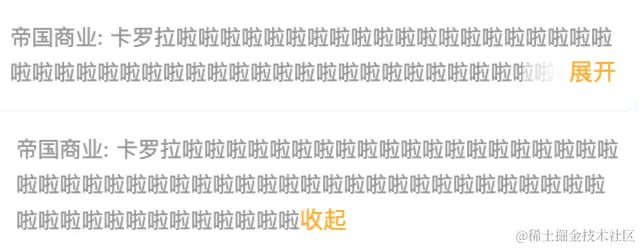
<template>
<view class="overflow-hidden overflow-text" :style="{ width, '-webkit-line-clamp': clamp}">
<text class="content" :style="{ color, lineHeight: `${lineHeight}rpx`, fontSize: `${size}rpx`}">{{ content }}</text>
<view v-if="more" :class="['btn-text', { 'btn-visible': expandStaus}]" @click.stop="onToggle">
{{ expandStaus ? '收起' : '展开' }}
</view>
</view>
</template>
<script>
export default {
name: "c-read-more",
props: {
content: {
type: String,
default: ''
},
width: {
type: String,
default: '100%'
},
lineClamp: {
type: [String, Number],
default: 2
},
lineHeight: {
type: [String, Number],
default: 1
},
size: {
type: [String, Number],
default: 26
},
color: {
type: String,
default: '#989797'
},
},
data() {
return {
expandStaus: false,
clamp: this.lineClamp,
more: false
};
},
mounted() {
this.$nextTick(async () => {
const {
height: cHeight
} = await this.$uGetRect('.content')
const {
height: fHeight
} = await this.$uGetRect('.overflow-hidden')
this.more = cHeight > fHeight
})
},
methods: {
onToggle() {
this.expandStaus = !this.expandStaus
if (this.expandStaus) {
this.clamp = 1000
} else {
this.clamp = this.lineClamp
}
this.$emit('toggle', this.expandStaus)
}
}
}
</script>
<style lang="scss" scoped>
.overflow-hidden {
display: -webkit-box;
word-break: break-all;
white-space: normal;
-webkit-box-orient: vertical;
overflow: hidden;
}
.overflow-text {
position: relative;
box-sizing: border-box;
}
.btn-text {
position: absolute;
right: 0;
bottom: 0;
z-index: 2;
background-color: #fff;
color: #FFAD2B;
padding-left: 0.25rem;
font-size: 26rpx;
&::after {
content: '';
position: absolute;
top: 0;
left: -1.5rem;
height: 100%;
width: 1.5rem;
background: linear-gradient(to right, rgba(255, 255, 255, 0.5) 10%, #fff);
pointer-events: none;
}
&.btn-visible {
display: inline-block;
position: static;
padding-left: 0;
}
}
</style>