基础
开始:
在我刚学springboot跟着老师用idea创建项目时,遇到了项目创建时,依赖加载失败,无法从阿里镜像拉取到依赖,且下载速度十分缓慢,很容易失败
开始创建第一个springboot项目:
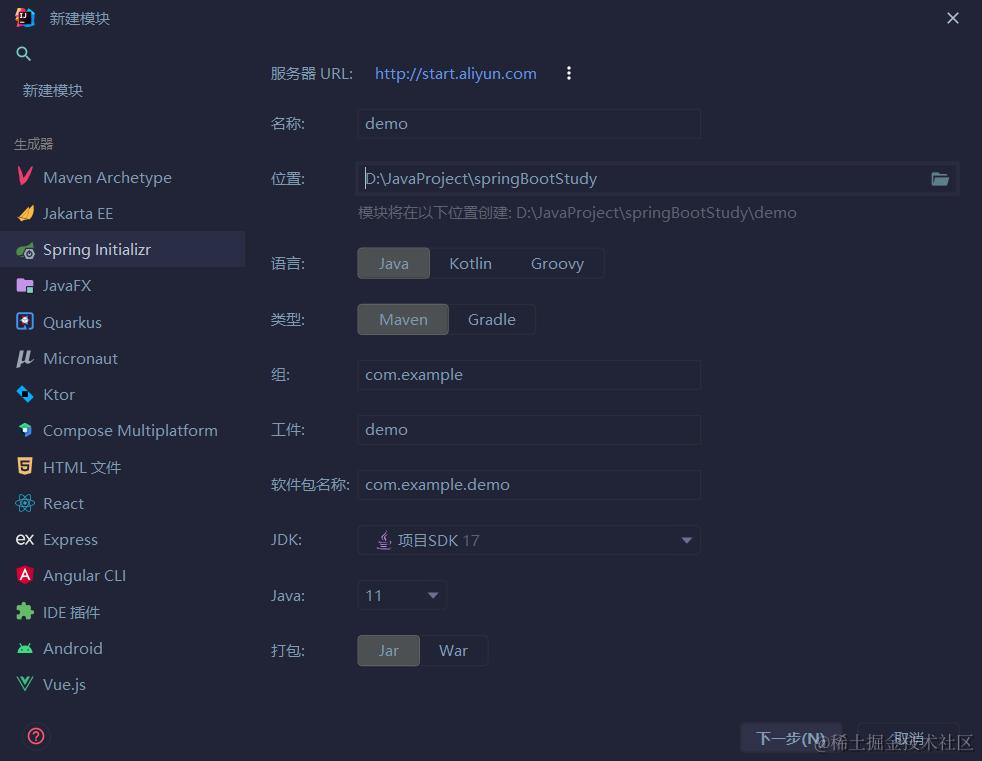
选择创建一个新的模块,模块用spring Initializr创建:
看到下图的服务器url,一般默认是
https://start.spring.io,这是官方提供的下载地址,因为是国外的网址,很容易创建失败,
- 所以下面我使用的阿里的服务,
http://start.aliyun.com,下载速度很快,但提供的springboot版本较低,不是当前最新的- 或者使用国内的
https://start.springboot.io
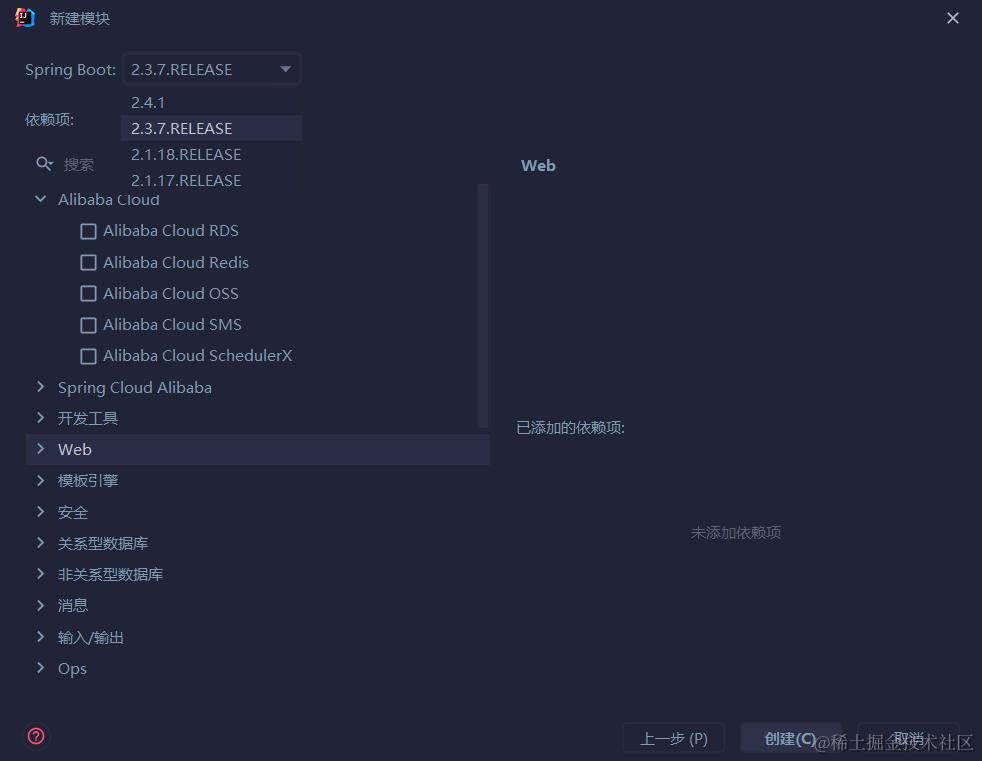
依赖选择
这里可以看到spring boot的版本可以进行选择,这里最高只有2.4.1,目前最新的是3.0,下方依赖项可以根据需求进行选择,这里我选择Web依赖,点开选择spring web,你还可以在这里选择其他的依赖
Maven配置
maven仓库配置另一个镜像网址,如下面所示
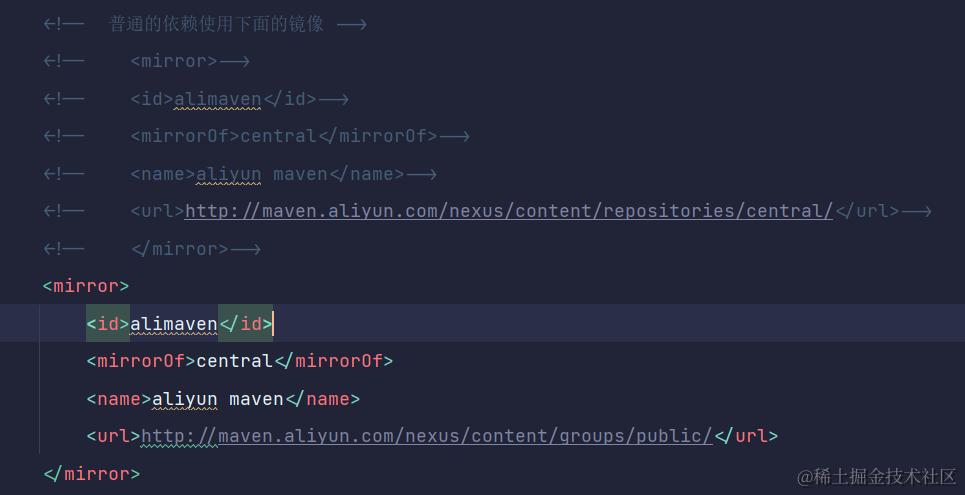 注:目前新的aliyun镜像地址如下
<mirror>
    <id>aliyunmaven</id>
    <mirrorOf>*</mirrorOf>
    <name>阿里云公共仓库</name>
    <url>https://maven.aliyun.com/repository/public</url>
</mirror>
创建过程中可能遇到的问题:
创建之后,没有任何文件和资源
- 等待会,可能是网络不好,没有下载完成,或者没有配置服务器url,使用默认的url,尝试换成aliyun的网址
启动类相关的问题
主类:
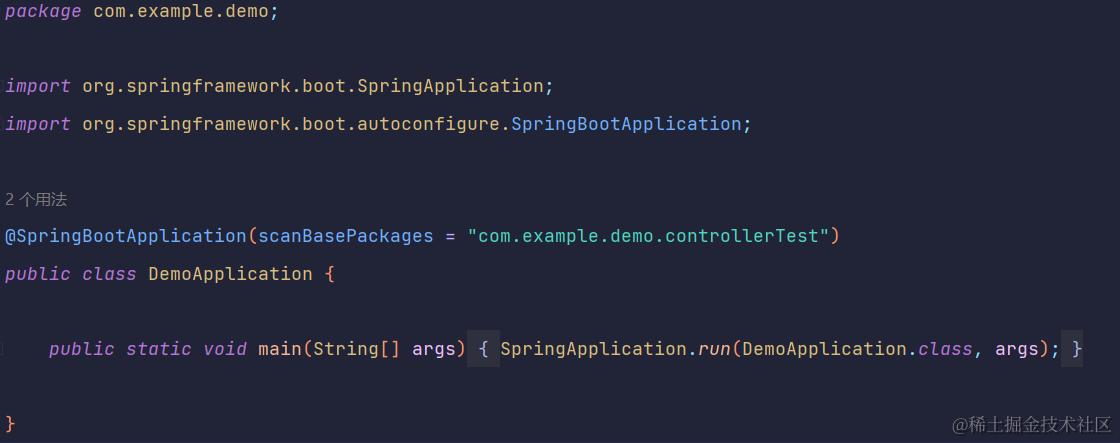
这里可以看到侧边栏,有两个绿色的箭头,这是启动项目的总按钮
注意:
- 主类必须在最外侧,如果有其他控制器或者资源放在主类的包外层,则不能直接访问,需要配置包扫描,在主类的注解中,如上图
可能遇到的错误:
启动项目访问资源失败:出现如下图的错误
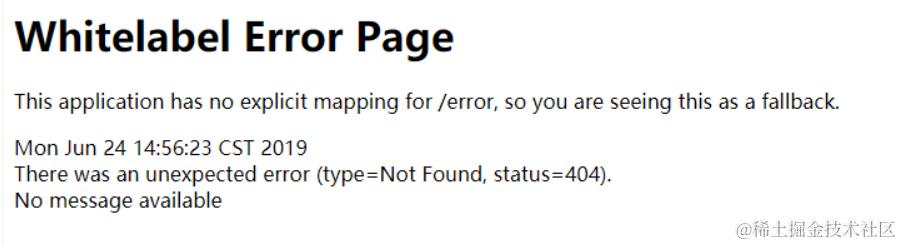
- 可能被访问的资源在主类的外侧,主类无法加载和访问
解决:
-
在主类的
@SpringBootApplication注解中,添加相应资源的包名,scanBasePackages=""; -
或者移入到主类的内侧文件,即同包下
spring的启动类
@SpringBootApplication
public class Demo2Application {

    public static void main(String[] args) {
        ConfigurableApplicationContext applicationContext = SpringApplication.run(Demo2Application.class, args);//SpringApplication本质上是spring容器,会创建spring容器,同时也会启动tomcat,由spring负责接管
        myController bean = applicationContext.getBean(myController.class);
        System.out.println(bean);
    }

}
yml配置文件
使用自定义对象封装数据:
配置文件
配置文件配置对应的属性
.yml或者.properties都可以
enterprise:
  name: test
  age:16
  subject:
    - 测试
    - 开发
    - 运维
配置类读取
定义一个
Component读取配置文件的属性,同时打上@ConfigurationProperties(prefix="enterprise")注解,prefix是配置文件的key前缀
@Component
@ConfigurationProperties(prefix="enterprise")
public class Enterprise{
    private String name;
    private Integer age;
    private List<String> subject
}
可能遇到的问题和坑:
- 通过
@ConfigurationProperties(prefix = "datasource")读取配置文件的数据,注意这里的prefix前缀不能为驼峰命名法,即不能为dataSource,应全为小写- 同时要添加component,让spring容器进行注入和管理
@Value读取配置文件
读取格式
@Value("${xx.xx.xx}"),xx表示层级,同时该class,需要交由spring管理,即需要添加@Component注解
@Value("${server.port}")
private String port;
配置文件中读取
# 1.通过${xx}读取配置文件中其他配置的属性进行拼接
baseUrl: xxx
devUrl: ${baseUrl}/xx
# 出现转义字符需要使用双引号包括
zy: "\t2" # 结果是
整合junit测试
需注意
- 测试类所在的包路径最好与引导类的包路径相同,不然会存在找不到引导类的情况。
- 也可以通过添加注解让测试类找到引导类
//以下注解选择其中一个即可,不过需要注意这里classes是引导类的class类,不是SpringApplication的class类,我就错了>_<
@SpringBootTest(classes = DemoApplication.class)
@ContextConfiguration(classes = DemoApplication.class)
请求注解的使用
@RequestParam
说明:
@RequestParam("name") String name, @RequestParam(value = "age", required = true, defaultValue = "19") String age
- 总共有三个配置项,value,required=true(默认),defultValue(默认值)
- 对于value就是请求头里的参数的键值,而required=true是设置该参数必须装配,如果不存在就会报错,而设置为false就跟正常请求一样了
- 对于defaultValue,如果不存在value对应的参数,则将默认值赋予加上注解的参数(类型必须一致),
使用:
更多的使用get请求,因为参数在请求体里,即requestHeader
**@RequestParam用来处理
Content-Type为application/x-www-form-urlencoded编码的内容,Content-Type默认为该属性。**也可用于其他请求post,put用于单数据添加修改
- 不支持json格式的发送,无法发送大量数据到后台,
@RequestBody
说明:
@RequestBody book book
- 前台发送的请求,数据编码格式设置为application/json才能使用该注解,即前台发送的数据为json格式
- 后台进行配对封装,如果存在字段和键值一样,自动封装
使用:
使用于前台发送大量数据的情况,发送post请求,put等
@PathVariable
说明:
@GetMapping("/book/{currentPage}/{pageSize}")
    @ResponseBody
    public Object getAllBooks(@PathVariable("currentPage") int currentPage, @PathVariable("pageSize") int pageSize) {//注解里的value值是路径中{key}的key值,
        System.out.println(currentPage + " <===>" + pageSize);
        state state = new state();
        IPage<book> page = new Page<>(currentPage, pageSize);
        IPage<book> page1 = bookService.page(page);
        if (page1.getRecords() != null) {
            state.setFlag(true);
            state.setData(page1);
        } else {
            state.setFlag(false);
        }
        return state;
    }
- 适用于restful风格的请求,路径参数的收集用该注解
使用:
可以用在restful风格的请求中
idea启动热部署
添加devtools依赖
 <dependency>
            <groupId>org.springframework.boot</groupId>
            <artifactId>spring-boot-devtools</artifactId>
        </dependency>
配置
- 开启
Build project automatically - 设置栏里的高级设置里将
compiler.automake.allow.when.app.running勾选上
自动热部署条件,idea失去焦点5秒后自动部署,不重新打jar包
设置日志的输出级别和添加日志文件
# 第一种配置方法
logging:
  level:
    root: info
  #  设置日志文件
  file:
    name: serve.log
    #    设置文件的大小
    max-size: 5KB


# 第二种配置方法
logging:
  level:
    #    设置整个项目的日志级别
    root: info
  file:
    #    设置文件名称
    name: server.log
  logback:
    rollingpolicy:
      #      设置文件的名称格式
      file-name-pattern: server.%d.%i.log
      #      设置日志文件的大小
      max-file-size: 50KB
添加lombok依赖--简化日志对象的创建
maven坐标:
 <dependency>
            <groupId>org.projectlombok</groupId>
            <artifactId>lombok</artifactId>
        </dependency>
使用:
在使用的类上添加@SLF4J注解,即可完成自动装入
语法:
//普通的写法
log.info("")
log.debug("")
log.error("")
log.warn("")
//使用动态占位符`{}`
log.info("{}:使用动态占位符","我是值")//后面紧跟参数,值会被赋到{}中
实现拦截器接口:
package com.reggie.interceptor;

import org.springframework.web.servlet.HandlerInterceptor;

import javax.servlet.http.HttpServletRequest;
import javax.servlet.http.HttpServletResponse;

public class loginInterceptor implements HandlerInterceptor {//实现HandlerInterceptor接口
    @Override
    public boolean preHandle(HttpServletRequest request, HttpServletResponse response, Object handler) throws Exception {//在请求发送之前进行处理
        Long employee = (Long) request.getSession().getAttribute("employee");
        return employee != null;
    }
}
配置webMvcConfigurer
package com.reggie.config;

import com.reggie.interceptor.loginInterceptor;
import org.springframework.context.annotation.Bean;
import org.springframework.context.annotation.Configuration;
import org.springframework.web.servlet.config.annotation.InterceptorRegistry;
import org.springframework.web.servlet.config.annotation.WebMvcConfigurer;

@Configuration
public class webConfig implements WebMvcConfigurer {
    @Override
    public void addInterceptors(InterceptorRegistry registry) {
        registry.addInterceptor(loginInterceptor()).addPathPatterns("/**").excludePathPatterns("/backend/page/login/login.html", "/employee/login");
    }

    @Bean
    public loginInterceptor loginInterceptor() {
        return new loginInterceptor();
    }
}
加载测试专用属性和Bean:
@SpringBootTest注解内部提供有properties属性(字符串数组),通过在properties添加属性提供给相应属性注入(通过@Value注解),同样的还有args属性,通过命令行的方式为属性注入值,在我使用的2.5版本中,args的优先级要比prooerties要高,在更高版本里可能properties的优先级更高
package com.example.configuration;

import org.junit.jupiter.api.Test;
import org.springframework.beans.factory.annotation.Autowired;
import org.springframework.beans.factory.annotation.Value;
import org.springframework.boot.test.context.SpringBootTest;
import org.springframework.context.annotation.Import;

@Import({BeanTest.class})//将配置导入到当前类进行使用
@SpringBootTest(properties = {"test.msg=添加属性测试成功!"}, args = {"--test.msg2=args添加属性测试成功2!", "--test.msg=args添加属性测试成功!"})//在2.5.6版本,args的优先级高于properties,在更高的版本里好像是properties优先级更高
class ConfigurationApplicationTests {
    @Value("${test.msg}")//通过properties添加属性
    private String msg;

    @Value("${test.msg2}")
    private String msg2;

    @Autowired//注入import配置类里的Bean,根据类型注入
    private String message;

    @Test
    void contextLoads() {
        System.out.println(msg);
        System.out.println(msg2);
        System.out.println(message);
    }

}
web环境模拟测试:
@SpringBootTest注解有webEnvironment属性,用于启动环境web进行controller层测试,同时,如果需要在测试类进行请求的调用,需要开启虚拟mvc的调用,并在方法内部注入MockMvc实现类,创建虚拟请求用到的api是MockMvcRequestBuilders,可用于创建get,pot,put等请求方式
package com.example.configuration;

import org.junit.jupiter.api.Test;
import org.springframework.beans.factory.annotation.Autowired;
import org.springframework.boot.test.autoconfigure.web.servlet.AutoConfigureMockMvc;
import org.springframework.boot.test.context.SpringBootTest;
import org.springframework.test.web.servlet.MockMvc;
import org.springframework.test.web.servlet.ResultActions;
import org.springframework.test.web.servlet.ResultMatcher;
import org.springframework.test.web.servlet.request.MockHttpServletRequestBuilder;
import org.springframework.test.web.servlet.request.MockMvcRequestBuilders;
import org.springframework.test.web.servlet.result.MockMvcResultMatchers;
import org.springframework.test.web.servlet.result.StatusResultMatchers;

@SpringBootTest(webEnvironment = SpringBootTest.WebEnvironment.RANDOM_PORT)//开启随机端口启动web项目
@AutoConfigureMockMvc//开启虚拟Mvc调用
public class WebTest {
    //可注入bean进行业务测试
    @Resouce
    private StringRedisTemplate template;
    @Test
    void testWeb(@Autowired MockMvc mockMvc) throws Exception {
        //创建虚拟请求,访问get请求/books
        MockHttpServletRequestBuilder builder = MockMvcRequestBuilders.get("/books");
        //执行请求
        ResultActions perform = mockMvc.perform(builder);
        //定义执行状态匹配器
        StatusResultMatchers status = MockMvcResultMatchers.status();
        //定义预期执行状态
        ResultMatcher ok = status.isOk();
        //在执行请求的返回类上添加预期结果
        ResultActions resultActions = perform.andExpect(ok);
    }
}
数据层事务进行回滚:
通过添加事务管理注解
@Transactional,开启事务管理,不过事务默认会进行回滚,不会进行提交,如果需要开启事务的提交,需要添加另一个注解@Rollback,@Rollback有属性value,默认为true,即进行回滚,如果将其值设置为false,即事务会进行提交
package com.example.springboot_test;

import com.example.springboot_test.pojo.book;
import org.junit.jupiter.api.Test;
import org.springframework.beans.factory.annotation.Autowired;
import org.springframework.boot.test.context.SpringBootTest;
import org.springframework.test.annotation.Rollback;
import org.springframework.transaction.annotation.Transactional;

@SpringBootTest
@Transactional//开启事务管理
@Rollback(value = false)//不进行事务的回滚,默认为true,即进行事务的回滚
class SpringbootTestApplicationTests {
    @Autowired
    private book book;

    @Test
    void contextLoads() {
        System.out.println(book);
    }

}
测试用随机属性:
测试时,如果需要自行添加测试数据,可以在配置文件里开启随机属性的启用,即类似于如下形式:
test:
book:
id: ${random.int} # 开启随机值
name: 中华上下五千年
price: ${random.int(100)} # 开启随机值
其中
int(value [max])的(),也可以是其他字符,如@,!等。
@ConfigurationProperties:
实现属性的注入,添加该注解的类必须交由spring管理,即添加相应的注解,
- 属性的配置在
application文件中,- 该注解有prefix属性,为配置属性相应的前缀,
@EnableConfigurationProperties:
添加在启动类上,添加相应的类,告诉容器对该类进行管理,并进行属性注入,即添加了
@ConfigurationProperties注解的类无需再添加相应component注解
常用计量单位:
对于配置属性时,会遇到给配置规定单位的问题,而
springboot提供提供了api用于规定单位,bean的属性映射配置,在yml配置中可为驼峰格式或者为烤肉串模式
bean:
package com.example.configuration.server;


import lombok.Data;
import org.springframework.boot.context.properties.ConfigurationProperties;
import org.springframework.boot.convert.DataSizeUnit;
import org.springframework.boot.convert.DurationUnit;
import org.springframework.stereotype.Component;
import org.springframework.util.unit.DataSize;
import org.springframework.util.unit.DataUnit;

import java.time.Duration;
import java.time.temporal.ChronoUnit;

@Data
@ConfigurationProperties(prefix = "servers")
public class config {
    private String ip;
    private String port;
    @DurationUnit(ChronoUnit.MINUTES)//规定单位为分钟
    private Duration timeOut;//数据类型也必须为Duration类型
    @DataSizeUnit(DataUnit.MEGABYTES)//规定数据大小为mb
    private DataSize dataSize;//数据类型也必须为DataSize类型
}
yml文件:
servers:
  ip: 192.168.148.128
  port: 6379
  timeOut: 2
  dataSize: 10
bean属性校验的开启:
添加接口规范和校验框架坐标:
		<dependency>
            <groupId>javax.validation</groupId>
            <artifactId>validation-api</artifactId>
        </dependency>
		<dependency>
            <groupId>org.hibernate.validator</groupId>
            <artifactId>hibernate-validator</artifactId>
        </dependency>
对bean开启校验规则并设置校验规则:
在添加了属性配置的bean上,添加如下注解
@Validated。设置校验规则,需要在相应的字段属性上添加如
@Max和@Min注解
@Max(value=3456,message="最大值不能超过3456")
error
web环境问题
springboot项目启动不起来,但无报错:
- 添加spring-boot-start-web依赖
其他
给启动项目设置启动参数
找到配置项,找到
VM options选项,配置启动参数,优先级高于配置文件格式:
相当于application.yml配置文件的配置加上-D前缀-Dserver.port=8083 -Dspring.cloud.nacos.discovery.cluster-name=SH
Mybatis-plus使用
更多使用请查看官方文档:简介 | MyBatis-Plus (baomidou.com)
mapper接口层的实现:
@Mapper//添加mapper注解,交给spring接管
public interface bookMapper extends BaseMapper<book> {//继承BaseMapper接口,内部实现crud的基础方法,直接调用即可
//这里可以添加自动义的功能实现
}
当mapper接口过多时,可以在主类添加
@mapperScan包扫描注解,实现全部注入
mybatis-plus的事务日志开启:
#      开启mybatis-plus的事务日志
mybatis-plus:
  configuration:
    log-impl: org.apache.ibatis.logging.stdout.StdOutImpl
实现分页查询:
首先要先添加拦截器(创建配置类):
@Configuration//添加spring的配置注解
public class MPconfig {
    @Bean//交给spring接管
    public MybatisPlusInterceptor mybatisPlusInterceptor() {
        //定义MP拦截器
        MybatisPlusInterceptor mybatisPlusInterceptor = new MybatisPlusInterceptor();
		//添加具体的拦截器
        mybatisPlusInterceptor.addInnerInterceptor(new PaginationInnerInterceptor());
        return mybatisPlusInterceptor;
    }
}
测试类实现:
/**
     * @return void
     * @description: 测试分页功能
     * @author 86187
     * @date: 2022/10/24 20:23
     */

    @Test
    void SelectPageTest() {
        IPage<book> page = new Page<>(1, 5);//通过IPage对象实现分页,第一个参数是显示的第几页,第二个参数是每页显示地数据条数
        bookMapper.selectPage(page, null);//这里返回的也是IPage对象
        List<book> records = page.getRecords();//获取查询出的数据
        records.forEach(System.out::println);
        System.out.println(page.getCurrent());//当前页数
        System.out.println(page.getTotal());//符合条件的总条数
        System.out.println(page.getPages());//总分页数
        System.out.println(page.getSize());//每页的大小

    }
条件查询的实现:
		QueryWrapper<book> qw = new QueryWrapper<>();//查询条件的实体类封装
        qw.like("name", "挑战程序设计竞赛");//添加条件实现模糊查询,第一个参数是字段,第二个字段是条件、
        qw.eq("price","54")//equals 判断是否相等,即?price="54"
        IPage<book> page = new Page<>(1, 5);
        bookMapper.selectPage(page, qw);//这里第二个参数是查询条件的实体类
Service层实现
在实现service层的调用时:
mapper层:实现了baseMapper接口,里面提供了基础的sql方法
//mybatis-plus 需要继续BaseMapper<T>这里是你的泛型类,里面有许多的默认方法
@Mapper
public interface bookMapper extends BaseMapper<book> {

}
对于service层:因为mapper层实现接口,所以接口层也要实现IService接口
service接口:
public interface bookService extends IService<book> {//实现IService接口,提供了基本sql方法

}
对于serviceImpl实现类:
@Service
public class bookServiceImpl extends ServiceImpl<bookMapper,book> implements bookService  {//实现bookService接口,
//继承父类ServiceImpl,里面传入mapper层的接口,和操作的实体类,实现方法对接
}
原理篇
bean加载
@import加载
通过
@import加载bean,可不用添加@component等加载成bean的注解,同时其内部的类也会被加载进spring@import({dog.class})添加该注解的类也会被加载为bean,且通过该类注册的bean为全路径限定
bean
ImportSelector
实现该注解,可通过编程式控制
bean的加载,加载该实现类的bean可通过@import进行按需加载bean,如果容器中存在对应bean,则不会进行加载package org.rpc.bean; import org.springframework.context.annotation.ImportSelector; import org.springframework.core.type.AnnotationMetadata; //实现ImportSelector接口,实现对应的方法 public class MyImportSelector implements ImportSelector { @Override public String[] selectImports(AnnotationMetadata importingClassMetadata) { //加载cat的bean return new String[]{"org.rpc.bean.cat"}; } }package org.rpc; import org.rpc.bean.MyImportSelector; import org.springframework.context.annotation.Import; @Import(MyImportSelector.class) public class Main { }
ImportBeanDefinitionRegistrar
实现该注解,重写如下方法,再通过
@Import导入实现类,可实现对现有的bean进行覆盖package org.rpc.bean; import org.springframework.beans.factory.support.AbstractBeanDefinition; import org.springframework.beans.factory.support.BeanDefinitionBuilder; import org.springframework.beans.factory.support.BeanDefinitionRegistry; import org.springframework.context.annotation.ImportBeanDefinitionRegistrar; import org.springframework.core.type.AnnotationMetadata; public class MyImportBeanDefinitionRegistrar implements ImportBeanDefinitionRegistrar { @Override public void registerBeanDefinitions(AnnotationMetadata importingClassMetadata, BeanDefinitionRegistry registry) { System.out.println("MyImportBeanDefinitionRegistrar.registerBeanDefinitions"); // 构建BeanDefinition AbstractBeanDefinition beanDefinition = BeanDefinitionBuilder.rootBeanDefinition(dog.class).getBeanDefinition(); // 注册一个BeanDefinition registry.registerBeanDefinition("dog", beanDefinition); } }
BeanDefinitionRegistryPostProcessor
通过实现该接口,并重写相应的方法,可实现bean的最终加载,如果bean的名称相同就会覆盖之前的bean
package org.rpc.config;

import org.rpc.service.Impl.HelloServiceImpl2;
import org.springframework.beans.BeansException;
import org.springframework.beans.factory.config.ConfigurableListableBeanFactory;
import org.springframework.beans.factory.support.AbstractBeanDefinition;
import org.springframework.beans.factory.support.BeanDefinitionBuilder;
import org.springframework.beans.factory.support.BeanDefinitionRegistry;
import org.springframework.beans.factory.support.BeanDefinitionRegistryPostProcessor;

public class MyPostProcessor implements BeanDefinitionRegistryPostProcessor {
   @Override
   public void postProcessBeanDefinitionRegistry(BeanDefinitionRegistry registry) throws BeansException {
       // 构建BeanDefinition
       AbstractBeanDefinition beanDefinition = BeanDefinitionBuilder.rootBeanDefinition(HelloServiceImpl2.class).getBeanDefinition();
       // 注册一个BeanDefinition
       registry.registerBeanDefinition("IHelloService", beanDefinition);
   }

   @Override
   public void postProcessBeanFactory(ConfigurableListableBeanFactory beanFactory) throws BeansException {

   }
}
自动装配原理
查看
@SpringBootApplication注解,
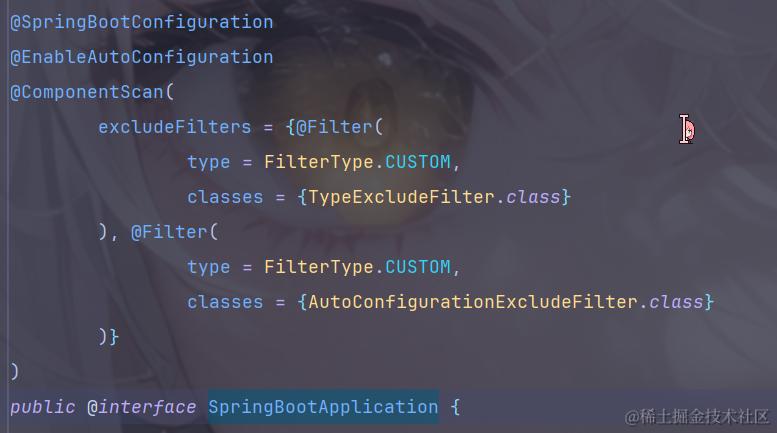
第一个
@SpringBootConfiguration注解如下//@SpringBootConfiguration @Target({ElementType.TYPE}) @Retention(RetentionPolicy.RUNTIME) @Documented @Configuration @Indexed public @interface SpringBootConfiguration { @AliasFor( annotation = Configuration.class ) boolean proxyBeanMethods() default true; } //@Configuration @Target({ElementType.TYPE}) @Retention(RetentionPolicy.RUNTIME) @Documented @Component public @interface Configuration { @AliasFor( annotation = Component.class ) String value() default ""; boolean proxyBeanMethods() default true; }作用是将其注册为
bean
第二个注解
@EnableAutoConfiguration源码如下:
@Target({ElementType.TYPE})
@Retention(RetentionPolicy.RUNTIME)
@Documented
@Inherited
@AutoConfigurationPackage
@Import({AutoConfigurationImportSelector.class})
public @interface EnableAutoConfiguration {
   String ENABLED_OVERRIDE_PROPERTY = "spring.boot.enableautoconfiguration";

   Class<?>[] exclude() default {};

   String[] excludeName() default {};
}
我们先查看其上的
@AutoConfigurationPackage注解@Target({ElementType.TYPE}) @Retention(RetentionPolicy.RUNTIME) @Documented @Inherited @Import({AutoConfigurationPackages.Registrar.class}) public @interface AutoConfigurationPackage { String[] basePackages() default {}; Class<?>[] basePackageClasses() default {}; }
AutoConfigurationPackage注解上有@Import导入的类,点击查看该类,发现该类实现了ImportBeanDefinitionRegistrar接口,debug运行到当前类static class Registrar implements ImportBeanDefinitionRegistrar, DeterminableImports { Registrar() { } public void registerBeanDefinitions(AnnotationMetadata metadata, BeanDefinitionRegistry registry) { AutoConfigurationPackages.register(registry, (String[])(new PackageImports(metadata)).getPackageNames().toArray(new String[0])); } //....... }
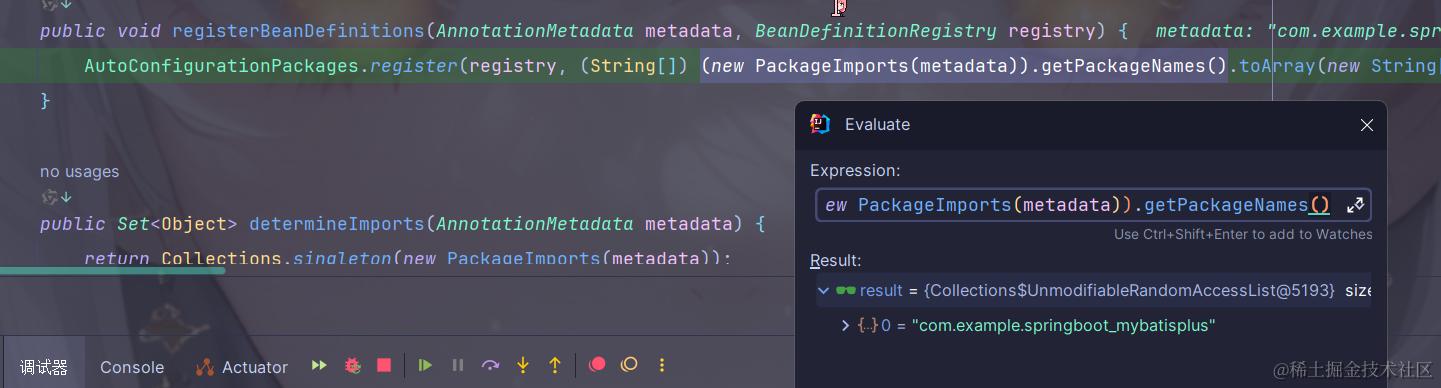
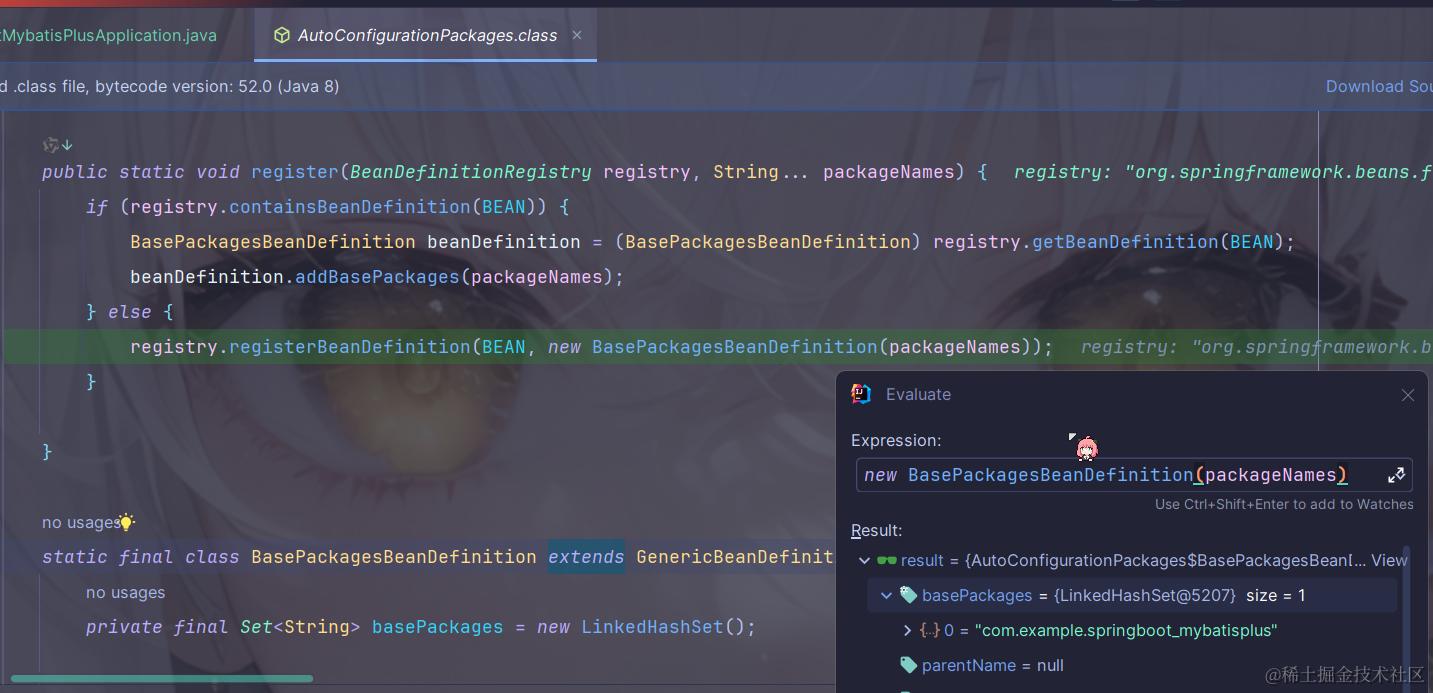
主要目的是将启动类所在的目录作为包扫描路径
实现自动装配
SpringBoot2
在
resource目录下建立META-INF目录,并在创建的目录下创建spring.factories,文件格式如下:# Auto Configure org.springframework.boot.env.EnvironmentPostProcessor=\ com.baomidou.mybatisplus.autoconfigure.SafetyEncryptProcessor org.springframework.boot.autoconfigure.EnableAutoConfiguration=\ com.baomidou.mybatisplus.autoconfigure.MybatisPlusLanguageDriverAutoConfiguration,\ com.baomidou.mybatisplus.autoconfigure.MybatisPlusAutoConfiguration其中
org.springframework.boot.autoconfigure.EnableAutoConfiguration配置是springboot提供的自动装配接口配置格式如上:每个需要自动装配的类通过
\隔开,自动装配类以全路径名进行配置
SpringBoot3
建立目录修改为:
/META-INF/spring/org.springframework.boot.autoconfigure.AutoConfiguration.imports,内容直接写全路径名即可,分行
开启yml提示
引入
pom依赖:<!-- 引入springboot的配置依赖(用于开启yml提示功能) --> <dependency> <groupId>org.springframework.boot</groupId> <artifactId>spring-boot-configuration-processor</artifactId> </dependency>
进行自定义提示功能提示
文件:
META-INF\additional-spring-configuration-metadata.json下图是
MybatisPlus的属性配置文件json{ "groups": [ { "sourceType": "com.baomidou.mybatisplus.autoconfigure.MybatisPlusProperties", "name": "mybatis-plus", "type": "com.baomidou.mybatisplus.autoconfigure.MybatisPlusProperties" }, { "sourceType": "com.baomidou.mybatisplus.autoconfigure.MybatisPlusProperties", "name": "mybatis-plus.configuration", "sourceMethod": "getConfiguration()", "type": "com.baomidou.mybatisplus.core.MybatisConfiguration" }, { "sourceType": "com.baomidou.mybatisplus.autoconfigure.MybatisPlusProperties", "name": "mybatis-plus.global-config", "sourceMethod": "getGlobalConfig()", "type": "com.baomidou.mybatisplus.core.config.GlobalConfig" }, { "sourceType": "com.baomidou.mybatisplus.core.config.GlobalConfig$DbConfig", "name": "mybatis-plus.global-config.db-config", "sourceMethod": "getDbConfig()", "type": "com.baomidou.mybatisplus.core.config.GlobalConfig$DbConfig" } ], "properties": [ { "defaultValue": false, "name": "mybatis-plus.lazy-initialization", "description": "Set whether enable lazy initialization for mapper bean.", "type": "java.lang.Boolean" }, { "defaultValue": "", "name": "mybatis-plus.mapper-default-scope", "description": "A default scope for mapper bean that scanned by auto-configure.", "type": "java.lang.String" }, { "sourceType": "com.baomidou.mybatisplus.core.config.GlobalConfig", "name": "mybatis-plus.global-config.identifier-generator", "deprecation": { "level": "error", "reason": "请使用@Bean的方式注入至Spring容器." } }, { "sourceType": "com.baomidou.mybatisplus.core.config.GlobalConfig", "name": "mybatis-plus.global-config.meta-object-handler", "deprecation": { "level": "error", "reason": "3.0开始废除此属性,请使用@Bean的方式注入至Spring容器." } }, { "sourceType": "com.baomidou.mybatisplus.core.config.GlobalConfig", "name": "mybatis-plus.global-config.sql-injector", "deprecation": { "level": "error", "reason": "3.0开始废除此属性,请使用@Bean的方式注入至Spring容器." } }, { "sourceType": "com.baomidou.mybatisplus.core.config.GlobalConfig$DbConfig", "name": "mybatis-plus.global-config.db-config.key-generator", "deprecation": { "level": "error", "reason": "3.0开始废除此属性,请使用@Bean的方式注入至Spring容器." } }, { "sourceType": "com.baomidou.mybatisplus.autoconfigure.MybatisPlusProperties", "name": "mybatis-plus.default-scripting-language-driver", "defaultValue": "com.baomidou.mybatisplus.core.MybatisXMLLanguageDriver", "type": "java.lang.Class<? extends org.apache.ibatis.scripting.LanguageDriver>", "deprecation": { "level": "error", "reason": "如果修改了该值,你会至少失去几乎所有 mp 提供的功能." } }, { "sourceType": "com.baomidou.mybatisplus.core.MybatisConfiguration", "name": "mybatis-plus.configuration.default-scripting-language", "defaultValue": "com.baomidou.mybatisplus.core.MybatisXMLLanguageDriver", "type": "java.lang.Class<? extends org.apache.ibatis.scripting.LanguageDriver>", "deprecation": { "level": "error", "reason": "设置无效." } }, { "sourceType": "com.baomidou.mybatisplus.core.MybatisConfiguration", "name": "mybatis-plus.configuration.default-enum-type-handler", "defaultValue": "org.apache.ibatis.type.EnumTypeHandler", "description": "A default TypeHandler class for Enum.", "type": "java.lang.Class<? extends org.apache.ibatis.type.TypeHandler>" } ] "hints":[ ] }
"hints":[
   {
    "name":"tools.ip.mode",//提示属性名
    "values":[
        {
            "value":"detail",//提示值
            "description":"明细模式"//提示消息
        },
        {
            "value":"simple",//提示值
            "description":"极简模式"//提示消息
        }
    ]
   }
}