在common模块导入tess4j对应的依赖
<dependency>
<groupId>net.sourceforge.tess4j</groupId>
<artifactId>tess4j</artifactId>
<version>5.2.0</version>
</dependency>
导入中文字体库, 把资料中的tessdata文件夹拷贝到自己的工作空间下-chisimtraineddata
package com.heima.common.tess4j;
import net.sourceforge.tess4j.ITesseract;
import net.sourceforge.tess4j.Tesseract;
import java.io.File;
public class Application {
public static void main(String[] args) {
try {
File file = new File("D:\\26.png");
ITesseract tesseract = new Tesseract();
tesseract.setDatapath("D:\\workspace\\tessdata");
tesseract.setLanguage("chi_sim");
String result = tesseract.doOCR(file);
result = result.replaceAll("\\r|\\n","-").replaceAll(" ","");
System.out.println("识别的结果为:"+result);
} catch (Exception e) {
e.printStackTrace();
}
}
}
:在heima-leadnews-common中创建工具类,简单封装一下tess4j
<dependency>
<groupId>net.sourceforge.tess4j</groupId>
<artifactId>tess4j</artifactId>
<version>5.2.0</version>
</dependency>
wemedia中的配置中添加两个属性
tess4j:
data-path: D:\workspace\tessdata
language: chi_sim
package com.heima.common.tess4j;
import com.heima.common.exception.LeadException;
import lombok.Data;
import net.sourceforge.tess4j.ITesseract;
import net.sourceforge.tess4j.Tesseract;
import net.sourceforge.tess4j.TesseractException;
import org.apache.commons.lang3.StringUtils;
import org.springframework.boot.context.properties.ConfigurationProperties;
import org.springframework.stereotype.Component;
import java.awt.image.BufferedImage;
@Data
@Component
@ConfigurationProperties(prefix = "tess4j")
public class Tess4jClient {
private String dataPath;
private String language;
public String doOCR(BufferedImage image) throws TesseractException {
if(StringUtils.isBlank(dataPath)){
throw new LeadException(500,"Tess4j,图片路径为空!");
}
ITesseract tesseract = new Tesseract();
tesseract.setDatapath(dataPath);
tesseract.setLanguage(language);
String result = tesseract.doOCR(image);
result = result.replaceAll("\\r|\\n", "-").replaceAll(" ", "");
return result;
}
}
在WmNewsAuditServiceImpl中添加方法
@Autowired
private Tess4jClient tess4jClient;
private boolean handleImageSensitiveScan(byte[] bytes,Integer wmNewsId){
try {
ByteArrayInputStream in = new ByteArrayInputStream(bytes);
BufferedImage imageFile = ImageIO.read(in);
String result = tess4jClient.doOCR(imageFile);
boolean isSensitive = handleSensitiveScan(result, wmNewsId);
return isSensitive;
}catch (Exception e){
e.printStackTrace();
return false;
}
}
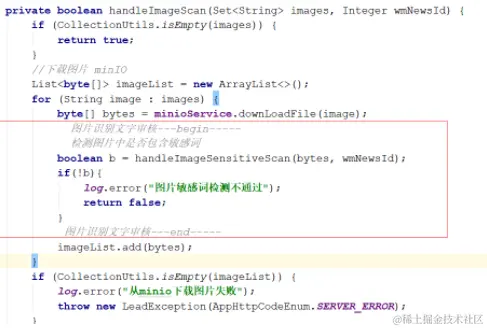
在WmNewsAuditServiceImpl中的handleImageScan方法上添加如下代码
try {
for (String image : images) {
byte[] bytes = minioService.downLoadFile(image);
boolean b = handleImageSensitiveScan(bytes, wmNewsId);
if(!b){
log.error("图片敏感词检测不通过");
return false;
}
imageList.add(bytes);
}
}catch (Exception e){
e.printStackTrace();
}
@Configuration
@ComponentScan({"com.heima.common.aliyun","com.heima.common.knife4j","com.heima.common.exception",
"com.heima.common.bcrypt","com.heima.common.tess4j"})
public class InitConfig {
}
public void auditWmNews(WmNews wmNews) {
log.info("开始审核文章");
if(wmNews.getStatus()!=1){
log.info("不是待审核状态,结束");
return ;
}
Integer wmNewsId = wmNews.getId();
Map<String,Object> map = getTextAndImage(wmNews);
String text = map.get("text").toString();
List<byte[]> imageList = (List<byte[]>)map.get("image");
boolean b = checkText(text,wmNewsId);
if(!b){
log.error("阿里云审核文本不通过");
return ;
}
boolean b1 = checkImage(imageList,wmNewsId);
if(!b1){
log.error("阿里云审核图片不通过");
return ;
}
boolean b2 = checkSensitive(text,wmNewsId);
if(!b2){
log.error("敏感词检测不通过");
return ;
}
if(!CollectionUtils.isEmpty(imageList)){
boolean b3 = true;
for (byte[] bytes : imageList) {
b3 = handleImageSensitiveScan(bytes,wmNewsId);
if(!b3){
log.error("图片敏感词检测不通过");
break ;
}
}
if(!b3){
log.error("图片敏感词检测不通过");
return ;
}
}
updateWmNewsStaus(wmNewsId,8,null,null);
if(wmNews.getPublishTime() != null &&
System.currentTimeMillis() < wmNews.getPublishTime().getTime()){
log.info("没有到发布时间,结束");
return ;
}
WmNewsResultDTO newsResultDTO = BeanHelper.copyProperties(wmNews, WmNewsResultDTO.class);
try {
Long articleId = articleFeign.saveArticle(newsResultDTO);
updateWmNewsStaus(wmNewsId,9,null,articleId);
}catch (Exception e){
log.error("远程调用article保存文章,失败");
e.printStackTrace();
throw new LeadException(AppHttpCodeEnum.SERVER_ERROR);
}
}