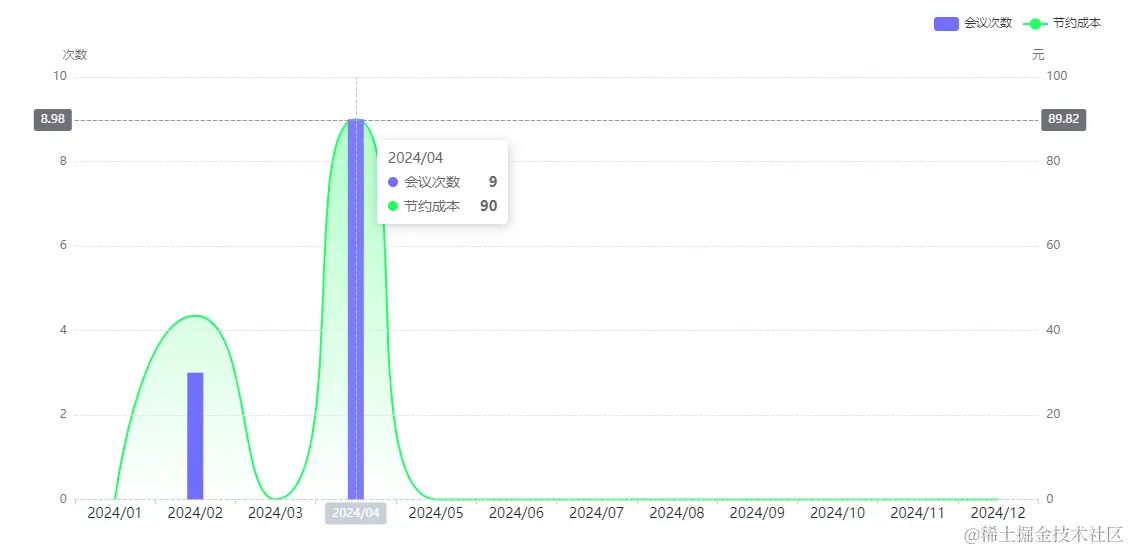
一、实现效果
- 技术栈:vue3 + TS + element-plus
二、实现逻辑
<div style="height: 520px">
  <div ref="echartsRef" style="width: 100%; height: 100%"></div>
</div>
const echartsRef = ref();
onMounted(() => {
init();
});
function init() {
const myChart = echarts.init(echartsRef.value);
const option = {
tooltip: {
trigger: "axis",
axisPointer: {
type: "cross"
}
},
grid: {
left: "3%",
right: "4%",
bottom: "3%",
containLabel: true
},
legend: {
x: "right",
padding: [0, 10, 30, 0],
data: ["会议次数", "节约成本"]
},
xAxis: [
{
type: "category",
axisLine: {
lineStyle: {
color: "#C7D0D8",
type: "dashed"
}
},
axisLabel: {
show: true,
textStyle: {
color: "#1e252b",
fontSize: 14
}
},
data: [
"2024/01",
"2024/02",
"2024/03",
"2024/04",
"2024/05",
"2024/06",
"2024/07",
"2024/08",
"2024/09",
"2024/10",
"2024/11",
"2024/12"
]
}
],
yAxis: [
{
type: "value",
name: "次数",
position: "left",
splitLine: {
show: true,
lineStyle: {
type: "dashed"
}
},
axisLabel: {
formatter: "{value}"
}
},
{
type: "value",
name: "元",
position: "right",
splitLine: {
show: true,
lineStyle: {
type: "dashed"
}
},
axisLabel: {
formatter: "{value}"
}
}
],
series: [
{
name: "会议次数",
type: "bar",
yAxisIndex: 0,
barWidth: "16px",
itemStyle: {
color: "#7070FF"
},
data: [0, 3, 0, 9, 0, 0, 0, 0, 0, 0, 0, 0]
},
{
name: "节约成本",
type: "line",
yAxisIndex: 1,
smooth: 0.7,
zlevel: -1,
symbol: "none",
data: [0, 43.5, 0, 90, 0, 0, 0, 0, 0, 0, 0, 0],
itemStyle: {
color: "#1EFF61"
},
areaStyle: {
color: new echarts.graphic.LinearGradient(0, 0, 0, 1, [
{
offset: 0,
color: "#8effb0"
},
{
offset: 1,
color: "rgba(139,255,174,0.00)"
}
])
}
}
]
};
useEcharts(myChart, option);
}
三、自定义Hooks
import { onBeforeUnmount, onActivated, onDeactivated } from "vue";
import { useDebounceFn } from "@vueuse/core";
import * as echarts from "echarts";
export const useEcharts = (myChart: echarts.ECharts, options: echarts.EChartsCoreOption) => {
if (options && typeof options === "object") {
myChart.setOption(options);
}
const echartsResize = useDebounceFn(() => {
myChart && myChart.resize();
}, 100);
window.addEventListener("resize", echartsResize);
onBeforeUnmount(() => {
window.removeEventListener("resize", echartsResize);
});
onActivated(() => {
window.addEventListener("resize", echartsResize);
});
onDeactivated(() => {
window.removeEventListener("resize", echartsResize);
});
};