vue的三大件组成:index.html,App.vue,main.js
1.main.js程序入口(将App.vue和index.html组合在一起)
import { createApp } from 'vue'
import App from './App.vue'---->连接App.vue

createApp(App).mount('#app')--->连接index.html
2.index.html程序静态组成
<!DOCTYPE html>
<html lang="">
<head>
<meta charset="utf-8">
<meta http-equiv="X-UA-Compatible" content="IE=edge">
<meta name="viewport" content="width=device-width,initial-scale=1.0">
<link rel="icon" href="<%= BASE_URL %>favicon.ico">
<title><%= htmlWebpackPlugin.options.title %></title>
</head>
<body>
<noscript>
<strong>We're sorry but <%= htmlWebpackPlugin.options.title %> doesn't work properly without JavaScript enabled. Please enable it to continue.</strong>
</noscript>
<div id="app">
</div>
</body>
</html>
3.App.vue(页面控制)
`<template>`

`  <div id="app">`---------------------------------------->index.html

`    <img src="./assets/logo.png">`

`    <router-view/>`

`  </div>`

`</template>`

` `

`<script>`

`export default {`

`  name: 'App'`

`}`

`</script>`

` `

`<style>`

`#app {`

`  font-family: 'Avenir', Helvetica, Arial, sans-serif;`

`  -webkit-font-smoothing: antialiased;`

`  -moz-osx-font-smoothing: grayscale;`

`  text-align: center;`

`  color: #2c3e50;`

`  margin-top: 160px;`

`  .img{`

`     200px;`

`  }`

`}`

`</style>`
创建自己的第一个vue--->DomeOne.vue
<template>

  <button @click="add">count: {{count}}</button>

</template>

<script setup>--------------------------------------------->不要忘记的setup
import {ref,onMounted} from "vue";
  const count = ref(0);-------------------->响应式数据的是声明

  function add(){
    count.value++;
  }

  onMounted(()=>{------------------------------------>钩子函数,vue声明周期函数,在运行最后会自动执行
    console.log("vue,运行完成!!!")
  })
</script>

<style scoped>

</style>
在App.vue中要导入我们写的DomeOne.vue
<template>
<div>
<DomeOne></DomeOne>
</div>
</template>
<script setup>
import DomeOne from './dome/DomeOne'-------->Domeone的路径
或者:
</script>
<style>
</style>
工程化代码---->axiosDome.vue
后端代码
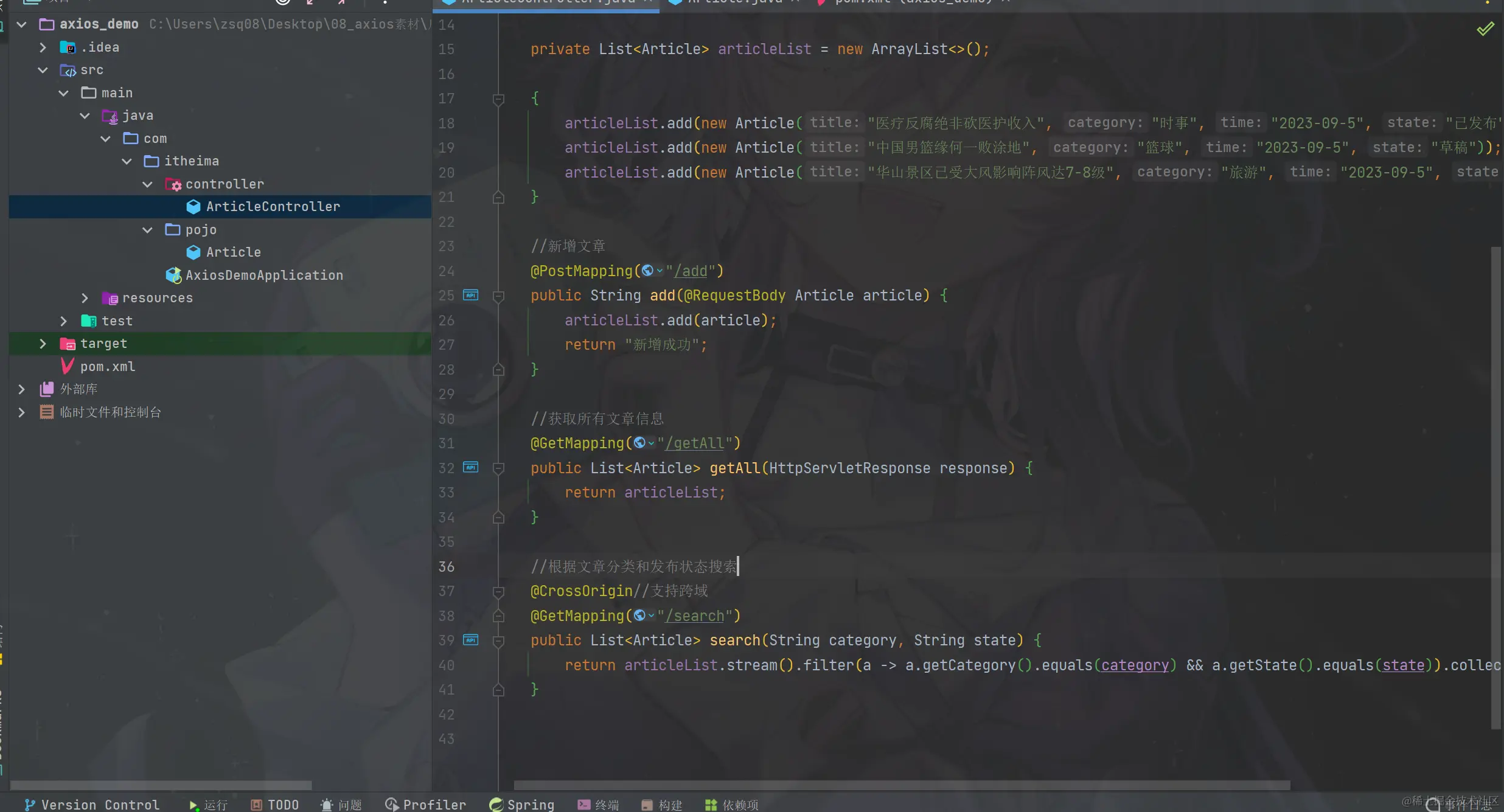
<template>
<div id="app">----------------------------------------------------------------------->表格代码
文章分类: <input type="text" v-model:="searchCondtions.category">
发布状态: <input type="text" v-model:="searchCondtions.state">
<button @click="search">搜索</button>
<br />
<br />
<table border="1 solid" colspa="0" cellspacing="0">
<tr>
<th>文章标题</th>
<th>分类</th>
<th>发表时间</th>
<th>状态</th>
<th>操作</th>
</tr>
<tr v-for="(article,index) in articleList" :key="index">
<td>{{article.title}}}</td>
<td>{{article.category}}</td>
<td>{{article.time}}</td>
<td>{{article.state}}</td>
<td>
<button>编辑</button>
<button>删除</button>
</td>
</tr>
</table>
</div>
</template>
<script setup>
import {ref} from "vue";
import axiox from 'axios';
const articleList = ref([]);
const searchCondtions = ref({
category:'',
state:''
})
axios.get('http://localhost:8080/article/getAll').then(result => {------------>异步后端接口调用
articleList.value = result.data;
}).catch(error => {
console.log(error);
})
const search = function(){
axios.get('http://localhost:8080/article/search'{params{...searchCondtions.value}}).then(
result=>{
articleList.value = result.data;
}
).catch(error=>{
console.log(error)
})
}
</script>
<style scoped>
</style>
运行结果
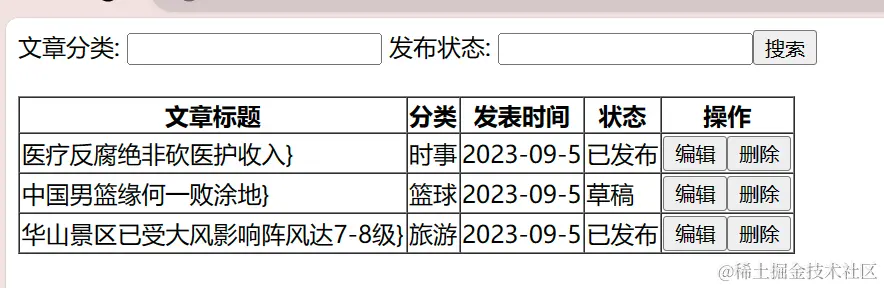
初级优化:创建api/article.js存储方法,实现方法的调用
<script setup>
import {ref} from "vue"
import {ArticleGetAllService,ArticleSearchService} from '@/api/Article.js'----->导入方法文件
const articleList = ref([])
const searchCondtions = ref({
category:'',
state:''
})
//获取所有文章数据(async....await 数据的异步获取)
const ArticleGetAll = async function () {
articleList.value = await ArticleGetAllService()
}
ArticleGetAll()
//搜索文章数据
const search = async function () {
articleList.value = await ArticleSearchService({...searchCondtions.value})
------------------------------------------------------------------------->获取查询文章数据
}
/* axios.get('http://localhost:8080/article/getAll').then(result => {
articleList.value = result.data
}).catch(error => {
console.log(error)
})
const search = function(){
axios.get('http://localhost:8080/article/search',{params:{...searchCondtions.value}}).then(
result=>{
articleList.value = result.data
}
).catch(error=>{
console.log(error)
})
}*/
</script>
api/article.js方法的创建
import axios from "axios";
const baseURL = 'http://localhost:8080';--------------------------------------->统一接口路径
const instance = axios.create({baseURL})--------------------------------------->
export const ArticleGetAllService = async function () {----------->export暴露方法,让外界可以调用
return await instance.get('/article/getAll').then(-------------------->await异步查询的数据
result => {
return result.data;
}
).catch(error => {
console.log(error)
})
}
export const ArticleSearchService = async function (contions){
return await instance.get('/article/search', {params: contions}).then(
result => {
return result.data;
}
).catch(error => {
console.log(error);
})
}
最终优化,响应拦截器----.request.js
import axios from "axios";
const baseURL = 'http://localhost:8080';
const instance = axios.create({baseURL})
instance.interceptors.response.use(
result=>{
return result.data;
},
error => {
alert("服务异常");
return Promise.reject(error);
}
)
export default instance;
方法创建---->article.js
//获取所有文章数据
/*import axios from "axios";
const baseURL =
const instance = axios.create({baseURL})*/
import request from "@/util/request.js";
export const ArticleGetAllService = function () {
return request.get(
/* .then(
result => {
return result.data;------------------------------------->优化代码
}
).catch(error => {
console.log(error)
})*/
}
export const ArticleSearchService = function (contions){
return request.get(
}