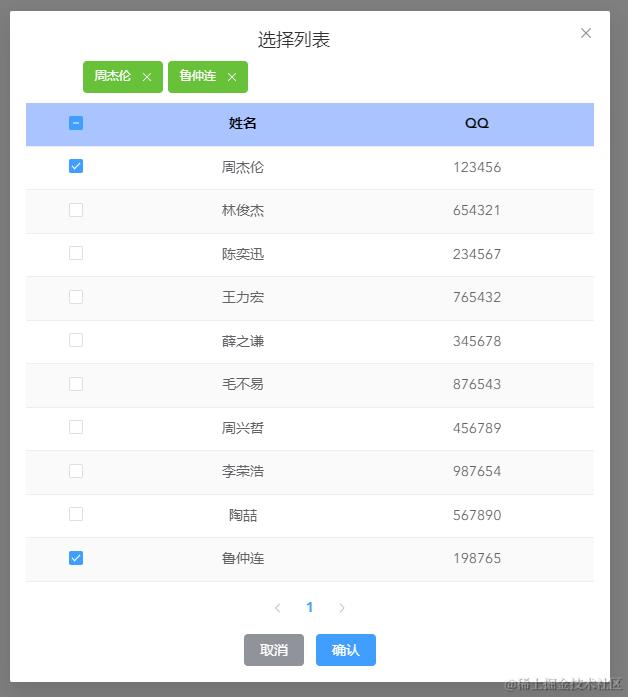
效果如图
使用方法
父组件使用的参数说明
isShow:控制dialog的展示与否
selectedData:该实例已有的内容,比如实例为阳光宅男组,成员有周杰伦和鲁仲连
columns:table中要显示哪些属性
@onConfirm:dialog点击确认后如何处理最新的已选内容
radio:是否为单选模式
使用封装组件的父组件的示例代码
<template>
  <div>
    <el-button @click="isShow = true">打开dialog</el-button>
    <TableSelectionDialog
      ref="TRef"
      v-if="isShow"
      v-model="isShow"
      :selectedData="selectedData"
      :columns="columns"
      @getData="getData"
      @onConfirm="onConfirm"
    ></TableSelectionDialog>
  </div>
</template>

<script setup>
import { ref } from "vue";
import TableSelectionDialog from "@/components/TableSelectionDialog.vue";
const TRef = ref(null);
const isShow = ref(false);
const selectedData = ref([
  { id: 1, name: "周杰伦", qq: 123456 },
  { id: 10, name: "鲁仲连", qq: 198765 },
]);
const columns = ref([
  { prop: "name", label: "姓名" },
  { prop: "qq", label: "QQ" },
]);
//. dialog确认时把最新的值赋给选定值
function onConfirm(newData) {
  console.log("newData", newData);
  selectedData.value = newData;
}

function fetData() {
  return new Promise((resolve) => {
    setTimeout(() => {
      resolve({
        data: {
          msg: "success",
          data: {
            list: testData,
            pageInfo: {
              total: 10,
            },
          },
        },
      });
    }, 10);
  });
}

async function getData(page) {
  const response = await fetData(page);
  const { msg, data } = response.data;
  if (msg == "success") {
    TRef.value.onDataFetched(data);
  }
}

const testData = [
  { id: 1, name: "周杰伦", qq: 123456 },
  { id: 2, name: "林俊杰", qq: 654321 },
  { id: 3, name: "陈奕迅", qq: 234567 },
  { id: 4, name: "王力宏", qq: 765432 },
  { id: 5, name: "薛之谦", qq: 345678 },
  { id: 6, name: "毛不易", qq: 876543 },
  { id: 7, name: "周兴哲", qq: 456789 },
  { id: 8, name: "李荣浩", qq: 987654 },
  { id: 9, name: "陶喆", qq: 567890 },
  { id: 10, name: "鲁仲连", qq: 198765 },
];
</script>

<style lang="scss" scoped></style>
封装组件完整代码(附详细注释)
<template>
  <div>
    <el-dialog v-model="isShow" title="选择列表" align="center">
      <!-- -------- Tag ------------ -->
      <div class="tag-container">
        <el-tag
          v-if="!radio"
          v-for="item in selectedData"
          @close="onTagClose(item.id)"
          :key="item.id"
          closable
          type="success"
          size="large"
          effect="dark"
        >
          {{ item.name }}
        </el-tag>
      </div>
      <!-- -------- Table ------------ -->
      <el-table
        :data="tableData"
        @selection-change="onSelectionChange"
        ref="TRef"
        stripe
        :class="{ 'radio-mode': radio }"
      >
        <el-table-column
          type="selection"
          header-align="center"
          align="center"
          width="100"
        ></el-table-column>
        <el-table-column
          v-for="item in columns"
          v-bind="item"
          :key="item"
          align="center"
        />
      </el-table>
      <!-- -------- 分页器 ------------ -->
      <el-pagination
        v-model:current-page="page.currentPage"
        v-model:page-size="page.rowsPerPage"
        @current-change="$emit('getData')"
        layout="prev, pager, next"
        :total="page.total"
      />
      <div class="menu-btn">
        <el-button type="info" @click="isShow = false">取消</el-button>
        <el-button type="primary" @click="onConfirm">确认</el-button>
      </div>
    </el-dialog>
  </div>
</template>

<script setup>
import { ref, reactive, nextTick, onMounted, computed } from "vue";
const props = defineProps({
  selectedData: {
    type: Array,
    default: [],
  },
  columns: {
    type: Array,
    default: [],
  },
  modelValue: {
    type: Boolean,
    default: false,
  },
  ///是否开启单选
  radio: {
    type: Boolean,
    default: false,
  },
});
//` 控制显隐
//#region
import { useVModel } from "@vueuse/core";
const emit = defineEmits(["update:modelValue", "getData", "onConfirm"]);
const isShow = useVModel(props, "modelValue", emit);
//#endregion

const TRef = ref(null);
///每次接受当前选中,确认后将最新选中传回父组件
const selectedData = ref(
  !props.radio ? props.selectedData : props.selectedData.slice(0, 1)
);
const tableData = ref([]); ///查询到的要在table里显示的数据
const page = reactive({
  currentPage: 1,
  rowsPerPage: 10,
  total: 0,
});

//. 可直接从tag里移除,从选中项里删除并取消选中
function onTagClose(id) {
  selectedData.value = selectedData.value.filter((item) => item.id != id);
  const row = TRef.value.data.find((row) => row.id === id);
  if (row) {
    TRef.value.toggleRowSelection(row, false);
  }
}

//` 选中项发生改变时
//#region
function onSelectionChange(selection) {
  props.radio ? radioMode(selection) : multiMode(selection);
}
//. 单选模式
function radioMode(selection) {
  /// 若多选则把第一个选中的取消点击,会再次触发selection-change事件
  if (selection.length > 1) {
    const delRow = selection.shift();
    TRef.value.toggleRowSelection(delRow, false);
  } else if (selection.length === 1) {
    /// 第二次触发把最新选中值赋给变量
    selectedData.value = selection;
  } else {
    selectedData.value = [];
  }
}
//. 多选模式
function multiMode(selection) {
  const selectedIds = new Set(selectedData.value.map((item) => item.id));
  const currentIds = new Set(selection.map((item) => item.id));

  /// 添加新选中的项
  tableData.value.forEach((item) => {
    if (currentIds.has(item.id) && !selectedIds.has(item.id)) {
      selectedData.value.push(item);
    }
  });

  /// 移除当前页中未被选中的原选中项
  selectedData.value = selectedData.value.filter((item) => {
    const isOnCurrentPage = tableData.value.some((row) => row.id === item.id);
    const isStillSelected = currentIds.has(item.id);
    return !isOnCurrentPage || isStillSelected;
  });

  /// 保持升序排序
  selectedData.value.sort((a, b) => a.id - b.id);
}
//#endregion

//. 确认时传更新后的selectedData,供父组件处理
function onConfirm() {
  emit("onConfirm", selectedData.value);
  isShow.value = false;
}

onMounted(() => {
  emit("getData", page);
});
//. 处理获取到的数据
function onDataFetched({ list, pageInfo }) {
  /// 根据接口数据定制解构的字段
  tableData.value = list;
  page.total = pageInfo.total;

  /// 将本页本已选的选中
  const selectedIds = selectedData.value.map((item) => item.id);
  nextTick(() => {
    list.forEach((row) =>
      TRef.value.toggleRowSelection(row, selectedIds.includes(row.id))
    );
  });
}

defineExpose({
  onDataFetched,
});
</script>

<style lang="scss" scoped>
.tag-container {
  margin: -10px auto 10px;
  display: flex;
  flex-wrap: wrap;
  width: 80%;
  gap: 5px;
}

:deep(.el-table__header th) {
  background-color: #a9c4ff;
  color: black;
}

:deep(.el-table.radio-mode .el-table__header .el-checkbox) {
  display: none;
}

.el-pagination {
  margin-top: 10px;
  display: flex;
  justify-content: center;
}
.menu-btn {
  margin-top: 10px;
}
:deep(.el-dialog) {
  width: 600px;
  margin: 50px auto;
}
</style>