OKHttp介绍
由square公司贡献的一个处理网络请求的开源项目,是目前Android使用最广泛的网络框架。从Android4.4开始HttpURLConnection的底层实现采用的是OkHttp。
- 支持HTTP/2并允许对同一主机的所有请求共享一个套接字;
- 如果非HTTP/2,则通过连接池,减少了请求延迟:
- 默认请求Gzip压缩数据:
- 响应缓存,避免了重复请求的网络;
一个简单的OKHttp的使用示例:
var okHttpClient = OkHttpClient.Builder().connectionPool(ConnectionPool())
                    .eventListener() // 配置各种监听器。
                    .build()
        var request = Request.Builder().url("https://www.baidu.com")
            .cacheControl(CacheControl.FORCE_CACHE)
            .build()
        var call = okHttpClient.newCall(request)
        val result = call.execute()
调用流程
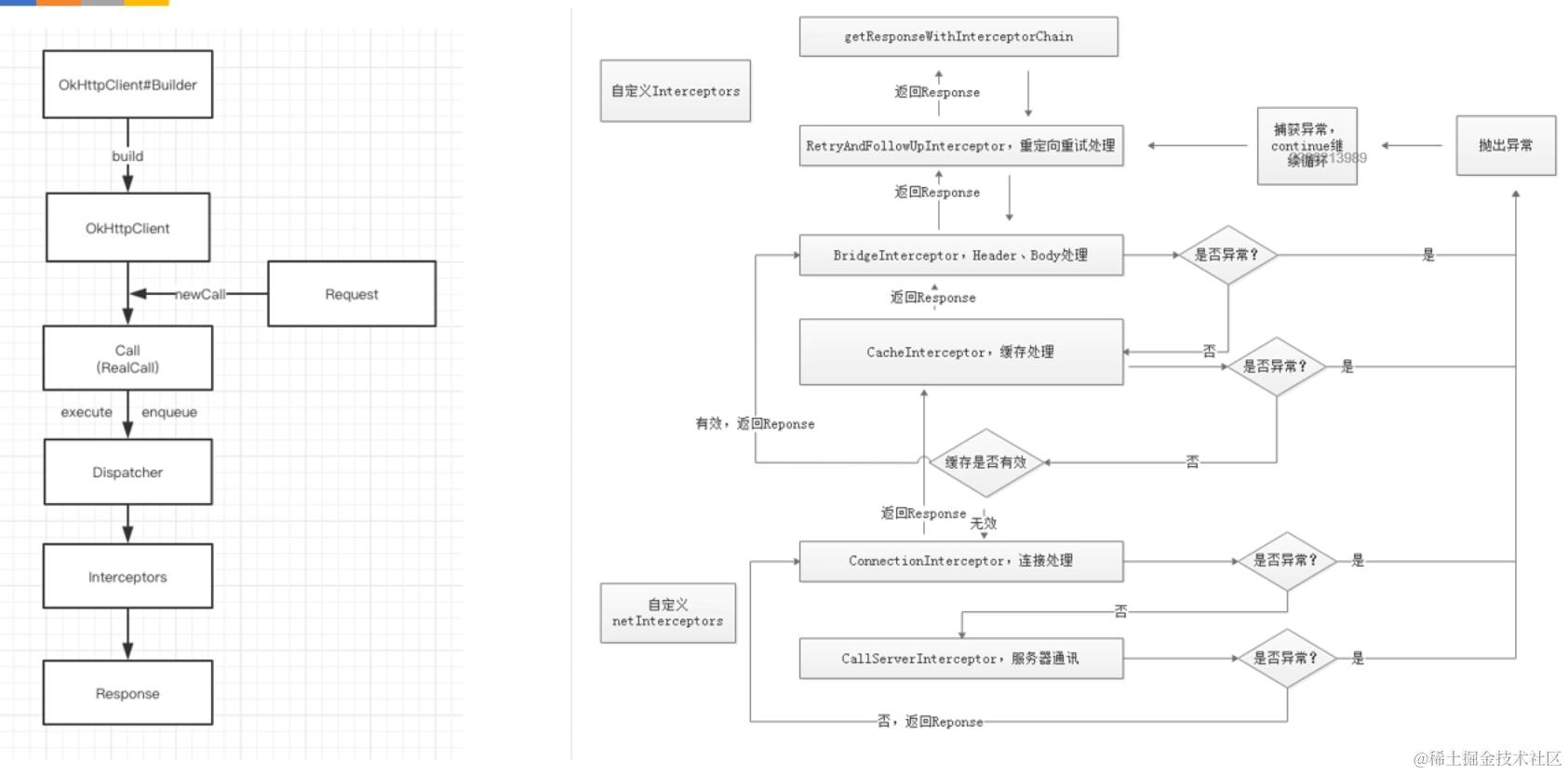
OkHttp请求过程中最少只需要接触OkHttpClient、Request、Call、Response,但是框架内部进行大量的逻辑处理,所有的逻辑大部分集中在拦截器中,但是在进入拦截器之前还需要依靠分发器来调配请求任务。
- 分发器:内部维护队列与线程池,完成请求调配
- 拦截器:完成整个请求过程
Dispatcher负责任务的分发,Intercepter真正的完成了请求的过程。
源码分析
call包装
OKHttp的请求载体是Call对象,我们先看看Call的生成okHttpClient.newCall(request):
override fun newCall(request: Request): Call = RealCall(this, request, forWebSocket = false)
我们发出的call会被包装成RealCall。
异步请求
异步请求需要将每一个请求入队。
override fun enqueue(responseCallback: Callback) {
  check(executed.compareAndSet(false, true)) { "Already Executed" }

  callStart()
  // 包装成AsyncCall然后入队。这里的Dispatcher我们可以自定义,不过一般我们也不需要这么做。
  client.dispatcher.enqueue(AsyncCall(responseCallback))
}

private fun callStart() {
  this.callStackTrace = Platform.get().getStackTraceForCloseable("response.body().close()")
  eventListener.callStart(this)
}
可见OKHttp为我们提供了很多监听器。
AsyncCall就是是一个runnable
internal inner class AsyncCall(
  private val responseCallback: Callback
) : Runnable {
  @Volatile var callsPerHost = AtomicInteger(0)
    private set

  fun reuseCallsPerHostFrom(other: AsyncCall) {
    this.callsPerHost = other.callsPerHost
  }

  val host: String
    get() = originalRequest.url.host

  val request: Request
      get() = originalRequest

  val call: RealCall
      get() = this@RealCall

  /**
   * Attempt to enqueue this async call on [executorService]. This will attempt to clean up
   * if the executor has been shut down by reporting the call as failed.
   */
  fun executeOn(executorService: ExecutorService) {
    client.dispatcher.assertThreadDoesntHoldLock()

    var success = false
    try {
      executorService.execute(this)
      success = true
    } catch (e: RejectedExecutionException) {
      val ioException = InterruptedIOException("executor rejected")
      ioException.initCause(e)
      noMoreExchanges(ioException)
      responseCallback.onFailure(this@RealCall, ioException)
    } finally {
      if (!success) {
        client.dispatcher.finished(this) // This call is no longer running!
      }
    }
  }
新入队的请求会被放入readyAsyncCalls中。Dispatcher总共有3个队列。
- 准备执行的异步请求
readyAsyncCalls = ArrayDeque<AsyncCall>() - 正在执行的异步请求
runningAsyncCalls = ArrayDeque<AsyncCall>() - 正在执行的同步请求
runningSyncCalls = ArrayDeque<RealCall>()
internal fun enqueue(call: AsyncCall) {
  synchronized(this) {
    readyAsyncCalls.add(call)

    // Mutate the AsyncCall so that it shares the AtomicInteger of an existing running call to
    // the same host.
    if (!call.call.forWebSocket) {
      // 查找是否有一个已经完全一样的host请求,防止浪费性能。
      val existingCall = findExistingCallWithHost(call.host)
      //将这两个一样的host 的callsPerhost变成完全一样的,让相同的host的async中的AtomicInteger callsPerHost是同一个对象,有多少个相同host的正在执行的请求数量。
      if (existingCall != null) call.reuseCallsPerHostFrom(existingCall)
    }
  }
  // 分发执行。
  promoteAndExecute()
}
在promoteAndExecute中。我们会迭代执行异步请求。
private fun promoteAndExecute(): Boolean {
  this.assertThreadDoesntHoldLock()

  val executableCalls = mutableListOf<AsyncCall>()
  val isRunning: Boolean
  synchronized(this) {

    val i = readyAsyncCalls.iterator()
    //迭代等待执行异步请求
    while (i.hasNext()) {
      val asyncCall = i.next()
      // 正在执行异步请求的任务数 不能大于 64个
      if (runningAsyncCalls.size >= this.maxRequests) break // Max capacity.
      // 同一个host的请求数 不能大于5,大于5个就去拿下一个任务,该任务会被搁置。
      if (asyncCall.callsPerHost.get() >= this.maxRequestsPerHost) continue // Host max capacity.
      // 任务要执行了,就需要移除掉。
      i.remove()
      asyncCall.callsPerHost.incrementAndGet()
      // 需要开始执行的任务集合,记录到一个临时的集合中。
      executableCalls.add(asyncCall)
      // 加入running队列。
      runningAsyncCalls.add(asyncCall)
    }
    isRunning = runningCallsCount() > 0
  }
    // 遍历执行任务集合。
    for (i in 0 until executableCalls.size) {
      val asyncCall = executableCalls[i]
      asyncCall.executeOn(executorService)
    }
    return isRunning
 }
这里就是开始执行任务了。
fun executeOn(executorService: ExecutorService) {
  client.dispatcher.assertThreadDoesntHoldLock()
  var success = false
  try {
    executorService.execute(this)
    success = true
  } catch (e: RejectedExecutionException) {
    val ioException = InterruptedIOException("executor rejected")
    ioException.initCause(e)
    noMoreExchanges(ioException)
    responseCallback.onFailure(this@RealCall, ioException)
  } finally {
    if (!success) {
      client.dispatcher.finished(this) // This call is no longer running!
    }
  }
}
override fun execute(): Response {
  // 每一个call都只能执行一次。
  check(executed.compareAndSet(false, true)) { "Already Executed" }

  timeout.enter()
  // 这里边其实就是配置了一个listener.我们在client创建的时候,可以自己配置一个eventListener。
  callStart()
  try {
    client.dispatcher.executed(this)
    return getResponseWithInterceptorChain()
  } finally {
    client.dispatcher.finished(this)
  }
}
根据上述的逻辑,我们总结出异步请求工作流程:
okhttp3.internal.connection.RealCall.AsyncCall#run 任务的最终执行是在这个run方法中实现的。
override fun run() {
  threadName("OkHttp ${redactedUrl()}") {
    var signalledCallback = false
    timeout.enter()
    try {
      // 执行请求,通过这个拦截器链条完成数据获取。
      val response = getResponseWithInterceptorChain()
      signalledCallback = true
      responseCallback.onResponse(this@RealCall, response)
    } catch (e: IOException) {
      if (signalledCallback) {
        // Do not signal the callback twice!
        Platform.get().log("Callback failure for ${toLoggableString()}", Platform.INFO, e)
      } else {
        responseCallback.onFailure(this@RealCall, e)
      }
    } catch (t: Throwable) {
      cancel()
      if (!signalledCallback) {
        val canceledException = IOException("canceled due to $t")
        canceledException.addSuppressed(t)
        responseCallback.onFailure(this@RealCall, canceledException)
      }
      throw t
    } finally {
      client.dispatcher.finished(this)
    }
  }
}
Dispatcher使用的线程池使用的是 SynchronousQueue,SynchronousQueue是一个没有数据缓冲的BlockingQueue,因此提交任务之后,一定会走创建新线程的流程去执行任务,这是为了让我们提交的任务得到及时的执行,满足我们对任务的高效执行的需求:
@get:JvmName("executorService") val executorService: ExecutorService
  get() {
    if (executorServiceOrNull == null) {

      executorServiceOrNull = ThreadPoolExecutor(0, Int.MAX_VALUE, 60, TimeUnit.SECONDS,
          SynchronousQueue(), threadFactory("$okHttpName Dispatcher", false))
    }
    return executorServiceOrNull!!
  }
同步请求
直接放到同步请求队列,开始执行。
@Synchronized internal fun executed(call: RealCall) {
  runningSyncCalls.add(call)
}
最终会走到这里
internal fun finished(call: AsyncCall) {
  call.callsPerHost.decrementAndGet()
  finished(runningAsyncCalls, call)
}
需要注意的是,同步请求最终也会触发promoteAndExecute()。
OkHttp 拦截器链(Interceptor Chain)机制整理
1. 职责链设计模式概述
- OkHttp的网络请求,无论同步还是异步,最终都会通过
getResponseWithInterceptorChain(),核心是责任链模式。 - 这种模式将多个处理节点(拦截器 Interceptor)串成链式结构,每个拦截器只需关注自身职责,处理完毕后交给链中的下一个节点。
- 客户端(如开发者或业务方)无需关心整个流程的细节,只需将请求交给责任链即可。
2. 拦截器执行流程图
- 拦截器链大致顺序:
自定义拦截器 → RetryAndFollowUpInterceptor → BridgeInterceptor → CacheInterceptor → ConnectInterceptor → (自定义网络拦截器) → CallServerInterceptor
3. 拦截器链的实现方式
3.1 添加自定义拦截器
// 放在所有拦截器之前,适用于全局功能(如统一header、日志等)
.addInterceptor(object : Interceptor {
    override fun intercept(chain: Interceptor.Chain): Response {
        val request = chain.request()
        // ...自定义处理...
        return chain.proceed(request) // 一定要调用,否则链条中断
    }
})

// 放在 CallServerInterceptor 之前,仅在app请求生效
.addNetworkInterceptor {
    // ...自定义处理...
}
⚠️ 注意:自定义拦截器必须调用 chain.proceed(request) ,否则责任链中断。
3.2 拦截器链的数据结构与“U型”传递
源码(示意),反映了“链式递进+U型返回”的本质:
public class Chain {
    private List<Interceptor> interceptors;
    private int index;
    public String request;

    public Chain(List<Interceptor> interceptors, int index, String request) {
        this.interceptors = interceptors;
        this.index = index;
        this.request = request;
    }
    // ...省略构造重载...

    public String processd(String request) {
        if (index >= interceptors.size()) {
            throw new AssertionError();
        }
        // 创建新chain,递归推进
        Chain chain = new Chain(interceptors, index + 1, request);
        Interceptor interceptor = interceptors.get(index);
        // 通过interceptor处理并递归进入下一级
        return interceptor.intercept(chain);
    }
}
- 每个
interceptor.intercept(chain)内部,都可以对 request/response 做任意处理,也可以决定是否继续下发。 - 注意整个调用是“进栈再出栈”,即U型结构——处理链递归推进到底,然后逐级返回结果。
4. 各内置拦截器职责(作用解释)
| 拦截器类型 | 主要职责 |
|---|---|
| 重试与重定向拦截器 | 链接准备、失败重试、出错重定向,判断用户是否取消请求,获得结果后判断是否需要重定向 |
| 桥接拦截器 | 添加HTTP协议必需头部(如Host)、GZIP压缩、处理cookie、解压缩 |
| 缓存拦截器 | 读取/判断缓存、响应304合并缓存、是否缓存本次响应 |
| 连接拦截器 | 建立或复用socket连接,连接池逻辑,无额外响应处理 |
| 请求服务器拦截器 | 真正与服务器通信、socket发送HTTP请求、解析响应 |
可自定义拦截器的位置和作用
- 普通
.addInterceptor:用于全局请求/响应预处理,例如请求签名、全局header、统一日志。 - 网络
.addNetworkInterceptor:更靠近网络I/O,适用于抓包/真实流量日志/缓存调试等。
5. 补充源码说明
下面这张图是OkHttp拦截器链在实际中的调用关系,链式嵌套、逐级下发、逐级回传,务必理解其U型调用栈结构:
1. RetryAndFollowUpInterceptor(重试与重定向拦截器)
这个拦截器负责连接准备、失败重试和自动重定向,处理各种网络异常和边界场景。
源码片段分析
/**
 * Report and attempt to recover from a failure to communicate with a server. Returns true if
 * `e` is recoverable, or false if the failure is permanent. Requests with a body can only
 * be recovered if the body is buffered or if the failure occurred before the request has been
 * sent.
 */
private fun recover(
  e: IOException,
  call: RealCall,
  userRequest: Request,
  requestSendStarted: Boolean
): Boolean {
  // 1. 判断客户端是否允许重试
  if (!client.retryOnConnectionFailure) return false

  // 2. 不能重试的情况:请求体只能用一次(如表单/文件流)、或IO异常表示已发出部分请求
  if (requestSendStarted && requestIsOneShot(e, userRequest)) return false

  // 3. 不可恢复的异常:协议异常、IO中断(非Socket超时)、证书相关异常
  if (!isRecoverable(e, requestSendStarted)) return false

  // 4. 没有可用路由可尝试(如所有IP都失败)
  if (!call.retryAfterFailure()) return false

  // 5. 上述条件都通过,允许重试
  return true
}

private fun requestIsOneShot(e: IOException, userRequest: Request): Boolean {
  val requestBody = userRequest.body
  return (requestBody != null && requestBody.isOneShot()) ||
      e is FileNotFoundException
}

private fun isRecoverable(e: IOException, requestSendStarted: Boolean): Boolean {
  if (e is ProtocolException) return false

  // SocketTimeout可以重试,普通中断不重试
  if (e is InterruptedIOException) {
    return e is SocketTimeoutException && !requestSendStarted
  }

  // 证书问题不重试
  if (e is SSLHandshakeException) {
    if (e.cause is CertificateException) return false
  }
  if (e is SSLPeerUnverifiedException) {
    return false
  }
  return true
}
关键点总结
- 自动重试的前提条件较严格(如配置允许、非一次性Body、异常类型可恢复、有可用路由等)。
- 不会无限重定向,会有重定向次数(比如20次)上限保护。
- 对文件上传等不可重放的请求体,不会重试,避免重复发包导致业务问题。
- SSL等安全异常一律不重试。
相关图片
-
408/503等服务端RetryAfter头部处理细节:
- 408:服务器给retry-after:0或未给才会重试
- 503:服务器必须给retry-after:0才能重试
2. BridgeInterceptor(桥接拦截器)
-
核心作用:
- 在请求发出前,自动补全HTTP协议需要的各种header(如User-Agent、Host、Content-Type、Accept-Encoding等);
- 自动管理Cookie(读取和保存);
- 自动处理GZIP压缩(设置请求头,解压响应);
- 保证业务方不需要手动维护这些“协议层”细节,提高易用性和容错性。
3. CacheInterceptor
功能要点速览:
- 支持HTTP协议的强缓存(Expires、Cache-Control)和协商缓存(Last-Modified、Etag)。
- 命中强缓存时,不发起真正的网络请求,直接返回本地缓存。
- 协商缓存未过期,收到304响应码时,从本地缓存读取数据。
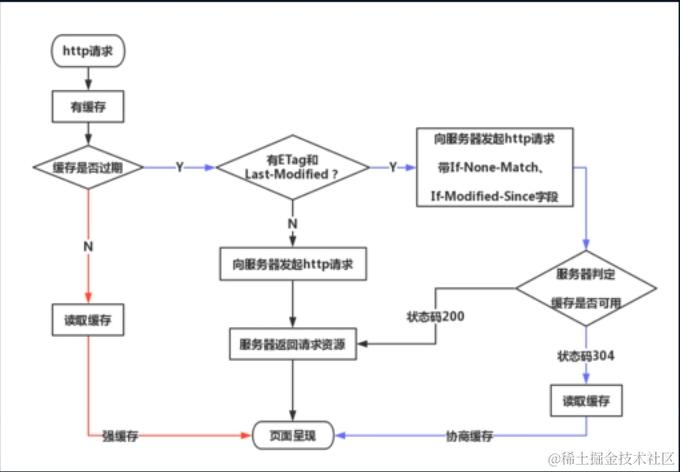
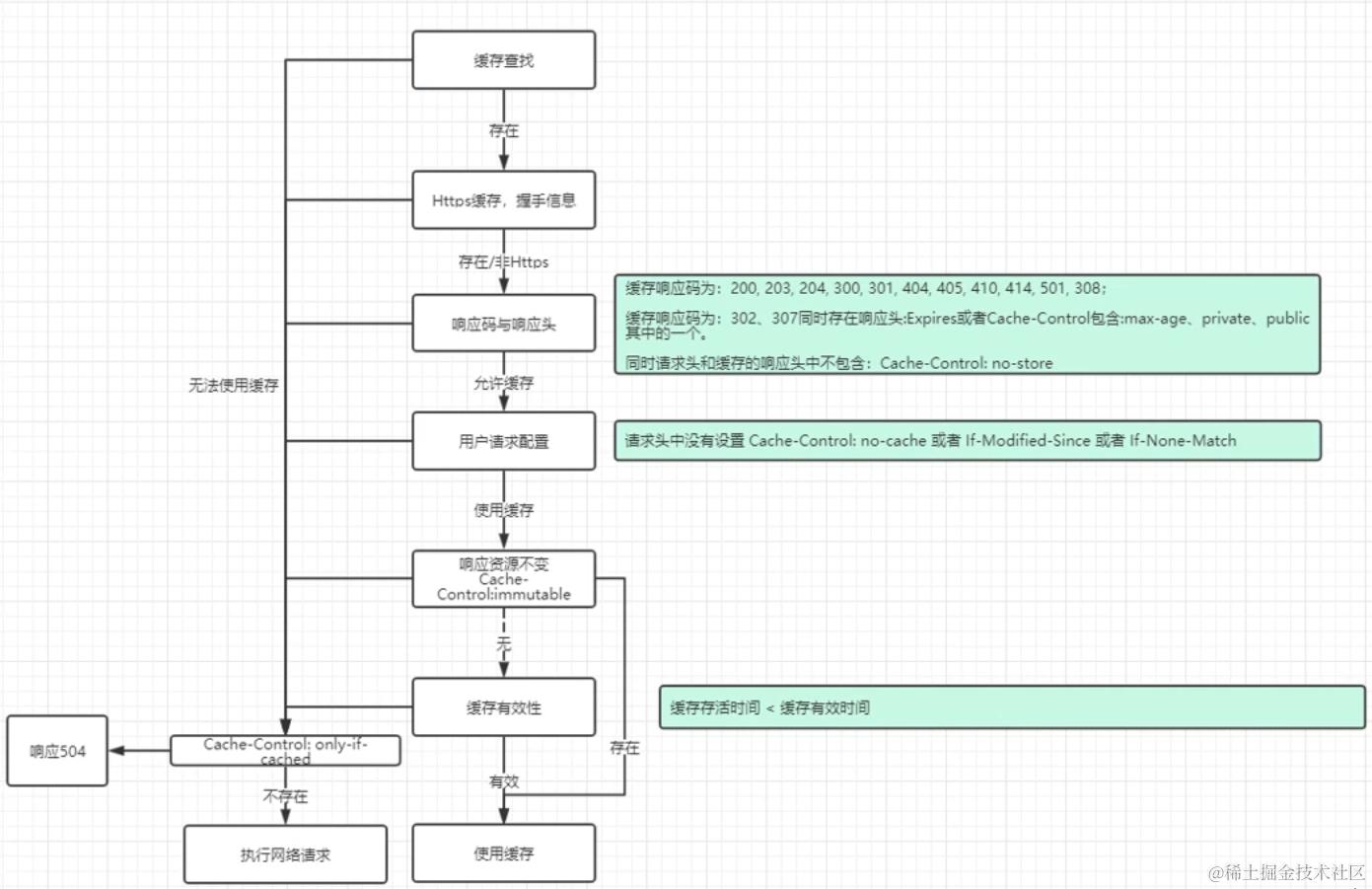
3. ConnectInterceptor
功能要点速览:
- 管理Socket连接的对象池(连接复用,减少三次握手开销)。
- 最大空闲连接数、最大空闲时间可配置。
- 链接池自动定时清理闲置链接,策略类似LRU。 一个对象池,用来做链接复用。内部实现使用的一 个RealConnectionPool来实现对象的保存。所有的链接都放到这里边了。这里边很重要的一个操作就是:
fun put(connection: RealConnection) {
  connection.assertThreadHoldsLock()

  connections.add(connection) // 保存链接对象。
  cleanupQueue.schedule(cleanupTask)
}
同时,内部还会启动一个周期性的任务,用来清理无效的链接。
```js
private val cleanupTask = object : Task("$okHttpName ConnectionPool") {
  override fun runOnce() = cleanup(System.nanoTime())
}
RealConnection代表是连接socket链路,RealConnection对象意味着我们已经跟服务端有了一条通信链路了。很多朋友这时候会想到,有通信链路了,是不是与意味着在这个类实现的三次握手,你们猜对了,的确是在这个类里面实现的三次握手。
RealConnectionPool 每一个链接,通过构造方法可以确定, 默认的最大空闲数为5,最大允许空闲时间为5分钟。也就是如果这个链接超过5分钟没有下一个请求使用,就会被弃用。弃用的方式采用的LRUCache.
/**
 * maxIdleConnections 连接池最大允许的空闲连接数
 * keepAliveDuration 连接最大允许的空闲时间5分钟
 */
constructor() : this(5, 5, TimeUnit.MINUTES)
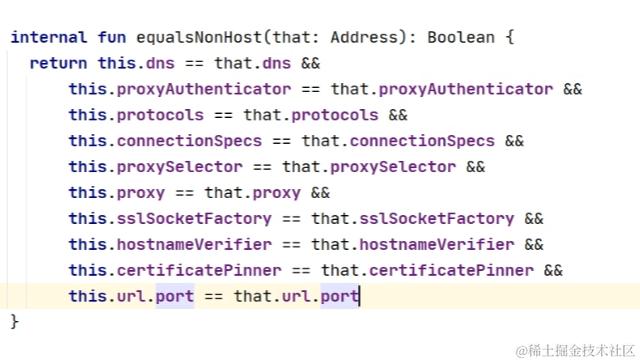
连接能够复用,这下边的所有变量都需要相同,同时host也要一致。
object ConnectInterceptor : Interceptor {
  @Throws(IOException::class)
  override fun intercept(chain: Interceptor.Chain): Response {
    val realChain = chain as RealInterceptorChain
    // 获取连接 Exchange:数据交换(封装了连接)
    val exchange = realChain.call.initExchange(chain)
    val connectedChain = realChain.copy(exchange = exchange)
    return connectedChain.proceed(realChain.request)
  }
}

internal fun initExchange(chain: RealInterceptorChain): Exchange {
  synchronized(this) {
    check(expectMoreExchanges) { "released" }
    check(!responseBodyOpen)
    check(!requestBodyOpen)
  }

  val exchangeFinder = this.exchangeFinder!!
  // ExchangeCodec: 编解码器 find:查找连接Realconnection
  val codec = exchangeFinder.find(client, chain)
  // Exchange:数据交换器 包含了exchangecodec与Realconnection
  val result = Exchange(this, eventListener, exchangeFinder, codec)
  this.interceptorScopedExchange = result
  this.exchange = result
  synchronized(this) {
    this.requestBodyOpen = true
    this.responseBodyOpen = true
  }

  if (canceled) throw IOException("Canceled")
  return result
}
Socket与Http的区别:socket能够完成TCP/IP所有协议,HTTP协议只能完成HTTP协议。参考:blog.csdn.net/mccand1234/…
连接池工作流程梳理:
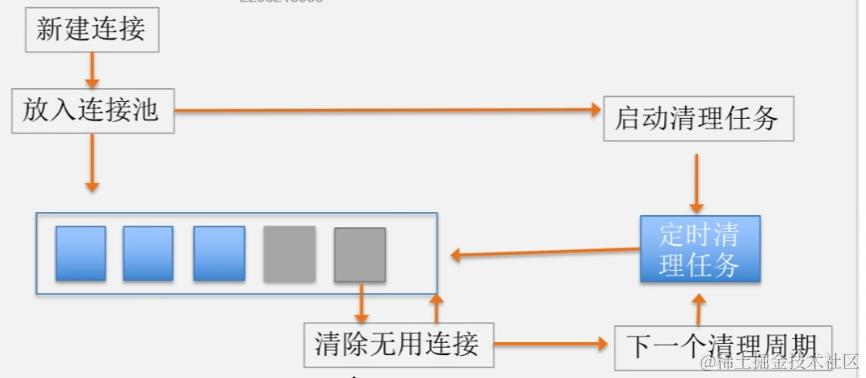 新建的链接如果是Keep-alive链接,就放入连接池。放入后还要同时启动清理任务,清理限制链接的事件取决于目前连接池里边最长闲置链接,如果连接池里边的闲置链接最长是1分钟,那么下次清理的事件就是4分钟之后了。
连接池清理流程:
fun `cleanup`(now: Long): Long {
  var inUseConnectionCount = 0
  var idleConnectionCount = 0
  var longestIdleConnection: RealConnection? = null
  var longestIdleDurationNs = Long.MIN_VALUE

  // Find either a connection to evict, or the time that the next eviction is due.
  for (connection in connections) {
    synchronized(connection) {
      // If the connection is in use, keep searching.
      // 记录正在使用与已经闲置的连接数
      if (pruneAndGetAllocationCount(connection, now) > 0) {
        inUseConnectionCount++
      } else {
        idleConnectionCount++

        // 记录最长闲置时间的连接longestIdleConnection
        // If the connection is ready to be evicted, we're done.
        val idleDurationNs = now - connection.idleAtNs
        if (idleDurationNs > longestIdleDurationNs) {
          longestIdleDurationNs = idleDurationNs
          longestIdleConnection = connection
        } else {
          Unit
        }
      }
    }
  }

  when {
    //最长闲置时间的连接超过了允许闲置时间 或者 闲置数量超过允许数量,清理此连接
    longestIdleDurationNs >= this.keepAliveDurationNs
        || idleConnectionCount > this.maxIdleConnections -> {
      // We've chosen a connection to evict. Confirm it's still okay to be evict, then close it.
      val connection = longestIdleConnection!!
      synchronized(connection) {
        if (connection.calls.isNotEmpty()) return 0L // No longer idle.
        if (connection.idleAtNs + longestIdleDurationNs != now) return 0L // No longer oldest.
        connection.noNewExchanges = true
        connections.remove(longestIdleConnection)
      }

      connection.socket().closeQuietly()
      if (connections.isEmpty()) cleanupQueue.cancelAll()

      // Clean up again immediately.
      return 0L
    }
    // 存在闲置连接,下次执行清理任务在 允许闲置时间-已经闲置时候后
    idleConnectionCount > 0 -> {
      // A connection will be ready to evict soon.
      return keepAliveDurationNs - longestIdleDurationNs
    }
    // 存在使用中的连接,下次清理在 允许闲置时间后
    inUseConnectionCount > 0 -> {
      // All connections are in use. It'll be at least the keep alive duration 'til we run
      // again.
      return keepAliveDurationNs // 5分钟之后开始清理。
    }

    else -> {
      // No connections, idle or in use. 立刻执行下一次的清理流程。
      return -1
    }
  }
}
5. CallServerInterceptor
功能要点速览:
- 真正进行与服务器的数据交互(底层Socket写入请求/读取响应)。
- 处理大数据上传、100-continue机制。
- 对HTTP/HTTPS协议底层细节做了高度抽象和统一。
class CallServerInterceptor(private val forWebSocket: Boolean) : Interceptor {

  @Throws(IOException::class)
  override fun intercept(chain: Interceptor.Chain): Response {
    val realChain = chain as RealInterceptorChain
    val exchange = realChain.exchange!!
    val request = realChain.request
    val requestBody = request.body
    val sentRequestMillis = System.currentTimeMillis()
    // 如果是获取数据的接口,走这里就够了。
    exchange.writeRequestHeaders(request)
    // 如果携带者数据上送,需要做以下处理。
    if (HttpMethod.permitsRequestBody(request.method) && requestBody != null) {
      // If there's a "Expect: 100-continue" header on the request, wait for a "HTTP/1.1 100
      // Continue" response before transmitting the request body. If we don't get that, return
      // what we did get (such as a 4xx response) without ever transmitting the request body.
      // 如果要向服务器发送比较大的数据,先要问服务器能否接受这么大的数据。
      if ("100-continue".equals(request.header("Expect"), ignoreCase = true)) {
        exchange.flushRequest()
        responseBuilder = exchange.readResponseHeaders(expectContinue = true)
        exchange.responseHeadersStart()
        invokeStartEvent = false
  }

// 最终是通过socket向服务器发送请求头请求行。
fun writeRequest(headers: Headers, requestLine: String) {
  check(state == STATE_IDLE) { "state: $state" }
  sink.writeUtf8(requestLine).writeUtf8("\r\n")
  for (i in 0 until headers.size) {
    sink.writeUtf8(headers.name(i))
        .writeUtf8(": ")
        .writeUtf8(headers.value(i))
        .writeUtf8("\r\n")
  }
  sink.writeUtf8("\r\n")
  state = STATE_OPEN_REQUEST_BODY
}
拦截器总结
-
重试与重定向拦截器(RetryAndFollowUpInterceptor)
- 负责请求失败时的自动重试和HTTP重定向,重定向最多20次。
- 遇到失败(如超时、断网、部分服务器错误)时,判断是否允许重试或自动跟随重定向(根据响应码判断)。
- 若重定向,则会将上一次的请求结果合并到本次请求结果中,形成链式历史。
-
桥接拦截器(BridgeInterceptor)
- 负责补全HTTP协议头(如Host、Content-Type等),自动添加必要头部。
- 负责请求体的Gzip压缩、响应的Gzip解压、Cookie的自动管理等协议兼容和优化。
- 在实际响应返回后,处理解压和持久化Cookie。
-
缓存拦截器(CacheInterceptor)
- 实现HTTP强缓存(Expires、Cache-Control)和协商缓存(Last-Modified/Etag)。
- 命中强缓存时直接返回缓存内容,不发起网络请求;协商缓存命中返回304,客户端加载本地缓存。
- 不满足缓存条件(如Cache-Control:no-store或无本地缓存)则直接网络请求,否则返回504错误。
-
连接拦截器(ConnectInterceptor)
- 负责底层连接的复用与管理(连接池、Socket复用)。
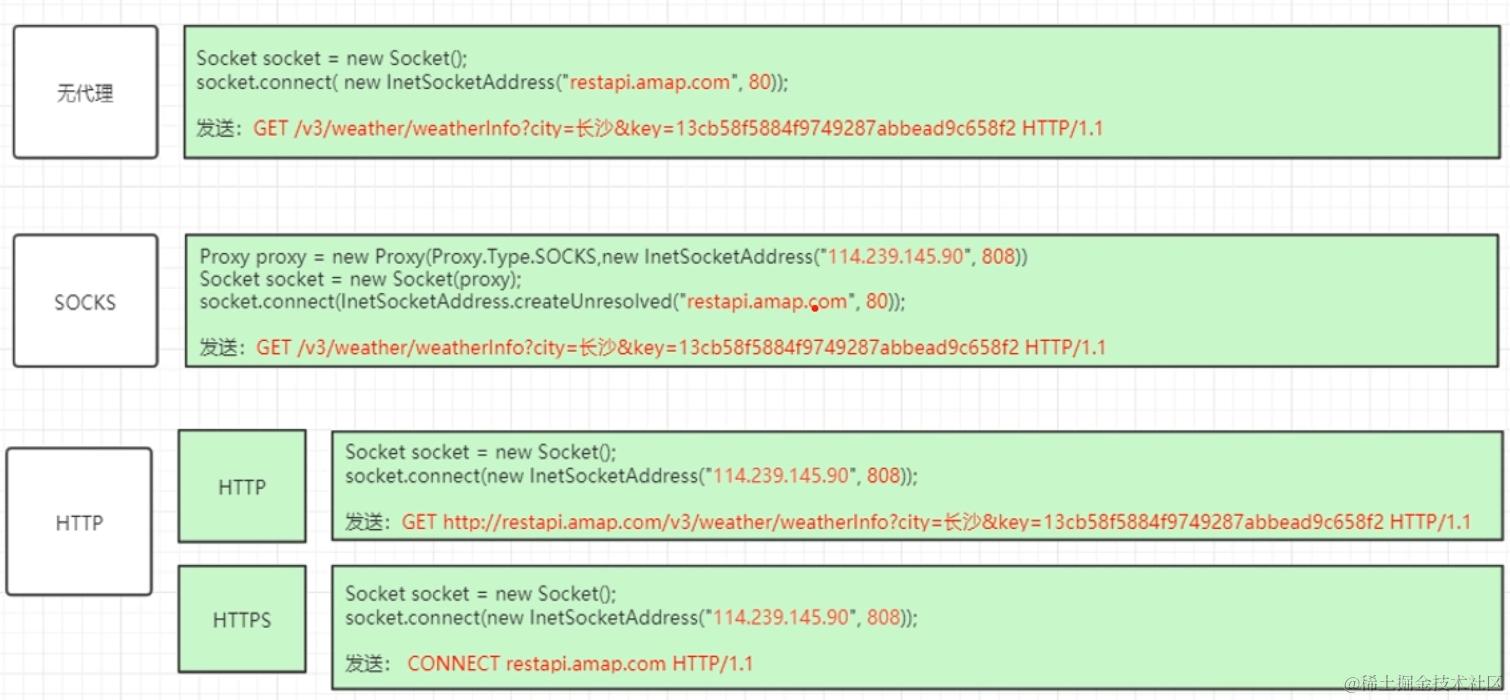
- 兼容Socket代理和HTTP代理,HTTPS通信自动建立隧道代理。
- 通过TLS的ALPN扩展自动选择HTTP/1.1或HTTP/2,最大空闲连接数默认5,最大空闲时长5分钟,超时未用则LRU回收。
- 新建或复用连接时自动启动清理任务(定时检测,回收空闲连接)。
-
请求服务拦截器(CallServerInterceptor)
- 最底层拦截器,直接负责通过Socket与服务器的数据交互。
- 发送请求行、请求头、请求体,读取响应头、响应体。
- 支持100-continue机制(大体积上传前先询问服务器),保证协议细节正确实现。
整体框架总结
一些问题
1. OKHttp请求流程是怎样的?
-
创建Request对象,配置URL、Headers、Body等参数。
-
OkHttpClient.newCall(request) 生成Call对象(内部实际是RealCall)。
-
同步请求:
execute(),直接发起请求; -
异步请求:
enqueue(),封装为AsyncCall,加入Dispatcher调度队列。 -
Dispatcher分发管理:
- readyAsyncCalls:等待执行的异步任务队列
- runningAsyncCalls:正在执行的异步任务队列(最多64个)
- 每个Host正在执行的异步任务不得超过5个(防止单Host被打满)
-
最终通过拦截器链(InterceptorChain)完成所有请求处理和响应解析。
2. OKHttp分发器(Dispatcher)是怎样工作的?
-
同步请求直接进入runningSyncCalls队列;
-
异步请求:
- 先加入readyAsyncCalls等待队列;
- 执行
promoteAndExecute(),把不超过全局和单host上限的任务转移到runningAsyncCalls,立即用线程池执行; - 超出限制的任务继续在ready队列等待,直到有slot空出。
-
队列管理机制保障不会有过多并发、不会把服务器打挂,且公平调度多host场景。
3. OKHttp拦截器(Interceptor)是如何工作的?
-
采用责任链模式,每个拦截器只负责自己关心的事情,处理完后通过
proceed()把请求传递给下一个拦截器。 -
主要内置拦截器顺序:
- RetryAndFollowUpInterceptor(重试与重定向)
- BridgeInterceptor(协议转换、补全头部、GZIP、Cookie)
- CacheInterceptor(HTTP缓存)
- ConnectInterceptor(连接管理、池化)
- CallServerInterceptor(真正网络读写)
-
自定义拦截器可以在链前后插入,添加如日志、加密、Mock等功能。
4. 应用拦截器和网络拦截器的区别?
-
应用拦截器(addInterceptor) :
- 加在链最前面,可以多次重试、重定向;
- 不关心中间缓存、重定向等细节,适合做日志、统一Header、签名等。
-
网络拦截器(addNetworkInterceptor) :
- 插入在ConnectInterceptor和CallServerInterceptor之间,只拦截真正的网络请求;
- 能拿到请求被重定向和缓存之后的最终内容,也能拿到实际网络响应内容,适合做抓包、重写响应等;
- 注意:某些场景下网络拦截器不一定执行(比如直接命中缓存)。
5. OKHttp如何复用TCP连接?
- 通过**连接池(ConnectionPool)**来管理和复用TCP连接;
- 只有满足“请求参数一致(协议、host、port、代理、SSL设置等)”的情况下才能复用连接;
- 支持HTTP/1.1的Keep-Alive和HTTP/2的多路复用;
- 池中最多保存5个空闲连接,单个连接最多空闲5分钟,超时或超量的连接用LRU算法清理;
- 节省连接建立的性能消耗,提升高并发场景性能。
学后检测
单选题
1. OkHttp 从哪个 Android 版本开始作为 HttpURLConnection 的底层实现?
A. Android 2.3
B. Android 4.4
C. Android 5.0
D. Android 6.0
答案:B
解析: OkHttp 从 Android 4.4 开始成为 HttpURLConnection 的底层实现。
2. 以下哪个拦截器直接负责与服务器进行底层数据交互?
A. BridgeInterceptor
B. CacheInterceptor
C. CallServerInterceptor
D. ConnectInterceptor
答案:C
解析: CallServerInterceptor 负责与服务器通过 Socket 进行数据读写,是真正的底层交互。
3. OkHttp 的连接池默认最多可以同时保存多少个空闲连接?
A. 3
B. 5
C. 10
D. 64
答案:B
解析: ConnectionPool 默认最多保存 5 个空闲连接。
多选题
4. 下列关于 OkHttp Dispatcher 分发器的说法,哪些是正确的?
A. Dispatcher 会维护异步和同步请求队列
B. 同一个 host 下最多支持 5 个异步请求同时进行
C. runningAsyncCalls 队列的上限为 64
D. Dispatcher 只负责异步请求调度
答案:A B C
解析: Dispatcher 既负责异步也负责同步请求队列(A);同 host 异步任务不超过 5 个(B);runningAsyncCalls 队列默认上限为 64(C);同步请求同样纳入管理(D 错)。
5. 关于 OkHttp 支持的 HTTP 协议和特性,下列说法正确的是?
A. 支持 HTTP/2
B. 支持多路复用
C. 支持 Gzip 自动压缩
D. 只支持 HTTP/1.1
答案:A B C
解析: OkHttp 支持 HTTP/1.1 和 HTTP/2,多路复用是 HTTP/2 特性,Gzip 自动压缩(D 错)。
判断题
6. OkHttp 的 CacheInterceptor 只支持强缓存,不支持协商缓存。( )
答案:错
解析: CacheInterceptor 同时支持强缓存和协商缓存(304响应等)。
7. 应用拦截器 addInterceptor 一定会被调用,而 addNetworkInterceptor 不一定被调用。( )
答案:对
解析: 应用拦截器始终会调用,网络拦截器遇到命中缓存时不会被执行。
8. OkHttp 的连接池会使用 LRU 算法清理闲置连接。( )
答案:对
解析: 连接池按 LRU 策略清理最长时间未使用的连接。
简答题
9. 简述 OkHttp 的请求从 OkHttpClient 到服务器响应的主要流程。
答案要点:
- 创建 Request,对应 URL/Headers/Body
- OkHttpClient.newCall(request) 生成 Call(实际为 RealCall)
- 调用 execute(同步)或 enqueue(异步)
- Dispatcher 分发请求,管理 readyAsyncCalls、runningAsyncCalls、runningSyncCalls 队列
- 异步任务交给线程池执行
- 请求会经过 Interceptor Chain(责任链),依次经过自定义拦截器、RetryAndFollowUpInterceptor、BridgeInterceptor、CacheInterceptor、ConnectInterceptor、CallServerInterceptor
- 最终通过底层 Socket 与服务器通信,读取响应
- Dispatcher 负责回收和管理执行状态
10. OkHttp 如何实现 TCP 连接复用?请说明机制和参数控制。
答案要点:
- 使用 ConnectionPool 管理连接对象(RealConnection)
- 相同的协议、host、port、代理、SSL 参数等情况下,后续请求会尝试复用已有的空闲连接
- 支持 HTTP/1.1 的 Keep-Alive 及 HTTP/2 的多路复用
- 连接池参数:maxIdleConnections(最大空闲连接数,默认5),keepAliveDuration(最大空闲时长,默认5分钟)
- 空闲连接超时或超出上限会被清理(LRU)
- 节省了握手和建链开销,提高高并发性能
编程题
11. 编写一个自定义 OkHttp 应用拦截器,要求给所有请求添加统一的 User-Agent 头,并在 logcat 打印请求的 URL。
class UserAgentInterceptor : Interceptor {
    override fun intercept(chain: Interceptor.Chain): Response {
        val request = chain.request().newBuilder()
            .header("User-Agent", "MyCustomAgent/1.0")
            .build()
        println("Request URL: ${request.url}")
        return chain.proceed(request)
    }
}

// 用法:
val client = OkHttpClient.Builder()
    .addInterceptor(UserAgentInterceptor())
    .build()
解析:
- 实现 Interceptor 接口,重写 intercept()
- 在 builder 里添加 header
- 打印请求 URL
- 必须调用 chain.proceed(request) 保证责任链不中断
12. (开放编程)使用 OkHttp 发起一个 GET 请求并打印响应体,要求带有超时时间设置。
val client = OkHttpClient.Builder()
    .callTimeout(10, TimeUnit.SECONDS)
    .build()

val request = Request.Builder()
    .url("https://www.example.com")
    .build()

client.newCall(request).execute().use { response ->
    if (!response.isSuccessful) throw IOException("Unexpected code $response")
    println(response.body?.string())
}
解析:
- 设置 callTimeout
- 使用 try-with-resources 或 use{} 自动关闭响应
- 校验 isSuccessful,打印 response.body