需要的技术基础
- react
- tailwindcss (css框架,文档使用的是3版本)
核心思路
- 组件加载时收集元素的
总高度、省略后的高度以及其他逻辑判断
- 点击展开、收起时修改元素的高度
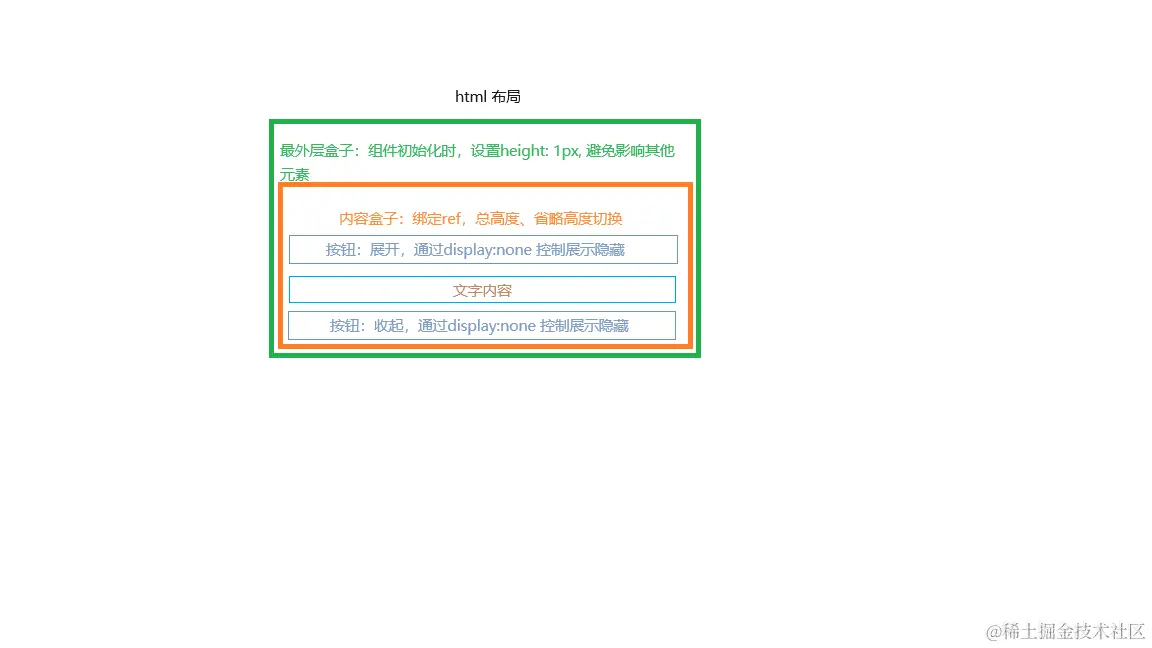
- 绿色是最外层盒子,
组件获取内容高度前,设置高度为1px,避免影响到其他元素布局
- 橙色为内容盒子,展示隐藏的样式,以及总高度、省略高度切换,ref绑定均在此盒子
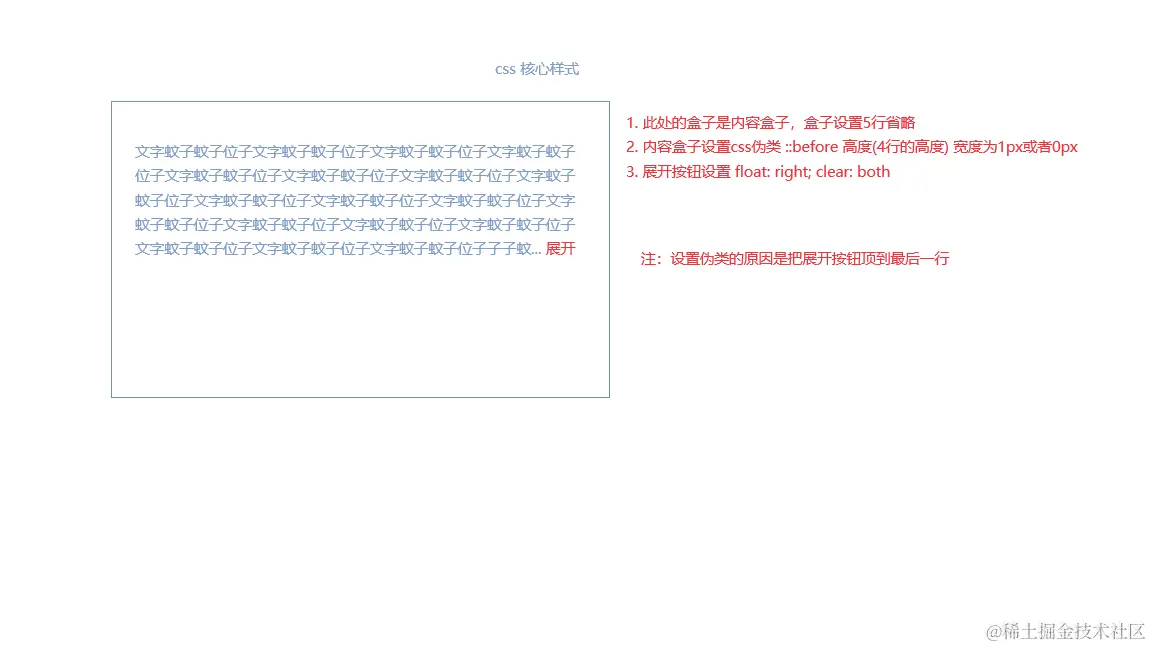
- 两个按钮是为了处理展开收起后,按钮的位置
- 文字内容只是文字节点,不需要任何处理
具体实现(此处只展示组件内逻辑)
- 接收主要porps、定义内部状态
const {
hiddenText = '收起',
showText = '展开',
children,
className,
onClick,
style,
} = props;
const boxRef = React.useRef(null);
const [{ isExpand, isShow, h, boxcn }, setExpand] = React.useState({
isExpand: false,
isShow: false,
h: {
a: 0,
o: 0,
},
boxcn: box_cn.replace(regOmitRow, 'opacity-0 overflow-y-auto w-full'),
});
- 组件加载时获取信息并保存到状态中
React.useEffect(() => {
if (boxRef.current) {
const lineH = window.getComputedStyle(boxRef.current).lineHeight;
const sh = boxRef.current.scrollHeight;
const omitO = className.match(regOmitRow);
if (omitO) {
let row;
if (omitO[0] === 'truncate') {
row = 1;
} else {
row = parseInt(omitO[0].match(/(\d)/)[0], 10);
}
setExpand((o) => ({
...o,
isShow: sh >= (row + 1) * parseInt(lineH, 10),
h: { a: sh, o: row * parseInt(lineH, 10) },
boxcn: className.replace(/(duration-\d{1,3}\s{0,1}|transition-\w{1,10})\s{0,1}/gi, ''),
}));
} else {
setExpand((o) => ({
...o,
h: { a: sh, o: 0 },
boxcn: className,
}));
}
}
}, [className]);
- 点击操作按钮的逻辑
const handleClick = (e) => {
setExpand((o) => ({
...o,
isExpand: !o.isExpand,
boxcn: `${!o.isExpand ? className.replace(regOmitRow, '') : className}`,
}));
};
- 元素高度设置
const mergeStyle = () => {
if (isShow) {
return {
...style,
height: isExpand ? h.a : h.o,
};
}
return style;
};
- 操作按钮的节点
const getBtnNode = (cn: string) => {
if (isShow) {
return (
<span
role="button"
className={class_esy([styles_cn.btn, cn])} // 作用于按钮
onClick={handleClick}
>
{isExpand ? hiddenText : showText}
</span>
);
}
return null;
};
全部代码
import React from 'react';
function class_esy(def_cn?: string[], cn?: string): string {
let classname = '';
if (Array.isArray(def_cn) && def_cn.length) {
def_cn.forEach((str_cn) => {
if (str_cn) {
classname = classname ? `${classname} ${str_cn}` : str_cn;
}
});
}
return cn ? `${classname} ${cn}` : classname;
}
const regOmitRow = /(line-clamp-\d)|(truncate)/gi;
const Ellipsis = (props) => {
const {
text,
hiddenText = '收起',
showText = '展开',
children,
className: cls,
onClick,
style,
} = props;
const className =
`relative text-justify before:inline-block before:float-right transition-height duration-200 ${cls}`
const boxRef = React.useRef(null);
const [{ isExpand, isShow, h, boxcn }, setExpand] = React.useState({
isExpand: false,
isShow: false,
h: {
a: 0,
o: 0,
},
boxcn: box_cn.replace(regOmitRow, 'opacity-0 overflow-y-auto w-full'),
});
React.useEffect(() => {
if (boxRef.current) {
const lineH = window.getComputedStyle(boxRef.current).lineHeight;
const omitO = className.match(regOmitRow);
const sh = boxRef.current.scrollHeight;
if (omitO) {
let row;
if (omitO[0] === 'truncate') {
row = 1;
} else {
row = parseInt(omitO[0].match(/(\d)/)[0], 10);
}
setExpand((o) => ({
...o,
isShow: sh >= (row + 1) * parseInt(lineH, 10),
h: { a: sh, o: row * parseInt(lineH, 10) },
boxcn: className.replace(/(duration-\d{1,3}\s{0,1}|transition-\w{1,10})\s{0,1}/gi, ''),
}));
} else {
setExpand((o) => ({
...o,
h: { a: sh, o: 0 },
boxcn: className,
}));
}
}
}, [className]);
const handleClick = (e) => {
setExpand((o) => ({
...o,
isExpand: !o.isExpand,
boxcn: `${!o.isExpand ? className.replace(regOmitRow, '') : box_cn}`,
}));
};
const mergeStyle = () => {
if (isShow) {
return {
...style,
height: isExpand ? h.a : h.o,
};
}
return style;
};
const getBtnNode = (cn: string) => {
if (isShow) {
return (
<span
role="button"
className={class_esy(["float-right clear-both text-ipt-focus cursor-pointer", cn])}
onClick={handleClick}
onTouchStart={handleTouchStart}
>
{isExpand ? hiddenText : showText}
</span>
);
}
return null;
};
return (
<div className={h.a ? '' : 'h-px'}>
<div ref={boxRef} style={mergeStyle()} className={boxcn} {...rest}>
{getBtnNode(isExpand ? 'hidden' : '')}
{text || children}
{getBtnNode(isExpand ? '' : 'hidden')}
</div>
</div>
);
};
export default Ellipsis;
demo
import { Ellipsis } from '*';
const text =
'庆历四年春,滕子京谪守巴陵郡。越明年,政通人和,百废具兴,乃重修岳阳楼,增其旧制,刻唐贤今人诗赋于其上,属予作文以记之.予观夫巴陵胜状,在洞庭一湖。衔远山,吞长江,浩浩汤汤,横无际涯,朝晖夕阴,气象万千,此则岳阳楼之大观也,前人之述备矣。';
export default () => {
return (
<div style={{ width: '200px', border: '1px solid skyblue' }}>
<Ellipsis text={text} className="line-clamp-3 before:h-12" />
</div>
);
};
组件存在的问题
- 目前操作按钮是会渲染两个节点,通过
display:none控制显示隐藏
- 操作按钮定义的是文本类型,未考虑传入节点的形式
- 多行省略使用到了css的
-webkit-line-clamp属性,该属性存在兼容性问题
以上就是展开收起小功能的开发思路以及具体逻辑的详解,如果小伙伴有更好的实现方式,也希望多多分享