String方法
- replace(pattern, replacement)
- pattern 可以是一个字符串;可以是一个有Symbol.replace的对象,特例是正则表达式。
- pattern 是字符串or正则(不适用g)的时候,replace只执行一次,要全局替换的话,使用g flag正则,or 使用replaceAll()方法。
- replacement 是字符串的情况
console.log("xxx".replace("", "_"));
console.log("foo".replace("f", "$$"));
console.log("foo".replace("f", "$&oo"));
console.log("oofoo".replace("f", "$`"));
console.log("oofoo".replace("f", "$'"));
"foo".replace(/(f)/, "$2");
"foo".replace("f", "$1");
"foo".replace(/(f)|(g)/, "$2");
- replacement是一个函数,每一个匹配完成后,调用这个函数一次
function replacer(match, p1, p2, pN, offset, string, groups) {
return replacement;
}
"abc".replace(/(a)|(b)/g, function(match,p1,p2){
console.log('p1',p1)
console.log('p2',p2)
retrun match
})
function styleHyphenFormat(propertyName) {
function upperToHyphenLower(match, offset, string) {
return (offset > 0 ? "-" : "") + match.toLowerCase();
}
return propertyName.replace(/[A-Z]/g, upperToHyphenLower);
}
function f2c(x) {
function convert(str, p1, offset, s) {
return `${((p1 - 32) * 5) / 9}C`;
}
const s = String(x);
const test = /(-?\d+(?:\.\d*)?)F\b/g;
return s.replace(test, convert);
}
function addOffset(match, ...args) {
const hasNamedGroups = typeof args.at(-1) === "object";
const offset = hasNamedGroups ? args.at(-3) : args.at(-2);
return `${match} (${offset}) `;
}
console.log("abcd".replace(/(bc)/, addOffset));
console.log("abcd".replace(/(?<group>bc)/, addOffset));
- replaceAll(pattern, replacement)
- pattern 如果是正则,必须使用g.没有Symbol.replace方法的pattern都将转化成字符串。
"xxx".replaceAll("", "_");
function unsafeRedactName(text, name) {
return text.replace(new RegExp(name, "g"), "[REDACTED]");
}
function safeRedactName(text, name) {
return text.replaceAll(name, "[REDACTED]");
}
const report =
"A hacker called ha.*er used special characters in their name to breach the system.";
console.log(unsafeRedactName(report, "ha.*er"));
console.log(safeRedactName(report, "ha.*er"));
- 实现是调用参数regexp的Symbol.match 方法, 其实际实现是
RegExp.prototype[@@match]().
- 没有匹配上返回null,
- paragraph.match()这样调用返回[""],等同于match(/(?:)/)
- 使用g,返回所有的结果,但是忽略分组的匹配信息;多次调用exec方法,当最后一个匹配失败时,exec自动设置lastIndex to 0。此时match方法没有太大副作用;regexp使用y flag时,匹配失败时并不会自动重置lastIndex,他会返回null.
- 不使用g,match方法与正则的exec返回的结果是一样地,都已要第一个匹配+分组。
const str = "For more information, see Chapter 3.4.5.1";
const re = /see (chapter \d+(\.\d)*)/i;
const found = str.match(re);
console.log(found);
const re = /[abc]/y;
for (let i = 0; i < 5; i++) {
console.log("abc".match(re), re.lastIndex);
}
const re2 = /[abc]/gy
console.log("ab-c".match(re2));
console.log(re2.lastIndex)
console.log("aa-a".replace(/a/gy, "b"));
console.log("bbbaa-a".replace(/a/gy, "b"));
- 实现原理,直接调用参数的 Symbol.matchAll 方法,将字符串作为第一个参数传入即可
- String.prototype.matchAll() 正则参数必须有g;参数不是对象,不是正则,会(例如:字符串)默认转成正则表达式。
- 不改变regexp.lastIndex的值。
- Capture groups are ignored when using match() with the global
g flag
const regexp = /t(e)(st(\d?))/g;
const str = 'test1test2';
const array = [...str.matchAll(regexp)];
console.log(array[0]);
console.log(array[1]);
str.match(regexp);
str.matchAll({
[Symbol.matchAll](str) {
return [["Yes, it's interesting."]];
},
});
正则表达式方法
- m flag
- f
m is used, ^ and $ change from matching at only the start or end of the entire string to the start or end of any line within the string.
/ab+c/i;
new RegExp("ab+c", "i");
- regexp.source 返回两条// 中间得字符串。返回的字符串要进行转义,这样两边加上 / 就可以就会形成一个正则表达式。
console.log(new RegExp('/').source);
console.log(new RegExp('\n').source === '\\n');
- 正则表达式使用global、sticky flag后(e.g.
/foo/g or /foo/y).正则表达式对象是有状态的,维护一个lastIndex属性。
- sticky就是添加了一个lastIndex,从lastIndex开发搜索字符串。
@@match 可以用来判断是否是正则表达式,
- 1.x是一个对象。2.x[Symbol.match]不是undefined, 判断是否是truthy,是正则。3、x[Symbol.match]是undefined,判断x是不是由RegExp构造函数创建的。
- 一个 RegExp 对象,虽然具有 exec 和 @@replace 等其他属性,但其 Symbol.match 属性的值为假值(false),但不是 undefined。在这种情况下,虽然该对象仍然是一个 RegExp 对象,但在使用时会被视为非正则表达式对象。
- 一个非 RegExp 对象,但具有 Symbol.match 属性的对象,会被视为正则表达式对象。
const re = /bar/g;
re[Symbol.match] = false;
"/bar/g".endsWith(re);
re.exec("bar");
"bar & bar".replace(re, "foo");
- 正则的基础方法,多个方法内部调用这个方法。
- RegExp.prototype.test 方法内部调用exec方法
- 不要在while条件中声明正则,会死循环
- 一定要设置g,不然lastIndex不改变。
- If the regex may match zero-length characters (e.g.
/^/gm), increase its lastIndex manually each time to avoid being stuck in the same place.
- 使用sticky flag时,global flag将会被忽略。
- 内部调用exec的方法有
- 使用规范
const myRe = /ab*/g;
const str = "abbcdefabh";
let myArray;
while ((myArray = myRe.exec(str)) !== null) {
let msg = `Found ${myArray[0]}. `;
msg += `Next match starts at ${myRe.lastIndex}`;
console.log(msg);
}
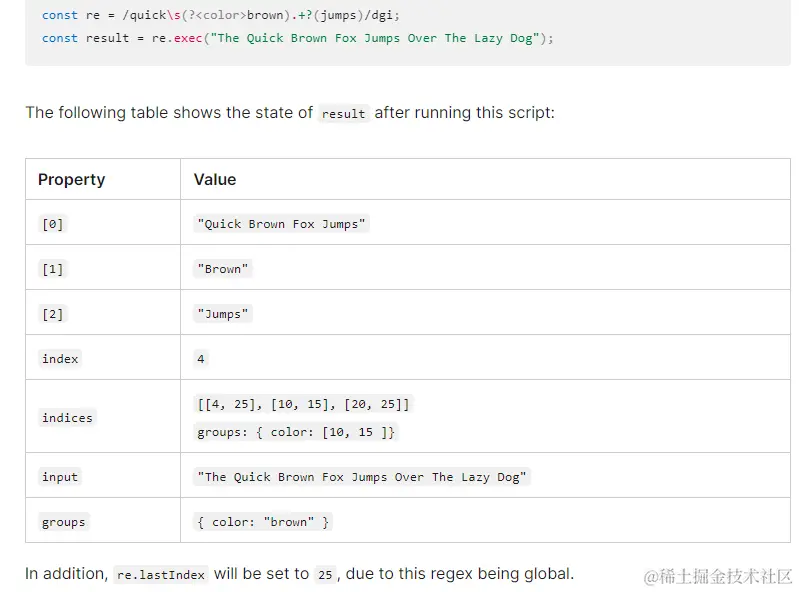
- 返回 /source/flags
- 在正则表达式中,反斜杠 "" 是一个转义字符,用来表示特殊字符。所以在表示换行符时,可以使用 "\n",也可以使用 "\n",它们是等价的。
console.log(new RegExp('\n', 'g').toString() === new RegExp('\\n', 'g').toString());
正则表达式的书写
贪婪模式(?、+) vs 非贪婪模式(*?)
const quote = `Single quote "'" and double quote '"'`;
const regexpQuotes = /(['"]).*?\1/g;
const regexpQuotesGreedy = /(['"]).*\1/g;
for (const match of quote.matchAll(regexpQuotes)) {
console.log(match);
}
- 五种方式:(x)、 (?x)、(?:x)、\n、 \k
- Capturing group vs Named capturing group
const personList = `First_Name: John, Last_Name: Doe
First_Name: Jane, Last_Name: Smith`;
const regexpNames =
/First_Name: (?<firstname>\w+), Last_Name: (?<lastname>\w+)/gm;
for (const match of personList.matchAll(regexpNames)) {
console.log(match);
}
const str = 'Today is 2022-10-01 08:30:00';
const regex = /\b(\d{4})-(\d{2})(?:-\d{2} \d{2}:\d{2}:\d{2})\b/;
-
backreferences
- \n 引用第n个捕获组匹配的字符串,\k 引用命名捕获组匹配的字符串
const findDuplicates = 'foo foo bar';
const regex = /\b(\w+)\s+\1\b/g;
console.log(findDuplicates.match(regex));
# Assertions
- 确定匹配边界的
- ^, $. 使用m flag,匹配每行中的开头和结尾。
- \b, \B. /\w\b\w/正则不匹配任何字符串,一个字符不可能连着接\b\w
- 匹配的是x, x(?=y), x(?!y), (?<=y)x, (?<!y)x
- /^[^A]/ 匹配非A开头的字符串
- /x(?!y)/ 与 [^?!]区别
let buggyMultiline = `tey, ihe light-greon apple
tangs on ihe greon traa`;
buggyMultiline = buggyMultiline.replace(/^t/gim, "h");
console.log(buggyMultiline);
# Character classes
- [xyz] 、[a-c];要匹配'-',要将'-'放在最后or最前 [abcd-] === [-abcd]
- [^xyz] [^abcd-] === [^-abcd] [.] 匹配字符'.'
- x|y
/green|red/ matches "green" in "green apple"。
\ 将普通字符转成特殊字符 /b/--->/\b/; 将特殊字符转成普通字符 /a*/--->/a\*/;要匹配字符 "\" 使用/\\/
if (config.origin === 'top' || config.origin === 'left') {
	distance = /^-/.test(distance) ? distance.substr(1) : `-${distance}`
}

const [value, unit] = distance.match(/(^-?\d+\.?\d?)|(em$|px$|%$)/g)