1.结构伪类选择器,伪类元素选择器
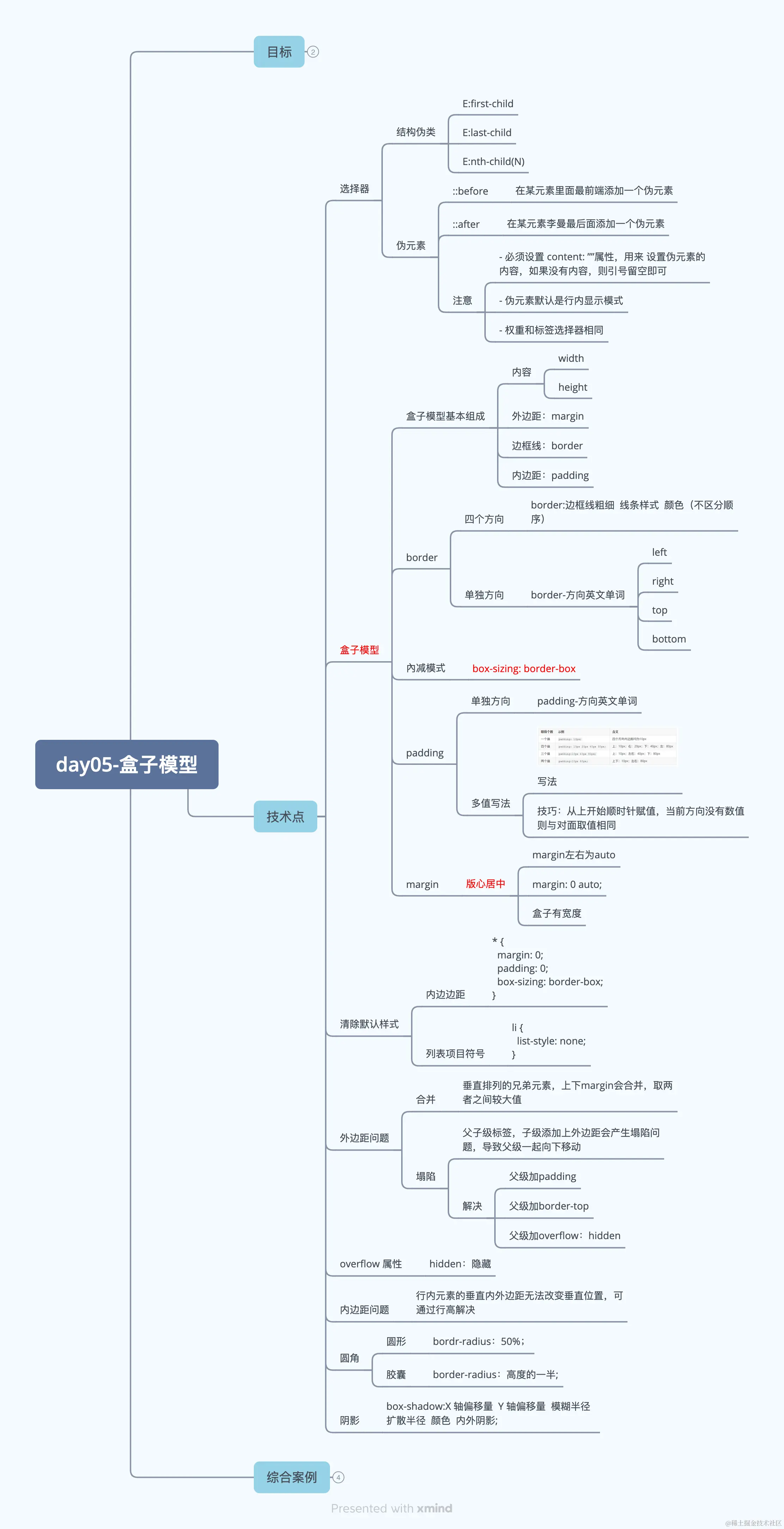
结构伪类选择器是跟类选择器是一样的是权重是10.
伪类元素选择器和标签选择器是一样的权重是1.
结构伪类选择器
1.结构伪类选择器 结构关系查找元素。 第几个,第几个。
<!DOCTYPE html>
<html lang="en">
<head>
<meta charset="UTF-8">
<meta name="viewport" content="width=device-width, initial-scale=1.0">
<title>Document</title>
<style>
ul li:first-child{
color: saddlebrown;
}
ul li:last-child{
color: red;
}
ul li:nth-child(2){
color: green;
}
ul li:nth-child(2n) {
color: blanchedalmond;
}
ul li.lisecond {
color: red;
}
</style>
</head>
<body>
<ul>
<li>我是第1个li</li>
<li class="lisecond">我是第2个li</li>
<li>我是第3个li</li>
<li>我是第4个li</li>
<li>我是第5个li</li>
<li>我是第6个li</li>
<li>我是第7个li</li>
<li>我是第8个li</li>
<li>我是第9个li</li>
<li>我是第10个li</li>
<li>我是第11个li</li>
<li>我是第12个li</li>
<li>我是第13个li</li>
<li>我是第14个li</li>
<li>我是第15个li</li>
<li>我是第16个li</li>
<li>我是第17个li</li>
<li>我是第18个li</li>
<li>我是第19个li</li>
<li>我是第20个li</li>
</ul>
</body>
</html>
伪元素选择器
<!DOCTYPE html>
<html lang="en">
<head>
<meta charset="UTF-8">
<meta name="viewport" content="width=device-width, initial-scale=1.0">
<title>Document</title>
<style>
.div::before {
content: "前";
background-color: yellow;
}
.div::after {
content: "后";
background-color: blue;
}
.div {
background-color: blanchedalmond;
}
</style>
</head>
<body>
<div class="div">我的div的内容</div>
</body>
</html>
2.边框线 border
<!DOCTYPE html>
<html lang="en">
<head>
<meta charset="UTF-8">
<meta name="viewport" content="width=device-width, initial-scale=1.0">
<title>Document</title>
<style>
.box {
border: 1px dashed #000;
width: 100px;
height: 100px;
background-color: #fff;
}
input {
width: 100px;
height: 30px;
border: 1px dashed #fff;
border-bottom: 1px solid #000;
}
</style>
</head>
<body>
<div class="box"></div>
<input type="text">
</body>
</html>
3.padding
<style>
.div1 {
width: 160px;
height: 160px;
background-color: yellow;
padding: 10px;
border: 10px solid #000;
}
.div2{
width: 200px;
height: 200px;
background-color: pink;
padding: 10px;
border: 10px solid #000;
box-sizing: border-box;
}
.input{
width: 100px;
height: 30px;
border: 1px solid #000;
padding-left: 10px;
}
</style>
</head>
<body>
<div class="div1">盒子1</div>
<div class="div2">盒子2</div>
<input type="text" class="input" placeholder="请输入">
</body>
</html>
4.margin
<!DOCTYPE html>
<html lang="en">
<head>
<meta charset="UTF-8">
<meta name="viewport" content="width=device-width, initial-scale=1.0">
<title>Document</title>
<style>
.div1{
width: 100px;
height: 100px;
background-color: teal;
margin-bottom: 10px;
}
.div2 {
width: 100px;
height: 100px;
background-color: rebeccapurple;
}
.content {
margin: 0 auto;
width: 800px;
height: 1000px;
background-color: yellowgreen;
}
</style>
</head>
<body>
<div class="div1">我是div1</div>
<div class="div2">w shi div2</div>
<div class="content">
</div>
</body>
</html>
3.清除默认样式
<title>Document</title>
<style>
*{
margin: 0;
padding: 0;
box-sizing: border-box;
}
ul li {
list-style: none;
}
</style>
</head>
<body>
<div>清除默认样式</div>
<ul>
<li>hahhah</li>
<li>hahhah</li>
<li>hahhah</li>
<li>hahhah</li>
<li>hahhah</li>
<li>hahhah</li>
</ul>
</body>
</html>
4.外边距合并
<!DOCTYPE html>
<html lang="en">
<head>
<meta charset="UTF-8">
<meta name="viewport" content="width=device-width, initial-scale=1.0">
<title>Document</title>
<style>
.box1,.box2 {
width: 200px;
height: 200px;
}
.box1 {
background-color: yellow;
margin-bottom: 50px;
}
.box2{
background-color: blue;
width: 200px;
height: 200px;
margin-top: 40px;
}
</style>
</head>
<body>
<div class="box1"></div>
<div class="box2"></div>
</body>
</html>
5.元素的溢出
<style>
div{
width: 100px;
height: 200px;
background-color: yellowgreen;
overflow: scroll;
}
</style>
</head>
<body>
<div>福布斯不服的方式报复就是得不到副驾驶的奋笔疾书的部分基本都是加班
单独啊
</div>
</body>
</html>
6.盒子的塌陷
<style>
*{
margin: 0;
padding: 0;
}
.parent{
background-color: red;
width: 100px;
height: 100px;
padding-top: 20px;
}
.child{
width: 50px;
height: 50px;
background-color: blue;
}
</style>
</head>
<body>
<div class="parent">
<div class="child">
</div>
</div>
</body>
7.行内元素不能改变垂直距离。
<style>
*{
padding: 0;
margin: 0;
}
span {
background-color: yellowgreen;
line-height: 60px;
}
</style>
8. 圆角: 圆形,胶囊
<!DOCTYPE html>
<html lang="en">
<head>
<meta charset="UTF-8">
<meta name="viewport" content="width=device-width, initial-scale=1.0">
<title>Document</title>
<style>
.div {
width: 100px;
height: 200px;
background-color: red;
border-radius: 100px;
}
img {
border-radius: 0 20px 40px 60px;
}
</style>
</head>
<body>
<div class="div">我是div</div>
<img src="../../css/images/1.jpg" alt="">
</body>
</html>
9.盒子阴影
  img{
       border-radius: 50%;
       box-shadow: 0px 15px 30px rgba(0, 0, 0, 0.4);
     }
     <img src="../../css2/background/images/1.png" alt="">



