数字图像的基本运算
简单的二维变换
import cv2
import numpy as np
import math
def angle2radian(angle):
return angle / 180 * math.pi
def transform_image(image, matrix):
return cv2.warpAffine(image, matrix, (image.shape[1], image.shape[0]))
def translate_image(image, delta):
delta_x, delta_y = delta
matrix = np.float32([
[1, 0, delta_x],
[0, 1, delta_y]
])
return transform_image(image, matrix)
def rotate_image(image, angle, is_clockwise=True, origin=(0, 0)):
x0, y0 = origin
theta = angle2radian(angle)
k = -1 if is_clockwise else 1
matrix0 = np.float32([
[1, 0, -x0],
[0, 1, -y0],
[0, 0, 1]
])
matrix1 = np.float32([
[math.cos(theta), k * math.sin(theta), 0],
[-k * math.sin(theta), math.cos(theta), 0],
[0, 0, 1]
])
matrix2 = np.float32([
[1, 0, x0],
[0, 1, y0],
[0, 0, 1]
])
matrix = np.matmul(matrix2, np.matmul(matrix1, matrix0))
return transform_image(image, matrix[:-1])
def horiz_flip_image(image):
height, width, _ = image.shape
matrix = np.float32([
[-1, 0, width - 1],
[0, 1, 0]
])
return transform_image(image, matrix)
def vert_flip_image(image):
height, width, _ = image.shape
matrix = np.float32([
[1, 0, 0],
[0, -1, height - 1]
])
return transform_image(image, matrix)
image = cv2.imread('test.jpg')
height, width, _ = image.shape
center = (width / 2, height / 2)
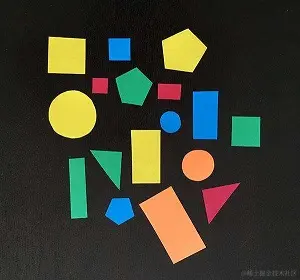
image_translated = translate_image(image, (-20, -20))
image_rotated_default = rotate_image(image, 15)
image_rotated_clockwise = rotate_image(image, 15, origin=center)
image_rotated_counter_clockwise = \
rotate_image(image, 15, is_clockwise=False, origin=center)
image_horiz_filpped = horiz_flip_image(image)
image_vert_filpped = vert_flip_image(image)
image_combine = np.hstack([
image_translated,
image_rotated_default,
image_rotated_clockwise,
image_rotated_counter_clockwise,
image_horiz_filpped,
image_vert_filpped
])
cv2.imwrite("result.jpg", image_combine)

图像缩放与插值算法
import cv2
import numpy as np
def nearest_neighbor_resize(image, x, y):
height, width, channels = image.shape
x = min(round(x), width - 1)
y = min(round(y), height - 1)
return image[y, x]
def bilinear_interpolate(image, x, y):
x1, y1 = int(x), int(y)
height, width, channels = image.shape
if x1 >= width - 1 and y1 < height - 1:
return image[y1, -1]
elif x1 < width - 1 and y1 >= height - 1:
return image[-1, x1]
elif x1 >= width - 1 and y1 >= height - 1:
return image[-1, -1]
"""
(x1, y1)-------------(x2, y1)
| |
| (x, y) |
| |
(x1, y2)-------------(x2, y2)
"""
x2, y2 = x1 + 1, y1 + 1
Q11 = image[y1, x1]
Q21 = image[y1, x2]
Q12 = image[y2, x1]
Q22 = image[y2, x2]
R1 = (x2 - x) / (x2 - x1) * Q11 + (x - x1) / (x2 - x1) * Q21
R2 = (x2 - x) / (x2 - x1) * Q12 + (x - x1) / (x2 - x1) * Q22
P = (y2 - y) / (y2 - y1) * R1 + (y - y1) / (y2 - y1) * R2
return P
def my_resize(image, scale_factor, interpolator):
height, width, channels = image.shape
new_width = round(width * scale_factor)
new_height = round(height * scale_factor)
resized_image = np.zeros((new_height, new_width, channels), np.uint8)
for i in range(new_height):
for j in range(new_width):
y = i / scale_factor
x = j / scale_factor
resized_image[i, j] = interpolator(image, x, y)
return resized_image
def main():
image_path = 'test.jpg'
image = cv2.imread(image_path)
height, width, _ = image.shape
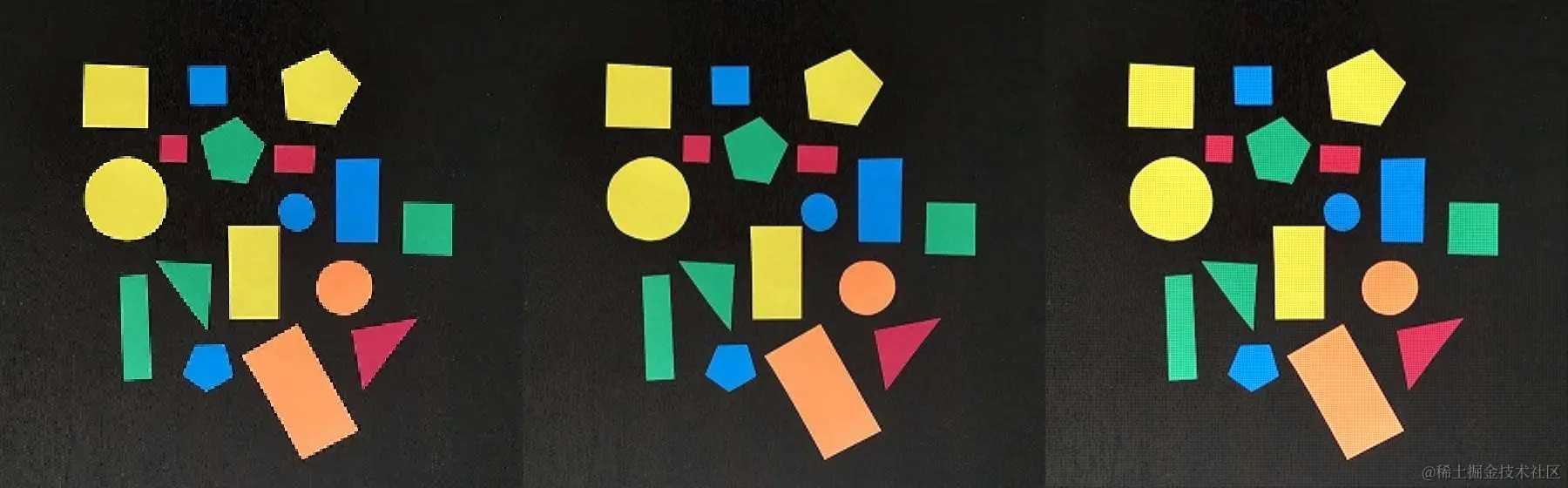
resized_image1 = my_resize(image, 2, nearest_neighbor_resize)
resized_image2 = my_resize(image, 2, bilinear_interpolate)
result = np.hstack([resized_image1, resized_image2, resized_image3])
cv2.imwrite("result.jpg", result)
if __name__ == '__main__':
main()
双三次插值
import cv2
import numpy as np
import datetime
def cubic(t):
t = abs(t)
if 1 < t and t < 2:
return 4 - 8 * t + 5 * (t ** 2) - (t ** 3)
elif t <= 1:
return 1 - 2 * (t ** 2) + (t ** 3)
else:
return 0
def my_resize(image, scale_factor):
height, width = image.shape
new_width = round(width * scale_factor)
new_height = round(height * scale_factor)
resized_image = np.zeros((new_height, new_width), dtype=np.uint8)
x_border = width - 1
y_border = height - 1
for i in range(new_height):
for j in range(new_width):
x = np.clip(j / scale_factor, 0, x_border)
y = np.clip(i / scale_factor, 0, y_border)
x_int, y_int = int(x), int(y)
dx, dy = x - x_int, y - y_int
y_low = max(y_int - 1, 0)
y_high = min(y_int + 2, y_border)
y_size = y_high - y_low + 1
x_low = max(x_int - 1, 0)
x_high = min(x_int + 2, x_border)
x_size = x_high - x_low + 1
weights_x_axis = np.empty(x_size)
for k in range(x_size):
weights_x_axis[k] = cubic(k - 1 - dx)
weights_y_axis = np.empty(y_size)
for k in range(y_size):
weights_y_axis[k] = cubic(k - 1 - dy)
resized_image[i, j] = np.dot(
image[y_low:y_high+1, x_low:x_high+1].ravel(),
np.outer(weights_y_axis, weights_x_axis).ravel()
).clip(0, 255)
return resized_image
def main():
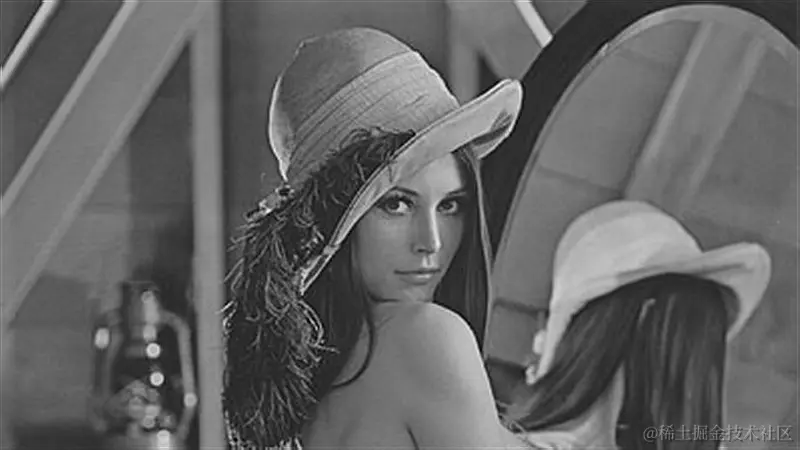
image_path = 'lenna.jpg'
image = cv2.imread(image_path, cv2.IMREAD_GRAYSCALE)
start_time = datetime.datetime.now()
resized_image = my_resize(image, 2)
end_time = datetime.datetime.now()
print("运行时间:", end_time - start_time)
cv2.imwrite('~lenna.jpg', resized_image)
if __name__ == '__main__':
main()

空间域图像增强
直方图均衡
import cv2
import numpy as np
import matplotlib.pyplot as plt
img = cv2.imread('./lenna.jpg', cv2.IMREAD_GRAYSCALE)
height, width = img.shape
frequencies = np.zeros(256, dtype=np.int32)
for i in range(height):
for j in range(width):
frequencies[img[i][j]] += 1
cdf = frequencies.cumsum() / (height * width)
gray_value_map = np.zeros(256, dtype=np.uint8)
for i in range(0, 256):
gray_value_map[i] = min(round(cdf[i] * 255), 255)
equ_img = gray_value_map[img]
cv2.imshow('Original Image', img)
cv2.imshow('Equalized Image', equ_img)
cv2.waitKey(0)
cv2.destroyAllWindows()
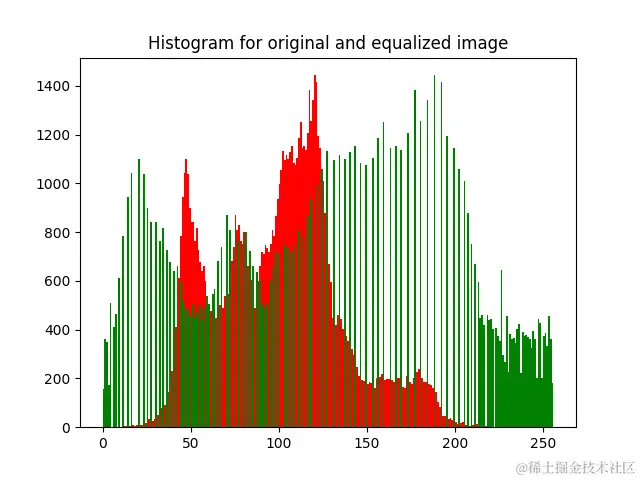
plt.figure()
plt.hist(img.ravel(), 256, [0, 256], color='r')
plt.hist(equ_img.ravel(), 256, [0, 256], color='g')
plt.title('Histogram for original and equalized image')
plt.show()
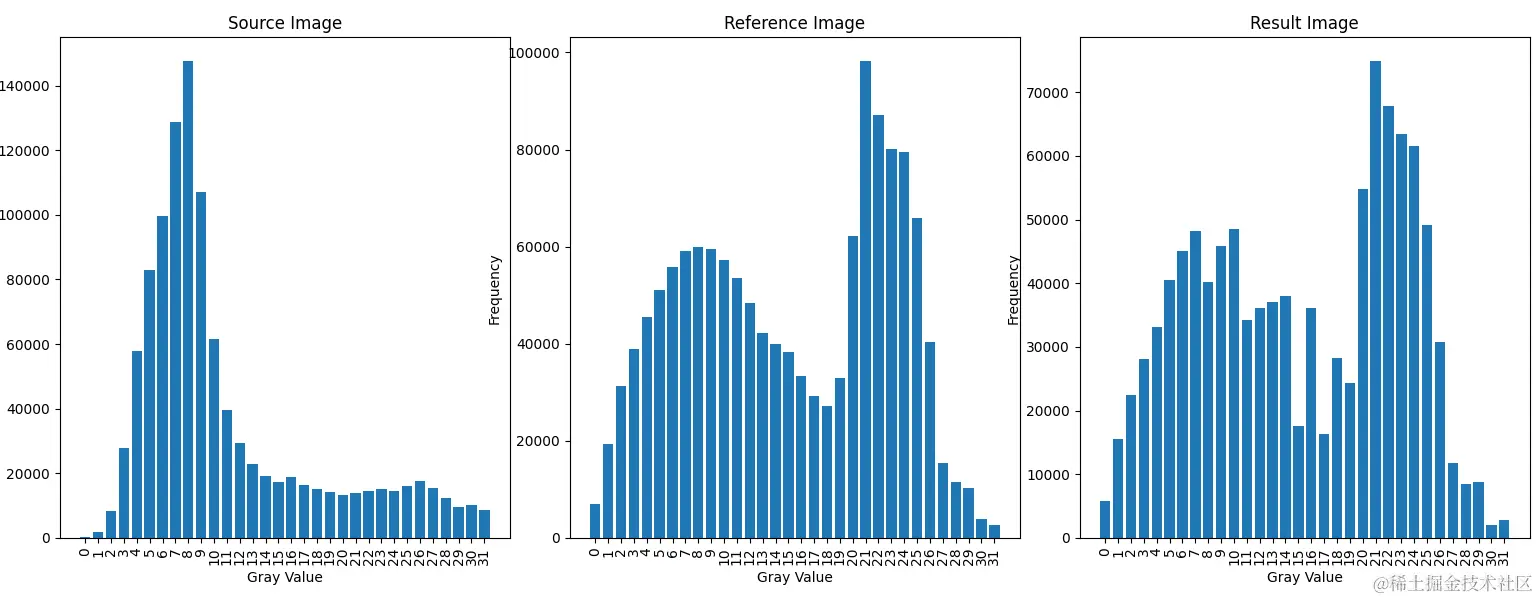
直方图规定化
import cv2
import numpy as np
import matplotlib.pyplot as plt
def draw(picture, title, data):
x_coords = range(len(data))
picture.bar(x_coords, data)
picture.set_title(title)
picture.set_xlabel('Gray Value')
picture.set_ylabel('Frequency')
picture.set_xticks(x_coords, labels=x_coords, rotation=90)
def calc_cdf(hist):
count_pixels = hist.sum()
frequencies = hist.ravel() / count_pixels
cumulative_sum = frequencies.cumsum()
return cumulative_sum
source_img = cv2.imread('source_image.jpg', cv2.IMREAD_GRAYSCALE)
reference_img = cv2.imread('reference_image.jpg', cv2.IMREAD_GRAYSCALE)
source_hist = cv2.calcHist([source_img], [0], None, [256], [0, 256])
reference_hist = cv2.calcHist([reference_img], [0], None, [256], [0, 256])
source_cdf = calc_cdf(source_hist)
reference_cdf = calc_cdf(reference_hist)
M = np.zeros((256,),dtype=np.uint8)
for a in range(0, 256):
j = np.abs(source_cdf[a] - reference_cdf).argmin()
M[a] = j
result_img = M[source_img]
fig, (picture1, picture2, picture3) = plt.subplots(1, 3, figsize=(25, 6))
source_hist = cv2.calcHist([source_img], [0], None, [32], [0, 256])
draw(picture1, "Source Image", source_hist.ravel())
reference_hist = cv2.calcHist([reference_img], [0], None, [32], [0, 256])
draw(picture2, "Reference Image", reference_hist.ravel())
result_hist = cv2.calcHist([result_img], [0], None, [32], [0, 256])
draw(picture3, "Result Image", result_hist.ravel())
plt.tight_layout()
plt.show()
空间平滑滤波
import cv2
import numpy as np
def convolve(image, kernel, target_row, target_col, delta_rows, delta_cols):
total_rows, total_cols = image.shape
top = max(0, target_row - delta_rows)
bottom = min(total_rows - 1, target_row + delta_rows)
left = max(0, target_col - delta_cols)
right = min(total_cols - 1, target_col + delta_cols)
result = 0
for row in range(top, bottom + 1):
for col in range(left, right + 1):
result += image[row, col] * kernel[row - top, col - left]
return result
def create_gaussian_kernel(delta_rows, delta_cols, sigma = 5):
size_width = 2 * delta_cols + 1
size_height = 2 * delta_rows + 1
kernel = np.zeros((size_width, size_height), dtype=np.float32)
first_term = 1 / np.sqrt(2 * np.pi) / sigma
second_term = lambda x, y: np.exp(-0.5 * (x ** 2 + y ** 2) / sigma ** 2)
for row in range(0, size_height):
for col in range(0, size_width):
kernel[row, col] = \
first_term * second_term(row - delta_rows, col - delta_cols)
kernel /= np.sum(kernel)
return kernel
def create_neighborhood_kernel(delta_rows, delta_cols):
size_width = 2 * delta_cols + 1
size_height = 2 * delta_rows + 1
kernel = np.full((size_width, size_height), 1.0, dtype=np.float32)
kernel /= np.sum(kernel)
return kernel
def myblur(image, ksize, kernel_creator):
total_rows, total_cols = image.shape
result = np.zeros((total_rows, total_cols), dtype=np.float32)
delta_cols, delta_rows = ksize[0] // 2, ksize[1] // 2
kernel = kernel_creator(delta_rows, delta_cols)
for row in range(total_rows):
for col in range(total_cols):
result[row, col] = \
convolve(image, kernel,
row, col, delta_rows,
delta_cols)
result = np.clip(result, 0, 255).astype(np.uint8)
return result
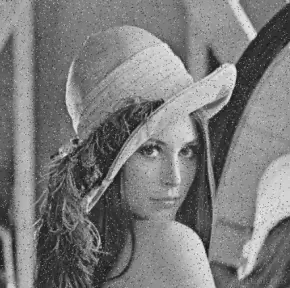
image = cv2.imread('input.png', cv2.IMREAD_GRAYSCALE)
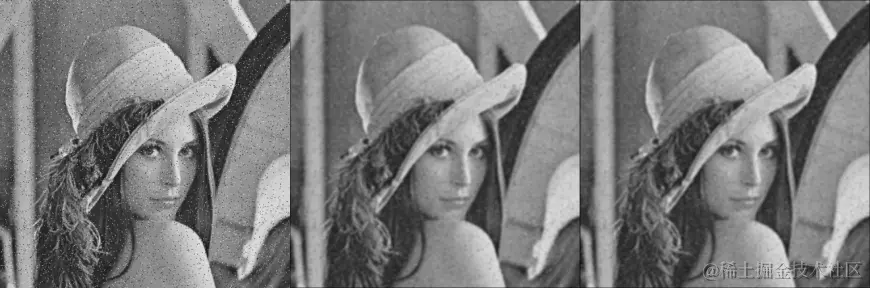
blurred_image_neighborhood = \
myblur(image, (3, 3), create_neighborhood_kernel)
blurred_image_gaussian = \
myblur(image, (3, 3), create_gaussian_kernel)
images = np.hstack([image, blurred_image_neighborhood, blurred_image_gaussian])
cv2.imwrite("output.png", images)
频率域图像增强
二维离散傅里叶变换
import cv2
import numpy as np
import math
import datetime
def Discrete_Fourier_Transform(source, height, width, is_positive=True):
F = np.zeros((height, width), dtype=complex)
coef = 2 * math.pi * (-1 if is_positive else 1)
vector_col = np.arange(height)
vector_row = np.arange(width)
u_matrix = np.exp(coef * (np.outer(vector_row, vector_row) / width) * 1j)
v_matrix = np.exp(coef * (np.outer(vector_col, vector_col) / height) * 1j).reshape(height, height, 1)
for v in range(height):
for u in range(width):
matrix = u_matrix[u] * v_matrix[v]
F[v, u] = np.dot(source.ravel(), matrix.ravel())
F /= math.sqrt(height * width)
if not is_positive:
F = F.real.astype(np.uint8).clip(0, 255)
return F
image = cv2.imread("checker.jpg", cv2.IMREAD_GRAYSCALE)
height, width = image.shape
start_time = datetime.datetime.now()
F = Discrete_Fourier_Transform(image, height, width)
new_image = Discrete_Fourier_Transform(F, height, width, False)
end_time = datetime.datetime.now()
print("消耗时间: ", end_time - start_time)
graph = np.abs(F).astype(np.uint8).clip(0, 255)
cv2.imshow('graph', graph)
cv2.imshow("re-built", new_image)
cv2.waitKey()
cv2.destroyAllWindows()