安装 mac
echo $PATH 查看路径
export PATH="$PATH:[需要拼接的路径]/flutter/bin"
- 或者用这种方式
- open .bash_profile
export PUB_HOSTED_URL=https://pub.flutter-io.cn
export FLUTTER_STORAGE_BASE_URL=https://storage.flutter-io.cn
export PATH=/Users/用户名/flutter/bin:$PATH   // 将用户名替换为自己的名称
flutter doctor
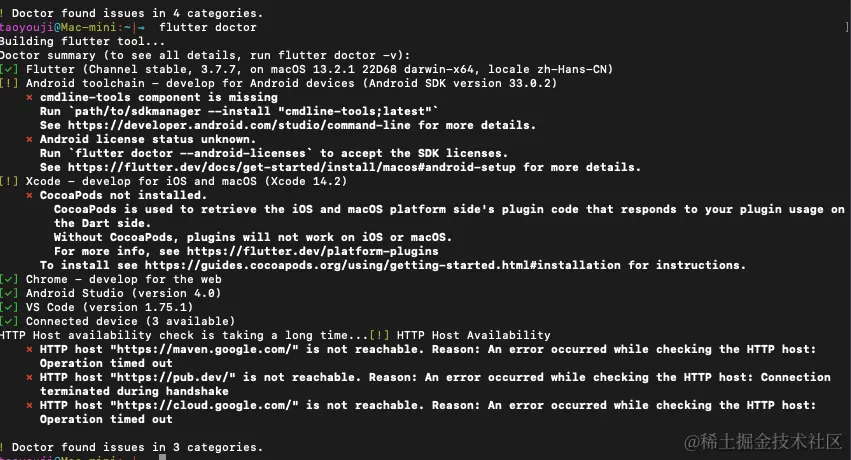
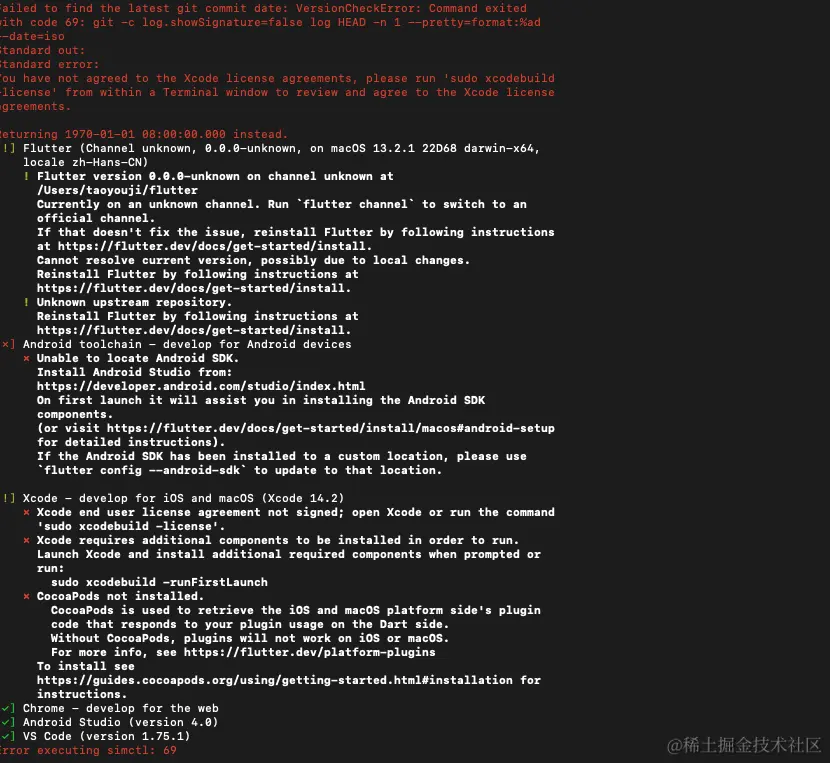
flutter doctor
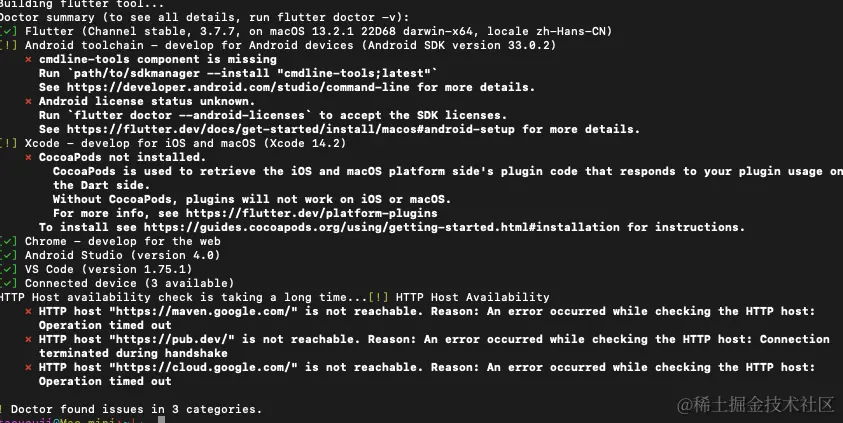
- CocoaPods not installed. 缺少 CocoaPods 需要安装
sudo gem install cocoapods
open /Applications/Android\ Studio.app
android studio 配置
- 在 plugins 搜索flutter、dart 下载并安装
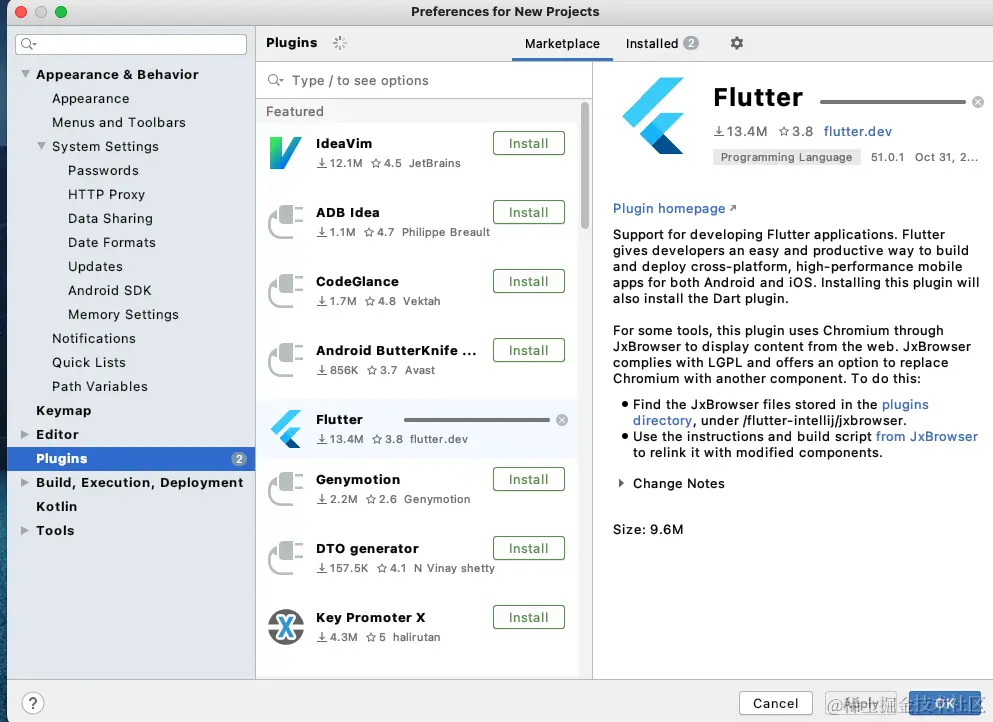
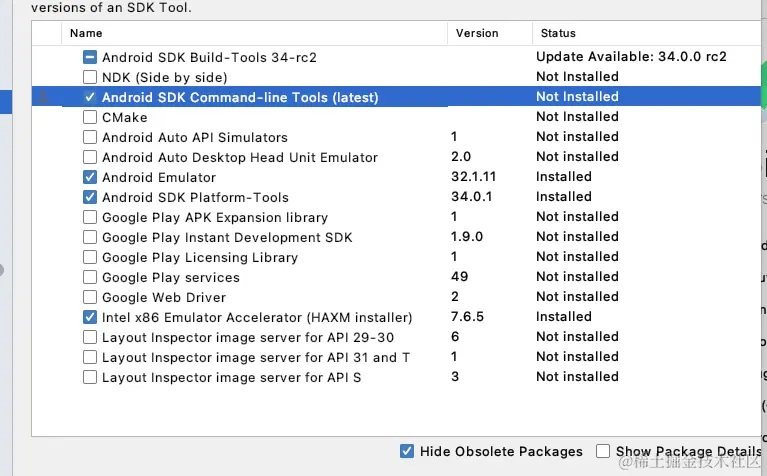
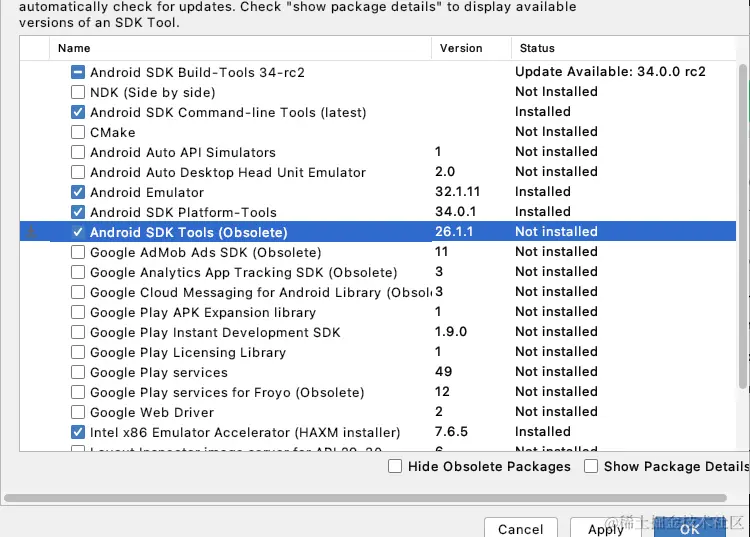
- 提示运行 flutter doctor --android-licenses android studio 配置完成
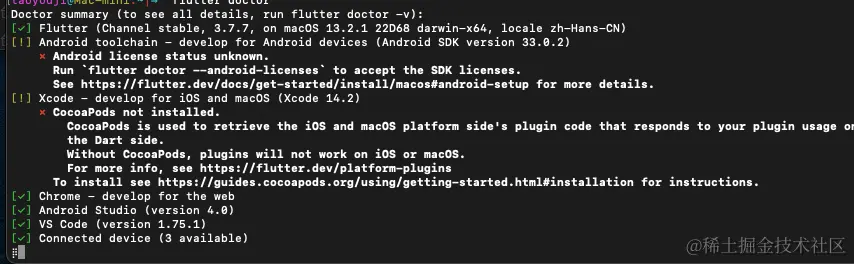
http配置
- 打开 flutter\packages\flutter_tools\lib\src\http_host_validator.dart 文件
- 修改如下
const String kPubDevHttpHost = 'https://pub.flutter-io.cn/';
const String kgCloudHttpHost = 'https://storage.flutter-io.cn/';
- flutter\bin目录,删除cache目录下的flutter_tools.snapshot 文件
配置环境变量 将镜像源改为国内
export PUB_HOSTED_URL=https:
export FLUTTER_STORAGE_BASE_URL=https:
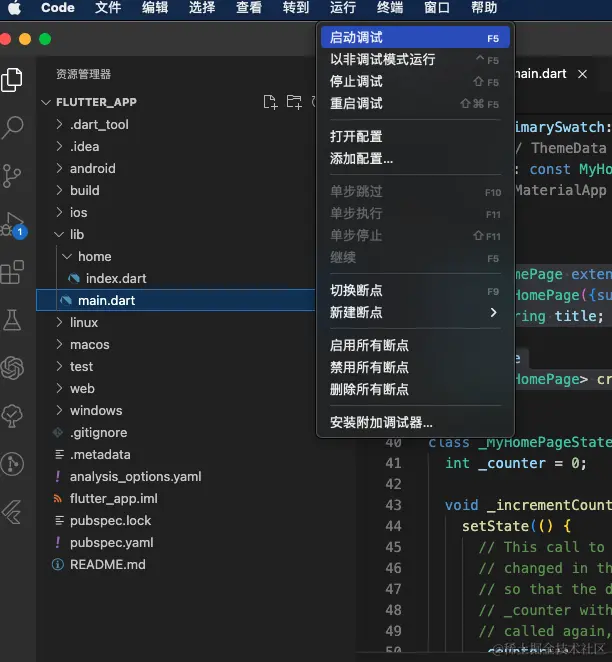
- flutter create mydemo_1
- 创建成功 vscode打开并调试
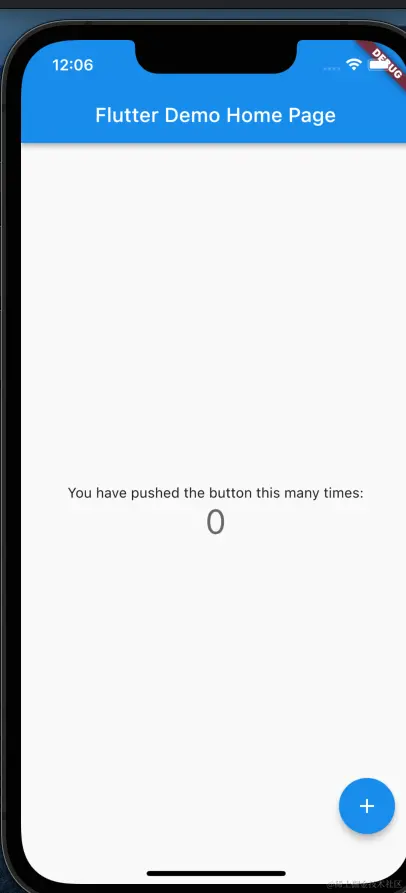
flutter 文件相关
| 文件夹 | 作用 |
|---|
| android | android平台相关代码 |
| ios | ios平台相关代码 |
| lib | flutter相关代码,我们主要编写的代码就在这个文件夹 |
| test | 用于存放测试代码 |
| pubspec.yaml | 配置文件,一般存放一些第三方的依赖。 |
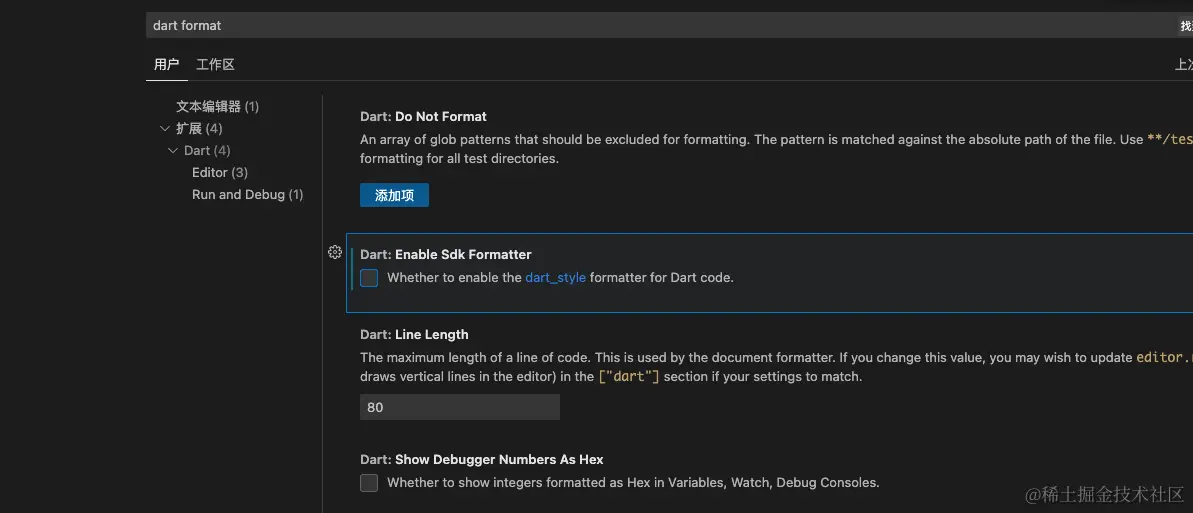
关闭 vs code 自动格式化
- 搜索“dart format”
- 关闭 Enable Sdk Formatter 选项
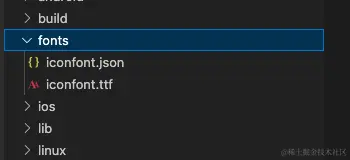
自定义iconfont
- iconfont 阿里巴巴图标库 下载需要图标
- 将下载代码后的 iconfont.json iconfont.ttf 文件放在app根目录
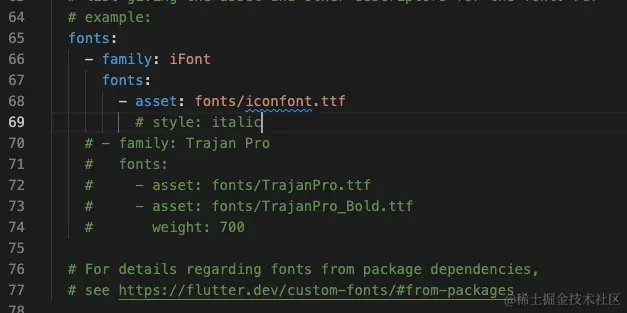
- pubspec.yaml文件配置
- 创建iconfont 类
import 'package:flutter/material.dart';
class iFont {
static const IconData xingquaihao = IconData(
0xe613,
fontFamily: "iFont",
matchTextDirection: true);
}
import './components/iIconfont.dart';

  children: <Widget>[
            const Text(
              'You have pushed the button this many times:',
            ),
            Text(
              '$_counter',
              style: Theme.of(context).textTheme.headlineMedium,
            ),
            Icon(iFont.xingquaihao,color: Colors.black12, size: 70)
          ],
        ),
      ),
空安全
flutter sdk 版本升级到2.0或者更高的版本后,代码会提示空安全
Error: Cannot run with sound null safety, because the following dependencies don't support null safety:

- package:http

- package:http_parser

For solutions, see [https://dart.dev/go/unsound-null-safety](<> "按住 Cmd 并单击以 执行链接")

Target kernel_snapshot failed: Exception
--no-sound-null-safety
Widget 组件
MaterialApp
| 属性 | 名称 |
|---|
| title | 名称 |
| home | 首页 |
| onGenerateRoute | 路由 |
| theme | 主题 |
- MaterialApp 一般作为顶层的Widget使用
class MyHome extends StatelessWidget{
const MyHome({Key? key}) : super(key: key);
@override
Widget build(BuildContext context) {
return MaterialApp(
debugShowCheckedModeBanner: false,
home: MyScaffold(),
initialRoute: '/',
onGenerateRoute:onGenerateRoute,
localizationsDelegates: const [
AppLocalizations.delegate,
GlobalMaterialLocalizations.delegate,
GlobalWidgetsLocalizations.delegate,
GlobalCupertinoLocalizations.delegate,
],
supportedLocales: const [
Locale('en', 'US'),
Locale('zh', 'CN'),
],
theme: ThemeData(
primarySwatch: Colors.blueGrey,
splashColor: Colors.transparent,
highlightColor: Colors.transparent,
),
);
}
}
Container
| 属性 | 名称 |
|---|
| width | 宽度 |
| height | 高度 |
| decoration | tabar |
| child | 内容 |
| margin | 外边距 |
body: Container(
width: double.infinity,
height: double.infinity,
decoration: const BoxDecoration(
image: DecorationImage(
image: AssetImage('assets/images/login_bg.png'),
fit: BoxFit.cover,
)
),
child: Container(
width: double.infinity,
height: double.infinity,
decoration: const BoxDecoration(
gradient: LinearGradient(
begin: Alignment.topCenter,
end: Alignment.bottomCenter,
colors: [
Color.fromRGBO(15, 66, 250, 0.35),
Color.fromRGBO(0, 0, 0,0.8)
]
)
),
),
),
Scaffold
| 属性 | 名称 |
|---|
| appBar | 顶部导航栏 |
| body | 内容填充 |
| bottomNavigationBar | tabar |
| endDrawer | 定义右侧边栏 |
| drawer | 定义左侧边栏 |
class Home extends StatefulWidget{
  const Home({super.key});

  @override
  State<Home> createState() => _Home();

}
class _Home extends State<Home> {
  @override
  Widget build(BuildContext context) {
   return Scaffold(
       appBar: AppBar(
        title: Text('首页') ,
       ),
    );
  }
}
bottomNavigationBar
| 属性 | 名称 | 说明 |
|---|
| currentIndex | 当前选中页 | |
| fixedColor | 选中颜色 | |
| backgroundColor | 背景色 | |
| backgroundColor | 背景色 | |
| selectedItemColor | 选中颜色 | 与fixedColor不能同时存在 |
| unselectedItemColor | 未选中颜色 | 与fixedColor不能同时存在 |
      bottomNavigationBar: BottomNavigationBar(
        currentIndex: 0,
        type: BottomNavigationBarType.fixed,
        fixedColor: Colors.red,
        backgroundColor: Colors.blue,
        selectedItemColor: Colors.green,
        unselectedItemColor: Colors.black,
        items: <BottomNavigationBarItem>[
          BottomNavigationBarItem(
            icon: Icon(Icons.home),
            label:  '首页',
            backgroundColor: Colors.black26
          ),
          BottomNavigationBarItem(
            icon: Icon(iFont.maozi),
            label:  '帽子'
          )
        ],
      ),
Column 垂直布局
| 属性 | 名称 | 方法 |
|---|
| MainAxisAlignment | 垂直对齐方式 | start、center、end... |
| CrossAxisAlignment | 水平对齐方式 | start、center、end... |
| endDrawer | 定义右侧边栏 | |
class Home extends StatefulWidget{
  const Home({super.key});

  @override
  State<Home> createState() => _Home();

}
class _Home extends State<Home> {
  @override
  Widget build(BuildContext context) {
   return Scaffold(
       appBar: AppBar(
        title: Text('首页') ,
       ),
    );
  }
}
Text 文本组件
| 属性 | 名称 | 方法 |
|---|
| style | 样式 | fontSize、fontWeight、color... |
const Text('Get Started',
  style: TextStyle(
    fontSize: 18,
    fontFamily: 'Arial'
    )
),
Row 水平布局
| 属性 | 名称 | 方法 |
|---|
| crossAxisAlignment | 对齐方式 | CrossAxisAlignment.start |
| mainAxisAlignment | 对齐方式 | MainAxisAlignment.spaceBetween |
Widget build(BuildContext context) {
return Row(
crossAxisAlignment: CrossAxisAlignment.start,
mainAxisAlignment: MainAxisAlignment.spaceAround,
children: <Widget>[
MyIcon(
Colors.white,
const Icon(
Icons.home,
color: Colors.red,
size: 46.0,
),
),
MyIcon(
const Color.fromRGBO(0, 122, 122, .9),
const Icon(
Icons.search,
color: Colors.white,
size: 46.0,
),
),
MyIcon(
Colors.white,
const Icon(
Icons.my_library_books,
color: Colors.blue,
size: 46.0,
),
),
]
);
}
TextField 文本输入框
| 属性 | 名称 | 方法 |
|---|
| controller | 样式 | fontSize、fontWeight、color... |
| decoration | 样式 | hintText、border、color... |
TextField(
style: TextStyle(
color: Colors.white,
fontSize: 14,
),
controller: _textController,
decoration: const InputDecoration(
hintText: '',
contentPadding: EdgeInsets.all(12.0),
border: OutlineInputBorder(
borderSide: BorderSide(
color: Colors.white,
width: 2.0,
),
borderRadius: BorderRadius.all(Radius.circular(4.0)),
),
enabledBorder: OutlineInputBorder(
borderSide: BorderSide(
color: Colors.white,
width: 1.0,
),
borderRadius: BorderRadius.all(Radius.circular(4.0)),
),
focusedBorder: OutlineInputBorder(
borderSide: BorderSide(
color: Colors.white,
width: 2.0,
),
borderRadius: BorderRadius.all(Radius.circular(4.0)),
),
),
onTap: () => {
setState(() {
size = 18.0;
}),
_controller.forward()
},
),
SizedBox 盒子
SizedBox(
    width: 20,
    height: 20,
    child: CircularProgressIndicator(
      strokeWidth: 2,
      color: Color.fromRGBO(0, 0, 0, 0.3),
    ),
  )
SafeArea 安全边距
SafeArea(
  child:  Image(
    image: AssetImage('assets/images/home_icon.png')
 )
)
TextButton 文本点击
| 属性 | 名称 | 方法 |
|---|
| onPressed | 按钮被按下时的回调函数 | |
| onLongPress | 长按回调 | |
| style | 样式 | backgroundColor、foregroundColor、elevation... |
| child | 内容 | |
Container(
width: double.infinity,
margin: const EdgeInsets.only(right: 48, left: 48),
child: ElevatedButton(
onPressed: () {
},
child: Text('Get Started'),
style: ButtonStyle(
backgroundColor: MaterialStateProperty.all(Colors.red),
elevation: MaterialStateProperty.all(10),
padding: MaterialStatePropertyAll(EdgeInsets.all(14)),
shape: MaterialStatePropertyAll(
RoundedRectangleBorder(
borderRadius: BorderRadius.circular(20.0)
)
)
),
),
ClipRRect 剪切组件
| 属性 | 名称 | 方法 |
|---|
| onPressed | 按钮被按下时的回调函数 | |
| onLongPress | 长按回调 | |
| style | 样式 | backgroundColor、foregroundColor、elevation... |
| child | | |
AnimatedContainer 过渡动画组件
| 属性 | 名称 | 方法 |
|---|
| duration | 过渡时间 | |
| curve | 动画效果 | easeOutSine |
| transform | 过渡方式 | Matrix4.rotationZ、Matrix4.scale、Matrix4.translationValues 等。 |
| child | | |
AnimatedContainer(
  duration: Duration(milliseconds: 200),
  curve: Curves.easeOutSine,
  transform: Matrix4.identity()..scale(scale),
  child: Column(
  mainAxisAlignment: MainAxisAlignment.start,
  crossAxisAlignment: CrossAxisAlignment.start,
  children: [
    ClipRRect(
      borderRadius: BorderRadius.circular(8.0),
      child: Image.network(
        widget.url,
        width: 100,
        height: 100,
      ),
 ),
GestureDetector 手势组件
| 属性 | 名称 | 方法 |
|---|
| onTapDown | 按下 | |
| onTapUp | 抬起 | easeOutSine |
| onLongPress | 长按 | |
| onTapCancel | 离开区域触发 | |
GestureDetector(
    onTapDown: (TapDownDetails details) {
      setState(() {
        scale = 0.8;
      });
    },
    onTapUp: (TapUpDetails details) {
      print('onTapUp');
      setState(() {
        scale = 1;
      });
    },
    onTapCancel: () => {
      setState(() {
        scale = 1;
      })
    },
    child: AnimatedContainer(
      duration: Duration(milliseconds: 200),
      curve: Curves.easeOutSine,
      transform: Matrix4.identity()..scale(scale),
      child: Column(
      mainAxisAlignment: MainAxisAlignment.start,
      crossAxisAlignment: CrossAxisAlignment.start,
      children: [
        ClipRRect(
          borderRadius: BorderRadius.circular(8.0),
          child: Image.network(
            widget.url,
            width: 100,
            height: 100,
          ),
        ),
      ]
    )
   )
 );
Stack 层叠组件
ElevatedButton 按钮组件
| 属性 | 名称 | 方法 |
|---|
| onPressed | 按钮被按下时的回调函数 | |
| onLongPress | 长按回调 | |
| style | 样式 | backgroundColor、foregroundColor、elevation... |
| child | | |
Container(
width: double.infinity,
margin: const EdgeInsets.only(right: 48, left: 48),
child: ElevatedButton(
onPressed: () {
},
child: Text('Get Started'),
style: ButtonStyle(
backgroundColor: MaterialStateProperty.all(Colors.red),
elevation: MaterialStateProperty.all(10),
padding: MaterialStatePropertyAll(EdgeInsets.all(14)),
shape: MaterialStatePropertyAll(
RoundedRectangleBorder(
borderRadius: BorderRadius.circular(20.0)
)
)
),
),
Animation 动画创建
- Animation负责生成动画
- AnimationController 负责控制动画的播放进度和动画状态
- Offset 位置
- double 形状/不透明度
class _LoginState extends State<Login> with TickerProviderStateMixin{
late AnimationController _controller;
late Animation<Offset> _animation;
@override
initState() {
super.initState();
_controller = AnimationController(
duration: const Duration(seconds: 1),
vsync: this,
)..repeat(reverse: true);
_animation = Tween<Offset>(
begin: Offset(.5, 0.0),
end: Offset(2.0, 0.0),
).animate(CurvedAnimation(
parent: _controller,
curve: Curves.easeIn,
));
}
Widget build(BuildContext context) {
return Container(
margin: EdgeInsets.only(left: 10),
child: SlideTransition(
position: _animation,
child: Image(image: AssetImage('assets/images/right_go.png')),
),
)
}
}
http 请求
pubspec.yaml 添加
 http: ^0.12.0 #latest version
 flutter pub get
import 'dart:io';
import 'package:http/http.dart' as http;

const BASE_URL = 'http://localhost:3000';

 http_get ({required String url}) {
  var client = http.Client();
  client.head({
   Cookie: ''
  });
  return client.get(BASE_URL + url);
}

void http_post () {
  var https = http.Client();
}