网帽材质 MeshMatcapMaterial
在场景没有光源的情况下,模拟出物体被光照的效果(该纹理是将光源、材质信息直接在建模软件中,烘培到纹理图上,渲染时不需要做额外的计算,性能提升明显)。
网帽材质 MeshMatcapMaterial 没有aoMap属性,但有 matcap 属性。
不对灯光作出反应。会投射阴影到接受阴影的物体上(and shadow clipping works),但不会产生自身阴影or接受阴影。
  // 创建立方体对象
  createObjects () {
    const colorTexture = this.textureLoader.load('/src/assets/textures/1.jpg') // 颜色贴图
    const aoTexture = this.textureLoader.load('/src/assets/textures/3.jpg') // AO贴图
    const normalTexture = this.textureLoader.load('/src/assets/textures/3.jpg') // 法线贴图

    const material = new THREE.MeshMatcapMaterial({
      // color: 0x1890ff,
      transparent: true,
      side: THREE.DoubleSide,
      matcap: aoTexture,
      map: colorTexture,
    })
    const mesh = new THREE.Mesh( new THREE.BoxGeometry(1, 1, 1), material) // 立方体
    const meshMaterial = new THREE.MeshMatcapMaterial({
      // color: 0x1890ff,
      map: colorTexture,
      matcap: aoTexture,
      normalMap: normalTexture,
    })

    const box = new THREE.Mesh( new THREE.BoxGeometry(1, 1, 1), meshMaterial) // 立方体

    mesh.position.x = -1
    box.position.x = 1

    this.scene.add(mesh, box)
    this.material = material;
    this.meshMaterial = meshMaterial;
  },
  // 调试工具
datGui () {
    const _this = this
    const gui = new dat.GUI();
    const params = {
      x: _this.meshMaterial.normalScale.x,
      y: _this.meshMaterial.normalScale.y,
    }

    // normalScale 是二维向量
    gui.add(params, 'x', 0, 1, 0.1).onChange(val => {
      _this.meshMaterial.normalScale = new THREE.Vector2(val, params.y)
    })
    gui.add(params, 'y', 0, 1, 0.1).onChange(val => {
      _this.meshMaterial.normalScale = new THREE.Vector2(params.x, val )
    })
},
深度网格材质 MeshDepthMaterial
按深度绘制几何体的材质。深度基于相机远近平面。可用于观测几何体与相机的距离,几何体接近相机就是白色,远离则是黑色。
对光照没有反应,适合被用来创建雾中的场景。
  // 创建立方体对象
  createObjects () {
    const geometry = new THREE.SphereGeometry(0.5, 64, 64)
    const material = new THREE.MeshDepthMaterial()
    const mesh1 = new THREE.Mesh(geometry, material)
    const mesh2 = new THREE.Mesh(geometry, material)
    const mesh3 = new THREE.Mesh(geometry, material)
    const mesh4 = new THREE.Mesh(geometry, material)

    mesh1.position.z = 0
    mesh2.position.z = 1
    mesh3.position.z = 2
    mesh4.position.z = 3

    this.scene.add( mesh1, mesh2, mesh3, mesh4 )
  },
  datGui () {
    const _this = this
    const gui = new dat.GUI();

    gui.add(_this.camera.position, 'z', 0.1, 10, 0.1).name('cameraZ')
  },
网格材质 MeshPhongMaterial
可模拟具有镜面高光的光泽表面(如,涂漆木材),即 没有高光贴图也能呈现的效果
该材质使用非物理Blinn-Phong模型来计算反射率,可对光照产生镜面反射。
独特属性(继承自该材质,也会有这些属性)
emissive材质的放射(光)颜色,基本上不受其他光照影响的固有颜色。默认是黑色。
emissiveMap 设置放射(发光)贴图
emissiveIntensity 放射光强度。调节发光颜色,默认是1。
specular 指定该材质的光亮程度+其高光部分的颜色。若设置成跟color属性相同的颜色,将会得到更加类似金属的材质。若设置为灰色,材质将变得像塑料。
shininess 指定高光部分的亮度,默认是30。
  // 创建立方体对象
  createObjects () {
    const colorTexture = this.textureLoader.load('/src/assets/textures/1.jpg')
    const normalTexture = this.textureLoader.load('/src/assets/textures/4.jpg')

    const material = new THREE.MeshPhongMaterial({
      transparent: true,
      side: THREE.DoubleSide,
      map: colorTexture
    })
    const box = new THREE.Mesh(new THREE.SphereGeometry(1, 64, 64), material) // 球体
    const meshMaterial = new THREE.MeshPhongMaterial({
      map: colorTexture,
      // normalMap: normalTexture,
      specular: 0x00ffff, // 高光颜色
    })
    const mesh = new THREE.Mesh(new THREE.SphereGeometry(1, 64, 64), meshMaterial) // 球体

    box.position.x = -1.5
    mesh.position.x = 1

    this.meshMaterial = meshMaterial
    this.material = material
    this.scene.add(box, mesh)
  },
  datGui () {
    const _this = this
    const gui = new dat.GUI();

    gui.add(_this.meshMaterial, 'shininess', 0, 10, 0.1) // 光照强度
    // 光照方位
    gui.add(_this.directionalLight.position, 'x', -10, 10, 0.1)
    gui.add(_this.directionalLight.position, 'y', -10, 10, 0.1)
    gui.add(_this.directionalLight.position, 'z', -10, 10, 0.1)
  },
卡通风格材质 MeshToonMaterial
二次元卡通风格,俗称3渲2。
Toon网格材质与Lambert材质很相似(是 MeshPhongMaterial卡通着色的扩展),但更偏向于卡通化,可使渐变层次更丰富。
放大滤镜 magFilter 通过拉伸修复,这个非常小的渐变纹理贴图,该过程就使用了 mipmapping 映射,使其变得模糊。若想防止该情况,可设置纹理贴图的缩小滤镜。
minFilter 属性+ 放大滤镜 magFilter属性 为THREE.NearestFilter
渐变纹理贴图是非常小的渐变图片,可能只有1x3像素。
gradientMap 属性配置渐变。
const threeToneTexture = textureLoader.load('/public/textures/threeTone.jpg');
const fiveToneTexture = textureLoader.load('/public/textures/fiveTone.jpg');

const material = new THREE.MeshToonMaterial({
  color: 0xffffee,
  map: colorTexture,
  gradientMap: null,
});

/**
 * gui
 */
const gui = new dat.GUI();

gui.add(material, 'gradientMap', [
  'none', 'three', 'five',
]).onChange(val => {
  if (val === 'none') {
    material.gradientMap = null;
  } else if (val === 'three') {
    // 如果卡通效果失效, 明暗过度过于丝滑, 可能是因为梯度纹理过小, 需要调整 minFilter magFilter
    // threeToneTexture.minFilter = THREE.NearestFilter;
    threeToneTexture.magFilter = THREE.NearestFilter;

    // minFilter属性使用了NearestFilter, 可以按需为该纹理停用mipmapping,使得GPU不再处理其mip映射
    threeToneTexture.generateMipmaps = false;

    material.gradientMap = threeToneTexture;
  } else {
    // fiveToneTexture.minFilter = THREE.NearestFilter;
    fiveToneTexture.magFilter = THREE.NearestFilter;

    // minFilter属性使用了NearestFilter, 可以按需为该纹理停用mipmapping,使得GPU不再处理其mip映射
    fiveToneTexture.generateMipmaps = false;

    material.gradientMap = fiveToneTexture;
  }
  material.needsUpdate = true;
});
gui.add(directionalLight.position, 'x', -10, 10, 0.1);
gui.add(directionalLight.position, 'y', -10, 10, 0.1);
gui.add(directionalLight.position, 'z', -10, 10, 0.1);
法线材质 MeshNormalMaterial
根据物体表面的法向量计算颜色
法线垂直于物体表面
没有 color(颜色)、map(贴图)等属性,对光照没有反应
法向量的作用:决定光的发射方向、在计算光照、阴影时提供信息、为物体表面上色。
法向量所指的方向,决定每个面从 MeshNormalMaterial材质获取到的颜色。
flatShading 和分段数会影响法向量计算结果。
    const meshFolder = gui.addFolder('物体')
    meshFolder.add(_this.material, 'wireframe')

    // flatShading 对曲面起作用,把曲面变成多个平面
    meshFolder.add(_this.material, 'flatShading').onChange(val => {
      // 更新
      _this.material.needsUpdate = true
    })

    // 所有的几何体一旦实例化后,就不能被修改
    meshFolder.add(_this.sphere.geometry.parameters, 'heightSegments', 16, 100, 1).onChange(val => {
      // 像更新纹理一样,先销毁,在重新赋值
      _this.sphere.geometry.dispose()

      const geometry = new THREE.SphereGeometry(0.5, 16, val)
      _this.sphere.geometry = geometry
    })
标准材质 MeshStandardMaterial
基于物理(PBR)的标准材质
该材质提供比 MeshLambertMaterial或 MeshPhongMaterial更精确逼真的效果,代价是计算成本更高。
计算着色的方式与MeshPhongMaterial相同,都使用Phong着色模型。
为获得最佳效果,在使用此材质时,应始终指定 environmantMap。
envMap 全景纹理,可模拟对四周环境的镜面反射。
物理材质 MeshPhysicalMaterial
基于物理(PBR)的标准材质。
高级光线反射:为非金属材质,提供更多更灵活的光线反射。
对 MeshStandardMaterial的扩展,提供了更高级的、基于物理(PBR)的渲染属性,能更高的控制反射率。
clearcoat类似于车漆、碳纤,具有反光特性的面。
基于物理(PBR)的透光性,transmission属性(感光的厚薄程度)让某些很薄的透明表面,如 玻璃,变得更真实。范围从0.0到1.0,默认值是0.0,越小透光越强。
ior 属性是 非金属材质所设置的反射率(数值越大,类似放大镜效果),范围由1.0~2.333,默认值是1.5
thickness曲面体积下的厚度,若值为0,则材质为薄壁,默认值是0
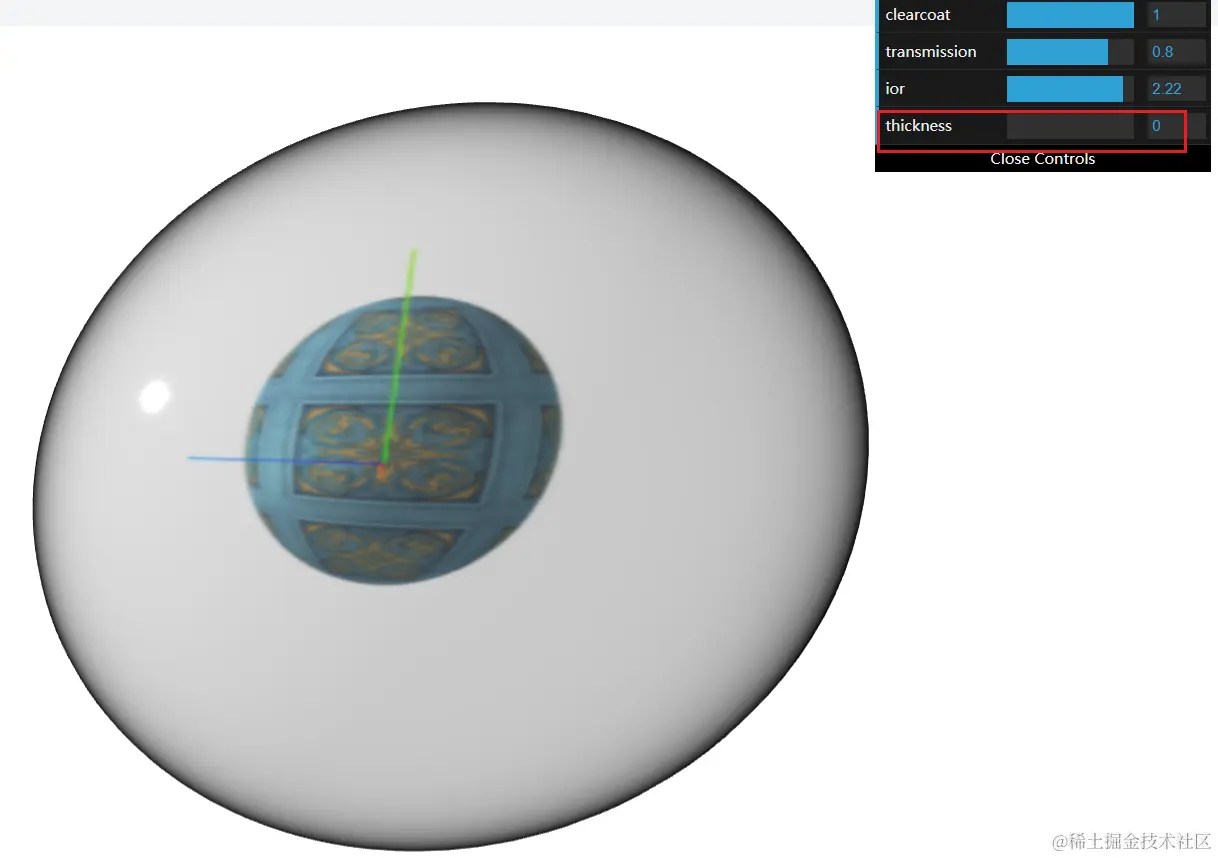
scene.background = new THREE.Color(0xffffff) // 场景背景色

  // 创建立方体对象
  createObjects () {
    const colorTexture = this.textureLoader.load('/src/assets/textures/1.jpg')

    const material = new THREE.MeshStandardMaterial({
      map: colorTexture,
    })

    const sphere = new THREE.Mesh(new THREE.SphereGeometry(1, 64, 64), material) // 球体
    const mesh = new THREE.Mesh(
      new THREE.SphereGeometry(1, 64, 64),
      new THREE.MeshPhysicalMaterial({
        // 可结合环境光,呈现玻璃球中透出纹理图的效果
        // envMap:,
        // envMapIntensity:
        roughnessMap: colorTexture,
        roughness: 0.1,
        clearcoat: 1.0, // 具有反光特性
        transmission: 0.8, // 厚度
        ior: 1.0, // 非金属材质的反射率
        thickness: 1.0, // 曲面下体积的厚度
      })
    )

    sphere.position.x = -2
    mesh.position.x = 2

    this.scene.add(sphere, mesh)
    this.mesh = mesh
    this.material = material
  },

// 物体外透明厚度
gui.add(_this.mesh.material, 'clearcoat', 0, 1, 0.1)
// 感光厚度 越小透光越强
gui.add(_this.mesh.material, 'transmission', 0, 1, 0.1)
gui.add(_this.mesh.material, 'ior', 1.0, 2.333, 0.01)
gui.add(_this.mesh.material, 'thickness', 0, 1, 0.01)
360度全景贴图
RGBELoader对象(hdr加载器)缺点:纯粹的环境全景。若想要交互(室内装修,室内物体交互,点击、选中),可使用cubeTexture立方纹理贴图(适用于复杂交互场景)
    // hdr 加载器
    const hdrLoader = new RGBELoader()
    const hdrTexture = hdrLoader.load('1.jpg',
      // onLoad回调
      ()=> {
        // 场景添加背景图
        this.scene.background = hdrTexture
        // hdrTexture.mapping = THREE.EquirectangularReflectionMapping // 反射映射
        hdrTexture.mapping = THREE.EquirectangularReflectionMapping // 折射映射

        // 给所有物体设置环境贴图 仅支持环境贴图的材质,反射周围的环境
        this.scene.environment = hdrTexture
    })

    const sceneFolder = gui.addFolder('场景')
    sceneFolder.add(_this.scene, 'backgroundBlurriness', 0, 1, 0.1) // 背景模糊
    sceneFolder.add(_this.scene, 'backgroundIntensity', 0, 1, 0.1) // 背景强度

    // 调整整个场景曝光度,toneMapping属性 是色调的算法,如手机p图时,调整的全局色调,默认值是不生效
    gui.add({ exposure: 1 }, 'exposure', 0, 10, 0.1).onChange(val =>{
      _this.renderer.toneMapping = THREE.LinearToneMapping // 曝光度线性变化
      _this.renderer.toneMappingExposure = val;
    })
    gui.add(_this.renderer, 'toneMapping', [
      'NoToneMapping',
      'LinearToneMapping',
      'ReinhardToneMapping',
      'CineonToneMapping',
      'ACESFilmicToneMapping',
    ]).onChange(val => {
      _this.renderer.toneMapping = THREE[val]
    })

    //  webglrenderer对象中,outputEncoding属性:定义渲染器的输出编码
    gui.add(_this.renderer, 'outputEncoding', [
      'LinearEncoding',
      'sRGBEncoding',
      'BasicDepthPacking',
      'RGBADepthPacking',
    ]).onChange(val => {
      _this.renderer.outputEncoding = THREE[val]
    })

    // 环境贴图除了用 hdr实现,还可用cubeTexture立方纹理贴图实现,
    gui.add(_this.mesh.material, 'envMap', ['hdr', 'cube']).onChange(val =>{
      if (val === 'cube') {
        _this.scene.background = _this.envTexture
        _this.sphere.material.envMap = _this.envTexture
        _this.box.material.envMap = _this.envTexture
      } else {
        _this.scene.background = _this.hdrTexture
        _this.sphere.material.envMap = _this.hdrTexture
        _this.box.material.envMap = _this.hdrTexture
      }
      _this.sphere.material.needsUpdate = true
      _this.box.material.needsUpdate = true
    })
webglrenderer对象中,outputEncoding属性:定义渲染器的输出编码。
以下0.151.3版本源码内容,问题出现:仅支持LinearEncoding、sRGBEncoding两个属性配置。
function getEncodingComponents( encoding ) {
    switch ( encoding ) {
        case LinearEncoding:
            return [ 'Linear', '( value )' ];
        case sRGBEncoding:
            return [ 'sRGB', '( value )' ];
        default:
            console.warn( 'THREE.WebGLProgram: Unsupported encoding:', encoding );
            return [ 'Linear', '( value )' ];
    }
}
阴影材质 ShadowMaterial
- 生成阴影机制:
- 物体castShadow属性产生阴影
- 平面receiveShadow属性接收阴影(默认不开启)
- 让平行光照castShadow属性产生阴影
- render中开启shadowMap属性
- 阴影材质特性:只有在有阴影的地方,才不是透明的,其他全是透明的
import { useEffect } from 'react';
import * as THREE from 'three';
import { RGBELoader } from 'three/examples/jsm/loaders/RGBELoader'
import { OrbitControls } from 'three/examples/jsm/controls/OrbitControls';
import * as dat from 'dat.gui';

const Page = () => {
  useEffect(() => {
    const $ = {
      createScene () {
        const canvas = document.getElementById('c')

        const width = window.innerWidth;
        const height = window.innerHeight;

        canvas.width = width
        canvas.height = height
        // 挂载全局上
        this.canvas = canvas
        this.width = width
        this.height = height

        // 创建3D场景对象
        const scene = new THREE.Scene();
        scene.background = new THREE.Color(0xf0f0f0)
        this.scene = scene
      },
      // 创建光照
      createLights () {
        // 添加全局光照
        const ambientLight = new THREE.AmbientLight(0xffffff, 0.7)
        const directionalLight = new THREE.DirectionalLight(0xffffff, 0.7)

        // 改变光照方向
        directionalLight.position.set(1, 2, 2)
        directionalLight.castShadow = true
        directionalLight.shadow.camera.near = 0.1
        directionalLight.shadow.camera.far = 40
        directionalLight.shadow.radius = 1.5 // 越小越清晰
        directionalLight.shadow.mapSize.x = 1024; // mapSize 影响阴影模糊,越大越清晰
        directionalLight.shadow.mapSize.y = 1024

        this.scene.add(ambientLight, directionalLight);
        this.directionalLight = directionalLight
      },
      // 纹理
      loadTextures () {
        // -----------------方法一
        // const img = new Image()
        // // 创建纹理
        // const texture = new THREE.Texture(img)

        // img.onload = function () {
        //   console.log(texture);
        //   // 更新纹理
        //   texture.needsUpdate = true
        // }
        // img.src = '/src/assets/textures/Wood_Ceiling_Coffers_003_basecolor.Cu38ry6v.jpg';
        // this.texture = texture;

        // ------------------方法二
        // setCrossOrigin('anonymous') 跨域方法
        // const textLoader = new THREE.TextureLoader()
        // this.texture =  textLoader.setCrossOrigin('anonymous').load(
        //   // this.texture =  textLoader.load(
        //   // 'https://3dbooks.netlify.app/assets/Wood_Ceiling_Coffers_003_basecolor.Cu38ry6v.jpg',
        //   '/src/assets/textures/Wood_Ceiling_Coffers_003_basecolor.Cu38ry6v.jpg',
        //   // onLoad回调
        //   function (texture) {},
        //   null,
        //   // onError回调
        //   (error) => {
        //     console.log('error', error);
        //   }
        // )

        // --------------------方法三
        const manager = new THREE.LoadingManager()
        manager.onStart = function( url, itemsLoaded, itemsTotal) {
          console.log( 'Start loading file: '+url +'.\nLoaded' + itemsLoaded+'of '+ itemsTotal+'files.');
        }

        manager.onLoad = function() {
          console.log('Loading complete !');
        }

        manager.onProgress = function( url, itemsLoaded, itemsTotal ){
          console.log('Loading file: '+ url+ '.\Loaded ' +itemsLoaded+ ' of '+itemsTotal+' files. ');
        }

        manager.onError = (url) =>{
          console.log('There was an error loading '+ url);
        }

        const textureLoader = new THREE.TextureLoader(manager)
        this.textureLoader = textureLoader
      },
      // 创建立方体对象
      createObjects () {
        // 阴影材质特性:只有在有阴影的地方,才不是透明的,其他全是透明的
        // 生成阴影机制: 1. 物体castShadow属性产生阴影 2. 平面receiveShadow属性接收阴影(默认不开启) 3. 让平行光照castShadow属性产生阴影 4. render中开启shadowMap属性
        const floorTexture = this.textureLoader.load('/src/assets/textures/6.jpg')
        const wallTexture = this.textureLoader.load('/src/assets/textures/2.jpg')

        this.floorTexture = floorTexture
        this.wallTexture = wallTexture

        // 在展示阴影中,两个平面会重叠
        const material = new THREE.ShadowMaterial({
          opacity: 1,
          polygonOffset: true, // 开启多边形偏移
          polygonOffsetFactor: -1,// 多边形偏移系数,默认值是0
        })

        const box = new THREE.Mesh(
          new THREE.BoxGeometry(1, 1, 1),
          new THREE.MeshBasicMaterial({
            color: 0x1890ff,
          })
        )

        // 平面阴影
        const planeShadow = new THREE.Mesh(
          new THREE.PlaneGeometry(10, 10),
          material
        )
        // 地板
        const floor = new THREE.Mesh(
          new THREE.PlaneGeometry(10, 10),
          new THREE.MeshBasicMaterial({
            map: floorTexture,
          })
        )

        // 墙面阴影
        const wallShadow = new THREE.Mesh(new THREE.PlaneGeometry(10, 10), material)
        // 墙面
        const wall = new THREE.Mesh(new THREE.PlaneGeometry(10, 10), new THREE.MeshBasicMaterial({
          map: wallTexture,
        }) )

        planeShadow.rotation.x = -Math.PI / 2
        planeShadow.position.y = -0.8
        floor.rotation.x = -Math.PI / 2
        floor.position.y = -0.8
        floor.position.z = -2
        wallShadow.position.y = 4
        wallShadow.position.z = -2
        wall.position.z = -2
        box.castShadow = true // 产生阴影
        wallShadow.receiveShadow = true // 墙面接收阴影
        planeShadow.receiveShadow = true // 平面接收阴影

        this.scene.add(box, planeShadow, floor, wallShadow, wall)
      },
      createCamera () {
        const size = 4;
        // 创建正交相机
        const orthoCamera = new THREE.OrthographicCamera(-size, size, size / 2, -size / 2, 0.1, 10);
        // 相机位置
        orthoCamera.position.set(0, 1, 3)
        // 设置相机朝向
        orthoCamera.lookAt(this.scene.position)
        // 相机添加场景中
        this.scene.add(orthoCamera)
        this.orthoCamera = orthoCamera
        // this.camera = orthoCamera
        // console.log(orthoCamera);

        // 透视相机 第二个相机
        const watcherCamera = new THREE.PerspectiveCamera(75, this.width / this.height, 0.1, 100)
        // 设置相机位置
        watcherCamera.position.set(0, 2, 4)
        // 设置相机朝向
        watcherCamera.lookAt(this.scene.position)
        // 将相机添加到场景中
        this.scene.add(watcherCamera)
        this.watcherCamera = watcherCamera
        this.camera = watcherCamera
      },
      datGui () {
        const _this = this
        const gui = new dat.GUI();

        gui.add(_this.directionalLight.position, 'x', -10, 10, 0.1)
        gui.add(_this.directionalLight.position, 'y', -10, 10, 0.1)
        gui.add(_this.directionalLight.position, 'z', -10, 10, 0.1)
      },
      // 添加辅助
      helpers () {
        // 创建辅助坐标系
        const axesHelper = new THREE.AxesHelper();

        const gridHelper = new THREE.GridHelper(20, 20, 0xf0f0f0)
        gridHelper.position.y = -1

        this.scene.add(axesHelper, gridHelper)
      },
      render () {
        // 创建渲染器
        const renderer = new THREE.WebGLRenderer({
          canvas: this.canvas,
          antialias: true
        })
        renderer.shadowMap.enabled = true;
        // 设置渲染器屏幕像素比 移动端解决像素问题
        renderer.setPixelRatio(window.devicePixelRatio || 1)
        // 设置渲染器大小
        renderer.setSize(this.width, this.height)
        // 执行渲染
        renderer.render(this.scene, this.camera)
        this.renderer = renderer
      },
      controls () {
        // 创建轨道控制器
        const orbitControls = new OrbitControls(this.camera, this.canvas)
        // 开启惯性
        orbitControls.enableDamping = true;
        this.orbitControls = orbitControls
      },
      tick () {
        // 更新
        this.orbitControls.update()

        this.renderer.render(this.scene, this.camera)
        window.requestAnimationFrame(()=> this.tick())
      },
      fitView () {
        // 监听窗口大小变化
        window.addEventListener('resize', () =>{
          this.camera.aspect = window.innerWidth / window.innerHeight;
          this.camera.updateProjectionMatrix();
          this.renderer.setSize(window.innerWidth, window.innerHeight)
        }, false)
      },
      init () {
        this.createScene()
        this.createLights()
        this.loadTextures()
        this.createObjects()
        this.createCamera()
        this.helpers()
        this.render()
        this.controls()
        this.tick()
        this.fitView()
        this.datGui()
      }
    }

    $.init();
  }, []);
  return <>
    <canvas id="c" />;
  </>
};
export default Page;
总结
- 标准材质 + 物理材质 材质高级,但更加消耗性能;