Jdk
jdk-8u281-windows-x64网盘下载
链接:https:
提取码:wfx8
父子依赖
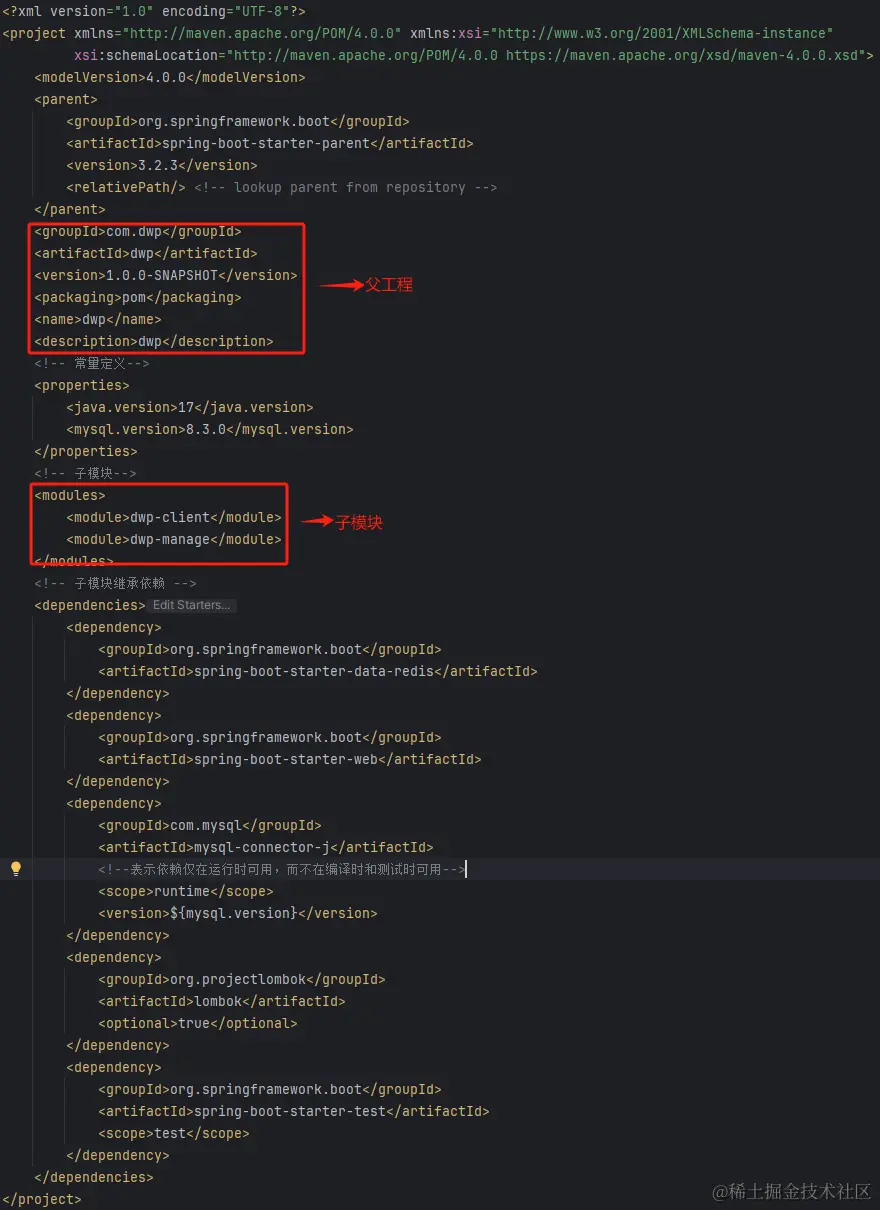
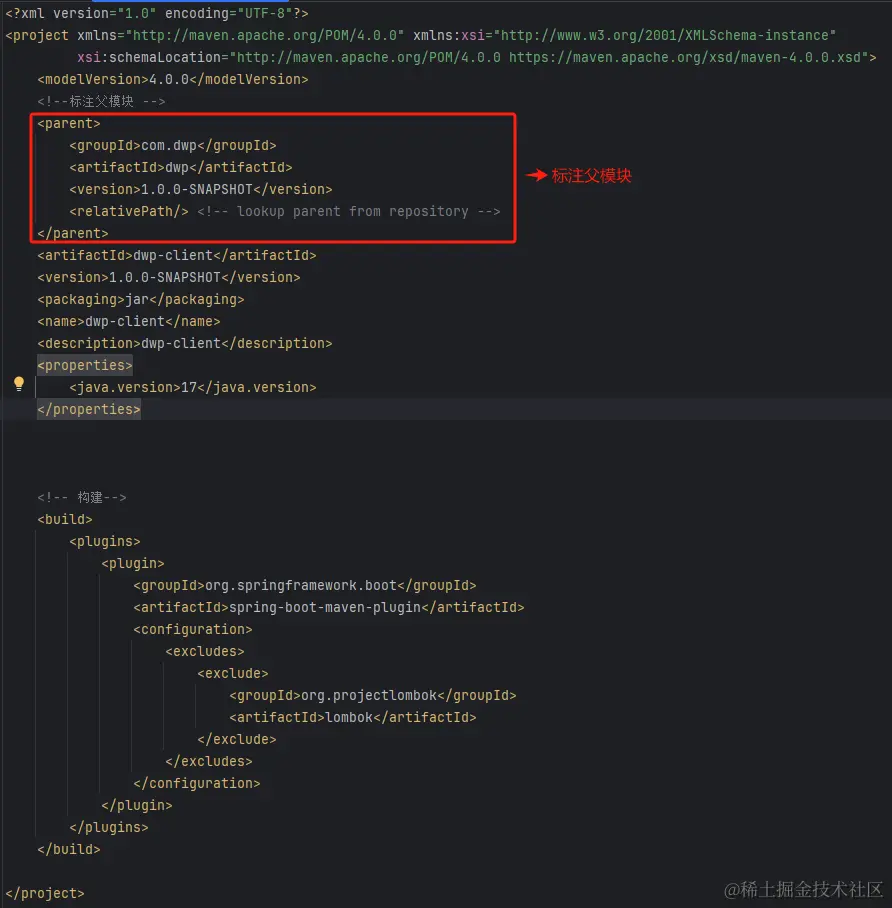
-bash: lsof: command not found
lsof命令无法使用,因为没有安装lsof。
安装命令:yum install -y lsof
Linux查看MySql密码
通常安装完MySql之后,密码会在/var/log/mysqld.log文件中,在文件中搜索/password关键字。
-------------------
使用初始密码登录后,要修改密码。
alter user 'root'@'localhost' identified by '新密码';
-------------------
默认root用户只支持本机访问,修改user表让其支持远程访问
-- 查询root访问host信息
select user,host from user where user='root';
-- 编辑支持任意ip远程连接
update user set host='%' where user='root';
-- 刷新使其生效
flush privileges;
小程序使用AES+RSA接口通信加密
AES对称加密,使用AES加密通信DATA。
RSA非对称加密,用来加密AES_KEY(AES私钥)。

简述逻辑:小程序有一套RSA公私钥,服务端有一套RSA公私钥。
服务端将自己RSA公钥给小程序,小程序将自己的RSA公钥给服务端。

1.小程序请求->生成AES_KEY->用AES_KEY加密通信DATA->用服务端RSA公钥加密AES_KEY。
2.服务端接收->用服务端RSA私钥解密出AES_KEY->用AES_KEY解密出通信DATA->将解密后的数据传递给业务接口。
3.服务端响应->生成AES_KEY->用AES_KEY加密通信DATA->用小程序RSA公钥加密AES_KEY。
4.小程序接收->用小程序RSA私钥解密出AES_KEY->用AES_KEY解密出响应DATA->将解密后的数据传递给全前端页面。

*:每次请求或者响应都生成一个新的AES_KEY(AES私钥)
小程序代码实现
crypto-js:实现AES对称加密 npm install crypto-js
wxmp-rsa: 实现RSA非对称加密(这个支持长文本加密) npm install wxmp-rsa
export const aesKey = () => {
	let strVals = 'ABCDEFGHJKMNPQRSTWXYZabcdefhijkmnprstwxyz2345678';
	let maxLen = strVals.length;
	let randomStr = '';
	for (var i = 0; i < 16; i++) {
		randomStr += strVals.charAt(Math.floor(Math.random() * maxLen));
	}
	return randomStr;
}
创建encipherUtil.js文件
import CryptoJS from 'crypto-js';
import WxmpRsa from 'wxmp-rsa'
import { aesKey } from '@/util'
const managePublicKey =`请填写服务端公钥`;
const clientPrivateKey =`请填写客户端私钥`;
export const aesGenKey = () => {
return aesKey();
}
export const aesEncrypt = (data, key) => {
const cfg = {
mode: CryptoJS.mode.CBC,
padding: CryptoJS.pad.Pkcs7,
iv: CryptoJS.enc.Utf8.parse("DYgjCEIMVrj2W9xN")
};
let encrypted = CryptoJS.AES.encrypt(CryptoJS.enc.Utf8.parse(data), CryptoJS.enc.Utf8.parse(key), cfg);
return encrypted.toString();
}
export const aesDecrypt = (data, key) => {
const cfg = {
mode: CryptoJS.mode.CBC,
padding: CryptoJS.pad.Pkcs7,
iv: CryptoJS.enc.Utf8.parse("DYgjCEIMVrj2W9xN")
};
let decrypt = CryptoJS.AES.decrypt(data, CryptoJS.enc.Utf8.parse(key), cfg);
let decString = CryptoJS.enc.Utf8.stringify(decrypt).toString();
return decString;
}
export const rsaEncrypt = (aseKey) => {
const rsa = new WxmpRsa()
rsa.setPublicKey(managePublicKey);
const data = rsa.encryptLong(aseKey)
return data
}
export const rsaDecrypt = (aseKeyCiphertext) => {
const rsa = new WxmpRsa()
rsa.setPrivateKey(clientPrivateKey);
const data = rsa.decryptLong(aseKeyCiphertext)
return data
}
import { aesGenKey, aesEncrypt, rsaEncrypt } from '@/util/encipherUtil.js'
let aesKey = aesGenKey();
let params = {
'key': rsaEncrypt(aesKey),
'data': aesEncrypt(JSON.stringify(config.data), aesKey)
}
后端代码AOP实现
import cn.hutool.core.util.ObjectUtil;
import cn.hutool.core.util.RandomUtil;
import cn.hutool.crypto.asymmetric.KeyType;
import cn.hutool.crypto.asymmetric.RSA;
import cn.hutool.crypto.symmetric.AES;
import cn.hutool.json.JSONUtil;
import com.dwp.base.dto.controller.RspDto;
import com.dwp.common.constant.Cons;
import jakarta.servlet.http.HttpServletRequest;
import org.aspectj.lang.ProceedingJoinPoint;
import org.aspectj.lang.annotation.Around;
import org.aspectj.lang.annotation.Aspect;
import org.aspectj.lang.annotation.Pointcut;
import org.slf4j.Logger;
import org.slf4j.LoggerFactory;
import org.springframework.beans.factory.annotation.Value;
import org.springframework.stereotype.Component;
import org.springframework.web.context.request.RequestContextHolder;
import org.springframework.web.context.request.ServletRequestAttributes;
import java.util.HashMap;
import java.util.Map;
@Component
@Aspect
public class EncryptionAndDecryptionAspect {
private final Logger logger = LoggerFactory.getLogger(EncryptionAndDecryptionAspect.class);
@Value("${client.rsa.publicKey}")
private String clientRsaPublicKey;
@Value("${manage.rsa.privateKey}")
private String manageRsaPrivateKey;
private final String IV = "自定义偏移量--这块自己填充";
private final String DATA = "data";
private final String KEY = "key";
@Pointcut("execution(* com.dwp.*.controller..*.*(..))")
public void safetyAspect() {
}
@Around(value = "safetyAspect()")
public Object around(ProceedingJoinPoint pjp) throws Throwable {
logger.info("EncryptionAndDecryptionAspect-->clientRsaPublicKey={}", clientRsaPublicKey);
logger.info("EncryptionAndDecryptionAspect-->clientRsaPublicKey={}", manageRsaPrivateKey);
ServletRequestAttributes attributes = (ServletRequestAttributes) RequestContextHolder.getRequestAttributes();
HttpServletRequest request = attributes.getRequest();
String httpMethod = request.getMethod().toLowerCase();
Object[] args = pjp.getArgs();
if (Cons.POST.equals(httpMethod) && args.length > 0) {
Map<String, String> map = JSONUtil.toBean(JSONUtil.toJsonStr(args[0]),Map.class);
String data = map.get(DATA);
String aesKey = map.get(KEY);
RSA rsa = new RSA(manageRsaPrivateKey, null);
aesKey = rsa.decryptStr(aesKey, KeyType.PrivateKey);
AES aes = new AES("CBC", "PKCS7Padding", aesKey.getBytes(), IV.getBytes());
String decryptData = aes.decryptStr(data);
if (JSONUtil.isTypeJSONObject(decryptData)) {
args[0] = JSONUtil.toBean(decryptData, args[0].getClass());
}
}
Object returnObj = pjp.proceed(args);
if (returnObj instanceof RspDto) {
Object data = ((RspDto) returnObj).getData();
if (ObjectUtil.isNotEmpty(data)) {
String dataString;
if (data instanceof String) {
dataString = String.valueOf(data);
} else {
dataString = JSONUtil.toJsonStr(data);
}
String aesKey = RandomUtil.randomString(16);
AES aes = new AES("CBC", "PKCS7Padding", aesKey.getBytes(), IV.getBytes());
String dataEncrypt = aes.encryptBase64(dataString);
RSA rsa = new RSA(null, clientRsaPublicKey);
String encryptAesKey = rsa.encryptBase64(aesKey, KeyType.PublicKey);
Map<String, String> result = new HashMap<>();
result.put(DATA, dataEncrypt);
result.put(KEY, encryptAesKey);
((RspDto) returnObj).setData(result);
}
}
return returnObj;
}
}
Linux常用命令
unzip xx.zjp 解压缩命令
tar zxvf xxx.tar.gz 解压缩命令
tar zcvf xxx.tar.gz xxx 压缩命令(将xxx目录压缩为xxx.tar.gz)
--将本地文件发送到远程主机
scp 本地文件 远程主机名@远程主机ip:远程主机目录
scp /tmp/aa.zip root@192.168.255.129:/tmp (将本地/tmp/aa.zip发送到192.168.255.129服务器的/tmp目录)

--将远程主机上的文件拉取到本地主机
scp 远程主机名@远程主机ip:远程主机目录 本地目录
scp root@192.168.255.129:/tmp/aa.zip /tmp (将192.168.255.129服务器的/tmp目录下的aa.zip文件拉取到本地/tmp目录)
--检查端口是否被占用
netstat -tuln | grep :your_port_number
--查询进程运行情况
ps aux | grep your_project_name



