蓝桥杯算法竞赛系列第0章——蓝桥必考点及标准模板库STL(上)(万字博文,建议抱走)_蓝桥杯 知识点 图谱-CSDN博客
[TOC]
先通过这篇博文对每个知识点有个大体上的认识,然后再刷题去感受知识点的深度。一定要自己多多实现!!!
一、蓝桥必考点剖析
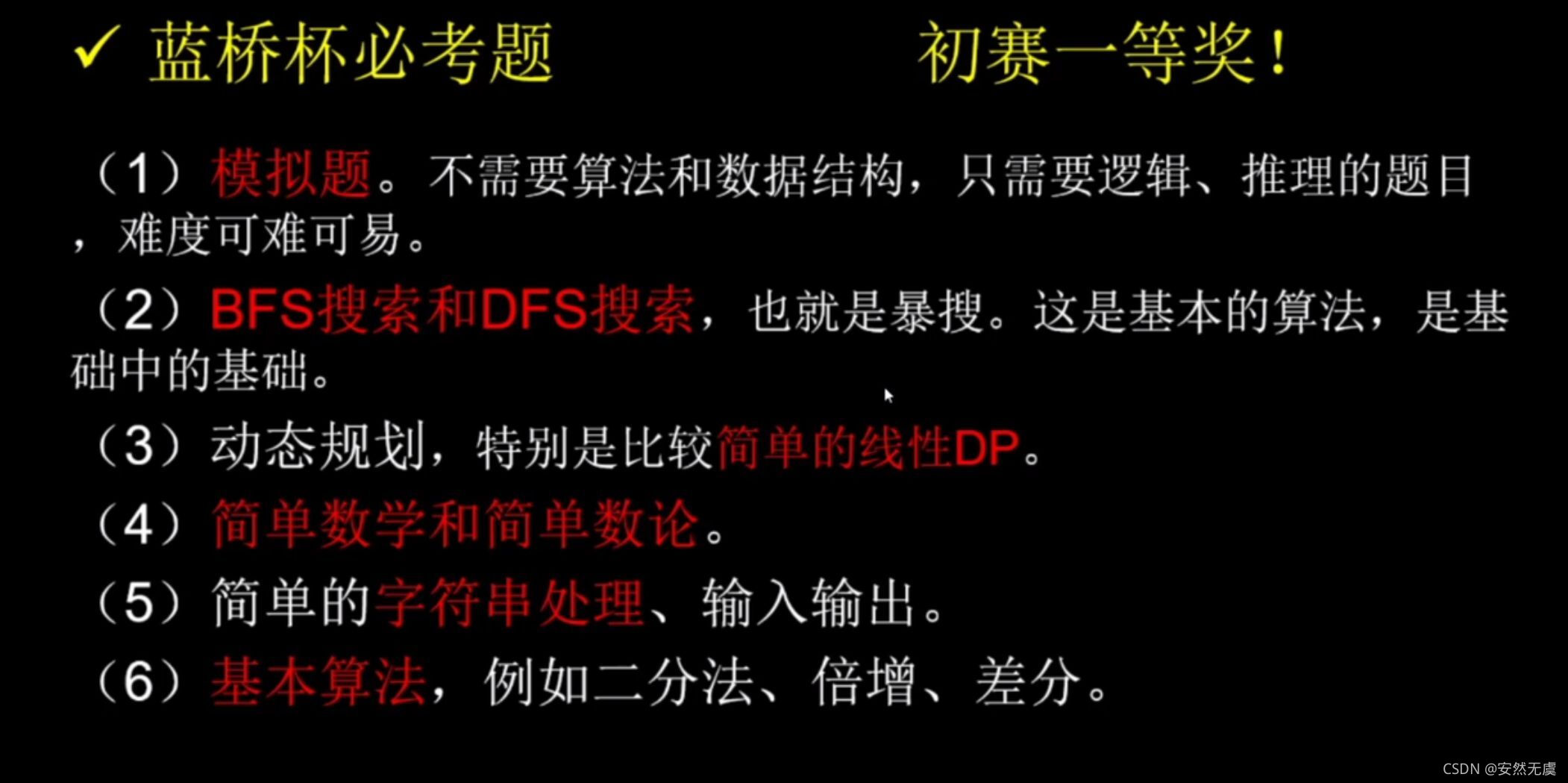
搜索类题目出现得很多,而且主要集中在第7, 第8两道大题
二、什么是STL
作为C语言的plusplus版本的C++,它为使用者提供了标准模板库(STL),其中封装了很多相当实用的容器。
STL在广义上分为:容器(contains)、算法(algorithm)和迭代器(iterator);
容器和算法之间通过迭代器进行无缝链接;
容器就是各种数据结构,如vevtor, set, string, map, queue, stack等,用来存放数据,从实现角度来说,STL容器是一种class template(类模板);
算法:各种常用的算法,如sort, find, copy, for_each(遍历)等,从实现的角度来说,STL算法是一种function template(函数模板);
迭代器:扮演了容器和算法之间的胶合剂,可简单地认为它就是。
三、vector的常见用法详解
vector翻译为向量,但是这里使用“变长数组”的叫法更容易理解,即“长度根据需要而自动改变的数组”。
1.vector的定义
vector<typename> name;
//typename可以是任何基本类型,例如int,double,char,结构体等,也可以是STL标准容器
vector<int> name;
vector<double> name;
vector<char> name;
vector<node> name;//node是结构体的类型

//如果typename也是一个STL容器,定义的时候一定要在>>符号之间加上空格
vector<vector<int> > name;
定义vector数组
很容易联想到二维数组的定义,即元素类型是一维数组的数组。那么vector数组也是一样,即Arrayname[ ]中的每一个元素都是一个vector。初学者可以把vector数组当作两个维都可以变长的二维数组理解。
vector<typename> Arrayname[arraySize];
例如:
vector<int> vi[100];
这样Arrayname[0]~Arrayname[arraySize - 1]中每一个都是一个vector容器。
与vector<vector<int> > name不同的是,这种写法的一维长度已经固定为arraySize,另一维才是“变长”的(注意体会着两种写法的区别哦)
2.vector容器内元素的访问
(1).通过下标访问
对一个定义为vector<typename> vi 的vector容器来说,直接访问vi[index]即可(例如vi[0],vi[1])。当然,这里下标是从0 ~ vi.size() - 1。
(2).通过迭代器访问
迭代器(iterator)可以理解为一种类似指针的东西
vector<typename>::iterator it;
这样it就是一个vector<typename>::iterator型的变量(虽然这个类型看起来很长),其中typename就是定义vector时填写的类型。
vector<int>::iterator it;
vector<double>::iterator it;
这样就得到了迭代器it,并且可以通过*it来访问vector里的元素。
#include <bits/stdc++.h>
//#include <iostream>
//#include <vector>
using namespace std;

int main() {
	vector<int> vi;
	for (int i = 1; i <= 5; i++) {
		vi.push_back(i); //push_back(i)在vi的末尾添加元素i,即依次添加1 2 3 4 5
	}
    //vi.begin()为取vi得首元素地址,而it指向这个地址
	vector<int>::iterator it = vi.begin();
	for (int i = 0; i < 5; i++) {
		printf("%d ", *(it + i));
        cout << *(vi.begin() + i) << " ";
		cout << vi[i] << " ";
		cout << "\t";
	}
	cout << "\n";
	return 0;
}
1 1 1   2 2 2   3 3 3   4 4 4   5 5 5

--------------------------------
Process exited after 0.012 seconds with return value 0
begin()和end()
-
begin()函数的作用是取vi的首元素地址
-
end()并不是取vi尾元素的地址,而是取尾元素地址的下一个地址。end()作为迭代器的末尾标志,不储存任何元素。
米国人思维比较习惯左闭右开,在这里begin()和end()也是如此。
三种遍历方式理解iterator
while循环
利用while循环,定义起始迭代器和结束迭代器。
#include <bits/stdc++.h>
//#include <iostream>
//#include <vector>
using namespace std;

int main() {
	vector<int> vi;

	vi.push_back(10);
	vi.push_back(20);
	vi.push_back(30);
	vi.push_back(40);
	vi.push_back(50);

	vector<int>::iterator iBegin = vi.begin();
	vector<int>::iterator iEnd = vi.end();

	while (iBegin != iEnd) {
		cout << *(iBegin) << " ";
		iBegin++;
	}
	cout << "\n";
	return 0;
}
10 20 30 40 50

--------------------------------
Process exited after 0.01343 seconds with return value 0
for循环
#include <bits/stdc++.h>
//#include <iostream>
//#include <vector>
using namespace std;

int main() {
	vector<int> vi;

	for (int i = 10; i <= 50; i += 10) {
		vi.push_back(i);
	}

	for (vector<int>::iterator it = vi.begin(); it != vi.end(); it++) {
		cout << *it << " ";
	}
	cout << "\n";
	return 0;
}
10 20 30 40 50

--------------------------------
Process exited after 0.01282 seconds with return value 0
【敲黑板】:vector的迭代器不支持it < vi.end()写法,因此循环条件只能用
it != vi.end()
专门的遍历算法
#include <bits/stdc++.h>
//#include <iostream>
//#include <vector>
//#include <algorithm>
using namespace std;

void myPrint(int val) {
	cout << val << " ";
}

int main() {
	vector<int> v;
	for (int i = 10; i <= 50; i += 10) {
		v.push_back(i);
	}

	for_each(v.begin(), v.end(), myPrint);

	cout << "\n";
	return 0;
}
10 20 30 40 50

--------------------------------
Process exited after 0.01291 seconds with return value 0
【敲黑板】:最后需要指出的是,在常用STL容器中,只有在vector和string中,才允许使用
vi.begin()+3这种迭代器加上整数的写法。
3.vector常用函数实例解析
(1).push_back()
push_back(x):在vector后面添加一个元素x, 时间复杂度为O(1)
#include <bits/stdc++.h>
//#include <iostream>
//#include <vector>
using namespace std;

int main() {
	vector<int> vi;
	for (int i = 10; i <= 50; i += 10) {
		vi.push_back(i);
	}
	//size()函数会给出vi中元素的个数
	for (int i = 0; i < vi.size(); i++) {
		cout << vi[i] << " ";
	}

	cout << "\n";
	return 0;
}
10 20 30 40 50

--------------------------------
Process exited after 0.01237 seconds with return value 0
(2).pop_back()
pop_back():删除vector的尾元素,时间复杂度为O(1)
#include <bits/stdc++.h>
//#include <iostream>
//#include <vector>
using namespace std;

int main() {
	vector<int> vi;
	for (int i = 10; i <= 50; i += 10) {
		vi.push_back(i);
	}

	vi.pop_back();//删除vi的尾元素50

	for (int i = 0; i < vi.size(); i++) {
		cout << vi[i] << " ";
	}

	cout << "\n";
	return 0;
}
10 20 30 40

--------------------------------
Process exited after 0.01266 seconds with return value 0
(3).size()
size():获得vector中元素的个数,时间复杂度为O(1)。
#include <bits/stdc++.h>
//#include <iostream>
//#include <vector>
using namespace std;

int main() {
	vector<int> vi;
	for (int i = 10; i <= 50; i += 10) {
		vi.push_back(i);
	}

	cout << vi.size();

	cout << "\n";
	return 0;
}
5

--------------------------------
Process exited after 0.01148 seconds with return value 0
(4).clear()
clear():清空vector中的所有元素,时间复杂度为O(N),其中N为vector中元素个数
#include <bits/stdc++.h>
//#include <iostream>
//#include <vector>
using namespace std;

int main() {
	vector<int> vi;
	for (int i = 10; i <= 50; i += 10) {
		vi.push_back(i);
	}

	vi.clear();

	cout << vi.size();

	cout << "\n";
	return 0;
}
0

--------------------------------
Process exited after 0.01169 seconds with return value 0
(5).insert()
insert(it, x):向vector的任意迭代器it处插入一个元素x, 时间复杂度为O(N)
#include <bits/stdc++.h>
//#include <iostream>
//#include <vector>
using namespace std;

int main() {
	vector<int> vi;
	for (int i = 10; i <= 50; i += 10) {
		vi.push_back(i);
	}

	//将-1插入vi[2]的位置
	vi.insert(vi.begin() + 2, -1);
	for (int i = 0; i < vi.size(); i++) {
		cout << vi[i] << " ";
	}

	cout << "\n";
	return 0;
}
10 20 -1 30 40 50

--------------------------------
Process exited after 0.01082 seconds with return value 0
(6).erase()
erase()有两种用法:
- 删除单个元素、
- 删除一个区间内的所有元素。
时间复杂度均为O(N)
1.删除单个元素:
erase(it) 即删除迭代器为it 处的元素
#include <bits/stdc++.h>
//#include <iostream>
//#include <vector>
using namespace std;

int main() {
	vector<int> vi;
	for (int i = 10; i <= 50; i += 10) {
		vi.push_back(i);
	}
    for (int i = 0; i < vi.size(); i++) {
    	cout << vi[i] << " ";
	}

	cout << "\n-----\n";

    vi.erase(vi.begin() + 2);
    for (int i = 0; i < vi.size(); i++) {
    	cout << vi[i] << " ";
	}

	cout << "\n-----\n";

    vi.erase(vi.end() - 1);
    for (int i = 0; i < vi.size(); i++) {
    	cout << vi[i] << " ";
	}

	cout << "\n";
	return 0;
}
10 20 30 40 50
-----
10 20 40 50
-----
10 20 40

--------------------------------
Process exited after 0.01232 seconds with return value 0
2.删除一个区间内的所有元素,
erase(first, last),即删除 内的所有元素,注意哦,不包括last
#include <bits/stdc++.h>
//#include <iostream>
//#include <vector>
using namespace std;

int main() {
	vector<int> vi;
	for (int i = 10; i <= 50; i += 10) {
		vi.push_back(i);
	}

    vi.erase(vi.begin() + 1, vi.begin() + 4);
    for (int i = 0; i < vi.size(); i++) {
    	cout << vi[i] << " ";
	}

	cout << "\n";
	return 0;
}
10 50

--------------------------------
Process exited after 0.01394 seconds with return value 0
由上面的说法可以知道,如果要删除这个vector内的所有元素,正确的写法应该是
vi.erase(vi.begin(), vi.end()),这正对应前面所说,vi.end()就是尾元素地址的下一个地址。当然啦,更方便的清空vector的方法是使用vi.clear()
(7).assign()
此函数为向量(vector)分配新值,并替换旧值。
语法
要为其分配值的向量(vector)v。语法为:
v.assign(first,last);//将区间 [first,last) 的元素赋值到当前的vector容器中。
v.assign(n,val);//n:出现值的次数。val:要分配的值。
实例1
#include<iostream>
#include<vector>
using namespace std;
int main()
{
	vector<int> v{1,2,3,4,5};
	vector<int> v1;
	v1.assign(v.begin()+1, v.end()-1);
	for(int i = 0; i < v1.size(); i++)
	cout << v1[i] << endl;
	return 0;
}
2
3
4
实例2
#include<iostream>
#include<vector>
using namespace std;
int main()
{
    vector<char> v;
    v.assign(5, 'C');
    for(int i = 0; i < v.size(); i++)
    cout << v[i] << " ";
    return 0;
}
C C C C C
四、set 的常见用法详解
set翻译为集合,是一个内部自动有序且不含重复元素的容器。
set最主要的作用是自动去重并按升序排序,因此当我们碰到去重但是不方便直接开数组的情况,可以尝试用set解决。
1.set的定义
set<typename> name;
其定义的写法其实和vector基本是一样的,或者说其实大部分STL都是这样定义的。
//typename可以是任何基本类型,例如int,double,char,结构体等,也可以是STL标准容器
set<int> name;
set<double> name;
set<char> name;
set<node> name;//node是结构体的类型

//如果typename也是一个STL容器,定义的时候一定要在>>符号之间加上空格
set<vector<int> > name;
定义set数组
set<typename> Arrayname[arraySize];
例如:
set<int> a[100];
这样 a[0] ~ a[99] 中的每一个都是一个set容器。
2.set容器内元素的访问
set只能通过迭代器(iterator)访问:
set<typename>::iterator it;
例如:
set<int>::iterator it;
set<char>::iterator it;
这样就得到了it, 并且可以通过*it 来访问set 里的元素。
由于除了vector 和 string 之外的STL容器都不支持*(it + i) 的访问方式,因此只能按如下方式枚举:
#include <bits/stdc++.h>
//#include <iostream>
//#include <set>
using namespace std;

int main() {
	set<int> st;
	st.insert(3); // insert(x)将x插入set中
    st.insert(5);
    st.insert(2);
    st.insert(3);

    for (set<int>::iterator it = st.begin(); it != st.end(); it++) {
    	cout << *it << " ";
	}
	cout << "\n";
	return 0;
}
2 3 5

--------------------------------
Process exited after 0.01225 seconds with return value 0
3.set常用函数实例解析
(1).insert()
insert(x):将x插入set容器中,并自动递增排序和去重,时间复杂度为O(logN),其中N为set容器内元素的个数,注意insert()和vector中用法的不同
(2).find()
find(value):返回set中对应值为value的迭代器,时间复杂度为O(logN),N为set内的元素个数
#include <bits/stdc++.h>
//#include <iostream>
//#include <set>
using namespace std;

int main() {
	set<int> st;
	for (int i = 10; i <= 50; i += 10) {
		st.insert(i);
	}

	set<int>::iterator it = st.find(20);
	cout << *it << "\t";
	cout << *(st.find(20));

	cout << "\n";
	return 0;
}
20      20

--------------------------------
Process exited after 0.0104 seconds with return value 0
(3).erase()
erase()有两种用法:
- 删除单个元素、
- 删除一个区间内的所有元素
1.删除单个元素:
删除单个元素也有两种方法
方法一:st.erase(it), it为所需要删除元素的迭代器。时间复杂度为O(1)。结合find()函数来使用
#include <bits/stdc++.h>
//#include <iostream>
//#include <set>
using namespace std;

int main() {
	set<int> st;
	for (int i = 10; i <= 50; i += 10) {
		st.insert(i);
	}

	st.erase(st.find(20));

	for (set<int>::iterator it = st.begin(); it != st.end(); it++) {
		cout << *it << " ";
	}

	cout << "\n";
	return 0;
}
10 30 40 50

--------------------------------
Process exited after 0.01312 seconds with return value 0
方法二:st.erase(value), value为所需要删除元素的值。时间复杂度为O(logN),N为set内的元素个数。
#include <bits/stdc++.h>
//#include <iostream>
//#include <set>
using namespace std;

int main() {
	set<int> st;
	for (int i = 10; i <= 50; i += 10) {
		st.insert(i);
	}

	st.erase(20);

	for (set<int>::iterator it = st.begin(); it != st.end(); it++) {
		cout << *it << " ";
	}

	cout << "\n";
	return 0;
}
10 30 40 50

--------------------------------
Process exited after 0.01211 seconds with return value 0
2.删除一个区间内的所有元素:
st.erase(first, last)可以删除一个区间内的所有元素,其中first为所需要删除区间的起始迭代器,而last则为所需要删除区间的末尾迭代器的下一个地址,即为删除 ,时间复杂度为O(last - first)。注意哦,不包括last。
#include <bits/stdc++.h>
//#include <iostream>
//#include <set>
using namespace std;

int main() {
	set<int> st;

	st.insert(20);
	st.insert(10);
	st.insert(40);
	st.insert(30);
	st.insert(10);
	st.insert(50);

    set<int>::iterator it = st.find(30);
	// 删除元素30至末尾之间的元素,即30、40、50
	st.erase(it, st.end());

	for (it = st.begin(); it != st.end(); it++) {
		printf("%d ", *it);
	}

	cout << "\n";
	return 0;
}
10 20

--------------------------------
Process exited after 0.01265 seconds with return value 0
(4).size()
size():获得set内的元素个数,时间复杂度为O(1)
#include <bits/stdc++.h>
//#include <iostream>
//#include <set>
using namespace std;

int main() {
	set<int> st;
	for (int i = 10; i <= 50; i += 10) {
		st.insert(i);
	}

	cout << st.size();

	cout << "\n";
	return 0;
}
5

--------------------------------
Process exited after 0.01172 seconds with return value 0
(5).clear()
clear():清空set中的所有元素,时间复杂度为O(N),其中N为set内的元素个数
#include <bits/stdc++.h>
//#include <iostream>
//#include <set>
using namespace std;

int main() {
	set<int> st;
	for (int i = 10; i <= 50; i += 10) {
		st.insert(i);
	}

    st.clear();
	cout << st.size();

	cout << "\n";
	return 0;
}
0

--------------------------------
Process exited after 0.01178 seconds with return value 0