概述
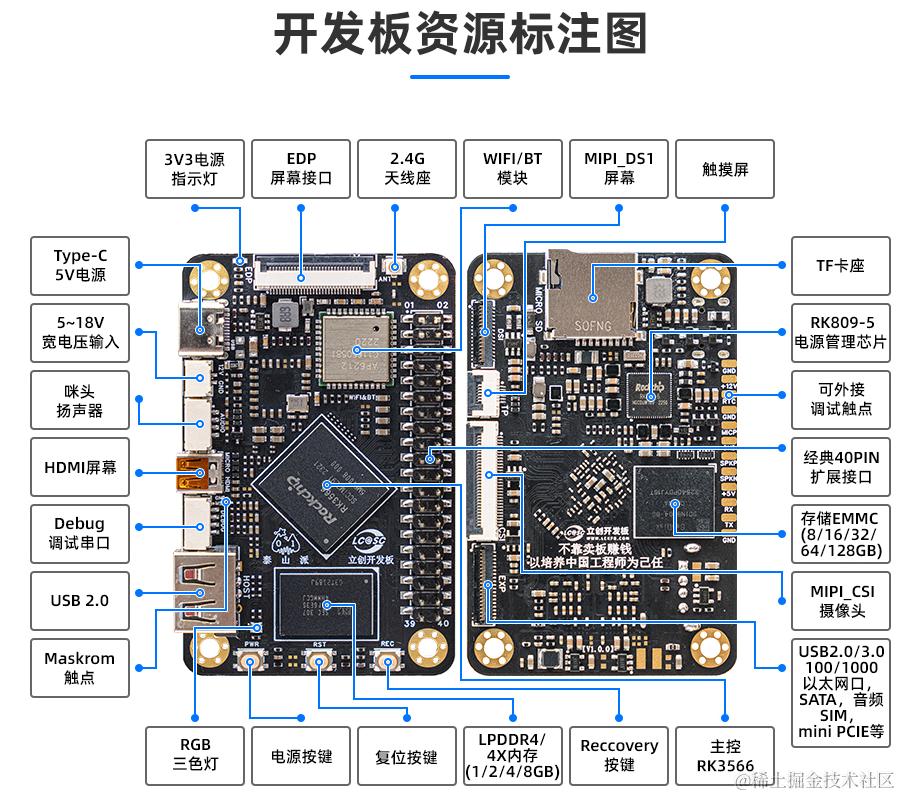
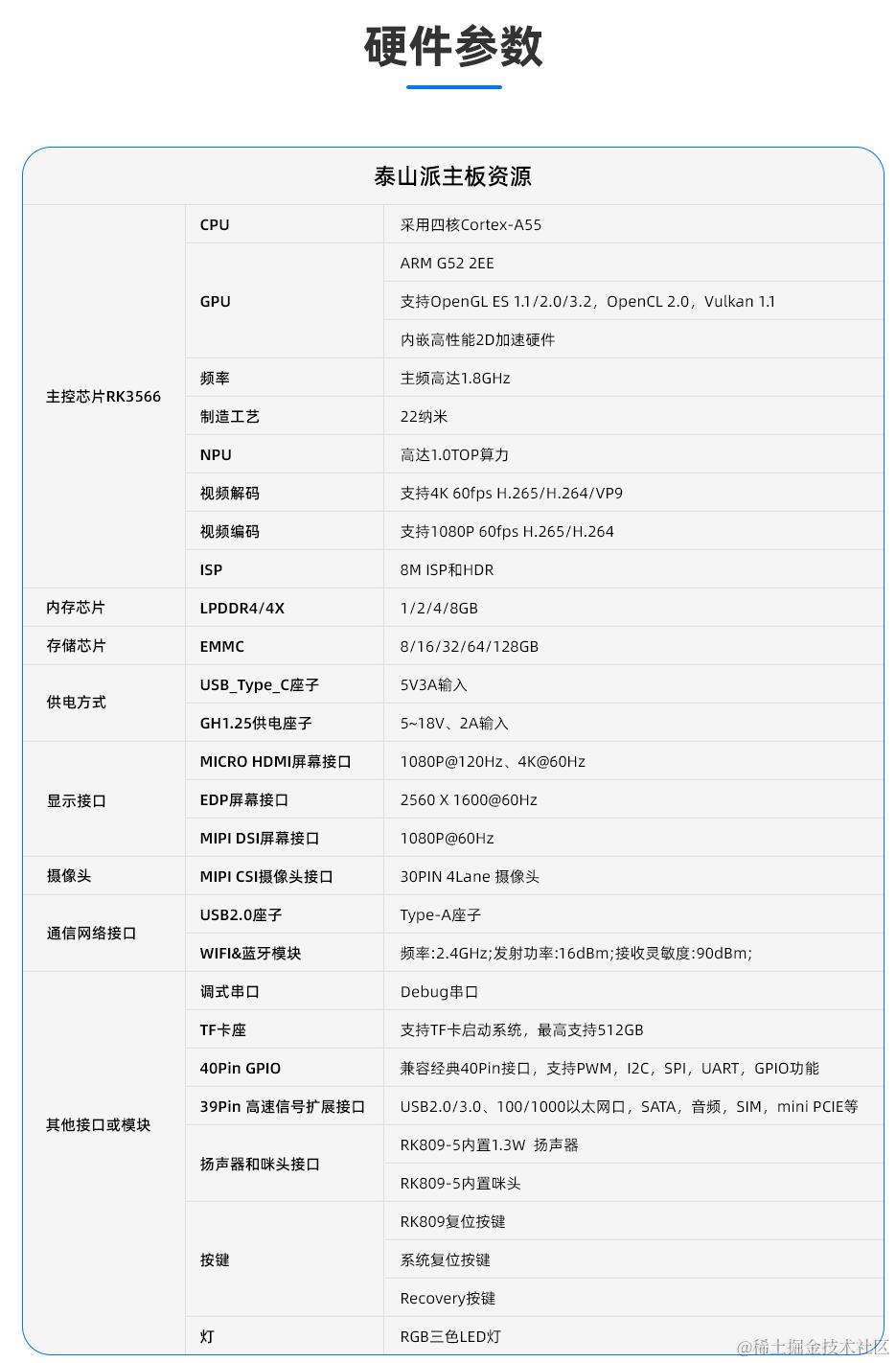
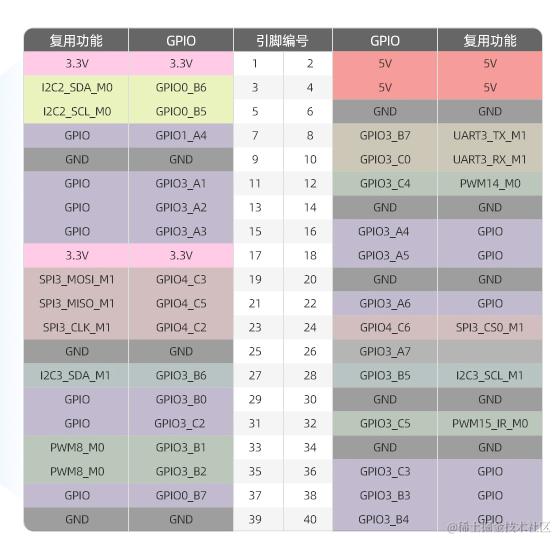
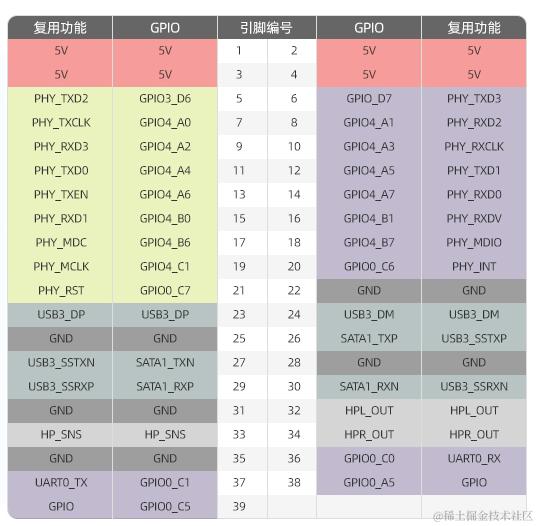
GPIO
Android SDK开发环境(wsl2的ubuntu 18.04)
WSL2挂载android sdk的外接硬盘的方法
- 参考 zhuanlan.zhihu.com/p/661175117 ,用他的方法更新了wsl2的kernel版本到
5.15.133.1-microsoft-standard-WSL2 - 启动wsl2的ubuntu 18.04
- [windows]powershell以管理员打开后,执行
_nisy_load_1st_m2_disk.bat脚本,该脚本内容如下:
PS C:\WINDOWS\system32> usbipd list
Connected:
BUSID  VID:PID    DEVICE                                                        STATE
1-5    8087:0a2b  英特尔(R) 无线 Bluetooth(R)                                   Not shared
1-7    05c8:03c0  HD Camera                                                     Not shared
2-1    10c4:ea60  Silicon Labs CP210x USB to UART Bridge (COM14)                Not shared
2-3    093a:2510  USB 输入设备                                                  Not shared
3-3    0bda:9210  USB Attached SCSI (UAS) 大容量存储设备                        Attached

Persisted:
GUID                                  DEVICE
1454d717-26b8-4f07-a6f2-3b812ddd67c5  USB 大容量存储设备

usbipd: warning: Unknown USB filter 'hrdevmon' may be incompatible with this software; 'bind --force' may be required.
usbipd: warning: USB filter 'UsbDk' is known to be incompatible with this software; 'bind --force' will be required.
PS C:\WINDOWS\system32>
PS C:\WINDOWS\system32> cat _nisy_load_1st_m2_disk.bat
usbipd unbind --hardware-id 0bda:9210
usbipd bind --hardware-id 0bda:9210  --force
usbipd attach --wsl --hardware-id 0bda:9210
PS C:\WINDOWS\system32>
- [wsl2]wsl2的ubuntu 18.04中确认usb已经识别到:
root@nisymatebook:/dev/bus/usb/001# lsusb
Bus 002 Device 001: ID 1d6b:0003 Linux Foundation 3.0 root hub
Bus 001 Device 001: ID 1d6b:0002 Linux Foundation 2.0 root hub

root@nisymatebook:/usr/lib/wsl/drivers# sudo lsblk -f
NAME   FSTYPE LABEL            UUID                                 MOUNTPOINT
sda    ext4
sdb    swap                    189897a5-9c49-4abf-b0a7-00a8becfb538 [SWAP]
sdc    ext4                    38bc855d-dd26-4ecf-8774-67cc37b6f2fd /mnt/wslg/distro
sdd
├─sdd1 vfat                    7772-8AEA
├─sdd2
├─sdd3 ext4   1st_M2_deepin    1d5f7501-18f0-42e0-abd0-5e73899c30ac
├─sdd4 ext4   1st_M2_debian    7bf7ba82-5954-1f4c-b5a6-5a74b63eb6eb
├─sdd5 ext4   1st_M2_ubuntu184 72190675-ef27-44eb-9820-fdf01fb9fbd5
├─sdd6 ext4   1st_M2_ext4_data 9568086a-de0d-4ecc-b947-dde082bf5bae
└─sdd7 ext3   1st_M2_ubuntu204 64b1a869-6e8b-452e-9be4-db0727295798
挂载相关分区到
sudo mkdir -p /mnt/external/sdd6
sudo mount -t ext4 /dev/sdd6 /mnt/external/sdd6   # 因为是 ext4 文件系统(Linux)
结果:
book@nisymatebook:/mnt/external/sdd6$ lsusb
Bus 002 Device 002: ID 0bda:9210 Realtek Semiconductor Corp.
Bus 002 Device 001: ID 1d6b:0003 Linux Foundation 3.0 root hub
Bus 001 Device 001: ID 1d6b:0002 Linux Foundation 2.0 root hub

book@nisymatebook:~$ cd /mnt/external/sdd6/
book@nisymatebook:/mnt/external/sdd6$ ls -al
total 40
drwxr-xr-x 7 book 1001  4096 Oct 27 22:53 .
drwxr-xr-x 9 root root  4096 Nov  2 11:40 ..
drwx------ 5 book 1001  4096 Oct 13 01:54 .Trash-1000
drwxrwxr-x 5 book book  4096 Oct 27 23:36 _imx6ull
drwxr-xr-x 2 book book  4096 Oct 30 00:00 _runninglinuxkernel_5.0
drwxrwxr-x 4 book book  4096 Oct 27 23:13 _taishanpi
drwx------ 2 root root 16384 Oct 27  2024 lost+found
[wsl2]当您完成使用后,可以卸载分区:
sudo umount /mnt/external/sdd6
也可以直接执行脚本_nisy_auto_mount_1#_M2_disk.sh挂载磁盘所有的分区:
book@nisymatebook:~$ cat ./_auto_mount_1#_M2_disk.sh
#!/bin/bash

# 定义挂载点基础路径
MOUNT_BASE="/mnt"

# 挂载所有 sdd 分区
for i in {1..7}; do
    DEVICE="/dev/sdd$i"
    MOUNT_POINT="$MOUNT_BASE/sdd$i"

    # 检查设备是否存在
    if [ -b "$DEVICE" ]; then
        echo "挂载 $DEVICE 到 $MOUNT_POINT"
        sudo mkdir -p $MOUNT_POINT
        sudo mount $DEVICE $MOUNT_POINT 2>/dev/null

        # 如果挂载失败,尝试自动检测文件系统
        if [ $? -ne 0 ]; then
            echo "尝试自动检测文件系统挂载 $DEVICE"
            sudo mount $DEVICE $MOUNT_POINT
        fi
    else
        echo "设备 $DEVICE 不存在"
    fi
done

# 检查挂载结果
echo "挂载结果:"
df -h | grep sdd
book@nisymatebook:~$  ./_auto_mount_1#_M2_disk.sh
挂载 /dev/sdd1 到 /mnt/sdd1
[sudo] password for book:
挂载 /dev/sdd2 到 /mnt/sdd2
尝试自动检测文件系统挂载 /dev/sdd2
mount: /mnt/sdd2: wrong fs type, bad option, bad superblock on /dev/sdd2, missing codepage or helper program, or other error.
挂载 /dev/sdd3 到 /mnt/sdd3
挂载 /dev/sdd4 到 /mnt/sdd4
挂载 /dev/sdd5 到 /mnt/sdd5
挂载 /dev/sdd6 到 /mnt/sdd6
挂载 /dev/sdd7 到 /mnt/sdd7
挂载结果:
/dev/sdd1                        300M  9.1M  291M   4% /mnt/sdd1
/dev/sdd3                         25G   15G  8.5G  64% /mnt/sdd3
/dev/sdd4                         64G   51G   11G  83% /mnt/sdd4
/dev/sdd5                         30G   26G  2.3G  92% /mnt/sdd5
/dev/sdd6                        310G  235G   59G  80% /mnt/sdd6
/dev/sdd7                         30G   17G   12G  59% /mnt/sdd7
book@nisymatebook:~$
Android SDK开发环境(manjaro下docker环境跑ubuntu)
参考官方文档 wiki.lckfb.com/zh-hans/tsp…
manjaro下烧录1个完整镜像
[nisy 【镜像】Android]# upgrade_tool uf hdmi_edp1920X1080_20230912_update.img
Program Log will save in the /root/upgrade_tool/log/
Loading firmware...
Support Type:RK3568	FW Ver:b.0.00	FW Time:2023-09-12 03:18:38
Loader ver:1.01	Loader Time:2023-09-05 13:14:17
Download Image Total(3294458K),Current(659714K)
manjaro下烧录单个镜像
在 /run/media/nisy/1st_M2_ext4_data/tspi_android_sdk_repo_20240202/rockdev/Image-rk3566_tspi路径下,入bootloader模式
进入Loader升级模式(用到两个按键分别是RST与REC,进入Loader升级模式方法,先按住REC按钮不放,接着按下RST复位按键并松开),用upgrade_tool ld能检测到单板的loader模式:
[nisy Image-rk3566_tspi]# upgrade_tool ld
Program Log will save in the /root/upgrade_tool/log/
List of rockusb connected(1)
DevNo=1	Vid=0x2207,Pid=0x350a,LocationID=122	Mode=Loader	SerialNo=b9842dca921fb5a2
[nisy Image-rk3566_tspi]#
然后升级boot.img,比如:
[nisy Image-rk3566_tspi]# upgrade_tool ul MiniLoaderAll.bin  -noreset
Program Log will save in the /root/upgrade_tool/log/
Loading loader...
Support Type:RK3568	Loader ver:1.01	Loader Time:2025-10-03 14:10:54
Upgrade loader ok.
[nisy Image-rk3566_tspi]# upgrade_tool di -p parameter.txt
Program Log will save in the /root/upgrade_tool/log/
directlba=1,first4access=1,gpt=1
Write gpt...
Write gpt ok.
[nisy Image-rk3566_tspi]# upgrade_tool di -b boot.img
Program Log will save in the /root/upgrade_tool/log/
directlba=1,first4access=1,gpt=1
Download boot start...(0x0000c800)
Download image ok.
[nisy Image-rk3566_tspi]# upgrade_tool rd  # 重启设备
Program Log will save in the /root/upgrade_tool/log/
Reset Device OK.
[nisy Image-rk3566_tspi]#
类似地升级uboot:
upgrade_tool di -u uboot.img
upgrade_tool 的help等命令:
[nisy Image-rk3566_tspi]# upgrade_tool -h
Program Log will save in the /root/upgrade_tool/log/

---------------------Tool Usage ---------------------
Help:             H
Quit:             Q
Version:          V
Clear Screen:     CS
------------------Upgrade Command ------------------
ChooseDevice:		CD
ListDevice:		LD
SwitchDevice:		SD
UpgradeFirmware:	UF <Firmware> [-noreset]
UpgradeLoader:		UL <Loader> [-noreset] [FLASH|EMMC|SPINOR|SPINAND]
DownloadImage:		DI <-p|-b|-k|-s|-r|-m|-u|-t|-re image>
DownloadBoot:		DB <Loader>
EraseFlash:		EF <Loader|firmware>
PartitionList:		PL
WriteSN:		SN <serial number>
ReadSN:			RSN
ReadComLog:		RCL <File>
CreateGPT:		GPT <Input Parameter> <Output Gpt>
SwitchStorage:		SSD
----------------Professional Command -----------------
TestDevice:		TD
ResetDevice:		RD [subcode]
ResetPipe:		RP [pipe]
ReadCapability:		RCB
ReadFlashID:		RID
ReadFlashInfo:		RFI
ReadChipInfo:		RCI
ReadSecureMode:		RSM
ReadSector:		RS  <BeginSec> <SectorLen> [-decode] [File]
WriteSector:		WS  <BeginSec> <File>
ReadLBA:		RL  <BeginSec> <SectorLen> [File]
WriteLBA:		WL  <BeginSec> <File>
EraseLBA:		EL  <BeginSec> <EraseCount>
EraseBlock:		EB <CS> <BeginBlock> <BlokcLen> [--Force]
RunSystem:		RUN <uboot_addr> <trust_addr> <boot_addr> <uboot> <trust> <boot>
-------------------------------------------------------

[nisy Image-rk3566_tspi]# upgrade_tool PL
Program Log will save in the /root/upgrade_tool/log/
Partition Info(gpt):
NO  LBA        Size       Name
01  0x00002000 0x00002000 security
02  0x00004000 0x00002000 uboot
03  0x00006000 0x00002000 trust
04  0x00008000 0x00002000 misc
05  0x0000a000 0x00002000 dtbo
06  0x0000c000 0x00000800 vbmeta
07  0x0000c800 0x00014000 boot
08  0x00020800 0x00030000 recovery
09  0x00050800 0x000c0000 backup
10  0x00110800 0x000c0000 cache
11  0x001d0800 0x00008000 metadata
12  0x001d8800 0x00000800 baseparameter
13  0x001d9000 0x00614000 super
14  0x007ed000 0x0153bfc0 userdata

[nisy Image-rk3566_tspi]# upgrade_tool RCI
Program Log will save in the /root/upgrade_tool/log/
Chip Info: 38 36 35 33 0 0 0 0 0 0 0 0 0 0 0 0
[nisy Image-rk3566_tspi]# upgrade_tool RFI
Program Log will save in the /root/upgrade_tool/log/
Flash Info:
	Manufacturer: SAMSUNG,value=00
	Flash Size: 14930MB
	Block Size: 512KB
	Page Size: 2KB
	ECC Bits: 0
	Access Time: 40
	Flash CS: Flash<0>
Linux SDK 编译
root@nisy:~/tspi_linux_sdk_repo_20240131# ./build.sh -h
Usage: build.sh [OPTIONS]
Available options:
BoardConfig*.mk    -switch to specified board config
lunch              -list current SDK boards and switch to specified board config
uboot              -build uboot
uefi             -build uefi
spl                -build spl
loader             -build loader
kernel             -build kernel
modules            -build kernel modules
toolchain          -build toolchain
rootfs             -build default rootfs, currently build buildroot as default
buildroot          -build buildroot rootfs
ramboot            -build ramboot image
multi-npu_boot     -build boot image for multi-npu board
yocto              -build yocto rootfs
debian             -build debian rootfs
pcba               -build pcba
recovery           -build recovery
all                -build uboot, kernel, rootfs, recovery image
cleanall           -clean uboot, kernel, rootfs, recovery
firmware           -pack all the image we need to boot up system
updateimg          -pack update image
otapackage         -pack ab update otapackage image (update_ota.img)
sdpackage          -pack update sdcard package image (update_sdcard.img)
save               -save images, patches, commands used to debug
allsave            -build all & firmware & updateimg & save
check              -check the environment of building
info               -see the current board building information
app/<pkg>          -build packages in the dir of app/*
external/<pkg>     -build packages in the dir of external/*

createkeys         -create secureboot root keys
security_rootfs    -build rootfs and some relevant images with security paramter (just for dm-v)
security_boot      -build boot with security paramter
security_uboot     -build uboot with security paramter
security_recovery  -build recovery with security paramter
security_check     -check security paramter if it's good

Default option is 'allsave'.
root@nisy:~/tspi_linux_sdk_repo_20240131# ./build.sh lunch
processing option: lunch

You're building on Linux
Lunch menu...pick a combo:

0. default BoardConfig.mk
1. BoardConfig-rk3566-evb2-lp4x-v10-32bit.mk
2. BoardConfig-rk3566-evb2-lp4x-v10.mk
3. BoardConfig-rk3566-tspi-v10.mk
4. BoardConfig-rk3568-evb1-ddr4-v10-32bit.mk
5. BoardConfig-rk3568-evb1-ddr4-v10-spi-nor-64M.mk
6. BoardConfig-rk3568-evb1-ddr4-v10.mk
7. BoardConfig-rk3568-nvr-spi-nand.mk
8. BoardConfig-rk3568-nvr.mk
9. BoardConfig-rk3568-uvc-evb1-ddr4-v10.mk
10. BoardConfig.mk
Which would you like? [0]: