- 颜色:新增 RGBA,HSLA 模式,新增透明度
- 盒阴影:(box-shadow)
box-shadow属性值的顺序和功能如下:
h-shadow(水平阴影的位置):此值可以是正值、负值或0。正值表示阴影向右偏移,负值表示阴影向左偏移,0表示无偏移。
v-shadow(垂直阴影的位置):此值也可以是正值、负值或0。正值表示阴影向下偏移,负值表示阴影向上偏移,0表示无偏移。
blur(模糊半径):此值用于控制阴影的模糊程度。值越大,阴影越模糊;值为0表示无模糊。
spread(阴影的尺寸扩展):此值表示阴影的尺寸扩展。正值表示阴影扩大,负值表示阴影收缩,0表示无扩展。
color(颜色):此值用于设置阴影的颜色。如果没有显式设置该值,那么会使用text的颜色作为阴影颜色。
inset(可选):此关键字可以添加到box-shadow值的最开始处,使阴影呈现在边框内部。
常用设置: {
box-shadow :box-shadow: 5px 5px 5px #ccc;
}
- 边框: 边框圆角:(border-radius) 边框阴影:(box-shadow) 边框图片:(border-image)
- 弹性盒子模型:(box-sizing:border-box;)
- 背景:
- background-size :设置背景图片的尺寸
- background-origin :设置背景图片的原点(定位、位置)
- background-clip :设置背景图片的裁切区域,以”,”分隔,可以设置多背景,用于自适应布局
- 背景渐变 / 文字渐变:
- linear-gradient:(线性渐变)
- radial-gradient :(径向渐变)
.class {
background: linear-gradient(blue, pink);
background: linear-gradient(to right, blue, pink);
background: linear-gradient(to bottom right, blue, pink);
background: linear-gradient(70deg, blue, pink);
}
<style scoped lang="scss">
.sps {
background: linear-gradient(to right, #e8ebf8, #3044aa);
-webkit-background-clip: text;
color: transparent;
}
</style>
<template>
<div>
<span class="sps">• • • • • • •</span>
</div>
</template>
- 过渡:transition,transform可实现动画
transform: rotate(30deg)表示元素将绕其中心点顺时针旋转30度。
transform: scale(2)表示元素将在X轴和Y轴方向上都放大2倍。
transform: translate(50px, 100px)表示元素将在X轴方向上移动50像素,在Y轴方向上移动100像素。
总的来说,transform属性是一个非常强大的工具,可以实现各种复杂的2D和3D转换效果,为网页设计和开发提供了更多的可能性。
- 自定义动画 animation 定义动画:@keyframes 动画名称
- 在 CSS3 中唯一引入的伪元素是 :selection
- 媒体查询@media,多栏布局:
    @media screen and (width:500px) {
        body {
            background-color: red;
        }
    }
- 2D 转换:
- transform:translate(x,y) 移动
- rotate(x,y) 旋转
- skew(x,y) 翻转
- scale(x,y) 缩放
- 3D 转换
- 字体图标 : font-face
- 弹性布局 :flex
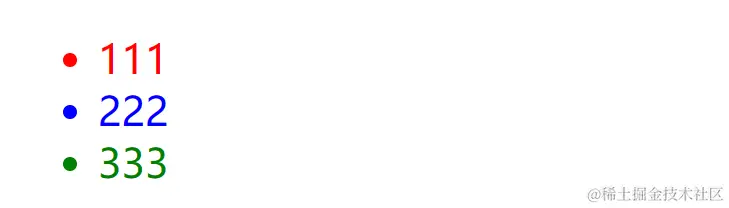
- 新增伪类选择器: nth-child(n)
    <body>
        <ul>
            <li>111</li>
            <li>222</li>
            <li>333</li>
        </ul>
    </body>
    <style>
            ul li:nth-child(1) {
                color: red;
            }
            ul li:nth-child(2) {
                color: blue;
            }
            ul li:nth-child(3) {
                color: green;
            }
        </style>