

将对象转化为数组
const a = { name: 'AAA', age: '999' }
const re3 = Object.keys(a).map((v, i) => {
  return {
    [v]: a[v]
  }
})
console.log(re3)
修改数组中某一项的值
function $updateArrayItemByKey(array, keyName, newValue) {
  if (!Array.isArray(array)) {
    console.error("The first argument must be an array.");
    return;
  }
  // 查找匹配的项并更新
  const index = array.findIndex((item) => item.hasOwnProperty(keyName));
  if (index !== -1) {
    // 找到了匹配的项,进行赋值
    // Vue.set(array, index, { ...array[index], [keyName]: newValue });
    array[index][keyName] = newValue;
  } else {
    console.warn(`No item found with the key '${keyName}'.`);
  }
}
深拷贝
function clone(value) {
  const type = getType(value)
  if (type === 'Array' || type==='Object' ) {
    const object = type === 'Array' ? [] : {}
    for (const key in value) {
      if (Object.hasOwnProperty.call(object, key)) {
        const element = value[key]
        object[key] = clone(element)
      }
    }
  } else {
    return object
  }
}
reduce使用的汇总
const objects = [{ x: 1 }, { x: 2 }, { x: 3 }]
//累加
const sum = objects.reduce((accumulator, currentValue) => {
  //每次返回的值作为acc的值
  return accumulator + currentValue.x
}, 0)
console.log(sum) // 6

//求数组出现最多的一个元素,并打印次数
const names = ['Alice', 'Bob', 'Tiff', 'Bruce', 'Alice']
const re = names.reduce((acc, name) => {
  const count = acc[name] ?? 0
  return {
    ...acc,
    [name]: count + 1
  }
}, {})
console.log(re)
//面试的时候  面试的时候一定要说array.isArray,还有Object身上的方法
//数组去重
const myArray = ['a', 'b', 'a', 'b', 'c', 'e', 'e', 'c', 'd', 'd', 'd', 'd']
const re2 = myArray.reduce((acc, item) => {
  if (!acc.includes(item)) {
    return [...acc, item]
  }
}, [])
map的使用
const conditions = [
  [1, (param) => { console.log(`Condition 1: ${param}`); }],
  [2, (param) => { console.log(`Condition 2: ${param}`); }],
  [3, (param) => { console.log(`Condition 3: ${param}`); }],
];

// 创建一个 Map 对象
const conditionMap = new Map(conditions);

// 定义一个函数来处理不同的条件
function handleConditions(type, param) {
  // 获取对应的处理函数
  const handler = conditionMap.get(type);

  if (handler) {
    // 调用处理函数
    handler(param);
  } else {
    console.log(`No handler for type: ${type}`);
  }
}

// 测试
const param = "Hello, World!";

handleConditions(1, param); // 输出: Condition 1: Hello, World!
handleConditions(2, param); // 输出: Condition 2: Hello, World!
handleConditions(3, param); // 输出: Condition 3: Hello, World!
handleConditions(4, param); // 输出: No handler for type: 4
set用于数组去重
[...new Set([...a,...b])]
推平数组
function flat(arr){
  const result = []
  arr.forEach(element => {
    if(Array.isArray(element)){
      result = result.concat(flat(element))
    } else {
      // result.push(element)
      result = result.concat(element)
    }
    return result
  });
}
后端代码参数处理
// 垃圾代码示例
    handleParams() {
      const params = {};
      params.id = this.formItem.id;
      params.startDate = this.formItem.startDate.format("YYYY-MM-DD");
      params.endDate = this.formItem.endDate.format("YYYY-MM-DD");
      params.price = this.formItem.price.toString();
      params.type = this.formItem.type;
      params.total = this.formItem.total;
      params.name = this.formItem.name;
      params.comment = this.formItem.comment;
      // ... 此处省略一万行代码
    }
// 好的代码
    handleParams() {
      const { startDate, endDate, price, ...params } = this.formItem;
      params.startDate = startDate.format("YYYY-MM-DD");
      params.endDate = endDate.format("YYYY-MM-DD");
      params.price = price.toString();
      // 前端只需要使用这个params即可,所有的属性都已经追加到params中了
      // ... 此处省掉一万行代码
    }
// 原理  为什么可以这样写
const aa = {
  a: 1,
  b: 2,
  c: 3,
};
// 这个rest是一个对象,
const { a, b, ...rest } = aa;
console.log(rest);
rest.d = 4
4
aa
{a: 1, b: 2, c: 3}
rest
{c: 3, d: 4}
扁平转tree
function translate(arr, id) {
  const list = []
  arr.forEach((element) => {
    if (element.parentId === id) {
      // 找到了一级节点
      const children = translate(arr, element.id)
      element.children = children
      list.push(element)
    }
  })
  return list
}
// 示例数据
const flatData = [
  { id: 1, name: 'Node 1', parentId: null },
  { id: 2, name: 'Node 1.1', parentId: 1 },
  { id: 3, name: 'Node 1.2', parentId: 1 },
  { id: 4, name: 'Node 2', parentId: null },
  { id: 5, name: 'Node 2.1', parentId: 4 },
  { id: 6, name: 'Node 2.1.1', parentId: 5 },
  { id: 7, name: 'Node 3', parentId: null }
]
const result = translate(flatData, null)
console.log(result)
vue属性,并实现响应式
export default {
  data() {
    return {
      user: {
        name: 'John Doe',
        age: 30,
        address: '123 Main St'
      }
    };
  },
  methods: {
    clearUser() {
      Object.keys(this.user).forEach(key => {
        this.user[key] = key === 'age' ? null : '';
      });
    }
  }
};
js关键字与结构赋值进阶使用
// js关键字 in delete使用
let aa = {name:'小明',age:14}
const response = {rows: {name:'小明',age:14}}
delete aa.name
'name' in aa
// 解构赋值进阶使用,将rows变为数组
const {rows:{}} = response || {}
response.rows = [rows]
// rows 将被改变
delete row.name
js模拟枚举值最佳实践
// bad
v-if="!['3', '4', '5', '6', '7', '8'].includes(item.status)"
// goods
const Status = {
 /**
  * @description 用户已确认
  */
 CONFIRMED: '3',
 /**
  * @description 审核中
  */
 UNDER_REVIEW: '4',
  /**
   * @description 已完成
   */
  COMPLETED: '5',
  /**
   * @description 已取消
   */
  CANCELLED: '6',
  /**
   * @description 无效状态
   */
  INVALID: '7',
  /**
   * @description 待支付
   */
  PENDING_PAYMENT: '8'
};

// 使用Object.values来获取所有状态值组成的数组
const excludedStatuses = Object.values(Status);

// 或者直接在v-if中引用Status的键值
<div v-if="!Object.values(Status).includes(item.status)">
  <!-- 内容 -->
</div>
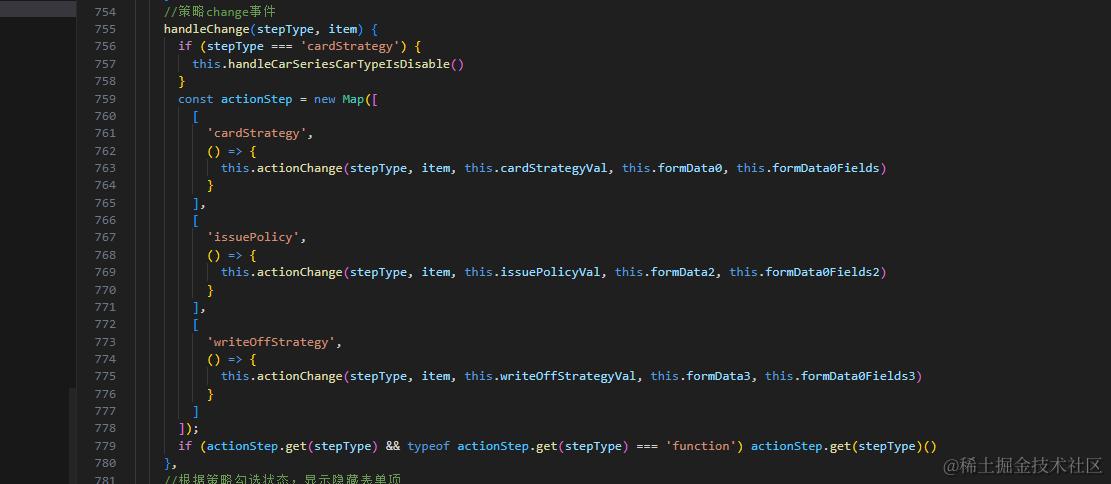
策略模式优化多if分支
map数组对象去重
function removeDuplicatesByProperty(arr, property) {
 const map = new Map();
 const result = [];
 for (const item of arr) {
   if (!map.has(item[property])) {
     map.set(item[property], item);
     result.push(item);
   }
  }
  return result;
}

// 示例对象数组
const arrayOfObjects = [
  { id: 1, name: "Alice" },
  { id: 2, name: "Bob" },
  { id: 1, name: "Alice" }, // 重复项
  { id: 3, name: "Charlie" },
];

// 基于"id"属性去重
const uniqueArray = removeDuplicatesByProperty(arrayOfObjects, "id");
console.log(uniqueArray);
将js工具函数放入vue原型
// main.js 或 app.js
import Vue from 'vue';
import { formatDate } from './utils'; // 引入你的工具函数
// 将工具函数添加到 Vue 原型
Vue.prototype.$formatDate = formatDate;
new Vue({
  render: h => h(App),
}).$mount('#app');

export const utils = {
	/**
	 * 用户反馈(轻提示)
	 * @param {string} title 提示文字内容
	 * @param {string} icon 提示图标类型
	 */
	toast(title = '数据加载失败!', icon = 'none') {
		uni.showToast({
			title,
			icon,
			mask: true,
		})
	}
}
// 方便全局进行引用
uni.utils = utils
两个date时间对比,判断哪个时间早
  isDateEarlier1(dateStr1, dateStr2) {
      // 将时间字符串转换为Date对象
      const date1 = new Date(dateStr1)
      const date2 = new Date(dateStr2)
      // 直接比较两个Date对象,< 表示date1早于date2
      return date1 < date2
    }
根据初始化已经存在的数组做批量$set(解决为了响应式而手动一个个初始化的时候给对象添加属性的问题)
function $initSet(arr,obj){
if (!Array.isArray(arr) || !(obj instanceof Object)) return;
 const list = arr.map(v=>v.codeField)
 for (const iterator of list) {
  this.$set(obj, iterator, '')
 }
}
vue中进行前端字典映射
   <fast-table ref="tableRef" :table-ref-index="0" :dynamic-table-options="tableData0" :callback-obj="callbackObj">
      <template slot="orderStatus" slot-scope="{ row: { orderStatus='' } }"> {{ mapObj[orderStatus] }} </template>
      <template slot="isSign" slot-scope="{ row: { isSign='' } }"> {{ mapObj[isSign] }} </template>
    </fast-table>
vue计算属性的特点
  **自动依赖追踪**:Vue会自动追踪计算属性中所依赖的所有响应式属性。当这些依赖项的值发生变化时,Vue会知道需要重新计算计算属性的值。
  **惰性求值**:计算属性在初次访问时才进行计算,如果从未在模板或代码中访问过,那么计算属性的getter函数根本不会执行,从而节省不必要的计算资源。
  **缓存结果**:一旦计算属性被计算过一次,它的结果就会被存储起来。只有当依赖的响应式属性变化时,getter函数才会再次执行,重新计算结果并更新缓存。如果依赖项没有变化,计算属性会直接返回之前缓存的结果,避免重复计算。
一个错误js代码实例
   if (this.isAdd) {
        for (const key in this.formData0Fields) {
          if (Object.hasOwnProperty.call(this.formData0Fields, key)) {
          // 这里必须是&&号,只有同时不是两者才可以过滤,||的话 任何条件都会走进来
            if (key !== 'createdTime' && key !== 'lendDate') {
              console.log(key, 'key')
              this.formData0Fields[key] = ''
            }
          }
        }
计算属性错误使用示例
updateControlIdComputedSave() {
      // 编辑第一次提交 使用列表带过来的并发id  第二次就是使用保存接口返回的并发id了
      // this.isEdit只会在初始化的时候变化一次
      if (this.isEdit) {
        // 第一次提交
        if (this.updateControlId === '') {
          return this.dialogObjValue.params.it?.updateControlId
        } else {
          return this.updateControlId
        }
        // 新增的保存,第二次就要带id和并发id了
      } else if (this.isAdd) {
        return this.updateControlId
      }
    }
参数上送示例
vue封装组件思路
异步事件最佳实践
async function aa() {
  try {
    console.log("aa");
    const bb = await Blob();
    console.log("cc");
    if (bb == 1) {
      throw new Error();
    } else {
      return "";
    }
  } catch (error) {
    console.log(111);
    throw new Error();
  }
}

async function cc() {
  try {
    await aa();
    console.log("ee");
  } catch (error) {}
}
// bad
// async  function Blob(){
//     setTimeout(()=>{
//         return Promise.resolve(1)
//     },1000)
// }
async function Blob() {
  return new Promise((resolve) => {
    setTimeout(() => {
      resolve(1);
    }, 1000);
  });
}
cc();
一个async await示例
   async function hahdd() {
     const r1 = await new Promise(resolve=>{
       setTimeout(()=>{
         resolve(123)
       },1000)
     })
     console.log(r1,'r1');
     // r1会被顶部async包装成一个成功的promise
     return r1
   }
    async function dd1() {
      const a = await hahdd();
      console.log(a,'a');
    }
dd1();
动态表单校验开发技巧
思路:初始化定义为required:false
content-type常用格式
**`application/x-www-form-urlencoded`**
-   用于传统的表单提交。
json
form-data

`axios` 默认情况下不会自动设置 `Content-Type` 请求头。这意味着如果你不显式地设置 `Content-Type`,`axios` 发送的请求将不会包含 `Content-Type` 头。不过,根据你发送的数据类型,`axios` 会有一些默认行为:

1.  **JSON 数据**:

    -   如果你发送的是 JSON 数据,`axios` 会默认将 `Content-Type` 设置为 `application/json`。
    -   例如,当你使用 `axios.post` 方法并传递一个 JavaScript 对象作为数据时,`axios` 会自动将该对象转换为 JSON 字符串,并设置 `Content-Type` 为 `application/json`。

1.  **表单数据**:

    -   如果你发送的是表单数据(例如使用 `URLSearchParams` 或 `FormData`),`axios` 不会自动设置 `Content-Type`。你需要手动设置 `Content-Type` 为 `application/x-www-form-urlencoded` 或 `multipart/form-data`。
vue封装工具方法中this的问题
function $throwCatchMsg({ type = 'catch', error = {}, response = {} }) { throw new Error( $catchMsg.bind(this)({ type, response, error }) ) }

`$catchMsg.bind(this)` 中的 `this` 是指当前调用 `$throwCatchMsg` 函数的作用域中的 `this`。换句话说,`this` 的值取决于 `$throwCatchMsg` 是在哪里被调用的。

当您使用 `.bind(this)` 时,它会创建一个新的函数,这个新函数在被调用时会确保 `this` 的值为指定的对象。在这个例子中,`this` 的值就是您调用 `$throwCatchMsg` 时的 `this` 的值。
完整方法
hasowmpropertity是亮点
类封装工具函数最佳实践
  class DataManagement {
        constructor(vueInstance, options = {}) {
          // 处理全局this
          this.vueInstance = vueInstance;
          this.options = options;
          this.MONEY_REGEX = /^[0-9]+(.[0-9]{1,2})?$/;
          // 初始化一些状态
          this.initState();
        }
        initState() {
          // 初始化状态,例如配置选项、默认值等
          this.defaultConfig = {
            // 默认配置选项
            // ...
          };
          // 合并默认配置和用户提供的配置
          this.config = { ...this.defaultConfig, ...this.options };
          // 设置一些默认值
          this.data = [];
          // 设置事件监听器
          this.setupListeners();
        }
        setupListeners() {
          // 设置事件监听器
          this.vueInstance.$on('someEvent', this.handleSomeEvent.bind(this));
        }
        handleSomeEvent(data) {
          // 处理某个事件
          console.log('Handling some event:', data);
        }
      // 其他方法...
      }
解构一个值得注意的问题
   const { outAmount, outPrice, outQuantity, ...rest } = v
   // 解构出来的属性未必有
      if (this.formData0Fields.businessNo) {
        if (outAmount && outPrice && outQuantity) {
          rest.inAmount = outAmount
          rest.inPrice = outPrice
          rest.inQuantity = outQuantity
        }
      }
      console.log(v, 'vsave')
      console.log(rest, 'rest**')
      return {
        ...rest,
        statusItem: status
      }
isNaN()可以检查是否输入的非法字符
`isNaN()` 是一个全局函数,它可以接收任何类型的值,并尝试将其转换为数字,然后判断结果是否为 `NaN`。需要注意的是,`isNaN()` 对于非数字类型的值也会返回 `true`,因为它们会被转换成 `NaN`。
typeof专题
会将null判断判断成object属性,除了function,其他引用类型都会是object
硬编码
  computed: {
    isGood() {
      return this.type === 1;
    },
    isBad() {
      return this.type === 0;
    }
  }
// good
// 货物的品质枚举值
export const GOODS_TYPE = {
  good: 1, // 质量好
  bad: 0   // 质量差
};
看上面的例子,这种硬编码基本随处可见,作者在写这段代码的时候肯定是觉得这个type只会在这里用到,没有必要单独定义一个常量来管理,后面接收的同学来了他也不会去关注之前的逻辑,他只要用到了type又会去重新判断一下是good还是bad,就这样最后代码中充斥着0,1,2,3这样的数字,后来新人接到一个需求并且涉及到这些数字背后的含义这个时候就不得不去一个一个地询问原作者了,好的做法就是写成常量配置文件,单独写一个文件config.js,然后组件去引用这个常量:
map去重
function uniqueById(arr) {
  const idMap = new Map()
  const result = []
  arr.forEach((item) => {
    const id = item.id
    if (!idMap.has(id)) {
      idMap.set(id, true)
      result.push(item)
    }
  })
  return result
}
一个undifed引发的计算Nan的问题
let a
const b = '3'
// 此处Nan了,原因是a是undifed,   undified+'' 是Nan
a + +b
一个可以借鉴的vue组件
<template>
  <div>
    <ul>
      <li v-for="(item, index) in filteredItems" :key="item.id" :style="{ fontSize: shouldHighlightItem(item.id) ? '24px' : '16px' }">
        {{ item.name }}
      </li>
    </ul>
  </div>
</template>

<script>
export default {
  data() {
    return {
      items: [
        { id: 1, name: 'Apple' },
        { id: 2, name: 'Banana' },
        { id: 3, name: 'Cherry' },
        { id: 4, name: 'Date' }
      ]
    };
  },
  methods: {
    // 方法用于决定是否高亮显示特定项
    shouldHighlightItem(id) {
      return id === 1;
    }
  },
  computed: {
    // 计算属性用于过滤列表
    filteredItems() {
      return this.items;
    }
  }
};
</script>

### js数组中
```js
this.users.slice(); 实际上只是一个浅拷贝
大模型优秀代码
   // let obj
              // if (v.groupName && v.groupName !== '') {
              //   obj.groupName = v?.groupName
              //   obj.technicianName = ''
              //   obj.itemEndTime = v?.itemEndTime
              //   obj.assignLabourHour = v?.assignLabourHour
              // } else {
              //   obj.technicianName = v.technicianName
              //   obj.groupName = ''
              //   obj.itemEndTime = v?.itemEndTime
              //   obj.assignLabourHour = v?.assignLabourHour
              // }
              // return obj
              return v.groupName && v.groupName !== ''
                ? {
                    name: item.labourName,
                    groupName: v.groupName,
                    technicianName: '',
                    itemEndTime: v.itemEndTime,
                    assignLabourHour: v.assignLabourHour
                  }
                : {
                    name: item.labourName,
                    groupName: '',
                    technicianName: v.technicianName,
                    itemEndTime: v.itemEndTime,
                    assignLabourHour: v.assignLabourHour
                  }
            })
异步事件流程最佳实践
// 异步函数 divideAsync
//
async function divideAsync(a, b) {
  if (b === 0) {
    throw new Error('Cannot divide by zero')
  }
  return a / b
// Result 将不会被执行 ,此处相当于 return
async function performDivision() {
  try {
    console.log(1223)
    // eslint-disable-next-line no-constant-condition
    if (1 == 1) {
      await divideAsync(10, 0) // 这里会抛出异常
    }
    console.log('Result:')
  } catch (error) {
    console.log(error, 'error')
  }

  // console.error('Caught error:', error.message)
}

// 调用 performDivision
performDivision()
简单算法
const ar = [1, 2, 3]
const aa = [
  {
    a: 1
  },
  { a: 2 },
  { a: 3 }
]
ar.forEach((v, i) => {
  aa[i] = {
    ...aa[i],
    b: v
  }
})
console.log(aa, 'aa***')
几个js优化技巧
// **复杂判断逻辑抽离成单独函数**
**复杂判断逻辑抽离成单独函数**
// 判断逻辑不要嵌套太深
function checkStatus() {
 // isLogin就是复杂的判断
  if (isLogin()) {
    if (isVip()) {
      if (isDoubleCheck()) {
        done();
      } else {
        throw new Error('不要重复点击');
      }
    } else {
      throw new Error('不是会员');
    }
  } else {
    throw new Error('未登录');
  }
}
// 避免魔法数字
// bad
// 魔法数字
if (state === 1 || state === 2) {
  // ...
} else if (state === 3) {
  // ...
}
// good
// 魔法数字改用常量
const UNPUBLISHED = 1;
const PUBLISHED = 2;
const DELETED = 3;

if (state === UNPUBLISHED || state === PUBLISHED) {
  // ...
} else if (state === DELETED) {
  // ...
}
v-bind与:title区别
vue2中的.sync
如何创建一个 Map
1.不带参数
const myMap = new Map();
2.带参数
const pairs = [[1, 'one'], [2, 'two']]; const myMap = new Map(pairs);
关于axios配置
// 上面是修改axios配置的手段
// 如果不修改axios,也是可以的
  Api.SaveTrademark,
    {
      tmName,
      logoUrl,
    },
    {
      "Content-Type": "application/x-www-form-urlencode",
    }
    将上面入参使用qs.stringify包起来,axios会自动将请求类型识别为表单形式
    formdata也是一样
关于子类和super的问题
-   子类确实有自己的 `this` 对象。
-   在子类构造函数中,必须首先调用 `super()` 来初始化父类的构造函数。
-   在调用 `super()` 之后,才能安全地使用 `this` 来设置子类的属性。
react踩坑
  changeCar = () => {
        const { carList } = this.state
        this.setState({
            num:this.state.num+1
        },()=>{
            if(this.state.num <= carList?.length-1){
                this.setState({ selectCar: carList[this.state.num], vinNum: carList[this.state.num].vin_num })
            }else{
                this.setState({
                    num:0,
                    selectCar: carList[0],
                    vinNum: carList[0]?.vin_num
                })
            }
            this.getShoppingList1()
        })
    }

