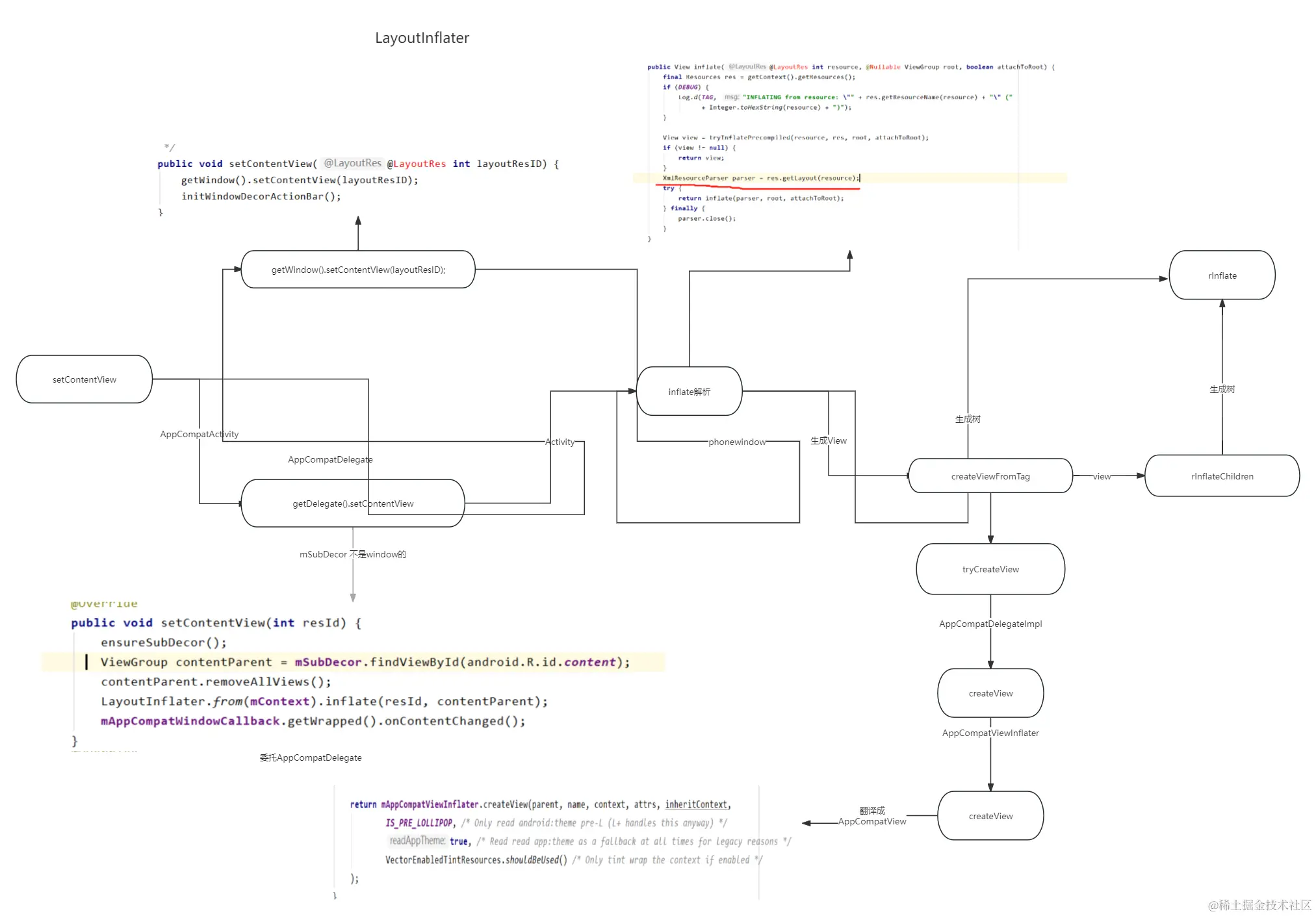
- LayoutInflater系统服务,抽象不能被外部实例化
- 解析xml布局-XmlPullParser
- 根据XmlPullParser创建View对象
- rInflater添加到布局树
获取LayoutInflater实例
LayoutInflater LayoutInflater =
(LayoutInflater) context.getSystemService(Context.LAYOUT_INFLATER_SERVICE);
LayoutInflater.from(mContext).inflate(resId, contentParent);
context获取服务原理:理论上一个app只有一个服务实例
ActivityManager manager = (ActivityManager) getSystemService(Context.ACTIVITY_SERVICE);
@Overridepublic Object getSystemService(String name) { return mBase.getSystemService(name);}
@Override
public Object getSystemService(String name) {
return SystemServiceRegistry.getSystemService(this, name);
}
public static Object getSystemService(ContextImpl ctx, String name) {
ServiceFetcher<?> fetcher = SYSTEM_SERVICE_FETCHERS.get(name);
return fetcher != null ? fetcher.getService(ctx) : null;
}
private static final HashMap<String, ServiceFetcher<?>> SYSTEM_SERVICE_FETCHERS =
new HashMap<String, ServiceFetcher<?>>();
static {
registerService(Context.ACCESSIBILITY_SERVICE, AccessibilityManager.class,
new CachedServiceFetcher<AccessibilityManager>() {
@Override
public AccessibilityManager createService(ContextImpl ctx) {
return AccessibilityManager.getInstance(ctx);
}});
registerService(Context.CAPTIONING_SERVICE, CaptioningManager.class,
new CachedServiceFetcher<CaptioningManager>() {
@Override
public CaptioningManager createService(ContextImpl ctx) {
return new CaptioningManager(ctx);
}});
registerService(Context.LAYOUT_INFLATER_SERVICE, LayoutInflater.class,
new CachedServiceFetcher<LayoutInflater>() {
@Override
public LayoutInflater createService(ContextImpl ctx) {
return new PhoneLayoutInflater(ctx.getOuterContext());
}});
}
LayoutInflater在Activity中的创建过程
- 每个 Context 都有其独立的 LayoutInflater(cloneInContext)
- 根据SystemServiceRegistry注册LayoutInflater 实例为PhoneLayoutInflater
@Override
public Object getSystemService(String name) {
if (LAYOUT_INFLATER_SERVICE.equals(name)) {
if (mInflater == null) {
mInflater = LayoutInflater.from(getBaseContext()).cloneInContext(this);
}
return mInflater;
}
return getBaseContext().getSystemService(name);
}
PhoneLayoutInflater 源码
public class PhoneLayoutInflater extends LayoutInflater {
private static final String[] sClassPrefixList = {
"android.widget.",
"android.webkit.",
"android.app."
};
public PhoneLayoutInflater(Context context) {
super(context);
}
protected PhoneLayoutInflater(LayoutInflater original, Context newContext) {
super(original, newContext);
}
@Override protected View onCreateView(String name, AttributeSet attrs) throws ClassNotFoundException {
for (String prefix : sClassPrefixList) {
try {
View view = createView(name, prefix, attrs);
if (view != null) {
return view;
}
} catch (ClassNotFoundException e) {
}
}
return super.onCreateView(name, attrs);
}
public LayoutInflater cloneInContext(Context newContext) {
return new PhoneLayoutInflater(this, newContext);
}
}
Appcompat包对于LayoutInflater的适配
- 委托类 AppCompatDelegate -->AppCompatDelegateImpl
-
- 主要用于继承AppCompat支持任何的android.app.Activity
-
-
-
-
AppCompatDelegate LayoutInflater布局解析过程
- setContentView-->ensureSubDecor
- 创建subDecor
-
- AppCompatDelegate - setContentView尝试创建subDecor
-
private void ensureSubDecor() {
if (!mSubDecorInstalled) {
mSubDecor = createSubDecor();
}
private ViewGroup createSubDecor() {
ensureWindow();
mWindow.getDecorView();
final LayoutInflater inflater = LayoutInflater.from(mContext);
ViewGroup subDecor = null;
mWindow.setContentView(subDecor);
return subDecor;
}
public View inflate(@LayoutRes int resource, @Nullable ViewGroup root, boolean attachToRoot) {
final Resources res = getContext().getResources();
XmlResourceParser parser = res.getLayout(resource);
try {
return inflate(parser, root, attachToRoot);
} finally {
parser.close();
}
}
public View inflate(XmlPullParser parser, @Nullable ViewGroup root, boolean attachToRoot) {
synchronized (mConstructorArgs) {
advanceToRootNode(parser);
if (type != XmlPullParser.START_TAG) {
throw new InflateException(parser.getPositionDescription()
+ ": No start tag found!");
}
final String name = parser.getName();
if (TAG_MERGE.equals(name)) {
if (root == null || !attachToRoot) {
throw new InflateException("<merge /> can be used only with a valid "
+ "ViewGroup root and attachToRoot=true");
}
rInflate(parser, root, inflaterContext, attrs, false);
} else {
final View temp = createViewFromTag(root, name, inflaterContext, attrs);
rInflateChildren(parser, temp, attrs, true);
if (root != null && attachToRoot) {
root.addView(temp, params);
}
if (root == null || !attachToRoot) {
result = temp;
}
}
}
}
- 根据解析的xml创建对应的AppCompatView类型的布局,
final View createView(View parent, final String name, @NonNull Context context,
@NonNull AttributeSet attrs, boolean inheritContext,
boolean readAndroidTheme, boolean readAppTheme, boolean wrapContext)
View view = null;
case "TextView":
view = createTextView(context, attrs);
verifyNotNull(view, name);
break;
case "ImageView":
view = createImageView(context, attrs);
verifyNotNull(view, name);
break;
case "Button":
view = createButton(context, attrs);
verifyNotNull(view, name);
break;
case "EditText":
view = createEditText(context, attrs);
verifyNotNull(view, name);
break;
default:
view = createView(context, name, attrs);
}
}



