实现效果
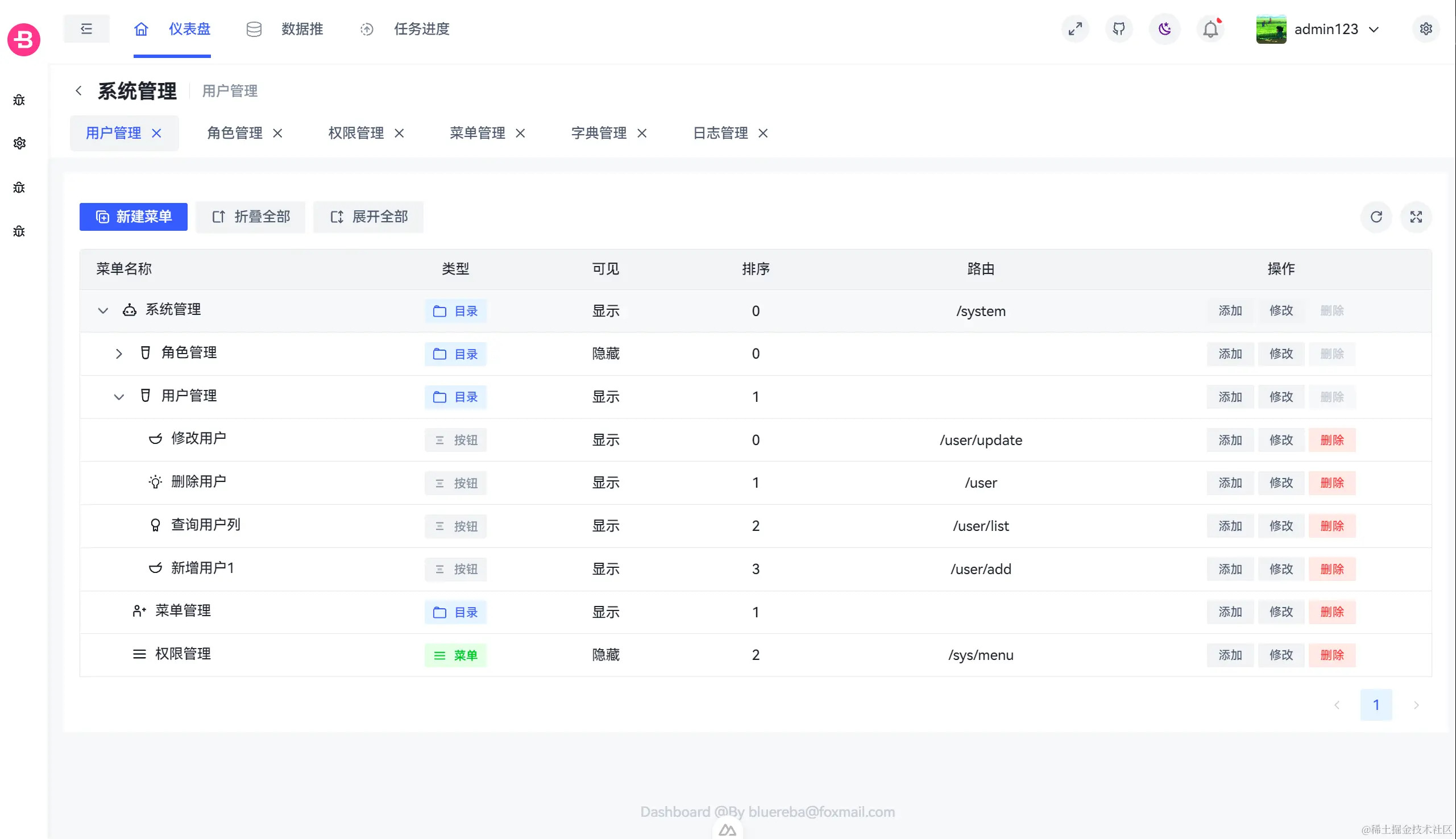
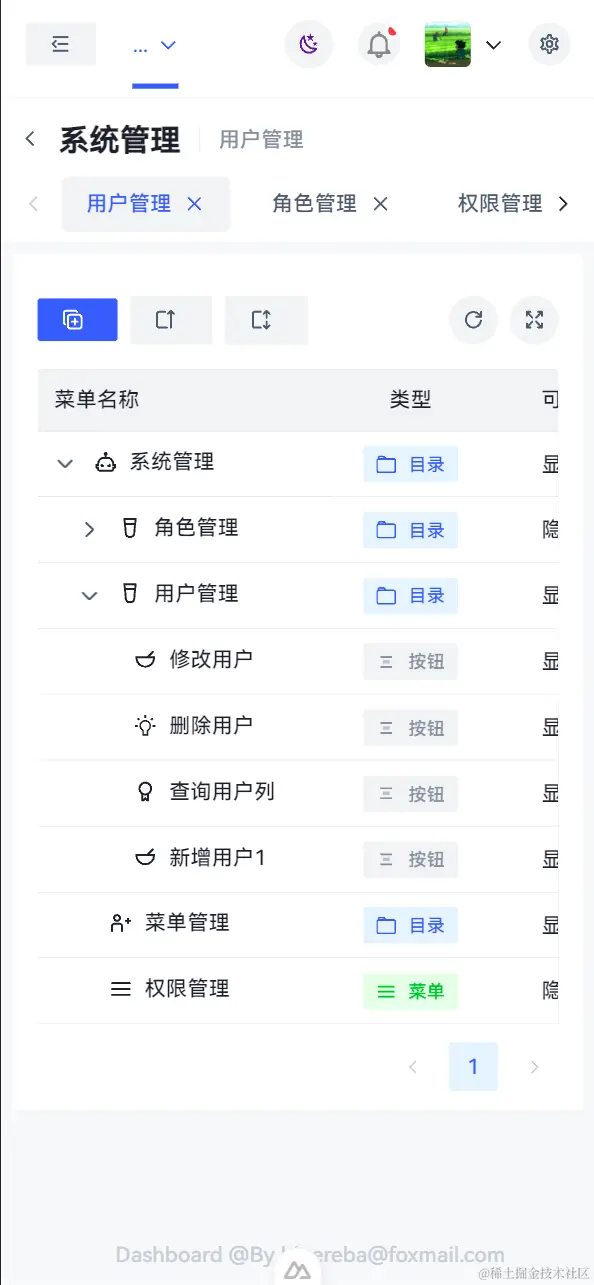
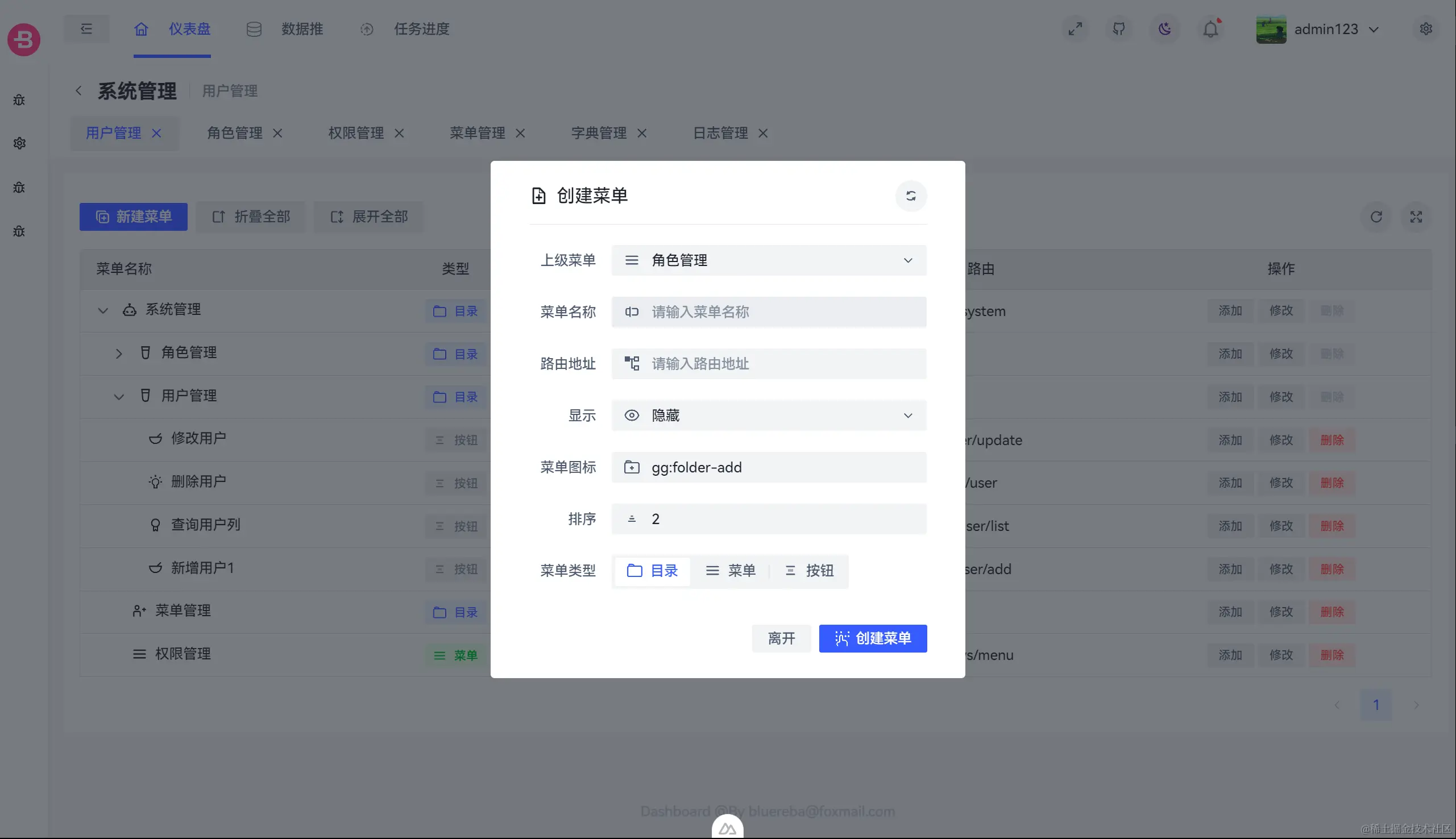
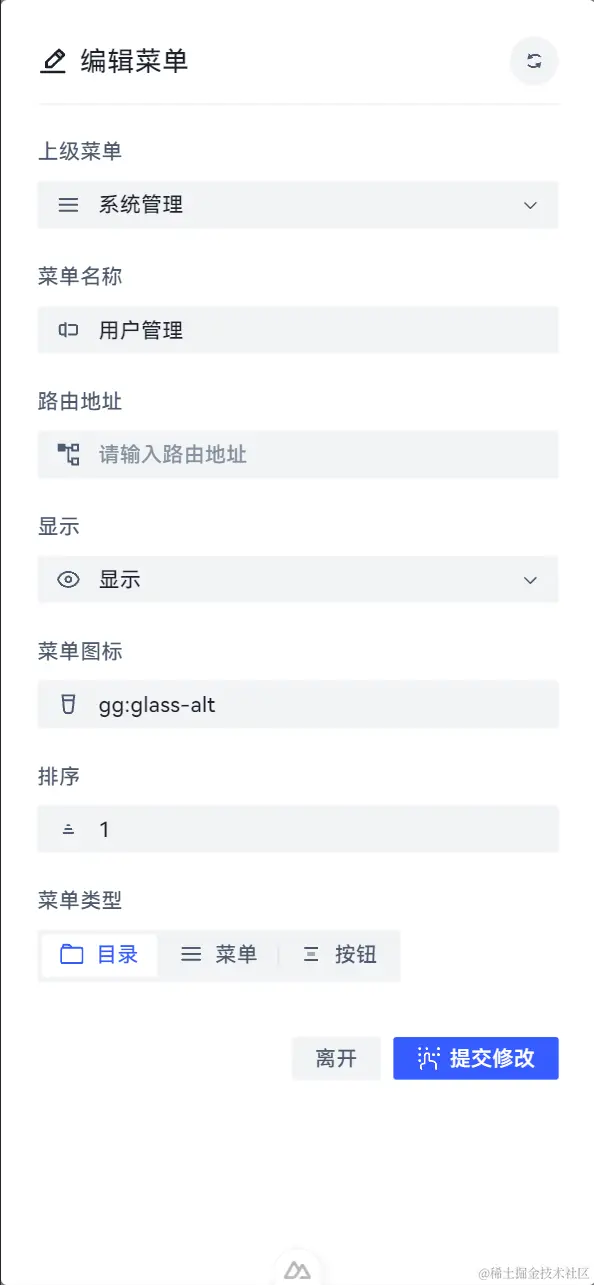
页面实现
pages/menu/index.vue
<script lang="ts" setup>
import { type TableInstance } from '@arco-design/web-vue';
import { menuMeta } from './menuMeta';
import DeleteMenu from './components/DeleteMenu.vue';
import UpdateMenu from './components/UpdateMenu.vue';
import { getMenuTreeApi } from '~/api/menu';
import { useRequest } from '#imports';
const {
loading,
data: menuTree,
refresh: menuTreeRefresh,
} = useRequest(getMenuTreeApi, {
manual: false,
});
const { tableColumns, menuTypeColors } = menuMeta();
const { isDesktop } = useLayout();
const tableBoxRef = ref<HTMLElement>();
const tableRef = ref<TableInstance>();
const updateMenuRef = ref<InstanceType<typeof UpdateMenu>>();
const loadingMenuInfo = computed(() => {
return updateMenuRef.value!.loadMenuLoading || false;
});
const expandedKeys = ref([]);
const { toggle } = useFullscreen(tableBoxRef);
const onExpandAll = () => {
tableRef.value!.expandAll();
};
const onFoldingAll = () => {
expandedKeys.value = [];
};
const selectMenuId = ref('');
const onUpdate = (mid: string) => {
selectMenuId.value = mid;
updateMenuRef.value!.loadMenuRunAsync(mid);
};
const onUpdateSuccess = () => {
Message.success('更新成功');
menuTreeRefresh();
};
const onCreateMenu = (parentId: string) => {
updateMenuRef.value!.onCreateMenuVisible(parentId);
};
const onCreateSuccess = () => {
Message.success('创建菜单成功');
menuTreeRefresh();
};
</script>
<template>
<a-card ref="tableBoxRef" :bordered="false" :size="'small'">
<UpdateMenu
ref="updateMenuRef"
:menu-tree="menuTree"
@on-update-success="onUpdateSuccess"
@on-create-success="onCreateSuccess"
/>
<div class="flex justify-between py-4">
<a-space>
<a-button :size="'small'" type="primary" @click="onCreateMenu('0')">
<span v-if="isDesktop">新建菜单</span>
<template #icon>
<i class="i-tabler-copy-plus" />
</template>
</a-button>
<a-button @click="onFoldingAll">
<span v-if="isDesktop">折叠全部</span>
<template #icon>
<i class="i-tabler-arrow-autofit-up" />
</template>
</a-button>
<a-button @click="onExpandAll">
<span v-if="isDesktop">展开全部</span>
<template #icon>
<i class="i-tabler-arrow-autofit-height" />
</template>
</a-button>
</a-space>
<a-space>
<a-button shape="circle" @click="menuTreeRefresh">
<i class="i-tabler-reload" />
</a-button>
<a-button shape="circle" @click="toggle">
<i class="i-tabler-arrows-maximize" />
</a-button>
</a-space>
</div>
<a-table
ref="tableRef"
v-model:expanded-keys="expandedKeys"
:columns="tableColumns"
:data="menuTree"
:loading="loading"
filter-icon-align-left
hide-expand-button-on-empty
row-key="menuId"
>
<template #menuType="{ record }">
<a-tag
:color="
menuTypeColors[record.menuType?.code as keyof typeof menuTypeColors]
"
>
<a-space>
<Iconify :name="record.menuType?.icon" />
<span>{{ record.menuType?.label }}</span>
</a-space>
</a-tag>
</template>
<template #menuName="{ record }">
<a-space>
<Iconify :name="record.menuIcon" />
<a-typography-text>{{ record.menuName }}</a-typography-text>
</a-space>
</template>
<template #optional="{ record }">
<a-button-group :size="'mini'">
<a-space :size="'mini'">
<a-button @click="onCreateMenu(record.menuId as string)">
添加
</a-button>
<a-button
:loading="selectMenuId == record.menuId && loadingMenuInfo"
@click="onUpdate(record.menuId as string)"
>
修改
</a-button>
<DeleteMenu
:disabled="record.children.length !== 0"
:menu-id="record.menuId"
:menu-name="record.menuName"
@success="menuTreeRefresh"
/>
</a-space>
</a-button-group>
</template>
<template #expand-icon="{ expanded }">
<i
v-if="expanded"
class="i-material-symbols-arrow-forward-ios-rounded rotate-90"
/>
<i v-else class="i-material-symbols-arrow-forward-ios-rounded" />
</template>
</a-table>
</a-card>
</template>
<style lang="scss" scoped>
:deep(.arco-table-cell-inline-icon) {
@apply pr-2;
}
:deep(.arco-table-expand-btn) {
background-color: transparent;
}
</style>
pages/menu/components/DeleteMenu.vue
<script lang="ts" setup>
import { delMenuApi } from '~/api/menu';
import { useRequest } from '#imports';
const props = defineProps<{
menuId: string;
menuName: string;
disabled: boolean;
}>();
const emits = defineEmits<{
(e: 'success'): void;
}>();
const { loading, run } = useRequest(delMenuApi, {
onError(error) {
Message.error(error.message);
},
onSuccess() {
emits('success');
},
});
const onConfirm = () => {
run(props.menuId);
};
</script>
<template>
<a-popconfirm
:cancel-button-props="{
type: 'secondary',
}"
:ok-button-props="{
status: 'danger',
}"
:position="'left'"
type="error"
@ok="onConfirm"
>
<template #content>
<span>
确认删除
<span class="highlight">{{ menuName }}</span>
菜单吗
</span>
</template>
<a-tooltip v-if="disabled" :content="`${menuName} 存在子节点`">
<a-button
:disabled="disabled"
:loading="loading"
:status="disabled ? 'normal' : 'danger'"
>
删除
</a-button>
</a-tooltip>
<a-button v-else :loading="loading" :status="'danger'">删除</a-button>
</a-popconfirm>
</template>
<style scoped>
.highlight {
color: rgb(var(--danger-6));
}
</style>
pages/menu/components/UpdateMenu.vue
<script lang="ts" setup>
import type { FormInstance, TreeNodeData } from '@arco-design/web-vue';
import type { MenuDto } from '~/types/dto/menu';
import { MenuTreeUtil } from '~/utils/MenuTreeUtil';
import { getMenusApi, postMenuApi, putMenuApi } from '~/api/menu';
import { useRequest } from '#imports';
import { SYS_MENU_TYPE, SYS_VISIBLE } from '~/key/dict';
const props = defineProps<{
menuTree: MenuEntity[] | undefined;
}>();
const emits = defineEmits<{
(e: 'onUpdateSuccess'): void;
(e: 'onCreateSuccess'): void;
}>();
const { isTablet } = useLayout();
const formRef = ref<FormInstance>();
const visible = ref(false);
const systemDictStore = useSystemDictStore();
const formData = ref<Partial<MenuDto> & { menuId?: string }>({});
const isCreateMenu = computed(() => {
return !formData.value?.menuId;
});
const {
runAsync: loadMenuRunAsync,
loading: loadMenuLoading,
refresh,
} = useRequest(getMenusApi, {
onSuccess: (data) => {
formData.value = {
menuName: data.menuName,
menuType: data.menuType.code,
parentId: data.parentId,
menuSort: data.menuSort,
component: data.component,
menuIcon: data.menuIcon,
visible: data.visible.code,
menuId: data.menuId,
};
visible.value = true;
},
});
const { runAsync: createMenuRunAsync, loading: createMenuLoading } =
useRequest(postMenuApi);
const { runAsync: updateMenuRunAsync, loading: updateMenuLoading } =
useRequest(putMenuApi);
const treeData = computed<TreeNodeData[]>(() => {
return MenuTreeUtil.toTreeNodeData(props.menuTree);
});
const onUpdateConfirm = async () => {
await updateMenuRunAsync(formData.value.menuId as string, {
...unref(formData),
});
visible.value = false;
emits('onUpdateSuccess');
onResetForm();
};
const onCancel = () => {
visible.value = false;
onResetForm();
};
const onCreateMenuVisible = (parentId: string) => {
formData.value.parentId = parentId;
visible.value = true;
onResetForm();
};
const onCreateMenu = async () => {
await createMenuRunAsync({ ...unref(formData) });
emits('onCreateSuccess');
visible.value = false;
onResetForm();
};
const onResetForm = () => {
formData.value = {
menuType: systemDictStore.getDefaultValue(SYS_MENU_TYPE),
visible: systemDictStore.getDefaultValue(SYS_VISIBLE),
};
};
defineExpose({
loadMenuLoading,
loadMenuRunAsync,
onCreateMenuVisible,
});
</script>
<template>
<a-modal
v-model:visible="visible"
:footer="false"
:fullscreen="isTablet"
:hide-title="true"
:modal-style="{
padding: isTablet ? '1.5rem !important' : '',
}"
:simple="true"
@cancel="onCancel"
>
<a-space class="justify-between" fill>
<a-space v-if="isCreateMenu" class="text-lg">
<i class="i-line-md:document-add" />
<span>创建菜单</span>
</a-space>
<a-space v-else class="text-lg">
<i class="i-line-md:edit-twotone" />
<span>编辑菜单</span>
</a-space>
<a-button :loading="loadMenuLoading" shape="circle" @click="refresh">
<template #icon>
<i class="i-gg-sync" />
</template>
</a-button>
</a-space>
<a-divider />
<a-form
ref="formRef"
:layout="isTablet ? 'vertical' : 'horizontal'"
:model="formData"
>
<a-form-item field="parentId" label="上级菜单">
<MenuTreeSelect
v-model:selected-key="formData.parentId"
:tree-data="treeData"
/>
</a-form-item>
<a-form-item field="menuName" label="菜单名称">
<a-input v-model="formData.menuName" placeholder="请输入菜单名称">
<template #prefix>
<i class="i-gg-rename" />
</template>
</a-input>
</a-form-item>
<a-form-item field="component" label="路由地址">
<a-input v-model="formData.component" placeholder="请输入路由地址">
<template #prefix>
<i class="i-gg-list-tree" />
</template>
</a-input>
</a-form-item>
<a-form-item field="visible" label="显示">
<a-select v-model="formData.visible" placeholder="菜单是否显示">
<a-option
v-for="dictData in systemDictStore.getDictTypeData(SYS_VISIBLE)"
:key="dictData.value"
:value="dictData.value"
>
<span>{{ dictData.label }}</span>
<template #icon>
<Iconify :name="dictData.icon" />
</template>
</a-option>
<template #prefix>
<i class="i-gg-eye" />
</template>
</a-select>
</a-form-item>
<a-form-item field="menuIcon" label="菜单图标">
<a-input
v-model="formData.menuIcon"
placeholder="icones.js.org 图标(`gg:user-add`)"
>
<template v-if="formData.menuIcon" #prefix>
<Iconify :name="formData.menuIcon" />
</template>
</a-input>
</a-form-item>
<a-form-item field="menuSort" label="排序" placeholder="请输入序号">
<a-input-number v-model="formData.menuSort" placeholder="请输入序号">
<template #prefix>
<i class="i-gg-sort-za" />
</template>
</a-input-number>
</a-form-item>
<a-form-item field="menuType" label="菜单类型">
<a-radio-group v-model="formData.menuType" :type="'button'">
<a-radio
v-for="dictData in systemDictStore.getDictTypeData(SYS_MENU_TYPE)"
:key="dictData.value"
:value="dictData.value"
>
<a-space>
<Iconify :name="dictData.icon" />
<span>{{ dictData.label }}</span>
</a-space>
</a-radio>
</a-radio-group>
</a-form-item>
</a-form>
<a-space class="justify-end pt-4" fill>
<a-button :size="'small'" @click="onCancel">离开</a-button>
<a-button
v-if="isCreateMenu"
:loading="createMenuLoading"
:size="'small'"
type="primary"
@click="onCreateMenu"
>
创建菜单
<template #icon>
<i class="i-streamline-braille-blind" />
</template>
</a-button>
<a-button
v-else
:loading="updateMenuLoading"
:size="'small'"
type="primary"
@click="onUpdateConfirm"
>
提交修改
<template #icon>
<i class="i-streamline-braille-blind" />
</template>
</a-button>
</a-space>
</a-modal>
</template>
<style scoped></style>