编译问题
20. java.lang.NullPointerException: Missing required view with ID: com.dcxing.xxx:id/xxx_id
- 自定义View中逻辑错误导致该问题
- 修复:检查自定义View逻辑,修正View问题
- app模块xml与lib中xml同名,合并时误认为重写,加载时导致id找不到
- 修复:保证命名不一致
19. Algorithm HmacPBESHA256 not available
Android Studio切换至瓢虫版本,编译apk报错
- jdk版本过低,要求最低要适配至jdk17,可参考问题9解决方案调整jdk版本
18. Could not find com.xxx:xxx:1.0.0
某些旧版本库mavenCentral找不到,可尝试添加三方云依赖库
maven { url 'https://maven.aliyun.com/repository/public/' }
maven { url 'https://maven.aliyun.com/repository/jcenter/' }
17. A failure occurred while executing com.android.build.gradle.internal.lint.AndroidLintWorkAction
- 同问题12,一般为gradle版本与插件版本不匹配
- gradle对应关系参考
16. Null extracted folder for artifact: ResolvedArtifact(componentIdentifier=androidx.annotation:annotation-experimental:1.4.0, variantName=null, artifactFile=C:\Users\xxx.gradle\caches\modules-2\files-2.1\androidx.annotation\annotation-experimental\1
- 新建Lib库时执行
Sync Project with Gradle Files报错 - 原因:新建Lib,自动添加
androidx.appcompat:appcompat库版本比主module版本高导致,修改版本保持一致即可
15. .9图编译失败
- 编辑.9图时只能编辑左上角,右下角不可编辑
14. 重复依赖
- Duplicate class org.reactivestreams.subscriber found in modules jetified-commonlib (comonlib.jar) and jetified-reactive-streams-1.8.3...
- 使用命令
gradlew :app:dependencies(有些项目该命令无效,可使用如下方式) - 查看方式:
gradle -> app -> tasks -> help -> dependencies
13. ARouter引入问题
- java与kotlin共存项目,需同时配置java+kotlin:AROUTER_MODULE_NAME
ARouter::Compiler An exception is encountered, [Cannot invoke "javax.lang.model.element.TypeElement.asType()" because the return value of "javax.lang.model.util.Elements.getTypeElement(java.lang.CharSequence)" is null]
defaultConfig {
    ...
    // ARouter
    kapt {
        arguments {
            arg("AROUTER_MODULE_NAME", project.name)
        }
    }
    javaCompileOptions {
        annotationProcessorOptions {
            argument("AROUTER_MODULE_NAME", project.name)
        }
    }
}
12. Plugins升级,Gradle需同步升级
- project -> build.gradle.kts
- project -> gradle -> wrapper -> gradle-wrapper.properties
- 版本对应关系参考
11. Android Studio升级问题
- java版本问题
A problem occurred evaluating project ':android'.
> Failed to apply plugin 'com.android.internal.application'.
   > Android Gradle plugin requires Java 11 to run. You are currently using Java 1.8.
     You can try some of the following options:
       - changing the IDE settings.
       - changing the JAVA_HOME environment variable.
       - changing `org.gradle.java.home` in `gradle.properties`.
- 修改:File->Project Structure->SDK location->JDK location...(更改对应jdk版本)
- gradle.properties:org.gradle.java.home=C:\Program Files\Java\jdk-11.0.6
10. Task :Common:compileDebugJavaWithJavac
Common Lib中java调用kotlin报错,乱码
plugins {
    id 'com.android.library'

    // build.gradle引入kt插件依赖
    id 'org.jetbrains.kotlin.android'
}
9. 解决报错Unable to make field private... 或 Runtime JAR files in the classpath should have the same version. These files were found in the classpath:
- 调整JDK版本
- File -> Settings -> Gradle
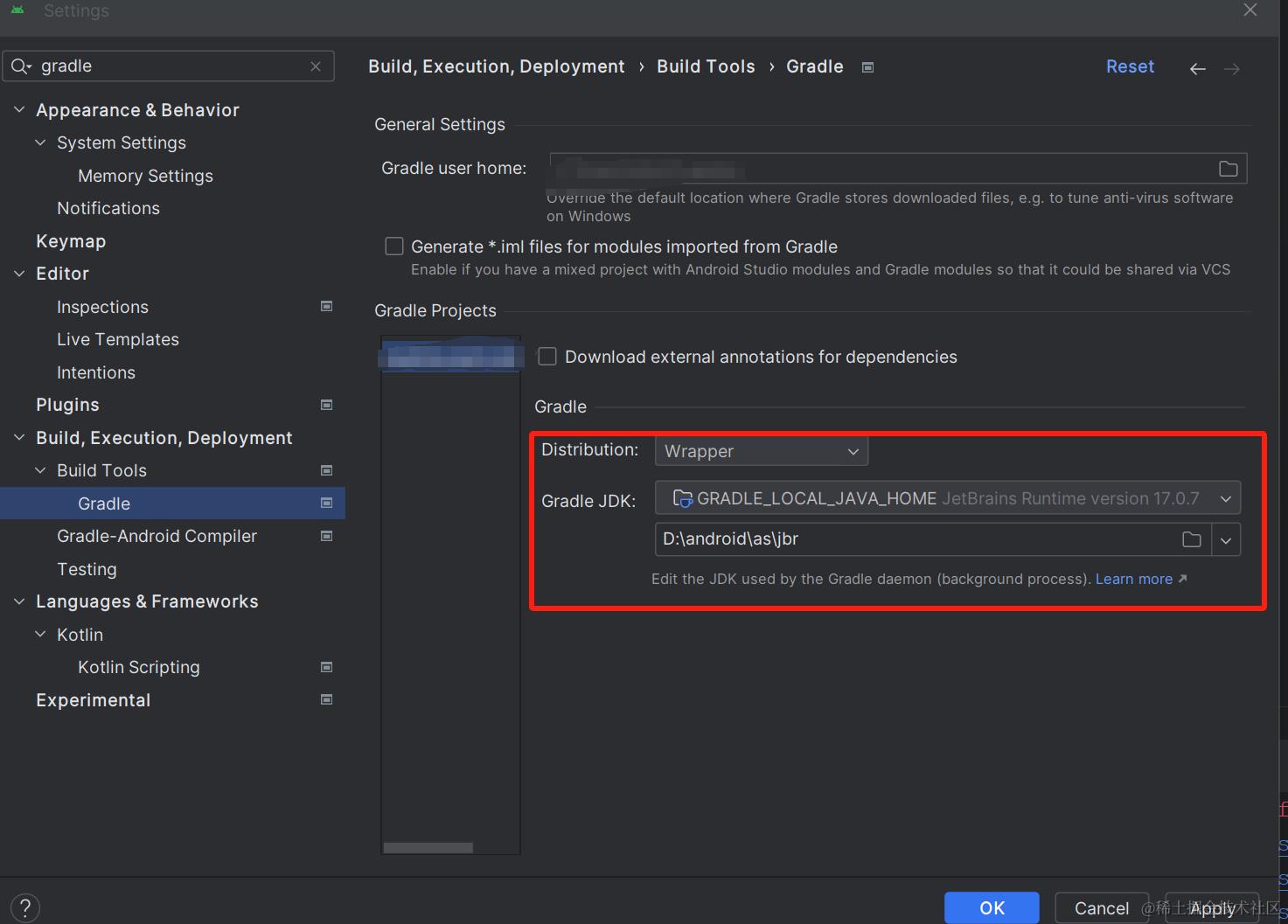
8. The specified Gradle installation directory 'D:\xxx\gradle\gradle-x.xx.x' does not exist.
- File -> Settings -> Gradle,修改gradle路径
7. Invalid keystore format
- 按照错误提示为debug签名问题
- 进入C:\user.android目录,删除debug.keystore,重新编译即可
6. java.lang.IllegalStateException: Module entity with name: xxx should be available
- settings.gradle问题
- 确保rootProject.name与项目根目录文件夹同名(区分大小写)
...
rootProject.name = "Xxx"
include = ":app"
...
5. Android Studio执行Run安装成功,但启动的还是原应用页面
- AS -> File -> Invalidate Caches ... -> Invalidate and Restart -> Run
4. java.lang.NoClassDefFoundError:Lorg/apache/http/ProtocolVersion 解析失败
// AndroidManifest.xml添加配置
// Android 6.0 中,已移除对 Apache HTTP 客户端的支持。Android 9 开始,默认情况下对应用不可用
<uses-library android:name="org.apache.http.legacy" android:required="false" />
3. More than one file was found with OS independent path 'lib/x86/libc++_shared.so'
android引入三方库时,本地项目与三方库同时引用相同的.so文件 或 三方库引入了相同的.so文件,导致编译时不知以哪个为主。
修改如下:android/app/build.gradle的android{}块添加代码
android {
    packagingOptions {
        pickFirst 'lib/x86/libc++_shared.so'
        pickFirst 'lib/arm64-v8a/libc++_shared.so'
        pickFirst 'lib/x86_64/libc++_shared.so'
        pickFirst 'lib/armeabi-v7a/libc++_shared.so'
        // dex { // dex文件压缩
            // useLegacyPackaging true
        // }
    }
    ...
}
...
2. 解决org.gradle.api.tasks.TaskExecutionException: Execution failed for task ‘:framework:compileDebugJavaWithJavac
1. 项目运行时检查NDK,NDK异常(无NDK或NDK有问题)
    解决:项目运行时不检查NDK,FIle -> Settings -> Android NDK取消勾选(NDK项目不可做此操作)
2. 检查sdk是否有问题
3. 检查build.gradle 相关版本是否存在异常
4. 查看gradle版本,并检查相关api是否过期
5. 使用命令查看完整错误信息
    gradlew compileDebug --stacktrace -info
    gradlew compileDebug --stacktrace -debug
    gradlew compileDebugSources --stacktrace -info
6. 检查相关依赖引用是否正确
7. 重复依赖检查包冲突(AS右侧gradle -> 项目 -> Tasks -> help -> dependencies)
    gradlew -q app:dependencies
    implementation('com.xxx:xxx:1.0.0' exclude group:"com.xxx", module: "xxx")
1. Android开发获取数据库数据报错"Value must be ≥ 0 but 'getColumnIndex' can be -1"
方式一:方法替换
cursor.getFloat(cursor.getColumnIndex(""))
替换为 cursor.getFloat(cursor.getColumnIndexOrThrow(""))

方式二:注解
@SuppessLint("Range")