- MaterialApp 替换成GetMaterialApp
- 使用系统的alertDialog(showDialog -> AlertDialog)
- 使用get的alertDialog(Get.defaultDialog)
- 使用get的_getSnackBar(Get.snackbar)
- 使用系统的BottomSheet (showModalBottomSheet 主题样式切换 黑夜/白天)
- 使用get的BottomSheet (Get.bottomSheet() 主题样式切换 黑夜/白天)Get.changeTheme(ThemeData.dark());
- 修改系统的昼夜模式切换入口 黑夜/白天
- flutter系统路由使用 Navigator.push,(Navigator.pushNamed 两种传参方式),Navigator.pop
- getx的路由跳转使用(Get.to(),Get.toName(),Get.back(),Get.offAll())。
- 路由动画 defaultTransition: Transition.rightToLeft,
- get使用getPages 也可以使用Routes: 参数 get要求名字必须有/斜杠
- 路由中间件,类似于截获。
- 响应式状态管理。
1.MaterialApp 替换成GetMaterialApp
runApp(GetMaterialApp(
2.使用系统的alertDialog(showDialog -> AlertDialog)
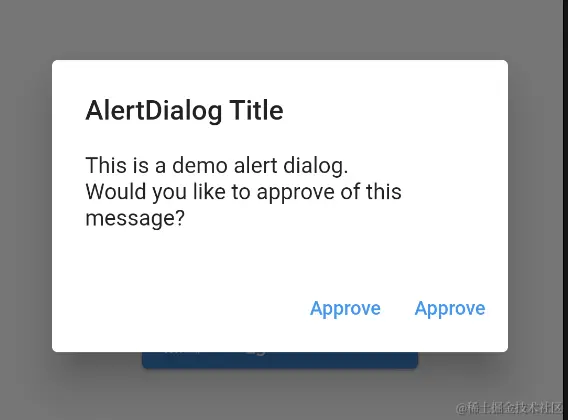
Future<void> _showMyDialog(context) async {
return showDialog<void>(
context: context,
barrierDismissible: false,
builder: (BuildContext context) {
return AlertDialog(
title: const Text('AlertDialog Title'),
content: SingleChildScrollView(
child: ListBody(
children: const <Widget>[
Text('This is a demo alert dialog.'),
Text('Would you like to approve of this message?'),
],
),
),
actions: <Widget>[
TextButton(
child: const Text('Approve'),
onPressed: () {
Navigator.of(context).pop();
},
),
TextButton(
child: const Text('Approve'),
onPressed: () {
Navigator.of(context).pop();
},
),
],
);
},
);
}
3.使用get的alertDialog(Get.defaultDialog)

return Get.defaultDialog(
title: '提示信息',
middleText: '请选择!!!!!',
confirm: ElevatedButton(
onPressed: () {
Get.back();
},
child: Text('确定')),
cancel: ElevatedButton(
onPressed: () {
Get.back();
},
child: Text('取消')));
4.使用get的_getSnackBar(Get.snackbar)
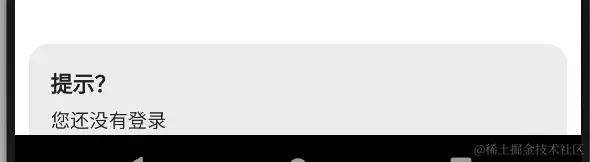
Get.snackbar('提示?', '您还没有登录', snackPosition: SnackPosition.BOTTOM);
5.使用系统的BottomSheet (showModalBottomSheet)
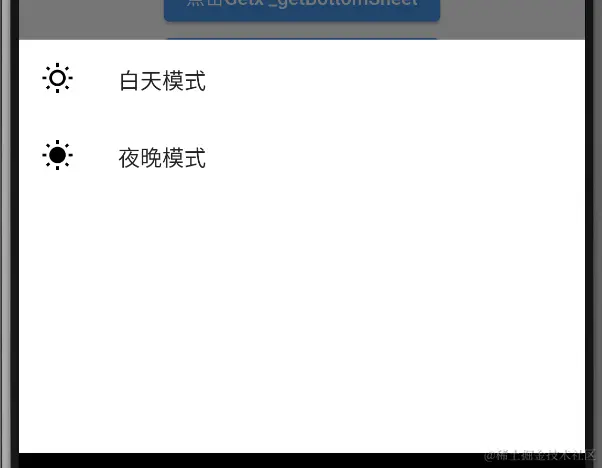
_sysShowModalBottomSheet(context){
  showModalBottomSheet(context: context, builder: (context) {
      return Column(
        children: [
          ListTile(
            title: Text("白天模式"),
            onTap: (){
              Get.changeTheme(ThemeData.light());
              Get.back();
            },
            leading: Icon(Icons.wb_sunny_outlined,color: Colors.black,),
          ),
          ListTile(
            title: Text("夜晚模式"),
            onTap: (){
              Get.changeTheme(ThemeData.dark());
              Get.back();
            },
            leading: Icon(Icons.wb_sunny,color: Colors.black,),
          )
        ],
      );
  });
}
6.使用get的BottomSheet (Get.bottomSheet())
_getBottomSheet() {
  Get.bottomSheet(Container(
    color: Colors.white,
    height: 300,
    child: Column(
      children: [
        ListTile(
          title: Text("白天模式"),
          onTap: (){
            Get.changeTheme(ThemeData.light());
            Get.back();
          },
          leading: Icon(Icons.wb_sunny_outlined,
color: Get.isDarkMode == true ? Colors.black :Colors.white,
),
        ),
        ListTile(
          title: Text("夜晚模式"),
          onTap: (){
            Get.changeTheme(ThemeData.dark());
            Get.back();
          },
          leading: Icon(Icons.wb_sunny,color: Get.isDarkMode == true ? Colors.black :Colors.white,),
        )
      ],
    ),
  ));
}
7.MaterialApp->theme->brightness 系统的昼夜模式切换入口
MaterialApp(
  theme: ThemeData(primarySwatch: Colors.green,brightness: Brightness.dark),
8. flutter系统路由使用 Navigator.push,(Navigator.pushNamed 两种传参方式),
runApp(MaterialApp(
  routes: {
    "/page1": (context) => Page1(),
    "/page2": (context) => Page2(),
  },
  initialRoute: "/page1",
  onGenerateRoute:(settings){
  },
));
onGenerateRoute: (settings) {
switch (settings.name) {
case '/page3':
return MaterialPageRoute(
builder: (context) => Page3(
params: settings.arguments,
));
}
},
Map argMap = widget.params;
print("params 打印");
print(argMap);
print(Get.arguments);
print("参数");
print(ModalRoute.of(context).settings.arguments);
navigationWidget(){
  return Column(
    children: [
      ElevatedButton(onPressed: (){
        Navigator.push(context, MaterialPageRoute(builder: (context) {
          return Page1(params:'content');
        }));
      }, child: Text('Navigator.push 跳转')),
      ElevatedButton(onPressed: (){
       Navigator.pushNamed(context, 'Page2',arguments: {"page-title": "test-router"});
      }, child: Text('Navigator.pushNamed 跳转带参数')),
      ElevatedButton(onPressed: (){
        Navigator.pushNamed(context, 'Page3',arguments: {"page-title": "test-router"});
      }, child: Text('Navigator.pushNamed 跳转带参数'))
    ],
  );
}
runApp(MaterialApp(
  theme: ThemeData(primarySwatch: Colors.green),
  routes: {
    "Page1": (context) => Page1(),
    "Page2": (context) => Page2(),
    "Page9": (context) => Page9()
  },
  onGenerateRoute: (settings) {
    switch (settings.name) {
      case 'Page3':
        return MaterialPageRoute(builder: (context) => Page3(params:settings.arguments));
      default:
        return null;
    }
  },
class Page2 extends StatelessWidget {
   Page2({Key key}) : super(key: key);
  @override
  Widget build(BuildContext context) {
    Map argMap = ModalRoute.of(context)?.settings.arguments;
    print("打印");
class Page3 extends StatefulWidget {
  Page3({Key key,this.params}) : super(key: key);
  Map params;
  @override
  State<Page3> createState() => _Page3State();
}

class _Page3State extends State<Page3> {
  @override
  Widget build(BuildContext context) {
    Map argMap = widget.params;
    print("打印");
    print(argMap);
9. getx的路由跳转使用(Get.to(),Get.toName(),Get.back(),Get.offAll())。
Navigator.pushNamed(context, 'Page2',arguments: {"page-title": "test-router"});
Get.toNamed('Page2');
Navigator.pushNamedAndRemoveUntil(context, 'Page1', (route) => false);
Get.offAllNamed('Page1');
Get.toNamed('Page2',arguments:{"page-title": "test-router"});
Get.toNamed('Page3',arguments:{"page-title": "test-router"});
Get.off(Page7());
Get.to(Page7());
Get.back();
Get.to(Page3(params: {"title":111},));
Navigator.pushNamed(context, 'Page3',arguments: {"page-title": "test-router"});

Map argMap = widget.params;
print("打印");
print(argMap);
runApp(GetMaterialApp(
theme: ThemeData(primarySwatch: Colors.green),
defaultTransition: Transition.rightToLeft,
routes: {
"Page1": (context) => Page1(),
"Page2": (context) => Page2(),
"Page9": (context) => Page9(),
"Page7": (context) => Page7(),
"Page13": (context) => Page13(),
},
onGenerateRoute: (settings) {
switch (settings.name) {
case 'Page3':
return MaterialPageRoute(
builder: (context) => Page3(params: settings.arguments));
default:
return null;
}
},
routes 需要写page3
"Page3": (context) => Page3()
不需要onGenerateRoute
Navigator.pushNamed(context, 'Page3',arguments: {"page-title": "test-router"});
print(Get.arguments);
10. getx的路由动画。
runApp(GetMaterialApp(
  theme: ThemeData(primarySwatch: Colors.green),
  defaultTransition: Transition.rightToLeft,
11. get使用getPages 也可以使用Routes: 参数 get要求名字必须有/斜杠
runApp(GetMaterialApp(
theme: ThemeData(primarySwatch: Colors.green),
defaultTransition: Transition.rightToLeft,
getPages: [
GetPage(name: '/page1', page: () => Page1()),
GetPage(name: '/page3', page: () => Page3()),
GetPage(name: '/page7', page: () => Page7()),
GetPage(name: '/', page: () => Page9()),
],
Get.toNamed('/page3',arguments: {"name": "zhangsan"});

runApp(GetMaterialApp(
  getPages: [
    GetPage(name: "/", page: () => Page1()),
    GetPage(name: "/page3", page: () => Page3())
  ],
  initialRoute: "/",
));


print("Get.arguments 打印");
print(Get.arguments);

print("参数");
print(ModalRoute.of(context).settings.arguments);
12. 中间件
class ShopMiddleWare extends GetMiddleware {
  @override
  RouteSettings redirect(String route) {
    print('-------->');
    print(route);

    print(Get.parameters);

    return RouteSettings(name: '/page1');
  }
}

GetPage(name: '/page3', page: () => Page3(), middlewares: [
  ShopMiddleWare(),
], parameters: {
  "title": "1"
},),
13. 响应式状态管理
class StatePage extends StatefulWidget {
  const StatePage({Key key}) : super(key: key);
  @override
  State<StatePage> createState() => _StatePageState();
}

class _StatePageState extends State<StatePage> {
  var _counter = 0;
  @override
  Widget build(BuildContext context) {
    return Scaffold(
        appBar:AppBar(title:Text("响应式状态管理")),
        body: Container(
          margin: EdgeInsets.all(30),
          child: Text('${_counter}'),
        ),
        floatingActionButton: FloatingActionButton(
          child: Icon(Icons.add),
          onPressed: (){
            _counter ++;
            setState(() {
            });
          },
        ),
    );
  }
}
RxInt _counter = 0.obs;
RxInt _counter1 = RxInt(12);

@override
Widget build(BuildContext context) {
  return Scaffold(
    appBar: AppBar(title: Text("响应式状态管理")),
    body: Container(
      margin: EdgeInsets.all(30),
      child: Obx(() => Text('${_counter.value}')),
    ),
    floatingActionButton: FloatingActionButton(
      child: Icon(Icons.add),
      onPressed: () {
        _counter++;
      },
    ),
  );
}
类的响应式
class Person {
RxString name = "".obs
RxInt age = 0.obs
}
class Animal {
String name
int age
Animal(this.name,this.age)
}
RxInt _counter = 0.obs
RxString _userName = RxString("zhangsan")
RxList list = RxList(["zhangsan","lisi"])
Person person = Person()
var animal = Animal("xiaomao",2).obs
@override
void initState() {
super.initState()
person.name.value = "关羽"
person.age.value = 30
}
@override
Widget build(BuildContext context) {
return Scaffold(
appBar: AppBar(title: Text("响应式状态管理")),
body: Column(
children: [
Obx(() => Text(person.name.value)),
Obx(() => Text(animal.value.name)),
Container(
margin: EdgeInsets.all(30),
child: Obx(() => Text('${_counter.value}')),
),
Obx(() => Text(_userName.value)),
Expanded(
child: Obx(() => ListView(
children: list.map((element) {
return ListTile(title: Text(element),);
}).toList(),
)),
),
],
),
floatingActionButton: FloatingActionButton(
child: Icon(Icons.add),
onPressed: () {
_counter++
_userName.value = "lisi"
list.add("wangwu")
person.name.value = "项羽"
animal.value.name = "xiaogou"
animal.value = animal.value
},
),
)
}
}



