最近,碰到一个需求,大致意思是这样的,需要使用高拍仪对一个工作台进行拍照,工作台上摆满了仪器,仪器上面贴了对应的二维码,需要去识别这些二维码,并走后续的业务流程。
我们假设仪器摆得很规范,且拍照也很清晰规范。然后我想到的思路就是:
- 高拍仪拍照并拿到高拍仪拍的照片
- 合理分隔这张照片
- 一个一个识别上面的二维码
我模拟了一个照片,假如以下照片就是我们待处理源【2*5】,我使用的是jsQR.js

<html>

<head>
  <title>QRCode</title>
  <meta http-equiv="Content-Type" content="text/html; charset=UTF-8" />
  <meta name="viewport" content="width=device-width,initial-scale=1,user-scalable=no" />
  <script type="text/javascript" src="https://cdn.staticfile.org/jquery/2.1.1/jquery.min.js"></script>
  <script type="text/javascript"
    src="https://lf9-cdn-tos.bytecdntp.com/cdn/expire-1-M/qrcodejs/1.0.0/qrcode.min.js"></script>
</head>

<body>
  <img id="one" />
  <input type="file" id="upload">
  <div id="show-split">

  </div>
  <div style="display: flex; justify-content: center; align-items: center;">
    <div id="qrcode1" style="width:100px; height:100px; margin:15px;"></div>
    <div id="qrcode2" style="width:100px; height:100px; margin:15px;"></div>
    <div id="qrcode3" style="width:100px; height:100px; margin:15px;"></div>
    <div id="qrcode4" style="width:100px; height:100px; margin:15px;"></div>
    <div id="qrcode5" style="width:100px; height:100px; margin:15px;"></div>
  </div>
  <div style="display: flex; justify-content: center; align-items: center;">
    <div id="qrcode6" style="width:100px; height:100px; margin:15px;"></div>
    <div id="qrcode7" style="width:100px; height:100px; margin:15px;"></div>
    <div id="qrcode8" style="width:100px; height:100px; margin:15px;"></div>
    <div id="qrcode9" style="width:100px; height:100px; margin:15px;"></div>
    <div id="qrcode10" style="width:100px; height:100px; margin:15px;"></div>
  </div>
  <script type="text/javascript">
    class CreateUI {
      constructor(container, width, height, text) {
        this.container = container;
        this.width = width;
        this.height = height;
        this.text = text;
      }
      initCode() {
        return new QRCode(document.getElementById(this.container), {
          width: this.width,
          height: this.height
        })
      }
      makeCode() {
        this.initCode().makeCode(this.text);
      }
    }
    function _createQr() {
      for (var i = 0; i < 10; i++) {
        let cUI = new CreateUI(`qrcode${i + 1}`, 100, 100, `www.content9527${i + 1}.com`);
        cUI.makeCode();
      }
    }
    // _createQr();
  </script>
  <script src="jsQR.js"></script>
  <script type="text/javascript">
    if ('BarcodeDetector' in window) {
      // 创建检测器
      const barcodeDetector = new BarcodeDetector({
        // formats 是检测的条码格式类型
        formats: ['qr_code']
      });
      console.log(barcodeDetector, 'barcodeDetector');
    } else {
      console.log('无');
    }
    function splitImage(imagePath, numRows, numColumns) {
      return new Promise((resolve, reject) => {
        let codes = [];
        const image = new Image();
        image.src = imagePath;
        image.onload = function () {
          const canvas = document.createElement("canvas");
          const context = canvas.getContext("2d");
          const {width, height} = image;

          canvas.width = width;
          canvas.height = height;
          context.drawImage(image, 0, 0);

          const smallWidth = Math.floor(width / numColumns);
          const smallHeight = Math.floor(height / numRows);
          let splitHtml = '';
          for (let row = 0; row < numRows; row++) {
            for (let col = 0; col < numColumns; col++) {
              const startX = col * smallWidth;
              const startY = row * smallHeight;
              const imageData = context.getImageData(startX, startY, smallWidth, smallHeight);

              const smallCanvas = document.createElement("canvas");
              const smallContext = smallCanvas.getContext("2d");
              smallCanvas.width = smallWidth;
              smallCanvas.height = smallHeight;
              smallContext.putImageData(imageData, 0, 0);
              const smallImage = smallCanvas.toDataURL("image/jpeg");
              const fileName = `small_image_${row}_${col}.jpg`;
              // console.log(smallImage, 'small');
              splitHtml += `<div><h1>${row}-${col}</h1> <img src=${smallImage} name=${fileName}/> </div>`
              try {
                const code = jsQR(imageData.data, smallWidth, smallHeight);
                codes.push(code);
              } catch (e) {
                reject(e);
              }
            }
          }
          $('#show-split').html(splitHtml);
          resolve(codes);
        };
      });
    }
    $('#upload').change((e) => {
      const file = e.target.files[0];
      let uSrc = URL.createObjectURL(file);
      $('#one').attr('src', uSrc);
      splitImage(uSrc, 2, 5).then(res => {
        console.log(res);
      }).catch(err => {
        console.log(err);
      })
    })
  </script>
</body>

</html>
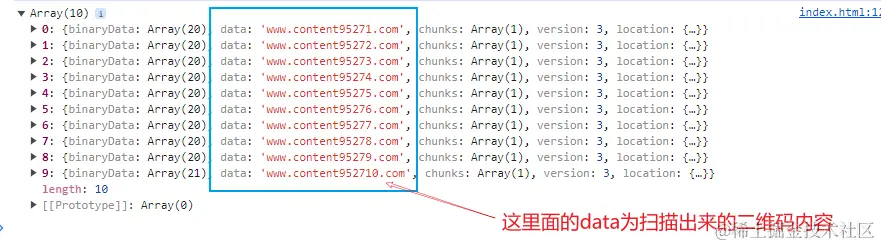
打印的结果为: