效果图
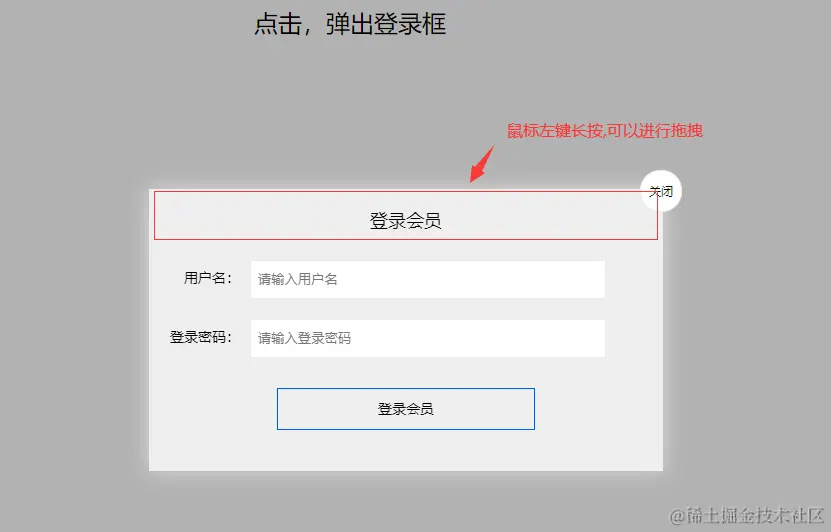
#
.login-header {
    width: 100%;
    text-align: center;
    height: 30px;
    font-size: 24px;
    line-height: 30px;
}
.login {
    display: none;
    width: 512px;
    height: 280px;
    position: fixed;
    border: #ebebeb solid 1px;
    left: 50%;
    top: 50%;
    background: #efefef;
    box-shadow: 0px 0px 20px #ddd;
    z-index: 9999;
    transform: translate(-50%, -50%);
}

.login-title {
    width: 100%;
    margin: 10px 0px 0px 0px;
    text-align: center;
    line-height: 40px;
    height: 40px;
    font-size: 18px;
    position: relative;
    cursor: move;
}

.login-input-content {
    margin-top: 20px;
}

.login-button {
    width: 50%;
    margin: 30px auto 0px auto;
    line-height: 40px;
    font-size: 14px;
    border: #0059ff 1px solid;
    text-align: center;
}

.login-bg {
    display: none;
    width: 100%;
    height: 100%;
    position: fixed;
    top: 0px;
    left: 0px;
    background: rgba(0, 0, 0, .3);
}

a {
    text-decoration: none;
    color: #000000;
}

.login-button a {
    display: block;
}

.login-input input.list-input {
    float: left;
    line-height: 35px;
    height: 35px;
    width: 350px;
    border: #ebebeb 1px solid;
    text-indent: 5px;
}

.login-input {
    overflow: hidden;
    margin: 0px 0px 20px 0px;
}

.login-input label {
    float: left;
    width: 90px;
    padding-right: 10px;
    text-align: right;
    line-height: 35px;
    height: 35px;
    font-size: 14px;
}

.login-title span {
    position: absolute;
    font-size: 12px;
    right: -20px;
    top: -30px;
    background: #ffffff;
    border: #ebebeb solid 1px;
    width: 40px;
    height: 40px;
    border-radius: 20px;
}
HTML的全称为超文本标记语言,是一种标记语言。它包括一系列标签,通过这些标签可以将网络上的文档格式统一,使分散的Internet资源连接为一个逻辑整体。HTML文本是由HTML命令组成的描述性文本,HTML命令可以说明文字,图形、动画、声音、表格、链接等。
<div class="login-header"><a id="link" href="javascript:;">点击,弹出登录框</a></div>
<div id="login" class="login">
<div id="title" class="login-title">登录会员
<span><a id="closeBtn" href="javascript:void(0);" class="close-login">关闭</a></span>
</div>
<div class="login-input-content">
<div class="login-input">
<label>用户名:</label>
<input type="text" placeholder="请输入用户名" name="info[username]" id="username" class="list-input">
</div>
<div class="login-input">
<label>登录密码:</label>
<input type="password" placeholder="请输入登录密码" name="info[password]" id="password" class="list-input">
</div>
</div>
<div id="loginBtn" class="login-button"><a href="javascript:void(0);" id="login-button-submit">登录会员</a></div>
</div>
<div id="bg" class="login-bg"></div>
JavaScript脚本行为
var login = document.querySelector('.login');
var mask = document.querySelector('.login-bg');
var link = document.querySelector('#link');
var closeBtn = document.querySelector('#closeBtn');
link.addEventListener('click', function() {
mask.style.display = 'block';
login.style.display = 'block';
});
closeBtn.addEventListener('click', function() {
mask.style.display = 'none';
login.style.display = 'none';
});
title.addEventListener('mousedown', function(e) {
var x = e.pageX - login.offsetLeft;
var y = e.pageY - login.offsetTop;
document.addEventListener('mousemove', move);
function move(e) {
login.style.left = e.pageX - x + 'px';
login.style.top = e.pageY - y + 'px';
}
document.addEventListener('mouseup', function() {
document.removeEventListener('mousemove', move);
});
});