依赖
"docxtemplater": "^3.43.1",
"docxtemplater-image-module-free": "^1.1.1",
"pizzip": "^3.1.4",
实现
import Docxtemplater from "docxtemplater";
import ImageModule from "docxtemplater-image-module-free";
import PizZip from 'pizzip';
import PizZipUtils from 'pizzip/utils/index.js';
async function downloadFile(from, fileName) {
if (!(from instanceof Blob)) from = await (await fetch(from)).blob();
const aEl = document.createElement('a');
aEl.href = URL.createObjectURL(from);
aEl.download = fileName || '';
aEl.click();
}
async function docx(dcoxUrl, outName, data) {
if (arguments.length < 3) throw new Error('docx方法缺少必要的参数');
const response = await fetch(dcoxUrl);
const arrayBuffer = await response.arrayBuffer();
const zip = new PizZip(arrayBuffer);
const imageModule = new ImageModule({
centered: false,
fileType: 'docx',
getImage: async (tagPath) => (await fetch(tagPath)).arrayBuffer(),
getSize(img) {
return [150, 150];
}
});
const doc = new Docxtemplater()
.loadZip(zip)
.attachModule(imageModule).compile()
.renderAsync(data)
doc.then(() => {
const out = doc.getZip().generate({
type: 'blob',
mimeType: 'application/vnd.openxmlformats-officedocument.wordprocessingml.document',
});
downloadFile(out, outName);
})
},
使用
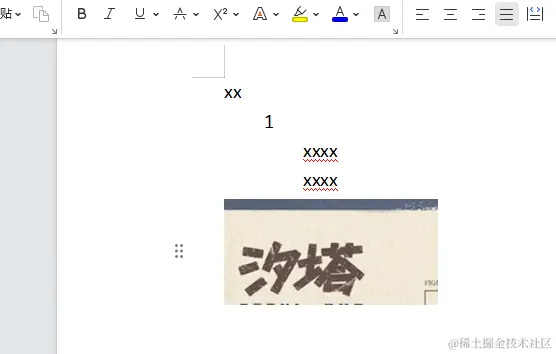
docx('./文档.docx', '文档.docx', {
    name: "xx",
    info: { id: 1, address: [{ title: 'xxxx' },{ title: 'xxxx' }] },
    img: 'url'
})
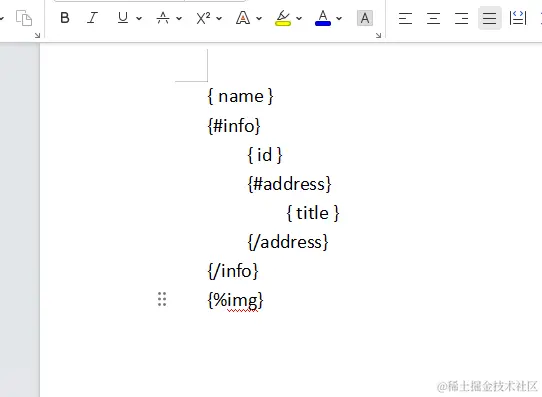
/** 标签
* {
* {属性名称}
* {%图片路径}
* 文档 https://docxtemplater.com/docs/tag-types/
*/
效果