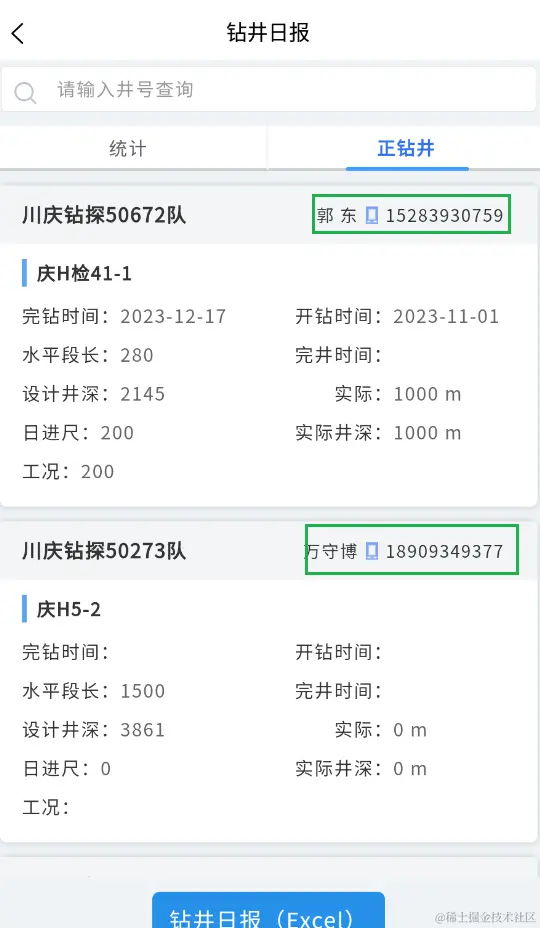
描述: 页面点击电话号码,跳转到系统拨打电话界面
存在问题
1、直接使用uni.makePhoneCall,打包后,小米手机测试。既不报错,也无任何反应。后在设置-应用中开启拨打电话权限后测试,可以跳转到拨打电话页面
callNumber(phone) {
      uni.makePhoneCall({
        phoneNumber: phone,
        success: () => {
          console.log('拨打电话成功!');
        },
        fail: () => {
          console.error('拨打电话失败!');
        }
      });
    },
2、换一种方式,使用plus.device.dial(tel, false),华为手机可以直接将电话拨打出去,第二个参数true表示直接拨打电话,false跳转到拨打电话界面。小米手机测试无任何反应,和1一样
plus.device.dial(tel, false);
3、应该是权限问题:加权限判断,代码如下,打包后,小米手机测试还是没有报错,也没有任何反应。查找原因:uni.authorize方法在APP中不起作用,只能用于小程序判断
callPhone(tel) {
      if(!tel){
        uni.showToast({
          icon: 'none',
          title:'暂无联系方式'
        })
        return
      }
      this.makeCall(tel)
    },
    makeCall(tel) {
      uni.getSetting({
        success: (res) => {
          if (res.authSetting['scope.makePhoneCall']) {
            this.callNumber(tel);
          } else {
            uni.authorize({
              scope: 'scope.makePhoneCall',
              success: () => {
                this.callNumber(tel);
              },
              fail: () => {
                uni.openSetting({
                  success: (res) => {
                    if (res.authSetting['scope.makePhoneCall']) {
                      this.callNumber(tel);
                    }
                  }
                });
              }
            });
          }
        }
      });
    },
    callNumber(phone) {
      uni.makePhoneCall({
        phoneNumber: phone,
        success: () => {
          console.log('拨打电话成功!');
        },
        fail: () => {
          console.error('拨打电话失败!');
        }
      });
    },
4、换一种权限判断方式,打包后还是没有任何反应。。。应该是判断是否安卓写错了。
makeCall(phone, callBack) {
let agent = navigator.userAgent.toLowerCase();
let isAndroid = agent.indexOf("android") != -1;
if (isAndroid) {
plus.android.requestPermissions(
['android.permission.CALL_PHONE'],
function (resultObj) {
var result = 0
for (var i = 0; i < resultObj.granted.length; i++) {
var grantedPermission = resultObj.granted[i]
console.log('已获取的权限:' + grantedPermission)
result = 1
}
for (var i = 0; i < resultObj.deniedPresent.length; i++) {
var deniedPresentPermission = resultObj.deniedPresent[i]
console.log('拒绝本次申请的权限:' + deniedPresentPermission)
result = 0
}
for (var i = 0; i < resultObj.deniedAlways.length; i++) {
var deniedAlwaysPermission = resultObj.deniedAlways[i]
console.log('永久拒绝申请的权限:' + deniedAlwaysPermission)
result = -1
}
uni.showToast({title: result})
if (result == 1) {
uni.makePhoneCall({
phoneNumber: phone,
success(ress) {
console.log('拨打电话成功', ress)
},
fail(err) {
console.log('拨打电话失败', 'err')
},
})
} else {
callBack()
}
},
function (error) {
console.log('申请权限错误:' + error.code + ' = ' + error.message)
}
)
} else {
uni.makePhoneCall({
phoneNumber: phone,
})
}
},
5、最终解决如下:
callPhone(tel) {
if(!tel){
uni.showToast({
icon: 'none',
title:'暂无联系方式'
})
return
}
this.makeCall(tel)
},
makeCall(phoneNumber) {
plus.android.requestPermissions(
['android.permission.CALL_PHONE'],
function (resultObj) {
let result = 0
for (let i = 0; i < resultObj.granted.length; i++) {
let grantedPremission = resultObj.granted[i]
console.log('已获取权限',grantedPremission)
result =1
}
for(let i =0 ;i<resultObj.deniedPresent.length;i++){
let deniedPresentPremission = resultObj.deniedPresent[i]
console.log('拒绝本次申请的权限',deniedPresentPremission)
result=0
}
for(let i=0;i>resultObj.deniedAlways.length;i++){
let deniedAlwaysPremission = resultObj.deniedAlways[i]
console.log('永久拒绝申请的权限',deniedAlwaysPremission)
result=-1
}
if(result==1){
uni.makePhoneCall({
phoneNumber,
success:(res)=>{
console.log('拨打电话成功')
},
fail:(err)=>{
console.log('拨打电话失败')
}
})
}else{
uni.showToast({
icon: 'error',
title: '请在设置-应用管理中打开拨打电话权限!'
})
}
},
function(err){
uni.showToast({
icon: 'none',
title: '申请权限错误:' + err.code + " = " + err.message
})
}
)
},
callNumber(phone) {
uni.makePhoneCall({
phoneNumber: phone,
success: () => {
console.log('拨打电话成功!');
},
fail: () => {
console.error('拨打电话失败!');
}
});
},


