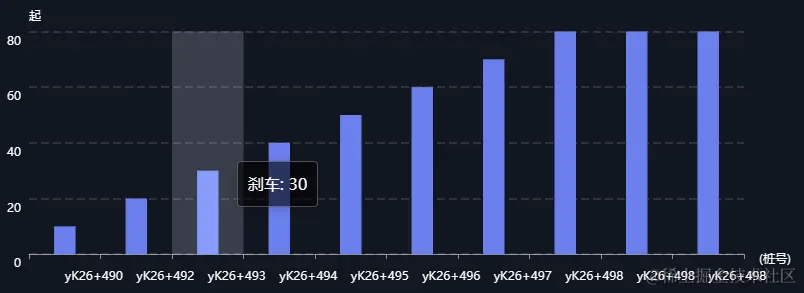
一、示例
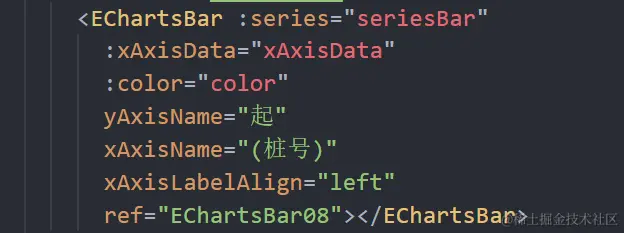
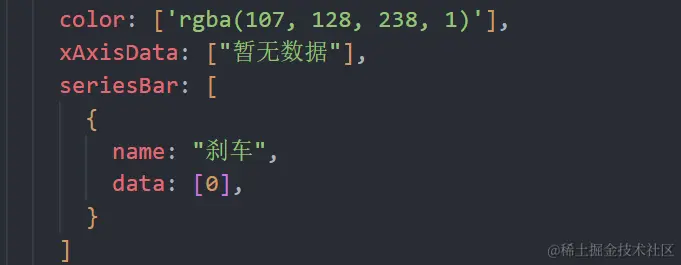
二、使用案例
三、封装组件完整代码
<template>
<div class="EChartsBar"
:ref="chartRef"
@mouseover="clearTimer"
@mouseout="setTimer">
</div>
</template>
<script>
export default {
name: "EChartsBar",
props: {
chartRef: {
type: String,
default: "chartRef"
},
grid: {
type: Object,
default: () => {
return {}
}
},
yAxisName: {
type: String,
default: "辆"
},
xAxisName: {
type: String,
default: ""
},
color: {
type: Array,
default: () => {
return ["rgba(255, 179, 0, 1)", "rgba(4, 245, 255, 1)", "rgba(1, 156, 255, 1)"]
}
},
xAxisData: {
type: Array,
default: () => {
return ["暂无数据"]
}
},
series: {
type: Array,
default: () => {
return [{ data: [0] }]
},
},
legendShow: {
type: Boolean,
default: false
},
xAxisLabelAlign: {
type: String,
default: ""
},
isAnimate: {
type: Boolean,
default: true
}
},
data() {
return {
EChartsBarTimer: null,
option: {}
}
},
mounted() {
this.$nextTick(() => {
this.initECharts()
})
},
beforeDestroy() {
clearInterval(this.EChartsBarTimer)
},
watch: {
series: {
handler() {
this.updateECharts()
},
deep: true
},
xAxisData() {
this.updateECharts()
}
},
methods: {
updateECharts() {
let seriesArray = []
this.series.forEach((item) => {
seriesArray.push({
type: "bar",
barWidth: "30%",
...item
})
})
this.EChartsBar.setOption({
xAxis: { data: this.xAxisData },
series: seriesArray
})
clearInterval(this.EChartsBarTimer)
this.setTimer()
},
clearTimer() {
clearInterval(this.EChartsBarTimer)
},
setTimer() {
this.isAnimate && this.animateECharts(this.EChartsBar, this.xAxisData)
},
initECharts() {
this.EChartsBar = this.$echarts.init(this.$refs[this.chartRef])
let seriesArray = []
this.series.forEach((item) => {
seriesArray.push({
type: "bar",
barWidth: "30%",
...item
})
})
this.option = {
backgroundColor: "#00000000",
color: this.color,
tooltip: {
trigger: "axis",
axisPointer: {
type: "shadow"
},
textStyle: {
color: "#ffffff",
align: "left",
fontSize: 16
},
backgroundColor: "rgba(0, 0, 0,.6)",
borderColor: "rgba(186, 186, 186, .4)",
formatter: '{a}: {c}'
},
grid: {
top: this.legendShow ? "15%" : '8%',
left: "2%",
right: "6%",
bottom: "10%",
containLabel: true,
...this.grid
},
xAxis: {
type: "category",
name: this.xAxisName,
nameTextStyle: {
color: "#ffffff",
fontSize: 12,
verticalAlign: 'top',
align: 'left',
},
data: [...this.xAxisData],
axisLine: {
show: true,
lineStyle: { color: "#FFFFFF80", type: "solid", width: 1 }
},
axisTick: {
show: true
},
axisLabel: {
show: true,
fontSize: 12,
interval: 0,
color: "#ffffff",
align: this.xAxisLabelAlign,
lineHeight: 30,
},
},
yAxis: {
type: "value",
name: this.yAxisName,
nameTextStyle: {
color: "#ffffff",
fontSize: 12,
align: "left",
lineHeight: 0
},
minInterval: 1,
splitNumber: 4,
splitLine: {
show: true,
lineStyle: {
color: "#ffffff20",
type: "dashed",
width: 2
}
},
axisLine: {
show: false
},
axisLabel: {
color: "#ffffff",
fontSize: 12,
verticalAlign: 'top',
lineHeight: 20,
},
axisTick: {
show: false
}
},
legend: {
show: this.legendShow,
left: '2%',
top: "2%",
icon: "rect",
itemWidth: 14,
itemHeight: 10,
textStyle: {
color: "#ffffff",
fontSize: 14
}
},
series: seriesArray
}
this.EChartsBar.setOption(this.option, true)
this.isAnimate && this.animateECharts(this.EChartsBar, this.xAxisData)
},
animateECharts(myChart, array) {
let currentIndex = -1
this.EChartsBarTimer = setInterval(() => {
var dataLen = array.length
myChart.dispatchAction({
type: "downplay",
seriesIndex: 0,
dataIndex: currentIndex
})
currentIndex = (currentIndex + 1) % dataLen
myChart.dispatchAction({
type: "highlight",
seriesIndex: 0,
dataIndex: currentIndex
})
myChart.dispatchAction({
type: "showTip",
seriesIndex: 0,
dataIndex: currentIndex
})
}, 3000)
}
}
}
</script>
<style lang="scss" scoped>
.EChartsBar {
width: 100%;
height: 100%;
}
</style>