虚拟Dom
本质上是一个object类型的对象(一般对象)
比较轻没有真是Dom上那么多的属性
会转化为真实Dom再页面上进行展示
jsx语法规则
1.定义虚拟DOM时一定不要写引号
2.便签混入js表达式要用{}
3.样式的类名指定要用className
4.内联样式要用style={{key:'value'}} 多个样式要用小驼峰
5.只有一个根标签
6.标签必须闭合
7.标签首字母
  (1).若小写字母开头,则将该标签转换为html中的同名元素标签没有则报错
  (2).若为大写字母开头 react就渲染对应的组件若组件未定义则报错
三大核心属性
state
总结
1.state是组件对象最重要的属性 值是对象{可以包含多个值的组合key:value}
2.组件被称为“状态机”,通过更新组件的state来更新对应的页面显示(重新渲染组件)
注意!!!
1.组件中的render方法中的this为组件实例对象
2.组件自定义方法中的this为undefined
解决办法
2.1 强制绑定this通过函数的bind()
使用bind更改ChangWeather中this的指向使其指向Weather的实例对象
this.ChangWeather = this.ChangWeather.bind(this);
2.2使用赋值形式加箭头函数
ChangWeather = ()=> {
const isHot = this.state.isHot;
this.setState({ isHot: !isHot });
}
}
3状态数据 state不能直接修改 要使用setStateAPI进行修改 且修改后数据为合并
方法一、对象式的setState 接收两个参数一个为对象 后面函数参数为可选参数
const isHot = this.state.isHot;
this.setState({ isHot: !isHot },()=>{
cosole.log('输出修改后的值为',this.state.isHot)
});
方法二、函数式的setState接收两个参数 第二个回调函数参数可省略
this.setState(
(state,props)=>{return {count: state.count + 1}},
()=>{cosole.log('输出修改后的值为',state.count)})
class Weather extends React.Component {
state = { isHot: false };
render() {
const { isHot } = this.state;
return (
<h1 onClick={this.ChangWeather}>
今天天气很{isHot ? "炎热" : "凉爽"}
</h1>
);
}
ChangWeather = ()=> {
const isHot = this.state.isHot;
this.setState({ isHot: !isHot });
}
}
const container = document.getElementById("root");
const root = ReactDOM.createRoot(container);
root.render(<Weather />);
props
<script type="text/babel">
class Student extends React.Component {
constructor(props){
super(props)
console.log(this.props)
}
static propTypes = {
name:PropTypes.string.isRequired,
age:PropTypes.number,
speak:PropTypes.func
}
static defaultProps = {
sex: '双性',
age: '未知'
}
render() {
console.log(this)
const {name, sex,age} = this.props
return (
<ul>
<li>姓名: {name}</li>
<li>性别: {sex}</li>
<li>年龄: {age+1}</li>
</ul>
)
}
}
ReactDOM.render(<Student name="Tom" speak={speak} />,document.getElementById('root'))
const p = {name:'xie',sex:"女",age:18}
function speak(){
console.log("Speak English")
}
ReactDOM.render(<Student {...p} />,document.getElementById('app'))
</script>
ref
1.字符串类型
读取
this.refs
<input ref="input1" type="text" placeholder="点击按钮提示数据" />

2.回调式
读取
this.input1
<input ref={c =>this.input1 = c} type="text" placeholder="点击按钮提示数据" />

3.create
创建容器
MyRef = React.createRef()
读取
this.MyRef.current
<input ref={MyRef}>
高阶函数与函数颗粒化
<script type="text/babel">
class MyApp extends React.Component {
state = {
username: "",
password: "",
};
saveFromData = (dataType) => {
return (event) => {
this.setState({ [dataType]: event.target.value });
};
};
goLogin = (event) => {
event.preventDefault();
const { username, password } = this.state;
alert(`你输入的用户名:${username},你输入的密码:${password}`);
};
render() {
return (
<form onSubmit={this.goLogin}>
用户名:{" "}
<input
onChange={this.saveFromData("username")}
type="text"
username="username"
/>
密码:{" "}
<input
onChange={this.saveFromData("password")}
type="text"
password="password"
/>
<button>登录</button>
</form>
);
}
}
const container = document.getElementById("root");
const root = ReactDOM.createRoot(container);
root.render(<MyApp />);
</script>
生命周期(旧)
分为三个阶段
  1.初始化阶段 由ReactDOM.Render触发---初次渲染
     1.constructor()
     2.componentWillMount()
     3.render()
     4.componentDidMount() ---- 常用
     一般做一些初始化的事 例如: 开启定时器 发送网络请求 订阅消息
  2.更新阶段: 由组件内部this.setState()或父组件render触发
     1.shouldComponentUpdate()
     2.componentWillUpdate()
     3.render() ----必用
     4.ComponentDidUpdata()
  3.卸载组件: 由ReactDOM.unmountComponentAtNode()触发
     1.componentWillUnmount() ---- 常用
     一般做一些收尾的事 例如: 关闭定时器  取消订阅消息
<script type="text/babel">
class App extends React.Component {
constructor(props) {
console.log("App---constructor");
super(props);
this.state = { count: 0 };
}
Add = () => {
const { count } = this.state;
this.setState({ count: count + 1 });
};
delete = () => {
ReactDOM.unmountComponentAtNode(document.getElementById("app"));
};
update = () => {
this.forceUpdate();
};
componentWillMount() {
console.log("App---componentWillMount");
}
componentDidMount() {
console.log("App---componentDidMount");
}
componentWillUnmount() {
console.log("App---componentWillUnmount");
}
shouldComponentUpdate() {
console.log("App-shouldComponentUpdate");
return true;
}
componentWillUpdate() {
console.log("App---componentWillUpdate");
}
componentDidUpdate() {
console.log("App---componentDidUpdate");
}
render() {
console.log("App---render");
const { count } = this.state;
return (
<div>
<h2>当前求和为{count}</h2>
<button onClick={this.Add}>点我+1</button>
<button onClick={this.delete}>卸载组件</button>
{/* 不更改任何状态中的数据 强制更新一下*/}
<button onClick={this.update}>强制更新</button>
</div>
);
}
}
class HuaWei extends React.Component {
state = { Phone: "Mate50" };
UpPhone = () => {
this.setState({ Phone: "Mate60Pro" });
};
render() {
return (
<div>
<h2>我是父组件HUAWEI</h2>
<button onClick={this.UpPhone}>更新手机数据</button>
<RonYao Phone={this.state.Phone} />
</div>
);
}
}
class RonYao extends React.Component {
componentWillReceiveProps(props) {
console.log("RonYao---componentWillReceiveProps", props);
}
shouldComponentUpdate() {
console.log("RonYao---shouldComponentUpdate");
return true;
}
componentWillUpdate() {
console.log("RonYao---componentWillUpdate");
}
componentDidUpdate() {
console.log("RonYao---componentDidUpdate");
}
render() {
console.log("RonYao---render");
return (
<div>
<h2>我是子组件RonYao</h2>
<h2>我接收到的数据是{this.props.Phone}</h2>
</div>
);
}
}
ReactDOM.render(<HuaWei />, document.getElementById("app"));
</script>
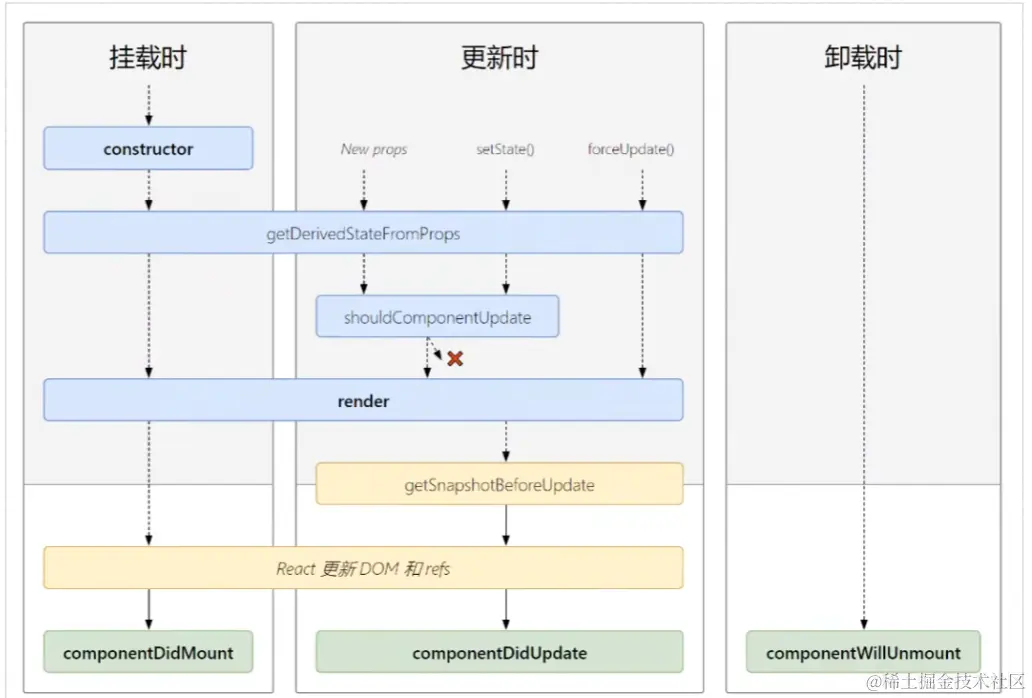
生命周期(新)
分为三个阶段
  1.初始化阶段 由ReactDOM.Render触发---初次渲染
     1.constructor()
     2.getDerivedStateFromProps()
     3.render()
     4.componentDidMount() ---- 常用
     一般做一些初始化的事 例如: 开启定时器 发送网络请求 订阅消息
  2.更新阶段: 由组件内部this.setState()或父组件render触发
     1.getDerivedStateFromProps()
     2.shouldComponentUpdate()
     3.render() ----必用
     4.getSnapshotBeforeUpdate()
     5.ComponentDidUpdata()
  3.卸载组件: 由ReactDOM.unmountComponentAtNode()触发
     1.componentWillUnmount() ---- 常用
     一般做一些收尾的事 例如: 关闭定时器  取消订阅消息
<script type="text/babel">
class App extends React.Component {
constructor(props) {
console.log("App---constructor");
super(props);
this.state = { count: 0 };
}
Add = () => {
const { count } = this.state;
this.setState({ count: count + 1 });
};
delete = () => {
ReactDOM.unmountComponentAtNode(document.getElementById("app"));
};
update = () => {
this.forceUpdate();
};
static getDerivedStateFromProps(props, state) {
console.log("App---getDerivedStateFromProps", props, state);
return null;
}
getSnapshotBeforeUpdate() {
console.log("App---getSnapshotBeforeUpdate");
return "hello";
}
componentDidMount() {
console.log("App---componentDidMount");
}
componentWillUnmount() {
console.log("App---componentWillUnmount");
}
shouldComponentUpdate() {
console.log("App-shouldComponentUpdate");
return true;
}
componentDidUpdate(preProps, preState, snapshotValue) {
console.log(
"App---componentDidUpdate",
preProps,
preState,
snapshotValue
);
}
render() {
console.log("App---render");
const { count } = this.state;
return (
<div>
<h2>当前求和为{count}</h2>
<button onClick={this.Add}>点我+1</button>
<button onClick={this.delete}>卸载组件</button>
{/* 不更改任何状态中的数据 强制更新一下*/}
<button onClick={this.update}>强制更新</button>
</div>
);
}
}
ReactDOM.render(<App count={200} />, document.getElementById("app"));
</script>
生命周期新旧对比
getSnapshotBeforeUpdate()实例
<!DOCTYPE html>
<html lang="en">
<head>
    <meta charset="UTF-8">
    <meta http-equiv="X-UA-Compatible" content="IE=edge">
    <meta name="viewport" content="width=device-width, initial-scale=1.0">
    <script src="https://unpkg.com/react@18/umd/react.development.js"></script>
    <script src="https://unpkg.com/react-dom@18/umd/react-dom.development.js"></script>

    <!-- Don't use this in production: -->
    <script src="https://unpkg.com/@babel/standalone/babel.min.js"></script>
    <title>新闻案列</title>
    <style>
        .news{
        width: 200px;
        height: 150px;
        background: rgb(91, 105, 215);
        /* 开启滚动条 */
        overflow: auto;
        }
        .list{
            height: 30px;
        }
    </style>
</head>
<body>
    <div id="root"></div>
    <script type="text/babel">
         class MyList extends React.Component{
            //  定义状态
            state = {listArr:[]}

            //当组件挂载完成时
            componentDidMount(){
            //开启循环定时器
               setInterval(()=>{
            //获取当前state
             const {listArr} = this.state
            // 模拟新的新闻
            const news = '新闻' + (listArr.length)
            //更新状态
            this.setState({listArr:[news, ...listArr]})
               },1000);


            }


            //当组件将要更新的快照
            getSnapshotBeforeUpdate(){
               //获取高度
              return this.refs.list.scrollHeight
            }

            //组件完成更新
            componentDidUpdate(preProps,preState,height){
                // 获取上一次的高度和现在的高度差值
              this.refs.list.scrollTop += this.refs.list.scrollHeight - height
            }

            render(){
                return (
                    <div className="news" ref="list">
                        {
                            this.state.listArr.map((item,index)=>{
                            return <div className="list" key={index}>{item}</div>
                            })
                        }

                    </div>
                )
            }
         }


      //渲染组件
      ReactDOM.render(<MyList />, document.getElementById('root'));

    </script>


</body>
</html>
基于React脚手架开发
一、创建项目并启动
1.全局安装
npm install -g create-react-app
2.切换目录创建并启动项目
cd '项目目录'
create-react-app '项目名'
npm start
TodoList案例相关知识点
1.拆分组件---实现静态组件 注意className style的写法
2.动态初始化列表,如何确定将数据放在那个组件的state中
   ---某个组件使用: 放在其自身的state中
   ---某些组件再用: 放在他们共同的父组件state中(状态提升)
3.父子组件通信
   1.【父组件】给【子组件】传递数据:通过props
   2.【子组件】给【父组件】传递数据:通过props 要求父组件提前给子组件传递一个函数
4.注意defaultChecked 和checked的区别 类似还有defaultValur 和 value
5.状态在哪里,操作状态的方法就定义在哪里
React ajax
1.安装axios
yarn add axios 或 npm i axios
2.导入
import axios from 'axios'
3.异步
async fetchData () {
axios.get('/api').then(
(res)=>{ console.log(res.data) }
(err)=>{ console.log(err) }
)
}
4.同步
async fetData() {
const resp = await axios.get('/api')
console.log(resp)
}
5.携带查询参数 请求头数据
async fetchData() {
const resp = await axios.post(
'/api',
{'请求的参数'},
{
headers:{
Authorization: 'token',
}
}
)
console.log(resp)
}
6。携带Params参数 特殊字符手动解析
async fetchData() {
const name = encodeURIComponent('&&&')
const age = 21
const res = await axios.get(
`/api/getParams?name=${name}&age=${age}`
)
console.log(res.data)
}
7.携带Params参数 特殊字符自动解析
async fetchData() {
const res = await axios.get('/api/getParams',{
params: {
name: '&&&',
age: 20,
}
})
console.log(res.data)
}
8.使用请求体发送数据 格式为urlencoded
async fetchData() {
const params = new URLSearchParams()
params.append('name', 'zs')
params.append('age', 20)
const res = await axios.post('/api/getParamsPost', params)
console.log(res.data)
}
9.使用请求体发送数据,格式为multipart
async fetchData() {
const params = new FormData()
params.append('name', 'ly')
params.append('age', 25)
const res = await axios.post('/api/getParamsPost', params)
console.log(res.data)
}
10.使用请求体发送数据,格式为JSON
async fetchData() {
const o = {
name: '&&&',
age: 20,
}
const res = await axios.post('/api/getJSONPost', o)
console.log(res.data)
}
配置代理
1.创建代理配置文件
在src下创建配置文件 setProxy.js
2.具体配置
const { createProxyMiddleware } = require("http-proxy-middleware")
module.exports = function (app) {
app.use(
createProxyMiddleware("/api",{
target: "https://tenapi.cn/v2/baiduhot",
changeOrigin: true,
pathRewrite: { "^/api": "" },
}),
)
}
任意组件间通信(消息订阅与发布机制)
1.工具库 PubSubJS
2.下载
npm install pubsub-js --save
3.引入消息订阅与发布插件
import PubSub from 'pubsub-js';
##先订阅再发布
##在componentWillUnmount中取消订阅
4.谁接收数据谁订阅消息
当组件挂载完毕时
componentDidMount(){
this.token = PubSub.subscribe('userList',(msg,stateObj)=>{
this.setState(stateObj);
})
}
取消订阅
componentWillUnmount(){
PubSub.unsubscribe(this.token)
}
5.谁发送数据谁发布
PubSub.publish("userList", { isLoading: false, users: res.data.items });
github案例相关知识点
1、设计状态时要考虑全面:例如带有网络请求的组件,要考虑请求失败怎么办,加载中
2. ES6小知识点 解构赋值+ 重名名
let obj = {a:{b:1}}
const {a} = obj
const{a:{b}} = obj
const {a:{b:value}} = obj
React路由
1.react-router-dom ---react的一个插件库 用来实现SPA(单页面)应用
2.安装
yarn add react-router-dom
3.引入
import {Link, Route, BrowserRouter} from 'react-router-dom'
4.简单使用
4.1明确好界面的中的导航区,展示区
4.2导航区的a标签改为Link标签
{}
<Link className="About" to="/about"> About</Link>
4.3展示区写Router标签进行路径的匹配
{}
<Route path="/about" component={About} />
4.4在<App />最外侧包裹BrowserRouter
<BrowserRouter>
<App />
</BrowserRouter>
5.路由组件与一般组件
5.1:写法不同
一般组件:<demo/>
路由组件:<Route path="/demo" component={Demo}/>
5.2: 存放位置不同
一般组件:conponents文件夹
路由组件:pages文件夹
5.3: 接收到的props不同
一般组件:写组件的时候传递了什么就接收什么
路由组件:接收到固定的三个属性
history:
go: ƒ go(n)
goBack: ƒ goBack()
goForward: ƒ goForward()
push: ƒ push(path, state)
replace: ƒ replace(path, state)
location:
pathname:"/about"
search:""
state: undefined
match:
params: {}
path : "/about"
url: "/about"
6.NavLink与封装MyNavLink
6.1 NavLink可以实现路由链接的高亮
6.2 标签体内容是一个特殊的标签属性
6.3 通过this.props.children可以获取标签体内容
7.Switch的使用
7.1 通常情况下,path和component是一一匹配的
7.2 Switch可以提高匹配效率(单一匹配)
{}
<Switch>
{}
<Route path="/about" component={About} />
<Route path="/home" component={Home} />
</Switch>
8.解决多级路径刷新页面样式丢失问题
8.1 在public/index.html中引入样式 不写./ 写 / (常用)
8.2 在public/index.html中引入样式 不写./写%PUBLIC_URL% (常用)
8.3 使用HashRouter
9.路由的严格匹配与模糊匹配
9.1 默认开启模糊匹配(输入的地址必须包含要匹配的路径,且顺序要一致)
9.2 开启严格匹配 开启精准匹配 exact={true} 或 exact
9.3 严格匹配不要随便开启需要在开 有些时候开启会导致无法继续匹配二级路由
10.路由重定向
10.1一般写在所有路由的最下方 当所有路由都无法匹配时跳转
{}
<Redirect to="/home"/>
11.嵌套路由
11.1:注册子路由的时候要写上父路由的path值
<Route path="/home/news" component={News} />
11.2 路由的匹配是按照路由的顺序进行的
12.路由传参
一.params参数
12.1 路由链接(携带参数) {}
<Link to={`/home/messages/detail/${item.id}/${item.title}`}>{item.title}</Link>
12.2 注册路由(申明接收) {}
<Route path="/home/messages/detail/:id/:title" component={Detail} />
12.3 接收参数
const { id, title } = this.props.match.params
二.search参数
12.4 路由链接(search参数): {}
<Link to={`/home/messages/detail/?id=${item.id}&title=${item.title}`}>
{item.title}
</Link>
12.5 注册路由 {}
12.6 接收search参数
const{search} = this.props.location
const {id,title} = qs.parse(search.slice(1));
备注:接收到的search时urlencoded编码字符串,需要借助querystring解析成对象key:value
三.state参数
12.7 注册路由{}
<Link to={{
pathname: '/home/messages/detail',
state: { id: item.id, title: item.title },
}}>
12.8 {}
<Route path="/home/messages/detail" component={Detail} />
12.9 接收state参数
const{id,title} = this.props.location.state
备注:地址栏不展示 刷新参数不丢失
13.编程式路路由导航
借助this.props.history对象上的API对路由进行 跳转 前进 后退操作
13.1组件定义点击按钮事件
<button onClick="{()=>this.showPush(item.id,item.title)}">push跳转</button>
<button onClick="{()=>this.showReplace(item.id,item.title)}">push跳转</button>
13.2事件回调
showReplace = (id, title) => {
this.props.history.replace("/home/messages/detail", { id, title });
};
showPush = (id, title) => {
this.props.history.push("/home/messages/detail", { id, title });
};
13.3前进后退 go自定义步数按钮实现
advance = () => {
this.props.history.goForward();
};
back = () => {
this.props.history.goBack();
};
go =() =>{
this.props.history.go(2);
this.props.history.go(2);
}
14.withRouter
### 解决在一般组件中使用路由组件API的
14.1 withRouter可以接收一个一般组件,为其加上路由组件身上所特有的 location history match 的方法
14.2 在要使用方法的一般组件上引入
import {withRouter} from 'react-router-dom'
export default withRouter(一般组件名)
15.BrowserRouter 和 HashRouter的区别
15.1 底层原理不一样
BrowserRouter使用的是H5的history API不兼容 IE9及以下版本
HashRouter使用的是URL的哈希值
15.2url表现形式不一样
BrowserRouter :localhost:3000/demo/test
HashRouter: localhost:3000/#/demo/test
3.刷新后对路由state参数的影响
BrowserRouter没有任何影响 因为state保存在history中
HashRouter:刷新后会导致路由state参数的丢失
4.备注: HashRouter可用于二级路由刷新样式丢失问题
redux
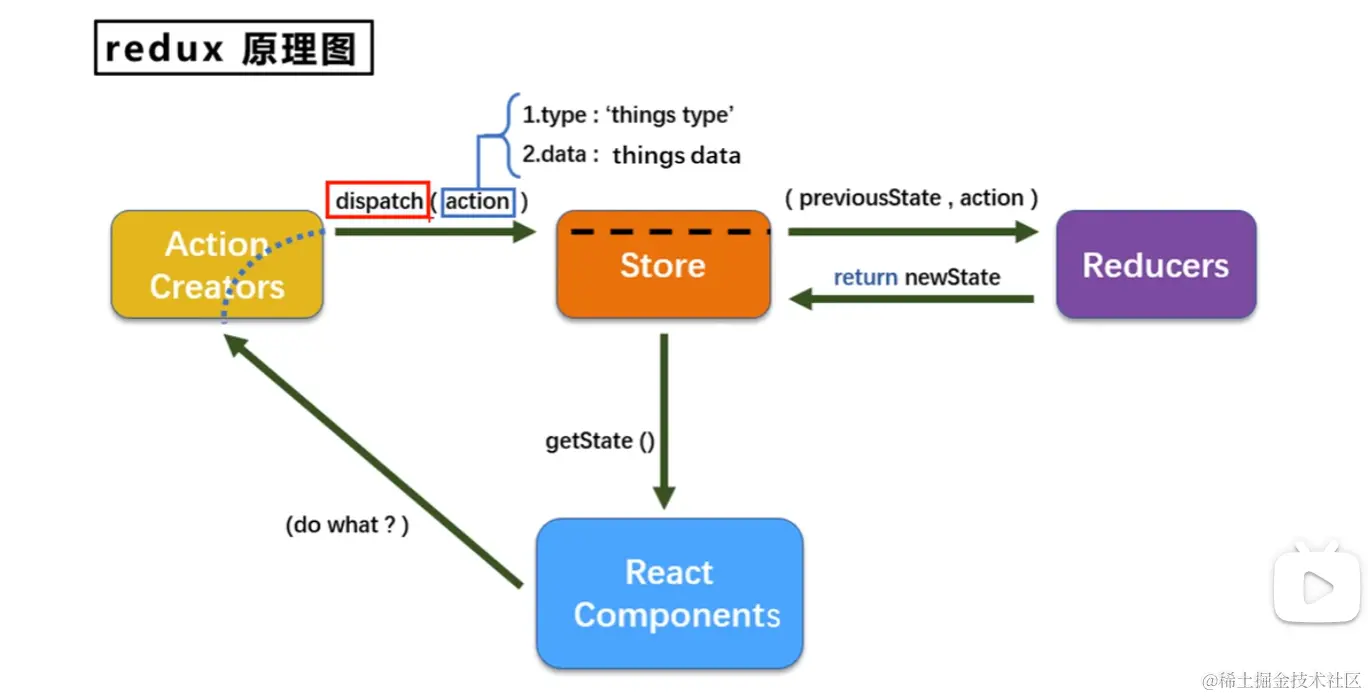
1.安装redux
yarn add redux
## 求和案例 reduce——精简版
1.去除Count组件自身state中的count
2.在src下新建redux文件夹,下面新建 store.js 和 count_reducer.js文件
(3). store.js 配置
import { legacy_createStore } from "redux";
import countReducer from './count_reducer'
export default legacy_createStore(countReducer);
(4). count_reducer.js文件配置
const initState = 0
export default function countReducer(preState=initState,action){
console.log(preState, action);
const {type, data} = action
switch (type) {
case "increment":
return preState + data;
case "decrement":
return preState - data;
default:
return preState;
}
}
(5).在组件挂载完毕时检测状态 调用render渲染更新后的页面
componentDidMount(){
store.subscribe(()=>{
this.setState({})
})
}
## 求和案例完整版
新增文件
1.count_action.js 用于创建action对象
import { INCREMENT, DECREMENT } from "./constant"
export function createIncrementAction (data) {
return { type: INCREMENT, data: data };
}
export const createDecrementAction = (data) => ({ type: DECREMENT, data });
2.constant.js
export const INCREMENT = 'increment'
export const DECREMENT = 'decrement'
##求和案列redux 异步action
(1)明确 延迟的动作不想交给组件自身 在action中
(2)异步action要写成函数形式
action.js文件
export const createIncrementAsyncAction=(data,time) =>{
return ()=>{
setTimeout(()=>{
store.dispatch(createIncrementAction(data));
},time)
}
}
(3).在story.js文件 函数形式要安装使用中间件
yarn add redux-thunk
import { legacy_createStore, applyMiddleware } from "redux";
import countReducer from './count_reducer'
import thunk from 'redux-thunk'
export default legacy_createStore(countReducer, applyMiddleware(thunk));
react-redux
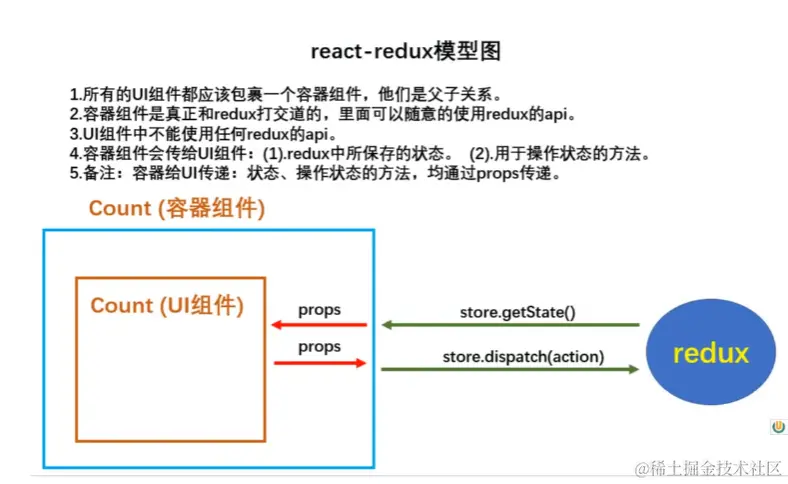
##求和案例react-redux的基本使用
(1)明确两个概念
1.UI组件:不能使用任何的redux的api只负责页面的呈现交互等
2.容器组件:负责和redux通信 将结果交给UI组件
(2).如何创建一个容器组件---靠react-redux的connect函数
使用connect()()创建并暴露一个Count的容器组件
export default connect(mapStateToProps, mapDispatchToProps)(CountUI);
function mapStateToProps(state){
return {count:state}
}
function mapDispatchToProps(dispatch){
return {
jia: (value) => dispatch(createIncrementAction(value)),
jian: (value) => dispatch(createDecrementAction(value)),
Asyncjia: (value,time) => dispatch(createIncrementAsyncAction(value, time)),
};
}
备注:1.容器组件中的store是靠props传进去的而不是在容器组件中直接引入
2.mapDispatchToProps也可以是一个对象
mapStateToProps,mapDispatchToProps简写形式
export default connect(
state =>({count:state}),
{
jia:createIncrementAction,
jian:createDecrementAction,
Asyncjia:createIncrementAsyncAction
}
)(CountUI);
### 求和案例优化
1.容器组件和UI组件整合成一个文件
2.无需自己给容器传递store 利用
<Provider store={store}>
<App />
</Provider>
3.使用react-redux不用自己检测状态的变化
4.mapDispatchToProps也可以成一个对象
5.一个组件要和redux打交道要经过几步
1.定义好一个Ui组件 ---不暴露
2.引入connect生成一个容器组件 并暴露
connect(
state=> ({Key:value}),
{Key,xxxxxAction}
)(UI组件)
3.在UI组件中可用过this.props.xxxx读取和操作状态
##求和案例react-redux数据共享版
1.定义一个Person组件 和conunt组件共享数据
2.为person组件编写 reducee action 配置contans常量
3.重点:Person的reducer和Count的Reducer要使用conbineReducer进行合并
合并后的总状态是一个对象
4.交给store的是总refucer 最后注意在组件中取出状态的时候记得取到位
##求和案列最终版
1。所有变量名要规范尽量触发对象简写形式
2.reducer文件夹中编写index.js 用于汇总暴露所有的reducer
纯函数
1.一类特别的函数,只要是同样的输入(实参),必定得到同样的输出(返回)
2.必须遵守以下约束
   1.不得改写参数数据
   2.不会产生任何副作用,例如网络请求 输入和输出设备
   3.不能调用Date.now()或者Math.random()等不纯方法
3.redux的redux的函数必须是一个纯函数
react-dev-Tools-extension开发工具使用
1.安装 yarn add redux-devtools-extension
2.在store中配置
import { composeWithDevTools } from "redux-devtools-extension";
export default legacy_createStore(
allReducer,
composeWithDevTools(applyMiddleware(thunk))
);
LazyLoad
1.引入 lazy,Suspense
import React, { Component,lazy,Suspense } from "react";
2.路由懒加载引入路由组件
const Home = lazy(() => import('./components/Home'))
const About = lazy(()=> import ('./components/About'));
3.注册路由使用 Suspense  fallback也可以是组件 组件不可使用懒加载引入
            <Suspense fallback={<h2>Loading.....</h2>}>
              <Route path="/about" component={About} />
              <Route path="/home" component={Home} />
            </Suspense>
Hooks
1.React 16.8.0 语法新特性
2.可以让你在函数组件中使用state一起其他的React特性
3.常用的Hook
  State Hook(useState)
  Effect Hook (React.useEffect)
State Hook(useState)
useState的使用 是一个数组 第一个为状态值 第二个为操作状态的方法
const [count,setCount] = React.useState(0)
const [name,setName] = React.useState('tom')
function add (){
setCount(count=> count + 1)
}
function changName() {
setName("jerry");
}
Effect Hook
Effect Hook React.useEffect
1.可以让你在函数组件中执行副作用操作(生命周期钩子函数)
副作用操作:
发送ajax请求 设置订阅 启动定时器 手动更改真实DOM(卸载组件)
语法和说明
React.useEffect(() => {
let time = setInterval(() => {
setCount((count) => count + 1);
}, 1000);
return ()=>{
clearInterval(time)
}
}, []);
注意: 可以把React.useEffect看做是一下函数的组合
componentDidMount()
componentDidUpdate()
componentWillUnmount()
Hook Ref
1.ref Hook 可以在函数组件中存储、查找组件内的标签或任意其他数据
2.语法
<input type="text" ref={myRef}></input>
const myRef = React.useRef()
3.作用:保存标签对象 功能和React.create()一样
Context
1.一种组件间通信的方式 常用于 【祖组件】与【后代组件】间通信
2.渲染子组件时,外面包裹 xxxContext.Provider 通过value属性 给后代组件传递数据
const MyContext = React.createContext()
const { Provider, Consumer } = MyContext;
<Provider value={{username,age}}>
< B/>
</Provider>
方式一、仅适用于类式组件
this.context.username this.context.age
方式二、通用
<h4>
我从A组件收到的用户名是
<Consumer>
{(value) => {
return `${value.username},年龄是:${value.age}`
}}
</Consumer>
</h4>
注意:在应用开发中一般不用context 一般用它封装react插件
组件通信方法总结
组件间关系
父组组件
兄弟组件(非嵌套组件)
祖孙组件(跨级组件)
通信方式
1.props ------------------父子
2.消息订阅与发布-----------兄弟,祖孙
3.集中式管理 redux dva-----兄弟,祖孙
4.contText-----------------祖孙
React-Router 6
1.switer 改为Routes 且必须写
2.component 改为 element={<Home />}