ref
<!-- ref属性
1.被用来给元素或子组件注册引用信息(id的代替者)
2.应用在html标签上获取的是真实DOM元素,应用在组件标签上是组件实例对象(vc)
使用方法
<h2 v-text="msg" ref="title"></h2>
<button @click="showDom" ref="btn">点我输出Dom</button>
<School ref="sch" />
-->
console.log(this.$refs.title)
console.log(this.$refs.btn)
console.log(this.$refs.sch)
props配置项
<!-- 配置项props
功能:让组件接收外部传过来的数据
(1)传递数据:
<Student name="蔡徐坤" sex="男" />
(2)接收数据
1.数组写法
props:['name', 'age', 'sex']
2.对象写法 接收的同时限制类型
props:{
name:String,
age:Number,
sex:String
}
3.对象写法: 接收的同时对数据 进行类型限制 + 默认值的指定 + 必要性的限制
props:{
name:{
typeof: String,
required:true
},
age:{
type: Number,
default: 100
},
sex:{
type:String,
require: true
}
备注: props是只读的,Vue底层会检测你对props的修改
如果进行了修改就会发出警告 若业务确实需要修改请复制props的内容到data
中一份再去修改data中的数据
myAge:this.age
-->
mixin混入配置
export const mixin = {
methods: {
showName() {
alert(this.name)
}
},
}
插件
import Vue from "vue";
export default{
install(Vue){
console.log(Vue);
Vue.filter('MyName',function(value) {
return value.slice(0,2)
});
Vue.directive('fbind',{
bind(element,binding) {
console.log('bind');
element.value = binding.value
},
inserted(element,binding){
console.log('inserted');
element.focus()
},
update(element,binding) {
console.log('update');
element.value = binding.value
},
});
const mixin = {
methods: {
showName() {
alert(this.name)
}
},
};
Vue.prototype.hello = () =>{('你好呀')}
}
}
scoped样式
作用:让样式在局部生效,防止冲突
写法:<style scoped>
总结TodoList案例
1.组件化编码流程:
  (1)拆分静态组件: 组件要按照功能点拆分,命名不要与html元素冲突
  (2)实现动态组件:考虑好数据的存放位置,数据是一个组件在用,还是多个组件
  再用
    (1)一个组件在用 放在组件自身即可
    (2)多个组件在用,放在他们共同的父组件身上
  (3)实现交互  ---从绑定事件开始
2.props适用于
(1)父组件给子组件  通信
(2)子组件 ==> 父组件通信 (要求父组件先给一个函数)

3.使用v-model要切记 v-model绑定的值不能是props传过来的值因为props的值是不可以修改的、

4.props传过来的若是对象的值 修改对象中的属性时 Vue不会报错但不推荐这样做
WebStorage
1.存储内容大小:一般支持5MB左右(不同浏览器不一样)
2.浏览器端通过Window.sessionStorage和Window.localStorage属性来实现本地存储机制
3.相关API
localStorage
function saveData() {
localStorage.setItem('msg', 'hello')
localStorage.setItem('person', JSON.stringify(p))
}
function readerData() {
console.log(localStorage.getItem('msg'));
let result = localStorage.getItem('person');
console.log(JSON.parse(result));
}
function deleteData() {
localStorage.removeItem('msg');
}
function deleteAll() {
localStorage.clear();
}
sessionStorage
function saveData() {
sessionStorage.setItem('msg', 'hello')
sessionStorage.setItem('person', JSON.stringify(p))
}
function readerData() {
console.log(sessionStorage.getItem('msg'));
let result = sessionStorage.getItem('person');
console.log(JSON.parse(result));
}
function deleteData() {
sessionStorage.removeItem('msg');
}
function deleteAll() {
sessionStorage.clear();
}
</script>
4.备注:
1.sessionStorage存储的内容会随着浏览器窗口关闭而消失
2.localStorage存储的内容需要手动清楚才会消失
3.local/sessionStorage.getItem(XXX)如果XXX对应的value获取不到那么getItem的返回值是null
4.JSON.parse(null)的结果依然是null
组件的自定义事件(组件通信)
1.一种组件间通信的方式 适用于 子组件向父组件通信
2.使用场景 App是父组件 Studeng是子组件 那么就是要在App中给student绑定自定义事件
3.绑定自定义事件
3.1通过父组件给子组件传递函数类型的props实现 子给父传递数据
<Student :getSchoolName="getSchoolName" />
3.2 通过父组件给子组件绑定一个自定义事件实现 子组件给父组件传递数据 (第二种写法使用 ref) 灵活性好-->
<Student ref="student"/>
3.3 事件只触发一次 once事件修饰符
<Student @luohaozhe.once="getStudentName"/>
4.触发自定义事件 ===给谁绑定的事件就在谁身上触发 this.$emit('事件名',数据)
sendStudentName(){
this.$emit('luohaozhe',this.name,31234,423,534,645,756875)
},
5.解绑自定义事件
this.$off('luohaozhe')
this.$off(['luohaozhe','要解绑的事件名'])
this.$off()
6.组件也可以使用原生DOM事件需要叫native事件修饰符
<Student ref="student" @click.native="show" />
7.注意:
通过<Student v-on:luohaozhe="getStudentName"/>方式绑定事件时 回调要么写在父组件的moutend上要么写成箭头函数
使用箭头函数写法否则箭头函数指向会出现问题
全局事件总线GlobalEventBus(任意组件间通信)
1.一种组件间通信的方式,适用于任意组件间通信
2.安装全局事件总线
new Vue({
render: h => h(App),
beforeCreate(){
Vue.prototype.$bus = this
}
}).$mount('#app')
3.使用全局事件总线
1.接受数据 School组件想接受Student组件数据 就在school中给$bus绑定自定义事件,事件的回调留在school本身
mounted() {
this.$bus.$on('SendStudentName',(name) =>{
console.log("我是school组件收到了学生姓名:",name)
});
},
2.提供数据Studeng组件
<button @click="SendStudentName">点我发送学生姓名给School</button>
methods: {
SendStudentName(){
this.$bus.$emit('SendStudentName',this.name)
}
},
4.最好在beforeDestroy钩子中用$off去解绑当前组件用到的事件
beforeDestroy() {
this.$bus.$off('SendStudentName')
},
消息订阅与发布
1.一种组件间通信的方式 适用于任何组件间通信
2.使用步骤
1.安装第三方库 punsub
npm i pubsub-js
3.接收数据--消息订阅 A组件想接收数据就在A组件订阅消息 订阅的回调函数在组件滋生==自身
import pubsub from 'pubsub-js'
mounted() {
this.pubId = pubsub.subscribe('hello',(h,value) =>{
console.log("有人发布了hello消息回调函数:",h,"收到的数据为:",value);
console.log(this)
})
},
4.提供数据 --消息发布
<button @click="SendStudentName">点我发送学生姓名给School</button>
import pubsub from 'pubsub-js'
methods: {
SendStudentName() {
pubsub.publish('hello',this.name)
}
},
5.最好在beforeDestroy钩子里面取消消息订阅
beforeDestroy(){
pubsub.unsubscribe(this.pubId)
}
Vue封装的动画与过渡
1.作用:在插入,更新或移除DOM元素时 在合适的时候给元素添加样式类名
2.图示
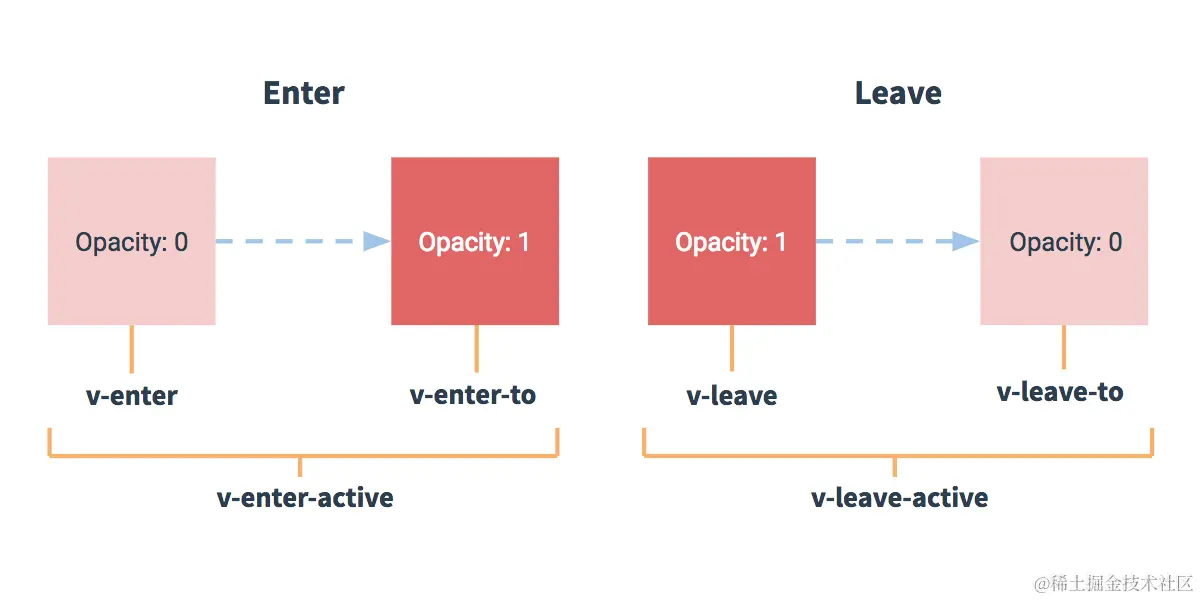
3写法
##准备好样式
1.动画写法
使用 transition包裹要过渡的元素 并配置name属性
<transition name="hello" appear>
<h1 v-show="isShow">你好呀</h1>
</transition>
<style scoped>
进入的过程中
.hello-enter-active{
animation: luohaozhe 1s linear;
}
离开的过程中
.hello-leave-active{
animation: luohaozhe 1s linear reverse;
}
@keyframes luohaozhe {
from{
transform: translateX(-100%);
}
to{
transform: translateX(0px);
}
}
</style>
2.过渡写法
如果有多个元素需要过渡请使用 transition-group 包裹 且每个元素都需要指定key值
<transition-group name="hello" appear>
<h1 v-show="!isShow" key="1">你好呀</h1>
<h1 v-show="isShow" key="2">罗浩哲</h1>
</transition-group>
<style scoped>
h1{
background: #2779f375;
}
.hello-enter ,.hello-leave-to{
transform: translateX(-100%);
}
.hello-enter-active,.hello-leave-active{
transition: 1s linear;
}
.hello-enter-to ,.hello-leave{
transform: translateX(0px);
}
</style>
3.利用第三方集成库
<transition
初始化自动加载
appear
设置name
name="animate__animated animate__bounce"
进入的动画
enter-active-class="animate__rubberBand"
离开的动画
leave-active-class="animate__heartBeat"
>
<h1 v-show="isShow">你好呀</h1>
</transition>
<script>
import 'animate.css'
Vuecli 配置代理
开启代理服务器 方式一
devServer: {
proxy: 'http://localhost:5000'
}
说明:
1.优点:配置简单,请求资源时直接发送给前端(8080)即可
2.缺点:不能配置多个代理 不能灵活的控制是否使用代理
3.工作方式 若按照以上配置代理 当请求了前端(本机)不存在的资源时那么该请求会转发给服务器(优先匹配前端资源)
方法二
配置具体代理规则
devServer: {
proxy: {
'/api': {
target: 'http://localhost:5000',
pathRewrite:{'^/api':''},
ws: true,
changeOrigin: true
},
'/foo': {
target: 'http://localhost:3000',
pathRewrite:{'^/foo':''},
},
}
}
说明
1.优点:可以配置多个代理 且可以灵活的控制请求是否走代理
2.缺点:配置略显繁琐,请求资源时必须加前缀
slot 插槽
1.作用: 让父组件可以向子组件指定位置插入html结构 ,也是一种组件通信方式 适用于父组件===>子组件
2.分类:默认插槽 具名插槽 作用域插槽
3.使用方式:
3.1默认插槽
父组件App
<Categories title="美食" >
<img src="https://gd-hbimg.huaban.com/75174832753b6257bcfbcd0f4fc89bd0c5ba43556a766-9OhWld_fw1200webp" alt="">
</Categories>
子组件Categories
<!-- 定义一个默认插槽(等着组件的使用者进行内容填充) -->
<slot>我是一些默认值,当使用者没有传递具体结构时我会出现</slot>
3.2具名插槽
父组件 App
<Categories title="游戏" >
<!-- 使用具名插槽 方式一 slot="center" -->
<ul slot="center">
<li v-for="(game, index) in games" :key="index">game</li>
</ul>
<div class="foot" slot="footer">
<a href="#">单机游戏</a>
<a href="#">网络游戏</a>
</div>
</Categories>
<Categories title="电影">
<img slot="center" src="https://gd-hbimg.huaban.com/2ceb09d869c9ae5561fb7a29c30a7bdf3fcb6fba9823f8-jsuPvR_fw1200webp" alt="">
<template v-slot:footer>
<a slot="footer" href="https://gd-hbimg.huaban.com/2ceb09d869c9ae5561fb7a29c30a7bdf3fcb6fba9823f8-jsuPvR_fw1200webp">详情</a>
<h2>欢迎前来观影</h2>
</template>
</Categories>
子组件Categories
<slot name="center">我是一些默认值,当使用者没有传递具体结构时我会出现</slot>
<slot name="footer">我是一些默认值,当使用者没有传递具体结构时我会出现</slot>
3.3作用域插槽
理解:数据在组件自身 但根据数据生成的结构需要组件的使用者来决定 moves数据在Categories
数据遍历出来的结构由Categories组件使用者App组件决定
父组件App
<Categories title="电影" >
<template scope="{moves}">
<ul>
<li v-for="(move, index) in moves" :key="index">{{move}}</li>
</ul>
</template>
</Categories>
<Categories title="电影" >
<template slot-scope="{moves}">
<h4 style="color:green" v-for="(move, index) in moves" :key="index">{{move}}</h4>
</template>
</Categories>
子组件Categories
<slot :moves="moves">我是一些默认值,当使用者没有传递具体结构时我会出现</slot>
vuex
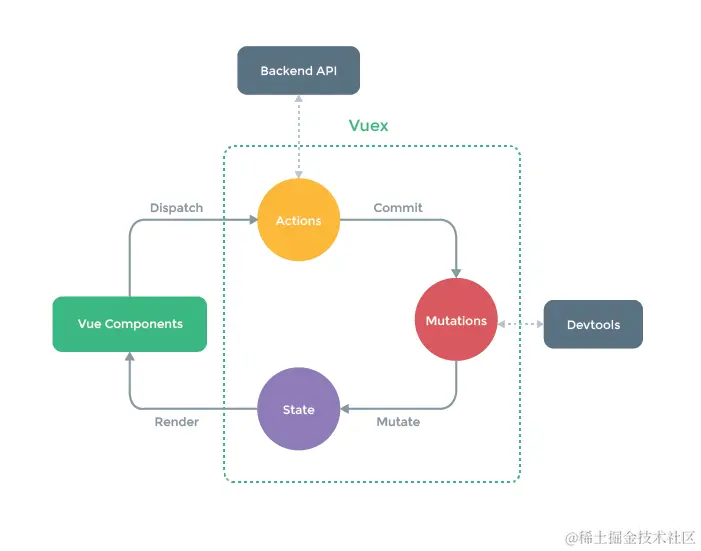
1.vuex是什么
1.1 概念:专门在Vue中实现集中式状态(数据)管理的一个Vue插件,对vue应用中
多个组件的共享状态进行集中式的管理(读/写),也是一种组件间通信的方式且适用于任意组件间通信
1.2 Github地址:https:
2.什么时候使用vuex
2.1 多个组件依赖于同一状态
2.2 来自不同的组件的行为需要变更同一状态
搭建Vuex环境
1.创建文件 src/store/index.js
import Vuex from 'vuex';
import Vue from 'vue';
Vue.use(Vuex)
const actions = {}
const mutations = {}
const state = {}
export default new Vuex.Store({
actions,
mutations,
state
})
在mian.js文件中创建vm时传入store配置项
import store from './store/index'
new Vue({
render: h => h(App),
store,
beforeCreate(){
Vue.prototype.$bus = this
}
}).$mount('#app')
基本使用
1.初始化数据配置actions mutations 操作文件store.js
import Vuex from 'vuex';
import Vue from 'vue';
Vue.use(Vuex)
const actions = {
jiaOdd:function(context,value) {
if(context.state.sum % 2){
context.commit('JIA',value)
}
},
jiaWait:function(context,value){
setTimeout(() =>{
context.commit('JIA',value)
},1000)
}
}
const mutations = {
JIA(state,value){
state.sum += value;
},
JIAN(state,value){
state.sum -= value;
}
}
const state = {
sum:0,
}
export default new Vuex.Store({
actions,
mutations,
state
})
2.组件中读取vuex中的数据 $store.state.sum
3.组件中修改vuex的数据
methods: {
addition(){
this.$store.commit('JIA', this.n)
},
subtraction(){
this.$store.commit('JIAN', this.n)
},
additionOdd(){
this.$store.dispatch('jiaOdd', this.n)
},
additionWait(){
setTimeout(() => {
this.$store.dispatch('jiaWait', this.n)
},1000)
}
},
};
备注:若没有网络请求或其他业务逻辑 组件中也可以越过actions 即不写dispatch 直接写commit
vuex中的getters
1.概念当state中的数据需要进行加工后再使用时 可以使用getters加工
2.在 store.js中添加getters的配置
const getters = {
bigSum(state){
return state.sum* 10
}
}
export default new Vuex.Store({
actions,
mutations,
state,
getters
})
3.在组件中读取读取数据 $store.getters.bigSum
<h3>当前求和放大10倍为{{$store.getters.bigSum}}</h3>
四个map方法的使用
1.mapState方法用于帮助我们映射state中的数据作为计算属性
2.mapGetters方法用于帮助我们映射getters中的数据作为计算属性
3.mapActions方法用于帮助我们生成actions对话的方法即包含dispaytch的函数
4.mapMutations方法用于帮助我们生成Mutations对话的方法即包含commit的函数
备注:
mapActions和mapMutations使用时如果需要传递参数在模板绑定时传递好参数否则参数是事件对象对象
<button @click="addition(n)">+</button>
<button @click="subtraction(n)">-</button>
<button @click="additionOdd(n)">当前求和为奇数再加</button>
<button @click="additionWait(n)">等一等再加</button>
import {mapState, mapGetters, mapMutations,mapActions} from 'vuex'
computed:{
...mapState(['sum','school','Subject']),
...mapGetters({bigSum:'bigSum'}),
},
methods: {
...mapMutations({addition:'JIA',subtraction:'JIAN'}),
...mapActions({additionOdd:'jiaOdd',additionWait:'jiaWait'})
模块化+命名空间
1.目的:让代码更好维护,让多种数据分类更加准确
2.修改store.js
import Vuex from "vuex";
import Vue from "vue";
import axios from 'axios';
import { nanoid } from "nanoid";
Vue.use(Vuex);
const CountOptions ={
namespaced:true,
actions:{
jiaOdd(context, value) {
if (context.state.sum % 2) {
context.commit("JIA", value);
}
},
jiaWait(context, value) {
setTimeout(() => {
context.commit("JIA", value);
}, 1000);
},
},
mutations:{
JIA(state, value) {
state.sum += value;
},
JIAN(state, value) {
state.sum -= value;
},
},
state:{
sum: 0,
school: "合肥八中",
Subject: "前端",
},
getters:{
bigSum(state) {
return state.sum * 10;
},
},
}
const PersonOptions ={
namespaced:true,
actions:{
addPersonWang(context,value){
if(value.name.indexOf('王') === 0){
context.commit('ADD_PERSON',value)
}else{
alert('添加的人必须姓王')
}
},
addPersonServer(){
axios.get('https://api.uixsj.cn/hitokoto/get?type=social').then(
res => {
context.commit('ADD_PERSON',{id:nanoid(),name:res.data})
},
err =>{
console.log('请求失败了',err.message);
},
)
}
},
mutations:{
ADD_PERSON(state, value) {
state.PersonList.unshift(value);
},
},
state:{
PersonList: [
{
id: "001",
name: "罗浩哲",
},
],
},
getters:{
firstName(state){
return state.PersonList[0].name
}
},
}
export default new Vuex.Store({
modules:{
countAbout: CountOptions,
personAbout: PersonOptions
}
});
开启命名空间后组件读取state数据
方式一、直接读取
this.$store.state.personAbout.list

方式二、借助mapState读取
...mapStete('countAbput',['sum','school','Subject']),
开启命名空间后组件中读取getters数据
方式一、直接读取
this.$store.getters['personAbout/firsePersonName']

方式二、借助mapGetters读取
...mapGetters('countAbput',['bigSum']),

开启命名空间后组件中调用dispatch数据
方式一 自己直接dispatch
this.$store.dispath('personAbout/addPersonWang',person)
方式二 借助 mapActions
...mapActions('countAbout',{additionOdd:'jiaOdd',additionWait:'jiaWait'})

开启命名空间后组件中调用conmit
方式一自己直接commit
this.$store.commit('personAbout/ADD_PERSON',person)
方式二 ...mapMutations
...mapMutations('countAbout',{addition:'JIA',subtraction:'JIAN'}),
路由 vue-router
1.安装 vue-router
npm i vue-router (Vue3使用@4版本 Vue2使用@3版本)
2.引入路由
import VueRouter from 'vue-router'
3.使用
Vue.use(VueRouter)
4创建router文件夹在index.js文件中配置router
该文件专用于创建整个应用的路由器
引入路由
import VueRouter from 'vue-router'
创建一个路由器
const router = new VueRouter({
routes:[
{
path:'/about',
component:() => import('@/components/About.vue'),
},
{
path:'/home',
component:() => import('@/components/Home.vue'),
}
]
})
4.使用router-link 实现且换 (active-class="active"可配置高亮样式)
<router-link active-class="active" to="/about">About<router-link>
5.指定展示位置
<router-view><router-view>
几个注意点
1.路由组件通常存放在pages文件夹,一般组件通常存放在components文件夹

2.通过且换路径隐藏了的路由默认是被销毁的 需要的时候再去挂载

3.每个组件都有自己的$route属性 里面存储自己的路由信息

4.整个应用只有一个router,可以通过组件的$router属性获取到
多级路由(嵌套路由)
1.配置路由规则 使用children配置项
routes:[
{
path:'/about',
component:() => import('@/components/About.vue'),
},
{
path:'/home',
component:() => import('@/components/Home.vue'),
children:[
{
path:'news',
component:() => import('@/pages/News.vue'),
},
{
path:'message',
component:() => import('@/pages/Message.vue'),
}
]
}
]
2.路由跳转要写完整路径
<!-- 二级路由路径需携带父路由路径 -->
<router-link to="/home/news">news</router-link>
<hr>
<router-link to="/home/message">Messages</router-link>
路由传参
1.路由传递query参数
 <li v-for="m in messages" :key="m.id">
        <!-- 路由跳转携带query参数字符串写法 -->
        <!-- <router-link :to="`/home/message/detail?{$router.query.id}&{$router.query.title}`">{{m.title}}</router-link> -->

       <!-- 路由跳转 携带query参数 对象写法 -->
       <router-link
       :to="{
        path:'/home/message/detail',
        query:{
          id:m.id,
          title:m.title
        }
       }">
         {{m.title}}
       </router-link>
        </li>
    </ul>
    <hr>
    <router-view></router-view>
  </div>


  2.接收参数
   <li>
      消息编号:{{$route.query.id}}
    </li>
    <li>
      消息标题:{{$route.query.title}}
    </li>
params参数
1.配置路由 申明时要使用占位符占位
children:[
{
name:'Detail',
path:'detail/:id/:title',
component:() => import('@/pages/Detail.vue'),
}
]
2.传递参数
特别注意路由携带params参数时若使用对象写法就不能使用path项而要使用命名
路由name
<!-- 路由跳转携带params参数字符串写法 -->
<!-- <router-link :to="`/home/message/detail/${m.id}/${m.title}`">{{m.title}}</router-link> -->
<!-- 路由跳转 携带params参数 对象写法 -->
<router-link
:to="{
name:'Detail', //使用命名路由name写法不能使用path
params:{
id:m.id,
title:m.title
}
}">
{{m.title}}
</router-link>
3.接收params参数
<ul>
<li>
消息编号:{{$route.params.id}}
</li>
<li>
消息标题:{{$route.params.title}}
</li>
</ul>
路由的props配置
作用:让路由组件更方便的收到参数
children: [
{
name: "Detail",
path: "detail",
props($route) {
return { id: $route.query.id, title: $route.query.title };
},
component: () => import("@/pages/Detail.vue"),
},
],
router-link的replace属性
1.作用:控制路由跳转时操作浏览器记录的模式

2.浏览器的历史记录有两种写入模式 push(默认开启)追加历史记录可回退  replace是替换当前记录
默认关闭

3.如何开启
  <router-link replace to="/home/news">news</router-link>
编程式路由导航
1.作用:不借助router-link进行路由跳转 让路由跳转更加灵活
2.使用方法
定义单击事件携带遍历的参数m
<button @click="pushShow(m)">push</button>
<button @click="replaceShow(m)">replace</button>
在methos中通过$router路由器配置路由跳转携带query参数
methods: {
pushShow(m){
this.$router.push({
path:'/home/message/detail',
query:{
id:m.id,
title:m.title
}
});
},
replaceShow(m){
this.$router.replace({
path:'/home/message/detail',
query:{
id:m.id,
title:m.title
}
})
}
},
3.$router的其他API方法 前进/后退 go
<button @click="back">后退</button>
<button @click="forward">前进</button>
<button @click="text">测试一下go</button>
methods:{
back(){
this.$router.back()
},
forward(){
this.$router.forward()
},
text(){
this.$router.go(2)
}
},
缓存路由组件
1.作用:让不展现的组件保持挂载,不被销毁

2.使用
<!-- 组件显示的地方 -->
  <!-- 组件缓存机制配置 include 后面接组件名 则该组件不会被销毁 -->
  <keep-alive include="News">
  <router-view></router-view>
  </keep-alive>
   <!-- 组件缓存机制配置 缓存多个include 后面接组件名 则该组件不会被销毁 -->
   <keep-alive :include=['News','Message']>
  <router-view></router-view>
  </keep-alive>
两个新的生命周期钩子
1.作用:路由组件所独有的生命周期钩子 用于捕获组件的激活状态
2.使用
activated(){
this.timer = setInterval(()=>{
this.opacity -= 0.01
if(this.opacity <= 0) this.opacity = 1
},16)
},
deactivated() {
clearInterval(this.timer)
},
路由守卫
1.作用:对路由进行权限控制
2.分类 全局守卫 独享守卫 组件内守卫
3.全局守卫
router.beforeEach((to,from,next)=>{
console.log('前置路由守卫',to,from);
if(to.meta.isAuth){
if (localStorage.getItem('school') === 'luohaozhe') {
next()
}else{
alert('学校名不正确,无权限查看')
}
}else{
next()
}
});
router.afterEach((to,from)=>{
console.log('后置路由守卫',to,from)
document.title = to.meta.title
})
4.独享路由守卫 某一个路由独享的 只有前置路由独享守卫可配合全局后置路由守卫使用
children: [
{
name:'News',
path: "news",
component: () => import("@/pages/News.vue"),
meta:{isAuth:true, title:'新闻'},
beforeEnter:((to,from,next)=>{
if(to.meta.isAuth){
if(localStorage.getItem('school') === 'luohaozhe'){
next()
}else{
alert('学校的名称不正确,没有权限访问')
}
}else{
next()
}
})
},
5.组件内守卫
beforeRouteEnter (to, from, next) {
console.log('组件内守卫beforeRouteEnter被调用了',to,from);
if(to.meta.isAuth){
if(localStorage.getItem('school') === 'luohaozhe'){
next()
}else{
alert('学校名称不符没有访问权限')
}
}else{
next()
}
},
beforeRouteLeave (to, from, next) {
console.log('组件内守卫 beforeRouteLeave被调用了',to,from);
next()
}
路由的两种工作模式
1.对于一个url来说 什么是hash值 url/#及其后面的内容就是hash值
2.hash值不会包含再HTTP请求中 即:hash值不会带给服务器
3.hash模式
   1.地址中永远带#号不美观
   2.若以后将地址通过第三方手机App分享 若App校验严格则地址会被标记不合法
   3.兼容性较好
4.history模式:
   1.地址干净
   2.兼容性和hash相比较差
   3.应用部署需要后端人员配合 解决刷新页面404问题
本地服务器部署项目
1.新建文件夹
2.cd 文件夹名 npm init 初始化环境
3.安装express框架 npm i express
4.在文件夹下新建server.js文件做如下配置
const express = require('express')
const app = express()
5.利用中间间解决mode:history下刷新404问题
const history = require('connect-history-api-fallback');
app.use(history());
app.use(express.static(__dirname+'/static'))
app.use((req,res,next) =>{
console.log('有人使用服务器了');
console.log('请求的资源是:',req.url);
console.log('请求来自于',req.get('Host'));
next()
})
app.get('/person', (req,res)=>{
res.send({
name:'tom',
age:18
})
})
app.listen(3001,(err)=>{
if(!err)console.log('服务器已经启动了,3001端口监听中....请求地址:http://localhost:3001/person')
})
element UI
1.安装 npm i element-ui
2.全局引入element 和样式
import ElementUI from 'element-ui';
import 'element-ui/lib/theme-chalk/index.css';
3.使用
Vue.use(ElementUI);
优点:使用方便 缺点体积太大
按需引入
1.首先,安装 babel-plugin-component:
npm install babel-plugin-component -D
2.更改babel.config.js文件
module.exports = {
presets: [
'@vue/cli-plugin-babel/preset',
["@babel/preset-env", { "modules": false }],
],
plugins: [
[
"component",
{
"libraryName": "element-ui",
"styleLibraryName": "theme-chalk"
}
]
]
}
3。在mian.js文件中按需引入使用
import { Button, Select } from 'element-ui';
Vue.use(Button)
Vue.use(Select)
注意若出现 not find报错信息安装后面的依赖即可