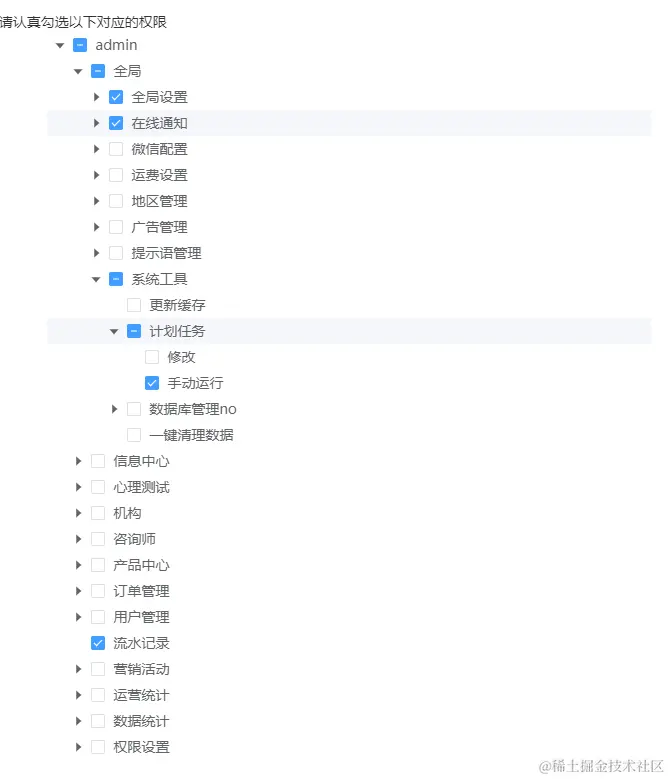
1.问题: el-tree回显ui是需要根据我们选中的id来回显 check-strictly如果添加这个属性的话 有没办法进行父子关联所有比较麻烦 看了文档的方法使用setCheckedKeys依然没办法生效 然后我就发现了 只要包含父级id 那么下面所有的子级都会被选中 但实际上我们要的效果就是 只要子集没被选中那么父级就不勾选 或者子集没全部选中父级就是半选
<el-tree
ref="treeRef"
:data="data.nodeMenuList"
:props="defaultProps"
node-key="id"
show-checkbox
:default-expanded-keys="[1]"
:default-checked-keys="defaultPermTreeSelect"
@check="checkPermission"
style="width: 100%"
/>
<template #handle="scope">
<el-button type="primary" size="small" @click="handleEdit(scope)">编辑</el-button>
<el-button type="danger" size="small" @click="handleDel(scope)">删除</el-button>
</template>
2.既然知道了问题所在 那么事情就好办了 我们只需要在编辑的时候 把数据中的父级id去掉 只留下子集id那么自然就完成我们这个功能了
const ruleFormRef = ref()
const treeRef = ref()
const defaultProps = {
children: 'children',
label: 'title',
}
const handleEdit = ({ scope }: any) => {
data.ruleForm = JSON.parse(JSON.stringify(scope.row))
data.ruleForm.status = scope.row.status === '停用' ? '0' : '1'
dialogTitle.value = '编辑权限管理员'
const selectedRules = scope.row.rules.split(',').map(Number)
const parentIds = selectedRules.map((item: any) => item)
const idsArr: any = []
const processChildren = (children: any) => {
children.forEach((child: any) => {
if (child.children.length === 0 && parentIds.includes(child.id)) {
idsArr.push(child.id)
}
if (child.children.length > 0) {
processChildren(child.children)
}
})
}
store.menuTreeList[0].children.forEach((child: any) => {
if (child.children.length === 0 && parentIds.includes(child.id)) {
idsArr.push(child.id)
}
if (child.children.length > 0) {
processChildren(child.children)
}
})
console.log(idsArr, 'idsArr')
defaultPermTreeSelect.value = idsArr
dialogVisible.value = true
}
3.选择节点的时候 这里如果后端要求一定要把父级节点加进去的 那么这里也需要我们进行一个处理 如果后端不用我们提交父级id的那么直接把选中的值给他就好
- 为什么需要这样处理呢? 因为饿了么他半选状态的时候 父级节点是不勾选的 这时候返回的其实是没有父级id 这时候我们通过它里面的方法 getHalfCheckedKeys()获取到被勾选的父级节点 包括半选的
const checkPermission = (_checkedNodes: any, checkedKeys: any) => {
const treeB = treeRef.value.getHalfCheckedKeys()
data.ruleForm.rules = checkedKeys.checkedKeys.join(',')
if (treeB.length > 0) {
data.ruleForm.rules = data.ruleForm.rules.concat(',', treeB.join(','))
}
}
4.效果图