效果如下,H5没问题,app样式有问题,app要用时自己调一下样式
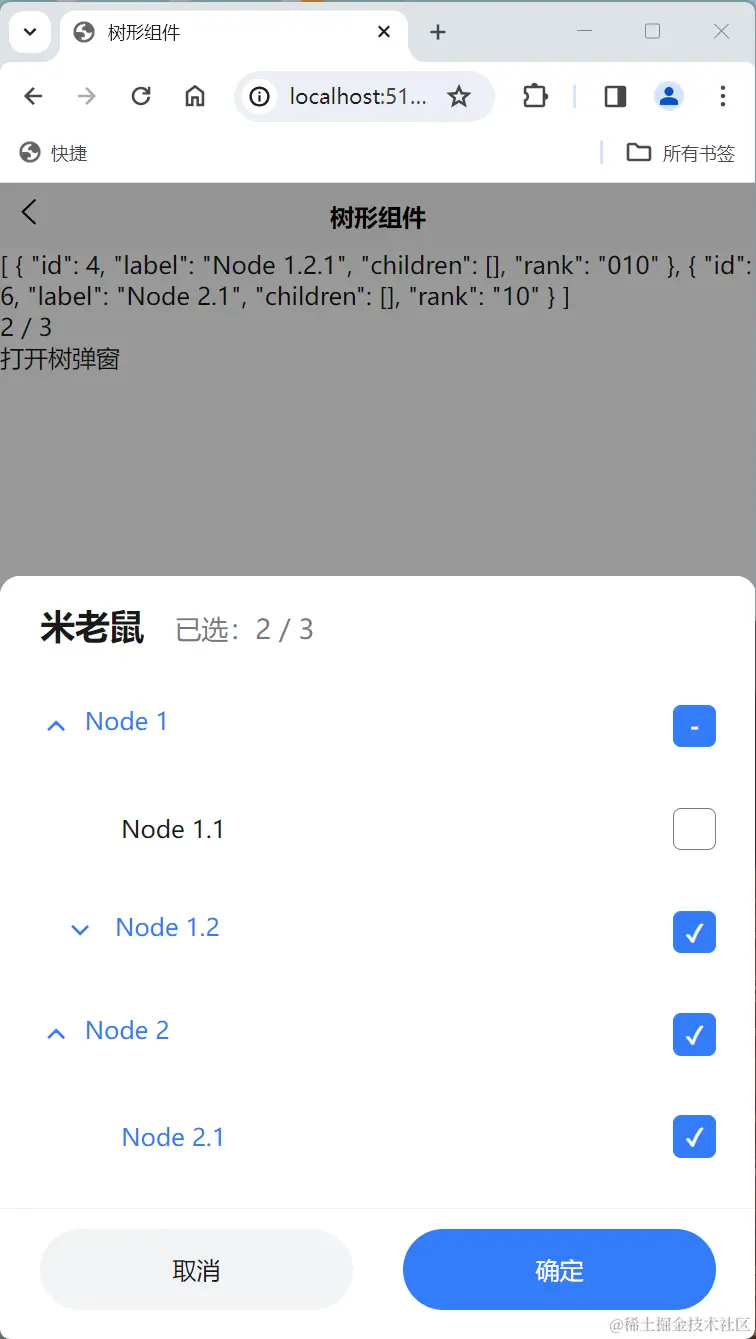
源码如下
结构
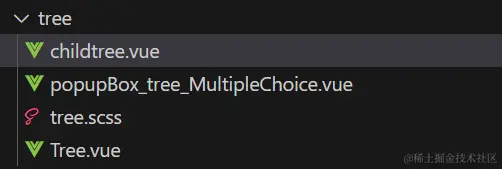
Tree.vue 树主要逻辑
<template>
<view v-for="node in treeOBJ" :class="{ line: !isLeaf(node) }">
<view @click="toggleExpanded(node)" class="item">
<view :class="['label', node[props.isChooseKey] ? 'blue' : '']">
<view :class="['icon', node.expanded ? 'up' : 'down']">
<uni-icons type="forward" v-if="!isLeaf(node)"></uni-icons>
<view v-else style="width: 30rpx"></view>
</view>
<view>{{ node[props.labelKey] }}</view>
</view>
<view
class="check ischeck"
v-if="node[props.isChooseKey] == true"
@click.stop="choose(node, false)"
>
✓
</view>
<view
class="check ischeck"
v-else-if="node[props.isChooseKey] == '-'"
@click.stop="choose(node, true)"
>
-
</view>
<view class="check uncheck" v-else @click.stop="choose(node, true)">
</view>
</view>
<view v-if="!isLeaf(node) && node.expanded" style="padding-left: 30rpx">
<childtree
:treeData="node.children"
:labelKey="props.labelKey"
:isChooseKey="props.isChooseKey"
@toggleExpanded="toggleExpanded"
@choose="choose"
></childtree>
</view>
</view>
</template>
<script setup>
import { ref, computed } from "vue";
import { onLoad } from "@dcloudio/uni-app";
import childtree from "./childtree.vue";
const props = defineProps({
treeData: {
type: Array,
required: true,
},
rankKey: {
type: String,
default: "rank",
},
labelKey: {
type: String,
default: "label",
},
isChooseKey: {
type: String,
default: "isChoose",
},
});
const newtreeData = computed(() => {
function Tagging(treeData, level = "") {
let littleLevels = 0;
if (!treeData.length) {
return [];
}
for (let i = 0; i < treeData.length; i++) {
const node = treeData[i];
if (node.children) {
node[props.rankKey] = level + "" + littleLevels;
Tagging(node.children, node[props.rankKey]);
}
littleLevels += 1;
}
}
let arr = JSON.parse(JSON.stringify(props.treeData));
Tagging(arr);
return arr;
});
const treeOBJ = computed(() => {
function Tagging(treeData, level = "") {
let littleLevels = 0;
if (!treeData.length) {
return [];
}
for (let i = 0; i < treeData.length; i++) {
const node = treeData[i];
if (node.children) {
node[props.rankKey] = level + "" + littleLevels;
if (expandedArr.value.includes(node[props.rankKey])) {
node.expanded = true;
}
if (lastChooseArr.value.includes(node[props.rankKey])) {
node[props.isChooseKey] = true;
}
if (childOBJ.value[node[props.rankKey]] !== undefined) {
if (
childOBJ.value[node[props.rankKey]].every((item) =>
lastChooseArr.value.includes(item)
)
) {
node[props.isChooseKey] = true;
} else if (
childOBJ.value[node[props.rankKey]].some((element) =>
lastChooseArr.value.includes(element)
)
) {
node[props.isChooseKey] = "-";
}
}
Tagging(node.children, node[props.rankKey]);
}
littleLevels += 1;
}
}
let arr = JSON.parse(JSON.stringify(newtreeData.value));
Tagging(arr);
return arr;
});
const childOBJ = computed(() => {
function generateMapping(tree) {
const mapping = {};
function traverse(node) {
if (node.children.length === 0) {
return [node[props.rankKey]];
}
const childrenMapping = node.children.flatMap(traverse);
mapping[node[props.rankKey]] = childrenMapping;
return childrenMapping;
}
tree.forEach((node) => {
traverse(node);
});
return mapping;
}
let arr = JSON.parse(JSON.stringify(newtreeData.value));
const mapping = generateMapping(arr);
return mapping;
});
const allchildArr = computed(() => {
function mergeArrays(mapping) {
const merged = [];
for (const ids of Object.values(mapping)) {
for (const id of ids) {
if (!merged.includes(id)) {
merged.push(id);
}
}
}
return merged;
}
return mergeArrays(childOBJ.value)
});
const isLeaf = (node) => {
return !node.children || node.children.length === 0;
};
let expandedArr = ref([]);
const toggleExpanded = (node) => {
const rank = node[props.rankKey];
if (expandedArr.value.includes(rank)) {
var index = expandedArr.value.indexOf(rank);
expandedArr.value.splice(index, 1);
} else {
expandedArr.value.push(rank);
}
};
const lastChooseArr = ref([]);
const lastChooseArr2 = ref([]);
function choose(node, isChoose) {
const rank = node[props.rankKey];
if (isLeaf(node)) {
if (lastChooseArr.value.includes(rank)) {
if (!isChoose) {
var index = lastChooseArr.value.indexOf(rank);
lastChooseArr.value.splice(index, 1);
lastChooseArr2.value.splice(index, 1);
}
} else {
lastChooseArr.value.push(rank);
lastChooseArr2.value.push(node);
}
}
if (!isLeaf(node)) {
for (let i = 0; i < node.children.length; i++) {
choose(node.children[i], isChoose);
}
}
}
defineExpose({
allchildArrlength:allchildArr.value.length,
lastChooseArr2,
lastChooseArr
})
</script>
<style scoped>
@import url("./tree.scss");
</style>
childtree.vue 子树
<template>
<view v-for="node in treeOBJ" :class="{ line: !isLeaf(node) }">
<view @click="toggleExpanded(node)" class="item">
<view :class="['label', node[props.isChooseKey] ? 'blue' : '']">
<view :class="['icon', node.expanded ? 'up' : 'down']">
<uni-icons type="forward" v-if="!isLeaf(node)"></uni-icons>
<view v-else style="width: 30rpx"></view>
</view>
<view>{{ node[props.labelKey] }}</view>
</view>
<view
class="check ischeck"
v-if="node[props.isChooseKey] == true"
@click.stop="choose(node, false)"
>
✓
</view>
<view
class="check ischeck"
v-else-if="node[props.isChooseKey] == '-'"
@click.stop="choose(node, true)"
>
-
</view>
<view class="check uncheck" v-else @click.stop="choose(node, true)">
</view>
</view>
<view v-if="!isLeaf(node) && node.expanded" style="padding-left: 30rpx">
<childtree
:treeData="node.children"
:labelKey="props.labelKey"
:isChooseKey="props.isChooseKey"
@toggleExpanded="toggleExpanded"
@choose="choose"
></childtree>
</view>
</view>
</template>
<script setup>
import childtree from "./childtree.vue";
import { ref, computed } from "vue";
import { onLoad } from "@dcloudio/uni-app";
const emits = defineEmits(["toggleExpanded", "choose"]);
const props = defineProps({
treeData: {
type: Array,
required: true,
},
labelKey: {
type: String,
default: "label",
},
isChooseKey: {
type: String,
default: "isChoose",
},
});
const treeOBJ = computed(() => {
return props.treeData;
});
const isLeaf = (node) => {
return !node.children || node.children.length === 0;
};
const toggleExpanded = (node) => {
emits("toggleExpanded", node);
};
function choose(node, isChoose) {
emits("choose", node, isChoose);
}
</script>
<style scoped>
@import url("./tree.scss");
</style>
tree.scss 样式
.item {
    display: flex;
    justify-content: space-between;
    align-items: center;
    padding: 30rpx 0;

    .label {
      display: flex;

      &.blue {
        color: rgba(51, 124, 250, 1);

        :deep() {
          .uni-icons {
            color: rgba(51, 124, 250, 1) !important;
          }
        }
      }

      .icon {
        font-size: 30.53rpx;
        font-weight: 600;
        transform: rotate(90deg);
        margin-right: 20rpx;

        &.down {
          transform: rotate(90deg);
        }

        &.up {
          transform: rotate(-90deg);
        }
      }
    }

    .check {
      width: 40rpx;
      height: 40rpx;
      border-radius: 8rpx;
      display: flex;
      align-items: center;
      justify-content: center;
      color: #fff;
      font-weight: 600;

      &.ischeck {
        background: rgba(51, 124, 250, 1);
        border: 1rpx solid rgba(51, 124, 250, 1);
      }

      &.uncheck {
        border: 1rpx solid rgba(122, 122, 122, 1);
      }
    }
  }
使用弹窗容器包裹,完成最后组件逻辑
<template>
  <popupBox ref="SubmitSureRef" @sure="SubmitSureRef.close()">
    <template #title>
      <view class="top">
        <view class="left">
          <text class="title">{{props.title}}</text>
          <text class="remark"
            >已选:{{ tree_ref?.lastChooseArr2.length }} /
            {{ tree_ref?.allchildArrlength }}
          </text>
        </view>
      </view></template
    >
    <template #content>
      <tree
        :treeData="props.treeData"
        :rankKey="props.rankKey"
        :isChooseKey="props.isChooseKey"
        :labelKey="props.labelKey"
        ref="tree_ref"
      ></tree>
    </template>
  </popupBox>
</template>
<script setup>
import { ref, computed, watch, onMounted, defineEmits, defineProps } from "vue";
import tree from "./tree.vue";
import popupBox from "../popupBox.vue";
import { onLoad } from "@dcloudio/uni-app";
const props = defineProps({
  treeData: {
    type: Array,
    default: [],
  },
  rankKey: {
    type: String,
    default: "rank",
  },
  labelKey: {
    type: String,
    default: "label",
  },
  isChooseKey: {
    type: String,
    default: "isChoose",
  },
  title: {
    type: String,
    default: "树多选",
  },
});

const SubmitSureRef = ref(null);
const tree_ref = ref(null);
function open(params) {
  SubmitSureRef.value.open({
    cancelText: "取消",
    confirmText: "确定",
    onOpen: function () {
      if (params.chooseArr) {
        tree_ref.value.lastChooseArr2 = JSON.parse(
          JSON.stringify(params.chooseArr)
        );
        tree_ref.value.lastChooseArr = tree_ref.value.lastChooseArr2.map(
          (item) => item[props.rankKey]
        );
      }
    },
    onConfirm: function () {
      if (params.onConfirm) {
        params.onConfirm(tree_ref.value?.lastChooseArr2,`${tree_ref.value.lastChooseArr2.length} / ${tree_ref.value.allchildArrlength}`);
      }
      SubmitSureRef.value.close();
    },
    onClose: function () {},
  });
}
onLoad(() => {});
defineExpose({
  open,
});
</script>
<style scoped lang="scss">
.top {
  // display: flex;
  // justify-content: space-between;
  width: 100%;

  .left {
    .title {
      font-size: 34.35rpx;
      font-weight: 600;
    }

    .remark {
      margin-left: 30rpx;
      color: rgba(122, 122, 122, 1);
      font-size: 26.71rpx;
    }
  }

  .right {
  }
}
</style>
使用
<template>
{{ chooseArr }}<br />
{{ title }}
<view @click="open">打开树弹窗</view>
<!--treeData 树结构 -->
<!--rankKey 层次key 可以随便填,不要跟树结构里的key冲突就行 -->
<!--isChooseKey 选中标识 可以随便填,不要跟树结构里的key冲突就行 -->
<!--labelKey显示文字的key -->
<popupBox_tree_MultipleChoice
ref="popupBox_tree_MultipleChoice_Ref"
:treeData="treeData"
:rankKey="'rank'"
:labelKey="'label'"
:isChooseKey="'choose'"
title="米老鼠"
></popupBox_tree_MultipleChoice>
</template>
<script setup>
import { ref, onMounted, computed, watch, defineProps } from "vue";
import popupBox_tree_MultipleChoice from "./components/tree/popupBox_tree_MultipleChoice.vue";
const treeData = ref([
{
id: 1,
label: "Node 1",
children: [
{
id: 2,
label: "Node 1.1",
children: [],
},
{
id: 3,
label: "Node 1.2",
children: [
{
id: 4,
label: "Node 1.2.1",
children: [],
},
],
},
],
},
{
id: 5,
label: "Node 2",
children: [
{
id: 6,
label: "Node 2.1",
children: [],
},
],
},
]);
const popupBox_tree_MultipleChoice_Ref = ref(null);
const chooseArr = ref([]);
const title = ref("");
function open() {
popupBox_tree_MultipleChoice_Ref.value.open({
chooseArr: chooseArr.value,
onConfirm: (choose, remark) => {
chooseArr.value = choose;
title.value = remark;
},
});
}
</script>
<style scoped></style>