表单输⼊绑定
作⽤:⾃动收集数据
语法: v-model
示例:
<!DOCTYPE html>

<html lang="en">

<head>

<meta charset="UTF-8">

<meta name="viewport" content="width=device-width, initial-scale=1.0">

<title>表单</title>

<script src="https://unpkg.com/vue@3/dist/vue.global.js"></script>

</head>

<body>

<div id="app">

<form action="/xxx" @submit.prevent="handleSubmit">

<span>⽤户名: </span>

<input type="text" v-model="userInfo.username"><br>

<span>性别: </span>

<input type="radio" id="female" value="⼥" v-model="userInfo.s

ex">

<label for="female">⼥</label>

<input type="radio" id="male" value="男" v-model="userInfo.se

x">

<label for="male">男</label><br>

<span>爱好: </span>

<input type="checkbox" id="eat" value="eat" v-model="userInfo.

hobbies">

<label for="eat">吃</label>

<input type="checkbox" id="drink" value="drink" v-model="userI

nfo.hobbies">

<label for="drink">喝</label>

<input type="checkbox" id="sleep" value="sleep" v-model="userI

nfo.hobbies">

<label for="sleep">睡</label><br>

<span>籍贯: </span>

<select v-model="userInfo.cityCode">

<option value="">未选择</option>

<option :value="city.code" v-for="(city, index) in citys"

:key="city.code">{{city.name}}</option>

</select><br>

<span>介绍: </span>

<textarea rows="10" v-model="userInfo.introduction"></textarea

><br>
<input type="submit" value="注册">

</form>

</div>

<script>

const { createApp } = Vue

createApp({

data() {

return {

userInfo: {

username: "",

introduction: "",

sex: "",

hobbies: [],

city: ""

},

citys: [{

code: '0551',

name: '合肥'

}, {

code: '0552',

name: '蚌埠'

}, {

code: '0553',

name: '芜湖'

}]

}

},

methods: {

handleSubmit() {

console.log(this.userInfo);

}

}

}).mount("#app")

</script>

</body>

</html>
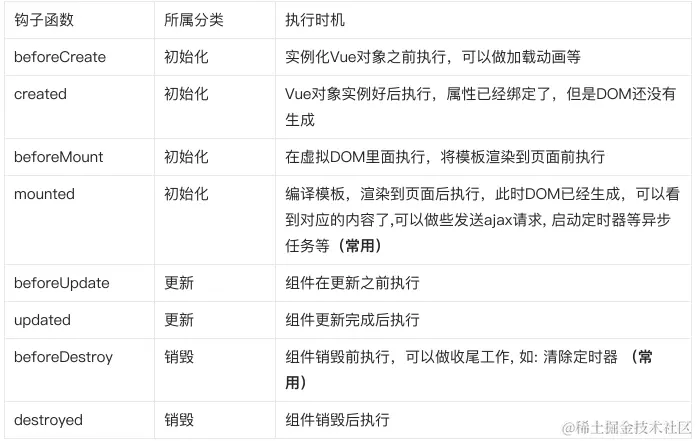
Vue⽣命周期
作⽤:在Vue⽣命周期的各个阶段触发某些操作
钩⼦函数:
示例:
<!DOCTYPE html>

<html lang="en">

<head>

<meta charset="UTF-8">

<meta name="viewport" content="width=device-width, initial-scale=1.0">

<title>⽣命周期</title>

<script src="https://unpkg.com/vue@3/dist/vue.global.js"></script>

</head>

<body>

<div id="app">

<h1>Vue 3 ⽣命周期示例</h1>

<p>{{ message }}</p>

</div>

<script>

const { createApp } = Vue

const vm = createApp({

data() {

return {

message: 'Hello, Vue 3!',

show:true

}

},

beforeCreate() {

console.log('beforeCreate - 在实例初始化之后,数据观测 (data o

bserver) 和 event/watcher 事件配置之前被调⽤');

},

created() {

console.log('created - 在实例创建完成后被⽴即调⽤。在这⼀步,实例

已完成以下的配置:数据观测 (data observer)、属性和⽅法的运算、watch/event 事件回调'

);

},

beforeMount() {

console.log('beforeMount - 在挂载开始之前被调⽤:相关的 rende

r 函数⾸次被调⽤');

},

mounted() {

console.log('mounted - 在挂载完成后被调⽤,这个时候⻚⾯上可⻅了'

);

},

beforeUpdate() {

console.log('beforeUpdate - 数据更新时调⽤,但是在更新 DOM 之前

被调⽤');
},

updated() {

console.log('updated - 数据更新且 DOM 已更新');

},

beforeUnmount() {

console.log('beforeUnmount - 在卸载组件之前调⽤');

},

unmounted() {

console.log('unmounted - 组件卸载完成后调⽤');

},

}).mount("#app")

// 模拟数据更新

setTimeout(() => {

vm.message = 'Vue 3 ⽣命周期示例 - 更新消息';

}, 2000);

</script>

</body>

</html>