创建数据库
create database dbname default character set utf8 collate utf8_general_ci;
新建数据表
drop table if exists `school`; //如果数据表存在,删除
create table `school`(
	`id` int(10) not null primary key comment '学校id',
	`school_name` varchar(500) comment '学校名称',
	`adress` varchar(1000) comment '地址');
插入表数据
insert into school (id,school_name,adress) values (1,'ceshi','五星小学');
更新表数据
update school set adress='希望小学' where id =1;
删除表数据
truncate table school;
drop table school;
delete from school where school.id=1;
查询表数据
1.模糊查询
select * from user where username like '%a';
select * from user where username like '%a%';
select * from user where username like 'a%';
select * from user where username like '_a';
select * from user where username like '_a_';
2.LIMIT限制查询结果
select * from user limit 5;
select u.address from user as u where u.username='meng' limit 2,1; //从第二条开始往后查1位
select * from user limit (pageNum-1)*pageSize,pageSize; //pageSize为5就是1-5,6-10,11-15
3.查询数据排序
select * from user order by create_time desc;
select * from user order by create_time,level;
4.正则匹配查询
select * from user where username REGEXP 'ton';
select * from user where username REGEXP 'ton|jack';
select * from user where username REGEXP '\.';
5.聚合函数查询
select avg(price) as avg_price from product;
select count(*) as user_count from user;
select max(price) as max_price from product;
select min(price) as min_price from product;
select sum(price) as total_price from product;
6.查询数据去重
select distinct name from fruit;
select avg(distinct price) as avg_price from product where vendorid='1001';
7.按分组查询
--1.查询每个用户下单了多少次(需要group by分组)
select t.userid,count(*) as order_count from trans as t group by t.userid;
8.过滤分组(having)
--1.查询每个用户下单了多少次,并过滤出下单次数大于1次的数据(group by ,having)
select t.userid,count(*) as order_count from trans as t group by t.userid having count(*)>=2;
--2.where和having的区别
   2.1having支持where的所有操作符
   2.2where在数据分组前过滤,having在数据分组后进行过滤
9.使用子查询
--1.利用子查询过滤
(1) 检索包含物品TNT2的所有订单的编号。
(2) 检索具有前一步骤列出的订单编号的所有客户的ID。
(3) 检索前一步骤返回的所有客户ID的客户信息。
select userid from order wehre orderid in (select orderid from orderitems where productid='TNT2');
--2.作为计算字段使用子查询
(1) 从customers表中检索客户列表。
(2) 对于检索出的每个客户,统计其在orders表中的订单数目
首先写出第二个条件对应的语句
select count(*) as order_count from orders where uid='111'
然后就可以分析写出最终的语句
select username,userstatus,(select count(*) as order_count from orders where orders.uid=customers.uid) as order_count from customers order by username;
10.联合查询
表A记录如下:
aID     aNum
1     a20050111
2     a20050112
3     a20050113
4     a20050114
5     a20050115

表B记录如下:
bID     bName
1     2006032401
2     2006032402
3     2006032403
4     2006032404
8     2006032408
10.1等值联结查询
select * from A,B where A.aID=B.aID;
10.2内部联结
select * from A inner join B on A.aID=B.bID;
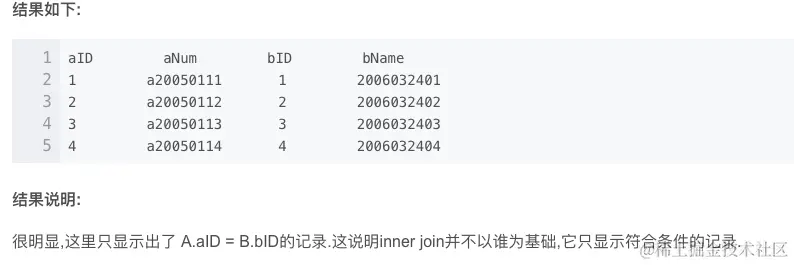
10.3外部联结
select * from A left join B on A.aID=B.bID;
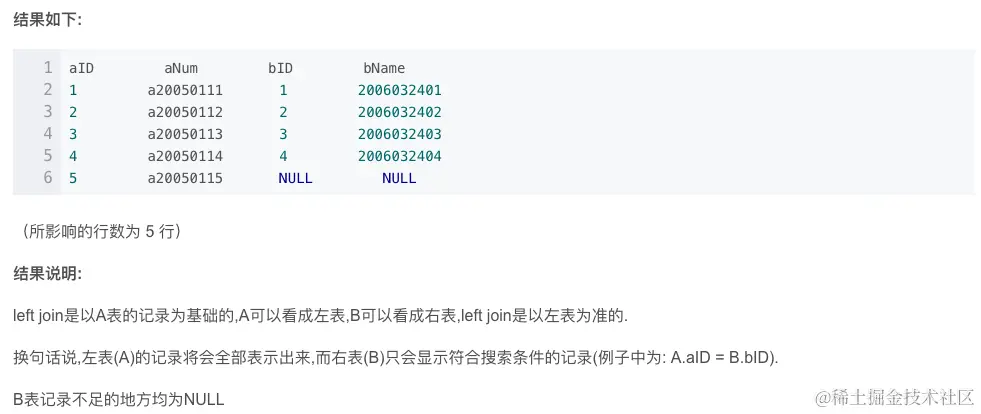
select * from A join B on A.aID=B.bID;
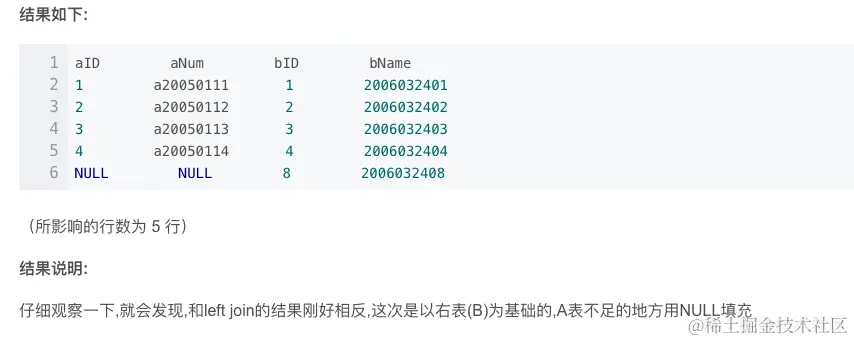
11.组合查询uinon
select id,name,address from student where math_count>60
union
select id,name,address from student where id in (1001,1002);
select id,name,address from student where math_count>60
union
select id,school_name as name,school_adress as adress from school where school_status='0';
12.查询当前天0点和下一天0点
SELECT TIMESTAMP(DATE_ADD(CURDATE(), INTERVAL - 0 DAY)) AS m_starttime
SELECT TIMESTAMP(DATE_ADD(CURDATE(), INTERVAL + 1 DAY))AS m_endtime;
导出导入表数据
mysqldump -u root -p testmeng user >testmeng_user.sql
mysqldump -u root -p testmeng > testmeng.sql
mysql>source c:/desk/testmeng.sql